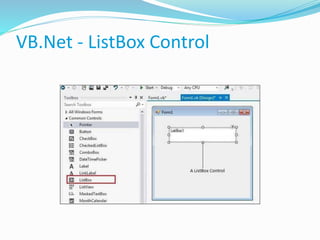
VB.Net - ListBox Control
Prof. Neeraj Bhargava
Kapil Chauhan
Department of Computer Science
School of Engineering & Systems Sciences
MDS University, Ajmer
VB.Net - ListBox Control
Cont…
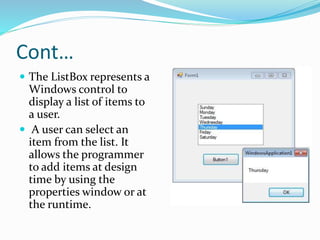
 The ListBox represents a
Windows control to
display a list of items to
a user.
 A user can select an
item from the list. It
allows the programmer
to add items at design
time by using the
properties window or at
the runtime.
Cont..
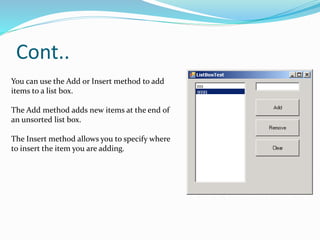
You can use the Add or Insert method to add
items to a list box.
The Add method adds new items at the end of
an unsorted list box.
The Insert method allows you to specify where
to insert the item you are adding.
Properties of the ListBox Control
1AllowSelection
Gets a value indicating whether the ListBox currently enables selection of list
items.
2BorderStyle
Gets or sets the type of border drawn around the list box.
3ColumnWidth
Gets of sets the width of columns in a multicolumn list box.
4HorizontalExtent
Gets or sets the horizontal scrolling area of a list box.
Cont..
5. ItemHeight
 Gets or sets the height of an item in the list box
6. Items
 Gets the items of the list box.
7. MultiColumn
 Gets or sets a value indicating whether the list box supports multiple columns.
8. SelectedIndex
 Gets or sets the zero-based index of the currently selected item in a list box.
9.SelectedValue
 Gets or sets the value of the member property specified by the ValueMember property
10. Sorted
 Gets or sets a value indicating whether the items in the list box are sorted alphabetically.
Events of the ListBox Control
1. ClickOccurs
 when a list box is selected.
2. SelectedIndexChanged
 Occurs when the SelectedIndex property of a list box is
changed
Assignment
 Explain all the methods and events of Listbox in vb.net
with example.

4. listbox

  • 1.
    VB.Net - ListBoxControl Prof. Neeraj Bhargava Kapil Chauhan Department of Computer Science School of Engineering & Systems Sciences MDS University, Ajmer
  • 2.
  • 3.
    Cont…  The ListBoxrepresents a Windows control to display a list of items to a user.  A user can select an item from the list. It allows the programmer to add items at design time by using the properties window or at the runtime.
  • 4.
    Cont.. You can usethe Add or Insert method to add items to a list box. The Add method adds new items at the end of an unsorted list box. The Insert method allows you to specify where to insert the item you are adding.
  • 5.
    Properties of theListBox Control 1AllowSelection Gets a value indicating whether the ListBox currently enables selection of list items. 2BorderStyle Gets or sets the type of border drawn around the list box. 3ColumnWidth Gets of sets the width of columns in a multicolumn list box. 4HorizontalExtent Gets or sets the horizontal scrolling area of a list box.
  • 6.
    Cont.. 5. ItemHeight  Getsor sets the height of an item in the list box 6. Items  Gets the items of the list box. 7. MultiColumn  Gets or sets a value indicating whether the list box supports multiple columns. 8. SelectedIndex  Gets or sets the zero-based index of the currently selected item in a list box. 9.SelectedValue  Gets or sets the value of the member property specified by the ValueMember property 10. Sorted  Gets or sets a value indicating whether the items in the list box are sorted alphabetically.
  • 7.
    Events of theListBox Control 1. ClickOccurs  when a list box is selected. 2. SelectedIndexChanged  Occurs when the SelectedIndex property of a list box is changed
  • 8.
    Assignment  Explain allthe methods and events of Listbox in vb.net with example.