Using technology in the classroomMarch 31, 2011Tara E. Tarpeytet2103@columbia.edu
What types of technologies have you used in the classroom? What challenges have you faced?dan / FreeDigitalPhotos.net
AgendaBlogs/Wikis
Digital Video
Document Sharing Services
Brainstorming SessionBlogs and WikisWhat is the difference between a blog and a wiki?Blog: a website on which users construct an ongoing narrative through text, images, and/or videoBetter for individual work or collaborative work that allows for individual evaluationWiki: a website that allows users to collaboratively edit the content and structureBetter for collaborative work that allows for group evaluation
Types of Blogs/WikisBloggerEasy to useCustomizable Requires a Google accountWordPressSlightly more difficult to useMore customizable than Blogger WikispacesEasy to useMay be less recognizable to students than a blog
What Skills Can Blogs/Wikis Target?ReadingWriting SpeakingListeningGrammarPronunciation
ExamplesSpeakingSpeaking and ListeningVocabularyAll SkillsWiki
Steps for Classroom BloggingDecide on the skill/s that you want to targetDecide how the blog could contribute to that skill (e.g. posting YouTube videos for listening)Decide whether the blog will focus on promoting fluency or accuracy (e.g. How much time will you spend giving feedback? Can students post freely or should they submit a post to you first?)Choose a platform and create a blogGet students email addresses and invite them to the blogExplain to students how to use the blog, how to access computers in the library, and give them clear guidelines for when, how, and how often to use the blog.Be clear about assessment: Will the blog count towards participation? Will it count as an assignment?
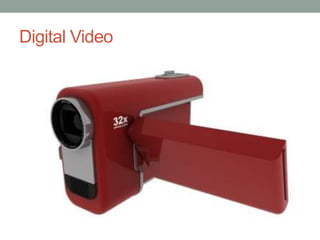
Digital Video
Accessibility Media Services  Request EquipmentRequest: Camcorder – Digital – Video Workshops offered by Academic ComputingCamcorder 101, one-day workshop, $15, by appointment (4 participants needed)Digital Video Editing with Final Cut Pro, two-day workshop, $45, by appointment (4 participants needed)212-678-3302 for an appointment
Example #1: Pronunciation & Speaking
Example #2: Review & Motivation
Example #3: Writing, Speaking, Grammar, Vocabulary, and PronunciationIn groups, students prepare a script that utilizes (1) the theme of the current unit, and (2) grammar and/or vocabulary that they have learnedThe scripts should be teacher- or peer-reviewedStudents should rehearse the scripts until they feel comfortable with pronunciationEach group is filmed acting out their scriptStudents review the scripts afterwards to critique their performances through discussion and/or writing
Example #4: Presentation Skills For a major presentation, require each student to film his/her performanceMost students will have video on their cell phones or cameras, but you can rent a camera for those who don’tAfter the presentation, require each student to write a reflection piece in which they watch the video first without the visual, then without sound, and finally with both the visual and the sound. They should reflect on their speaking and pronunciation, their body language, and what they learned from the exercise
Important ConsiderationsBe prepared: Digital video can be complicated, so be sure that you are comfortable with the amount of work you might be getting yourself into. However: Don’t be intimidated: Students often have cameras and know how to view, upload, and share video. And you can use digital video without getting in over your headReview it: If you don’t have students watch the video, there is little reason to film them. Remember the language focus and have students use video to improve their language capacity.
Document Sharing Services
OptionsGoogle DocumentsEasy to useRequires a Google accountZohoSlightly more difficult to useUsers must register with Zoho
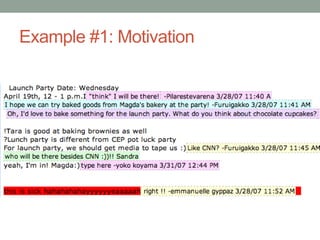
Example #1: Motivation
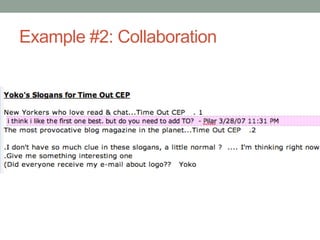
Example #2: Collaboration
Before You Use Document SharingDecide what can be gained by having students collaborate online rather than in personBe sure that students know how to register and how to use document sharingGive students clear guidelines (e.g. will they be evaluated as a group, individually, based on feedback, based on final product, etc.)
Brainstormingtarpey.te@gmail.comChoose a technology (blogs, wikis, digital video, or document sharing) and a language focus.Brainstorm an activity that merges the twoConsider why you have chosen the technology, how it will support the language focus, and how it will be implemented (e.g. short-term or long-term, fluency- or accuracy-focused, practical considerations, etc.)

Technology workshop

  • 1.
    Using technology inthe classroomMarch 31, 2011Tara E. Tarpeytet2103@columbia.edu
  • 2.
    What types oftechnologies have you used in the classroom? What challenges have you faced?dan / FreeDigitalPhotos.net
  • 3.
  • 4.
  • 5.
  • 6.
    Brainstorming SessionBlogs andWikisWhat is the difference between a blog and a wiki?Blog: a website on which users construct an ongoing narrative through text, images, and/or videoBetter for individual work or collaborative work that allows for individual evaluationWiki: a website that allows users to collaboratively edit the content and structureBetter for collaborative work that allows for group evaluation
  • 7.
    Types of Blogs/WikisBloggerEasyto useCustomizable Requires a Google accountWordPressSlightly more difficult to useMore customizable than Blogger WikispacesEasy to useMay be less recognizable to students than a blog
  • 8.
    What Skills CanBlogs/Wikis Target?ReadingWriting SpeakingListeningGrammarPronunciation
  • 9.
  • 10.
    Steps for ClassroomBloggingDecide on the skill/s that you want to targetDecide how the blog could contribute to that skill (e.g. posting YouTube videos for listening)Decide whether the blog will focus on promoting fluency or accuracy (e.g. How much time will you spend giving feedback? Can students post freely or should they submit a post to you first?)Choose a platform and create a blogGet students email addresses and invite them to the blogExplain to students how to use the blog, how to access computers in the library, and give them clear guidelines for when, how, and how often to use the blog.Be clear about assessment: Will the blog count towards participation? Will it count as an assignment?
  • 11.
  • 12.
    Accessibility Media Services Request EquipmentRequest: Camcorder – Digital – Video Workshops offered by Academic ComputingCamcorder 101, one-day workshop, $15, by appointment (4 participants needed)Digital Video Editing with Final Cut Pro, two-day workshop, $45, by appointment (4 participants needed)212-678-3302 for an appointment
  • 13.
  • 14.
    Example #2: Review& Motivation
  • 15.
    Example #3: Writing,Speaking, Grammar, Vocabulary, and PronunciationIn groups, students prepare a script that utilizes (1) the theme of the current unit, and (2) grammar and/or vocabulary that they have learnedThe scripts should be teacher- or peer-reviewedStudents should rehearse the scripts until they feel comfortable with pronunciationEach group is filmed acting out their scriptStudents review the scripts afterwards to critique their performances through discussion and/or writing
  • 16.
    Example #4: PresentationSkills For a major presentation, require each student to film his/her performanceMost students will have video on their cell phones or cameras, but you can rent a camera for those who don’tAfter the presentation, require each student to write a reflection piece in which they watch the video first without the visual, then without sound, and finally with both the visual and the sound. They should reflect on their speaking and pronunciation, their body language, and what they learned from the exercise
  • 17.
    Important ConsiderationsBe prepared:Digital video can be complicated, so be sure that you are comfortable with the amount of work you might be getting yourself into. However: Don’t be intimidated: Students often have cameras and know how to view, upload, and share video. And you can use digital video without getting in over your headReview it: If you don’t have students watch the video, there is little reason to film them. Remember the language focus and have students use video to improve their language capacity.
  • 18.
  • 19.
    OptionsGoogle DocumentsEasy touseRequires a Google accountZohoSlightly more difficult to useUsers must register with Zoho
  • 20.
  • 21.
  • 22.
    Before You UseDocument SharingDecide what can be gained by having students collaborate online rather than in personBe sure that students know how to register and how to use document sharingGive students clear guidelines (e.g. will they be evaluated as a group, individually, based on feedback, based on final product, etc.)
  • 23.
    Brainstormingtarpey.te@gmail.comChoose a technology(blogs, wikis, digital video, or document sharing) and a language focus.Brainstorm an activity that merges the twoConsider why you have chosen the technology, how it will support the language focus, and how it will be implemented (e.g. short-term or long-term, fluency- or accuracy-focused, practical considerations, etc.)