



















Teaching with Tableau: Showing
insights and telling data-driven stories
Professor Kristen Sosulski
Today’s Speaker
Kristen Sosulski, Ed.D
Associate Professor
Director of Education
W. R. Berkley Innovation Lab
New York University
Leonard N. Stern School of
Business
Bio
Dr. Kristen Sosulski develops innovative practices for higher education as the
Director of Education for the NYU Stern W.R. Berkley Innovation Lab. She also
teaches MBA students and executives data visualization, R programming, and
operations management as an Associate Professor at NYU’s Stern School of
Business.
As a leading expert on data visualization, Kristen regularly consults, delivers
seminars, and leads workshops on data visualization techniques and best
practices. You can find her speaking on the subject at events like Social Media
Week NYC and to organizations like the National Association of Pubic Opinion,
Digital Analytics Association, and the National Economic Research Associates.
Follow Kristen on Twitter at @sosulski and learn more at
http://kristensosulski.com
College/University Background
Course 1: Data Visualization
Audience: 50 MBA students from NYU Stern
Format: Blended Online
Course 2: Data Visualization
Audience: 70 NYU Stern Master Science in Business Analytics students
Format: Intensive 2-day session with asynchronous online activities
The Challenge
In data visualization courses, students learn to present data in visual form. This
involves working with data, learning new software, and applying visual design
principles.
Sometimes imaging software by default enables us to create beautiful
visualizations.
However, designing visualizations that are readable and provide key insights is
much more difficult.
Visualizations are only as effective as the insights they reveal.
How can professors support students in their process of creating purposeful and
interpretable visualizations and use they as powerful tools in their presentations?
As visualization designers we are “melding the
skills of computer science, statistics, artistic
design, and storytelling.”
K. Cukier (2010). Show me: New ways of visualizing data.
http://www.economist.com/node/15557455
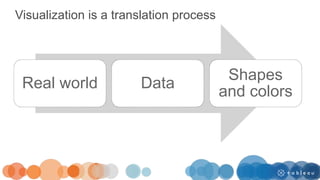
Visualization is a translation process
Real world Data
Shapes
and colors
My courses in data visualization are designed to provide students with the
techniques to communicate insights, allow them to apply those techniques,
and to receive feedback on how well they’ve applied those techniques.
This done through 1) demonstration 2) practice & application 3)
critique and 4) expert and peer feedback.
PART I: The use of software to support data
presentation in visual form
PART II: Using visualizations effectively in a
presentation
PART III: Application, practice, & feedback
PART I: The use of software to support data
presentation in visual form
PART II: Using visualizations effectively in a
presentation
PART III: Application, practice, & feedback
Three features to build into your visualizations
1. Annotation: To highlight and direct the user’s attention.
2. Animation: To walk the user through the visualization, step by step. To
show and explain the data points at a slower pace.
3. Interactivity: To provide summary level data and details on demand.
To engage and involve the audience.
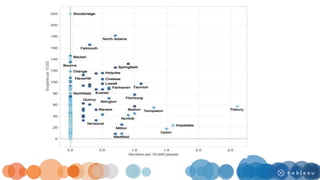
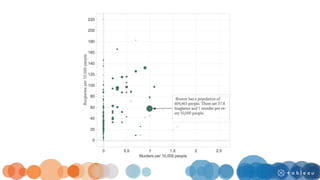
Annotation and encodings
• Emphasize the purposeful use of pre-attentive attributes.
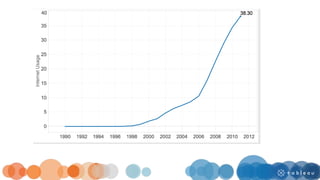
• Highlight a data point, using a pre-attentive attribute.
• Avoid highlighting every data point.
• Reserve the use of pre-attentive attributes as cues for your audience.
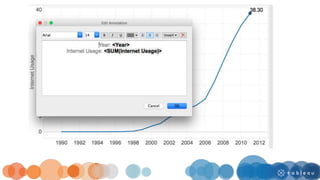
This can be easily done in Tableau.
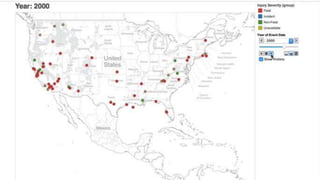
Animation
• To progressively reveal content.
• To mark specific data points at specific times.
• To show time series data.
Animations work well for showing times series
data for one or more categories.
Animations allow the user to start, stop, rewind, and
fast forward.
Animation provides a navigational feature to a
visualization.
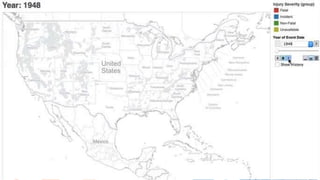
Trend animation
• Trend animation shows all trends simultaneously.
• It works best for presentation rather than analysis.
• It is limited to approximately 200 data points on a single display.
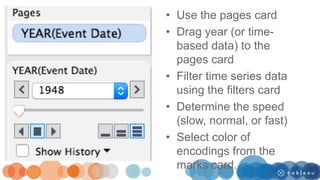
• Use the pages card
• Drag year (or time-
based data) to the
pages card
• Filter time series data
using the filters card
• Determine the speed
(slow, normal, or fast)
• Select color of
encodings from the
marks card.
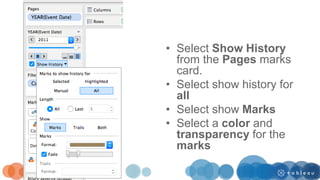
Trace animation
• Trace animation uses fade-in bubbles/links to show the direction of
the flow of data points and history.
• Traces work best for analysis when the result is not cluttered.
• Beware of too many data points and visual clutter.
• Consider small multiples for analysis rather than animation.
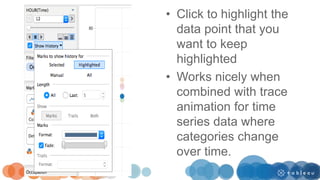
• Select Show History
from the Pages marks
card.
• Select show history for
all
• Select show Marks
• Select a color and
transparency for the
marks
Transition animation
• Short animation keeps users in context during view/data
transitions.
• These usually follow an action, such as connect, select,
or explore, for interactive displays.
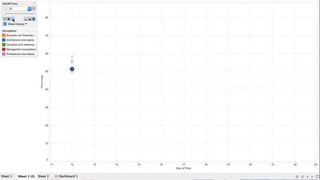
• Click to highlight the
data point that you
want to keep
highlighted
• Works nicely when
combined with trace
animation for time
series data where
categories change
over time.
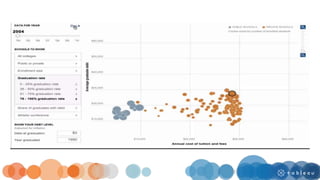
Interactivity
• To enable audience interaction and involvement
• To filter details on demand
• To traverse the data set to compare and contrast different
attributes.
31
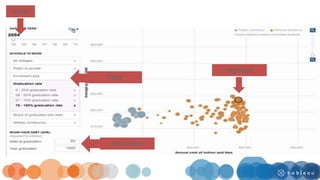
Slider
Input field
Highlight
Filter
PART I: The use of software to support data
presentation in visual form
PART II: Using visualizations effectively in a
presentation
PART III: Application, practice, and feedback
Three techniques for presentation
Technique #1: Identify the key takeaway
• Provide clear takeaways for each visualization.
• Write it in the notes or the title of the slide.
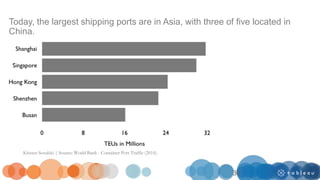
Today, the largest shipping ports are in Asia, with three of five located in
China.
Kristen Sosulski | Source: World Bank - Container Port Traffic (2014).
36
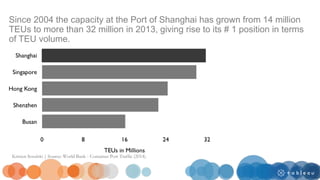
Technique #2: Put your findings in context
• Provide a context for your findings.
• Without a context, data is meaningless.
• In the example on the next slide, an insight is communicated that puts
the number one position (Shanghai) in context and provides an
explanation for the rise to the top.
Since 2004 the capacity at the Port of Shanghai has grown from 14 million
TEUs to more than 32 million in 2013, giving rise to its # 1 position in terms
of TEU volume.
Kristen Sosulski | Source: World Bank - Container Port Traffic (2014).
Technique #3: Present the key numbers
• It is important to summarize the key findings and present the numbers
in a meaningful context that is comprehensible to the audience.
• For example, it may be more helpful to show a percentage change
from year to year when presenting an increase over time, rather than
with absolute numbers.
• Specifically, if the core point is to compare the change from year to
year, percentage change is an effective metric.
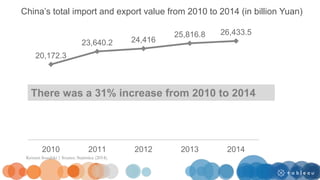
20,172.3
23,640.2 24,416
25,816.8 26,433.5
2010 2011 2012 2013 2014
China’s total import and export value from 2010 to 2014 (in billion Yuan)
There was a 31% increase from 2010 to 2014
Kristen Sosulski | Source: Statistica (2014).
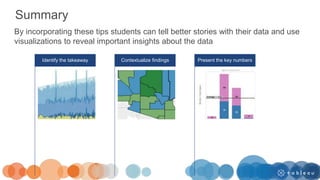
Summary
By incorporating these tips students can tell better stories with their data and use
visualizations to reveal important insights about the data
Identify the takeaway Contextualize findings Present the key numbers
PART I: The use of software to support data
presentation in visual form
PART II: Using visualizations effectively in a
presentation
PART III: Application, practice, and feedback
Application: How do you have students practice
applying these techniques?
Individual Project
1) 2 minute live presentation
2) 2 minute video presentation
Group Project
20 minute live presentation with peer feedback and critique
Individual
Project
34
PITCHES
2 MINUTES
EACH
NOTE &
VOTE
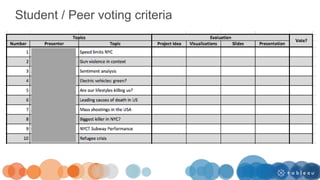
Student / Peer voting criteria
TOP 9
MEET
DISCUSS
EAT
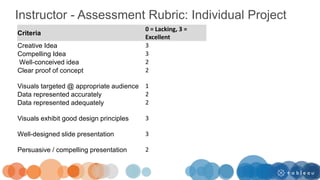
Instructor - Assessment Rubric: Individual Project
Criteria
0 = Lacking, 3 =
Excellent
Creative Idea 3
Compelling Idea 3
Well-conceived idea 2
Clear proof of concept 2
Visuals targeted @ appropriate audience 1
Data represented accurately 2
Data represented adequately 2
Visuals exhibit good design principles 3
Well-designed slide presentation 3
Persuasive / compelling presentation 2
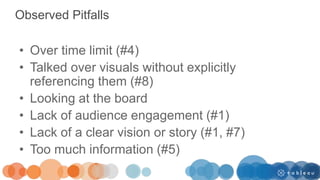
Observed Pitfalls
• Over time limit (#4)
• Talked over visuals without explicitly
referencing them (#8)
• Looking at the board
• Lack of audience engagement (#1)
• Lack of a clear vision or story (#1, #7)
• Too much information (#5)
Group project
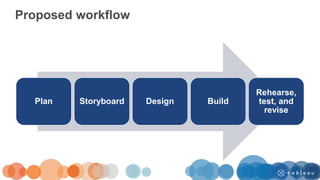
Proposed workflow
Plan Storyboard Design Build
Rehearse,
test, and
revise
• 20 minutes
• 10 minute Q & A
• All team members must be present, but all do
not have to present. Peer feedback and
ratings will be factored into your grade.
• Review the presentation testing & delivery
standards
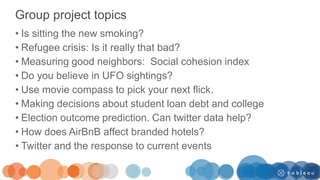
• Is sitting the new smoking?
• Refugee crisis: Is it really that bad?
• Measuring good neighbors: Social cohesion index
• Do you believe in UFO sightings?
• Use movie compass to pick your next flick.
• Making decisions about student loan debt and college
• Election outcome prediction. Can twitter data help?
• How does AirBnB affect branded hotels?
• Twitter and the response to current events
Group project topics
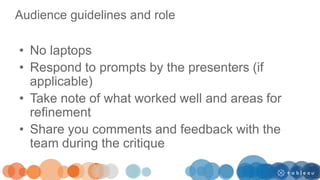
Audience guidelines and role
• No laptops
• Respond to prompts by the presenters (if
applicable)
• Take note of what worked well and areas for
refinement
• Share you comments and feedback with the
team during the critique
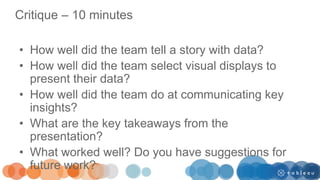
Critique – 10 minutes
• How well did the team tell a story with data?
• How well did the team select visual displays to
present their data?
• How well did the team do at communicating key
insights?
• What are the key takeaways from the
presentation?
• What worked well? Do you have suggestions for
future work?
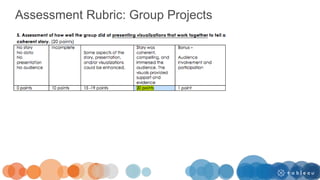
Assessment Rubric: Group Projects
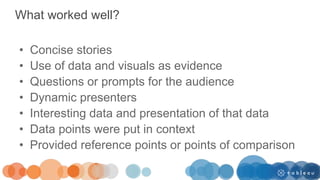
What worked well?
• Concise stories
• Use of data and visuals as evidence
• Questions or prompts for the audience
• Dynamic presenters
• Interesting data and presentation of that data
• Data points were put in context
• Provided reference points or points of comparison
Interesting in learning more and keeping in touch?
Go to my website and sign up for my mailing list at:
http://bit.ly/datavisupdates
You’ll immediately receive access to:
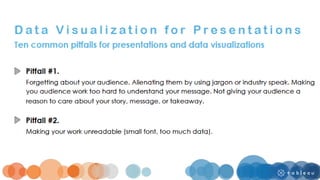
“Ten common pitfalls for presentations and data
visualizations?
Upcoming Talks
May 16th: Digital Analytics Association - Engaged
Storytelling with Information Visualization: Techniques
for Audience and Presenter Driven Stories
November 16th: Plot Com. The Plot.ly Conference
Live Q&A
Teaching with Tableau

Teaching with Tableau

  • 1.
    Teaching with Tableau:Showing insights and telling data-driven stories Professor Kristen Sosulski
  • 2.
    Today’s Speaker Kristen Sosulski,Ed.D Associate Professor Director of Education W. R. Berkley Innovation Lab New York University Leonard N. Stern School of Business
  • 3.
    Bio Dr. Kristen Sosulskidevelops innovative practices for higher education as the Director of Education for the NYU Stern W.R. Berkley Innovation Lab. She also teaches MBA students and executives data visualization, R programming, and operations management as an Associate Professor at NYU’s Stern School of Business. As a leading expert on data visualization, Kristen regularly consults, delivers seminars, and leads workshops on data visualization techniques and best practices. You can find her speaking on the subject at events like Social Media Week NYC and to organizations like the National Association of Pubic Opinion, Digital Analytics Association, and the National Economic Research Associates. Follow Kristen on Twitter at @sosulski and learn more at http://kristensosulski.com
  • 4.
    College/University Background Course 1:Data Visualization Audience: 50 MBA students from NYU Stern Format: Blended Online Course 2: Data Visualization Audience: 70 NYU Stern Master Science in Business Analytics students Format: Intensive 2-day session with asynchronous online activities
  • 5.
    The Challenge In datavisualization courses, students learn to present data in visual form. This involves working with data, learning new software, and applying visual design principles. Sometimes imaging software by default enables us to create beautiful visualizations. However, designing visualizations that are readable and provide key insights is much more difficult. Visualizations are only as effective as the insights they reveal. How can professors support students in their process of creating purposeful and interpretable visualizations and use they as powerful tools in their presentations?
  • 6.
    As visualization designerswe are “melding the skills of computer science, statistics, artistic design, and storytelling.” K. Cukier (2010). Show me: New ways of visualizing data. http://www.economist.com/node/15557455
  • 7.
    Visualization is atranslation process Real world Data Shapes and colors
  • 8.
    My courses indata visualization are designed to provide students with the techniques to communicate insights, allow them to apply those techniques, and to receive feedback on how well they’ve applied those techniques. This done through 1) demonstration 2) practice & application 3) critique and 4) expert and peer feedback.
  • 9.
    PART I: Theuse of software to support data presentation in visual form PART II: Using visualizations effectively in a presentation PART III: Application, practice, & feedback
  • 10.
    PART I: Theuse of software to support data presentation in visual form PART II: Using visualizations effectively in a presentation PART III: Application, practice, & feedback
  • 11.
    Three features tobuild into your visualizations 1. Annotation: To highlight and direct the user’s attention. 2. Animation: To walk the user through the visualization, step by step. To show and explain the data points at a slower pace. 3. Interactivity: To provide summary level data and details on demand. To engage and involve the audience.
  • 12.
    Annotation and encodings •Emphasize the purposeful use of pre-attentive attributes. • Highlight a data point, using a pre-attentive attribute. • Avoid highlighting every data point. • Reserve the use of pre-attentive attributes as cues for your audience. This can be easily done in Tableau.
  • 17.
    Animation • To progressivelyreveal content. • To mark specific data points at specific times. • To show time series data.
  • 18.
    Animations work wellfor showing times series data for one or more categories.
  • 19.
    Animations allow theuser to start, stop, rewind, and fast forward.
  • 20.
    Animation provides anavigational feature to a visualization.
  • 21.
    Trend animation • Trendanimation shows all trends simultaneously. • It works best for presentation rather than analysis. • It is limited to approximately 200 data points on a single display.
  • 23.
    • Use thepages card • Drag year (or time- based data) to the pages card • Filter time series data using the filters card • Determine the speed (slow, normal, or fast) • Select color of encodings from the marks card.
  • 24.
    Trace animation • Traceanimation uses fade-in bubbles/links to show the direction of the flow of data points and history. • Traces work best for analysis when the result is not cluttered. • Beware of too many data points and visual clutter. • Consider small multiples for analysis rather than animation.
  • 26.
    • Select ShowHistory from the Pages marks card. • Select show history for all • Select show Marks • Select a color and transparency for the marks
  • 27.
    Transition animation • Shortanimation keeps users in context during view/data transitions. • These usually follow an action, such as connect, select, or explore, for interactive displays.
  • 29.
    • Click tohighlight the data point that you want to keep highlighted • Works nicely when combined with trace animation for time series data where categories change over time.
  • 30.
    Interactivity • To enableaudience interaction and involvement • To filter details on demand • To traverse the data set to compare and contrast different attributes.
  • 31.
  • 32.
  • 33.
    PART I: Theuse of software to support data presentation in visual form PART II: Using visualizations effectively in a presentation PART III: Application, practice, and feedback
  • 34.
  • 35.
    Technique #1: Identifythe key takeaway • Provide clear takeaways for each visualization. • Write it in the notes or the title of the slide.
  • 36.
    Today, the largestshipping ports are in Asia, with three of five located in China. Kristen Sosulski | Source: World Bank - Container Port Traffic (2014). 36
  • 37.
    Technique #2: Putyour findings in context • Provide a context for your findings. • Without a context, data is meaningless. • In the example on the next slide, an insight is communicated that puts the number one position (Shanghai) in context and provides an explanation for the rise to the top.
  • 38.
    Since 2004 thecapacity at the Port of Shanghai has grown from 14 million TEUs to more than 32 million in 2013, giving rise to its # 1 position in terms of TEU volume. Kristen Sosulski | Source: World Bank - Container Port Traffic (2014).
  • 39.
    Technique #3: Presentthe key numbers • It is important to summarize the key findings and present the numbers in a meaningful context that is comprehensible to the audience. • For example, it may be more helpful to show a percentage change from year to year when presenting an increase over time, rather than with absolute numbers. • Specifically, if the core point is to compare the change from year to year, percentage change is an effective metric.
  • 40.
    20,172.3 23,640.2 24,416 25,816.8 26,433.5 20102011 2012 2013 2014 China’s total import and export value from 2010 to 2014 (in billion Yuan) There was a 31% increase from 2010 to 2014 Kristen Sosulski | Source: Statistica (2014).
  • 41.
    Summary By incorporating thesetips students can tell better stories with their data and use visualizations to reveal important insights about the data Identify the takeaway Contextualize findings Present the key numbers
  • 42.
    PART I: Theuse of software to support data presentation in visual form PART II: Using visualizations effectively in a presentation PART III: Application, practice, and feedback
  • 43.
    Application: How doyou have students practice applying these techniques? Individual Project 1) 2 minute live presentation 2) 2 minute video presentation Group Project 20 minute live presentation with peer feedback and critique
  • 44.
  • 45.
  • 46.
  • 49.
  • 50.
  • 51.
    Student / Peervoting criteria
  • 52.
  • 53.
  • 54.
  • 55.
  • 56.
    Instructor - AssessmentRubric: Individual Project Criteria 0 = Lacking, 3 = Excellent Creative Idea 3 Compelling Idea 3 Well-conceived idea 2 Clear proof of concept 2 Visuals targeted @ appropriate audience 1 Data represented accurately 2 Data represented adequately 2 Visuals exhibit good design principles 3 Well-designed slide presentation 3 Persuasive / compelling presentation 2
  • 57.
    Observed Pitfalls • Overtime limit (#4) • Talked over visuals without explicitly referencing them (#8) • Looking at the board • Lack of audience engagement (#1) • Lack of a clear vision or story (#1, #7) • Too much information (#5)
  • 59.
  • 60.
    Proposed workflow Plan StoryboardDesign Build Rehearse, test, and revise
  • 61.
    • 20 minutes •10 minute Q & A • All team members must be present, but all do not have to present. Peer feedback and ratings will be factored into your grade. • Review the presentation testing & delivery standards
  • 62.
    • Is sittingthe new smoking? • Refugee crisis: Is it really that bad? • Measuring good neighbors: Social cohesion index • Do you believe in UFO sightings? • Use movie compass to pick your next flick. • Making decisions about student loan debt and college • Election outcome prediction. Can twitter data help? • How does AirBnB affect branded hotels? • Twitter and the response to current events Group project topics
  • 63.
    Audience guidelines androle • No laptops • Respond to prompts by the presenters (if applicable) • Take note of what worked well and areas for refinement • Share you comments and feedback with the team during the critique
  • 64.
    Critique – 10minutes • How well did the team tell a story with data? • How well did the team select visual displays to present their data? • How well did the team do at communicating key insights? • What are the key takeaways from the presentation? • What worked well? Do you have suggestions for future work?
  • 65.
  • 66.
  • 67.
  • 68.
    What worked well? •Concise stories • Use of data and visuals as evidence • Questions or prompts for the audience • Dynamic presenters • Interesting data and presentation of that data • Data points were put in context • Provided reference points or points of comparison
  • 69.
    Interesting in learningmore and keeping in touch? Go to my website and sign up for my mailing list at: http://bit.ly/datavisupdates You’ll immediately receive access to: “Ten common pitfalls for presentations and data visualizations?
  • 70.
    Upcoming Talks May 16th:Digital Analytics Association - Engaged Storytelling with Information Visualization: Techniques for Audience and Presenter Driven Stories November 16th: Plot Com. The Plot.ly Conference
  • 71.

Editor's Notes

  • #37 In 2013, all the major shipping hubs are in Asia.
  • #39 In 2013, all the major shipping hubs are in Asia.
  • #41 The total value of Chinese imports and exports hit $3.87trillion (£2.45trillion) in 2012 – edging past the $3.82trillion (£2.44trillion) trade registered by the US. 6261.2
  • #61 Plan the key elements of your presentation Storyboard Design. Refine the storyboard information using graphics, videos, pictures, etc as appropriate. Select theme. Build Aggregate information in PowerPoint. Add talking points to the notes section of your PowerPoint Rehearse, test, and revise
  • #73 Tableau Logo