What is a
database?
•A database is any object that is used to collect, store
& organize data
• Examples of databases:
o Excel Spreadsheets
o File cabinet in an office with organized/disorganized data
o Collection of Text Files (txt, csv, xml, json)
• Databases are comprised of a series of tables
• Within a database data is typically modeled using
rows and columns in within these tables to make
processing efficient
3.
Types of
Databases
• Thereare many types of databases used depending
on the needs of an organization. For e.g. -
• Distributed
• Relational
• Object-Oriented
• NoSQL, etc.
• We will stick to Relational Databases (RDBMS) for
our course, as it is still the most popular
4.
Relational
Database
• Relational Databases(RDBMS) is a type of db that
comprises of tables which are related to each other
through fields/columns
• One field in a table can point to another field in a
different table
• Data is placed into predefined categories in those
tables
• These relationships are maintained by Schemas,
which are nothing but an architecture of how the
data will be stored. They define the shape of the
data and how they relate to other tables.
5.
Databases &
Tables
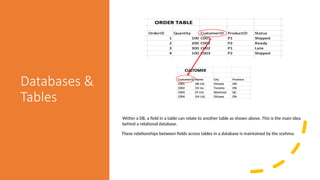
Within aDB, a field in a table can relate to another table as shown above. This is the main idea
behind a relational database.
These relationships between fields across tables in a database is maintained by the scehma.
6.
Schema
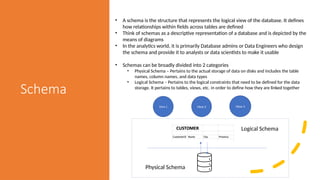
• A schemais the structure that represents the logical view of the database. It defines
how relationships within fields across tables are defined
• Think of schemas as a descriptive representation of a database and is depicted by the
means of diagrams
• In the analytics world, it is primarily Database admins or Data Engineers who design
the schema and provide it to analysts or data scientists to make it usable
• Schemas can be broadly divided into 2 categories
• Physical Schema – Pertains to the actual storage of data on disks and includes the table
names, column names, and data types
• Logical Schema – Pertains to the logical constraints that need to be defined for the data
storage. It pertains to tables, views, etc. in order to define how they are linked together
View 1 View 3
View 2
Logical Schema
Physical Schema
7.
But why dowe
need these
multi-table
schemas
• The answer to that question leads us to Normalization
• Normalization is a design techniques that allows admins/designers to reduce data redundancy
and eliminate the need to have bloated tables.
• Normalization rules divide large tables into multiple small tables and link them using
relationships/schema
• These rules are also responsible to ensure any dependencies are stored logically and
the relationships make sense
• The lack of normalization rules also lead to anomalies in basic functions such as Insert, Update,
Delete*
*We will cover Insert, Update, Delete and other functions in session 2
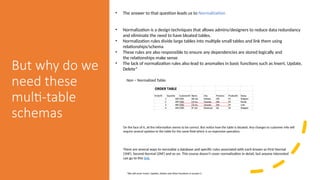
Non – Normalized Table:
On the face of it, all the information seems to be correct. But notice how the table is bloated. Any changes to customer info will
require several updates to the table for the same field which is an expensive operation.
There are several ways to normalize a database and specific rules associated with each known as First Normal
(1NF), Second Normal (2NF) and so on. This course doesn’t cover normalization in detail, but anyone interested
can go to this link.
8.
Table
Identifiers
• So howdo databases maintain these relationships:
• One of the more important concepts in Database Management is Primary & Foreign Keys
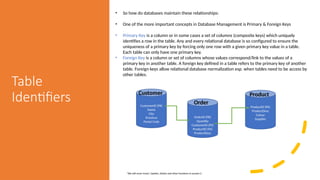
• Primary Key is a column or in some cases a set of columns (composite keys) which uniquely
identifies a row in the table. Any and every relational database is so configured to ensure the
uniqueness of a primary key by forcing only one row with a given primary key value in a table.
Each table can only have one primary key.
• Foreign Key is a column or set of columns whose values correspond/link to the values of a
primary key in another table. A foreign key defined in a table refers to the primary key of another
table. Foreign keys allow relational database normalization esp. when tables need to be access by
other tables.
*We will cover Insert, Update, Delete and other functions in session 2
CustomerID (PK)
Name
City
Province
Postal Code
OrderID (PK)
Quantity
CustomerID (FK)
ProductID (FK)
ProductDesc
ProductID (PK)
ProductDesc
Colour
Supplier
Customer
Order
Product
9.
Database
Vendors
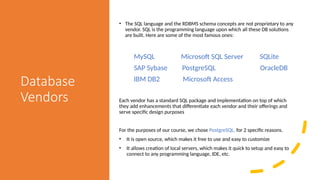
• The SQLlanguage and the RDBMS schema concepts are not proprietary to any
vendor. SQL is the programming language upon which all these DB solutions
are built. Here are some of the most famous ones:
MySQL Microsoft SQL Server SQLite
SAP Sybase PostgreSQL OracleDB
IBM DB2 Microsoft Access
Each vendor has a standard SQL package and implementation on top of which
they add enhancements that differentiate each vendor and their offerings and
serve specific design purposes
For the purposes of our course, we chose PostgreSQL, for 2 specific reasons.
• It is open source, which makes it free to use and easy to customize
• It allows creation of local servers, which makes it quick to setup and easy to
connect to any programming language, IDE, etc.
10.
Database
Architecture
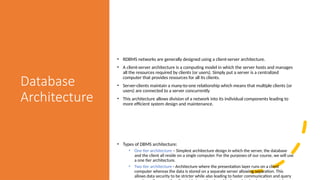
• RDBMS networksare generally designed using a client-server architecture.
• A client-server architecture is a computing model in which the server hosts and manages
all the resources required by clients (or users). Simply put a server is a centralized
computer that provides resources for all its clients.
• Server-clients maintain a many-to-one relationship which means that multiple clients (or
users) are connected to a server concurrently
• This architecture allows division of a network into its individual components leading to
more efficient system design and maintenance.
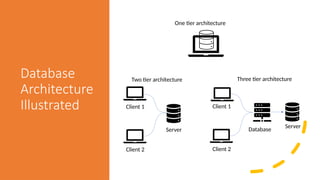
• Types of DBMS architecture:
• One tier architecture – Simplest architecture design in which the server, the database
and the client all reside on a single computer. For the purposes of our course, we will use
a one tier architecture.
• Two tier architecture - Architecture where the presentation layer runs on a client
computer whereas the data is stored on a separate server allowing separation. This
allows data security to be stricter while also leading to faster communication and query
Setting up
your one-tier
architecture-
based
environment
Inorder to be able to use PostgreSQL on local machines we will have to install
PostgreSQL on our computer and then add pgAdmin4 along with that as an
added wrapper for a coding environment
Installing PostgreSQL
• For Windows
• Resource 1
• Resource 2
• For MacOS
• Postgre Wrapper for MacOS - https://postgresapp.com
Installing pgAdmin4
• For Windows & Mac - https://www.pgadmin.org/download/
For more advanced installs refer to Appendix A:
Installing PostgreSQL on the PostgreSQL Up & Running Book from O'Reilly
Editor's Notes
#7 Additionally students can also refer to the Section 1: Database Fundamentals in the Learn SQL Database Programming book. (Available through the Conestoga library)
#8 Additionally students can also refer to the Section 1: Database Fundamentals in the Learn SQL Database Programming book. (Available through the Conestoga library)


![[DSC Europe 25] Jovan Sumarac - Real-World Applications of Computer Vision in...](https://cdn.slidesharecdn.com/ss_thumbnails/fiksms22smcpopvvld03-jovan-sumarac-real-life-applications-of-computer-vision-in-automotive-systems-260120105855-de622abb-thumbnail.jpg?width=640&height=640&fit=bounds)

![[DSC Europe 25] Milos Belcevic - Product Professional's Journey to Full-Stack...](https://cdn.slidesharecdn.com/ss_thumbnails/1zovd6fgsycdg4wvgvls-milos-belcevic-product-professionals-journey-to-full-stack-product-developer-260123083019-d993120d-thumbnail.jpg?width=640&height=640&fit=bounds)


![[DSC Europe 25] Tali Fulman - Guild Meetings, Then What? Building Data Commun...](https://cdn.slidesharecdn.com/ss_thumbnails/fgohhi33rwmhqdowdj5k-tali-fulman-guild-meetings-then-what-building-data-communities-that-actually-ch-260120105855-528492c3-thumbnail.jpg?width=640&height=640&fit=bounds)

![[DSC Europe 25] Mikhail Rozhkov - AI Product Canvas: From Business Goals to T...](https://cdn.slidesharecdn.com/ss_thumbnails/d53doddtpgfqivmzqel6-mikhail-rozhkov-ai-product-canvas-v1-260121115910-9dd517a7-thumbnail.jpg?width=640&height=640&fit=bounds)


![[DSC Europe 25] Srdj Stanisic - Local and Private AI in UX.pdf](https://cdn.slidesharecdn.com/ss_thumbnails/vwmetykqmztgmokmmkfa-3-srdjan-stanisic-local-and-small-ai-in-ux-260120105855-55a31869-thumbnail.jpg?width=640&height=640&fit=bounds)

![[DSC Europe 25] Paula Garcia Esteban -Building the Future: The Role of Data S...](https://cdn.slidesharecdn.com/ss_thumbnails/9ld1r1bsqpwve8qfvphy-paula-garcia-esteban-building-the-future-260122103838-4171f5cb-thumbnail.jpg?width=640&height=640&fit=bounds)
![[DSC Europe 25] Marcos Heidemann - Beyond the Hype: Making AI Coding Assistan...](https://cdn.slidesharecdn.com/ss_thumbnails/eexkhvldrjsopspdjbur-marcos-heidemann-beyond-the-hype-getting-real-value-out-of-ai-assisted-coding-260121115910-7e9d41ec-thumbnail.jpg?width=640&height=640&fit=bounds)
