


TOP 5
DATA VISUALIZATION
ERRORS
Professor Kristen Sosulski, Ed.D
New York University Stern School of Business
@sosulski | ks123@nyu.edu | kristensosulski.com
1
Introduction
• Building data visualizations is easy.
• In fact, you can build beautiful geospatial, categorical,
statistical, relational, multivariate, and time series
displays with little effort, as long the data is presented
in the correct format.
• However, it’s always important to study and review the
output of your visualizations; the default settings can
result in errors of omission and poor scaling.
2Copyright 2016 Kristen Sosulski ks123@nyu.edu @sosulski kristensosulski.com
Learn how to avoid errors
made by data visualization
software.
3Copyright 2016 Kristen Sosulski ks123@nyu.edu @sosulski kristensosulski.com
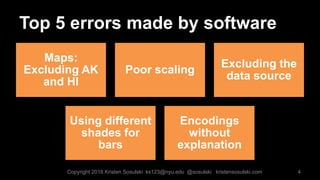
Top 5 errors made by software
Maps:
Excluding AK
and HI
Poor scaling
Excluding the
data source
Using different
shades for
bars
Encodings
without
explanation
4Copyright 2016 Kristen Sosulski ks123@nyu.edu @sosulski kristensosulski.com
ERROR 1
5
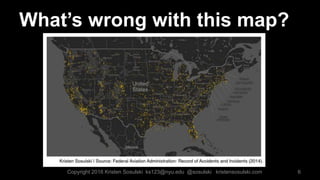
What’s wrong with this map?
6Copyright 2016 Kristen Sosulski ks123@nyu.edu @sosulski kristensosulski.com
Answer:
The map below shows the location of
aviation incidents and accidents in the US.
However, it only shows the 48 contiguous
states.
7
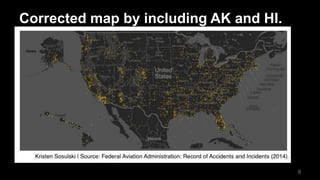
How do we correct this error?
• When mapping data points on a geospatial display of
the United States, be sure to include all 50 states.
• To include Alaska and Hawaii on your map, simply
take screenshots of the two states from your original
visualization (you may have to zoom out or pan), and
paste them near the west coast of the US.
8Copyright 2016 Kristen Sosulski ks123@nyu.edu @sosulski kristensosulski.com
Corrected map by including AK and HI.
9
ERROR 2
10
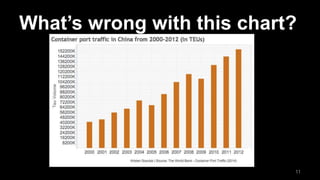
What’s wrong with this chart?
11
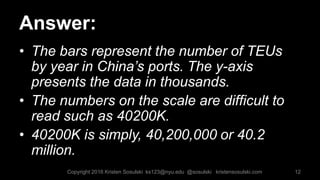
Answer:
• The bars represent the number of TEUs
by year in China’s ports. The y-axis
presents the data in thousands.
• The numbers on the scale are difficult to
read such as 40200K.
• 40200K is simply, 40,200,000 or 40.2
million.
12Copyright 2016 Kristen Sosulski ks123@nyu.edu @sosulski kristensosulski.com
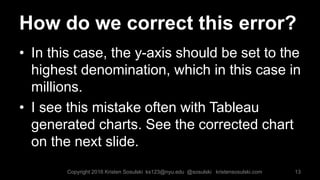
How do we correct this error?
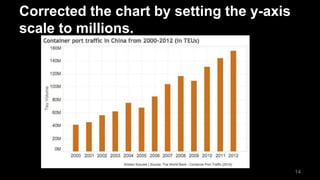
• In this case, the y-axis should be set to the
highest denomination, which in this case in
millions.
• I see this mistake often with Tableau
generated charts. See the corrected chart
on the next slide.
13Copyright 2016 Kristen Sosulski ks123@nyu.edu @sosulski kristensosulski.com
Corrected the chart by setting the y-axis
scale to millions.
14
ERROR 3
15
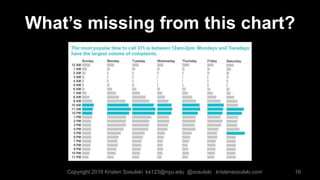
What’s missing from this chart?
16Copyright 2016 Kristen Sosulski ks123@nyu.edu @sosulski kristensosulski.com
Answer:
• Omitting a reference to the data source.
This makes it impossible to check the
validity and integrity of the visual
presentation.
• Also, the scale is also omitted on this
chart.
17
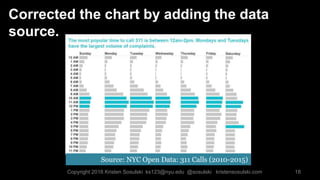
Corrected the chart by adding the data
source.
18
Source: NYC Open Data: 311 Calls (2010-2015)
Copyright 2016 Kristen Sosulski ks123@nyu.edu @sosulski kristensosulski.com
ERROR 4
19
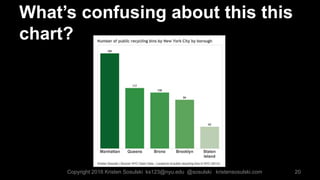
What’s confusing about this this
chart?
20Copyright 2016 Kristen Sosulski ks123@nyu.edu @sosulski kristensosulski.com
Answer:
21
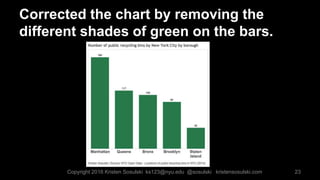
• There are there redundant encodings for
the categorical data.
• The value of each bar is represented by
both a color and a number, in addition to
the bar length.
• There is no extra information provided by
the different colors used.
Copyright 2016 Kristen Sosulski ks123@nyu.edu @sosulski kristensosulski.com
How do we correct the error?
• Remove the different colors or shading
within the same bar chart.
• The label describing the bar should make
it clear enough what the bar represents..
22Copyright 2016 Kristen Sosulski ks123@nyu.edu @sosulski kristensosulski.com
Corrected the chart by removing the
different shades of green on the bars.
23Copyright 2016 Kristen Sosulski ks123@nyu.edu @sosulski kristensosulski.com
ERROR 5
24
25
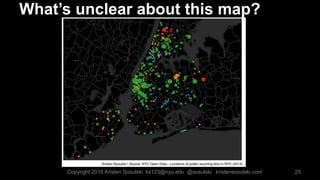
What’s unclear about this map?
Copyright 2016 Kristen Sosulski ks123@nyu.edu @sosulski kristensosulski.com
Answer:
26
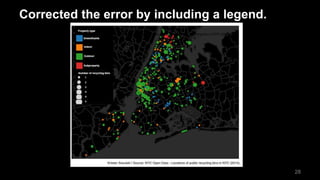
• There is no description of what the colors, bubbles, and
bubble size signify in the chart.
• Bubble charts are used to display multivariate data. The size
of a bubble represents a quantitative value such as population
or quantity, while the color usually is a categorical variable
such as region.
• The position of the bubble is the intersection of the x and y
coordinates. In this case, it is the longitude and latitude.
How can we fix this error?
27
Simply include a legend to explain the color
codes and sizes of your bubbles.
Copyright 2016 Kristen Sosulski ks123@nyu.edu @sosulski kristensosulski.com
Corrected the error by including a legend.
28
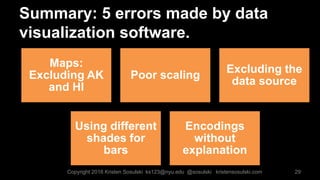
Summary: 5 errors made by data
visualization software.
29
Maps:
Excluding AK
and HI
Poor scaling
Excluding the
data source
Using different
shades for
bars
Encodings
without
explanation
Copyright 2016 Kristen Sosulski ks123@nyu.edu @sosulski kristensosulski.com
By checking for these five errors made
by data visualization software, you’ll be
on your way to creating data
visualizations like a pro.
30Copyright 2016 Kristen Sosulski ks123@nyu.edu @sosulski kristensosulski.com
Are there any other errors that you’ve come across in
your data visualization work? Do you have any
questions? Contact me on twitter @sosulski.
You can learn more on my blog at
http://kristensosulski.com
31
Questions? Comments?
Copyright 2016 Kristen Sosulski ks123@nyu.edu @sosulski kristensosulski.com
Thank you!
32
Professor Kristen Sosulski, Ed.D
New York University Stern School of Business
@sosulski | ks123@nyu.edu | kristensosulski.com

Top 5 data visualization errors

  • 1.
    TOP 5 DATA VISUALIZATION ERRORS ProfessorKristen Sosulski, Ed.D New York University Stern School of Business @sosulski | ks123@nyu.edu | kristensosulski.com 1
  • 2.
    Introduction • Building datavisualizations is easy. • In fact, you can build beautiful geospatial, categorical, statistical, relational, multivariate, and time series displays with little effort, as long the data is presented in the correct format. • However, it’s always important to study and review the output of your visualizations; the default settings can result in errors of omission and poor scaling. 2Copyright 2016 Kristen Sosulski ks123@nyu.edu @sosulski kristensosulski.com
  • 3.
    Learn how toavoid errors made by data visualization software. 3Copyright 2016 Kristen Sosulski ks123@nyu.edu @sosulski kristensosulski.com
  • 4.
    Top 5 errorsmade by software Maps: Excluding AK and HI Poor scaling Excluding the data source Using different shades for bars Encodings without explanation 4Copyright 2016 Kristen Sosulski ks123@nyu.edu @sosulski kristensosulski.com
  • 5.
  • 6.
    What’s wrong withthis map? 6Copyright 2016 Kristen Sosulski ks123@nyu.edu @sosulski kristensosulski.com
  • 7.
    Answer: The map belowshows the location of aviation incidents and accidents in the US. However, it only shows the 48 contiguous states. 7
  • 8.
    How do wecorrect this error? • When mapping data points on a geospatial display of the United States, be sure to include all 50 states. • To include Alaska and Hawaii on your map, simply take screenshots of the two states from your original visualization (you may have to zoom out or pan), and paste them near the west coast of the US. 8Copyright 2016 Kristen Sosulski ks123@nyu.edu @sosulski kristensosulski.com
  • 9.
    Corrected map byincluding AK and HI. 9
  • 10.
  • 11.
    What’s wrong withthis chart? 11
  • 12.
    Answer: • The barsrepresent the number of TEUs by year in China’s ports. The y-axis presents the data in thousands. • The numbers on the scale are difficult to read such as 40200K. • 40200K is simply, 40,200,000 or 40.2 million. 12Copyright 2016 Kristen Sosulski ks123@nyu.edu @sosulski kristensosulski.com
  • 13.
    How do wecorrect this error? • In this case, the y-axis should be set to the highest denomination, which in this case in millions. • I see this mistake often with Tableau generated charts. See the corrected chart on the next slide. 13Copyright 2016 Kristen Sosulski ks123@nyu.edu @sosulski kristensosulski.com
  • 14.
    Corrected the chartby setting the y-axis scale to millions. 14
  • 15.
  • 16.
    What’s missing fromthis chart? 16Copyright 2016 Kristen Sosulski ks123@nyu.edu @sosulski kristensosulski.com
  • 17.
    Answer: • Omitting areference to the data source. This makes it impossible to check the validity and integrity of the visual presentation. • Also, the scale is also omitted on this chart. 17
  • 18.
    Corrected the chartby adding the data source. 18 Source: NYC Open Data: 311 Calls (2010-2015) Copyright 2016 Kristen Sosulski ks123@nyu.edu @sosulski kristensosulski.com
  • 19.
  • 20.
    What’s confusing aboutthis this chart? 20Copyright 2016 Kristen Sosulski ks123@nyu.edu @sosulski kristensosulski.com
  • 21.
    Answer: 21 • There arethere redundant encodings for the categorical data. • The value of each bar is represented by both a color and a number, in addition to the bar length. • There is no extra information provided by the different colors used. Copyright 2016 Kristen Sosulski ks123@nyu.edu @sosulski kristensosulski.com
  • 22.
    How do wecorrect the error? • Remove the different colors or shading within the same bar chart. • The label describing the bar should make it clear enough what the bar represents.. 22Copyright 2016 Kristen Sosulski ks123@nyu.edu @sosulski kristensosulski.com
  • 23.
    Corrected the chartby removing the different shades of green on the bars. 23Copyright 2016 Kristen Sosulski ks123@nyu.edu @sosulski kristensosulski.com
  • 24.
  • 25.
    25 What’s unclear aboutthis map? Copyright 2016 Kristen Sosulski ks123@nyu.edu @sosulski kristensosulski.com
  • 26.
    Answer: 26 • There isno description of what the colors, bubbles, and bubble size signify in the chart. • Bubble charts are used to display multivariate data. The size of a bubble represents a quantitative value such as population or quantity, while the color usually is a categorical variable such as region. • The position of the bubble is the intersection of the x and y coordinates. In this case, it is the longitude and latitude.
  • 27.
    How can wefix this error? 27 Simply include a legend to explain the color codes and sizes of your bubbles. Copyright 2016 Kristen Sosulski ks123@nyu.edu @sosulski kristensosulski.com
  • 28.
    Corrected the errorby including a legend. 28
  • 29.
    Summary: 5 errorsmade by data visualization software. 29 Maps: Excluding AK and HI Poor scaling Excluding the data source Using different shades for bars Encodings without explanation Copyright 2016 Kristen Sosulski ks123@nyu.edu @sosulski kristensosulski.com
  • 30.
    By checking forthese five errors made by data visualization software, you’ll be on your way to creating data visualizations like a pro. 30Copyright 2016 Kristen Sosulski ks123@nyu.edu @sosulski kristensosulski.com
  • 31.
    Are there anyother errors that you’ve come across in your data visualization work? Do you have any questions? Contact me on twitter @sosulski. You can learn more on my blog at http://kristensosulski.com 31 Questions? Comments? Copyright 2016 Kristen Sosulski ks123@nyu.edu @sosulski kristensosulski.com
  • 32.
    Thank you! 32 Professor KristenSosulski, Ed.D New York University Stern School of Business @sosulski | ks123@nyu.edu | kristensosulski.com

Editor's Notes

  • #2 In this session you will learn strategies for telling a story using data. Emphasis will be placed on creating readable and interpretable presentations.