Antonella Torres

SURREALISM COLLAGE
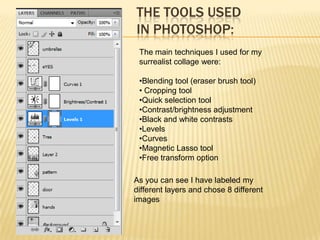
THE TOOLS USED
IN PHOTOSHOP:
 The main techniques I used for my
 surrealist collage were:

 •Blending tool (eraser brush tool)
 • Cropping tool
 •Quick selection tool
 •Contrast/brightness adjustment
 •Black and white contrasts
 •Levels
 •Curves
 •Magnetic Lasso tool
 •Free transform option

As you can see I have labeled my
different layers and chose 8 different
images
Other technique I
I started of with two
                                                       applied was by
different images for
                                                       making the image
my background. I
                                                       almost fade in the
first cropped the
                                                       background so it
parts I wanted to
                                                       gives a transparent
use as you can see
                                                       look. For example I
at the top of the
                                                       gave a
background shows
                                                       reflection/shining and
clouds however to
                                                       sharpened touch to
make this cloudy
                                                       the eyes in the
technique I used
                                                       collage
the filter, render
option.
                                                For the hole collage the black
For this part of the                            and white option panel was
background I                                    used and I sharpened and
gathered a picture                              intensified the contrast and
and by using the                                brightness. Also for each
magnetic lasso          For the legs I used     image I adjusted the curves
tool I cropped the      the brush eraser tool   and levels so they will fit
person on top so        so in between the       according to the hole image.
the shoes would         color would be equal    Without the brightness layer
be left just with       to the background       my image would be much
the reflection                                  more bright and without many

Surrealism collage

  • 1.
  • 2.
    THE TOOLS USED INPHOTOSHOP: The main techniques I used for my surrealist collage were: •Blending tool (eraser brush tool) • Cropping tool •Quick selection tool •Contrast/brightness adjustment •Black and white contrasts •Levels •Curves •Magnetic Lasso tool •Free transform option As you can see I have labeled my different layers and chose 8 different images
  • 3.
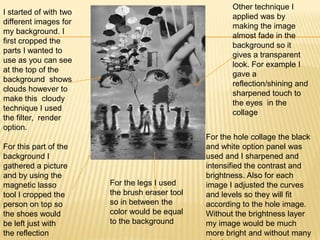
    Other technique I Istarted of with two applied was by different images for making the image my background. I almost fade in the first cropped the background so it parts I wanted to gives a transparent use as you can see look. For example I at the top of the gave a background shows reflection/shining and clouds however to sharpened touch to make this cloudy the eyes in the technique I used collage the filter, render option. For the hole collage the black For this part of the and white option panel was background I used and I sharpened and gathered a picture intensified the contrast and and by using the brightness. Also for each magnetic lasso For the legs I used image I adjusted the curves tool I cropped the the brush eraser tool and levels so they will fit person on top so so in between the according to the hole image. the shoes would color would be equal Without the brightness layer be left just with to the background my image would be much the reflection more bright and without many