[i]
INDUSTRIAL TRAINING AND PROJECT REPORT
On
PLC SCADA AND AUTOMATION
BY
VARUN KUMAR RAGHAV (1703221107)
SUBMITTED TO THE DEPARTMENT OF ELECTRICAL AND ELECRONICS ENGINEERINGIN
PARTIAL FULFILLMENT OF THE REQUIREMENS
FOR THE DEGREE OF BACHELOR OF
TECHNOLOGY
IN
ELECTRICAL AND ELECRONICS ENGINEERINGING
ABES Engineering college Ghaziabad
Dr. APJ Abdul Kalam technical university Uttar Pradesh Lucknow
[ii]
ACKNOWLEDGEMENT
I feel profound happiness in forwarding this industrial training report as an image
of sincere efforts. It is almost inevitable to ensure indebtedness to all who
generously helped by sharing their valuable experience & devoting their precious
time with us, without whom this seminar report would have never been
accomplished.
First & foremost I extend my thanks & gratitude to the entire unit of “SOFCON
INDIAN PVT.LTD. NOIDA” along with “Mr. PUSHKAR BAJPAYEE
(DIRECTOR)”,“Mr. PRAVEEN KUMAR (Assistant Professor)” whose
guidance, teaching and invaluable suggestions provided me a deep insight in my
chosen field of technology, enhanced my knowledge and supported in widening
my outlook towards the communication industry. I am also very thankful to all the
engineers of the department for their kind support throughout the training.
[iii]
ABSTRACT
Industrial training is must for every student perusing professional degree because
the ultimate goal of every student is to get the information the industrial training
helps us to get an idea of the things. We should know in order to get a job i.e. I
have a good professional career. Industrial training teaches us lots of things. it
helps us to know the kind of environment we would be getting in the industry and
help us to get with the kind of environment. The totality the industrial teaches us
industrial ethics. Some advance technical how and help us to acquire with
industrial working style. Supervisory control and data acquisition (SCADA) allows
a utility operator to monitor and control processes that are distributed among
various remote sites. SCADA, is a system for gathering real time data, controlling
processes, and monitoring equipment from remote locations. As more companies
are implementing an open SCADA architecture through the Internet to monitor
critical infrastructure components such as power plants, oil and gas pipelines,
chemical refineries, flood control dams, and waste and water systems, vital
systems are becoming increasingly open to attack. This report provides an
overview of SCADA, outlines several vulnerabilities of SCADA systems, presents
data on known and possible threats, and provides particular remediation strategies
for protecting these systems. PLCs are used in many different industries and
machines such as packaging and semiconductor machines. Programs to control
machine operation are typically stored in battery-backed or non-volatile memory.
A programmable logic controller (PLC) or programmable controller is a digital
computer used for automation of electromechanical processes, such as control of
machinery on factory assembly lines, amusement rides, or lighting fixtures. PLCs
are used in many industries and machines. Unlike general-purpose computers, the
PLC is designed for multiple inputs and output arrangements, extended
temperature ranges, immunity to electrical noise, and resistanc e to vibration and
impact.
4
Certificate
24th July 2020
TO WHOMSOEVER IT MAY CONCERN
To,
The Director/HOD/HR
ABES Engineering College, Ghaziabad
Subject: Internship letter
Dear Sir;
Sofcon is pleased to inform you that Mr. Varun Kumar Raghav S/o Dinesh Kumar Raghav,
B.Tech(EEE/EE/CS/IT)-Roll No./ID No. 1703221107 is completed/Perusing Industrial Internship on
Industrial Automation System from Sofcon India Pvt. Ltd.(Noida)
We found him extremely inquisitive and hardworking during his training, he was exposed to the practical
activity in PLC & SCADA.
He was very much interested to learn the function of our core engineering and also willing to put his best
efforts and get into the depth of the subject to understand it better.
His association with us was very fruitful and we wish him all the best in his future endeavors.
Intern Details:
Batch Date: - 18th May 2020 to 05th July 2020
Covered Topics: - PLC & SCADA
For Sofcon India Pvt.Ltd
Authorized Signatory
Mr. Rajesh Singh Branch Manager
Noida, UP(India)-201301
Mail id: bm.noi@sofcontraining.com
Contact No : +91- 9811626172
SOFCON INDIA PVT.LTD
WWW.sofcontraining.com info@sofcontraining.com
5
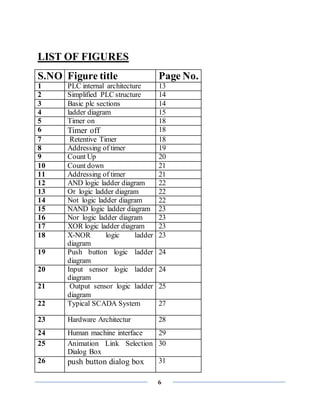
Table Content:-
Acknowledgement……………………………………………………………………………… ii
Abstract………………………………………………………………………………………… iii
Certificate with Signatures and Seal of the Industry Person………………………………………4
List of figures……………………………………………………………………………………...6
Company Profile……………………………………………………...…………………………...8
Introduction to automation …….………………………………………………………………….9
Advantage/Disadvantage …………………………………...…………………………………….9
Applications...……………………………………………...……………………………….……10
Limitation of automation ………………………………...……………………………….……..11
PLC ………………………………………………………...…………………………..………..12
Architecture of PLC ……………………………………...…………….………………………..13
Ladder Diagram…………………………………………...…………………..…………………15
Programming by Ladder Diagram ………………………………...…………….………………15
Programming and Operation in PLC …………………………………………..…….……….…24
Application of PLC ……………………………………………………….…………………..…25
SCADA …………………………………………………………………….………..……….…26
SCADA Software ……………………………………………………………………………....27
Architecture …………………………………………………………….…………………….…28
INTOUCH SCADA Software ……………………………………………………………….…30
Application of SCADA …………………………………………….………………………..…35
Conclusion …………………………………………………………..………………….………37
6
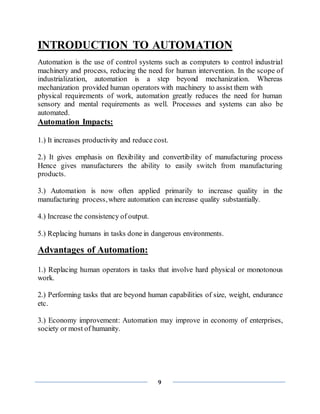
LIST OF FIGURES
S.NO Figure title Page No.
1 PLC internal architecture 13
2 Simplified PLC structure 14
3 Basic plc sections 14
4 ladder diagram 15
5 Timer on 18
6 Timer off 18
7 Retentive Timer 18
8 Addressing of timer 19
9 Count Up 20
10 Count down 21
11 Addressing of timer 21
12 AND logic ladder diagram 22
13 Or logic ladder diagram 22
14 Not logic ladder diagram 22
15 NAND logic ladder diagram 23
16 Nor logic ladder diagram 23
17 XOR logic ladder diagram 23
18 X-NOR logic ladder
diagram
23
19 Push button logic ladder
diagram
24
20 Input sensor logic ladder
diagram
24
21 Output sensor logic ladder
diagram
25
22 Typical SCADA System 27
23 Hardware Architectur 28
24 Human machine interface 29
25 Animation Link Selection
Dialog Box
30
26 push button dialog box 31
7
27 Fill colour dialog box 32
28 object height dialog box 33
29 horizontal location dialog
box
34
8
COMPANY PROFILE
9
INTRODUCTION TO AUTOMATION
Automation is the use of control systems such as computers to control industrial
machinery and process, reducing the need for human intervention. In the scope of
industrialization, automation is a step beyond mechanization. Whereas
mechanization provided human operators with machinery to assist them with
physical requirements of work, automation greatly reduces the need for human
sensory and mental requirements as well. Processes and systems can also be
automated.
Automation Impacts:
1.) It increases productivity and reduce cost.
2.) It gives emphasis on flexibility and convertibility of manufacturing process
Hence gives manufacturers the ability to easily switch from manufacturing
products.
3.) Automation is now often applied primarily to increase quality in the
manufacturing process,where automation can increase quality substantially.
4.) Increase the consistency of output.
5.) Replacing humans in tasks done in dangerous environments.
Advantages of Automation:
1.) Replacing human operators in tasks that involve hard physical or monotonous
work.
2.) Performing tasks that are beyond human capabilities of size, weight, endurance
etc.
3.) Economy improvement: Automation may improve in economy of enterprises,
society or most of humanity.
10
Disadvantages of Automation:
1) Technology limits: Current technology is unable to automate all the desired
tasks.
2) Unpredictable development costs: The research and development cost of
automating a process may exceed the costsaved by the automation itself.
3) High initial cost: The automation of a new product or plant requires a huge
initial investment in comparison with the unit costof the product.
Applications
 Automated video surveillance:
Automated video surveillance monitors
people and vehicles in real time within a busy environment. Existing automated
surveillance systems are based on the environment they are primarily designed to
observe, i.e., indoor, outdoor or airborne, the amount of sensors that the automated
system can handle and the mobility of sensor, i.e., stationary camera vs. mobile
camera. The purpose of a surveillance system is to record properties and
trajectories of objects in a given area generate warnings or notify designated
authority in case of occurrence of particular events.
 Automated manufacturing:
Automated manufacturing refers to the
application of automation to produce things in the factory way. Most of the
advantages of the automation technology have its influence in the manufacture
processes. The main advantages of automated manufacturing are higher
consistency and quality, reduced lead times, simplified production, reduced
handling, improved work flow, and increased worker morale when a good
implementation of the automation is made.
 Home automation:
Home automation designates an emerging practice of
increased automation of household appliances and features in residential dwellings,
11
particularly through electronic means that allow for things impracticable, overly
expensive or simply not possible recent past decades.
 Industrial automation:
Industrial automation deals with the optimization of
energy efficient drive systems by precise measurement and control technologies.
Nowadays energy efficiency in industrial
Processes are becoming more and more relevant. Semiconductor companies like
Infineon Technologies are offering 8-bit microcontroller applications for example
found in motor controls, general purpose pumps, fans, and e bikes to reduce energy
consumption and thus increase
Efficiency.
Limitations to automation:
 Current technology is unable to automate all the desired tasks.
 As a process becomes increasingly automated, there is less and less labour
to be saved or quality improvement to be gained. This is an example of both
diminishing returns and the logistic function.
 Similar to the above, as more and more processes become automated, there
are fewer remaining non-automated processes. This is an example of
exhaustion of opportunities.
12
PROGRAMMABLE LOGIC CONTROLLER
HISTORY OF PLC:
In the 1960's Programmable Logic Controllers were first developed to replace
relays and relay control systems. Relays, while very useful in some applications,
also have some problems. The primary reason for designing such a device was
eliminating the large cost involved in replacing the complicated relay based
machine control systems for major U.S. car manufacturers. These controllers
eliminated the need of rewiring and adding additional hardware for every new
configuration of logic. These, along with other considerations, led to the
development of PLCs. plc was more improved in 1970’s. In 1973 the ability to
communicate between PLCs was added. This also made it possible to have the
controlling circuit quite a ways away from the machine it was controlling.
However, at this time the lack of standardization in PLCs created other problems.
This was improved in the 1980's.The size of PLC was also reduced then, thus using
space even more efficiently. The 90's increased the collection of ways in 10 which
a PLC could be programmed (block diagrams, instruction list, C, etc.).
INTRODUCTION OF PLC:
 A programmable logic controller (PLC) is an industrial computer control
system that continuously monitors the state of input devices and makes
decisions based upon a custom program to control the state of output
devices.
 It is designed for multiple inputs and output arrangements, extended
temperature ranges, immunity to electrical noise, and resistance to vibration
and impact.
 They are used in many industries such as oil refineries, manufacturing lines,
conveyor systems and so on, wherever there is a need to control devices the
PLC provides a flexible way to "softwire" the components together.
 The basic units have a CPU (a computer processor) that is dedicated to run
one program that monitors a series of different inputs and logically
manipulates the outputs for the desired control. They are meant to be very
flexible in how they can be programmed while also providing the advantages
of high reliability (no program crashes or mechanical failures), compact and
economical over traditional control systems.
13
 In simple words, Programmable Logic Controllers are relay control systems
put in a very small package. This means that one PLC acts basically like a
bunch of relays, counters, timers, places for data storage, and a few various
other things, all in one small package.
ARCHITECTURE OF PLC:
The PLC give output in order to switch things
on or off. The PLC’s output is proportionally activated according on the status of
the system’s feedback sensors and input terminal which is connected to PLC. The
decision to activate output is based on logic programmers. The logic programmer
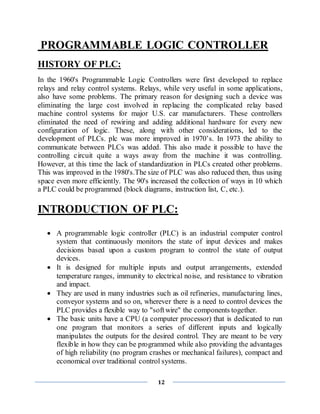
stored in RAM or ROM memory. The PLC also has same as computer, a CPU,
data bus and address bus
Fig 1 :- PLC internal architecture
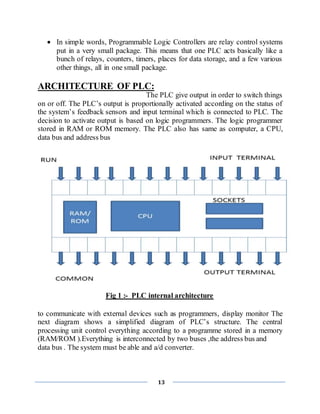
to communicate with external devices such as programmers, display monitor The
next diagram shows a simplified diagram of PLC’s structure. The central
processing unit control everything according to a programme stored in a memory
(RAM/ROM ).Everything is interconnected by two buses ,the address bus and
data bus . The system must be able and a/d converter.
14
Fig 2 :- Simplified PLC structure
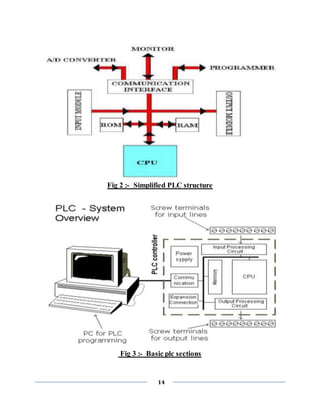
Fig 3 :- Basic plc sections
15
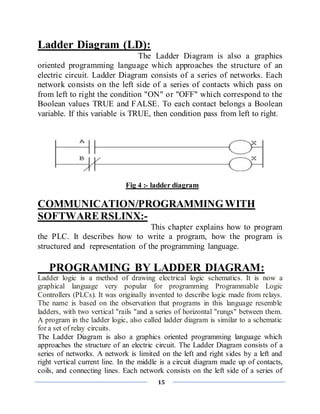
Ladder Diagram (LD):
The Ladder Diagram is also a graphics
oriented programming language which approaches the structure of an
electric circuit. Ladder Diagram consists of a series of networks. Each
network consists on the left side of a series of contacts which pass on
from left to right the condition "ON" or "OFF" which correspond to the
Boolean values TRUE and FALSE. To each contact belongs a Boolean
variable. If this variable is TRUE, then condition pass from left to right.
Fig 4 :- ladder diagram
COMMUNICATION/PROGRAMMINGWITH
SOFTWARERSLINX:-
This chapter explains how to program
the PLC. It describes how to write a program, how the program is
structured and representation of the programming language.
PROGRAMING BY LADDER DIAGRAM:
Ladder logic is a method of drawing electrical logic schematics. It is now a
graphical language very popular for programming Programmable Logic
Controllers (PLCs). It was originally invented to describe logic made from relays.
The name is based on the observation that programs in this language resemble
ladders, with two vertical "rails "and a series of horizontal "rungs" between them.
A program in the ladder logic, also called ladder diagram is similar to a schematic
for a set of relay circuits.
The Ladder Diagram is also a graphics oriented programming language which
approaches the structure of an electric circuit. The Ladder Diagram consists of a
series of networks. A network is limited on the left and right sides by a left and
right vertical current line. In the middle is a circuit diagram made up of contacts,
coils, and connecting lines. Each network consists on the left side of a series of
16
contacts which pass on from left to right the condition "ON" or "OFF" which
correspond to the Boolean values TRUE and FALSE. To each contact belongs a
Boolean variable. If this variable is TRUE, then the condition is passed from left to
right along the connecting line. Otherwise the right connection receives the value
OFF.
INPUT represented by (I)
OUTPUT represented by (O)
 Addressing method:
1 slot=32 bit=2 word (1 char. / word=2 byte=16 bit)
 Input addressing:
File letter: Slot number. Word number/Bit number
Forexample:- I:2.1/1
 Output addressing:
File letter: Slot number. Word number/Bit number
Forexample:- O:2.1/1
GENERALLY USED INSTRUCTIONS & SYMBOL FOR
PLC PROGRAMMING:-
 Input Instruction:
1) --[ ]—
This Instruction is Called XIC or Examine If Closed. ie; If a NO
switch is actuated then only this instruction will be true. If a NC switch is
actuated then this instruction will not be true and hence output will not be
generated.
2) --[]—
This Instruction is Called XIO or Examine If Open ie; If a
NC switch is actuated then only this instruction will be true. If a NC
switch is actuated then this instruction will not be true and hence output
will not be generated.
17
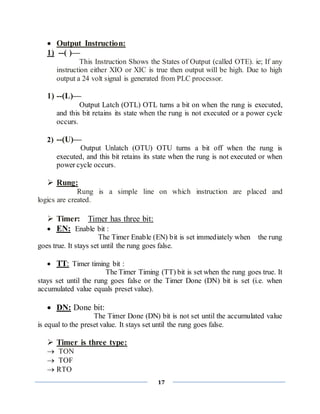
 Output Instruction:
1) --( )—
This Instruction Shows the States of Output (called OTE). ie; If any
instruction either XIO or XIC is true then output will be high. Due to high
output a 24 volt signal is generated from PLC processor.
1) --(L)—
Output Latch (OTL) OTL turns a bit on when the rung is executed,
and this bit retains its state when the rung is not executed or a power cycle
occurs.
2) --(U)—
Output Unlatch (OTU) OTU turns a bit off when the rung is
executed, and this bit retains its state when the rung is not executed or when
power cycle occurs.
 Rung:
Rung is a simple line on which instruction are placed and
logics are created.
 Timer: Timer has three bit:
 EN: Enable bit :
The Timer Enable (EN) bit is set immediately when the rung
goes true. It stays set until the rung goes false.
 TT: Timer timing bit :
The Timer Timing (TT) bit is set when the rung goes true. It
stays set until the rung goes false or the Timer Done (DN) bit is set (i.e. when
accumulated value equals preset value).
 DN: Done bit:
The Timer Done (DN) bit is not set until the accumulated value
is equal to the preset value. It stays set until the rung goes false.
 Timer is three type:
 TON
 TOF
 RTO
18
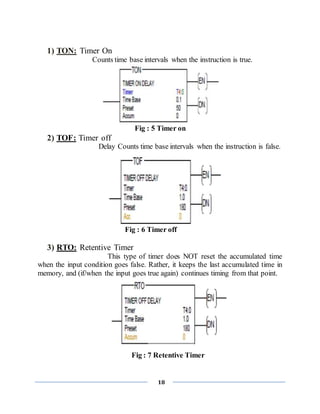
1) TON: Timer On
Counts time base intervals when the instruction is true.
Fig : 5 Timer on
2) TOF: Timer off
Delay Counts time base intervals when the instruction is false.
Fig : 6 Timer off
3) RTO: Retentive Timer
This type of timer does NOT reset the accumulated time
when the input condition goes false. Rather, it keeps the last accumulated time in
memory, and (if/when the input goes true again) continues timing from that point.
Fig : 7 Retentive Timer
19
 Addressing of timer:
Fig :8 Addressing of timer
Table : 8 Status of bits in timer
20
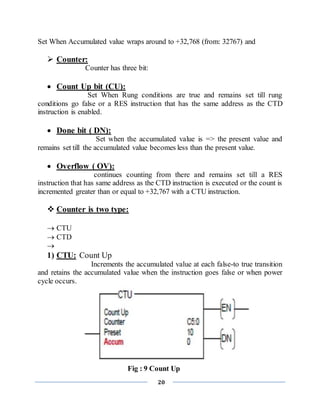
Set When Accumulated value wraps around to +32,768 (from: 32767) and
 Counter:
Counter has three bit:
 Count Up bit (CU):
Set When Rung conditions are true and remains set till rung
conditions go false or a RES instruction that has the same address as the CTD
instruction is enabled.
 Done bit ( DN):
Set when the accumulated value is => the present value and
remains set till the accumulated value becomes less than the present value.
 Overflow ( OV):
continues counting from there and remains set till a RES
instruction that has same address as the CTD instruction is executed or the count is
incremented greater than or equal to +32,767 with a CTU instruction.
 Counter is two type:
 CTU
 CTD

1) CTU: Count Up
Increments the accumulated value at each false-to true transition
and retains the accumulated value when the instruction goes false or when power
cycle occurs.
Fig : 9 Count Up
21
2) CTD: Count Down
Decrements the accumulate value at each false-to true
transition and retains the accumulated value when the instruction goes false or
when power cycle occurs.
Fig: 10 Count Down
 Addressing of counter:
Fig: 11 Addressing of timer
 RESET: --(RES)--
Reset the accumulated value and status bits of a timer or counter.
A C5:0
-------[ ]---------------------(RES)--------------------------
When A is true than counter C5:0 is reset.
22
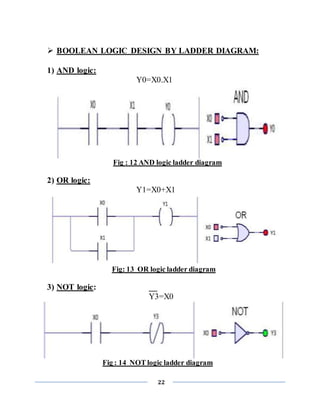
 BOOLEAN LOGIC DESIGN BY LADDER DIAGRAM:
1) AND logic:
Y0=X0.X1
Fig : 12 AND logic ladder diagram
2) OR logic:
Y1=X0+X1
Fig: 13 OR logic ladder diagram
3) NOT logic: __
Y3=X0
Fig : 14 NOT logic ladder diagram
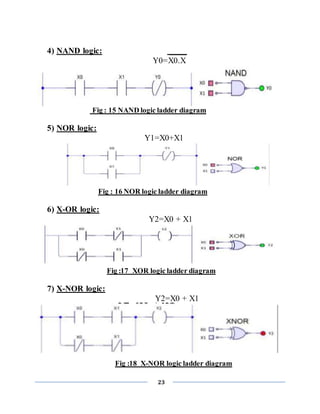
23
4) NAND logic: ____
Y0=X0.X
Fig : 15 NAND logic ladder diagram
5) NOR logic:
Y1=X0+X1
Fig : 16 NOR logic ladder diagram
6) X-OR logic:
Y2=X0 + X1
Fig :17 XOR logic ladder diagram
7) X-NOR logic:
Y2=X0 + X1
Fig :18 X-NOR logic ladder diagram
24
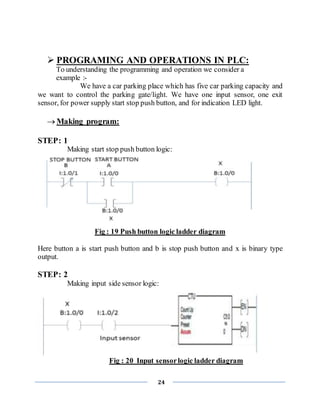
 PROGRAMING AND OPERATIONS IN PLC:
To understanding the programming and operation we consider a
example :-
We have a car parking place which has five car parking capacity and
we want to control the parking gate/light. We have one input sensor, one exit
sensor, for power supply start stop push button, and for indication LED light.
 Making program:
STEP: 1
Making start stop push button logic:
Fig : 19 Push button logic ladder diagram
Here button a is start push button and b is stop push button and x is binary type
output.
STEP: 2
Making input side sensor logic:
Fig : 20 Input sensorlogic ladder diagram
25
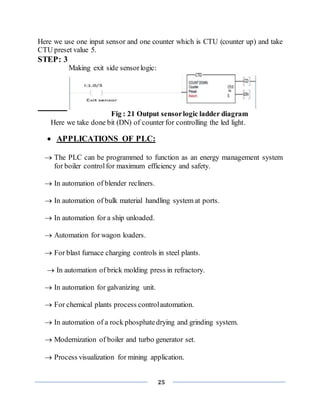
Here we use one input sensor and one counter which is CTU (counter up) and take
CTU preset value 5.
STEP: 3
Making exit side sensorlogic:
Fig : 21 Output sensorlogic ladder diagram
Here we take done bit (DN) of counter for controlling the led light.
 APPLICATIONS OF PLC:
 The PLC can be programmed to function as an energy management system
for boiler controlfor maximum efficiency and safety.
 In automation of blender recliners.
 In automation of bulk material handling system at ports.
 In automation for a ship unloaded.
 Automation for wagon loaders.
 For blast furnace charging controls in steel plants.
 In automation of brick molding press in refractory.
 In automation for galvanizing unit.
 For chemical plants process controlautomation.
 In automation of a rock phosphatedrying and grinding system.
 Modernization of boiler and turbo generator set.
 Process visualization for mining application.
26
SCADA
(SUPERVISORY CONTROL AND DATA ACQUISITION)
INTRODUCTION
SCADA stands for Supervisory Control And Data Acquisition. As the name
indicates, it is not a full control system, but rather focuses on the supervisory level.
As such, it is a purely software package that is positioned on top of hardware to
which it is interfaced, in general via Programmable Logic Controllers (PLCs), or
other commercial hardware modules.
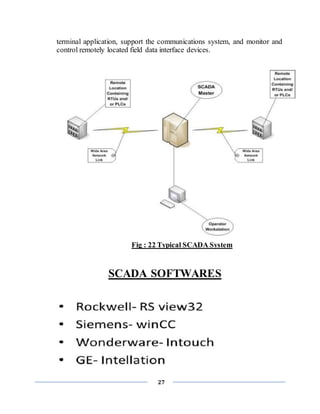
SCADA systems are used to monitor and
control a plant or equipment in industries such as telecommunications, water and
waste control, energy, oil and gas refining and transportation. These systems
encompass the transfer of data between a SCADA central host computer and a
number of Remote Terminal Units (RTUs) and/or Programmable Logic Controllers
(PLCs), and the central host and the operator terminals. A SCADA system gathers
information (such as where a leak on a pipeline has occurred), transfers the
information back to a central site, then alerts the home station that a leak has
occurred, carrying out necessary analysis and control, such as determining if the
leak is critical, and displaying the information in a logical and organized fashion.
SCADA systems consistof:
1) One or more field data interface devices, usually RTUs, or PLCs, which
interface to field sensing devices and local control switchboxes and valve
actuators.
2) A communications system used to transfer data between field data interface
devices and control units and the computers in the SCADA central host. The
system can be radio, telephone, cable, satellite, etc., or any combination of
these.
3) A central host computer server or servers (sometimes called a SCADA
Center, master station, or Master Terminal Unit (MTU).
4) A collection of standard and/or custom software [sometimes called Human
Machine Interface (HMI) software or Man Machine Interface (MMI)
software] systems used to provide the SCADA central host and operator
27
terminal application, support the communications system, and monitor and
control remotely located field data interface devices.
Fig : 22 Typical SCADA System
SCADA SOFTWARES
28
ARCHITECTURE:
Generally SCADA system is a centralized system which monitors
and controls entire area. It is purely software package that is positioned on top of
hardware. A supervisory system gathers data on the process and sends the
commands control to the process. For example, in the thermal power plant the
water flow can be set to specific value or it can be changed according to the
requirement. The SCADA system allows operators to change the set point for the
flow, and enable alarm conditions incase of loss of flow and high temperature and
the condition is displayed and recorded. The SCADA system monitors the overall
performance of the loop. The SCADA system is a centralized system to
communicate with both wire and wireless technology to Clint devices. The
SCADA system controls can run completely all kinds of industrial process.
EX: If too much pressure in building up in a gas pipe line the SCADA system can
automatically open a release valve.
Hardware Architecture:
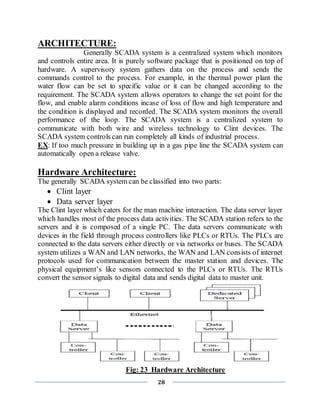
The generally SCADA system can be classified into two parts:
 Clint layer
 Data server layer
The Clint layer which caters for the man machine interaction. The data server layer
which handles most of the process data activities. The SCADA station refers to the
servers and it is composed of a single PC. The data servers communicate with
devices in the field through process controllers like PLCs or RTUs. The PLCs are
connected to the data servers either directly or via networks or buses. The SCADA
system utilizes a WAN and LAN networks, the WAN and LAN consists of internet
protocols used for communication between the master station and devices. The
physical equipment’s like sensors connected to the PLCs or RTUs. The RTUs
convert the sensor signals to digital data and sends digital data to master unit.
Fig: 23 Hardware Architecture
29
Software Architecture:
Most of the servers are used for multitasking and real
time database. The servers are responsible for data gathering and handling. The
SCADA system consists of a software program to provide trending, diagnostic
data, and manage information such as scheduled maintenance procedure, logistic
information, detailed schematics for a particular sensor or machine and expert
system troubleshooting guides. This means the operator can sea a schematic
representation of the plant being controlled.
EX: alarm checking, calculations, logging and archiving; polling controllers on a
set of parameter, those are typically connected to the server.
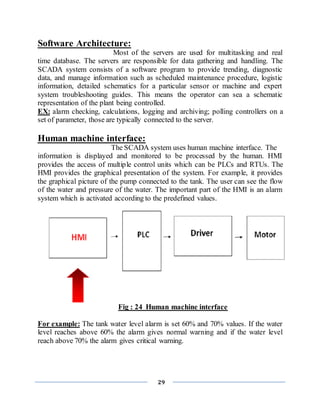
Human machine interface:
The SCADA system uses human machine interface. The
information is displayed and monitored to be processed by the human. HMI
provides the access of multiple control units which can be PLCs and RTUs. The
HMI provides the graphical presentation of the system. For example, it provides
the graphical picture of the pump connected to the tank. The user can see the flow
of the water and pressure of the water. The important part of the HMI is an alarm
system which is activated according to the predefined values.
Fig : 24 Human machine interface
For example: The tank water level alarm is set 60% and 70% values. If the water
level reaches above 60% the alarm gives normal warning and if the water level
reach above 70% the alarm gives critical warning.
30
Monitoring/Control:
The SCADA system uses different switches to operate each
device and displays the status at the control area. Any part of the process can be
turned ON/OFF from the controlstation using these switches. SCADA system is
implemented to work automatically without human intervention but at critical
situations it is handled by man power.
DESIGN SCADA WITH INTOUCH WONDERWARE
SOFTWARE AND APPLICATION:
SCADA is main interface between your
control system and Operator. Maximum data and features available on SCADA
give you better control and clarity about the system. SCADA needs to read data
from various devices like:-
 PLC/Controllers
 RTU
 Energy meters/Load managers/Data loggers
 Field instruments like Flow meters and positioners
Each of above data communicates with SCADA on various protocols . SCADA
reads or writes the data in format of tags.
INTOUCH WONDERWARE SCADA SOFTWARE:
First we crate the animated object from “Wizard Selection” tool than specify tag
name as require. We can create almost any screen animation effect imaginable. We
can make objects change color, size, location, visibility, fill level, and so on.
Animation link selection dialog boxare shown in fig
Fig : 25 Animation Link SelectionDialog Box
31
TOUCH LINK:-
1) User Input touch links:
Discrete:Used to control the value of a discrete tagname.
Analog: Used to input the value of an analog (integer or real) tagname.
String: Used to create an object into which a string message may be input.
2) Sliders touch links:
Vertical& Horizontal:
we can move the slider position horizontally or vertically.
3) Touch Pushbutton links:
Discrete Value:
Used to make any object or symbol into a pushbutton that controls
the state of a discrete tagname. Pushbutton actions can be set, reset, toggle,
momentary on (direct) and momentary off (reverse) types.
Action:
Allows any object, symbol or button to have up to three different action scripts
linked to it; On Down, While Down and On Up.
Show Window:
Used to make an object or symbol into a button that opens one or more windows
when it is clicked or touched.
Hide Window:
Used to make an object or symbol into a button that closes one or more windows
when it is clicked or touched.
Fig : 26 push button dialog box
32
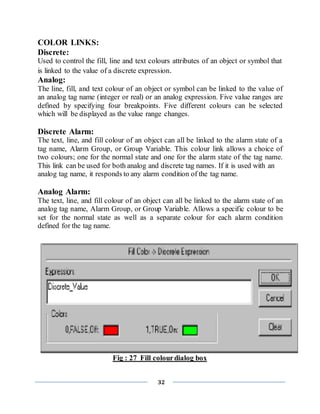
COLOR LINKS:
Discrete:
Used to control the fill, line and text colours attributes of an object or symbol that
is linked to the value of a discrete expression.
Analog:
The line, fill, and text colour of an object or symbol can be linked to the value of
an analog tag name (integer or real) or an analog expression. Five value ranges are
defined by specifying four breakpoints. Five different colours can be selected
which will be displayed as the value range changes.
Discrete Alarm:
The text, line, and fill colour of an object can all be linked to the alarm state of a
tag name, Alarm Group, or Group Variable. This colour link allows a choice of
two colours; one for the normal state and one for the alarm state of the tag name.
This link can be used for both analog and discrete tag names. If it is used with an
analog tag name, it responds to any alarm condition of the tag name.
Analog Alarm:
The text, line, and fill colour of an object can all be linked to the alarm state of an
analog tag name, Alarm Group, or Group Variable. Allows a specific colour to be
set for the normal state as well as a separate colour for each alarm condition
defined for the tag name.
Fig : 27 Fill colourdialog box
33
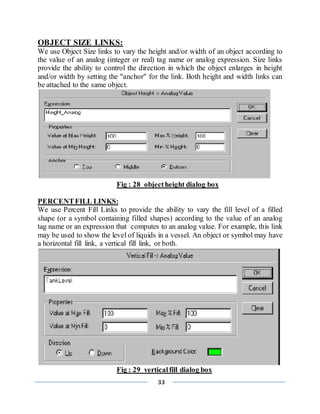
OBJECT SIZE LINKS:
We use Object Size links to vary the height and/or width of an object according to
the value of an analog (integer or real) tag name or analog expression. Size links
provide the ability to control the direction in which the object enlarges in height
and/or width by setting the "anchor" for the link. Both height and width links can
be attached to the same object.
Fig : 28 objectheight dialog box
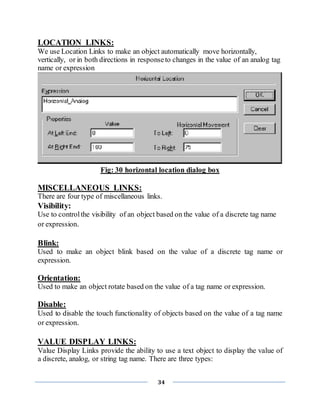
PERCENTFILL LINKS:
We use Percent Fill Links to provide the ability to vary the fill level of a filled
shape (or a symbol containing filled shapes) according to the value of an analog
tag name or an expression that computes to an analog value. For example, this link
may be used to show the level of liquids in a vessel. An object or symbol may have
a horizontal fill link, a vertical fill link, or both.
Fig : 29 verticalfill dialog box
34
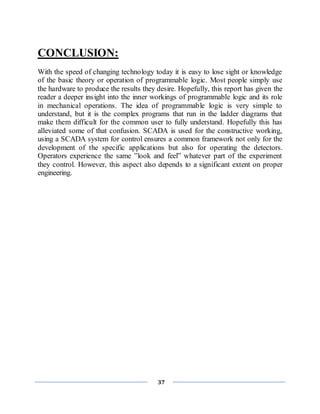
LOCATION LINKS:
We use Location Links to make an object automatically move horizontally,
vertically, or in both directions in responseto changes in the value of an analog tag
name or expression
Fig: 30 horizontal location dialog box
MISCELLANEOUS LINKS:
There are four type of miscellaneous links.
Visibility:
Use to controlthe visibility of an object based on the value of a discrete tag name
or expression.
Blink:
Used to make an object blink based on the value of a discrete tag name or
expression.
Orientation:
Used to make an object rotate based on the value of a tag name or expression.
Disable:
Used to disable the touch functionality of objects based on the value of a tag name
or expression.
VALUE DISPLAY LINKS:
Value Display Links provide the ability to use a text object to display the value of
a discrete, analog, or string tag name. There are three types:
35
Discrete :
Uses the value of a discrete expression to display an On or Off user defined
message in a text object.
Analog:
Displays the value of an analog expression in a text object.
String:
Displays the value of a string expression in a text object.
APPLICATIONSOF SCADA:
SCADA systems can be relatively simple, such as one that monitors environmental
conditions of a small office building, or incredibly complex, such as a system that
monitors all the activity in a nuclear power plant or the activity of a municipal
water system.
SCADA monitors and controls industrial, infrastructure, or facility-based
processes,as described below:.
 Infrastructure processes may be public or private, and include water
treatment and distribution, wastewater collection and treatment, oil and gas
pipelines, electrical power transmission and distribution, wind farms, civil
defence siren systems, and large communication systems.
 Facility processes occur both in public facilities and private ones, including
buildings, airports, ships, and space stations. They monitor and control
HVAC, access, and energy consumption.
Industries that are catered to are:
 Automotive
 Building Automation
 Cement & Glass
 Chemical
 Electronics
 Food and Beverage
 Machinery & Manufacturing
 Aerospace& Defence
 Metals & Mining
36
 Oil & Gas
 Pharmaceutical
 Power, Utilities & Generation
 Transportation
 Water & Wastewater
ADVANTAGES:
 The SCADA system provides on board mechanical and graphical
information.
 The SCADA system is easily expandable. We can add set of control units and
sensors according to the requirement.
 The SCADA system ability to operate critical situations.
37
CONCLUSION:
With the speed of changing technology today it is easy to lose sight or knowledge
of the basic theory or operation of programmable logic. Most people simply use
the hardware to produce the results they desire. Hopefully, this report has given the
reader a deeper insight into the inner workings of programmable logic and its role
in mechanical operations. The idea of programmable logic is very simple to
understand, but it is the complex programs that run in the ladder diagrams that
make them difficult for the common user to fully understand. Hopefully this has
alleviated some of that confusion. SCADA is used for the constructive working,
using a SCADA system for control ensures a common framework not only for the
development of the specific applications but also for operating the detectors.
Operators experience the same ”look and feel” whatever part of the experiment
they control. However, this aspect also depends to a significant extent on proper
engineering.
38
PROJECTREPORTON SOLAR POWER:-
Fig.31 solar energy
INTRODUCTION:
Solar energy simply can be defined as energy provided by the sun’s radiation where the sun is a
very powerful source of energy. It is very important for us to harness and increase the usage of
the solar energy because it is practically emission free while generating electricity so it is an
excellent alternative for traditional energy the fossil fuel like coal and petroleum. Furthermore,
with solar energy the danger of further damage to the environment is minimized as it does not
pollute the environment and it also reduces the pollution of the noise because it does not produce
any noise. Moreover, sunlight can be used to directly generate electricity by the use of
photovoltaic technology and the use of solar cells or photovoltaic arrays is getting more and
more acceptable as an alternative and cost efficient means of generating power.
Solar power was
discovered not that long ago. Auguste Mouchout was the first man to invent a solar power motor.
He discovered it starting in 1860, and ended in 1881. Next, Willoughly Smith found out about
solar cell’s sensitivity to light. He did this in 1873. Then, William Adams wrote the first book on
solar energy called A Substitute for Fuel in Tropical Countries. William Adams started writing
the book in 1876, and finished the book in 1878. After that, Charles Fritz transformed sunlight
into energy. He made this happen in 1883. Finally, Charles Tellier installed the first solar power
system for heating water. Charles Tellier made the system starting in the year 1865, and he
finished in the year 1889. That is a quick history of solar energy.
39
ADVANTAGES:
The advantages of using solar energy are it is clean and is renewable energy which it does not
cause any pollution such as air, land, water, noise and any other pollution that can be named. It
can also be produced free of charge once solar panel is installed and less maintenance needed to
keep solar cells running. Lastly, it greatly reduces the energy expenditures.
DISADVANTAGES:
The disadvantages of using solar energy is that it is very expensive to buy and install as it costs
twice as much as coal, oil and any other non-renewable energies. The usage of this depends on
the exposure of the sunlight by country and it cannot be produced during the night.
Technology of Solar Energy:
There are two main types of technology in solar energy which are photovoltaic (PV) and solar
thermal. The photovoltaic is a technology that produces electricity directly from the sun radiation
and it is easily found and operates mainly on residential appliances, commercial equipment,
lighting and air conditioning for all types of building. It can be installed mounting on the ground,
rooftop of a building and it is designed into building materials. Whereas for solar thermal
technology, it uses the energy from the sun to generate heat and from there the electricity is
generated.
40
PROJECT SIMULATION IN SCADA INTOUCH
SOFTWARE:-
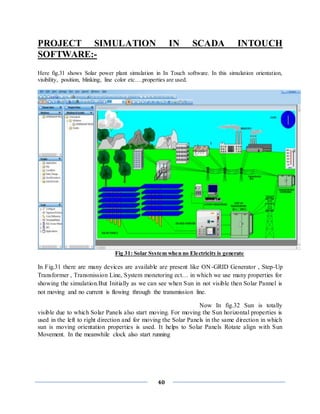
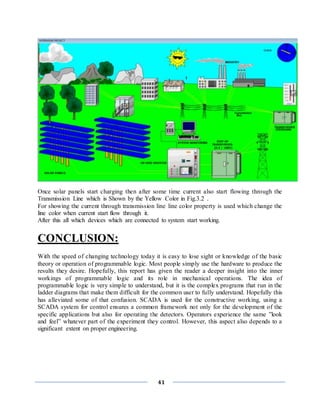
Here fig.31 shows Solar power plant simulation in In Touch software. In this simulation orientation,
visibility, position, blinking, line color etc….properties are used.
Fig 31: Solar System when no Electricity is generate
In Fig.31 there are many devices are available are present like ON-GRID Generator , Step-Up
Transformer , Transmission Line, System monetoring ect… in which we use many properties for
showing the simulation.But Initially as we can see when Sun in not visible then Solar Pannel is
not moving and no current is flowing through the transmission line.
Now In fig.32 Sun is totally
visible due to which Solar Panels also start moving. For moving the Sun horizontal properties is
used in the left to right direction and for moving the Solar Panels in the same direction in which
sun is moving orientation properties is used. It helps to Solar Panels Rotate align with Sun
Movement. In the meanwhile clock also start running
41
Once solar panels start charging then after some time current also start flowing through the
Transmission Line which is Shown by the Yellow Color in Fig.3.2 .
For showing the current through transmission line line color property is used which change the
line color when current start flow through it.
After this all which devices which are connected to system start working.
CONCLUSION:
With the speed of changing technology today it is easy to lose sight or knowledge of the basic
theory or operation of programmable logic. Most people simply use the hardware to produce the
results they desire. Hopefully, this report has given the reader a deeper insight into the inner
workings of programmable logic and its role in mechanical operations. The idea of
programmable logic is very simple to understand, but it is the complex programs that run in the
ladder diagrams that make them difficult for the common user to fully understand. Hopefully this
has alleviated some of that confusion. SCADA is used for the constructive working, using a
SCADA system for control ensures a common framework not only for the development of the
specific applications but also for operating the detectors. Operators experience the same ”look
and feel” whatever part of the experiment they control. However, this aspect also depends to a
significant extent on proper engineering.
42

summer internship report on PLC & SCADA

  • 1.
    [i] INDUSTRIAL TRAINING ANDPROJECT REPORT On PLC SCADA AND AUTOMATION BY VARUN KUMAR RAGHAV (1703221107) SUBMITTED TO THE DEPARTMENT OF ELECTRICAL AND ELECRONICS ENGINEERINGIN PARTIAL FULFILLMENT OF THE REQUIREMENS FOR THE DEGREE OF BACHELOR OF TECHNOLOGY IN ELECTRICAL AND ELECRONICS ENGINEERINGING ABES Engineering college Ghaziabad Dr. APJ Abdul Kalam technical university Uttar Pradesh Lucknow
  • 2.
    [ii] ACKNOWLEDGEMENT I feel profoundhappiness in forwarding this industrial training report as an image of sincere efforts. It is almost inevitable to ensure indebtedness to all who generously helped by sharing their valuable experience & devoting their precious time with us, without whom this seminar report would have never been accomplished. First & foremost I extend my thanks & gratitude to the entire unit of “SOFCON INDIAN PVT.LTD. NOIDA” along with “Mr. PUSHKAR BAJPAYEE (DIRECTOR)”,“Mr. PRAVEEN KUMAR (Assistant Professor)” whose guidance, teaching and invaluable suggestions provided me a deep insight in my chosen field of technology, enhanced my knowledge and supported in widening my outlook towards the communication industry. I am also very thankful to all the engineers of the department for their kind support throughout the training.
  • 3.
    [iii] ABSTRACT Industrial training ismust for every student perusing professional degree because the ultimate goal of every student is to get the information the industrial training helps us to get an idea of the things. We should know in order to get a job i.e. I have a good professional career. Industrial training teaches us lots of things. it helps us to know the kind of environment we would be getting in the industry and help us to get with the kind of environment. The totality the industrial teaches us industrial ethics. Some advance technical how and help us to acquire with industrial working style. Supervisory control and data acquisition (SCADA) allows a utility operator to monitor and control processes that are distributed among various remote sites. SCADA, is a system for gathering real time data, controlling processes, and monitoring equipment from remote locations. As more companies are implementing an open SCADA architecture through the Internet to monitor critical infrastructure components such as power plants, oil and gas pipelines, chemical refineries, flood control dams, and waste and water systems, vital systems are becoming increasingly open to attack. This report provides an overview of SCADA, outlines several vulnerabilities of SCADA systems, presents data on known and possible threats, and provides particular remediation strategies for protecting these systems. PLCs are used in many different industries and machines such as packaging and semiconductor machines. Programs to control machine operation are typically stored in battery-backed or non-volatile memory. A programmable logic controller (PLC) or programmable controller is a digital computer used for automation of electromechanical processes, such as control of machinery on factory assembly lines, amusement rides, or lighting fixtures. PLCs are used in many industries and machines. Unlike general-purpose computers, the PLC is designed for multiple inputs and output arrangements, extended temperature ranges, immunity to electrical noise, and resistanc e to vibration and impact.
  • 4.
    4 Certificate 24th July 2020 TOWHOMSOEVER IT MAY CONCERN To, The Director/HOD/HR ABES Engineering College, Ghaziabad Subject: Internship letter Dear Sir; Sofcon is pleased to inform you that Mr. Varun Kumar Raghav S/o Dinesh Kumar Raghav, B.Tech(EEE/EE/CS/IT)-Roll No./ID No. 1703221107 is completed/Perusing Industrial Internship on Industrial Automation System from Sofcon India Pvt. Ltd.(Noida) We found him extremely inquisitive and hardworking during his training, he was exposed to the practical activity in PLC & SCADA. He was very much interested to learn the function of our core engineering and also willing to put his best efforts and get into the depth of the subject to understand it better. His association with us was very fruitful and we wish him all the best in his future endeavors. Intern Details: Batch Date: - 18th May 2020 to 05th July 2020 Covered Topics: - PLC & SCADA For Sofcon India Pvt.Ltd Authorized Signatory Mr. Rajesh Singh Branch Manager Noida, UP(India)-201301 Mail id: bm.noi@sofcontraining.com Contact No : +91- 9811626172 SOFCON INDIA PVT.LTD WWW.sofcontraining.com info@sofcontraining.com
  • 5.
    5 Table Content:- Acknowledgement……………………………………………………………………………… ii Abstract…………………………………………………………………………………………iii Certificate with Signatures and Seal of the Industry Person………………………………………4 List of figures……………………………………………………………………………………...6 Company Profile……………………………………………………...…………………………...8 Introduction to automation …….………………………………………………………………….9 Advantage/Disadvantage …………………………………...…………………………………….9 Applications...……………………………………………...……………………………….……10 Limitation of automation ………………………………...……………………………….……..11 PLC ………………………………………………………...…………………………..………..12 Architecture of PLC ……………………………………...…………….………………………..13 Ladder Diagram…………………………………………...…………………..…………………15 Programming by Ladder Diagram ………………………………...…………….………………15 Programming and Operation in PLC …………………………………………..…….……….…24 Application of PLC ……………………………………………………….…………………..…25 SCADA …………………………………………………………………….………..……….…26 SCADA Software ……………………………………………………………………………....27 Architecture …………………………………………………………….…………………….…28 INTOUCH SCADA Software ……………………………………………………………….…30 Application of SCADA …………………………………………….………………………..…35 Conclusion …………………………………………………………..………………….………37
  • 6.
    6 LIST OF FIGURES S.NOFigure title Page No. 1 PLC internal architecture 13 2 Simplified PLC structure 14 3 Basic plc sections 14 4 ladder diagram 15 5 Timer on 18 6 Timer off 18 7 Retentive Timer 18 8 Addressing of timer 19 9 Count Up 20 10 Count down 21 11 Addressing of timer 21 12 AND logic ladder diagram 22 13 Or logic ladder diagram 22 14 Not logic ladder diagram 22 15 NAND logic ladder diagram 23 16 Nor logic ladder diagram 23 17 XOR logic ladder diagram 23 18 X-NOR logic ladder diagram 23 19 Push button logic ladder diagram 24 20 Input sensor logic ladder diagram 24 21 Output sensor logic ladder diagram 25 22 Typical SCADA System 27 23 Hardware Architectur 28 24 Human machine interface 29 25 Animation Link Selection Dialog Box 30 26 push button dialog box 31
  • 7.
    7 27 Fill colourdialog box 32 28 object height dialog box 33 29 horizontal location dialog box 34
  • 8.
  • 9.
    9 INTRODUCTION TO AUTOMATION Automationis the use of control systems such as computers to control industrial machinery and process, reducing the need for human intervention. In the scope of industrialization, automation is a step beyond mechanization. Whereas mechanization provided human operators with machinery to assist them with physical requirements of work, automation greatly reduces the need for human sensory and mental requirements as well. Processes and systems can also be automated. Automation Impacts: 1.) It increases productivity and reduce cost. 2.) It gives emphasis on flexibility and convertibility of manufacturing process Hence gives manufacturers the ability to easily switch from manufacturing products. 3.) Automation is now often applied primarily to increase quality in the manufacturing process,where automation can increase quality substantially. 4.) Increase the consistency of output. 5.) Replacing humans in tasks done in dangerous environments. Advantages of Automation: 1.) Replacing human operators in tasks that involve hard physical or monotonous work. 2.) Performing tasks that are beyond human capabilities of size, weight, endurance etc. 3.) Economy improvement: Automation may improve in economy of enterprises, society or most of humanity.
  • 10.
    10 Disadvantages of Automation: 1)Technology limits: Current technology is unable to automate all the desired tasks. 2) Unpredictable development costs: The research and development cost of automating a process may exceed the costsaved by the automation itself. 3) High initial cost: The automation of a new product or plant requires a huge initial investment in comparison with the unit costof the product. Applications  Automated video surveillance: Automated video surveillance monitors people and vehicles in real time within a busy environment. Existing automated surveillance systems are based on the environment they are primarily designed to observe, i.e., indoor, outdoor or airborne, the amount of sensors that the automated system can handle and the mobility of sensor, i.e., stationary camera vs. mobile camera. The purpose of a surveillance system is to record properties and trajectories of objects in a given area generate warnings or notify designated authority in case of occurrence of particular events.  Automated manufacturing: Automated manufacturing refers to the application of automation to produce things in the factory way. Most of the advantages of the automation technology have its influence in the manufacture processes. The main advantages of automated manufacturing are higher consistency and quality, reduced lead times, simplified production, reduced handling, improved work flow, and increased worker morale when a good implementation of the automation is made.  Home automation: Home automation designates an emerging practice of increased automation of household appliances and features in residential dwellings,
  • 11.
    11 particularly through electronicmeans that allow for things impracticable, overly expensive or simply not possible recent past decades.  Industrial automation: Industrial automation deals with the optimization of energy efficient drive systems by precise measurement and control technologies. Nowadays energy efficiency in industrial Processes are becoming more and more relevant. Semiconductor companies like Infineon Technologies are offering 8-bit microcontroller applications for example found in motor controls, general purpose pumps, fans, and e bikes to reduce energy consumption and thus increase Efficiency. Limitations to automation:  Current technology is unable to automate all the desired tasks.  As a process becomes increasingly automated, there is less and less labour to be saved or quality improvement to be gained. This is an example of both diminishing returns and the logistic function.  Similar to the above, as more and more processes become automated, there are fewer remaining non-automated processes. This is an example of exhaustion of opportunities.
  • 12.
    12 PROGRAMMABLE LOGIC CONTROLLER HISTORYOF PLC: In the 1960's Programmable Logic Controllers were first developed to replace relays and relay control systems. Relays, while very useful in some applications, also have some problems. The primary reason for designing such a device was eliminating the large cost involved in replacing the complicated relay based machine control systems for major U.S. car manufacturers. These controllers eliminated the need of rewiring and adding additional hardware for every new configuration of logic. These, along with other considerations, led to the development of PLCs. plc was more improved in 1970’s. In 1973 the ability to communicate between PLCs was added. This also made it possible to have the controlling circuit quite a ways away from the machine it was controlling. However, at this time the lack of standardization in PLCs created other problems. This was improved in the 1980's.The size of PLC was also reduced then, thus using space even more efficiently. The 90's increased the collection of ways in 10 which a PLC could be programmed (block diagrams, instruction list, C, etc.). INTRODUCTION OF PLC:  A programmable logic controller (PLC) is an industrial computer control system that continuously monitors the state of input devices and makes decisions based upon a custom program to control the state of output devices.  It is designed for multiple inputs and output arrangements, extended temperature ranges, immunity to electrical noise, and resistance to vibration and impact.  They are used in many industries such as oil refineries, manufacturing lines, conveyor systems and so on, wherever there is a need to control devices the PLC provides a flexible way to "softwire" the components together.  The basic units have a CPU (a computer processor) that is dedicated to run one program that monitors a series of different inputs and logically manipulates the outputs for the desired control. They are meant to be very flexible in how they can be programmed while also providing the advantages of high reliability (no program crashes or mechanical failures), compact and economical over traditional control systems.
  • 13.
    13  In simplewords, Programmable Logic Controllers are relay control systems put in a very small package. This means that one PLC acts basically like a bunch of relays, counters, timers, places for data storage, and a few various other things, all in one small package. ARCHITECTURE OF PLC: The PLC give output in order to switch things on or off. The PLC’s output is proportionally activated according on the status of the system’s feedback sensors and input terminal which is connected to PLC. The decision to activate output is based on logic programmers. The logic programmer stored in RAM or ROM memory. The PLC also has same as computer, a CPU, data bus and address bus Fig 1 :- PLC internal architecture to communicate with external devices such as programmers, display monitor The next diagram shows a simplified diagram of PLC’s structure. The central processing unit control everything according to a programme stored in a memory (RAM/ROM ).Everything is interconnected by two buses ,the address bus and data bus . The system must be able and a/d converter.
  • 14.
    14 Fig 2 :-Simplified PLC structure Fig 3 :- Basic plc sections
  • 15.
    15 Ladder Diagram (LD): TheLadder Diagram is also a graphics oriented programming language which approaches the structure of an electric circuit. Ladder Diagram consists of a series of networks. Each network consists on the left side of a series of contacts which pass on from left to right the condition "ON" or "OFF" which correspond to the Boolean values TRUE and FALSE. To each contact belongs a Boolean variable. If this variable is TRUE, then condition pass from left to right. Fig 4 :- ladder diagram COMMUNICATION/PROGRAMMINGWITH SOFTWARERSLINX:- This chapter explains how to program the PLC. It describes how to write a program, how the program is structured and representation of the programming language. PROGRAMING BY LADDER DIAGRAM: Ladder logic is a method of drawing electrical logic schematics. It is now a graphical language very popular for programming Programmable Logic Controllers (PLCs). It was originally invented to describe logic made from relays. The name is based on the observation that programs in this language resemble ladders, with two vertical "rails "and a series of horizontal "rungs" between them. A program in the ladder logic, also called ladder diagram is similar to a schematic for a set of relay circuits. The Ladder Diagram is also a graphics oriented programming language which approaches the structure of an electric circuit. The Ladder Diagram consists of a series of networks. A network is limited on the left and right sides by a left and right vertical current line. In the middle is a circuit diagram made up of contacts, coils, and connecting lines. Each network consists on the left side of a series of
  • 16.
    16 contacts which passon from left to right the condition "ON" or "OFF" which correspond to the Boolean values TRUE and FALSE. To each contact belongs a Boolean variable. If this variable is TRUE, then the condition is passed from left to right along the connecting line. Otherwise the right connection receives the value OFF. INPUT represented by (I) OUTPUT represented by (O)  Addressing method: 1 slot=32 bit=2 word (1 char. / word=2 byte=16 bit)  Input addressing: File letter: Slot number. Word number/Bit number Forexample:- I:2.1/1  Output addressing: File letter: Slot number. Word number/Bit number Forexample:- O:2.1/1 GENERALLY USED INSTRUCTIONS & SYMBOL FOR PLC PROGRAMMING:-  Input Instruction: 1) --[ ]— This Instruction is Called XIC or Examine If Closed. ie; If a NO switch is actuated then only this instruction will be true. If a NC switch is actuated then this instruction will not be true and hence output will not be generated. 2) --[]— This Instruction is Called XIO or Examine If Open ie; If a NC switch is actuated then only this instruction will be true. If a NC switch is actuated then this instruction will not be true and hence output will not be generated.
  • 17.
    17  Output Instruction: 1)--( )— This Instruction Shows the States of Output (called OTE). ie; If any instruction either XIO or XIC is true then output will be high. Due to high output a 24 volt signal is generated from PLC processor. 1) --(L)— Output Latch (OTL) OTL turns a bit on when the rung is executed, and this bit retains its state when the rung is not executed or a power cycle occurs. 2) --(U)— Output Unlatch (OTU) OTU turns a bit off when the rung is executed, and this bit retains its state when the rung is not executed or when power cycle occurs.  Rung: Rung is a simple line on which instruction are placed and logics are created.  Timer: Timer has three bit:  EN: Enable bit : The Timer Enable (EN) bit is set immediately when the rung goes true. It stays set until the rung goes false.  TT: Timer timing bit : The Timer Timing (TT) bit is set when the rung goes true. It stays set until the rung goes false or the Timer Done (DN) bit is set (i.e. when accumulated value equals preset value).  DN: Done bit: The Timer Done (DN) bit is not set until the accumulated value is equal to the preset value. It stays set until the rung goes false.  Timer is three type:  TON  TOF  RTO
  • 18.
    18 1) TON: TimerOn Counts time base intervals when the instruction is true. Fig : 5 Timer on 2) TOF: Timer off Delay Counts time base intervals when the instruction is false. Fig : 6 Timer off 3) RTO: Retentive Timer This type of timer does NOT reset the accumulated time when the input condition goes false. Rather, it keeps the last accumulated time in memory, and (if/when the input goes true again) continues timing from that point. Fig : 7 Retentive Timer
  • 19.
    19  Addressing oftimer: Fig :8 Addressing of timer Table : 8 Status of bits in timer
  • 20.
    20 Set When Accumulatedvalue wraps around to +32,768 (from: 32767) and  Counter: Counter has three bit:  Count Up bit (CU): Set When Rung conditions are true and remains set till rung conditions go false or a RES instruction that has the same address as the CTD instruction is enabled.  Done bit ( DN): Set when the accumulated value is => the present value and remains set till the accumulated value becomes less than the present value.  Overflow ( OV): continues counting from there and remains set till a RES instruction that has same address as the CTD instruction is executed or the count is incremented greater than or equal to +32,767 with a CTU instruction.  Counter is two type:  CTU  CTD  1) CTU: Count Up Increments the accumulated value at each false-to true transition and retains the accumulated value when the instruction goes false or when power cycle occurs. Fig : 9 Count Up
  • 21.
    21 2) CTD: CountDown Decrements the accumulate value at each false-to true transition and retains the accumulated value when the instruction goes false or when power cycle occurs. Fig: 10 Count Down  Addressing of counter: Fig: 11 Addressing of timer  RESET: --(RES)-- Reset the accumulated value and status bits of a timer or counter. A C5:0 -------[ ]---------------------(RES)-------------------------- When A is true than counter C5:0 is reset.
  • 22.
    22  BOOLEAN LOGICDESIGN BY LADDER DIAGRAM: 1) AND logic: Y0=X0.X1 Fig : 12 AND logic ladder diagram 2) OR logic: Y1=X0+X1 Fig: 13 OR logic ladder diagram 3) NOT logic: __ Y3=X0 Fig : 14 NOT logic ladder diagram
  • 23.
    23 4) NAND logic:____ Y0=X0.X Fig : 15 NAND logic ladder diagram 5) NOR logic: Y1=X0+X1 Fig : 16 NOR logic ladder diagram 6) X-OR logic: Y2=X0 + X1 Fig :17 XOR logic ladder diagram 7) X-NOR logic: Y2=X0 + X1 Fig :18 X-NOR logic ladder diagram
  • 24.
    24  PROGRAMING ANDOPERATIONS IN PLC: To understanding the programming and operation we consider a example :- We have a car parking place which has five car parking capacity and we want to control the parking gate/light. We have one input sensor, one exit sensor, for power supply start stop push button, and for indication LED light.  Making program: STEP: 1 Making start stop push button logic: Fig : 19 Push button logic ladder diagram Here button a is start push button and b is stop push button and x is binary type output. STEP: 2 Making input side sensor logic: Fig : 20 Input sensorlogic ladder diagram
  • 25.
    25 Here we useone input sensor and one counter which is CTU (counter up) and take CTU preset value 5. STEP: 3 Making exit side sensorlogic: Fig : 21 Output sensorlogic ladder diagram Here we take done bit (DN) of counter for controlling the led light.  APPLICATIONS OF PLC:  The PLC can be programmed to function as an energy management system for boiler controlfor maximum efficiency and safety.  In automation of blender recliners.  In automation of bulk material handling system at ports.  In automation for a ship unloaded.  Automation for wagon loaders.  For blast furnace charging controls in steel plants.  In automation of brick molding press in refractory.  In automation for galvanizing unit.  For chemical plants process controlautomation.  In automation of a rock phosphatedrying and grinding system.  Modernization of boiler and turbo generator set.  Process visualization for mining application.
  • 26.
    26 SCADA (SUPERVISORY CONTROL ANDDATA ACQUISITION) INTRODUCTION SCADA stands for Supervisory Control And Data Acquisition. As the name indicates, it is not a full control system, but rather focuses on the supervisory level. As such, it is a purely software package that is positioned on top of hardware to which it is interfaced, in general via Programmable Logic Controllers (PLCs), or other commercial hardware modules. SCADA systems are used to monitor and control a plant or equipment in industries such as telecommunications, water and waste control, energy, oil and gas refining and transportation. These systems encompass the transfer of data between a SCADA central host computer and a number of Remote Terminal Units (RTUs) and/or Programmable Logic Controllers (PLCs), and the central host and the operator terminals. A SCADA system gathers information (such as where a leak on a pipeline has occurred), transfers the information back to a central site, then alerts the home station that a leak has occurred, carrying out necessary analysis and control, such as determining if the leak is critical, and displaying the information in a logical and organized fashion. SCADA systems consistof: 1) One or more field data interface devices, usually RTUs, or PLCs, which interface to field sensing devices and local control switchboxes and valve actuators. 2) A communications system used to transfer data between field data interface devices and control units and the computers in the SCADA central host. The system can be radio, telephone, cable, satellite, etc., or any combination of these. 3) A central host computer server or servers (sometimes called a SCADA Center, master station, or Master Terminal Unit (MTU). 4) A collection of standard and/or custom software [sometimes called Human Machine Interface (HMI) software or Man Machine Interface (MMI) software] systems used to provide the SCADA central host and operator
  • 27.
    27 terminal application, supportthe communications system, and monitor and control remotely located field data interface devices. Fig : 22 Typical SCADA System SCADA SOFTWARES
  • 28.
    28 ARCHITECTURE: Generally SCADA systemis a centralized system which monitors and controls entire area. It is purely software package that is positioned on top of hardware. A supervisory system gathers data on the process and sends the commands control to the process. For example, in the thermal power plant the water flow can be set to specific value or it can be changed according to the requirement. The SCADA system allows operators to change the set point for the flow, and enable alarm conditions incase of loss of flow and high temperature and the condition is displayed and recorded. The SCADA system monitors the overall performance of the loop. The SCADA system is a centralized system to communicate with both wire and wireless technology to Clint devices. The SCADA system controls can run completely all kinds of industrial process. EX: If too much pressure in building up in a gas pipe line the SCADA system can automatically open a release valve. Hardware Architecture: The generally SCADA system can be classified into two parts:  Clint layer  Data server layer The Clint layer which caters for the man machine interaction. The data server layer which handles most of the process data activities. The SCADA station refers to the servers and it is composed of a single PC. The data servers communicate with devices in the field through process controllers like PLCs or RTUs. The PLCs are connected to the data servers either directly or via networks or buses. The SCADA system utilizes a WAN and LAN networks, the WAN and LAN consists of internet protocols used for communication between the master station and devices. The physical equipment’s like sensors connected to the PLCs or RTUs. The RTUs convert the sensor signals to digital data and sends digital data to master unit. Fig: 23 Hardware Architecture
  • 29.
    29 Software Architecture: Most ofthe servers are used for multitasking and real time database. The servers are responsible for data gathering and handling. The SCADA system consists of a software program to provide trending, diagnostic data, and manage information such as scheduled maintenance procedure, logistic information, detailed schematics for a particular sensor or machine and expert system troubleshooting guides. This means the operator can sea a schematic representation of the plant being controlled. EX: alarm checking, calculations, logging and archiving; polling controllers on a set of parameter, those are typically connected to the server. Human machine interface: The SCADA system uses human machine interface. The information is displayed and monitored to be processed by the human. HMI provides the access of multiple control units which can be PLCs and RTUs. The HMI provides the graphical presentation of the system. For example, it provides the graphical picture of the pump connected to the tank. The user can see the flow of the water and pressure of the water. The important part of the HMI is an alarm system which is activated according to the predefined values. Fig : 24 Human machine interface For example: The tank water level alarm is set 60% and 70% values. If the water level reaches above 60% the alarm gives normal warning and if the water level reach above 70% the alarm gives critical warning.
  • 30.
    30 Monitoring/Control: The SCADA systemuses different switches to operate each device and displays the status at the control area. Any part of the process can be turned ON/OFF from the controlstation using these switches. SCADA system is implemented to work automatically without human intervention but at critical situations it is handled by man power. DESIGN SCADA WITH INTOUCH WONDERWARE SOFTWARE AND APPLICATION: SCADA is main interface between your control system and Operator. Maximum data and features available on SCADA give you better control and clarity about the system. SCADA needs to read data from various devices like:-  PLC/Controllers  RTU  Energy meters/Load managers/Data loggers  Field instruments like Flow meters and positioners Each of above data communicates with SCADA on various protocols . SCADA reads or writes the data in format of tags. INTOUCH WONDERWARE SCADA SOFTWARE: First we crate the animated object from “Wizard Selection” tool than specify tag name as require. We can create almost any screen animation effect imaginable. We can make objects change color, size, location, visibility, fill level, and so on. Animation link selection dialog boxare shown in fig Fig : 25 Animation Link SelectionDialog Box
  • 31.
    31 TOUCH LINK:- 1) UserInput touch links: Discrete:Used to control the value of a discrete tagname. Analog: Used to input the value of an analog (integer or real) tagname. String: Used to create an object into which a string message may be input. 2) Sliders touch links: Vertical& Horizontal: we can move the slider position horizontally or vertically. 3) Touch Pushbutton links: Discrete Value: Used to make any object or symbol into a pushbutton that controls the state of a discrete tagname. Pushbutton actions can be set, reset, toggle, momentary on (direct) and momentary off (reverse) types. Action: Allows any object, symbol or button to have up to three different action scripts linked to it; On Down, While Down and On Up. Show Window: Used to make an object or symbol into a button that opens one or more windows when it is clicked or touched. Hide Window: Used to make an object or symbol into a button that closes one or more windows when it is clicked or touched. Fig : 26 push button dialog box
  • 32.
    32 COLOR LINKS: Discrete: Used tocontrol the fill, line and text colours attributes of an object or symbol that is linked to the value of a discrete expression. Analog: The line, fill, and text colour of an object or symbol can be linked to the value of an analog tag name (integer or real) or an analog expression. Five value ranges are defined by specifying four breakpoints. Five different colours can be selected which will be displayed as the value range changes. Discrete Alarm: The text, line, and fill colour of an object can all be linked to the alarm state of a tag name, Alarm Group, or Group Variable. This colour link allows a choice of two colours; one for the normal state and one for the alarm state of the tag name. This link can be used for both analog and discrete tag names. If it is used with an analog tag name, it responds to any alarm condition of the tag name. Analog Alarm: The text, line, and fill colour of an object can all be linked to the alarm state of an analog tag name, Alarm Group, or Group Variable. Allows a specific colour to be set for the normal state as well as a separate colour for each alarm condition defined for the tag name. Fig : 27 Fill colourdialog box
  • 33.
    33 OBJECT SIZE LINKS: Weuse Object Size links to vary the height and/or width of an object according to the value of an analog (integer or real) tag name or analog expression. Size links provide the ability to control the direction in which the object enlarges in height and/or width by setting the "anchor" for the link. Both height and width links can be attached to the same object. Fig : 28 objectheight dialog box PERCENTFILL LINKS: We use Percent Fill Links to provide the ability to vary the fill level of a filled shape (or a symbol containing filled shapes) according to the value of an analog tag name or an expression that computes to an analog value. For example, this link may be used to show the level of liquids in a vessel. An object or symbol may have a horizontal fill link, a vertical fill link, or both. Fig : 29 verticalfill dialog box
  • 34.
    34 LOCATION LINKS: We useLocation Links to make an object automatically move horizontally, vertically, or in both directions in responseto changes in the value of an analog tag name or expression Fig: 30 horizontal location dialog box MISCELLANEOUS LINKS: There are four type of miscellaneous links. Visibility: Use to controlthe visibility of an object based on the value of a discrete tag name or expression. Blink: Used to make an object blink based on the value of a discrete tag name or expression. Orientation: Used to make an object rotate based on the value of a tag name or expression. Disable: Used to disable the touch functionality of objects based on the value of a tag name or expression. VALUE DISPLAY LINKS: Value Display Links provide the ability to use a text object to display the value of a discrete, analog, or string tag name. There are three types:
  • 35.
    35 Discrete : Uses thevalue of a discrete expression to display an On or Off user defined message in a text object. Analog: Displays the value of an analog expression in a text object. String: Displays the value of a string expression in a text object. APPLICATIONSOF SCADA: SCADA systems can be relatively simple, such as one that monitors environmental conditions of a small office building, or incredibly complex, such as a system that monitors all the activity in a nuclear power plant or the activity of a municipal water system. SCADA monitors and controls industrial, infrastructure, or facility-based processes,as described below:.  Infrastructure processes may be public or private, and include water treatment and distribution, wastewater collection and treatment, oil and gas pipelines, electrical power transmission and distribution, wind farms, civil defence siren systems, and large communication systems.  Facility processes occur both in public facilities and private ones, including buildings, airports, ships, and space stations. They monitor and control HVAC, access, and energy consumption. Industries that are catered to are:  Automotive  Building Automation  Cement & Glass  Chemical  Electronics  Food and Beverage  Machinery & Manufacturing  Aerospace& Defence  Metals & Mining
  • 36.
    36  Oil &Gas  Pharmaceutical  Power, Utilities & Generation  Transportation  Water & Wastewater ADVANTAGES:  The SCADA system provides on board mechanical and graphical information.  The SCADA system is easily expandable. We can add set of control units and sensors according to the requirement.  The SCADA system ability to operate critical situations.
  • 37.
    37 CONCLUSION: With the speedof changing technology today it is easy to lose sight or knowledge of the basic theory or operation of programmable logic. Most people simply use the hardware to produce the results they desire. Hopefully, this report has given the reader a deeper insight into the inner workings of programmable logic and its role in mechanical operations. The idea of programmable logic is very simple to understand, but it is the complex programs that run in the ladder diagrams that make them difficult for the common user to fully understand. Hopefully this has alleviated some of that confusion. SCADA is used for the constructive working, using a SCADA system for control ensures a common framework not only for the development of the specific applications but also for operating the detectors. Operators experience the same ”look and feel” whatever part of the experiment they control. However, this aspect also depends to a significant extent on proper engineering.
  • 38.
    38 PROJECTREPORTON SOLAR POWER:- Fig.31solar energy INTRODUCTION: Solar energy simply can be defined as energy provided by the sun’s radiation where the sun is a very powerful source of energy. It is very important for us to harness and increase the usage of the solar energy because it is practically emission free while generating electricity so it is an excellent alternative for traditional energy the fossil fuel like coal and petroleum. Furthermore, with solar energy the danger of further damage to the environment is minimized as it does not pollute the environment and it also reduces the pollution of the noise because it does not produce any noise. Moreover, sunlight can be used to directly generate electricity by the use of photovoltaic technology and the use of solar cells or photovoltaic arrays is getting more and more acceptable as an alternative and cost efficient means of generating power. Solar power was discovered not that long ago. Auguste Mouchout was the first man to invent a solar power motor. He discovered it starting in 1860, and ended in 1881. Next, Willoughly Smith found out about solar cell’s sensitivity to light. He did this in 1873. Then, William Adams wrote the first book on solar energy called A Substitute for Fuel in Tropical Countries. William Adams started writing the book in 1876, and finished the book in 1878. After that, Charles Fritz transformed sunlight into energy. He made this happen in 1883. Finally, Charles Tellier installed the first solar power system for heating water. Charles Tellier made the system starting in the year 1865, and he finished in the year 1889. That is a quick history of solar energy.
  • 39.
    39 ADVANTAGES: The advantages ofusing solar energy are it is clean and is renewable energy which it does not cause any pollution such as air, land, water, noise and any other pollution that can be named. It can also be produced free of charge once solar panel is installed and less maintenance needed to keep solar cells running. Lastly, it greatly reduces the energy expenditures. DISADVANTAGES: The disadvantages of using solar energy is that it is very expensive to buy and install as it costs twice as much as coal, oil and any other non-renewable energies. The usage of this depends on the exposure of the sunlight by country and it cannot be produced during the night. Technology of Solar Energy: There are two main types of technology in solar energy which are photovoltaic (PV) and solar thermal. The photovoltaic is a technology that produces electricity directly from the sun radiation and it is easily found and operates mainly on residential appliances, commercial equipment, lighting and air conditioning for all types of building. It can be installed mounting on the ground, rooftop of a building and it is designed into building materials. Whereas for solar thermal technology, it uses the energy from the sun to generate heat and from there the electricity is generated.
  • 40.
    40 PROJECT SIMULATION INSCADA INTOUCH SOFTWARE:- Here fig.31 shows Solar power plant simulation in In Touch software. In this simulation orientation, visibility, position, blinking, line color etc….properties are used. Fig 31: Solar System when no Electricity is generate In Fig.31 there are many devices are available are present like ON-GRID Generator , Step-Up Transformer , Transmission Line, System monetoring ect… in which we use many properties for showing the simulation.But Initially as we can see when Sun in not visible then Solar Pannel is not moving and no current is flowing through the transmission line. Now In fig.32 Sun is totally visible due to which Solar Panels also start moving. For moving the Sun horizontal properties is used in the left to right direction and for moving the Solar Panels in the same direction in which sun is moving orientation properties is used. It helps to Solar Panels Rotate align with Sun Movement. In the meanwhile clock also start running
  • 41.
    41 Once solar panelsstart charging then after some time current also start flowing through the Transmission Line which is Shown by the Yellow Color in Fig.3.2 . For showing the current through transmission line line color property is used which change the line color when current start flow through it. After this all which devices which are connected to system start working. CONCLUSION: With the speed of changing technology today it is easy to lose sight or knowledge of the basic theory or operation of programmable logic. Most people simply use the hardware to produce the results they desire. Hopefully, this report has given the reader a deeper insight into the inner workings of programmable logic and its role in mechanical operations. The idea of programmable logic is very simple to understand, but it is the complex programs that run in the ladder diagrams that make them difficult for the common user to fully understand. Hopefully this has alleviated some of that confusion. SCADA is used for the constructive working, using a SCADA system for control ensures a common framework not only for the development of the specific applications but also for operating the detectors. Operators experience the same ”look and feel” whatever part of the experiment they control. However, this aspect also depends to a significant extent on proper engineering.
  • 42.