Chapter 1
Introduction to HTML
(Part 3- Attribute and Anchor tag in HTML)
Attributes to the Tags
• To specify more information along with tags, additional
attribute accompany the tags.
• In other words, attributes tell more about the elements.
• Attributes always appear on the opening tags of the elements
that carry them.
• An attribute is made up of two parts:
– The first part is a name
• The name of an attribute indicates the property to be set
– the second part is a value.
• The value is a value to be set to the property.
• The values should be in double quotation marks.
• Between the name and the value there should be an equal (=)
sign.
<body bgcolor=“yellow”> Click here</a>
Attribute
name
Attribute
value
=
Align attribute
• The align attribute indicates whether the heading appears
to the left, center or right of the page.
• By default, the content is aligned to the left of the page.
• It can take three values as follows:
– Left: The content is aligned to the left of the page.
– Right: The content is aligned to the right of the page.
– Center: The content is aligned to the center of the page.
• There are some attributes which can appear along with
every tag. Such attributes are called universal attributes.
– Align is such universal attribute.
<p align=“right”>Some content goes here</p>
– Being a universal attribute, the align attribute can also go with
heading.
<h1 align=“center”>Some heading goes here</h1>
Soft spaces and hard spaces in HTML
• When content given in a paragraph is aligned, some
spaces are automatically added for adjustment. The
spaces which are inserted automatically are known
as soft spaces.
• If users himself (manually) inserts some spaces,
such hard spaces will be automatically deleted
unless the content is written using <pre> and </pre>
tag pairs.
Anchor tag
• A website, collection of many web pages, manages web pages
through such hyperlink management.
– To create link between web pages, we need hyperlink.
– The hyperlink is a way to link two HTML documents by
creating a hyper text in a document and giving reference
of the other document to it.
• Set of such words or text that appears in different colour
(generally blue and underlined) are called hyperlink.
• A hyperlink is created using an <a> element, where the ‘a’
stands for an anchor.
• It uses the attribute “href” that stands for hyperlink
reference or hypertext reference
• The value of the href attribute is the name and address of the
webpage to which we want to refer.
Absolute or Relative Address
• Relative Address
– Instead of giving a full address, we have given only the file
name.
– Giving just a file name will work only when you have the
calling file and called file in the same directory.
– The location of the called file is relative to the calling file.
Hence it is known as a relative address.
– <a href=“heading_style.html”>Heading Size</a>
• Absolute Address
– While the complete address is known as an absolute address.
– <a href=“file:///C:/Users/Nuzhat%20Memon/Desktop/
HTML%20Programs/heading_style.html”>Heading Size</a>
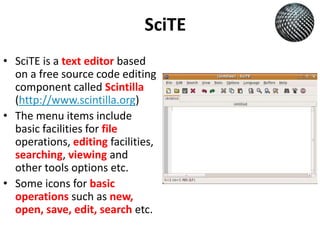
SciTE
• SciTE is a text editor based
on a free source code editing
component called Scintilla
(http://www.scintilla.org)
• The menu items include
basic facilities for file
operations, editing facilities,
searching, viewing and
other tools options etc.
• Some icons for basic
operations such as new,
open, save, edit, search etc.
Current Version of HTML
• Latest version of the HTML
is called HTML 5.0
Std 10 Computer  Chapter 1- Introduction to HTML - Basic Formatting Tag in HTML (Part 3)

Std 10 Computer Chapter 1- Introduction to HTML - Basic Formatting Tag in HTML (Part 3)

  • 1.
    Chapter 1 Introduction toHTML (Part 3- Attribute and Anchor tag in HTML)
  • 2.
    Attributes to theTags • To specify more information along with tags, additional attribute accompany the tags. • In other words, attributes tell more about the elements. • Attributes always appear on the opening tags of the elements that carry them. • An attribute is made up of two parts: – The first part is a name • The name of an attribute indicates the property to be set – the second part is a value. • The value is a value to be set to the property. • The values should be in double quotation marks. • Between the name and the value there should be an equal (=) sign. <body bgcolor=“yellow”> Click here</a> Attribute name Attribute value =
  • 3.
    Align attribute • Thealign attribute indicates whether the heading appears to the left, center or right of the page. • By default, the content is aligned to the left of the page. • It can take three values as follows: – Left: The content is aligned to the left of the page. – Right: The content is aligned to the right of the page. – Center: The content is aligned to the center of the page. • There are some attributes which can appear along with every tag. Such attributes are called universal attributes. – Align is such universal attribute. <p align=“right”>Some content goes here</p> – Being a universal attribute, the align attribute can also go with heading. <h1 align=“center”>Some heading goes here</h1>
  • 4.
    Soft spaces andhard spaces in HTML • When content given in a paragraph is aligned, some spaces are automatically added for adjustment. The spaces which are inserted automatically are known as soft spaces. • If users himself (manually) inserts some spaces, such hard spaces will be automatically deleted unless the content is written using <pre> and </pre> tag pairs.
  • 5.
    Anchor tag • Awebsite, collection of many web pages, manages web pages through such hyperlink management. – To create link between web pages, we need hyperlink. – The hyperlink is a way to link two HTML documents by creating a hyper text in a document and giving reference of the other document to it. • Set of such words or text that appears in different colour (generally blue and underlined) are called hyperlink. • A hyperlink is created using an <a> element, where the ‘a’ stands for an anchor. • It uses the attribute “href” that stands for hyperlink reference or hypertext reference • The value of the href attribute is the name and address of the webpage to which we want to refer.
  • 6.
    Absolute or RelativeAddress • Relative Address – Instead of giving a full address, we have given only the file name. – Giving just a file name will work only when you have the calling file and called file in the same directory. – The location of the called file is relative to the calling file. Hence it is known as a relative address. – <a href=“heading_style.html”>Heading Size</a> • Absolute Address – While the complete address is known as an absolute address. – <a href=“file:///C:/Users/Nuzhat%20Memon/Desktop/ HTML%20Programs/heading_style.html”>Heading Size</a>
  • 7.
    SciTE • SciTE isa text editor based on a free source code editing component called Scintilla (http://www.scintilla.org) • The menu items include basic facilities for file operations, editing facilities, searching, viewing and other tools options etc. • Some icons for basic operations such as new, open, save, edit, search etc.
  • 8.
    Current Version ofHTML • Latest version of the HTML is called HTML 5.0