Tutorial 1
Using HTML to Create Web Pages

Blended HTML and CSS
Fundamentals
3rd EDITION
Objectives 1.1

XP

• Explore the history of the Internet and the
World Wide Web
• Study the differences between HTML, XHTML,
and CSS
• Create a Web page with basic HTML tags
• Apply formatting tags to affect text on a Web
page

New Perspectives on Blended HTML and CSS Fundamentals, 3rd Edition

2
Objectives 1.2

XP

• Understand image files and file types
• Add an image to a Web page
• Create ordered, unordered, and description
lists
• Create nested lists
• Validate a Web page

New Perspectives on Blended HTML and CSS Fundamentals, 3rd Edition

3
Learning About the Internet and the
World Wide Web

XP

• The Internet is a global internetwork that
includes communication technologies such as
email, file transfers, and other data transfers.
• The World Wide Web (simply the Web) is the
Internet technology that provides the ability to
download Web pages.

New Perspectives on Blended HTML and CSS Fundamentals, 3rd Edition

4
XP
The Internet and the World Wide Web

• The software used to download and view Web
pages is called a Web browser.
• Current Web browsers:
– Microsoft Internet Explorer
– Apple Safari
– Google Chrome
– Mozilla Firefox

New Perspectives on Blended HTML and CSS Fundamentals, 3rd Edition

5
HTML, XHTML, and CSS

XP

• Hypertext Markup Language (HTML) is a set
of instructions that identify sections of a Web
page and may specify layout placement or
formatting.
• Extensible Hypertext Markup Language
(XHTML) is a set of rules applied to HTML to
ensure the code conforms to standards.
• Cascading Style Sheets (CSS) specifies
formatting and placement.
New Perspectives on Blended HTML and CSS Fundamentals, 3rd Edition

6
Hypertext and Markup

XP

• Rendering a Web page is the process of
interpreting a file that contains HTML and CSS,
and displaying the resulting Web page.
• Hypertext is a technology that allows you to
click a link that points to a file.
• Markup language is a system of codes that
describes something about the content.
• The standards for HTML are set by the World
Wide Web Consortium (W3C).
New Perspectives on Blended HTML and CSS Fundamentals, 3rd Edition

7
Basic HTML Tags

XP

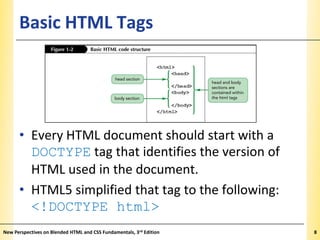
• Every HTML document should start with a
DOCTYPE tag that identifies the version of
HTML used in the document.
• HTML5 simplified that tag to the following:
<!DOCTYPE html>
New Perspectives on Blended HTML and CSS Fundamentals, 3rd Edition

8
XP
The html, head, and body Elements

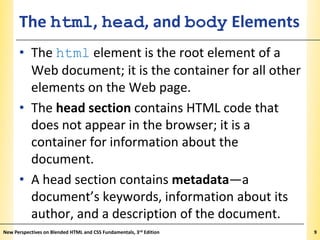
• The html element is the root element of a
Web document; it is the container for all other
elements on the Web page.
• The head section contains HTML code that
does not appear in the browser; it is a
container for information about the
document.
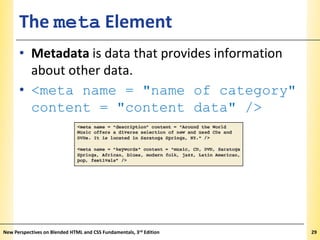
• A head section contains metadata—a
document’s keywords, information about its
author, and a description of the document.
New Perspectives on Blended HTML and CSS Fundamentals, 3rd Edition

9
XP
The html, head, and body Elements

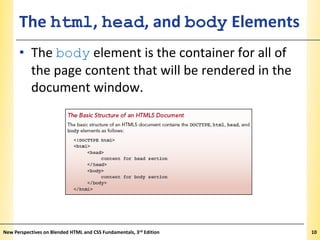
• The body element is the container for all of
the page content that will be rendered in the
document window.

New Perspectives on Blended HTML and CSS Fundamentals, 3rd Edition

10
Typing the Code

XP

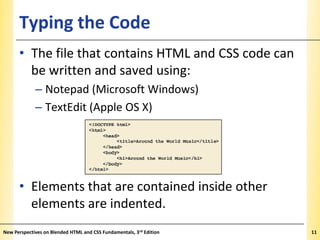
• The file that contains HTML and CSS code can
be written and saved using:
– Notepad (Microsoft Windows)
– TextEdit (Apple OS X)

• Elements that are contained inside other
elements are indented.
New Perspectives on Blended HTML and CSS Fundamentals, 3rd Edition

11
Typing the Code

XP

• An HTML element includes an opening tag, the
text content, and the closing tag using the
following format: <tag>content</tag>
• Tags that are not paired are called empty
elements, and their format is: <tag />

New Perspectives on Blended HTML and CSS Fundamentals, 3rd Edition

12
Commenting Code

XP

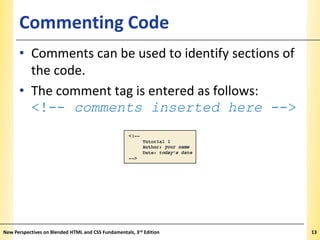
• Comments can be used to identify sections of
the code.
• The comment tag is entered as follows:
<!-- comments inserted here -->

New Perspectives on Blended HTML and CSS Fundamentals, 3rd Edition

13
Creating Headings

XP

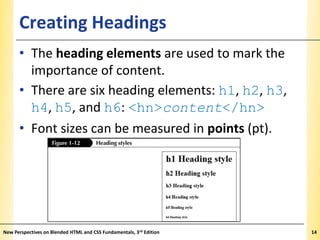
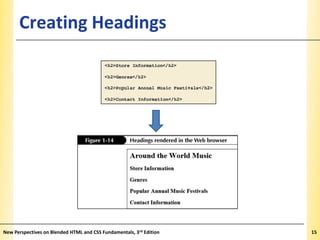
• The heading elements are used to mark the
importance of content.
• There are six heading elements: h1, h2, h3,
h4, h5, and h6: <hn>content</hn>
• Font sizes can be measured in points (pt).

New Perspectives on Blended HTML and CSS Fundamentals, 3rd Edition

14
Creating Headings

New Perspectives on Blended HTML and CSS Fundamentals, 3rd Edition

XP

15
The Paragraph Element

XP

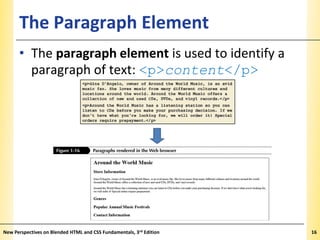
• The paragraph element is used to identify a
paragraph of text: <p>content</p>

New Perspectives on Blended HTML and CSS Fundamentals, 3rd Edition

16
Text Formatting Tags

XP

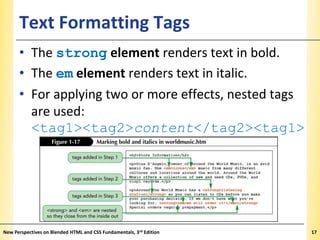
• The strong element renders text in bold.
• The em element renders text in italic.
• For applying two or more effects, nested tags
are used:
<tag1><tag2>content</tag2><tag1>

New Perspectives on Blended HTML and CSS Fundamentals, 3rd Edition

17
Inserting Special Characters

XP

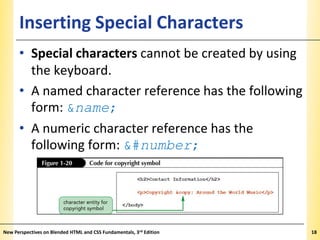
• Special characters cannot be created by using
the keyboard.
• A named character reference has the following
form: &name;
• A numeric character reference has the
following form: &#number;

New Perspectives on Blended HTML and CSS Fundamentals, 3rd Edition

18
Using Images on a Web Page

XP

• Image file formats are GIF, JPEG, and PNG.
• The image element is used to insert an image
on a Web page: <img />
• An attribute specifies the name of a property
related to a Web page element and the value
for that property.
• The image tag contains a source property: src
src = "images/logo.jpg"

New Perspectives on Blended HTML and CSS Fundamentals, 3rd Edition

19
Using the img Element

XP

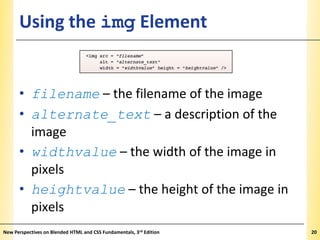
• filename – the filename of the image
• alternate_text – a description of the
image
• widthvalue – the width of the image in
pixels
• heightvalue – the height of the image in
pixels
New Perspectives on Blended HTML and CSS Fundamentals, 3rd Edition

20
Attributes Used with Images

XP

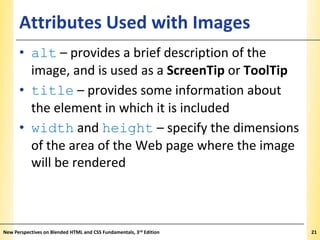
• alt – provides a brief description of the
image, and is used as a ScreenTip or ToolTip
• title – provides some information about
the element in which it is included
• width and height – specify the dimensions
of the area of the Web page where the image
will be rendered

New Perspectives on Blended HTML and CSS Fundamentals, 3rd Edition

21
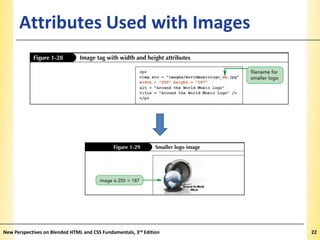
Attributes Used with Images

New Perspectives on Blended HTML and CSS Fundamentals, 3rd Edition

XP

22
Creating Lists

XP

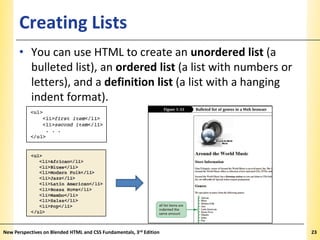
• You can use HTML to create an unordered list (a
bulleted list), an ordered list (a list with numbers or
letters), and a definition list (a list with a hanging
indent format).

New Perspectives on Blended HTML and CSS Fundamentals, 3rd Edition

23
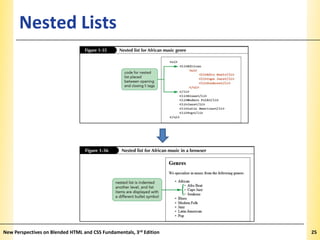
Nested Lists

XP

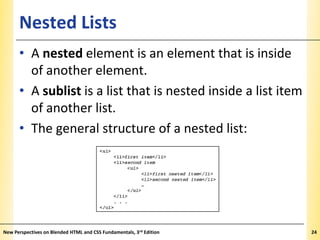
• A nested element is an element that is inside
of another element.
• A sublist is a list that is nested inside a list item
of another list.
• The general structure of a nested list:

New Perspectives on Blended HTML and CSS Fundamentals, 3rd Edition

24
Nested Lists

New Perspectives on Blended HTML and CSS Fundamentals, 3rd Edition

XP

25
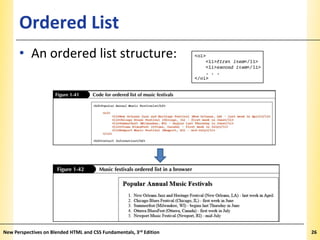
Ordered List

XP

• An ordered list structure:

New Perspectives on Blended HTML and CSS Fundamentals, 3rd Edition

26
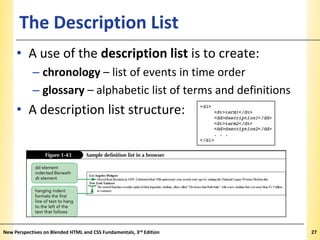
The Description List

XP

• A use of the description list is to create:
– chronology – list of events in time order
– glossary – alphabetic list of terms and definitions

• A description list structure:

New Perspectives on Blended HTML and CSS Fundamentals, 3rd Edition

27
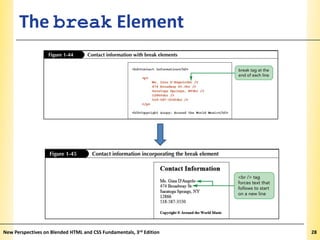
The break Element

New Perspectives on Blended HTML and CSS Fundamentals, 3rd Edition

XP

28
The meta Element

XP

• Metadata is data that provides information
about other data.
• <meta name = "name of category"
content = "content data" />

New Perspectives on Blended HTML and CSS Fundamentals, 3rd Edition

29
Validating a Completed File

XP

• Validation is the process of checking the file
for syntax and compliance errors.
• Validation does not check for
spelling, typos, or grammar errors.
• In addition to the HTML and XHTML
standards, there is also a Web Accessibility
Initiative standard.
• There are free validators available.

New Perspectives on Blended HTML and CSS Fundamentals, 3rd Edition

30
Validating a Completed File

XP

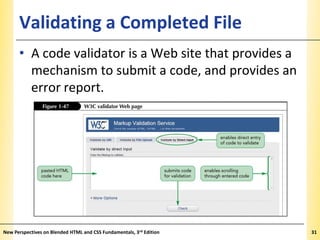
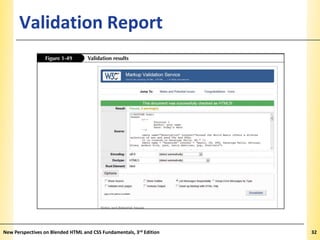
• A code validator is a Web site that provides a
mechanism to submit a code, and provides an
error report.

New Perspectives on Blended HTML and CSS Fundamentals, 3rd Edition

31
Validation Report

New Perspectives on Blended HTML and CSS Fundamentals, 3rd Edition

XP

32

Using HTML to Create Web Pages

  • 1.
    Tutorial 1 Using HTMLto Create Web Pages Blended HTML and CSS Fundamentals 3rd EDITION
  • 2.
    Objectives 1.1 XP • Explorethe history of the Internet and the World Wide Web • Study the differences between HTML, XHTML, and CSS • Create a Web page with basic HTML tags • Apply formatting tags to affect text on a Web page New Perspectives on Blended HTML and CSS Fundamentals, 3rd Edition 2
  • 3.
    Objectives 1.2 XP • Understandimage files and file types • Add an image to a Web page • Create ordered, unordered, and description lists • Create nested lists • Validate a Web page New Perspectives on Blended HTML and CSS Fundamentals, 3rd Edition 3
  • 4.
    Learning About theInternet and the World Wide Web XP • The Internet is a global internetwork that includes communication technologies such as email, file transfers, and other data transfers. • The World Wide Web (simply the Web) is the Internet technology that provides the ability to download Web pages. New Perspectives on Blended HTML and CSS Fundamentals, 3rd Edition 4
  • 5.
    XP The Internet andthe World Wide Web • The software used to download and view Web pages is called a Web browser. • Current Web browsers: – Microsoft Internet Explorer – Apple Safari – Google Chrome – Mozilla Firefox New Perspectives on Blended HTML and CSS Fundamentals, 3rd Edition 5
  • 6.
    HTML, XHTML, andCSS XP • Hypertext Markup Language (HTML) is a set of instructions that identify sections of a Web page and may specify layout placement or formatting. • Extensible Hypertext Markup Language (XHTML) is a set of rules applied to HTML to ensure the code conforms to standards. • Cascading Style Sheets (CSS) specifies formatting and placement. New Perspectives on Blended HTML and CSS Fundamentals, 3rd Edition 6
  • 7.
    Hypertext and Markup XP •Rendering a Web page is the process of interpreting a file that contains HTML and CSS, and displaying the resulting Web page. • Hypertext is a technology that allows you to click a link that points to a file. • Markup language is a system of codes that describes something about the content. • The standards for HTML are set by the World Wide Web Consortium (W3C). New Perspectives on Blended HTML and CSS Fundamentals, 3rd Edition 7
  • 8.
    Basic HTML Tags XP •Every HTML document should start with a DOCTYPE tag that identifies the version of HTML used in the document. • HTML5 simplified that tag to the following: <!DOCTYPE html> New Perspectives on Blended HTML and CSS Fundamentals, 3rd Edition 8
  • 9.
    XP The html, head,and body Elements • The html element is the root element of a Web document; it is the container for all other elements on the Web page. • The head section contains HTML code that does not appear in the browser; it is a container for information about the document. • A head section contains metadata—a document’s keywords, information about its author, and a description of the document. New Perspectives on Blended HTML and CSS Fundamentals, 3rd Edition 9
  • 10.
    XP The html, head,and body Elements • The body element is the container for all of the page content that will be rendered in the document window. New Perspectives on Blended HTML and CSS Fundamentals, 3rd Edition 10
  • 11.
    Typing the Code XP •The file that contains HTML and CSS code can be written and saved using: – Notepad (Microsoft Windows) – TextEdit (Apple OS X) • Elements that are contained inside other elements are indented. New Perspectives on Blended HTML and CSS Fundamentals, 3rd Edition 11
  • 12.
    Typing the Code XP •An HTML element includes an opening tag, the text content, and the closing tag using the following format: <tag>content</tag> • Tags that are not paired are called empty elements, and their format is: <tag /> New Perspectives on Blended HTML and CSS Fundamentals, 3rd Edition 12
  • 13.
    Commenting Code XP • Commentscan be used to identify sections of the code. • The comment tag is entered as follows: <!-- comments inserted here --> New Perspectives on Blended HTML and CSS Fundamentals, 3rd Edition 13
  • 14.
    Creating Headings XP • Theheading elements are used to mark the importance of content. • There are six heading elements: h1, h2, h3, h4, h5, and h6: <hn>content</hn> • Font sizes can be measured in points (pt). New Perspectives on Blended HTML and CSS Fundamentals, 3rd Edition 14
  • 15.
    Creating Headings New Perspectiveson Blended HTML and CSS Fundamentals, 3rd Edition XP 15
  • 16.
    The Paragraph Element XP •The paragraph element is used to identify a paragraph of text: <p>content</p> New Perspectives on Blended HTML and CSS Fundamentals, 3rd Edition 16
  • 17.
    Text Formatting Tags XP •The strong element renders text in bold. • The em element renders text in italic. • For applying two or more effects, nested tags are used: <tag1><tag2>content</tag2><tag1> New Perspectives on Blended HTML and CSS Fundamentals, 3rd Edition 17
  • 18.
    Inserting Special Characters XP •Special characters cannot be created by using the keyboard. • A named character reference has the following form: &name; • A numeric character reference has the following form: &#number; New Perspectives on Blended HTML and CSS Fundamentals, 3rd Edition 18
  • 19.
    Using Images ona Web Page XP • Image file formats are GIF, JPEG, and PNG. • The image element is used to insert an image on a Web page: <img /> • An attribute specifies the name of a property related to a Web page element and the value for that property. • The image tag contains a source property: src src = "images/logo.jpg" New Perspectives on Blended HTML and CSS Fundamentals, 3rd Edition 19
  • 20.
    Using the imgElement XP • filename – the filename of the image • alternate_text – a description of the image • widthvalue – the width of the image in pixels • heightvalue – the height of the image in pixels New Perspectives on Blended HTML and CSS Fundamentals, 3rd Edition 20
  • 21.
    Attributes Used withImages XP • alt – provides a brief description of the image, and is used as a ScreenTip or ToolTip • title – provides some information about the element in which it is included • width and height – specify the dimensions of the area of the Web page where the image will be rendered New Perspectives on Blended HTML and CSS Fundamentals, 3rd Edition 21
  • 22.
    Attributes Used withImages New Perspectives on Blended HTML and CSS Fundamentals, 3rd Edition XP 22
  • 23.
    Creating Lists XP • Youcan use HTML to create an unordered list (a bulleted list), an ordered list (a list with numbers or letters), and a definition list (a list with a hanging indent format). New Perspectives on Blended HTML and CSS Fundamentals, 3rd Edition 23
  • 24.
    Nested Lists XP • Anested element is an element that is inside of another element. • A sublist is a list that is nested inside a list item of another list. • The general structure of a nested list: New Perspectives on Blended HTML and CSS Fundamentals, 3rd Edition 24
  • 25.
    Nested Lists New Perspectiveson Blended HTML and CSS Fundamentals, 3rd Edition XP 25
  • 26.
    Ordered List XP • Anordered list structure: New Perspectives on Blended HTML and CSS Fundamentals, 3rd Edition 26
  • 27.
    The Description List XP •A use of the description list is to create: – chronology – list of events in time order – glossary – alphabetic list of terms and definitions • A description list structure: New Perspectives on Blended HTML and CSS Fundamentals, 3rd Edition 27
  • 28.
    The break Element NewPerspectives on Blended HTML and CSS Fundamentals, 3rd Edition XP 28
  • 29.
    The meta Element XP •Metadata is data that provides information about other data. • <meta name = "name of category" content = "content data" /> New Perspectives on Blended HTML and CSS Fundamentals, 3rd Edition 29
  • 30.
    Validating a CompletedFile XP • Validation is the process of checking the file for syntax and compliance errors. • Validation does not check for spelling, typos, or grammar errors. • In addition to the HTML and XHTML standards, there is also a Web Accessibility Initiative standard. • There are free validators available. New Perspectives on Blended HTML and CSS Fundamentals, 3rd Edition 30
  • 31.
    Validating a CompletedFile XP • A code validator is a Web site that provides a mechanism to submit a code, and provides an error report. New Perspectives on Blended HTML and CSS Fundamentals, 3rd Edition 31
  • 32.
    Validation Report New Perspectiveson Blended HTML and CSS Fundamentals, 3rd Edition XP 32