HTML
HTML is a computer language used to describe what is to appear on a web
page.
HTML stands for Hyper Text Markup Language.
You can view the HTML that makes up any web page by right-clicking on the
pages and selecting view source.
HTML
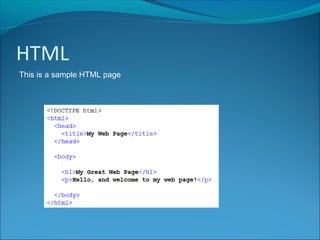
This is a sample HTML page
Head and Body
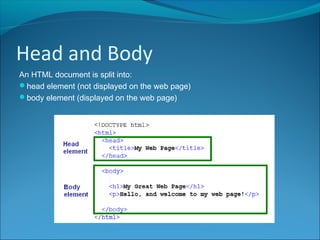
An HTML document is split into:
head element (not displayed on the web page)
body element (displayed on the web page)
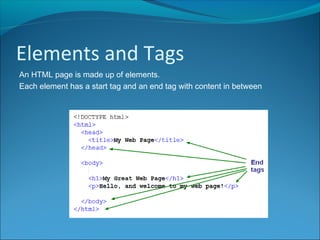
Elements and Tags
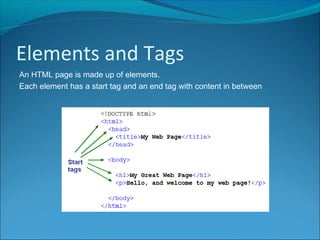
An HTML page is made up of elements.
Each element has a start tag and an end tag with content in between
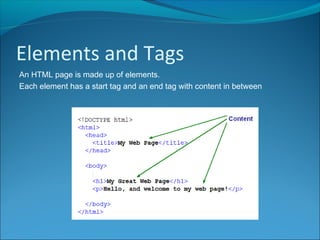
Elements and Tags
An HTML page is made up of elements.
Each element has a start tag and an end tag with content in between
Elements and Tags
An HTML page is made up of elements.
Each element has a start tag and an end tag with content in between
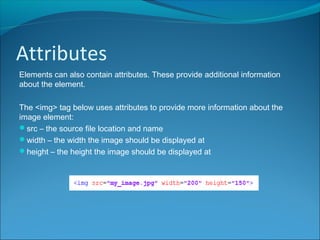
Attributes
Elements can also contain attributes. These provide additional information
about the element.
The <img> tag below uses attributes to provide more information about the
image element:
src – the source file location and name
width – the width the image should be displayed at
height – the height the image should be displayed at
HTML
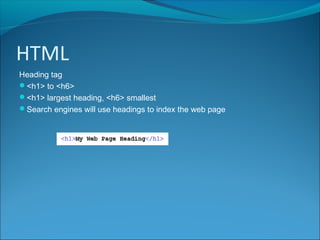
Heading tag
<h1> to <h6>
<h1> largest heading, <h6> smallest
Search engines will use headings to index the web page
HTML
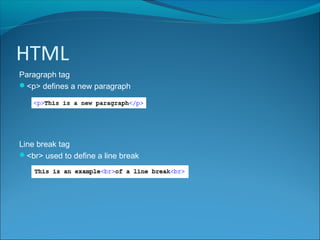
Paragraph tag
<p> defines a new paragraph
Line break tag
<br> used to define a line break
HTML
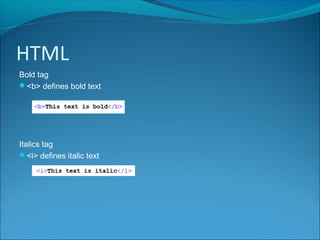
Bold tag
<b> defines bold text
Italics tag
<i> defines italic text
HTML
Hyperlinks
The world wide web is built around the concept of hyperlinks, an idea
conceived by Sir Tim Berners Lee in 1989.
Hyperlinks allow the user to navigate from one web page to another.
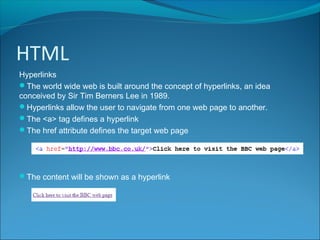
The <a> tag defines a hyperlink
The href attribute defines the target web page
The content will be shown as a hyperlink
HTML
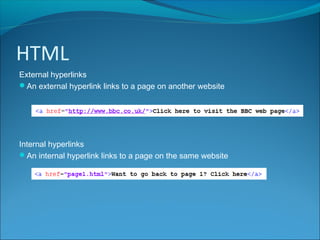
External hyperlinks
An external hyperlink links to a page on another website
Internal hyperlinks
An internal hyperlink links to a page on the same website
HTML
Anchor
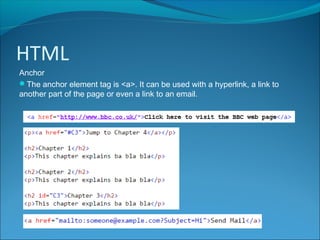
The anchor element tag is <a>. It can be used with a hyperlink, a link to
another part of the page or even a link to an email.
HTML
Images
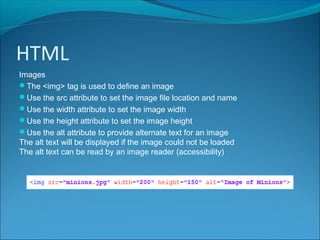
The <img> tag is used to define an image
Use the src attribute to set the image file location and name
Use the width attribute to set the image width
Use the height attribute to set the image height
Use the alt attribute to provide alternate text for an image
The alt text will be displayed if the image could not be loaded
The alt text can be read by an image reader (accessibility)
HTML
Images as hyperlinks
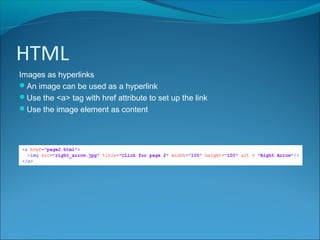
An image can be used as a hyperlink
Use the <a> tag with href attribute to set up the link
Use the image element as content
HTML
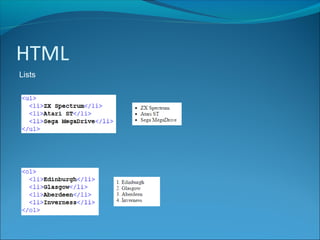
Lists
HTML can be either ordered (e.g. numbered items) or unordered (e.g.
bulleted items)
The <ol> tag defines an ordered list
The <ul> tag defines an unordered list
The <li> tag defines a list item
The type attribute can be used with an ordered list to define the list marker
(e.g. numbers, letters, Roman numerals)
The style attribute can be used with an unordered list to define the list marker
(e.g. bullets, circles, squares)
HTML
Lists
HTML
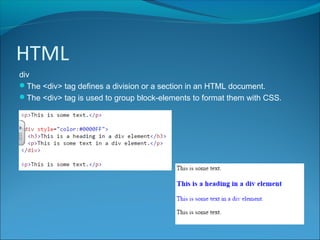
div
The <div> tag defines a division or a section in an HTML document.
The <div> tag is used to group block-elements to format them with CSS.
HTML
Audio and video
The HTML5 <video> and <audio> elements specify a standard ways to
embed a video and audio in a web page.

N5 Computing Science HTML

  • 2.
    HTML HTML is acomputer language used to describe what is to appear on a web page. HTML stands for Hyper Text Markup Language. You can view the HTML that makes up any web page by right-clicking on the pages and selecting view source.
  • 3.
    HTML This is asample HTML page
  • 4.
    Head and Body AnHTML document is split into: head element (not displayed on the web page) body element (displayed on the web page)
  • 5.
    Elements and Tags AnHTML page is made up of elements. Each element has a start tag and an end tag with content in between
  • 6.
    Elements and Tags AnHTML page is made up of elements. Each element has a start tag and an end tag with content in between
  • 7.
    Elements and Tags AnHTML page is made up of elements. Each element has a start tag and an end tag with content in between
  • 8.
    Attributes Elements can alsocontain attributes. These provide additional information about the element. The <img> tag below uses attributes to provide more information about the image element: src – the source file location and name width – the width the image should be displayed at height – the height the image should be displayed at
  • 9.
    HTML Heading tag <h1> to<h6> <h1> largest heading, <h6> smallest Search engines will use headings to index the web page
  • 10.
    HTML Paragraph tag <p> definesa new paragraph Line break tag <br> used to define a line break
  • 11.
    HTML Bold tag <b> definesbold text Italics tag <i> defines italic text
  • 12.
    HTML Hyperlinks The world wideweb is built around the concept of hyperlinks, an idea conceived by Sir Tim Berners Lee in 1989. Hyperlinks allow the user to navigate from one web page to another. The <a> tag defines a hyperlink The href attribute defines the target web page The content will be shown as a hyperlink
  • 13.
    HTML External hyperlinks An externalhyperlink links to a page on another website Internal hyperlinks An internal hyperlink links to a page on the same website
  • 14.
    HTML Anchor The anchor elementtag is <a>. It can be used with a hyperlink, a link to another part of the page or even a link to an email.
  • 15.
    HTML Images The <img> tagis used to define an image Use the src attribute to set the image file location and name Use the width attribute to set the image width Use the height attribute to set the image height Use the alt attribute to provide alternate text for an image The alt text will be displayed if the image could not be loaded The alt text can be read by an image reader (accessibility)
  • 16.
    HTML Images as hyperlinks Animage can be used as a hyperlink Use the <a> tag with href attribute to set up the link Use the image element as content
  • 17.
    HTML Lists HTML can beeither ordered (e.g. numbered items) or unordered (e.g. bulleted items) The <ol> tag defines an ordered list The <ul> tag defines an unordered list The <li> tag defines a list item The type attribute can be used with an ordered list to define the list marker (e.g. numbers, letters, Roman numerals) The style attribute can be used with an unordered list to define the list marker (e.g. bullets, circles, squares)
  • 18.
  • 19.
    HTML div The <div> tagdefines a division or a section in an HTML document. The <div> tag is used to group block-elements to format them with CSS.
  • 20.
    HTML Audio and video TheHTML5 <video> and <audio> elements specify a standard ways to embed a video and audio in a web page.