Tutorial 2
Creating Links

Blended HTML and CSS
Fundamentals
3rd EDITION
Objectives 2.1

XP

• Create a link to another Web site on the
Internet
• Create a link to download a file
• Create an email link
• Link to a specific section on the same page
• Create a link to another Web page on the
same site

New Perspectives on Blended HTML and CSS Fundamentals, 3rd Edition

2
Objectives 2.2
•
•
•
•

XP

Use an image as a link
Create thumbnail links to larger images
Create image maps
Create rectangle, circle, and polygon hotspots

New Perspectives on Blended HTML and CSS Fundamentals, 3rd Edition

3
Communications Technology

XP

• A hyperlink is text or an image that, when
clicked, displays:
– another part of the same Web page
– another Web page in the same site
– another Web page from a different site

• A protocol is a standard for sending and
receiving data.
• HTTP, or Hypertext Transfer Protocol, is used
to access the Web.
New Perspectives on Blended HTML and CSS Fundamentals, 3rd Edition

4
Communications Technology

XP

• File servers are computers that contain or
direct information.
• HTTP establishes standards for
communications between file servers and
clients.
• TCP/IP, or Transmission Control Protocol/
Internet Protocol, is used to send packets
across communication lines.

New Perspectives on Blended HTML and CSS Fundamentals, 3rd Edition

5
Web Site Addresses

XP

• Every computer connected to the Internet has
an IP address.
• IP addresses are composed of a series of four
numbers (e.g., 12.34.222.111).
• The Domain Name System refers to Web sites
by Web server names.
• The domain name is followed by a suffix
(.com, .net, .org, .edu, etc.).
• A URL, or Uniform Resource Locator, is the
complete address of a Web site and page.
New Perspectives on Blended HTML and CSS Fundamentals, 3rd Edition

6
Parts of a URL

XP

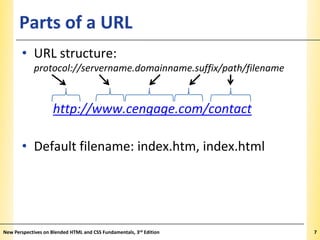
• URL structure:
protocol://servername.domainname.suffix/path/filename

http://www.cengage.com/contact

• Default filename: index.htm, index.html

New Perspectives on Blended HTML and CSS Fundamentals, 3rd Edition

7
Creating Links

XP

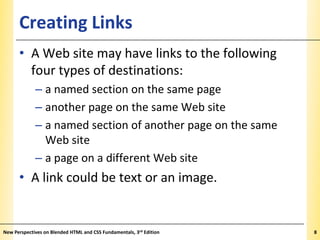
• A Web site may have links to the following
four types of destinations:
– a named section on the same page
– another page on the same Web site
– a named section of another page on the same
Web site
– a page on a different Web site

• A link could be text or an image.

New Perspectives on Blended HTML and CSS Fundamentals, 3rd Edition

8
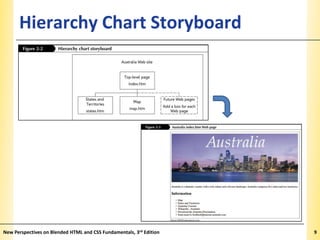
Hierarchy Chart Storyboard

New Perspectives on Blended HTML and CSS Fundamentals, 3rd Edition

XP

9
The Anchor Element

XP

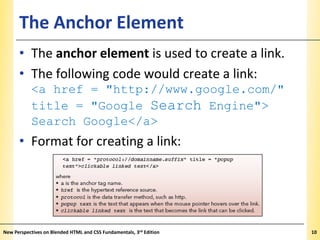
• The anchor element is used to create a link.
• The following code would create a link:
<a href = "http://www.google.com/"
title = "Google Search Engine">
Search Google</a>

• Format for creating a link:

New Perspectives on Blended HTML and CSS Fundamentals, 3rd Edition

10
Linking to an External Web Page

XP

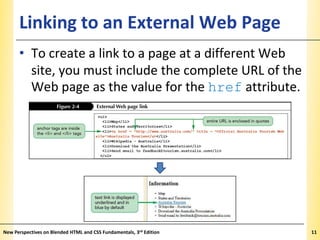
• To create a link to a page at a different Web
site, you must include the complete URL of the
Web page as the value for the href attribute.

New Perspectives on Blended HTML and CSS Fundamentals, 3rd Edition

11
Linking to Non-HTML Files

XP

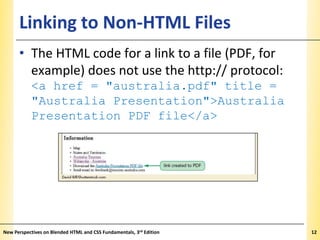
• The HTML code for a link to a file (PDF, for
example) does not use the http:// protocol:
<a href = "australia.pdf" title =
"Australia Presentation">Australia
Presentation PDF file</a>

New Perspectives on Blended HTML and CSS Fundamentals, 3rd Edition

12
Creating an Email Link

XP

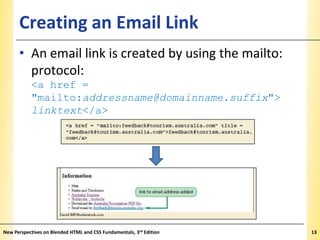
• An email link is created by using the mailto:
protocol:
<a href =
"mailto:addressname@domainname.suffix">
linktext</a>

New Perspectives on Blended HTML and CSS Fundamentals, 3rd Edition

13
Creating a Link to a Specific Section

XP

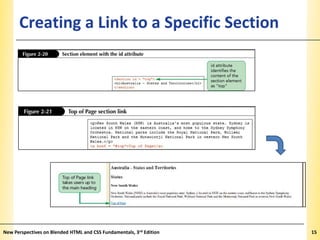
• HTML5 has a new <section> tag used to
identify content that belongs together as one
section of information.
• The id attribute is used to identify a section
by assigning it a unique name.
• Links to sections are known as anchor links or
bookmark links.
• Section: <section id = "idvalue">
content</section>

• Link: <a href = "#idname">linktext</a>
New Perspectives on Blended HTML and CSS Fundamentals, 3rd Edition

14
Creating a Link to a Specific Section

New Perspectives on Blended HTML and CSS Fundamentals, 3rd Edition

XP

15
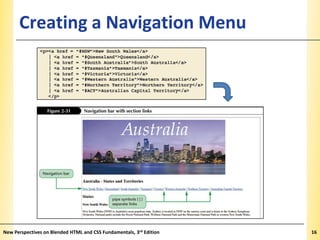
Creating a Navigation Menu

New Perspectives on Blended HTML and CSS Fundamentals, 3rd Edition

XP

16
Linking to Another Web Page on the
Same Site

XP

• Local link – points to a Web page on the same
site
• External link – points to a Web page on a
different Web server
• <a href = "filename">linktext</a>
• <a href = "cities.htm">Cities
Information</a>
• <a href = "locations/cities.htm">
Cities Information</a>
New Perspectives on Blended HTML and CSS Fundamentals, 3rd Edition

17
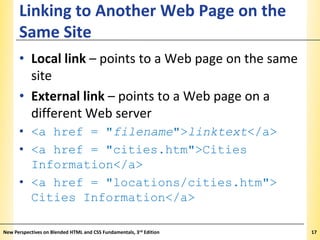
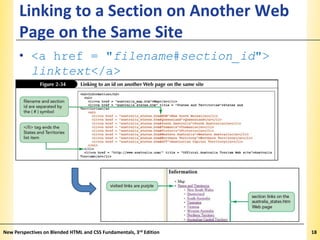
Linking to a Section on Another Web
XP
Page on the Same Site
• <a href = "filename#section_id">
linktext</a>

New Perspectives on Blended HTML and CSS Fundamentals, 3rd Edition

18
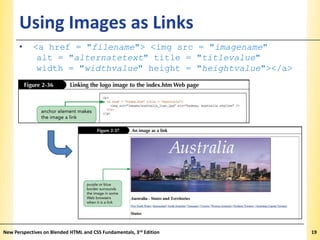
Using Images as Links
•

XP

<a href = "filename"> <img src = "imagename"
alt = "alternatetext" title = "titlevalue"
width = "widthvalue" height = "heightvalue"></a>

New Perspectives on Blended HTML and CSS Fundamentals, 3rd Edition

19
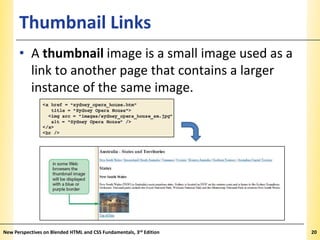
Thumbnail Links

XP

• A thumbnail image is a small image used as a
link to another page that contains a larger
instance of the same image.

New Perspectives on Blended HTML and CSS Fundamentals, 3rd Edition

20
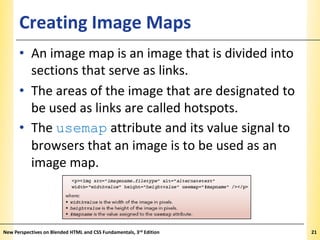
Creating Image Maps

XP

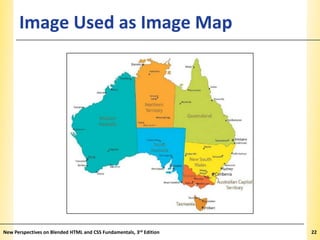
• An image map is an image that is divided into
sections that serve as links.
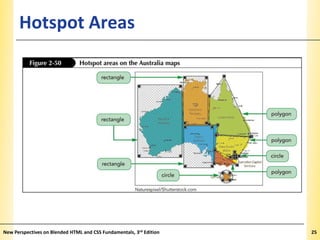
• The areas of the image that are designated to
be used as links are called hotspots.
• The usemap attribute and its value signal to
browsers that an image is to be used as an
image map.

New Perspectives on Blended HTML and CSS Fundamentals, 3rd Edition

21
Image Used as Image Map

New Perspectives on Blended HTML and CSS Fundamentals, 3rd Edition

XP

22
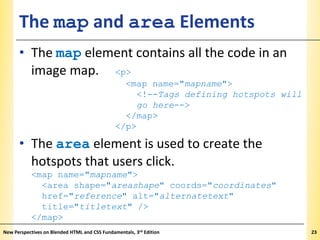
The map and area Elements

XP

• The map element contains all the code in an
image map. <p>
<map name="mapname">
<!--Tags defining hotspots will
go here-->
</map>
</p>

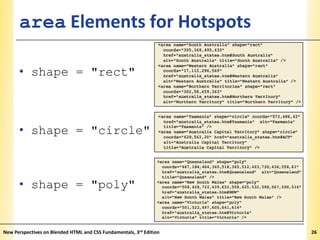
• The area element is used to create the
hotspots that users click.
<map name="mapname">
<area shape="areashape" coords="coordinates"
href="reference" alt="alternatetext"
title="titletext" />
</map>
New Perspectives on Blended HTML and CSS Fundamentals, 3rd Edition

23
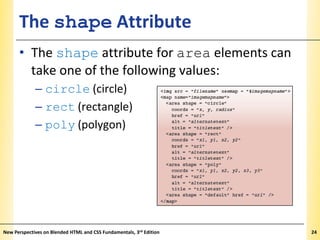
The shape Attribute

XP

• The shape attribute for area elements can
take one of the following values:
– circle (circle)
– rect (rectangle)
– poly (polygon)

New Perspectives on Blended HTML and CSS Fundamentals, 3rd Edition

24
Hotspot Areas

New Perspectives on Blended HTML and CSS Fundamentals, 3rd Edition

XP

25
area Elements for Hotspots

XP

• shape = "rect"

• shape = "circle"

• shape = "poly"

New Perspectives on Blended HTML and CSS Fundamentals, 3rd Edition

26
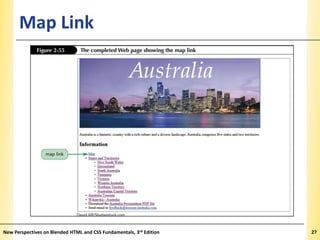
Map Link

New Perspectives on Blended HTML and CSS Fundamentals, 3rd Edition

XP

27

Creating Links

  • 1.
    Tutorial 2 Creating Links BlendedHTML and CSS Fundamentals 3rd EDITION
  • 2.
    Objectives 2.1 XP • Createa link to another Web site on the Internet • Create a link to download a file • Create an email link • Link to a specific section on the same page • Create a link to another Web page on the same site New Perspectives on Blended HTML and CSS Fundamentals, 3rd Edition 2
  • 3.
    Objectives 2.2 • • • • XP Use animage as a link Create thumbnail links to larger images Create image maps Create rectangle, circle, and polygon hotspots New Perspectives on Blended HTML and CSS Fundamentals, 3rd Edition 3
  • 4.
    Communications Technology XP • Ahyperlink is text or an image that, when clicked, displays: – another part of the same Web page – another Web page in the same site – another Web page from a different site • A protocol is a standard for sending and receiving data. • HTTP, or Hypertext Transfer Protocol, is used to access the Web. New Perspectives on Blended HTML and CSS Fundamentals, 3rd Edition 4
  • 5.
    Communications Technology XP • Fileservers are computers that contain or direct information. • HTTP establishes standards for communications between file servers and clients. • TCP/IP, or Transmission Control Protocol/ Internet Protocol, is used to send packets across communication lines. New Perspectives on Blended HTML and CSS Fundamentals, 3rd Edition 5
  • 6.
    Web Site Addresses XP •Every computer connected to the Internet has an IP address. • IP addresses are composed of a series of four numbers (e.g., 12.34.222.111). • The Domain Name System refers to Web sites by Web server names. • The domain name is followed by a suffix (.com, .net, .org, .edu, etc.). • A URL, or Uniform Resource Locator, is the complete address of a Web site and page. New Perspectives on Blended HTML and CSS Fundamentals, 3rd Edition 6
  • 7.
    Parts of aURL XP • URL structure: protocol://servername.domainname.suffix/path/filename http://www.cengage.com/contact • Default filename: index.htm, index.html New Perspectives on Blended HTML and CSS Fundamentals, 3rd Edition 7
  • 8.
    Creating Links XP • AWeb site may have links to the following four types of destinations: – a named section on the same page – another page on the same Web site – a named section of another page on the same Web site – a page on a different Web site • A link could be text or an image. New Perspectives on Blended HTML and CSS Fundamentals, 3rd Edition 8
  • 9.
    Hierarchy Chart Storyboard NewPerspectives on Blended HTML and CSS Fundamentals, 3rd Edition XP 9
  • 10.
    The Anchor Element XP •The anchor element is used to create a link. • The following code would create a link: <a href = "http://www.google.com/" title = "Google Search Engine"> Search Google</a> • Format for creating a link: New Perspectives on Blended HTML and CSS Fundamentals, 3rd Edition 10
  • 11.
    Linking to anExternal Web Page XP • To create a link to a page at a different Web site, you must include the complete URL of the Web page as the value for the href attribute. New Perspectives on Blended HTML and CSS Fundamentals, 3rd Edition 11
  • 12.
    Linking to Non-HTMLFiles XP • The HTML code for a link to a file (PDF, for example) does not use the http:// protocol: <a href = "australia.pdf" title = "Australia Presentation">Australia Presentation PDF file</a> New Perspectives on Blended HTML and CSS Fundamentals, 3rd Edition 12
  • 13.
    Creating an EmailLink XP • An email link is created by using the mailto: protocol: <a href = "mailto:addressname@domainname.suffix"> linktext</a> New Perspectives on Blended HTML and CSS Fundamentals, 3rd Edition 13
  • 14.
    Creating a Linkto a Specific Section XP • HTML5 has a new <section> tag used to identify content that belongs together as one section of information. • The id attribute is used to identify a section by assigning it a unique name. • Links to sections are known as anchor links or bookmark links. • Section: <section id = "idvalue"> content</section> • Link: <a href = "#idname">linktext</a> New Perspectives on Blended HTML and CSS Fundamentals, 3rd Edition 14
  • 15.
    Creating a Linkto a Specific Section New Perspectives on Blended HTML and CSS Fundamentals, 3rd Edition XP 15
  • 16.
    Creating a NavigationMenu New Perspectives on Blended HTML and CSS Fundamentals, 3rd Edition XP 16
  • 17.
    Linking to AnotherWeb Page on the Same Site XP • Local link – points to a Web page on the same site • External link – points to a Web page on a different Web server • <a href = "filename">linktext</a> • <a href = "cities.htm">Cities Information</a> • <a href = "locations/cities.htm"> Cities Information</a> New Perspectives on Blended HTML and CSS Fundamentals, 3rd Edition 17
  • 18.
    Linking to aSection on Another Web XP Page on the Same Site • <a href = "filename#section_id"> linktext</a> New Perspectives on Blended HTML and CSS Fundamentals, 3rd Edition 18
  • 19.
    Using Images asLinks • XP <a href = "filename"> <img src = "imagename" alt = "alternatetext" title = "titlevalue" width = "widthvalue" height = "heightvalue"></a> New Perspectives on Blended HTML and CSS Fundamentals, 3rd Edition 19
  • 20.
    Thumbnail Links XP • Athumbnail image is a small image used as a link to another page that contains a larger instance of the same image. New Perspectives on Blended HTML and CSS Fundamentals, 3rd Edition 20
  • 21.
    Creating Image Maps XP •An image map is an image that is divided into sections that serve as links. • The areas of the image that are designated to be used as links are called hotspots. • The usemap attribute and its value signal to browsers that an image is to be used as an image map. New Perspectives on Blended HTML and CSS Fundamentals, 3rd Edition 21
  • 22.
    Image Used asImage Map New Perspectives on Blended HTML and CSS Fundamentals, 3rd Edition XP 22
  • 23.
    The map andarea Elements XP • The map element contains all the code in an image map. <p> <map name="mapname"> <!--Tags defining hotspots will go here--> </map> </p> • The area element is used to create the hotspots that users click. <map name="mapname"> <area shape="areashape" coords="coordinates" href="reference" alt="alternatetext" title="titletext" /> </map> New Perspectives on Blended HTML and CSS Fundamentals, 3rd Edition 23
  • 24.
    The shape Attribute XP •The shape attribute for area elements can take one of the following values: – circle (circle) – rect (rectangle) – poly (polygon) New Perspectives on Blended HTML and CSS Fundamentals, 3rd Edition 24
  • 25.
    Hotspot Areas New Perspectiveson Blended HTML and CSS Fundamentals, 3rd Edition XP 25
  • 26.
    area Elements forHotspots XP • shape = "rect" • shape = "circle" • shape = "poly" New Perspectives on Blended HTML and CSS Fundamentals, 3rd Edition 26
  • 27.
    Map Link New Perspectiveson Blended HTML and CSS Fundamentals, 3rd Edition XP 27