Enterprise Solid State Drives


(c) 2010 Damir Lukic
Flash drive vs. Rotational
Enterprise Solid State Drive   FC/SATA 7.2/10/15krpm


new (old) technology           existing technology, widely accepted
~0 ms data access              high latency data access
performance $/IOPS             capacity $/GB
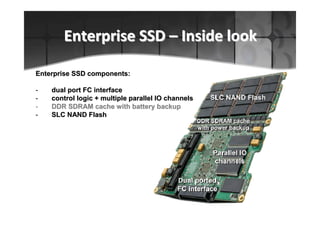
Enterprise SSD – Inside look

Enterprise SSD components:

-   dual port FC interface
-   control logic + multiple parallel IO channels
-   DDR SDRAM cache with battery backup
-   SLC NAND Flash
Enterprise SSD – Technology history

• SSD technology dates back to 1950
  – Core memory
  – Card Capacitor Read Only Store (CCROS)
  – development stopped due to high costs


• Flash-based SSD is re-introduced in
  1995 (M-Systems, now SanDisk)
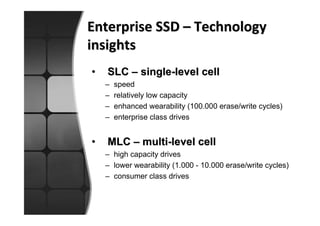
Enterprise SSD – Technology
insights
•   SLC – single-level cell
    –   speed
    –   relatively low capacity
    –   enhanced wearability (100.000 erase/write cycles)
    –   enterprise class drives


•   MLC – multi-level cell
    – high capacity drives
    – lower wearability (1.000 - 10.000 erase/write cycles)
    – consumer class drives
Enterprise SSD – Reliability
and durability
•   Wear leveling – Enterprise SSD use
    advanced wear-leveling algorithms
    that have almost no impact on
    performance

•   400GB * 100k E/W operations = 40
    PB of data per drive in its lifetime!
Enterprise SSD – Reliability
and durability
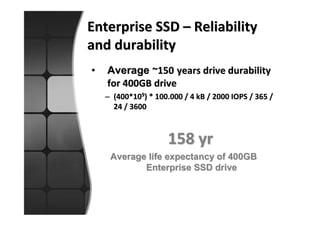
•   Average ~150 years drive durability
    for 400GB drive
    – (400*109) * 100.000 / 4 kB / 2000 IOPS / 365 /
      24 / 3600


                     158 yr
     Average life expectancy of 400GB
            Enterprise SSD drive
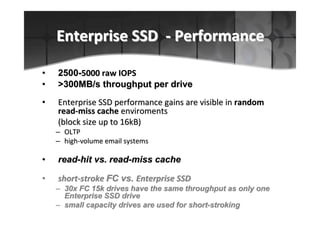
Enterprise SSD - Performance

•   2500-5000 raw IOPS
•   >300MB/s throughput per drive
•   Enterprise SSD performance gains are visible in random
    read-miss cache enviroments
    (block size up to 16kB)
    – OLTP
    – high-volume email systems

•   read-hit vs. read-miss cache

•   short-stroke FC vs. Enterprise SSD
    – 30x FC 15k drives have the same throughput as only one
      Enterprise SSD drive
    – small capacity drives are used for short-stroking
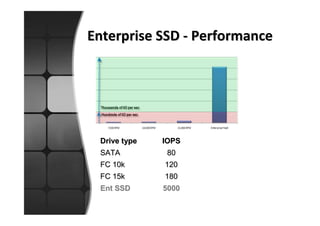
Enterprise SSD - Performance


 Drive type   IOPS
 SATA          80
 FC 10k       120
 FC 15k       180
 Ent SSD      5000
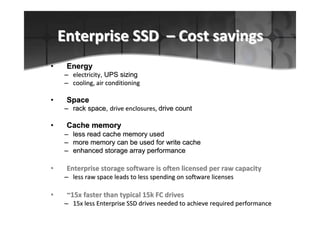
Enterprise SSD – Cost savings
•    Energy
    – electricity, UPS sizing
    – cooling, air conditioning

•    Space
    – rack space, drive enclosures, drive count

•    Cache memory
    – less read cache memory used
    – more memory can be used for write cache
    – enhanced storage array performance

•    Enterprise storage software is often licensed per raw capacity
    – less raw space leads to less spending on software licenses

•    ~15x faster than typical 15k FC drives
    – 15x less Enterprise SSD drives needed to achieve required performance
Enterprise SSD - Data safety

•   Less impact during degraded RAID operation
    – faster rebuild times
    – performance impact on RAID groups using Enterprise SSD drives is less
      noticeable compared to FC/SATA drives

•   No start/stop problems in case of power loss/power
    off
    – powering off a storage array is needed during datacenter migrations
    – one of the worst problems that magnetic drives have to deal with are
      starts/stops after a long time of being powered on
    – large numbers of magnetic drives fail to initialize (Y2K example, customer
      example)

•   ECC – error correction codes
    – detects 5B/512B
    – corrects 4B/512B
Enterprise SSD – Application
candidates
• Good candidates
  –   heavily utilized tablespaces
  –   temp files
  –   redo logs
  –   indexes
  –   typical applications
       • Oracle, SQL, DB2
       • Exchange, Domino
       • Sharepoint


• Bad candidates (not necessarily!)
  – sequential data (reads/writes)
       • multimedia files (audio, video)
       • archive logs
  – static documents (DOC, XLS, PPT, PDF)
Enterprise SSD – Summary
Enterprise SSD technology is ready for use

•    better performance using fewer drives
•    enhanced reliability compared to traditional drives
•    adopting tiering strategy can lower TCO and ROI
•    visible cost savings on energy, space, maintenance and
     administration
•    not necessary to use Enterprise SSD for all application data
    – only critical elements should be kept on Enterprise SSD

•   Recommendation
    – if possible, use thin provisioning and automatic tiering
      technologies on your storage systems

Enterprise-class Solid State Drives

  • 1.
    Enterprise Solid StateDrives (c) 2010 Damir Lukic
  • 2.
    Flash drive vs.Rotational Enterprise Solid State Drive FC/SATA 7.2/10/15krpm new (old) technology existing technology, widely accepted ~0 ms data access high latency data access performance $/IOPS capacity $/GB
  • 3.
    Enterprise SSD –Inside look Enterprise SSD components: - dual port FC interface - control logic + multiple parallel IO channels - DDR SDRAM cache with battery backup - SLC NAND Flash
  • 4.
    Enterprise SSD –Technology history • SSD technology dates back to 1950 – Core memory – Card Capacitor Read Only Store (CCROS) – development stopped due to high costs • Flash-based SSD is re-introduced in 1995 (M-Systems, now SanDisk)
  • 5.
    Enterprise SSD –Technology insights • SLC – single-level cell – speed – relatively low capacity – enhanced wearability (100.000 erase/write cycles) – enterprise class drives • MLC – multi-level cell – high capacity drives – lower wearability (1.000 - 10.000 erase/write cycles) – consumer class drives
  • 6.
    Enterprise SSD –Reliability and durability • Wear leveling – Enterprise SSD use advanced wear-leveling algorithms that have almost no impact on performance • 400GB * 100k E/W operations = 40 PB of data per drive in its lifetime!
  • 7.
    Enterprise SSD –Reliability and durability • Average ~150 years drive durability for 400GB drive – (400*109) * 100.000 / 4 kB / 2000 IOPS / 365 / 24 / 3600 158 yr Average life expectancy of 400GB Enterprise SSD drive
  • 8.
    Enterprise SSD -Performance • 2500-5000 raw IOPS • >300MB/s throughput per drive • Enterprise SSD performance gains are visible in random read-miss cache enviroments (block size up to 16kB) – OLTP – high-volume email systems • read-hit vs. read-miss cache • short-stroke FC vs. Enterprise SSD – 30x FC 15k drives have the same throughput as only one Enterprise SSD drive – small capacity drives are used for short-stroking
  • 9.
    Enterprise SSD -Performance Drive type IOPS SATA 80 FC 10k 120 FC 15k 180 Ent SSD 5000
  • 10.
    Enterprise SSD –Cost savings • Energy – electricity, UPS sizing – cooling, air conditioning • Space – rack space, drive enclosures, drive count • Cache memory – less read cache memory used – more memory can be used for write cache – enhanced storage array performance • Enterprise storage software is often licensed per raw capacity – less raw space leads to less spending on software licenses • ~15x faster than typical 15k FC drives – 15x less Enterprise SSD drives needed to achieve required performance
  • 11.
    Enterprise SSD -Data safety • Less impact during degraded RAID operation – faster rebuild times – performance impact on RAID groups using Enterprise SSD drives is less noticeable compared to FC/SATA drives • No start/stop problems in case of power loss/power off – powering off a storage array is needed during datacenter migrations – one of the worst problems that magnetic drives have to deal with are starts/stops after a long time of being powered on – large numbers of magnetic drives fail to initialize (Y2K example, customer example) • ECC – error correction codes – detects 5B/512B – corrects 4B/512B
  • 12.
    Enterprise SSD –Application candidates • Good candidates – heavily utilized tablespaces – temp files – redo logs – indexes – typical applications • Oracle, SQL, DB2 • Exchange, Domino • Sharepoint • Bad candidates (not necessarily!) – sequential data (reads/writes) • multimedia files (audio, video) • archive logs – static documents (DOC, XLS, PPT, PDF)
  • 13.
    Enterprise SSD –Summary Enterprise SSD technology is ready for use • better performance using fewer drives • enhanced reliability compared to traditional drives • adopting tiering strategy can lower TCO and ROI • visible cost savings on energy, space, maintenance and administration • not necessary to use Enterprise SSD for all application data – only critical elements should be kept on Enterprise SSD • Recommendation – if possible, use thin provisioning and automatic tiering technologies on your storage systems