
codeproject.com
SQL Server Replication Step by Step
Kareem.S
Introduction
Earlier, most of the applications were using standalone environment
where a single centralized server was responding to multiple users,
working in different locations.
Centralized Approach and Problems
Performance problems
Availability problems
Maintenance problems
To overcome all the above problems, we can use replication
solution.
Replication allows to maintain same database multiple copies at
different locations. Log shipping and mirroring allows to maintain
complete database redundancy whereas replication allows to
maintain some part of the database (a set of required objects) at
users location. Changes made at different user locations are
1 of 28 8/24/2016 5:58 PM
synchronized to the main server. It is object level high availability
feature. According to Books Online:
Replication is a set of technologies for copying and distributing data
and database objects from one database to another and then
synchronizing between databases to maintain consistency.
Unlike other methods of high availability, it doesn’t distribute entire
database, but only distributes some part of database like tables or
views.
Advantages
Improved performance
To reduce locking conflicts when multiple users are working
Improved availability
Easy maintenance
To allow sites work independently. So that each location can set
up its own rules and procedures for working with its copy of the
data.
To move data closer to the user
SQL Server 2005 Features
Restartable Snapshots
2 of 28 8/24/2016 5:58 PM
Oracle Publishing
Replicating all DDLs
Merge Replication allows to introduce custom business logic into
the synchronization process
Merge Replication provides the ability to replicate data over HTTP
with web synchronization option
Updatable Transactional Subscriptions can now handle updates to
large data types at Subscribers
SQL Server 2008 Features
In SQL Server 2005, replication had to be stopped in order to
perform some actions like adding nodes, making schema
changes, etc. But in 2008, these can be done online.
Conflict detection capacity in peer-to-peer replication.
All types of conflicts are detected and reported through agent error
log or conflicts table.
In SQL Server 2005, switch partition is unsupported, but in 2008 it
supports.
@allow_partition_switch
@replicate_partition_switch
3 of 28 8/24/2016 5:58 PM
Performance improvements, under Windows 2008
Snapshot delivery of more than 500MB/minute
Time to deliver 100000 varbinary(max) records in less than
2minutes where in 2005 223 minutes.
SQL Server 2012 Features
Updatable subscriptions with transactional publications are
discontinued.
Four new stored procedures provide replication support for
AlwaysOn.
sp_get_redirected_publisher
sp_redirect_publisher
sp_validate_replica_hosts_as_publishers
sp_validate_redirected_publisher
Replication supports the following features on Availability groups:
A publication database can be part of an availability group. The
publisher instances must share a common distributor.
In an AlwaysOn Availability Group, an AlwaysOn secondary
cannot be a publisher. Republishing is not supported when
4 of 28 8/24/2016 5:58 PM
replication is combined with AlwaysOn.
Heterogeneous replication to non-SQL Server subscribers is
deprecated. To move data, create solutions using change data
capture and SSIS.
Oracle Publishing is deprecated.
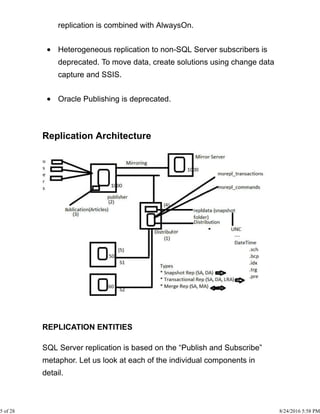
Replication Architecture
REPLICATION ENTITIES
SQL Server replication is based on the “Publish and Subscribe”
metaphor. Let us look at each of the individual components in
detail.
5 of 28 8/24/2016 5:58 PM
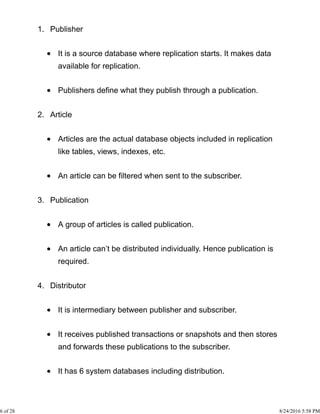
Publisher1.
It is a source database where replication starts. It makes data
available for replication.
Publishers define what they publish through a publication.
Article2.
Articles are the actual database objects included in replication
like tables, views, indexes, etc.
An article can be filtered when sent to the subscriber.
Publication3.
A group of articles is called publication.
An article can’t be distributed individually. Hence publication is
required.
Distributor4.
It is intermediary between publisher and subscriber.
It receives published transactions or snapshots and then stores
and forwards these publications to the subscriber.
It has 6 system databases including distribution.
6 of 28 8/24/2016 5:58 PM
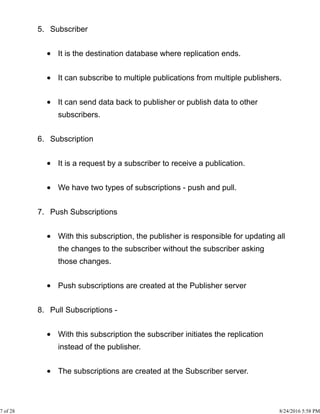
Subscriber5.
It is the destination database where replication ends.
It can subscribe to multiple publications from multiple publishers.
It can send data back to publisher or publish data to other
subscribers.
Subscription6.
It is a request by a subscriber to receive a publication.
We have two types of subscriptions - push and pull.
Push Subscriptions7.
With this subscription, the publisher is responsible for updating all
the changes to the subscriber without the subscriber asking
those changes.
Push subscriptions are created at the Publisher server
Pull Subscriptions -8.
With this subscription the subscriber initiates the replication
instead of the publisher.
The subscriptions are created at the Subscriber server.
7 of 28 8/24/2016 5:58 PM
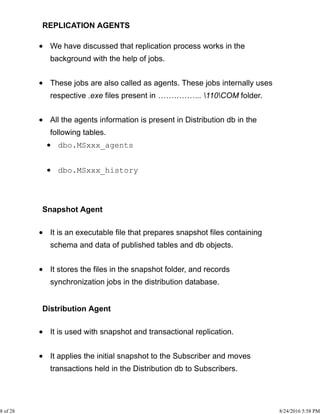
REPLICATION AGENTS
We have discussed that replication process works in the
background with the help of jobs.
These jobs are also called as agents. These jobs internally uses
respective .exe files present in …………….. 110COM folder.
All the agents information is present in Distribution db in the
following tables.
dbo.MSxxx_agents
dbo.MSxxx_history
Snapshot Agent
It is an executable file that prepares snapshot files containing
schema and data of published tables and db objects.
It stores the files in the snapshot folder, and records
synchronization jobs in the distribution database.
Distribution Agent
It is used with snapshot and transactional replication.
It applies the initial snapshot to the Subscriber and moves
transactions held in the Distribution db to Subscribers.
8 of 28 8/24/2016 5:58 PM
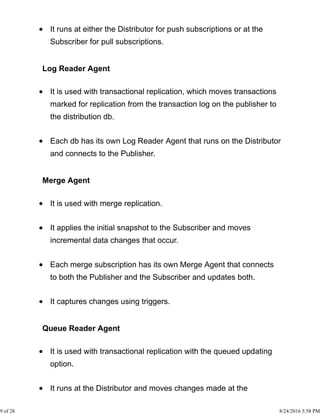
It runs at either the Distributor for push subscriptions or at the
Subscriber for pull subscriptions.
Log Reader Agent
It is used with transactional replication, which moves transactions
marked for replication from the transaction log on the publisher to
the distribution db.
Each db has its own Log Reader Agent that runs on the Distributor
and connects to the Publisher.
Merge Agent
It is used with merge replication.
It applies the initial snapshot to the Subscriber and moves
incremental data changes that occur.
Each merge subscription has its own Merge Agent that connects
to both the Publisher and the Subscriber and updates both.
It captures changes using triggers.
Queue Reader Agent
It is used with transactional replication with the queued updating
option.
It runs at the Distributor and moves changes made at the
9 of 28 8/24/2016 5:58 PM
Subscriber back to the Publisher.
Unlike Distribution Agent and Merge Agent, only one instance of
the Queue Reader Agent exists to service all Publishers and
publications for a given distribution db.
REPLICATION TYPES
Snapshot Replication
Transactional Replication
Merge Replication
1. Snapshot Replication
The snapshot process is commonly used to provide the initial set
of data and database objects for transactional and merge
publications.
It copies and distributes data and database objects exactly as they
appear at the current moment of time.
Snapshot replication is used to provide the initial data set for
transactional and merge replication.
It can also be used when complete refreshes of data are
appropriate (BOL).
Scenarios
10 of 28 8/24/2016 5:58 PM
When the data is not changing frequently.
If we want to replicate small amount of data.
To replicate Look-up tables which are not changing frequently.
It is acceptable to have copies of data that are out of date with
respect to the publisher for a period of time
For example, if a sales organization maintains a product price list
and the prices are all updated at the same time once or twice each
year, replicating the entire snapshot of data after it has changed is
recommended.
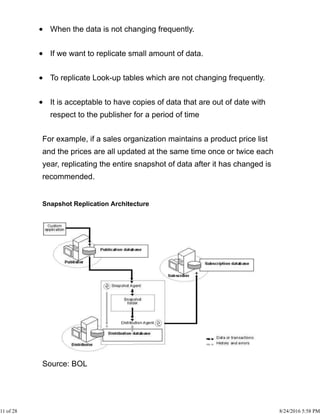
Snapshot Replication Architecture
Source: BOL
11 of 28 8/24/2016 5:58 PM
How it Works?
Snapshot Agent establish a connection from distributor to
publisher and generates fresh snapshot into snapshot folder by
placing locks.
Snapshot agent writes copy of the table schema for each article to
.sch file.
Copies data from published table at the Publisher and writes data
to the snapshot folder in the form of .bcp file.
Appends rows to the Msrepl_commands and
Msrepl_transactions.
Releases any locks on published tables.
Configuring Replication
Configuring distributor1.
Configuring publisher2.
Creating publication of required type3.
Creating subscription(s)4.
Step 1: Configuring distributor and publisher
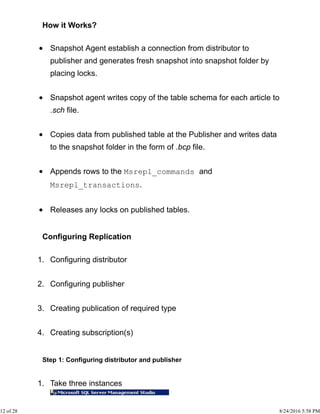
Take three instances1.
12 of 28 8/24/2016 5:58 PM
Go to second instance -> Right click on Replication -> Configure
Distribution…
2.
Next -> Select ‘SERVER2’ will act as its own distributor;3.
Next4.
13 of 28 8/24/2016 5:58 PM
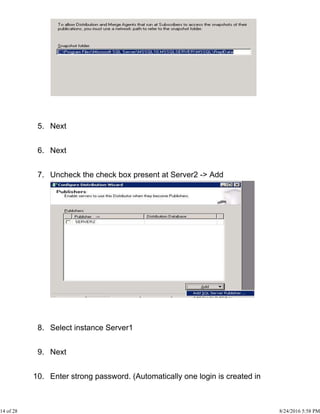
Next5.
Next6.
Uncheck the check box present at Server2 -> Add7.
Select instance Server18.
Next9.
Enter strong password. (Automatically one login is created in10.
14 of 28 8/24/2016 5:58 PM
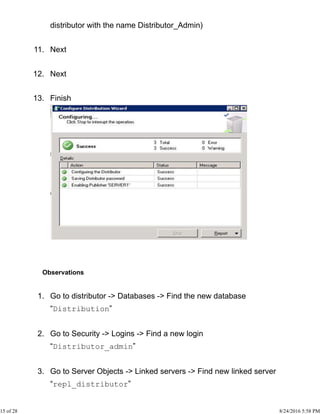
distributor with the name Distributor_Admin)
Next11.
Next12.
Finish13.
Observations
Go to distributor -> Databases -> Find the new database
“Distribution”
1.
Go to Security -> Logins -> Find a new login
“Distributor_admin”
2.
Go to Server Objects -> Linked servers -> Find new linked server
“repl_distributor”
3.
15 of 28 8/24/2016 5:58 PM
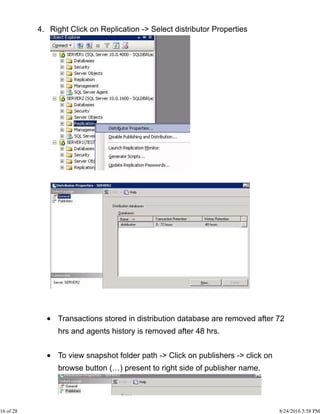
Right Click on Replication -> Select distributor Properties4.
Transactions stored in distribution database are removed after 72
hrs and agents history is removed after 48 hrs.
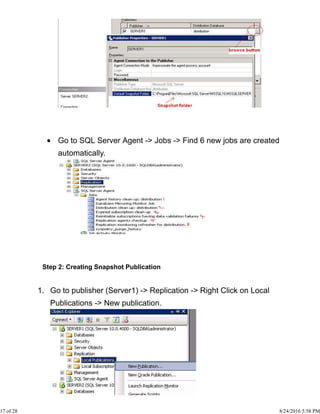
To view snapshot folder path -> Click on publishers -> click on
browse button (…) present to right side of publisher name.
16 of 28 8/24/2016 5:58 PM
Go to SQL Server Agent -> Jobs -> Find 6 new jobs are created
automatically.
Step 2: Creating Snapshot Publication
Go to publisher (Server1) -> Replication -> Right Click on Local
Publications -> New publication.
1.
17 of 28 8/24/2016 5:58 PM
Next2.
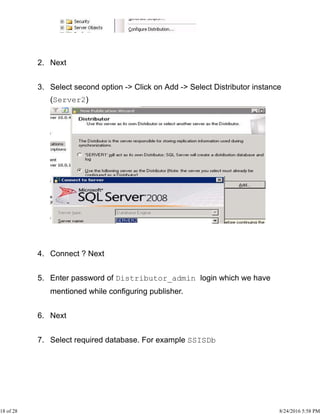
Select second option -> Click on Add -> Select Distributor instance
(Server2)
3.
Connect ? Next4.
Enter password of Distributor_admin login which we have
mentioned while configuring publisher.
5.
Next6.
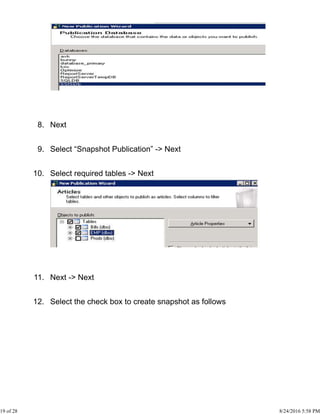
Select required database. For example SSISDb7.
18 of 28 8/24/2016 5:58 PM
Next8.
Select “Snapshot Publication” -> Next9.
Select required tables -> Next10.
Next -> Next11.
Select the check box to create snapshot as follows12.
19 of 28 8/24/2016 5:58 PM
Next13.
Click on security settings14.
Select as follows15.
OK16.
Next17.
Next -> Next18.
Enter publication name as follows19.
20 of 28 8/24/2016 5:58 PM
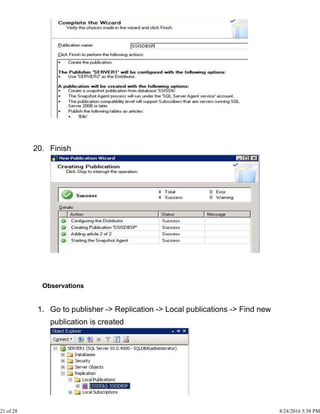
Finish20.
Observations
Go to publisher -> Replication -> Local publications -> Find new
publication is created
1.
21 of 28 8/24/2016 5:58 PM
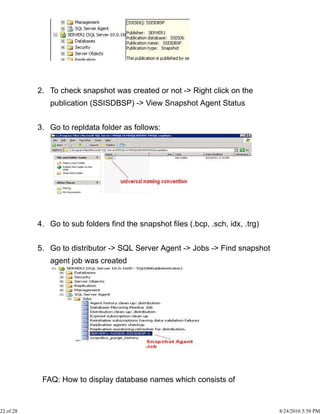
To check snapshot was created or not -> Right click on the
publication (SSISDBSP) -> View Snapshot Agent Status
2.
Go to repldata folder as follows:3.
Go to sub folders find the snapshot files (.bcp, .sch, idx, .trg)4.
Go to distributor -> SQL Server Agent -> Jobs -> Find snapshot
agent job was created
5.
FAQ: How to display database names which consists of
22 of 28 8/24/2016 5:58 PM
publications?
Ans: Go to publisher -> take new query ->
Hide Copy Code
select name from sys.databases where
is_published=1 or is_subscribed=1
Creating Subscription
Go to publisher -> Replication -> Local Publications -> Right Click
on SSISDBSP -> New Subscription
1.
Next2.
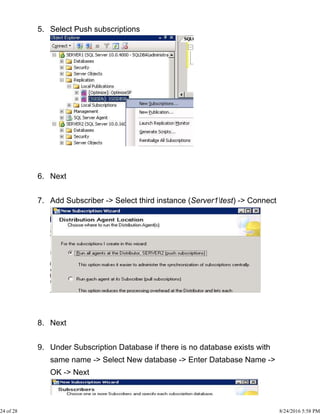
Select the publication name: SSISDBSP3.
Next4.
23 of 28 8/24/2016 5:58 PM
Select Push subscriptions5.
Next6.
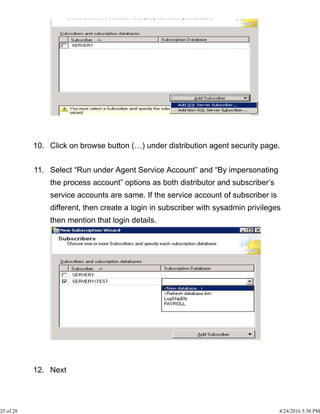
Add Subscriber -> Select third instance (Server1test) -> Connect7.
Next8.
Under Subscription Database if there is no database exists with
same name -> Select New database -> Enter Database Name ->
OK -> Next
9.
24 of 28 8/24/2016 5:58 PM
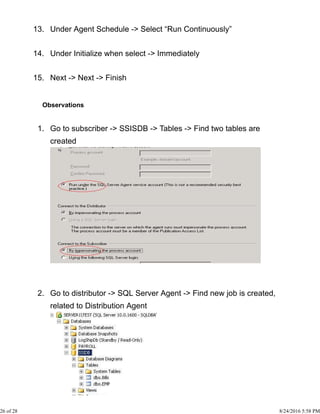
Click on browse button (…) under distribution agent security page.10.
Select “Run under Agent Service Account” and “By impersonating
the process account” options as both distributor and subscriber’s
service accounts are same. If the service account of subscriber is
different, then create a login in subscriber with sysadmin privileges
then mention that login details.
11.
Next12.
25 of 28 8/24/2016 5:58 PM
Under Agent Schedule -> Select “Run Continuously”13.
Under Initialize when select -> Immediately14.
Next -> Next -> Finish15.
Observations
Go to subscriber -> SSISDB -> Tables -> Find two tables are
created
1.
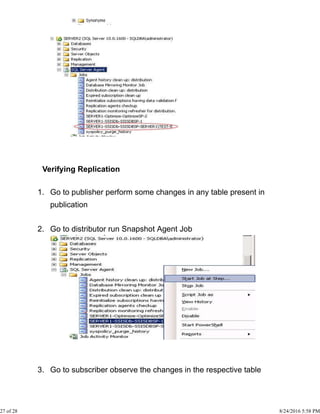
Go to distributor -> SQL Server Agent -> Find new job is created,
related to Distribution Agent
2.
26 of 28 8/24/2016 5:58 PM
Verifying Replication
Go to publisher perform some changes in any table present in
publication
1.
Go to distributor run Snapshot Agent Job2.
Go to subscriber observe the changes in the respective table3.
27 of 28 8/24/2016 5:58 PM
FAQ: How many articles may be there in a snapshot publication?
32767
FAQ: Max columns in a table?
1000
28 of 28 8/24/2016 5:58 PM

Sql server replication step by step

  • 1.
    codeproject.com SQL Server ReplicationStep by Step Kareem.S Introduction Earlier, most of the applications were using standalone environment where a single centralized server was responding to multiple users, working in different locations. Centralized Approach and Problems Performance problems Availability problems Maintenance problems To overcome all the above problems, we can use replication solution. Replication allows to maintain same database multiple copies at different locations. Log shipping and mirroring allows to maintain complete database redundancy whereas replication allows to maintain some part of the database (a set of required objects) at users location. Changes made at different user locations are 1 of 28 8/24/2016 5:58 PM
  • 2.
    synchronized to themain server. It is object level high availability feature. According to Books Online: Replication is a set of technologies for copying and distributing data and database objects from one database to another and then synchronizing between databases to maintain consistency. Unlike other methods of high availability, it doesn’t distribute entire database, but only distributes some part of database like tables or views. Advantages Improved performance To reduce locking conflicts when multiple users are working Improved availability Easy maintenance To allow sites work independently. So that each location can set up its own rules and procedures for working with its copy of the data. To move data closer to the user SQL Server 2005 Features Restartable Snapshots 2 of 28 8/24/2016 5:58 PM
  • 3.
    Oracle Publishing Replicating allDDLs Merge Replication allows to introduce custom business logic into the synchronization process Merge Replication provides the ability to replicate data over HTTP with web synchronization option Updatable Transactional Subscriptions can now handle updates to large data types at Subscribers SQL Server 2008 Features In SQL Server 2005, replication had to be stopped in order to perform some actions like adding nodes, making schema changes, etc. But in 2008, these can be done online. Conflict detection capacity in peer-to-peer replication. All types of conflicts are detected and reported through agent error log or conflicts table. In SQL Server 2005, switch partition is unsupported, but in 2008 it supports. @allow_partition_switch @replicate_partition_switch 3 of 28 8/24/2016 5:58 PM
  • 4.
    Performance improvements, underWindows 2008 Snapshot delivery of more than 500MB/minute Time to deliver 100000 varbinary(max) records in less than 2minutes where in 2005 223 minutes. SQL Server 2012 Features Updatable subscriptions with transactional publications are discontinued. Four new stored procedures provide replication support for AlwaysOn. sp_get_redirected_publisher sp_redirect_publisher sp_validate_replica_hosts_as_publishers sp_validate_redirected_publisher Replication supports the following features on Availability groups: A publication database can be part of an availability group. The publisher instances must share a common distributor. In an AlwaysOn Availability Group, an AlwaysOn secondary cannot be a publisher. Republishing is not supported when 4 of 28 8/24/2016 5:58 PM
  • 5.
    replication is combinedwith AlwaysOn. Heterogeneous replication to non-SQL Server subscribers is deprecated. To move data, create solutions using change data capture and SSIS. Oracle Publishing is deprecated. Replication Architecture REPLICATION ENTITIES SQL Server replication is based on the “Publish and Subscribe” metaphor. Let us look at each of the individual components in detail. 5 of 28 8/24/2016 5:58 PM
  • 6.
    Publisher1. It is asource database where replication starts. It makes data available for replication. Publishers define what they publish through a publication. Article2. Articles are the actual database objects included in replication like tables, views, indexes, etc. An article can be filtered when sent to the subscriber. Publication3. A group of articles is called publication. An article can’t be distributed individually. Hence publication is required. Distributor4. It is intermediary between publisher and subscriber. It receives published transactions or snapshots and then stores and forwards these publications to the subscriber. It has 6 system databases including distribution. 6 of 28 8/24/2016 5:58 PM
  • 7.
    Subscriber5. It is thedestination database where replication ends. It can subscribe to multiple publications from multiple publishers. It can send data back to publisher or publish data to other subscribers. Subscription6. It is a request by a subscriber to receive a publication. We have two types of subscriptions - push and pull. Push Subscriptions7. With this subscription, the publisher is responsible for updating all the changes to the subscriber without the subscriber asking those changes. Push subscriptions are created at the Publisher server Pull Subscriptions -8. With this subscription the subscriber initiates the replication instead of the publisher. The subscriptions are created at the Subscriber server. 7 of 28 8/24/2016 5:58 PM
  • 8.
    REPLICATION AGENTS We havediscussed that replication process works in the background with the help of jobs. These jobs are also called as agents. These jobs internally uses respective .exe files present in …………….. 110COM folder. All the agents information is present in Distribution db in the following tables. dbo.MSxxx_agents dbo.MSxxx_history Snapshot Agent It is an executable file that prepares snapshot files containing schema and data of published tables and db objects. It stores the files in the snapshot folder, and records synchronization jobs in the distribution database. Distribution Agent It is used with snapshot and transactional replication. It applies the initial snapshot to the Subscriber and moves transactions held in the Distribution db to Subscribers. 8 of 28 8/24/2016 5:58 PM
  • 9.
    It runs ateither the Distributor for push subscriptions or at the Subscriber for pull subscriptions. Log Reader Agent It is used with transactional replication, which moves transactions marked for replication from the transaction log on the publisher to the distribution db. Each db has its own Log Reader Agent that runs on the Distributor and connects to the Publisher. Merge Agent It is used with merge replication. It applies the initial snapshot to the Subscriber and moves incremental data changes that occur. Each merge subscription has its own Merge Agent that connects to both the Publisher and the Subscriber and updates both. It captures changes using triggers. Queue Reader Agent It is used with transactional replication with the queued updating option. It runs at the Distributor and moves changes made at the 9 of 28 8/24/2016 5:58 PM
  • 10.
    Subscriber back tothe Publisher. Unlike Distribution Agent and Merge Agent, only one instance of the Queue Reader Agent exists to service all Publishers and publications for a given distribution db. REPLICATION TYPES Snapshot Replication Transactional Replication Merge Replication 1. Snapshot Replication The snapshot process is commonly used to provide the initial set of data and database objects for transactional and merge publications. It copies and distributes data and database objects exactly as they appear at the current moment of time. Snapshot replication is used to provide the initial data set for transactional and merge replication. It can also be used when complete refreshes of data are appropriate (BOL). Scenarios 10 of 28 8/24/2016 5:58 PM
  • 11.
    When the datais not changing frequently. If we want to replicate small amount of data. To replicate Look-up tables which are not changing frequently. It is acceptable to have copies of data that are out of date with respect to the publisher for a period of time For example, if a sales organization maintains a product price list and the prices are all updated at the same time once or twice each year, replicating the entire snapshot of data after it has changed is recommended. Snapshot Replication Architecture Source: BOL 11 of 28 8/24/2016 5:58 PM
  • 12.
    How it Works? SnapshotAgent establish a connection from distributor to publisher and generates fresh snapshot into snapshot folder by placing locks. Snapshot agent writes copy of the table schema for each article to .sch file. Copies data from published table at the Publisher and writes data to the snapshot folder in the form of .bcp file. Appends rows to the Msrepl_commands and Msrepl_transactions. Releases any locks on published tables. Configuring Replication Configuring distributor1. Configuring publisher2. Creating publication of required type3. Creating subscription(s)4. Step 1: Configuring distributor and publisher Take three instances1. 12 of 28 8/24/2016 5:58 PM
  • 13.
    Go to secondinstance -> Right click on Replication -> Configure Distribution… 2. Next -> Select ‘SERVER2’ will act as its own distributor;3. Next4. 13 of 28 8/24/2016 5:58 PM
  • 14.
    Next5. Next6. Uncheck the checkbox present at Server2 -> Add7. Select instance Server18. Next9. Enter strong password. (Automatically one login is created in10. 14 of 28 8/24/2016 5:58 PM
  • 15.
    distributor with thename Distributor_Admin) Next11. Next12. Finish13. Observations Go to distributor -> Databases -> Find the new database “Distribution” 1. Go to Security -> Logins -> Find a new login “Distributor_admin” 2. Go to Server Objects -> Linked servers -> Find new linked server “repl_distributor” 3. 15 of 28 8/24/2016 5:58 PM
  • 16.
    Right Click onReplication -> Select distributor Properties4. Transactions stored in distribution database are removed after 72 hrs and agents history is removed after 48 hrs. To view snapshot folder path -> Click on publishers -> click on browse button (…) present to right side of publisher name. 16 of 28 8/24/2016 5:58 PM
  • 17.
    Go to SQLServer Agent -> Jobs -> Find 6 new jobs are created automatically. Step 2: Creating Snapshot Publication Go to publisher (Server1) -> Replication -> Right Click on Local Publications -> New publication. 1. 17 of 28 8/24/2016 5:58 PM
  • 18.
    Next2. Select second option-> Click on Add -> Select Distributor instance (Server2) 3. Connect ? Next4. Enter password of Distributor_admin login which we have mentioned while configuring publisher. 5. Next6. Select required database. For example SSISDb7. 18 of 28 8/24/2016 5:58 PM
  • 19.
    Next8. Select “Snapshot Publication”-> Next9. Select required tables -> Next10. Next -> Next11. Select the check box to create snapshot as follows12. 19 of 28 8/24/2016 5:58 PM
  • 20.
    Next13. Click on securitysettings14. Select as follows15. OK16. Next17. Next -> Next18. Enter publication name as follows19. 20 of 28 8/24/2016 5:58 PM
  • 21.
    Finish20. Observations Go to publisher-> Replication -> Local publications -> Find new publication is created 1. 21 of 28 8/24/2016 5:58 PM
  • 22.
    To check snapshotwas created or not -> Right click on the publication (SSISDBSP) -> View Snapshot Agent Status 2. Go to repldata folder as follows:3. Go to sub folders find the snapshot files (.bcp, .sch, idx, .trg)4. Go to distributor -> SQL Server Agent -> Jobs -> Find snapshot agent job was created 5. FAQ: How to display database names which consists of 22 of 28 8/24/2016 5:58 PM
  • 23.
    publications? Ans: Go topublisher -> take new query -> Hide Copy Code select name from sys.databases where is_published=1 or is_subscribed=1 Creating Subscription Go to publisher -> Replication -> Local Publications -> Right Click on SSISDBSP -> New Subscription 1. Next2. Select the publication name: SSISDBSP3. Next4. 23 of 28 8/24/2016 5:58 PM
  • 24.
    Select Push subscriptions5. Next6. AddSubscriber -> Select third instance (Server1test) -> Connect7. Next8. Under Subscription Database if there is no database exists with same name -> Select New database -> Enter Database Name -> OK -> Next 9. 24 of 28 8/24/2016 5:58 PM
  • 25.
    Click on browsebutton (…) under distribution agent security page.10. Select “Run under Agent Service Account” and “By impersonating the process account” options as both distributor and subscriber’s service accounts are same. If the service account of subscriber is different, then create a login in subscriber with sysadmin privileges then mention that login details. 11. Next12. 25 of 28 8/24/2016 5:58 PM
  • 26.
    Under Agent Schedule-> Select “Run Continuously”13. Under Initialize when select -> Immediately14. Next -> Next -> Finish15. Observations Go to subscriber -> SSISDB -> Tables -> Find two tables are created 1. Go to distributor -> SQL Server Agent -> Find new job is created, related to Distribution Agent 2. 26 of 28 8/24/2016 5:58 PM
  • 27.
    Verifying Replication Go topublisher perform some changes in any table present in publication 1. Go to distributor run Snapshot Agent Job2. Go to subscriber observe the changes in the respective table3. 27 of 28 8/24/2016 5:58 PM
  • 28.
    FAQ: How manyarticles may be there in a snapshot publication? 32767 FAQ: Max columns in a table? 1000 28 of 28 8/24/2016 5:58 PM