Disaster Recovery and High
Availability solutions with
SQL Server Azure
Montreal SQL Saturday
Prepared by Michelle Gutzait
WHOAMI?
gutzait@Pythian.com
SQL Server Consultant@ www.pythian.com
 24/7 Remote DBA services
© 2013 Pythian2
The environment
• OLTP/ DW?
• Availability? 24x7?
• Data loss and SLA?
• Local/hosted?
• SQL Server version and edition?
• Storage?
• Number of databases?
• Sizes of databases?
• Volume of transactions?
• Volume of reports?
• Backup strategy?
• Etc…
Problems?
• Performance issues
• Locks/blocks/deadlocks
• Application timeouts
• Backups failing
• Data updates VS reports
• Fragmented indexes
• Previous Database corruption
• Restore took too long
• Application bugs causing logical
corruption
• Long downtime on maintenance
What are YOUR problems?
HA and DR solutions
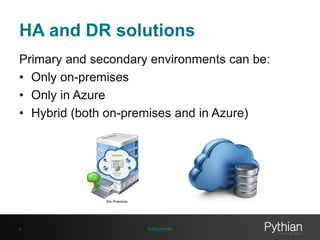
Primary and secondary environments can be:
• Only on-premises
• Only in Azure
• Hybrid (both on-premises and in Azure)
© 2013 Pythian6
Countless solutions!!!
Before Azure…
© 2013 Pythian8
Backups
• Full backup
• Differential backup
• T-Log backup
• Filegroup backup
• Filegroup Differential
Backups strategy for DR
• How long is the restore?
• Where are the backup files?
• What’s the affordable downtime?
• How much data loss is acceptable?
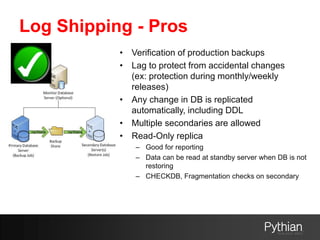
Log Shipping
• Replica of the entire database
• Synchronized to X minutes ago
• Backup and restore the t-logs
• Secondary can be:
– Read-only
– In recovery mode
Log Shipping - Pros
• Verification of production backups
• Lag to protect from accidental changes
(ex: protection during monthly/weekly
releases)
• Any change in DB is replicated
automatically, including DDL
• Multiple secondaries are allowed
• Read-Only replica
– Good for reporting
– Data can be read at standby server when DB is not
restoring
– CHECKDB, Fragmentation checks on secondary
Log Shipping - Cons
• X minutes data loss
• No automatic failover (can be automated)
• No easy failback (Log Shipping needs to be
recreated)
• DB Corruption may be replicated
• Database level replication, not instance
• T-log backup files can be large if there is a high
volume of transactions
• Database needs to be in FULL recovery model
• Same SQL Server version for read-only replica
• Users will be disconnected on DB restore
– Automatically
– Not automatically
• No particular indexes can be created for the
reports
Database Mirroring
• Replica of the entire database
• Synchronization
– Synchronized (High Safety)
• With or without a witness
– A-synchronized (High Performance)
Database Mirroring - Pros
• Real-time or close-to-real-time replica
• Any change in DB is replicated
automatically, including DDL
• Can implement Database Snapshots on
replica for reporting
• Corruption not being replicated
– SQL 2008+ page corresponding to a corruption is
retrieved from the replica/mirror and repaired,
transparently
• Easy failover and failback
• Automatic failover with a witness
– Faster failover than Clustering
• Reference to secondary instance in
connection strings
Database Mirroring - Cons
• Secondary cannot be used for reporting
– Can use Database Snapshot
• Sensitive to network bandwidth
– And volume of transactions
• A-synchronous mode - only in ENT Edition
• Witness - only in ENT Edition
• Deprecated in future releases
• Replication on the database level, not
instance
• Only one mirror allowed per database
• A bit more complicated if instances not in the
same network or Domain
Database Snapshot
• Static read-only copy of the
database
• Snapshot file grows when pages
modified
• On same instance as the original
database
Database Snapshot - Pros
• Great for reporting
– Non real-time data
• Great for DR
– Non real-time data
• Can be created on a mirrored replica
• Corruption will be kept if at page-level
• Created in less than a second
• Read –only operations such as DBCC or
index fragmentation
• Can be backed up
Database Snapshot - Cons
• Non real-time data
• Requires maintenance
– Multiple snapshots
– Add and remove
• Databases cannot be dropped if there is a
snapshot
• Snapshot cannot be dropped if there are
users
• No particular indexes can be created for
the reports
Replication
• Object-level replication
– Row level
– Column level
• Three types
– Snapshot
– Merge
– Transactional
• With updatable subscribers
• Peer-to-peer
• Transaction being replicated
Replication - Pros
• Partial replication
– Saving space and time
– Security
• Possibly different schema and different
indexes on secondary
• Great for reporting, users not disconnected
• Corruption not transferred
• Can configure a lag, protecting from
accidental data changes
• Secondary database can be backed up
Replication - Cons
• Management and troubleshooting
complexity
• All replicated tables require a Primary Key
• Database level replication, not instance
• More physical hardware required with
heavy IO throughput
• Some latency, possible data loss
Cluster
• Instance-level HA/DR
• High Availability with local cluster
• Plus Disaster Recovery with Geo-
Cluster
• 2 or N+1 nodes, M instances
• One instance can failover to different
nodes
• SQL Server has one virtual name
Cluster - Pros
• Failover transparent to applications
• Automatic failover on hardware or
OS failures
• Fast failover (only service restart)
• Easy upgrades and patches
• Can add nodes seamlessly
• Manual failover (ex: performance
reasons)
Cluster - Cons
• No protection from disk failure
• Only 2-node cluster for Standard
Edition
• More maintenance than a stand-
alone
• More expensive than a stand-alone
• There is no replica of the database
for reporting
Always
OnAvailability
Groups
• A mix of Failover clustering and
Database Mirroring
• Does not require shared storage
• Instances are not clustered
resources
• Database level replication
• Group of databases failing over
together
• Read-only or non-readable replicas
• Automatic failover
• Different sync modes
• Different failover rules
• Built-in Load balancing
Other solutions – not SQL Server,
not Azure
• VM replication
• SAN or storage replication
• 3-rd party tools
• Etc….
Architecture design – so far
Be creative….
Node A Node B
Instance A
Node N
Instance B
Passive
Instance C
Cluster
WOW!! More options with
Azure
© 2013 Pythian33
Other solutions – for Azure VMs
• Service healing for cloud services and
Failure recovery detection for the Virtual
Machines
– keep VM available even when there are problems
– VM proactively moved to new nodes
– VM may restart
– IP address of the VM does not change
• Azure Site Recovery
– Hyper-V replication
• Geo Redundant Storage (GRS) for
Windows Azure
– Locally or zone redundant
– Three copies of your data
– http://blogs.msdn.com/b/windowsazurestorage/archive/2011/09/15/in
troducing-geo-replication-for-windows-azure-storage.aspx
Cloud (Azure) only HA/DR solutions - examples
• Built-in Always On Availability Groups
© 2013 Pythian35
Within same region
Different region
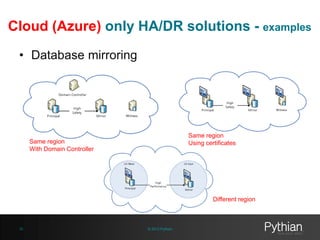
Cloud (Azure) only HA/DR solutions - examples
• Database mirroring
© 2013 Pythian36
Same region
With Domain Controller
Same region
Using certificates
Different region
Hybrid HA/DR solutions - examples
• Always On
Availability Groups
• Database
mirroring
• Log Shipping
© 2013 Pythian37
Quick demo…
manage.windowsazure.com
Easy to choose from a menu
© 2013 Pythian39
Connect an on-premises network to
a Microsoft Azure virtual network
© 2013 Pythian40
https://technet.microsoft.com/en-us/library/dn786406%28v=office.15%29.aspx
Or…. Point-to-Site VPN
© 2013 Pythian41
http://blogs.technet.com/b/francesco_diaz/archive/2013/05/14/implementare-uno-
scenario-ibrido-con-sql-server-e-windows-azure-point-to-site-vpn.aspx
Follow the steps
• On-premises Define and create an on-premises
network that requires a route to the Azure virtual network
and a VPN gateway device.
• Microsoft Azure Create an Azure virtual network with a
site-to-site VPN connection via the Azure Management
Portal.
• On premises Configure your on-premises hardware or
software VPN gateway to terminate the VPN tunnel,
which uses Internet Protocol security (IPsec).
© 2013 Pythian42
Thank you!
gutzait@Pythian.com

Dr and ha solutions with sql server azure

  • 1.
    Disaster Recovery andHigh Availability solutions with SQL Server Azure Montreal SQL Saturday Prepared by Michelle Gutzait
  • 2.
    WHOAMI? gutzait@Pythian.com SQL Server Consultant@www.pythian.com  24/7 Remote DBA services © 2013 Pythian2
  • 3.
    The environment • OLTP/DW? • Availability? 24x7? • Data loss and SLA? • Local/hosted? • SQL Server version and edition? • Storage? • Number of databases? • Sizes of databases? • Volume of transactions? • Volume of reports? • Backup strategy? • Etc…
  • 4.
    Problems? • Performance issues •Locks/blocks/deadlocks • Application timeouts • Backups failing • Data updates VS reports • Fragmented indexes • Previous Database corruption • Restore took too long • Application bugs causing logical corruption • Long downtime on maintenance
  • 5.
    What are YOURproblems?
  • 6.
    HA and DRsolutions Primary and secondary environments can be: • Only on-premises • Only in Azure • Hybrid (both on-premises and in Azure) © 2013 Pythian6
  • 7.
  • 8.
  • 9.
    Backups • Full backup •Differential backup • T-Log backup • Filegroup backup • Filegroup Differential
  • 10.
    Backups strategy forDR • How long is the restore? • Where are the backup files? • What’s the affordable downtime? • How much data loss is acceptable?
  • 11.
    Log Shipping • Replicaof the entire database • Synchronized to X minutes ago • Backup and restore the t-logs • Secondary can be: – Read-only – In recovery mode
  • 12.
    Log Shipping -Pros • Verification of production backups • Lag to protect from accidental changes (ex: protection during monthly/weekly releases) • Any change in DB is replicated automatically, including DDL • Multiple secondaries are allowed • Read-Only replica – Good for reporting – Data can be read at standby server when DB is not restoring – CHECKDB, Fragmentation checks on secondary
  • 13.
    Log Shipping -Cons • X minutes data loss • No automatic failover (can be automated) • No easy failback (Log Shipping needs to be recreated) • DB Corruption may be replicated • Database level replication, not instance • T-log backup files can be large if there is a high volume of transactions • Database needs to be in FULL recovery model • Same SQL Server version for read-only replica • Users will be disconnected on DB restore – Automatically – Not automatically • No particular indexes can be created for the reports
  • 14.
    Database Mirroring • Replicaof the entire database • Synchronization – Synchronized (High Safety) • With or without a witness – A-synchronized (High Performance)
  • 15.
    Database Mirroring -Pros • Real-time or close-to-real-time replica • Any change in DB is replicated automatically, including DDL • Can implement Database Snapshots on replica for reporting • Corruption not being replicated – SQL 2008+ page corresponding to a corruption is retrieved from the replica/mirror and repaired, transparently • Easy failover and failback • Automatic failover with a witness – Faster failover than Clustering • Reference to secondary instance in connection strings
  • 16.
    Database Mirroring -Cons • Secondary cannot be used for reporting – Can use Database Snapshot • Sensitive to network bandwidth – And volume of transactions • A-synchronous mode - only in ENT Edition • Witness - only in ENT Edition • Deprecated in future releases • Replication on the database level, not instance • Only one mirror allowed per database • A bit more complicated if instances not in the same network or Domain
  • 17.
    Database Snapshot • Staticread-only copy of the database • Snapshot file grows when pages modified • On same instance as the original database
  • 18.
    Database Snapshot -Pros • Great for reporting – Non real-time data • Great for DR – Non real-time data • Can be created on a mirrored replica • Corruption will be kept if at page-level • Created in less than a second • Read –only operations such as DBCC or index fragmentation • Can be backed up
  • 19.
    Database Snapshot -Cons • Non real-time data • Requires maintenance – Multiple snapshots – Add and remove • Databases cannot be dropped if there is a snapshot • Snapshot cannot be dropped if there are users • No particular indexes can be created for the reports
  • 20.
    Replication • Object-level replication –Row level – Column level • Three types – Snapshot – Merge – Transactional • With updatable subscribers • Peer-to-peer • Transaction being replicated
  • 21.
    Replication - Pros •Partial replication – Saving space and time – Security • Possibly different schema and different indexes on secondary • Great for reporting, users not disconnected • Corruption not transferred • Can configure a lag, protecting from accidental data changes • Secondary database can be backed up
  • 22.
    Replication - Cons •Management and troubleshooting complexity • All replicated tables require a Primary Key • Database level replication, not instance • More physical hardware required with heavy IO throughput • Some latency, possible data loss
  • 23.
    Cluster • Instance-level HA/DR •High Availability with local cluster • Plus Disaster Recovery with Geo- Cluster • 2 or N+1 nodes, M instances • One instance can failover to different nodes • SQL Server has one virtual name
  • 24.
    Cluster - Pros •Failover transparent to applications • Automatic failover on hardware or OS failures • Fast failover (only service restart) • Easy upgrades and patches • Can add nodes seamlessly • Manual failover (ex: performance reasons)
  • 25.
    Cluster - Cons •No protection from disk failure • Only 2-node cluster for Standard Edition • More maintenance than a stand- alone • More expensive than a stand-alone • There is no replica of the database for reporting
  • 26.
    Always OnAvailability Groups • A mixof Failover clustering and Database Mirroring • Does not require shared storage • Instances are not clustered resources • Database level replication • Group of databases failing over together • Read-only or non-readable replicas • Automatic failover • Different sync modes • Different failover rules • Built-in Load balancing
  • 28.
    Other solutions –not SQL Server, not Azure • VM replication • SAN or storage replication • 3-rd party tools • Etc….
  • 29.
    Architecture design –so far Be creative…. Node A Node B Instance A Node N Instance B Passive Instance C Cluster
  • 30.
    WOW!! More optionswith Azure © 2013 Pythian33
  • 31.
    Other solutions –for Azure VMs • Service healing for cloud services and Failure recovery detection for the Virtual Machines – keep VM available even when there are problems – VM proactively moved to new nodes – VM may restart – IP address of the VM does not change • Azure Site Recovery – Hyper-V replication • Geo Redundant Storage (GRS) for Windows Azure – Locally or zone redundant – Three copies of your data – http://blogs.msdn.com/b/windowsazurestorage/archive/2011/09/15/in troducing-geo-replication-for-windows-azure-storage.aspx
  • 32.
    Cloud (Azure) onlyHA/DR solutions - examples • Built-in Always On Availability Groups © 2013 Pythian35 Within same region Different region
  • 33.
    Cloud (Azure) onlyHA/DR solutions - examples • Database mirroring © 2013 Pythian36 Same region With Domain Controller Same region Using certificates Different region
  • 34.
    Hybrid HA/DR solutions- examples • Always On Availability Groups • Database mirroring • Log Shipping © 2013 Pythian37
  • 35.
  • 36.
    manage.windowsazure.com Easy to choosefrom a menu © 2013 Pythian39
  • 37.
    Connect an on-premisesnetwork to a Microsoft Azure virtual network © 2013 Pythian40 https://technet.microsoft.com/en-us/library/dn786406%28v=office.15%29.aspx
  • 38.
    Or…. Point-to-Site VPN ©2013 Pythian41 http://blogs.technet.com/b/francesco_diaz/archive/2013/05/14/implementare-uno- scenario-ibrido-con-sql-server-e-windows-azure-point-to-site-vpn.aspx
  • 39.
    Follow the steps •On-premises Define and create an on-premises network that requires a route to the Azure virtual network and a VPN gateway device. • Microsoft Azure Create an Azure virtual network with a site-to-site VPN connection via the Azure Management Portal. • On premises Configure your on-premises hardware or software VPN gateway to terminate the VPN tunnel, which uses Internet Protocol security (IPsec). © 2013 Pythian42
  • 40.