Conquer Reporting By Scaling Out SQL Server


                        January 16, 2013
My Contact Information
Anthony Sammartino MCITP(BI), PMP®
Vice President
TekPartners Business Intelligence Solutions
(954) 282-1798
asammartino@tekpartners.com

Twitter: @SQLAnt

Linkedin: http://www.linkedin.com/in/apsammartino

Blog: www.sqlant.me

Web: www.tekpartnersbi.com
About Me
• Started working with SQL Server 7.0 in 1999


• 14 Data Warehouse / BI Projects in 13 Years


• 11 Years SQL Server 2000, 2005, 2008(R2), 2012


• Live in South Florida with my wife and two daughters


• Fan of Miami and Philadelphia Sports teams, all things technology


• Solutions Architect, Project Manager, Technical Lead
  MCP(SQL Server), MCTS(BI), MCITP(BI), PMP®
Session Overview
1. Case for Scaling Out SQL Server for Reporting
2. Choosing a Method to Scale Out SQL Server
3. Architecture with Reporting Scaled Out
4. Replication Server Roles
5. Replication Agents
6. Distribution Database
7. Publications, Articles, Subscriptions
8. Partitioning
9. References for Replication
10. Questions
The "Situation"
Problem Statement:
A company named (House Widgets Inc.) has a main application that sells
widgets online. Every time the Sales staff runs reports to see how many
widgets were sold the application slows, and even times out.
Sales staff complains their reports are slow. Users complain application is slow.

Background:
• DBA team has tuned the reports (T-SQL) through execution plans.
• They also verified its using the correct indexes (Seeks).
• They even resorted to dirty reads using isolation level and nolocks in the code.
• Deemed the data is just to large and too busy. Thousands of users are trying to access
   it, change it at the same time.
• Solid State Disks were even thrown at it. Helped for a short time.

Resolution:
• Time to think about separating the databases for the application and reporting.
• Many ways to scale out SQL Server for reporting.
• Many variables to think about.
Choosing a Method to Scale Out
Requirements
• Requirement is to have real time reporting.
• Requirement is to only report on half of the db tables.

Transactional Replication…Why?
• Transactional Replication happens in near real time.
• Once setup, transactions flow.

Other types of Replication
• Snapshot: Point in time. For example once a day at 9am.
   Not Near real time.
• Merge: Near real time but ideal for situations where two dbs
   need to be kept in sync with writes in two locations.
   Example: Bank with two branches in NY, FL.

Database Mirroring
• Mirroring is very easy to setup and maintain.
• It’s a whole database or nothing solution.
• Point in time using database snapshots.

Always On Availability Groups *NEW SQL Server 2012
• Near real time transactions.
• It’s a whole database or nothing solution.
• Enterprise Edition needed $$$ on both Source and Replica.

Service Broker
• Near real time transactions.
• Harder to setup and maintain, more suited for transforming data.
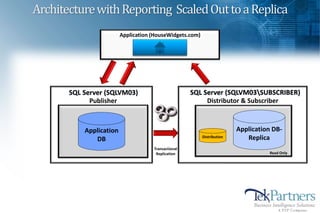
Architecture with Reporting Scaled Out to a Replica
                         Application (HouseWidgets.com)


       SQL Server (SQLVM03)                          SQL Server (SQLVM03SUBSCRIBER)
             Publisher                                    Distributor & Subscriber


           Application                                                   Application DB-
              DB                                          Distribution      Replica
                                     Transactional
                                      Replication                                  Read Only
Replication Server Roles
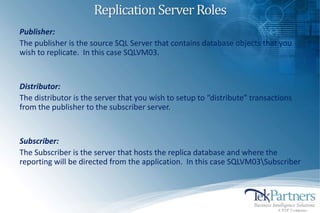
Publisher:
The publisher is the source SQL Server that contains database objects that you
wish to replicate. In this case SQLVM03.


Distributor:
The distributor is the server that you wish to setup to “distribute” transactions
from the publisher to the subscriber server.


Subscriber:
The Subscriber is the server that hosts the replica database and where the
reporting will be directed from the application. In this case SQLVM03Subscriber
Secret Agents…Man
• Replication creates a number of Agents.

• These Agents run as jobs scheduled under SQL
  Server Agent.

• SQL Server Agent must be turned on.

• Recommend restarting options be checked, and
  configure SQL Server Agent with a service account
  with access to both machines.

• Replication agents can be administered from SQL
  Server Replication Monitor and SQL Server
  Management Studio.
More Secret Agents
Snapshot Agent
• Used with all types of replication.
• It prepares schema and initial data files of published tables and other objects.
• Records information about synchronization in the distribution database.
• The Snapshot Agent runs at the Distributor.

Log Reader Agent
• Used with transactional replication.
• Moves transactions marked for replication from the Publisher to the
  distribution database. Each database published using transactional replication
  has its own Log Reader Agent.

Distribution Agent
• Used with snapshot replication and transactional replication.
• It applies the initial snapshot to the Subscriber and moves transactions held
  in the distribution database to Subscribers.
• The Distribution Agent runs at either the Distributor for
  push subscriptions or at the Subscriber for pull subscriptions.
More Secret Agents
Merge Agent
• Used with merge replication.
• It applies the initial snapshot to the Subscriber and moves and reconciles
  incremental data changes that occur.
• Each merge subscription has its own Merge Agent that connects to both the
  Publisher and the Subscriber and updates both.
• The Merge Agent runs at either the Distributor for push subscriptions or the
  Subscriber for pull subscriptions.

Replication Maintenance Jobs
Replication has a number of maintenance jobs that perform scheduled and
on-demand maintenance.
Distribution Database
Distribution DB
The distribution database holds all of the transactions from the publisher
database and applies them to the subscriber.

Performance Tip
As a general rule of thumb for smaller publisher database
implementations small in size, small number of concurrent users, small number
of transactions, place the distributor and subscriber on one server separate
from the publisher.

For larger database implementations large in size, large number of concurrent
users, large number of transactions, place the distributor on its own server and
the subscriber on its own server, both separate from the publisher.

Always separate the distributor and subscriber from the publisher.
Your goal is to take load off the publisher with this architectural solution.
Publications, Articles, Subscriptions
Publications
A Publication is what is created on the Publisher server and stores articles that
will be replicated.

Tip: One table per publication, especially if they are large. Re-snapshot.


Articles
Tables, Stored Procedures, Views , Indexed Views, User Defined Functions.


Subscriptions
A Subscriber is what is created on the Subscriber server to receive all of the
transactions of the Publication.
Partitioning Large Tables – How to deal?
• Partitioning Schemes can be propogated from the Publisher
  but don’t have to.


• They can also be created a the subscriber entirely different better for
  reporting.


• If you want to archive the Publishing database but keep the subscriber
  around you can get creative with Partition swapping.


• Replication is scalable. I have replicated a 6 billion record table with good
  performance. A lot of partitions 
Replication References
http://www.replicationanswers.com

Paul Ibison’s website full of good replication…well answers.

http://www.sqlsoldier.com

Robert Davis’s website and if you use the search box you can find some good stuff
on replication

Twitter: #sqlhelp
Questions
Thank you for your time today and hope you found this educational

Anthony Sammartino MCITP(BI), PMP®
Vice President
TekPartners Business Intelligence Solutions
(954) 282-1798
asammartino@tekpartners.com

Twitter: @SQLAnt

Linkedin: http://www.linkedin.com/in/apsammartino

Blog: www.sqlant.me

Web: www.tekpartnersbi.com

Conquer Reporting by Scaling Out SQL Server

  • 1.
    Conquer Reporting ByScaling Out SQL Server January 16, 2013
  • 2.
    My Contact Information AnthonySammartino MCITP(BI), PMP® Vice President TekPartners Business Intelligence Solutions (954) 282-1798 asammartino@tekpartners.com Twitter: @SQLAnt Linkedin: http://www.linkedin.com/in/apsammartino Blog: www.sqlant.me Web: www.tekpartnersbi.com
  • 3.
    About Me • Startedworking with SQL Server 7.0 in 1999 • 14 Data Warehouse / BI Projects in 13 Years • 11 Years SQL Server 2000, 2005, 2008(R2), 2012 • Live in South Florida with my wife and two daughters • Fan of Miami and Philadelphia Sports teams, all things technology • Solutions Architect, Project Manager, Technical Lead MCP(SQL Server), MCTS(BI), MCITP(BI), PMP®
  • 4.
    Session Overview 1. Casefor Scaling Out SQL Server for Reporting 2. Choosing a Method to Scale Out SQL Server 3. Architecture with Reporting Scaled Out 4. Replication Server Roles 5. Replication Agents 6. Distribution Database 7. Publications, Articles, Subscriptions 8. Partitioning 9. References for Replication 10. Questions
  • 5.
    The "Situation" Problem Statement: Acompany named (House Widgets Inc.) has a main application that sells widgets online. Every time the Sales staff runs reports to see how many widgets were sold the application slows, and even times out. Sales staff complains their reports are slow. Users complain application is slow. Background: • DBA team has tuned the reports (T-SQL) through execution plans. • They also verified its using the correct indexes (Seeks). • They even resorted to dirty reads using isolation level and nolocks in the code. • Deemed the data is just to large and too busy. Thousands of users are trying to access it, change it at the same time. • Solid State Disks were even thrown at it. Helped for a short time. Resolution: • Time to think about separating the databases for the application and reporting. • Many ways to scale out SQL Server for reporting. • Many variables to think about.
  • 6.
    Choosing a Methodto Scale Out Requirements • Requirement is to have real time reporting. • Requirement is to only report on half of the db tables. Transactional Replication…Why? • Transactional Replication happens in near real time. • Once setup, transactions flow. Other types of Replication • Snapshot: Point in time. For example once a day at 9am. Not Near real time. • Merge: Near real time but ideal for situations where two dbs need to be kept in sync with writes in two locations. Example: Bank with two branches in NY, FL. Database Mirroring • Mirroring is very easy to setup and maintain. • It’s a whole database or nothing solution. • Point in time using database snapshots. Always On Availability Groups *NEW SQL Server 2012 • Near real time transactions. • It’s a whole database or nothing solution. • Enterprise Edition needed $$$ on both Source and Replica. Service Broker • Near real time transactions. • Harder to setup and maintain, more suited for transforming data.
  • 7.
    Architecture with ReportingScaled Out to a Replica Application (HouseWidgets.com) SQL Server (SQLVM03) SQL Server (SQLVM03SUBSCRIBER) Publisher Distributor & Subscriber Application Application DB- DB Distribution Replica Transactional Replication Read Only
  • 8.
    Replication Server Roles Publisher: Thepublisher is the source SQL Server that contains database objects that you wish to replicate. In this case SQLVM03. Distributor: The distributor is the server that you wish to setup to “distribute” transactions from the publisher to the subscriber server. Subscriber: The Subscriber is the server that hosts the replica database and where the reporting will be directed from the application. In this case SQLVM03Subscriber
  • 9.
    Secret Agents…Man • Replicationcreates a number of Agents. • These Agents run as jobs scheduled under SQL Server Agent. • SQL Server Agent must be turned on. • Recommend restarting options be checked, and configure SQL Server Agent with a service account with access to both machines. • Replication agents can be administered from SQL Server Replication Monitor and SQL Server Management Studio.
  • 10.
    More Secret Agents SnapshotAgent • Used with all types of replication. • It prepares schema and initial data files of published tables and other objects. • Records information about synchronization in the distribution database. • The Snapshot Agent runs at the Distributor. Log Reader Agent • Used with transactional replication. • Moves transactions marked for replication from the Publisher to the distribution database. Each database published using transactional replication has its own Log Reader Agent. Distribution Agent • Used with snapshot replication and transactional replication. • It applies the initial snapshot to the Subscriber and moves transactions held in the distribution database to Subscribers. • The Distribution Agent runs at either the Distributor for push subscriptions or at the Subscriber for pull subscriptions.
  • 11.
    More Secret Agents MergeAgent • Used with merge replication. • It applies the initial snapshot to the Subscriber and moves and reconciles incremental data changes that occur. • Each merge subscription has its own Merge Agent that connects to both the Publisher and the Subscriber and updates both. • The Merge Agent runs at either the Distributor for push subscriptions or the Subscriber for pull subscriptions. Replication Maintenance Jobs Replication has a number of maintenance jobs that perform scheduled and on-demand maintenance.
  • 12.
    Distribution Database Distribution DB Thedistribution database holds all of the transactions from the publisher database and applies them to the subscriber. Performance Tip As a general rule of thumb for smaller publisher database implementations small in size, small number of concurrent users, small number of transactions, place the distributor and subscriber on one server separate from the publisher. For larger database implementations large in size, large number of concurrent users, large number of transactions, place the distributor on its own server and the subscriber on its own server, both separate from the publisher. Always separate the distributor and subscriber from the publisher. Your goal is to take load off the publisher with this architectural solution.
  • 13.
    Publications, Articles, Subscriptions Publications APublication is what is created on the Publisher server and stores articles that will be replicated. Tip: One table per publication, especially if they are large. Re-snapshot. Articles Tables, Stored Procedures, Views , Indexed Views, User Defined Functions. Subscriptions A Subscriber is what is created on the Subscriber server to receive all of the transactions of the Publication.
  • 14.
    Partitioning Large Tables– How to deal? • Partitioning Schemes can be propogated from the Publisher but don’t have to. • They can also be created a the subscriber entirely different better for reporting. • If you want to archive the Publishing database but keep the subscriber around you can get creative with Partition swapping. • Replication is scalable. I have replicated a 6 billion record table with good performance. A lot of partitions 
  • 15.
    Replication References http://www.replicationanswers.com Paul Ibison’swebsite full of good replication…well answers. http://www.sqlsoldier.com Robert Davis’s website and if you use the search box you can find some good stuff on replication Twitter: #sqlhelp
  • 16.
    Questions Thank you foryour time today and hope you found this educational Anthony Sammartino MCITP(BI), PMP® Vice President TekPartners Business Intelligence Solutions (954) 282-1798 asammartino@tekpartners.com Twitter: @SQLAnt Linkedin: http://www.linkedin.com/in/apsammartino Blog: www.sqlant.me Web: www.tekpartnersbi.com