Department of Information Technology 1Data base Technologies (ITB4201)
Introduction to
Structured Query Language (SQL)
Dr. C.V. Suresh Babu
Professor
Department of IT
Hindustan Institute of Science & Technology
Department of Information Technology 2Data base Technologies (ITB4201)
Discussion Topics
• SQL Introduction
• Simple Queries in SQL
• Queries with more than one relation
Department of Information Technology 3Data base Technologies (ITB4201)
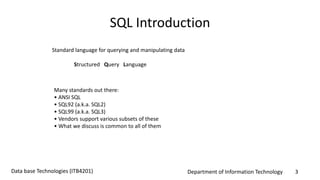
SQL Introduction
Standard language for querying and manipulating data
Structured Query Language
Many standards out there:
• ANSI SQL
• SQL92 (a.k.a. SQL2)
• SQL99 (a.k.a. SQL3)
• Vendors support various subsets of these
• What we discuss is common to all of them
Department of Information Technology 4Data base Technologies (ITB4201)
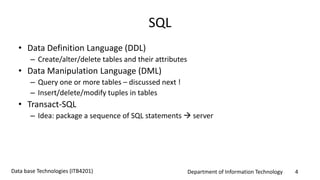
SQL
• Data Definition Language (DDL)
– Create/alter/delete tables and their attributes
• Data Manipulation Language (DML)
– Query one or more tables – discussed next !
– Insert/delete/modify tuples in tables
• Transact-SQL
– Idea: package a sequence of SQL statements  server
Department of Information Technology 5Data base Technologies (ITB4201)
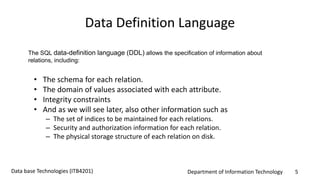
Data Definition Language
• The schema for each relation.
• The domain of values associated with each attribute.
• Integrity constraints
• And as we will see later, also other information such as
– The set of indices to be maintained for each relations.
– Security and authorization information for each relation.
– The physical storage structure of each relation on disk.
The SQL data-definition language (DDL) allows the specification of information about
relations, including:
Department of Information Technology 6Data base Technologies (ITB4201)
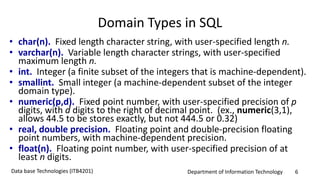
Domain Types in SQL
• char(n). Fixed length character string, with user-specified length n.
• varchar(n). Variable length character strings, with user-specified
maximum length n.
• int. Integer (a finite subset of the integers that is machine-dependent).
• smallint. Small integer (a machine-dependent subset of the integer
domain type).
• numeric(p,d). Fixed point number, with user-specified precision of p
digits, with d digits to the right of decimal point. (ex., numeric(3,1),
allows 44.5 to be stores exactly, but not 444.5 or 0.32)
• real, double precision. Floating point and double-precision floating
point numbers, with machine-dependent precision.
• float(n). Floating point number, with user-specified precision of at
least n digits.
Department of Information Technology 7Data base Technologies (ITB4201)
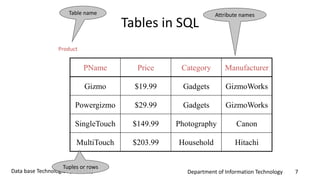
Tables in SQL
PName Price Category Manufacturer
Gizmo $19.99 Gadgets GizmoWorks
Powergizmo $29.99 Gadgets GizmoWorks
SingleTouch $149.99 Photography Canon
MultiTouch $203.99 Household Hitachi
Product
Attribute namesTable name
Tuples or rows
Department of Information Technology 8Data base Technologies (ITB4201)
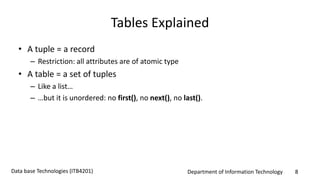
Tables Explained
• A tuple = a record
– Restriction: all attributes are of atomic type
• A table = a set of tuples
– Like a list…
– …but it is unordered: no first(), no next(), no last().
Department of Information Technology 9Data base Technologies (ITB4201)
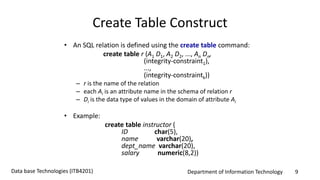
Create Table Construct
• An SQL relation is defined using the create table command:
create table r (A1 D1, A2 D2, ..., An Dn,
(integrity-constraint1),
...,
(integrity-constraintk))
– r is the name of the relation
– each Ai is an attribute name in the schema of relation r
– Di is the data type of values in the domain of attribute Ai
• Example:
create table instructor (
ID char(5),
name varchar(20),
dept_name varchar(20),
salary numeric(8,2))
Department of Information Technology 10Data base Technologies (ITB4201)
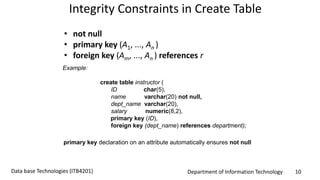
Integrity Constraints in Create Table
• not null
• primary key (A1, ..., An )
• foreign key (Am, ..., An ) references r
Example:
create table instructor (
ID char(5),
name varchar(20) not null,
dept_name varchar(20),
salary numeric(8,2),
primary key (ID),
foreign key (dept_name) references department);
primary key declaration on an attribute automatically ensures not null
Department of Information Technology 11Data base Technologies (ITB4201)
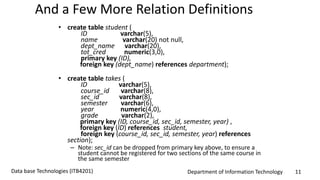
And a Few More Relation Definitions
• create table student (
ID varchar(5),
name varchar(20) not null,
dept_name varchar(20),
tot_cred numeric(3,0),
primary key (ID),
foreign key (dept_name) references department);
• create table takes (
ID varchar(5),
course_id varchar(8),
sec_id varchar(8),
semester varchar(6),
year numeric(4,0),
grade varchar(2),
primary key (ID, course_id, sec_id, semester, year) ,
foreign key (ID) references student,
foreign key (course_id, sec_id, semester, year) references
section);
– Note: sec_id can be dropped from primary key above, to ensure a
student cannot be registered for two sections of the same course in
the same semester
Department of Information Technology 12Data base Technologies (ITB4201)
And more still
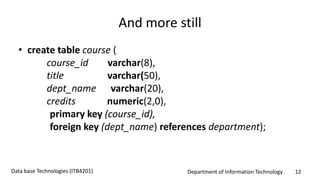
• create table course (
course_id varchar(8),
title varchar(50),
dept_name varchar(20),
credits numeric(2,0),
primary key (course_id),
foreign key (dept_name) references department);
Department of Information Technology 13Data base Technologies (ITB4201)
Updates to tables
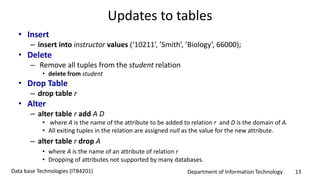
• Insert
– insert into instructor values (‘10211’, ’Smith’, ’Biology’, 66000);
• Delete
– Remove all tuples from the student relation
• delete from student
• Drop Table
– drop table r
• Alter
– alter table r add A D
• where A is the name of the attribute to be added to relation r and D is the domain of A.
• All exiting tuples in the relation are assigned null as the value for the new attribute.
– alter table r drop A
• where A is the name of an attribute of relation r
• Dropping of attributes not supported by many databases.
Department of Information Technology 14Data base Technologies (ITB4201)
Basic Query Structure
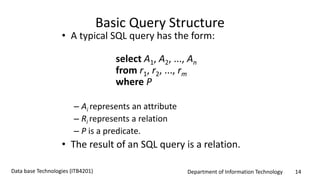
• A typical SQL query has the form:
select A1, A2, ..., An
from r1, r2, ..., rm
where P
– Ai represents an attribute
– Ri represents a relation
– P is a predicate.
• The result of an SQL query is a relation.
Department of Information Technology 15Data base Technologies (ITB4201)
Tables Explained
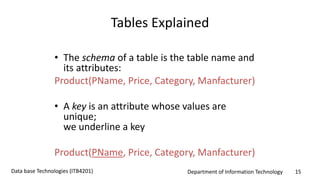
• The schema of a table is the table name and
its attributes:
Product(PName, Price, Category, Manfacturer)
• A key is an attribute whose values are
unique;
we underline a key
Product(PName, Price, Category, Manfacturer)
Department of Information Technology 16Data base Technologies (ITB4201)
SQL Query
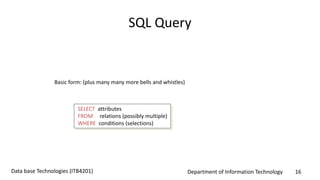
Basic form: (plus many many more bells and whistles)
SELECT attributes
FROM relations (possibly multiple)
WHERE conditions (selections)
Department of Information Technology 17Data base Technologies (ITB4201)
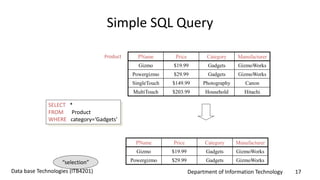
Simple SQL Query
PName Price Category Manufacturer
Gizmo $19.99 Gadgets GizmoWorks
Powergizmo $29.99 Gadgets GizmoWorks
SingleTouch $149.99 Photography Canon
MultiTouch $203.99 Household Hitachi
SELECT *
FROM Product
WHERE category=‘Gadgets’
Product
PName Price Category Manufacturer
Gizmo $19.99 Gadgets GizmoWorks
Powergizmo $29.99 Gadgets GizmoWorks“selection”
Department of Information Technology 18Data base Technologies (ITB4201)
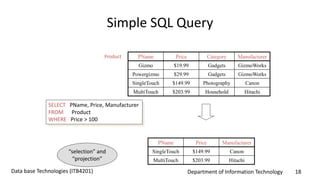
Simple SQL Query
PName Price Category Manufacturer
Gizmo $19.99 Gadgets GizmoWorks
Powergizmo $29.99 Gadgets GizmoWorks
SingleTouch $149.99 Photography Canon
MultiTouch $203.99 Household Hitachi
SELECT PName, Price, Manufacturer
FROM Product
WHERE Price > 100
Product
PName Price Manufacturer
SingleTouch $149.99 Canon
MultiTouch $203.99 Hitachi
“selection” and
“projection”
Department of Information Technology 19Data base Technologies (ITB4201)
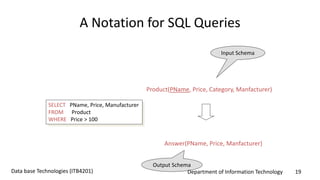
A Notation for SQL Queries
SELECT PName, Price, Manufacturer
FROM Product
WHERE Price > 100
Product(PName, Price, Category, Manfacturer)
Answer(PName, Price, Manfacturer)
Input Schema
Output Schema
Department of Information Technology 20Data base Technologies (ITB4201)
Selections
What goes in the WHERE clause:
• x = y, x < y, x <= y, etc
– For number, they have the usual meanings
– For CHAR and VARCHAR: lexicographic ordering
• Expected conversion between CHAR and VARCHAR
– For dates and times, what you expect...
• Pattern matching on strings...
Department of Information Technology 21Data base Technologies (ITB4201)
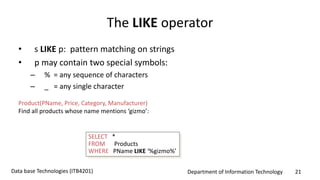
The LIKE operator
• s LIKE p: pattern matching on strings
• p may contain two special symbols:
– % = any sequence of characters
– _ = any single character
Product(PName, Price, Category, Manufacturer)
Find all products whose name mentions ‘gizmo’:
SELECT *
FROM Products
WHERE PName LIKE ‘%gizmo%’
Department of Information Technology 22Data base Technologies (ITB4201)
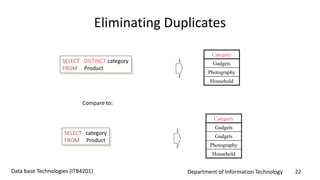
Eliminating Duplicates
SELECT DISTINCT category
FROM Product
Compare to:
SELECT category
FROM Product
Category
Gadgets
Gadgets
Photography
Household
Category
Gadgets
Photography
Household
Department of Information Technology 23Data base Technologies (ITB4201)
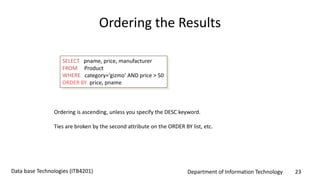
Ordering the Results
SELECT pname, price, manufacturer
FROM Product
WHERE category=‘gizmo’ AND price > 50
ORDER BY price, pname
Ordering is ascending, unless you specify the DESC keyword.
Ties are broken by the second attribute on the ORDER BY list, etc.
Department of Information Technology 24Data base Technologies (ITB4201)
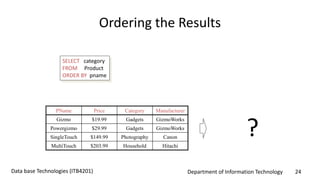
Ordering the Results
SELECT category
FROM Product
ORDER BY pname
PName Price Category Manufacturer
Gizmo $19.99 Gadgets GizmoWorks
Powergizmo $29.99 Gadgets GizmoWorks
SingleTouch $149.99 Photography Canon
MultiTouch $203.99 Household Hitachi
?
Department of Information Technology 25Data base Technologies (ITB4201)
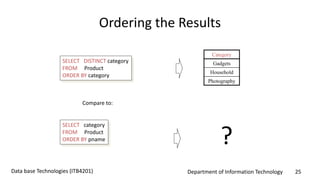
Ordering the Results
SELECT DISTINCT category
FROM Product
ORDER BY category
Compare to:
Category
Gadgets
Household
Photography
SELECT category
FROM Product
ORDER BY pname ?
Department of Information Technology 26Data base Technologies (ITB4201)
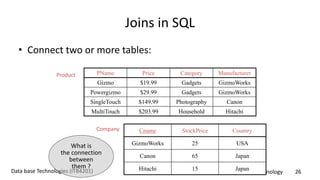
Joins in SQL
• Connect two or more tables:
PName Price Category Manufacturer
Gizmo $19.99 Gadgets GizmoWorks
Powergizmo $29.99 Gadgets GizmoWorks
SingleTouch $149.99 Photography Canon
MultiTouch $203.99 Household Hitachi
Product
Company Cname StockPrice Country
GizmoWorks 25 USA
Canon 65 Japan
Hitachi 15 Japan
What is
the connection
between
them ?
Department of Information Technology 27Data base Technologies (ITB4201)
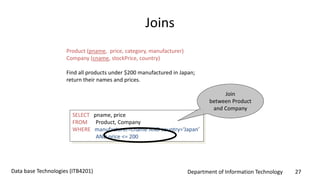
Joins
Product (pname, price, category, manufacturer)
Company (cname, stockPrice, country)
Find all products under $200 manufactured in Japan;
return their names and prices.
SELECT pname, price
FROM Product, Company
WHERE manufacturer=cname AND country=‘Japan’
AND price <= 200
Join
between Product
and Company
Department of Information Technology 28Data base Technologies (ITB4201)
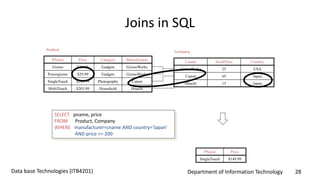
Joins in SQL
PName Price Category Manufacturer
Gizmo $19.99 Gadgets GizmoWorks
Powergizmo $29.99 Gadgets GizmoWorks
SingleTouch $149.99 Photography Canon
MultiTouch $203.99 Household Hitachi
Product
Company
Cname StockPrice Country
GizmoWorks 25 USA
Canon 65 Japan
Hitachi 15 Japan
PName Price
SingleTouch $149.99
SELECT pname, price
FROM Product, Company
WHERE manufacturer=cname AND country=‘Japan’
AND price <= 200
Department of Information Technology 29Data base Technologies (ITB4201)
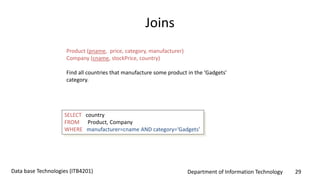
Joins
Product (pname, price, category, manufacturer)
Company (cname, stockPrice, country)
Find all countries that manufacture some product in the ‘Gadgets’
category.
SELECT country
FROM Product, Company
WHERE manufacturer=cname AND category=‘Gadgets’
Department of Information Technology 30Data base Technologies (ITB4201)
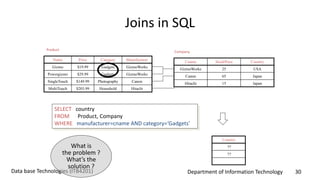
Joins in SQL
Name Price Category Manufacturer
Gizmo $19.99 Gadgets GizmoWorks
Powergizmo $29.99 Gadgets GizmoWorks
SingleTouch $149.99 Photography Canon
MultiTouch $203.99 Household Hitachi
Product
Company
Cname StockPrice Country
GizmoWorks 25 USA
Canon 65 Japan
Hitachi 15 Japan
SELECT country
FROM Product, Company
WHERE manufacturer=cname AND category=‘Gadgets’
Country
??
??
What is
the problem ?
What’s the
solution ?
Department of Information Technology 31Data base Technologies (ITB4201)
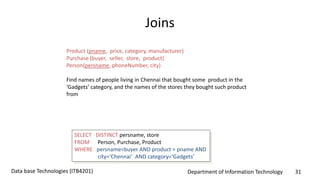
Joins
Product (pname, price, category, manufacturer)
Purchase (buyer, seller, store, product)
Person(persname, phoneNumber, city)
Find names of people living in Chennai that bought some product in the
‘Gadgets’ category, and the names of the stores they bought such product
from
SELECT DISTINCT persname, store
FROM Person, Purchase, Product
WHERE persname=buyer AND product = pname AND
city=‘Chennai’ AND category=‘Gadgets’
Department of Information Technology 32Data base Technologies (ITB4201)
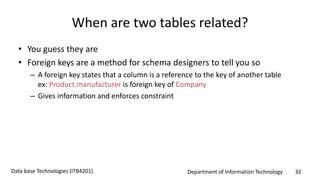
When are two tables related?
• You guess they are
• Foreign keys are a method for schema designers to tell you so
– A foreign key states that a column is a reference to the key of another table
ex: Product.manufacturer is foreign key of Company
– Gives information and enforces constraint
Department of Information Technology 33Data base Technologies (ITB4201)
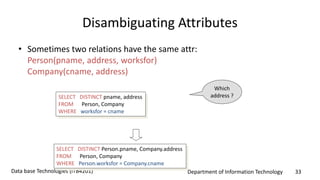
Disambiguating Attributes
• Sometimes two relations have the same attr:
Person(pname, address, worksfor)
Company(cname, address)
SELECT DISTINCT pname, address
FROM Person, Company
WHERE worksfor = cname
SELECT DISTINCT Person.pname, Company.address
FROM Person, Company
WHERE Person.worksfor = Company.cname
Which
address ?
Department of Information Technology 34Data base Technologies (ITB4201)
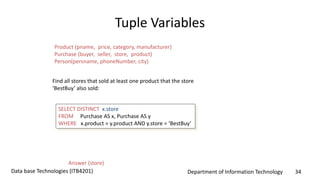
Tuple Variables
SELECT DISTINCT x.store
FROM Purchase AS x, Purchase AS y
WHERE x.product = y.product AND y.store = ‘BestBuy’
Find all stores that sold at least one product that the store
‘BestBuy’ also sold:
Answer (store)
Product (pname, price, category, manufacturer)
Purchase (buyer, seller, store, product)
Person(persname, phoneNumber, city)
Department of Information Technology 35Data base Technologies (ITB4201)
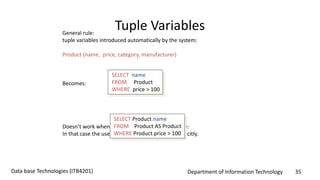
Tuple VariablesGeneral rule:
tuple variables introduced automatically by the system:
Product (name, price, category, manufacturer)
Becomes:
Doesn’t work when Product occurs more than once:
In that case the user needs to define variables explicitly.
SELECT name
FROM Product
WHERE price > 100
SELECT Product.name
FROM Product AS Product
WHERE Product.price > 100
Department of Information Technology 36Data base Technologies (ITB4201)
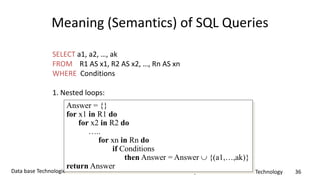
Meaning (Semantics) of SQL Queries
SELECT a1, a2, …, ak
FROM R1 AS x1, R2 AS x2, …, Rn AS xn
WHERE Conditions
1. Nested loops:
Answer = {}
for x1 in R1 do
for x2 in R2 do
…..
for xn in Rn do
if Conditions
then Answer = Answer  {(a1,…,ak)}
return Answer
Department of Information Technology 37Data base Technologies (ITB4201)
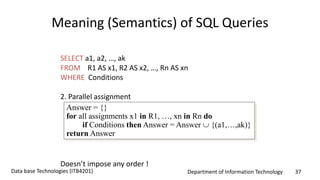
Meaning (Semantics) of SQL Queries
SELECT a1, a2, …, ak
FROM R1 AS x1, R2 AS x2, …, Rn AS xn
WHERE Conditions
2. Parallel assignment
Doesn’t impose any order !
Answer = {}
for all assignments x1 in R1, …, xn in Rn do
if Conditions then Answer = Answer  {(a1,…,ak)}
return Answer
Department of Information Technology 38Data base Technologies (ITB4201)
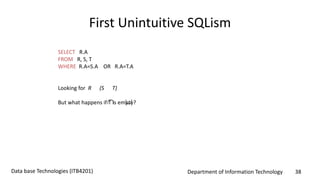
First Unintuitive SQLism
SELECT R.A
FROM R, S, T
WHERE R.A=S.A OR R.A=T.A
Looking for R (S T)
But what happens if T is empty? 
Department of Information Technology 39Data base Technologies (ITB4201)
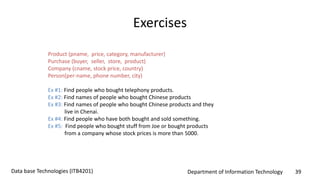
Exercises
Product (pname, price, category, manufacturer)
Purchase (buyer, seller, store, product)
Company (cname, stock price, country)
Person(per-name, phone number, city)
Ex #1: Find people who bought telephony products.
Ex #2: Find names of people who bought Chinese products
Ex #3: Find names of people who bought Chinese products and they
live in Chenai.
Ex #4: Find people who have both bought and sold something.
Ex #5: Find people who bought stuff from Joe or bought products
from a company whose stock prices is more than 5000.

SQL

  • 1.
    Department of InformationTechnology 1Data base Technologies (ITB4201) Introduction to Structured Query Language (SQL) Dr. C.V. Suresh Babu Professor Department of IT Hindustan Institute of Science & Technology
  • 2.
    Department of InformationTechnology 2Data base Technologies (ITB4201) Discussion Topics • SQL Introduction • Simple Queries in SQL • Queries with more than one relation
  • 3.
    Department of InformationTechnology 3Data base Technologies (ITB4201) SQL Introduction Standard language for querying and manipulating data Structured Query Language Many standards out there: • ANSI SQL • SQL92 (a.k.a. SQL2) • SQL99 (a.k.a. SQL3) • Vendors support various subsets of these • What we discuss is common to all of them
  • 4.
    Department of InformationTechnology 4Data base Technologies (ITB4201) SQL • Data Definition Language (DDL) – Create/alter/delete tables and their attributes • Data Manipulation Language (DML) – Query one or more tables – discussed next ! – Insert/delete/modify tuples in tables • Transact-SQL – Idea: package a sequence of SQL statements  server
  • 5.
    Department of InformationTechnology 5Data base Technologies (ITB4201) Data Definition Language • The schema for each relation. • The domain of values associated with each attribute. • Integrity constraints • And as we will see later, also other information such as – The set of indices to be maintained for each relations. – Security and authorization information for each relation. – The physical storage structure of each relation on disk. The SQL data-definition language (DDL) allows the specification of information about relations, including:
  • 6.
    Department of InformationTechnology 6Data base Technologies (ITB4201) Domain Types in SQL • char(n). Fixed length character string, with user-specified length n. • varchar(n). Variable length character strings, with user-specified maximum length n. • int. Integer (a finite subset of the integers that is machine-dependent). • smallint. Small integer (a machine-dependent subset of the integer domain type). • numeric(p,d). Fixed point number, with user-specified precision of p digits, with d digits to the right of decimal point. (ex., numeric(3,1), allows 44.5 to be stores exactly, but not 444.5 or 0.32) • real, double precision. Floating point and double-precision floating point numbers, with machine-dependent precision. • float(n). Floating point number, with user-specified precision of at least n digits.
  • 7.
    Department of InformationTechnology 7Data base Technologies (ITB4201) Tables in SQL PName Price Category Manufacturer Gizmo $19.99 Gadgets GizmoWorks Powergizmo $29.99 Gadgets GizmoWorks SingleTouch $149.99 Photography Canon MultiTouch $203.99 Household Hitachi Product Attribute namesTable name Tuples or rows
  • 8.
    Department of InformationTechnology 8Data base Technologies (ITB4201) Tables Explained • A tuple = a record – Restriction: all attributes are of atomic type • A table = a set of tuples – Like a list… – …but it is unordered: no first(), no next(), no last().
  • 9.
    Department of InformationTechnology 9Data base Technologies (ITB4201) Create Table Construct • An SQL relation is defined using the create table command: create table r (A1 D1, A2 D2, ..., An Dn, (integrity-constraint1), ..., (integrity-constraintk)) – r is the name of the relation – each Ai is an attribute name in the schema of relation r – Di is the data type of values in the domain of attribute Ai • Example: create table instructor ( ID char(5), name varchar(20), dept_name varchar(20), salary numeric(8,2))
  • 10.
    Department of InformationTechnology 10Data base Technologies (ITB4201) Integrity Constraints in Create Table • not null • primary key (A1, ..., An ) • foreign key (Am, ..., An ) references r Example: create table instructor ( ID char(5), name varchar(20) not null, dept_name varchar(20), salary numeric(8,2), primary key (ID), foreign key (dept_name) references department); primary key declaration on an attribute automatically ensures not null
  • 11.
    Department of InformationTechnology 11Data base Technologies (ITB4201) And a Few More Relation Definitions • create table student ( ID varchar(5), name varchar(20) not null, dept_name varchar(20), tot_cred numeric(3,0), primary key (ID), foreign key (dept_name) references department); • create table takes ( ID varchar(5), course_id varchar(8), sec_id varchar(8), semester varchar(6), year numeric(4,0), grade varchar(2), primary key (ID, course_id, sec_id, semester, year) , foreign key (ID) references student, foreign key (course_id, sec_id, semester, year) references section); – Note: sec_id can be dropped from primary key above, to ensure a student cannot be registered for two sections of the same course in the same semester
  • 12.
    Department of InformationTechnology 12Data base Technologies (ITB4201) And more still • create table course ( course_id varchar(8), title varchar(50), dept_name varchar(20), credits numeric(2,0), primary key (course_id), foreign key (dept_name) references department);
  • 13.
    Department of InformationTechnology 13Data base Technologies (ITB4201) Updates to tables • Insert – insert into instructor values (‘10211’, ’Smith’, ’Biology’, 66000); • Delete – Remove all tuples from the student relation • delete from student • Drop Table – drop table r • Alter – alter table r add A D • where A is the name of the attribute to be added to relation r and D is the domain of A. • All exiting tuples in the relation are assigned null as the value for the new attribute. – alter table r drop A • where A is the name of an attribute of relation r • Dropping of attributes not supported by many databases.
  • 14.
    Department of InformationTechnology 14Data base Technologies (ITB4201) Basic Query Structure • A typical SQL query has the form: select A1, A2, ..., An from r1, r2, ..., rm where P – Ai represents an attribute – Ri represents a relation – P is a predicate. • The result of an SQL query is a relation.
  • 15.
    Department of InformationTechnology 15Data base Technologies (ITB4201) Tables Explained • The schema of a table is the table name and its attributes: Product(PName, Price, Category, Manfacturer) • A key is an attribute whose values are unique; we underline a key Product(PName, Price, Category, Manfacturer)
  • 16.
    Department of InformationTechnology 16Data base Technologies (ITB4201) SQL Query Basic form: (plus many many more bells and whistles) SELECT attributes FROM relations (possibly multiple) WHERE conditions (selections)
  • 17.
    Department of InformationTechnology 17Data base Technologies (ITB4201) Simple SQL Query PName Price Category Manufacturer Gizmo $19.99 Gadgets GizmoWorks Powergizmo $29.99 Gadgets GizmoWorks SingleTouch $149.99 Photography Canon MultiTouch $203.99 Household Hitachi SELECT * FROM Product WHERE category=‘Gadgets’ Product PName Price Category Manufacturer Gizmo $19.99 Gadgets GizmoWorks Powergizmo $29.99 Gadgets GizmoWorks“selection”
  • 18.
    Department of InformationTechnology 18Data base Technologies (ITB4201) Simple SQL Query PName Price Category Manufacturer Gizmo $19.99 Gadgets GizmoWorks Powergizmo $29.99 Gadgets GizmoWorks SingleTouch $149.99 Photography Canon MultiTouch $203.99 Household Hitachi SELECT PName, Price, Manufacturer FROM Product WHERE Price > 100 Product PName Price Manufacturer SingleTouch $149.99 Canon MultiTouch $203.99 Hitachi “selection” and “projection”
  • 19.
    Department of InformationTechnology 19Data base Technologies (ITB4201) A Notation for SQL Queries SELECT PName, Price, Manufacturer FROM Product WHERE Price > 100 Product(PName, Price, Category, Manfacturer) Answer(PName, Price, Manfacturer) Input Schema Output Schema
  • 20.
    Department of InformationTechnology 20Data base Technologies (ITB4201) Selections What goes in the WHERE clause: • x = y, x < y, x <= y, etc – For number, they have the usual meanings – For CHAR and VARCHAR: lexicographic ordering • Expected conversion between CHAR and VARCHAR – For dates and times, what you expect... • Pattern matching on strings...
  • 21.
    Department of InformationTechnology 21Data base Technologies (ITB4201) The LIKE operator • s LIKE p: pattern matching on strings • p may contain two special symbols: – % = any sequence of characters – _ = any single character Product(PName, Price, Category, Manufacturer) Find all products whose name mentions ‘gizmo’: SELECT * FROM Products WHERE PName LIKE ‘%gizmo%’
  • 22.
    Department of InformationTechnology 22Data base Technologies (ITB4201) Eliminating Duplicates SELECT DISTINCT category FROM Product Compare to: SELECT category FROM Product Category Gadgets Gadgets Photography Household Category Gadgets Photography Household
  • 23.
    Department of InformationTechnology 23Data base Technologies (ITB4201) Ordering the Results SELECT pname, price, manufacturer FROM Product WHERE category=‘gizmo’ AND price > 50 ORDER BY price, pname Ordering is ascending, unless you specify the DESC keyword. Ties are broken by the second attribute on the ORDER BY list, etc.
  • 24.
    Department of InformationTechnology 24Data base Technologies (ITB4201) Ordering the Results SELECT category FROM Product ORDER BY pname PName Price Category Manufacturer Gizmo $19.99 Gadgets GizmoWorks Powergizmo $29.99 Gadgets GizmoWorks SingleTouch $149.99 Photography Canon MultiTouch $203.99 Household Hitachi ?
  • 25.
    Department of InformationTechnology 25Data base Technologies (ITB4201) Ordering the Results SELECT DISTINCT category FROM Product ORDER BY category Compare to: Category Gadgets Household Photography SELECT category FROM Product ORDER BY pname ?
  • 26.
    Department of InformationTechnology 26Data base Technologies (ITB4201) Joins in SQL • Connect two or more tables: PName Price Category Manufacturer Gizmo $19.99 Gadgets GizmoWorks Powergizmo $29.99 Gadgets GizmoWorks SingleTouch $149.99 Photography Canon MultiTouch $203.99 Household Hitachi Product Company Cname StockPrice Country GizmoWorks 25 USA Canon 65 Japan Hitachi 15 Japan What is the connection between them ?
  • 27.
    Department of InformationTechnology 27Data base Technologies (ITB4201) Joins Product (pname, price, category, manufacturer) Company (cname, stockPrice, country) Find all products under $200 manufactured in Japan; return their names and prices. SELECT pname, price FROM Product, Company WHERE manufacturer=cname AND country=‘Japan’ AND price <= 200 Join between Product and Company
  • 28.
    Department of InformationTechnology 28Data base Technologies (ITB4201) Joins in SQL PName Price Category Manufacturer Gizmo $19.99 Gadgets GizmoWorks Powergizmo $29.99 Gadgets GizmoWorks SingleTouch $149.99 Photography Canon MultiTouch $203.99 Household Hitachi Product Company Cname StockPrice Country GizmoWorks 25 USA Canon 65 Japan Hitachi 15 Japan PName Price SingleTouch $149.99 SELECT pname, price FROM Product, Company WHERE manufacturer=cname AND country=‘Japan’ AND price <= 200
  • 29.
    Department of InformationTechnology 29Data base Technologies (ITB4201) Joins Product (pname, price, category, manufacturer) Company (cname, stockPrice, country) Find all countries that manufacture some product in the ‘Gadgets’ category. SELECT country FROM Product, Company WHERE manufacturer=cname AND category=‘Gadgets’
  • 30.
    Department of InformationTechnology 30Data base Technologies (ITB4201) Joins in SQL Name Price Category Manufacturer Gizmo $19.99 Gadgets GizmoWorks Powergizmo $29.99 Gadgets GizmoWorks SingleTouch $149.99 Photography Canon MultiTouch $203.99 Household Hitachi Product Company Cname StockPrice Country GizmoWorks 25 USA Canon 65 Japan Hitachi 15 Japan SELECT country FROM Product, Company WHERE manufacturer=cname AND category=‘Gadgets’ Country ?? ?? What is the problem ? What’s the solution ?
  • 31.
    Department of InformationTechnology 31Data base Technologies (ITB4201) Joins Product (pname, price, category, manufacturer) Purchase (buyer, seller, store, product) Person(persname, phoneNumber, city) Find names of people living in Chennai that bought some product in the ‘Gadgets’ category, and the names of the stores they bought such product from SELECT DISTINCT persname, store FROM Person, Purchase, Product WHERE persname=buyer AND product = pname AND city=‘Chennai’ AND category=‘Gadgets’
  • 32.
    Department of InformationTechnology 32Data base Technologies (ITB4201) When are two tables related? • You guess they are • Foreign keys are a method for schema designers to tell you so – A foreign key states that a column is a reference to the key of another table ex: Product.manufacturer is foreign key of Company – Gives information and enforces constraint
  • 33.
    Department of InformationTechnology 33Data base Technologies (ITB4201) Disambiguating Attributes • Sometimes two relations have the same attr: Person(pname, address, worksfor) Company(cname, address) SELECT DISTINCT pname, address FROM Person, Company WHERE worksfor = cname SELECT DISTINCT Person.pname, Company.address FROM Person, Company WHERE Person.worksfor = Company.cname Which address ?
  • 34.
    Department of InformationTechnology 34Data base Technologies (ITB4201) Tuple Variables SELECT DISTINCT x.store FROM Purchase AS x, Purchase AS y WHERE x.product = y.product AND y.store = ‘BestBuy’ Find all stores that sold at least one product that the store ‘BestBuy’ also sold: Answer (store) Product (pname, price, category, manufacturer) Purchase (buyer, seller, store, product) Person(persname, phoneNumber, city)
  • 35.
    Department of InformationTechnology 35Data base Technologies (ITB4201) Tuple VariablesGeneral rule: tuple variables introduced automatically by the system: Product (name, price, category, manufacturer) Becomes: Doesn’t work when Product occurs more than once: In that case the user needs to define variables explicitly. SELECT name FROM Product WHERE price > 100 SELECT Product.name FROM Product AS Product WHERE Product.price > 100
  • 36.
    Department of InformationTechnology 36Data base Technologies (ITB4201) Meaning (Semantics) of SQL Queries SELECT a1, a2, …, ak FROM R1 AS x1, R2 AS x2, …, Rn AS xn WHERE Conditions 1. Nested loops: Answer = {} for x1 in R1 do for x2 in R2 do ….. for xn in Rn do if Conditions then Answer = Answer  {(a1,…,ak)} return Answer
  • 37.
    Department of InformationTechnology 37Data base Technologies (ITB4201) Meaning (Semantics) of SQL Queries SELECT a1, a2, …, ak FROM R1 AS x1, R2 AS x2, …, Rn AS xn WHERE Conditions 2. Parallel assignment Doesn’t impose any order ! Answer = {} for all assignments x1 in R1, …, xn in Rn do if Conditions then Answer = Answer  {(a1,…,ak)} return Answer
  • 38.
    Department of InformationTechnology 38Data base Technologies (ITB4201) First Unintuitive SQLism SELECT R.A FROM R, S, T WHERE R.A=S.A OR R.A=T.A Looking for R (S T) But what happens if T is empty? 
  • 39.
    Department of InformationTechnology 39Data base Technologies (ITB4201) Exercises Product (pname, price, category, manufacturer) Purchase (buyer, seller, store, product) Company (cname, stock price, country) Person(per-name, phone number, city) Ex #1: Find people who bought telephony products. Ex #2: Find names of people who bought Chinese products Ex #3: Find names of people who bought Chinese products and they live in Chenai. Ex #4: Find people who have both bought and sold something. Ex #5: Find people who bought stuff from Joe or bought products from a company whose stock prices is more than 5000.