UNIT-3
DATA MANAGEMENT
Database concepts and the
Structured Query Language
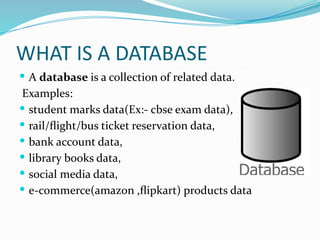
WHAT IS A DATABASE
 A database is a collection of related data.
Examples:
 student marks data(Ex:- cbse exam data),
 rail/flight/bus ticket reservation data,
 bank account data,
 library books data,
 social media data,
 e-commerce(amazon ,flipkart) products data
DBMS
 A database management system (DBMS) is a
collection of programs(SOFTWARE) that enables
users to create and maintain a database.
 Some examples of open source and commercial DBMS
include MySQL, PostgreSQL, Oracle, Teradata,
Microsoft SQL Server, Microsoft Access, MongoDB.
POPULAR DBMS
Relational Database
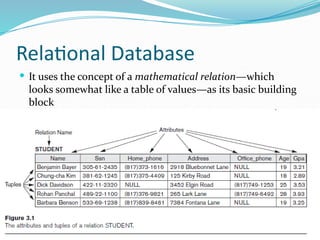
 It uses the concept of a mathematical relation—which
looks somewhat like a table of values—as its basic building
block
Relational Database
 Attributes : the columns of a relation are the attributes which are also
referred as fields
 Tuple:Each row of data in a relation (table) is called a tuple. The tuples
within a relation must be distinct.
 Degree of a table: The Number of Attributes in a table is called it’s
degree
 Cardinality of a table: The Number of Tuples in a table is called it’s
cardinality
 DOMAIN: It is a set of values from which an attribute can take a value in
each row. Usually, a data type is used to specify domain for an attribute.
For example, in STUDENT relation, the attribute RollNo takes integer
values and hence its domain is a set of integer values. Similarly, the set of
character strings constitutes the domain of the attribute Name.
RDBMS
 RDBMS : Relational database management
system
 Used to create and maintain relational databases
 Examples: MySQL,Oracle,Teradata
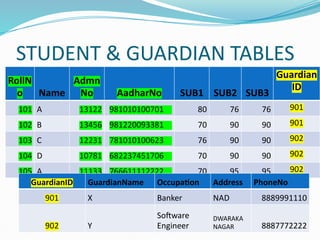
STUDENT & GUARDIAN TABLES
RollN
o Name
Admn
No AadharNo SUB1 SUB2 SUB3
Guardian
ID
101 A 13122 981010100701 80 76 76 901
102 B 13456 981220093381 70 90 90 901
103 C 12231 781010100623 76 90 90 902
104 D 10781 682237451706 70 90 90 902
105 A 11133 766611112222 70 95 95 902
GuardianID GuardianName Occupation Address PhoneNo
901 X Banker NAD 8889991110
902 Y
Software
Engineer
DWARAKA
NAGAR 8887772222
KEYS
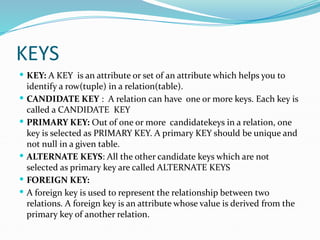
 KEY: A KEY is an attribute or set of an attribute which helps you to
identify a row(tuple) in a relation(table).
 CANDIDATE KEY : A relation can have one or more keys. Each key is
called a CANDIDATE KEY
 PRIMARY KEY: Out of one or more candidatekeys in a relation, one
key is selected as PRIMARY KEY. A primary KEY should be unique and
not null in a given table.
 ALTERNATE KEYS: All the other candidate keys which are not
selected as primary key are called ALTERNATE KEYS
 FOREIGN KEY:
 A foreign key is used to represent the relationship between two
relations. A foreign key is an attribute whose value is derived from the
primary key of another relation.
SQL
 SQL stands for structured query language.
 It is a standard language for creating,accessing and
manipulating databases.
TYPES OF SQL COMMANDS
DDL
DML
DQL
DDL
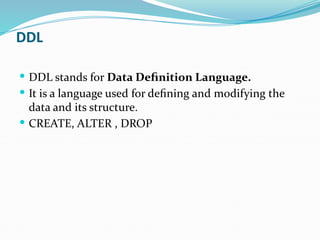
 DDL stands for Data Definition Language.
 It is a language used for defining and modifying the
data and its structure.
 CREATE, ALTER , DROP
DML
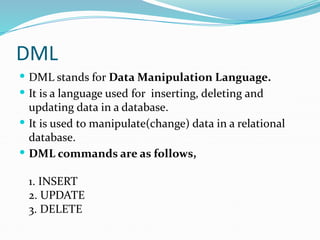
 DML stands for Data Manipulation Language.
 It is a language used for inserting, deleting and
updating data in a database.
 It is used to manipulate(change) data in a relational
database.
 DML commands are as follows,
1. INSERT
2. UPDATE
3. DELETE
DQL
 DQL stands for Data Query Language.
 It is a language used for selecting data in a database.
 DQL Command:
SELECT
MYSQL
 My is the daughter’s name of the MySQL’s
co-founder, Monty Widenius.
 The name of MySQL is the combination of My and
SQL, MySQL.
 MySQL is a database management system that allows
you to manage relational databases.
 It is free and open source software backed by Oracle.
 Free- means you can use MySQL without paying any
money.
 Open source means you can change its source code to
suit your needs.
DATA TYPES
 CHAR
 VARCHAR
 DATE
 INTEGER
 FLAOTING POINT(REAL)
 NUMERIC OR DECIMAL
CHARACTER DATA TYPES
 CHAR
 VARCHAR
CHAR(n)
 Specifies character type data of length n where n could
be any value from 0 to 255.
 CHAR is of fixed length, means, declaring CHAR (10)
implies to reserve spaces for 10 characters.
 If data does not have 10 characters (for example, ‘city’
has four characters), MySQL fills the remaining 6
characters with spaces padded on the right.
VARCHAR(n)
 Specifies character type data of length ‘n’ where n
could be any value from 0 to 65535.
 But unlike CHAR, VARCHAR is a variable-length data
type.
 That is, declaring VARCHAR (30) means a maximum
of 30 characters can be stored but the actual allocated
bytes will depend on the length of entered string.
 So ‘city’ in VARCHAR (30) will occupy the space
needed to store 4 characters only.
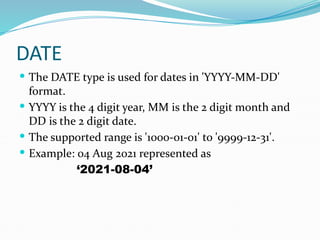
DATE
 The DATE type is used for dates in 'YYYY-MM-DD'
format.
 YYYY is the 4 digit year, MM is the 2 digit month and
DD is the 2 digit date.
 The supported range is '1000-01-01' to '9999-12-31'.
 Example: 04 Aug 2021 represented as
‘2021-08-04’
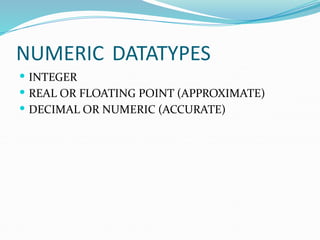
NUMERIC DATATYPES
 INTEGER
 REAL OR FLOATING POINT (APPROXIMATE)
 DECIMAL OR NUMERIC (ACCURATE)
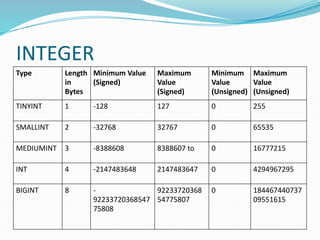
INTEGER
Type Length
in
Bytes
Minimum Value
(Signed)
Maximum
Value
(Signed)
Minimum
Value
(Unsigned)
Maximum
Value
(Unsigned)
TINYINT 1 -128 127 0 255
SMALLINT 2 -32768 32767 0 65535
MEDIUMINT 3 -8388608 8388607 to 0 16777215
INT 4 -2147483648 2147483647 0 4294967295
BIGINT 8 -
92233720368547
75808
92233720368
54775807
0 184467440737
09551615
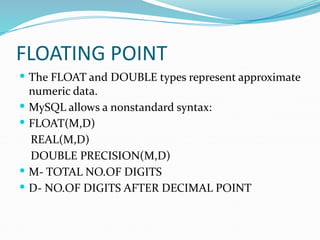
FLOATING POINT
 The FLOAT and DOUBLE types represent approximate
numeric data.
 MySQL allows a nonstandard syntax:
 FLOAT(M,D)
REAL(M,D)
DOUBLE PRECISION(M,D)
 M- TOTAL NO.OF DIGITS
 D- NO.OF DIGITS AFTER DECIMAL POINT
FLOATING POINT
 A column defined as FLOAT(8,5) will look like -
999.99999.
 MySQL performs rounding when storing values, so if
you insert 999.000009 into a FLOAT(8,5) column, the
approximate result is 999.00001
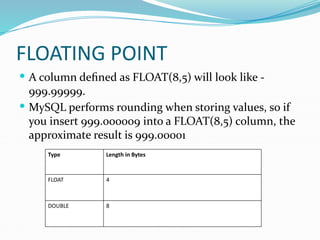
Type Length in Bytes
FLOAT 4
DOUBLE 8
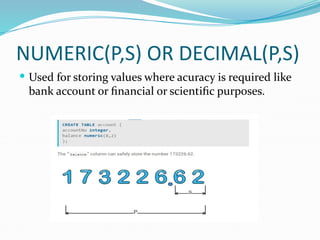
NUMERIC(P,S) OR DECIMAL(P,S)
 Used for storing values where acuracy is required like
bank account or financial or scientific purposes.
NUMERIC VS DECIMAL
 NUMERIC determines the exact precision and
scale.
 DECIMAL specifies only the exact scale; the
precision is equal or greater than what is specified
by the coder.
 DECIMAL columns can have a larger-than-
specified precision if this is more convenient or
efficient for the database system.
CONSTRAINTS
 Constraints are certain types of restrictions on the data
values that an attribute can have.
 They are used to ensure the accuracy and reliability of
data.
 However, it is not mandatory to define constraint for
each attribute of a table.
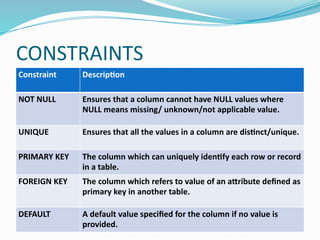
CONSTRAINTS
Constraint Description
NOT NULL Ensures that a column cannot have NULL values where
NULL means missing/ unknown/not applicable value.
UNIQUE Ensures that all the values in a column are distinct/unique.
PRIMARY KEY The column which can uniquely identify each row or record
in a table.
FOREIGN KEY The column which refers to value of an attribute defined as
primary key in another table.
DEFAULT A default value specified for the column if no value is
provided.
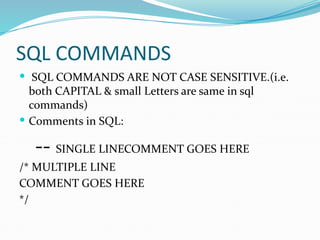
SQL COMMANDS
 SQL COMMANDS ARE NOT CASE SENSITIVE.(i.e.
both CAPITAL & small Letters are same in sql
commands)
 Comments in SQL:
-- SINGLE LINECOMMENT GOES HERE
/* MULTIPLE LINE
COMMENT GOES HERE
*/
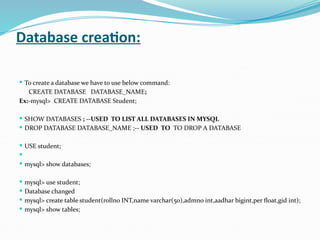
Database creation:
 To create a database we have to use below command:
CREATE DATABASE DATABASE_NAME;
Ex:-mysql> CREATE DATABASE Student;
 SHOW DATABASES ; --USED TO LIST ALL DATABASES IN MYSQL
 DROP DATABASE DATABASE_NAME ;-- USED TO TO DROP A DATABASE
 USE student;

 mysql> show databases;
 mysql> use student;
 Database changed
 mysql> create table student(rollno INT,name varchar(50),admno int,aadhar bigint,per float,gid int);
 mysql> show tables;

DATA MANAGEMENT computer science class 12 unit - 3 notes.pdf

  • 1.
    UNIT-3 DATA MANAGEMENT Database conceptsand the Structured Query Language
  • 2.
    WHAT IS ADATABASE  A database is a collection of related data. Examples:  student marks data(Ex:- cbse exam data),  rail/flight/bus ticket reservation data,  bank account data,  library books data,  social media data,  e-commerce(amazon ,flipkart) products data
  • 3.
    DBMS  A databasemanagement system (DBMS) is a collection of programs(SOFTWARE) that enables users to create and maintain a database.  Some examples of open source and commercial DBMS include MySQL, PostgreSQL, Oracle, Teradata, Microsoft SQL Server, Microsoft Access, MongoDB.
  • 4.
  • 5.
    Relational Database  Ituses the concept of a mathematical relation—which looks somewhat like a table of values—as its basic building block
  • 6.
    Relational Database  Attributes: the columns of a relation are the attributes which are also referred as fields  Tuple:Each row of data in a relation (table) is called a tuple. The tuples within a relation must be distinct.  Degree of a table: The Number of Attributes in a table is called it’s degree  Cardinality of a table: The Number of Tuples in a table is called it’s cardinality  DOMAIN: It is a set of values from which an attribute can take a value in each row. Usually, a data type is used to specify domain for an attribute. For example, in STUDENT relation, the attribute RollNo takes integer values and hence its domain is a set of integer values. Similarly, the set of character strings constitutes the domain of the attribute Name.
  • 7.
    RDBMS  RDBMS :Relational database management system  Used to create and maintain relational databases  Examples: MySQL,Oracle,Teradata
  • 8.
    STUDENT & GUARDIANTABLES RollN o Name Admn No AadharNo SUB1 SUB2 SUB3 Guardian ID 101 A 13122 981010100701 80 76 76 901 102 B 13456 981220093381 70 90 90 901 103 C 12231 781010100623 76 90 90 902 104 D 10781 682237451706 70 90 90 902 105 A 11133 766611112222 70 95 95 902 GuardianID GuardianName Occupation Address PhoneNo 901 X Banker NAD 8889991110 902 Y Software Engineer DWARAKA NAGAR 8887772222
  • 9.
    KEYS  KEY: AKEY is an attribute or set of an attribute which helps you to identify a row(tuple) in a relation(table).  CANDIDATE KEY : A relation can have one or more keys. Each key is called a CANDIDATE KEY  PRIMARY KEY: Out of one or more candidatekeys in a relation, one key is selected as PRIMARY KEY. A primary KEY should be unique and not null in a given table.  ALTERNATE KEYS: All the other candidate keys which are not selected as primary key are called ALTERNATE KEYS  FOREIGN KEY:  A foreign key is used to represent the relationship between two relations. A foreign key is an attribute whose value is derived from the primary key of another relation.
  • 10.
    SQL  SQL standsfor structured query language.  It is a standard language for creating,accessing and manipulating databases.
  • 11.
    TYPES OF SQLCOMMANDS DDL DML DQL
  • 12.
    DDL  DDL standsfor Data Definition Language.  It is a language used for defining and modifying the data and its structure.  CREATE, ALTER , DROP
  • 13.
    DML  DML standsfor Data Manipulation Language.  It is a language used for inserting, deleting and updating data in a database.  It is used to manipulate(change) data in a relational database.  DML commands are as follows, 1. INSERT 2. UPDATE 3. DELETE
  • 14.
    DQL  DQL standsfor Data Query Language.  It is a language used for selecting data in a database.  DQL Command: SELECT
  • 15.
    MYSQL  My isthe daughter’s name of the MySQL’s co-founder, Monty Widenius.  The name of MySQL is the combination of My and SQL, MySQL.  MySQL is a database management system that allows you to manage relational databases.  It is free and open source software backed by Oracle.  Free- means you can use MySQL without paying any money.  Open source means you can change its source code to suit your needs.
  • 16.
    DATA TYPES  CHAR VARCHAR  DATE  INTEGER  FLAOTING POINT(REAL)  NUMERIC OR DECIMAL
  • 17.
    CHARACTER DATA TYPES CHAR  VARCHAR
  • 18.
    CHAR(n)  Specifies charactertype data of length n where n could be any value from 0 to 255.  CHAR is of fixed length, means, declaring CHAR (10) implies to reserve spaces for 10 characters.  If data does not have 10 characters (for example, ‘city’ has four characters), MySQL fills the remaining 6 characters with spaces padded on the right.
  • 19.
    VARCHAR(n)  Specifies charactertype data of length ‘n’ where n could be any value from 0 to 65535.  But unlike CHAR, VARCHAR is a variable-length data type.  That is, declaring VARCHAR (30) means a maximum of 30 characters can be stored but the actual allocated bytes will depend on the length of entered string.  So ‘city’ in VARCHAR (30) will occupy the space needed to store 4 characters only.
  • 20.
    DATE  The DATEtype is used for dates in 'YYYY-MM-DD' format.  YYYY is the 4 digit year, MM is the 2 digit month and DD is the 2 digit date.  The supported range is '1000-01-01' to '9999-12-31'.  Example: 04 Aug 2021 represented as ‘2021-08-04’
  • 21.
    NUMERIC DATATYPES  INTEGER REAL OR FLOATING POINT (APPROXIMATE)  DECIMAL OR NUMERIC (ACCURATE)
  • 22.
    INTEGER Type Length in Bytes Minimum Value (Signed) Maximum Value (Signed) Minimum Value (Unsigned) Maximum Value (Unsigned) TINYINT1 -128 127 0 255 SMALLINT 2 -32768 32767 0 65535 MEDIUMINT 3 -8388608 8388607 to 0 16777215 INT 4 -2147483648 2147483647 0 4294967295 BIGINT 8 - 92233720368547 75808 92233720368 54775807 0 184467440737 09551615
  • 23.
    FLOATING POINT  TheFLOAT and DOUBLE types represent approximate numeric data.  MySQL allows a nonstandard syntax:  FLOAT(M,D) REAL(M,D) DOUBLE PRECISION(M,D)  M- TOTAL NO.OF DIGITS  D- NO.OF DIGITS AFTER DECIMAL POINT
  • 24.
    FLOATING POINT  Acolumn defined as FLOAT(8,5) will look like - 999.99999.  MySQL performs rounding when storing values, so if you insert 999.000009 into a FLOAT(8,5) column, the approximate result is 999.00001 Type Length in Bytes FLOAT 4 DOUBLE 8
  • 25.
    NUMERIC(P,S) OR DECIMAL(P,S) Used for storing values where acuracy is required like bank account or financial or scientific purposes.
  • 26.
    NUMERIC VS DECIMAL NUMERIC determines the exact precision and scale.  DECIMAL specifies only the exact scale; the precision is equal or greater than what is specified by the coder.  DECIMAL columns can have a larger-than- specified precision if this is more convenient or efficient for the database system.
  • 27.
    CONSTRAINTS  Constraints arecertain types of restrictions on the data values that an attribute can have.  They are used to ensure the accuracy and reliability of data.  However, it is not mandatory to define constraint for each attribute of a table.
  • 28.
    CONSTRAINTS Constraint Description NOT NULLEnsures that a column cannot have NULL values where NULL means missing/ unknown/not applicable value. UNIQUE Ensures that all the values in a column are distinct/unique. PRIMARY KEY The column which can uniquely identify each row or record in a table. FOREIGN KEY The column which refers to value of an attribute defined as primary key in another table. DEFAULT A default value specified for the column if no value is provided.
  • 29.
    SQL COMMANDS  SQLCOMMANDS ARE NOT CASE SENSITIVE.(i.e. both CAPITAL & small Letters are same in sql commands)  Comments in SQL: -- SINGLE LINECOMMENT GOES HERE /* MULTIPLE LINE COMMENT GOES HERE */
  • 30.
    Database creation:  Tocreate a database we have to use below command: CREATE DATABASE DATABASE_NAME; Ex:-mysql> CREATE DATABASE Student;  SHOW DATABASES ; --USED TO LIST ALL DATABASES IN MYSQL  DROP DATABASE DATABASE_NAME ;-- USED TO TO DROP A DATABASE  USE student;   mysql> show databases;  mysql> use student;  Database changed  mysql> create table student(rollno INT,name varchar(50),admno int,aadhar bigint,per float,gid int);  mysql> show tables;