SANJIVANI K. B. P. POLYTECHNIC, KOPARGAON
With NBA ACCREDIATED programs , Approved by AICTE, New Delhi,
Recognized by Govt. of Maharashtra, Affiliated to Maharashtra State Board of Technical Education, Mumbai,
ISO 9001:2015 Certified Institute
Department:- Computer Technology Class:-SYCM
Name of Subject:-Database Management System MSBTE Subject Code:- 22319
Sanjivani K.B.P. Polytechnic, Kopargaon Department of Computer Technology Miss.I.B.Tirse 1
Unit 2
Relational Data Model
Sanjivani K.B.P. Polytechnic, Kopargaon Department of Computer Technology Miss.I.B.Tirse 2
Unit Outcomes
• 2a.Explain the concept of RDBMS also appropriateness for the given
problem.
• 2b.Design normalized database structure in the given problem.
• 2c.Design SQL queries to create Relational database and apply in the given
data constraints.
• 2d.Identify the operators for queries implementation of the given problem.
Sanjivani K.B.P. Polytechnic, Kopargaon Department of Computer Technology Miss.I.B.Tirse 3
• Fundamentals of RDBMS
• Table
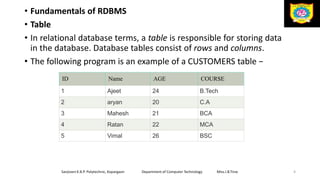
• In relational database terms, a table is responsible for storing data
in the database. Database tables consist of rows and columns.
• The following program is an example of a CUSTOMERS table −
Sanjivani K.B.P. Polytechnic, Kopargaon Department of Computer Technology Miss.I.B.Tirse 4
ID Name AGE COURSE
1 Ajeet 24 B.Tech
2 aryan 20 C.A
3 Mahesh 21 BCA
4 Ratan 22 MCA
5 Vimal 26 BSC
• Field
• Every table is broken up into smaller entities called fields. The
fields in the CUSTOMERS table consist of ID, NAME, AGE,
COURSE.
• A field is a column in a table that is designed to maintain specific
information about every record in the table.
Sanjivani K.B.P. Polytechnic, Kopargaon Department of Computer Technology Miss.I.B.Tirse 5
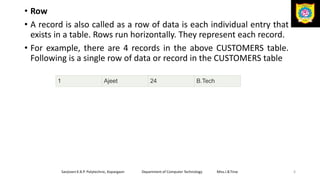
• Row
• A record is also called as a row of data is each individual entry that
exists in a table. Rows run horizontally. They represent each record.
• For example, there are 4 records in the above CUSTOMERS table.
Following is a single row of data or record in the CUSTOMERS table
Sanjivani K.B.P. Polytechnic, Kopargaon Department of Computer Technology Miss.I.B.Tirse 6
1 Ajeet 24 B.Tech
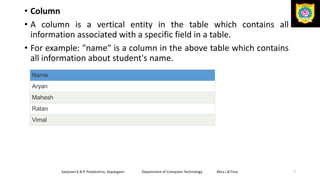
• Column
• A column is a vertical entity in the table which contains all
information associated with a specific field in a table.
• For example: "name" is a column in the above table which contains
all information about student's name.
Sanjivani K.B.P. Polytechnic, Kopargaon Department of Computer Technology Miss.I.B.Tirse 7
Name
Aryan
Mahesh
Ratan
Vimal
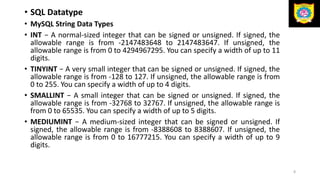
• SQL Datatype
• MySQL String Data Types
• INT − A normal-sized integer that can be signed or unsigned. If signed, the
allowable range is from -2147483648 to 2147483647. If unsigned, the
allowable range is from 0 to 4294967295. You can specify a width of up to 11
digits.
• TINYINT − A very small integer that can be signed or unsigned. If signed, the
allowable range is from -128 to 127. If unsigned, the allowable range is from
0 to 255. You can specify a width of up to 4 digits.
• SMALLINT − A small integer that can be signed or unsigned. If signed, the
allowable range is from -32768 to 32767. If unsigned, the allowable range is
from 0 to 65535. You can specify a width of up to 5 digits.
• MEDIUMINT − A medium-sized integer that can be signed or unsigned. If
signed, the allowable range is from -8388608 to 8388607. If unsigned, the
allowable range is from 0 to 16777215. You can specify a width of up to 9
digits.
8
• BIGINT − A large integer that can be signed or unsigned. If signed, the
allowable range is from -9223372036854775808 to
9223372036854775807. If unsigned, the allowable range is from 0 to
18446744073709551615. You can specify a width of up to 20 digits.
• FLOAT(M,D) − A floating-point number that cannot be unsigned. You can
define the display length (M) and the number of decimals (D). This is not
required and will default to 10,2, where 2 is the number of decimals and
10 is the total number of digits (including decimals). Decimal precision
can go to 24 places for a FLOAT. e.g1234567890.11
• DOUBLE(M,D) − A double precision floating-point number that cannot be
unsigned. You can define the display length (M) and the number of
decimals (D). This is not required and will default to 16,4, where 4 is the
number of decimals. Decimal precision can go to 53 places for a DOUBLE.
REAL is a synonym for DOUBLE. e.g123456789013456.0000
• DECIMAL(M,D) − An unpacked floating-point number that cannot be
unsigned. In the unpacked decimals, each decimal corresponds to one
byte. Defining the display length (M) and the number of decimals (D) is
required. NUMERIC is a synonym for DECIMAL.
9
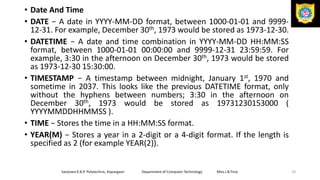
• Date And Time
• DATE − A date in YYYY-MM-DD format, between 1000-01-01 and 9999-
12-31. For example, December 30th, 1973 would be stored as 1973-12-30.
• DATETIME − A date and time combination in YYYY-MM-DD HH:MM:SS
format, between 1000-01-01 00:00:00 and 9999-12-31 23:59:59. For
example, 3:30 in the afternoon on December 30th, 1973 would be stored
as 1973-12-30 15:30:00.
• TIMESTAMP − A timestamp between midnight, January 1st, 1970 and
sometime in 2037. This looks like the previous DATETIME format, only
without the hyphens between numbers; 3:30 in the afternoon on
December 30th, 1973 would be stored as 19731230153000 (
YYYYMMDDHHMMSS ).
• TIME − Stores the time in a HH:MM:SS format.
• YEAR(M) − Stores a year in a 2-digit or a 4-digit format. If the length is
specified as 2 (for example YEAR(2)).
Sanjivani K.B.P. Polytechnic, Kopargaon Department of Computer Technology Miss.I.B.Tirse 10
• String Type
• VARCHAR(M) − A variable-length string between 1 and 255 characters in
length. For example, VARCHAR(25). You must define a length when
creating a VARCHAR field.
• BLOB or TEXT − A field with a maximum length of 65535 characters.
BLOBs are "Binary Large Objects" and are used to store large amounts of
binary data, such as images or other types of files.
• Fields defined as TEXT also hold large amounts of data. The difference
between the two is that the sorts and comparisons on the stored data
are case sensitive on BLOBs and are not case sensitive in TEXT fields. You
do not specify a length with BLOB or TEXT.
• ENUM − When defining an ENUM, you are creating a list of items from
which the value must be selected (or it can be NULL).
• For example, if you wanted your field to contain "A" or "B" or "C", you
would define your ENUM as ENUM ('A', 'B', 'C') and only those values (or
NULL) could ever populate that field.
Sanjivani K.B.P. Polytechnic, Kopargaon Department of Computer Technology Miss.I.B.Tirse 11
• EF Codd Rules
• Rule 0:
• This rule states that for a system to qualify as an RDBMS, it must
be able to manage database entirely through the relational
capabilities.
• Rule 1: Information Rule
• All the information in the database should be represented in the
term of relational or table. Information should be stored as an
values in a tables.
• Rule 2: Guaranteed Access Rule
• All data must be accessible. The Rule say that there is
fundamental requirement of primay key for each record in table ,
and there should be no ambiguity by stating the table name and
its primary key of the each record in the table along with
columns name to be accessed.
Sanjivani K.B.P. Polytechnic, Kopargaon Department of Computer Technology Miss.I.B.Tirse 12
• Rule 3: Systematic Treatment of NULL Values
• Null values could not be treated as blank space or zero values. The null
values are known as unknown values, unassigned values should be
treated as missing information and inapplicable information that should
be treated as systematic , distinct from regular values.
• Rule 4: Active Online Catalog
• The system must support an online catalog based data dictionary which
hold the information or description about the table in the database.
• Rule 5: Comprehensive Data Sub-Language Rule
• The system must support at least one relational language
• A database should be accessible by a language supported for definition,
manipulation and transaction management operation.
Sanjivani K.B.P. Polytechnic, Kopargaon Department of Computer Technology Miss.I.B.Tirse 13
• Rule 6: View Updating Rule
• All the views of a database, which can theoretically be updated,
must also be updatable by the system.
• Rule 7: High-Level Insert, Update, and Delete Rule
• This rules states that in the relational model, the structured query
language must performed data manipulation such as inserting ,
updating and deleting record on sets of rows in the table.
• Rule 8: Physical Data Independence
• The data stored in a database must be independent of the
applications that access the database. Any modification in the
physical location of a table should not enforce modification at
application level.
Sanjivani K.B.P. Polytechnic, Kopargaon Department of Computer Technology Miss.I.B.Tirse 14
.
• Rule 9: Logical Data Independence
• This rule state that changes in the logical level (rows ,columns and so on) must
not change to the application’s structure
• Rule 10: Integrity Independence
• Integrity constraints modified at database level should not enforce modification
at application level.
• Rule 11: Distribution Independence
• The end-user must not be able to see that the data is distributed over various
locations. Users should always get the impression that the data is located at one
site only.
• Rule 12: Non-Subversion Rule
• The system must not have features that allow you to subvert database structure
integrity. Basically, the system must not include back doors that let you cheat
the system for features such as administrative privileges or data constraints.
Sanjivani K.B.P. Polytechnic, Kopargaon Department of Computer Technology Miss.I.B.Tirse 15
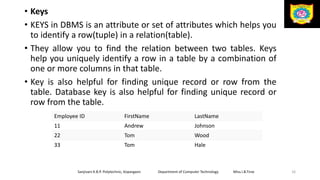
• Keys
• KEYS in DBMS is an attribute or set of attributes which helps you
to identify a row(tuple) in a relation(table).
• They allow you to find the relation between two tables. Keys
help you uniquely identify a row in a table by a combination of
one or more columns in that table.
• Key is also helpful for finding unique record or row from the
table. Database key is also helpful for finding unique record or
row from the table.
Sanjivani K.B.P. Polytechnic, Kopargaon Department of Computer Technology Miss.I.B.Tirse 16
Employee ID FirstName LastName
11 Andrew Johnson
22 Tom Wood
33 Tom Hale
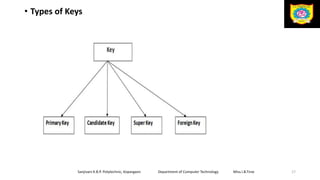
• Types of Keys
Sanjivani K.B.P. Polytechnic, Kopargaon Department of Computer Technology Miss.I.B.Tirse 17
• Primary Key
• PRIMARY KEY in DBMS is a column or group of columns in a
table that uniquely identify every row in that table.
• The Primary Key can’t be a duplicate meaning the same value
can’t appear more than once in the table.
• A table cannot have more than one primary key.
• Rules for defining Primary key:
• Two rows can’t have the same primary key value
• It must for every row to have a primary key value.
• The primary key field cannot be null.
• The value in a primary key column can never be modified or
updated if any foreign key refers to that primary key.
Sanjivani K.B.P. Polytechnic, Kopargaon Department of Computer Technology Miss.I.B.Tirse 18
Sanjivani K.B.P. Polytechnic, Kopargaon Department of Computer Technology Miss.I.B.Tirse 19
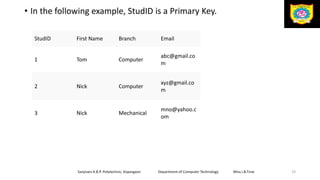
• In the following example, StudID is a Primary Key.
StudID First Name Branch Email
1 Tom Computer
abc@gmail.co
m
2 Nick Computer
xyz@gmail.co
m
3 Nick Mechanical
mno@yahoo.c
om
• Super Key
• Super Key is defined as a set of attributes within a table that can
uniquely identify each record within a table.
• Super Key is a superset of Candidate key.
• Let's take a simple Student table, with fields student_id, name,
phone, age.
Sanjivani K.B.P. Polytechnic, Kopargaon Department of Computer Technology Miss.I.B.Tirse 20
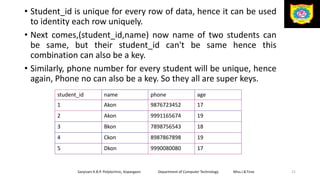
• Student_id is unique for every row of data, hence it can be used
to identity each row uniquely.
• Next comes,(student_id,name) now name of two students can
be same, but their student_id can't be same hence this
combination can also be a key.
• Similarly, phone number for every student will be unique, hence
again, Phone no can also be a key. So they all are super keys.
Sanjivani K.B.P. Polytechnic, Kopargaon Department of Computer Technology Miss.I.B.Tirse 21
student_id name phone age
1 Akon 9876723452 17
2 Akon 9991165674 19
3 Bkon 7898756543 18
4 Ckon 8987867898 19
5 Dkon 9990080080 17
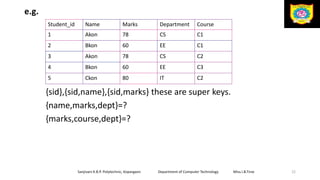
e.g.
{sid},{sid,name},{sid,marks} these are super keys.
{name,marks,dept}=?
{marks,course,dept}=?
Sanjivani K.B.P. Polytechnic, Kopargaon Department of Computer Technology Miss.I.B.Tirse 22
Student_id Name Marks Department Course
1 Akon 78 CS C1
2 Bkon 60 EE C1
3 Akon 78 CS C2
4 Bkon 60 EE C3
5 Ckon 80 IT C2
• Candidate Key
• Candidate Key in SQL is a set of attributes that uniquely identify
tuples in a table.
• Candidate Key is a super key with no repeated attributes. The
Primary key should be selected from the candidate keys.
• Every table must have at least a single candidate key. A table can
have multiple candidate keys but only a single primary key.
• Properties of Candidate key:
• It must contain unique values
• Must not contain null values
• It should contain minimum fields to ensure uniqueness
• Uniquely identify each record in a table
Sanjivani K.B.P. Polytechnic, Kopargaon Department of Computer Technology Miss.I.B.Tirse 23
Sanjivani K.B.P. Polytechnic, Kopargaon Department of Computer Technology Miss.I.B.Tirse 24
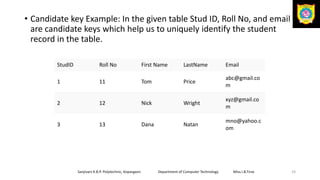
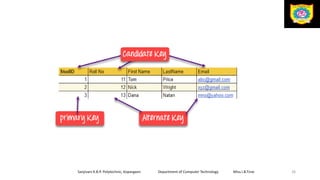
• Candidate key Example: In the given table Stud ID, Roll No, and email
are candidate keys which help us to uniquely identify the student
record in the table.
StudID Roll No First Name LastName Email
1 11 Tom Price
abc@gmail.co
m
2 12 Nick Wright
xyz@gmail.co
m
3 13 Dana Natan
mno@yahoo.c
om
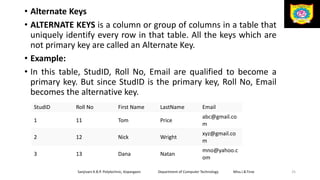
• Alternate Keys
• ALTERNATE KEYS is a column or group of columns in a table that
uniquely identify every row in that table. All the keys which are
not primary key are called an Alternate Key.
• Example:
• In this table, StudID, Roll No, Email are qualified to become a
primary key. But since StudID is the primary key, Roll No, Email
becomes the alternative key.
Sanjivani K.B.P. Polytechnic, Kopargaon Department of Computer Technology Miss.I.B.Tirse 25
StudID Roll No First Name LastName Email
1 11 Tom Price
abc@gmail.co
m
2 12 Nick Wright
xyz@gmail.co
m
3 13 Dana Natan
mno@yahoo.c
om
Sanjivani K.B.P. Polytechnic, Kopargaon Department of Computer Technology Miss.I.B.Tirse 26
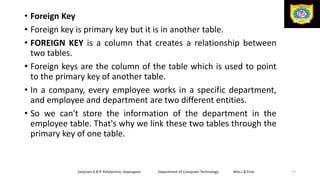
• Foreign Key
• Foreign key is primary key but it is in another table.
• FOREIGN KEY is a column that creates a relationship between
two tables.
• Foreign keys are the column of the table which is used to point
to the primary key of another table.
• In a company, every employee works in a specific department,
and employee and department are two different entities.
• So we can't store the information of the department in the
employee table. That's why we link these two tables through the
primary key of one table.
Sanjivani K.B.P. Polytechnic, Kopargaon Department of Computer Technology Miss.I.B.Tirse 27
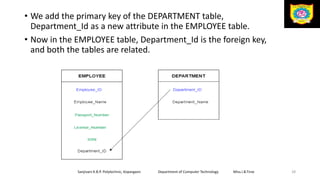
• We add the primary key of the DEPARTMENT table,
Department_Id as a new attribute in the EMPLOYEE table.
• Now in the EMPLOYEE table, Department_Id is the foreign key,
and both the tables are related.
Sanjivani K.B.P. Polytechnic, Kopargaon Department of Computer Technology Miss.I.B.Tirse 28
• Normalization
• Normalization is the process of organizing the data in the
database.
• Normalization is used to minimize the redundancy from a
relation or set of relations. It is also used to eliminate the
undesirable characteristics like Insertion, Update and Deletion
Anomalies.
• Normalization divides the larger table into the smaller table and
links them using relationship.
• The normal form is used to reduce redundancy from the
database table.
Sanjivani K.B.P. Polytechnic, Kopargaon Department of Computer Technology Miss.I.B.Tirse 29
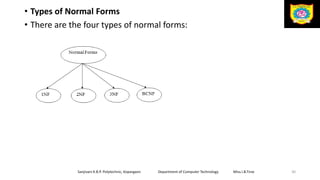
• Types of Normal Forms
• There are the four types of normal forms:
Sanjivani K.B.P. Polytechnic, Kopargaon Department of Computer Technology Miss.I.B.Tirse 30
• 1. First Normal Form –
• If a relation contain composite or multi-valued attribute, it
violates first normal form or a relation is in first normal form if it
does not contain any composite or multi-valued attribute.
• A relation is in first normal form if every attribute in that relation
is singled valued attribute.
Sanjivani K.B.P. Polytechnic, Kopargaon Department of Computer Technology Miss.I.B.Tirse 31
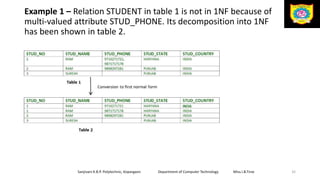
Example 1 – Relation STUDENT in table 1 is not in 1NF because of
multi-valued attribute STUD_PHONE. Its decomposition into 1NF
has been shown in table 2.
Sanjivani K.B.P. Polytechnic, Kopargaon Department of Computer Technology Miss.I.B.Tirse 32
• 2. Second Normal Form –
• To be in second normal form, a relation must be in first normal
form and relation must not contain any partial dependency.
• A relation is in 2NF if it has No Partial Dependency
• Partial Dependency – If the proper subset of candidate key
determines non-prime attribute, it is called partial dependency.
• Prime attribute − An attribute, which is a part of the prime-key,
is known as a prime attribute.
• Non-prime attribute − An attribute, which is not a part of the
prime-key, is said to be a nonprime attribute.
Sanjivani K.B.P. Polytechnic, Kopargaon Department of Computer Technology Miss.I.B.Tirse 33
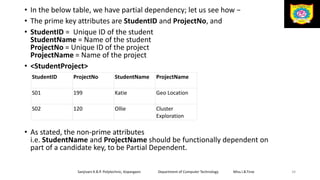
• In the below table, we have partial dependency; let us see how −
• The prime key attributes are StudentID and ProjectNo, and
• StudentID = Unique ID of the student
StudentName = Name of the student
ProjectNo = Unique ID of the project
ProjectName = Name of the project
• <StudentProject>
• As stated, the non-prime attributes
i.e. StudentName and ProjectName should be functionally dependent on
part of a candidate key, to be Partial Dependent.
Sanjivani K.B.P. Polytechnic, Kopargaon Department of Computer Technology Miss.I.B.Tirse 34
StudentID ProjectNo StudentName ProjectName
S01 199 Katie Geo Location
S02 120 Ollie Cluster
Exploration
• The StudentName can be determined by StudentID, which makes the
relation Partial Dependent.
• The ProjectName can be determined by ProjectNo, which makes the
relation Partial Dependent.
• Therefore, the <StudentProject> relation violates the 2NF in Normalization
and is considered a bad database design.
• To remove Partial Dependency and violation on 2NF, decompose the tables
<StudentInfo> <ProjectInfo>
Sanjivani K.B.P. Polytechnic, Kopargaon Department of Computer Technology Miss.I.B.Tirse 35
StudentI
D
ProjectNo StudentName
S01 199 Katie
S02 120 Ollie
ProjectNo ProjectName
199 Geo Location
120 Cluster Exploration
• Trivial Functional Dependency
• Trivial FD
• If a functional dependency (FD) X → Y holds, where Y is a subset
of X, then it is called a trivial FD. Trivial FDs always hold.
• Non-trivial FD
• If an FD X → Y holds, where Y is not a subset of X, then it is called
a non-trivial FD.
Sanjivani K.B.P. Polytechnic, Kopargaon Department of Computer Technology Miss.I.B.Tirse 36
• Third Normal form
• A relation will be in 3NF if it is in 1NF and 2NF and not contain
any transitive partial dependency. e.g. X->Y, Y->Z, X->Z
• 3NF is used to reduce the data duplication. It is also used to
achieve the data integrity.
• If there is no transitive dependency for non-prime attributes,
then the relation must be in third normal form.
• A relation is in third normal form if it holds atleast one of the
following conditions for every non-trivial function dependency X
→ Y.
• X is a super key.
• Y is a prime attribute, i.e., each element of Y is part of some
candidate key.
Sanjivani K.B.P. Polytechnic, Kopargaon Department of Computer Technology Miss.I.B.Tirse 37
• EMPLOYEE_DETAIL table:
• Non-prime attributes: In the given table, all attributes except EMP_ID are
non-prime.
• Here, EMP_STATE & EMP_CITY dependent on EMP_ZIP and EMP_ZIP
dependent on EMP_ID. The non-prime attributes (EMP_STATE, EMP_CITY)
transitively dependent on super key(EMP_ID). It violates the rule of third
normal form.
• That's why we need to move the EMP_CITY and EMP_STATE to the new
<EMPLOYEE_ZIP> table, with EMP_ZIP as a Primary key.
Sanjivani K.B.P. Polytechnic, Kopargaon Department of Computer Technology Miss.I.B.Tirse 38
EMP_ID EMP_NAME EMP_ZIP EMP_STATE EMP_CITY
222 Harry 201010 UP Noida
333 Stephan 02228 US Boston
444 Lan 60007 US Chicago
555 Katharine 06389 UK Norwich
666 John 462007 MP Bhopal
• EMPLOYEE table:
• EMPLOYEE_ZIP table:
Sanjivani K.B.P. Polytechnic, Kopargaon Department of Computer Technology Miss.I.B.Tirse 39
EMP_ID EMP_NAME EMP_ZIP
222 Harry 201010
333 Stephan 02228
444 Lan 60007
555 Katharine 06389
666 John 462007
EMP_ZIP EMP_STATE EMP_CITY
201010 UP Noida
02228 US Boston
60007 US Chicago
06389 UK Norwich
462007 MP Bhopal
• Structured Query Language
• It acts as an interpreter which allows the user to interact directly
with database through computer language.
• SQL is case insensitive. But it is a recommended practice to use
keywords (like SELECT, UPDATE, CREATE, etc) in capital letters
and use user defined things (liked table name, column name,
etc) in small letters.
• We can write comments in SQL using “–” (double hyphen) at the
beginning of any line.
• SQL is the programming language for relational databases
(explained below) like MySQL, Oracle, Sybase, SQL Server,
Postgre, etc. Other non-relational databases (also called NoSQL)
databases like MongoDB, DynamoDB, etc do not use SQL
Sanjivani K.B.P. Polytechnic, Kopargaon Department of Computer Technology Miss.I.B.Tirse 40
• What Can SQL do?
• SQL can execute queries against a database
• SQL can retrieve data from a database
• SQL can insert records in a database
• SQL can update records in a database
• SQL can delete records from a database
• SQL can create new databases
• SQL can create new tables in a database
• SQL can create stored procedures in a database
• SQL can create views in a database
• SQL can set permissions on tables, procedures, and views
Sanjivani K.B.P. Polytechnic, Kopargaon Department of Computer Technology Miss.I.B.Tirse 41
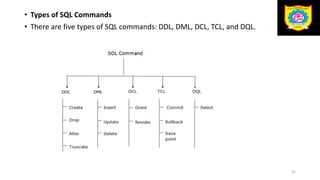
• Types of SQL Commands
• There are five types of SQL commands: DDL, DML, DCL, TCL, and DQL.
42
• Data Definition Language (DDL)
• DDL changes the structure of the table like creating a table, deleting a
table, altering a table, etc.
• All the command of DDL are auto-committed that means it permanently
save all the changes in the database.
• Here are some commands that come under DDL:
• CREATE
• ALTER
• DROP
• TRUNCATE
43
a.CREATE It is used to create a new table in the database
Syntax:
CREATE TABLE TABLE_NAME (COLUMN_NAME DATATYPES[,....]);
Example:
CREATE TABLE EMPLOYEE(Name VARCHAR2(20), Email VARCHAR2(100), DO
B DATE);
b. DROP: It is used to delete both the structure and record stored in the
table.
Syntax:
• DROP TABLE table_name;
• Example
• DROP TABLE EMPLOYEE;
44
c. ALTER: It is used to alter the structure of the database. This change could
be either to modify the characteristics of an existing attribute or probably
to add a new attribute.
• Syntax:
• To add a new column in the table
• ALTER TABLE table_name ADD column_name COLUMN-definition;
• To modify existing column in the table:
• ALTER TABLE table_name MODIFY(column_definitions....);
• EXAMPLE
• ALTER TABLE STU_DETAILS ADD(ADDRESS VARCHAR2(20));
• ALTER TABLE STU_DETAILS MODIFY (NAME VARCHAR2(20));
45
• d. TRUNCATE: It is used to delete all the rows from the table and free the
space containing the table.
• Truncate command deletes the data inside a table, but not the table
itself.
• Syntax:
TRUNCATE TABLE table_name;
• Example:
• TRUNCATE TABLE EMPLOYEE;
46
• 2. Data Manipulation Language
• DML commands are used to modify the database. It is responsible for all
form of changes in the database.
• The command of DML is not auto-committed that means it can't
permanently save all the changes in the database. They can be
rollback.(undo transcations)
• Here are some commands that come under DML:INSERT, UPDATE,
DELETE
• a. INSERT: The INSERT statement is a SQL query. It is used to insert data
into the row of a table.
• Syntax:
• INSERT INTO TABLE_NAME (col1, col2, col3,.... col N) VALUES (value1, valu
e2, value3, .... valueN);
OR
• INSERT INTO TABLE_NAME VALUES (value1, value2, value3, .... valueN);
47
• For example:
• INSERT INTO javatpoint (Author, Subject) VALUES (“ISRD
Group", "DBMS");
• b. UPDATE: This command is used to update or modify the value of a
column in the table.
• Syntax:
• UPDATE table_name SET [column_name1= value1,...column_nameN = val
ueN] [WHERE CONDITION]
• For example:
• UPDATE students SET User_Name = ‘Sunita' WHERE Student_Id = '3'
• c. DELETE: It is used to remove one or more row from a table.
• Syntax:
• DELETE FROM table_name [WHERE condition];
• For example:
• DELETE FROM javatpoint WHERE Author=“ISRD Group"; 48
• 3. Data Control Language
• DCL commands are used to grant and take back authority from any
database user.
• Here are some commands that come under DCL:
• Grant
• Revoke
• a. Grant: It is used to give user access privileges to a database. This
command also allows users to grant permissions to other users too.
• Example
• GRANT insert, select on account to Ram
• By the above command user ram has granted permissions on accounts
database object like he can insert into accounts
• b. Revoke: It is used to take back permissions from the user.
• Example
• Revoke insert, select on account to Ram
49
• 4. Transaction Control Language
• Transcation control language commands are used to manage transcation in
database.
• TCL commands can only use with DML commands like INSERT, DELETE and
UPDATE only.
• Here are some commands that come under TCL:
• COMMIT
• ROLLBACK
• SAVEPOINT
• a. Commit: Commit command is used to save all the transactions permanently
to the database.
• Syntax:
• COMMIT;
• Example:
• DELETE FROM CUSTOMERS WHERE AGE = 25;
• COMMIT;
50
• b. Rollback: Rollback command is used to undo transactions that have
not already been saved to the database.(undo change)
• Syntax:
• ROLLBACK;
• Example:
• DELETE FROM CUSTOMERS WHERE AGE = 25;
• ROLLBACK;
• c. SAVEPOINT: It is used to roll the transaction back to a certain point
without rolling back the entire transaction.(to save temporarily)
• Syntax:
• SAVEPOINT SAVEPOINT_NAME;
51
• 5. Data Query Language
• DQL is used to fetch the data from the database.
• It uses only one command:
• SELECT
• a. SELECT:It retrieve records from one or more table. It is used to select
the attribute based on the condition described by WHERE clause.
• Syntax:
• SELECT expressions FROM TABLES WHERE conditions;
• For example:
• SELECT emp_name FROM employee WHERE age > 20;
• SELECT * from student;
52
Constraint
Constrains that control data insertion and data retrieval speed are known as I/O
(Input-Output) constraints.
Constraints could be either on a column level or a table level. The column level
constraints are applied only to one column, whereas the table level constraints are
applied to the whole table.
• It includes the following constraints.
• Primary Key, Foreign Key, Unique Key, Not Null, Primary Key
• Primary key is used to identify a record uniquely from the database table.
• A primary key means UNIQUE + NOT NULL.
• Value must be available for the column on which primary key has been defined.
• User cannot leave the field blank.
• It cannot contain duplicate values.
• Primary key can be defined either at table level or at column level.
• Primary key keyword is used to define primary key constraint
53
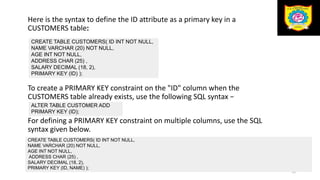
Here is the syntax to define the ID attribute as a primary key in a
CUSTOMERS table:
To create a PRIMARY KEY constraint on the "ID" column when the
CUSTOMERS table already exists, use the following SQL syntax −
For defining a PRIMARY KEY constraint on multiple columns, use the SQL
syntax given below.
54
CREATE TABLE CUSTOMERS( ID INT NOT NULL,
NAME VARCHAR (20) NOT NULL,
AGE INT NOT NULL,
ADDRESS CHAR (25) ,
SALARY DECIMAL (18, 2),
PRIMARY KEY (ID) );
ALTER TABLE CUSTOMER ADD
PRIMARY KEY (ID);
CREATE TABLE CUSTOMERS( ID INT NOT NULL,
NAME VARCHAR (20) NOT NULL,
AGE INT NOT NULL,
ADDRESS CHAR (25) ,
SALARY DECIMAL (18, 2),
PRIMARY KEY (ID, NAME) );
• Foreign Key
• A foreign key constraint is used to establish logical relationship between two or
more tables.
• Foreign key is also known as referential key. It can be defined using the
keyword “references”.
• Normally we can establish relationship between two or more tables by using
some common fields.
• Generally a primary key is considered for defining relationship with other tables.
• The main table which is logically linked with other table is known as ‘Parent
table’ or “master table” while other table is referred to as ‘Child
table’ or “detail table”.
• The following point should be kept in the mind while defining foreign key.
• Data type and size of the parent table and child table should be the same.
• Record can be inserted in detail table only if relevant record is available into the
master table that means while inserting record first we need to insert record into
the parent table then and then we can insert record into the child table.
• To delete a specific record, first we need to delete a relevant record from the
detail table and after that record can be deleted from the parent table.
55
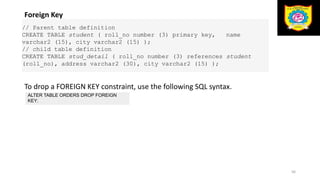
Foreign Key
To drop a FOREIGN KEY constraint, use the following SQL syntax.
56
// Parent table definition
CREATE TABLE student ( roll_no number (3) primary key, name
varchar2 (15), city varchar2 (15) );
// child table definition
CREATE TABLE stud_detail ( roll_no number (3) references student
(roll_no), address varchar2 (30), city varchar2 (15) );
ALTER TABLE ORDERS DROP FOREIGN
KEY;
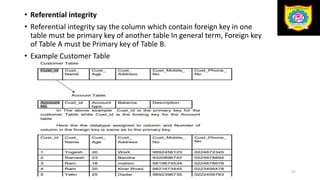
• Referential integrity
• Referential integrity say the column which contain foreign key in one
table must be primary key of another table In general term, Foreign key
of Table A must be Primary key of Table B.
• Example Customer Table
57
• Not Null
• We can define not null constraint when we do not want the user to leave
the field blank.
• When any column contains not null constraint, the user must have to
insert value for the column and it cannot be left blank.
• However it allows duplicate value.
• A table can contain not null constraint on multiple columns.
• Not null constraint can only be defined at column level that means it
cannot be defined at table level.
• ‘Not Null’ keyword is used to define not null constraint.
• Example:
58
CREATE TABLE student ( roll_no number (3) Primary key, name varchar2 (15)
not null, mob number (15) not null );
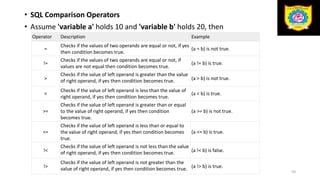
• SQL Comparison Operators
• Assume 'variable a' holds 10 and 'variable b' holds 20, then
59
Operator Description Example
=
Checks if the values of two operands are equal or not, if yes
then condition becomes true.
(a = b) is not true.
!=
Checks if the values of two operands are equal or not, if
values are not equal then condition becomes true.
(a != b) is true.
>
Checks if the value of left operand is greater than the value
of right operand, if yes then condition becomes true. (a > b) is not true.
<
Checks if the value of left operand is less than the value of
right operand, if yes then condition becomes true.
(a < b) is true.
>=
Checks if the value of left operand is greater than or equal
to the value of right operand, if yes then condition
becomes true.
(a >= b) is not true.
<=
Checks if the value of left operand is less than or equal to
the value of right operand, if yes then condition becomes
true.
(a <= b) is true.
!<
Checks if the value of left operand is not less than the value
of right operand, if yes then condition becomes true. (a !< b) is false.
!>
Checks if the value of left operand is not greater than the
value of right operand, if yes then condition becomes true. (a !> b) is true.
60
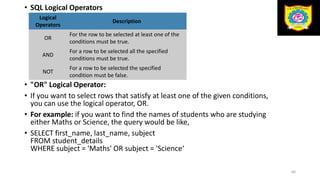
• SQL Logical Operators
• "OR" Logical Operator:
• If you want to select rows that satisfy at least one of the given conditions,
you can use the logical operator, OR.
• For example: if you want to find the names of students who are studying
either Maths or Science, the query would be like,
• SELECT first_name, last_name, subject
FROM student_details
WHERE subject = 'Maths' OR subject = 'Science‘
Logical
Operators
Description
OR
For the row to be selected at least one of the
conditions must be true.
AND
For a row to be selected all the specified
conditions must be true.
NOT
For a row to be selected the specified
condition must be false.
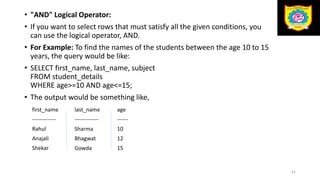
• "AND" Logical Operator:
• If you want to select rows that must satisfy all the given conditions, you
can use the logical operator, AND.
• For Example: To find the names of the students between the age 10 to 15
years, the query would be like:
• SELECT first_name, last_name, subject
FROM student_details
WHERE age>=10 AND age<=15;
• The output would be something like,
61
first_name last_name age
------------- ------------- ------
Rahul Sharma 10
Anajali Bhagwat 12
Shekar Gowda 15
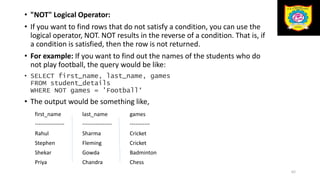
• "NOT" Logical Operator:
• If you want to find rows that do not satisfy a condition, you can use the
logical operator, NOT. NOT results in the reverse of a condition. That is, if
a condition is satisfied, then the row is not returned.
• For example: If you want to find out the names of the students who do
not play football, the query would be like:
• SELECT first_name, last_name, games
FROM student_details
WHERE NOT games = 'Football‘
• The output would be something like,
62
first_name last_name games
---------------- ---------------- -----------
Rahul Sharma Cricket
Stephen Fleming Cricket
Shekar Gowda Badminton
Priya Chandra Chess
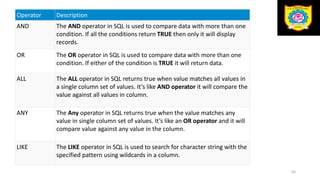
Operator Description
AND The AND operator in SQL is used to compare data with more than one
condition. If all the conditions return TRUE then only it will display
records.
OR The OR operator in SQL is used to compare data with more than one
condition. If either of the condition is TRUE it will return data.
ALL The ALL operator in SQL returns true when value matches all values in
a single column set of values. It’s like AND operator it will compare the
value against all values in column.
ANY The Any operator in SQL returns true when the value matches any
value in single column set of values. It’s like an OR operator and it will
compare value against any value in the column.
LIKE The LIKE operator in SQL is used to search for character string with the
specified pattern using wildcards in a column.
63
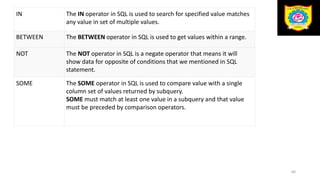
IN The IN operator in SQL is used to search for specified value matches
any value in set of multiple values.
BETWEEN The BETWEEN operator in SQL is used to get values within a range.
NOT The NOT operator in SQL is a negate operator that means it will
show data for opposite of conditions that we mentioned in SQL
statement.
SOME The SOME operator in SQL is used to compare value with a single
column set of values returned by subquery.
SOME must match at least one value in a subquery and that value
must be preceded by comparison operators.
64
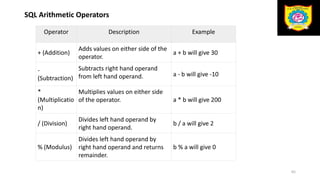
SQL Arithmetic Operators
65
Operator Description Example
+ (Addition)
Adds values on either side of the
operator.
a + b will give 30
-
(Subtraction)
Subtracts right hand operand
from left hand operand. a - b will give -10
*
(Multiplicatio
n)
Multiplies values on either side
of the operator. a * b will give 200
/ (Division)
Divides left hand operand by
right hand operand.
b / a will give 2
% (Modulus)
Divides left hand operand by
right hand operand and returns
remainder.
b % a will give 0
• Set Operation
• SQL supports few Set operations which can be performed on the table
data.
• 4 different types of set operation
• UNION
• UNION ALL
• INTERSECT
• MINUS
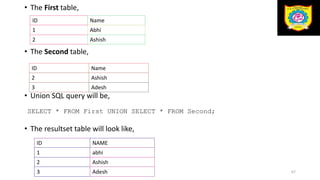
1.Union
• UNION is used to combine the results of two or more SELECT statements.
66
• The First table,
• The Second table,
• Union SQL query will be,
• The resultset table will look like,
67
ID Name
1 Abhi
2 Ashish
ID Name
2 Ashish
3 Adesh
SELECT * FROM First UNION SELECT * FROM Second;;
ID NAME
1 abhi
2 Ashish
3 Adesh
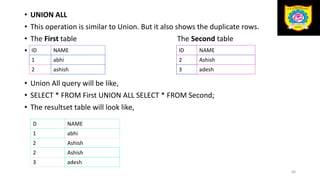
• UNION ALL
• This operation is similar to Union. But it also shows the duplicate rows.
• The First table The Second table
•
• Union All query will be like,
• SELECT * FROM First UNION ALL SELECT * FROM Second;
• The resultset table will look like,
68
ID NAME
1 abhi
2 ashish
ID NAME
2 Ashish
3 adesh
D NAME
1 abhi
2 Ashish
2 Ashish
3 adesh
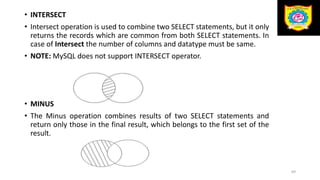
• INTERSECT
• Intersect operation is used to combine two SELECT statements, but it only
returns the records which are common from both SELECT statements. In
case of Intersect the number of columns and datatype must be same.
• NOTE: MySQL does not support INTERSECT operator.
• MINUS
• The Minus operation combines results of two SELECT statements and
return only those in the final result, which belongs to the first set of the
result.
69
References
Introduction To Database Management Systems, ISRD Group
70
Sanjivani K.B.P. Polytechnic, Kopargaon Department of Computer Technology Miss.I.B.Tirse 71

DBMS Relational Data Model .pptx

  • 1.
    SANJIVANI K. B.P. POLYTECHNIC, KOPARGAON With NBA ACCREDIATED programs , Approved by AICTE, New Delhi, Recognized by Govt. of Maharashtra, Affiliated to Maharashtra State Board of Technical Education, Mumbai, ISO 9001:2015 Certified Institute Department:- Computer Technology Class:-SYCM Name of Subject:-Database Management System MSBTE Subject Code:- 22319 Sanjivani K.B.P. Polytechnic, Kopargaon Department of Computer Technology Miss.I.B.Tirse 1
  • 2.
    Unit 2 Relational DataModel Sanjivani K.B.P. Polytechnic, Kopargaon Department of Computer Technology Miss.I.B.Tirse 2
  • 3.
    Unit Outcomes • 2a.Explainthe concept of RDBMS also appropriateness for the given problem. • 2b.Design normalized database structure in the given problem. • 2c.Design SQL queries to create Relational database and apply in the given data constraints. • 2d.Identify the operators for queries implementation of the given problem. Sanjivani K.B.P. Polytechnic, Kopargaon Department of Computer Technology Miss.I.B.Tirse 3
  • 4.
    • Fundamentals ofRDBMS • Table • In relational database terms, a table is responsible for storing data in the database. Database tables consist of rows and columns. • The following program is an example of a CUSTOMERS table − Sanjivani K.B.P. Polytechnic, Kopargaon Department of Computer Technology Miss.I.B.Tirse 4 ID Name AGE COURSE 1 Ajeet 24 B.Tech 2 aryan 20 C.A 3 Mahesh 21 BCA 4 Ratan 22 MCA 5 Vimal 26 BSC
  • 5.
    • Field • Everytable is broken up into smaller entities called fields. The fields in the CUSTOMERS table consist of ID, NAME, AGE, COURSE. • A field is a column in a table that is designed to maintain specific information about every record in the table. Sanjivani K.B.P. Polytechnic, Kopargaon Department of Computer Technology Miss.I.B.Tirse 5
  • 6.
    • Row • Arecord is also called as a row of data is each individual entry that exists in a table. Rows run horizontally. They represent each record. • For example, there are 4 records in the above CUSTOMERS table. Following is a single row of data or record in the CUSTOMERS table Sanjivani K.B.P. Polytechnic, Kopargaon Department of Computer Technology Miss.I.B.Tirse 6 1 Ajeet 24 B.Tech
  • 7.
    • Column • Acolumn is a vertical entity in the table which contains all information associated with a specific field in a table. • For example: "name" is a column in the above table which contains all information about student's name. Sanjivani K.B.P. Polytechnic, Kopargaon Department of Computer Technology Miss.I.B.Tirse 7 Name Aryan Mahesh Ratan Vimal
  • 8.
    • SQL Datatype •MySQL String Data Types • INT − A normal-sized integer that can be signed or unsigned. If signed, the allowable range is from -2147483648 to 2147483647. If unsigned, the allowable range is from 0 to 4294967295. You can specify a width of up to 11 digits. • TINYINT − A very small integer that can be signed or unsigned. If signed, the allowable range is from -128 to 127. If unsigned, the allowable range is from 0 to 255. You can specify a width of up to 4 digits. • SMALLINT − A small integer that can be signed or unsigned. If signed, the allowable range is from -32768 to 32767. If unsigned, the allowable range is from 0 to 65535. You can specify a width of up to 5 digits. • MEDIUMINT − A medium-sized integer that can be signed or unsigned. If signed, the allowable range is from -8388608 to 8388607. If unsigned, the allowable range is from 0 to 16777215. You can specify a width of up to 9 digits. 8
  • 9.
    • BIGINT −A large integer that can be signed or unsigned. If signed, the allowable range is from -9223372036854775808 to 9223372036854775807. If unsigned, the allowable range is from 0 to 18446744073709551615. You can specify a width of up to 20 digits. • FLOAT(M,D) − A floating-point number that cannot be unsigned. You can define the display length (M) and the number of decimals (D). This is not required and will default to 10,2, where 2 is the number of decimals and 10 is the total number of digits (including decimals). Decimal precision can go to 24 places for a FLOAT. e.g1234567890.11 • DOUBLE(M,D) − A double precision floating-point number that cannot be unsigned. You can define the display length (M) and the number of decimals (D). This is not required and will default to 16,4, where 4 is the number of decimals. Decimal precision can go to 53 places for a DOUBLE. REAL is a synonym for DOUBLE. e.g123456789013456.0000 • DECIMAL(M,D) − An unpacked floating-point number that cannot be unsigned. In the unpacked decimals, each decimal corresponds to one byte. Defining the display length (M) and the number of decimals (D) is required. NUMERIC is a synonym for DECIMAL. 9
  • 10.
    • Date AndTime • DATE − A date in YYYY-MM-DD format, between 1000-01-01 and 9999- 12-31. For example, December 30th, 1973 would be stored as 1973-12-30. • DATETIME − A date and time combination in YYYY-MM-DD HH:MM:SS format, between 1000-01-01 00:00:00 and 9999-12-31 23:59:59. For example, 3:30 in the afternoon on December 30th, 1973 would be stored as 1973-12-30 15:30:00. • TIMESTAMP − A timestamp between midnight, January 1st, 1970 and sometime in 2037. This looks like the previous DATETIME format, only without the hyphens between numbers; 3:30 in the afternoon on December 30th, 1973 would be stored as 19731230153000 ( YYYYMMDDHHMMSS ). • TIME − Stores the time in a HH:MM:SS format. • YEAR(M) − Stores a year in a 2-digit or a 4-digit format. If the length is specified as 2 (for example YEAR(2)). Sanjivani K.B.P. Polytechnic, Kopargaon Department of Computer Technology Miss.I.B.Tirse 10
  • 11.
    • String Type •VARCHAR(M) − A variable-length string between 1 and 255 characters in length. For example, VARCHAR(25). You must define a length when creating a VARCHAR field. • BLOB or TEXT − A field with a maximum length of 65535 characters. BLOBs are "Binary Large Objects" and are used to store large amounts of binary data, such as images or other types of files. • Fields defined as TEXT also hold large amounts of data. The difference between the two is that the sorts and comparisons on the stored data are case sensitive on BLOBs and are not case sensitive in TEXT fields. You do not specify a length with BLOB or TEXT. • ENUM − When defining an ENUM, you are creating a list of items from which the value must be selected (or it can be NULL). • For example, if you wanted your field to contain "A" or "B" or "C", you would define your ENUM as ENUM ('A', 'B', 'C') and only those values (or NULL) could ever populate that field. Sanjivani K.B.P. Polytechnic, Kopargaon Department of Computer Technology Miss.I.B.Tirse 11
  • 12.
    • EF CoddRules • Rule 0: • This rule states that for a system to qualify as an RDBMS, it must be able to manage database entirely through the relational capabilities. • Rule 1: Information Rule • All the information in the database should be represented in the term of relational or table. Information should be stored as an values in a tables. • Rule 2: Guaranteed Access Rule • All data must be accessible. The Rule say that there is fundamental requirement of primay key for each record in table , and there should be no ambiguity by stating the table name and its primary key of the each record in the table along with columns name to be accessed. Sanjivani K.B.P. Polytechnic, Kopargaon Department of Computer Technology Miss.I.B.Tirse 12
  • 13.
    • Rule 3:Systematic Treatment of NULL Values • Null values could not be treated as blank space or zero values. The null values are known as unknown values, unassigned values should be treated as missing information and inapplicable information that should be treated as systematic , distinct from regular values. • Rule 4: Active Online Catalog • The system must support an online catalog based data dictionary which hold the information or description about the table in the database. • Rule 5: Comprehensive Data Sub-Language Rule • The system must support at least one relational language • A database should be accessible by a language supported for definition, manipulation and transaction management operation. Sanjivani K.B.P. Polytechnic, Kopargaon Department of Computer Technology Miss.I.B.Tirse 13
  • 14.
    • Rule 6:View Updating Rule • All the views of a database, which can theoretically be updated, must also be updatable by the system. • Rule 7: High-Level Insert, Update, and Delete Rule • This rules states that in the relational model, the structured query language must performed data manipulation such as inserting , updating and deleting record on sets of rows in the table. • Rule 8: Physical Data Independence • The data stored in a database must be independent of the applications that access the database. Any modification in the physical location of a table should not enforce modification at application level. Sanjivani K.B.P. Polytechnic, Kopargaon Department of Computer Technology Miss.I.B.Tirse 14 .
  • 15.
    • Rule 9:Logical Data Independence • This rule state that changes in the logical level (rows ,columns and so on) must not change to the application’s structure • Rule 10: Integrity Independence • Integrity constraints modified at database level should not enforce modification at application level. • Rule 11: Distribution Independence • The end-user must not be able to see that the data is distributed over various locations. Users should always get the impression that the data is located at one site only. • Rule 12: Non-Subversion Rule • The system must not have features that allow you to subvert database structure integrity. Basically, the system must not include back doors that let you cheat the system for features such as administrative privileges or data constraints. Sanjivani K.B.P. Polytechnic, Kopargaon Department of Computer Technology Miss.I.B.Tirse 15
  • 16.
    • Keys • KEYSin DBMS is an attribute or set of attributes which helps you to identify a row(tuple) in a relation(table). • They allow you to find the relation between two tables. Keys help you uniquely identify a row in a table by a combination of one or more columns in that table. • Key is also helpful for finding unique record or row from the table. Database key is also helpful for finding unique record or row from the table. Sanjivani K.B.P. Polytechnic, Kopargaon Department of Computer Technology Miss.I.B.Tirse 16 Employee ID FirstName LastName 11 Andrew Johnson 22 Tom Wood 33 Tom Hale
  • 17.
    • Types ofKeys Sanjivani K.B.P. Polytechnic, Kopargaon Department of Computer Technology Miss.I.B.Tirse 17
  • 18.
    • Primary Key •PRIMARY KEY in DBMS is a column or group of columns in a table that uniquely identify every row in that table. • The Primary Key can’t be a duplicate meaning the same value can’t appear more than once in the table. • A table cannot have more than one primary key. • Rules for defining Primary key: • Two rows can’t have the same primary key value • It must for every row to have a primary key value. • The primary key field cannot be null. • The value in a primary key column can never be modified or updated if any foreign key refers to that primary key. Sanjivani K.B.P. Polytechnic, Kopargaon Department of Computer Technology Miss.I.B.Tirse 18
  • 19.
    Sanjivani K.B.P. Polytechnic,Kopargaon Department of Computer Technology Miss.I.B.Tirse 19 • In the following example, StudID is a Primary Key. StudID First Name Branch Email 1 Tom Computer abc@gmail.co m 2 Nick Computer xyz@gmail.co m 3 Nick Mechanical mno@yahoo.c om
  • 20.
    • Super Key •Super Key is defined as a set of attributes within a table that can uniquely identify each record within a table. • Super Key is a superset of Candidate key. • Let's take a simple Student table, with fields student_id, name, phone, age. Sanjivani K.B.P. Polytechnic, Kopargaon Department of Computer Technology Miss.I.B.Tirse 20
  • 21.
    • Student_id isunique for every row of data, hence it can be used to identity each row uniquely. • Next comes,(student_id,name) now name of two students can be same, but their student_id can't be same hence this combination can also be a key. • Similarly, phone number for every student will be unique, hence again, Phone no can also be a key. So they all are super keys. Sanjivani K.B.P. Polytechnic, Kopargaon Department of Computer Technology Miss.I.B.Tirse 21 student_id name phone age 1 Akon 9876723452 17 2 Akon 9991165674 19 3 Bkon 7898756543 18 4 Ckon 8987867898 19 5 Dkon 9990080080 17
  • 22.
    e.g. {sid},{sid,name},{sid,marks} these aresuper keys. {name,marks,dept}=? {marks,course,dept}=? Sanjivani K.B.P. Polytechnic, Kopargaon Department of Computer Technology Miss.I.B.Tirse 22 Student_id Name Marks Department Course 1 Akon 78 CS C1 2 Bkon 60 EE C1 3 Akon 78 CS C2 4 Bkon 60 EE C3 5 Ckon 80 IT C2
  • 23.
    • Candidate Key •Candidate Key in SQL is a set of attributes that uniquely identify tuples in a table. • Candidate Key is a super key with no repeated attributes. The Primary key should be selected from the candidate keys. • Every table must have at least a single candidate key. A table can have multiple candidate keys but only a single primary key. • Properties of Candidate key: • It must contain unique values • Must not contain null values • It should contain minimum fields to ensure uniqueness • Uniquely identify each record in a table Sanjivani K.B.P. Polytechnic, Kopargaon Department of Computer Technology Miss.I.B.Tirse 23
  • 24.
    Sanjivani K.B.P. Polytechnic,Kopargaon Department of Computer Technology Miss.I.B.Tirse 24 • Candidate key Example: In the given table Stud ID, Roll No, and email are candidate keys which help us to uniquely identify the student record in the table. StudID Roll No First Name LastName Email 1 11 Tom Price abc@gmail.co m 2 12 Nick Wright xyz@gmail.co m 3 13 Dana Natan mno@yahoo.c om
  • 25.
    • Alternate Keys •ALTERNATE KEYS is a column or group of columns in a table that uniquely identify every row in that table. All the keys which are not primary key are called an Alternate Key. • Example: • In this table, StudID, Roll No, Email are qualified to become a primary key. But since StudID is the primary key, Roll No, Email becomes the alternative key. Sanjivani K.B.P. Polytechnic, Kopargaon Department of Computer Technology Miss.I.B.Tirse 25 StudID Roll No First Name LastName Email 1 11 Tom Price abc@gmail.co m 2 12 Nick Wright xyz@gmail.co m 3 13 Dana Natan mno@yahoo.c om
  • 26.
    Sanjivani K.B.P. Polytechnic,Kopargaon Department of Computer Technology Miss.I.B.Tirse 26
  • 27.
    • Foreign Key •Foreign key is primary key but it is in another table. • FOREIGN KEY is a column that creates a relationship between two tables. • Foreign keys are the column of the table which is used to point to the primary key of another table. • In a company, every employee works in a specific department, and employee and department are two different entities. • So we can't store the information of the department in the employee table. That's why we link these two tables through the primary key of one table. Sanjivani K.B.P. Polytechnic, Kopargaon Department of Computer Technology Miss.I.B.Tirse 27
  • 28.
    • We addthe primary key of the DEPARTMENT table, Department_Id as a new attribute in the EMPLOYEE table. • Now in the EMPLOYEE table, Department_Id is the foreign key, and both the tables are related. Sanjivani K.B.P. Polytechnic, Kopargaon Department of Computer Technology Miss.I.B.Tirse 28
  • 29.
    • Normalization • Normalizationis the process of organizing the data in the database. • Normalization is used to minimize the redundancy from a relation or set of relations. It is also used to eliminate the undesirable characteristics like Insertion, Update and Deletion Anomalies. • Normalization divides the larger table into the smaller table and links them using relationship. • The normal form is used to reduce redundancy from the database table. Sanjivani K.B.P. Polytechnic, Kopargaon Department of Computer Technology Miss.I.B.Tirse 29
  • 30.
    • Types ofNormal Forms • There are the four types of normal forms: Sanjivani K.B.P. Polytechnic, Kopargaon Department of Computer Technology Miss.I.B.Tirse 30
  • 31.
    • 1. FirstNormal Form – • If a relation contain composite or multi-valued attribute, it violates first normal form or a relation is in first normal form if it does not contain any composite or multi-valued attribute. • A relation is in first normal form if every attribute in that relation is singled valued attribute. Sanjivani K.B.P. Polytechnic, Kopargaon Department of Computer Technology Miss.I.B.Tirse 31
  • 32.
    Example 1 –Relation STUDENT in table 1 is not in 1NF because of multi-valued attribute STUD_PHONE. Its decomposition into 1NF has been shown in table 2. Sanjivani K.B.P. Polytechnic, Kopargaon Department of Computer Technology Miss.I.B.Tirse 32
  • 33.
    • 2. SecondNormal Form – • To be in second normal form, a relation must be in first normal form and relation must not contain any partial dependency. • A relation is in 2NF if it has No Partial Dependency • Partial Dependency – If the proper subset of candidate key determines non-prime attribute, it is called partial dependency. • Prime attribute − An attribute, which is a part of the prime-key, is known as a prime attribute. • Non-prime attribute − An attribute, which is not a part of the prime-key, is said to be a nonprime attribute. Sanjivani K.B.P. Polytechnic, Kopargaon Department of Computer Technology Miss.I.B.Tirse 33
  • 34.
    • In thebelow table, we have partial dependency; let us see how − • The prime key attributes are StudentID and ProjectNo, and • StudentID = Unique ID of the student StudentName = Name of the student ProjectNo = Unique ID of the project ProjectName = Name of the project • <StudentProject> • As stated, the non-prime attributes i.e. StudentName and ProjectName should be functionally dependent on part of a candidate key, to be Partial Dependent. Sanjivani K.B.P. Polytechnic, Kopargaon Department of Computer Technology Miss.I.B.Tirse 34 StudentID ProjectNo StudentName ProjectName S01 199 Katie Geo Location S02 120 Ollie Cluster Exploration
  • 35.
    • The StudentNamecan be determined by StudentID, which makes the relation Partial Dependent. • The ProjectName can be determined by ProjectNo, which makes the relation Partial Dependent. • Therefore, the <StudentProject> relation violates the 2NF in Normalization and is considered a bad database design. • To remove Partial Dependency and violation on 2NF, decompose the tables <StudentInfo> <ProjectInfo> Sanjivani K.B.P. Polytechnic, Kopargaon Department of Computer Technology Miss.I.B.Tirse 35 StudentI D ProjectNo StudentName S01 199 Katie S02 120 Ollie ProjectNo ProjectName 199 Geo Location 120 Cluster Exploration
  • 36.
    • Trivial FunctionalDependency • Trivial FD • If a functional dependency (FD) X → Y holds, where Y is a subset of X, then it is called a trivial FD. Trivial FDs always hold. • Non-trivial FD • If an FD X → Y holds, where Y is not a subset of X, then it is called a non-trivial FD. Sanjivani K.B.P. Polytechnic, Kopargaon Department of Computer Technology Miss.I.B.Tirse 36
  • 37.
    • Third Normalform • A relation will be in 3NF if it is in 1NF and 2NF and not contain any transitive partial dependency. e.g. X->Y, Y->Z, X->Z • 3NF is used to reduce the data duplication. It is also used to achieve the data integrity. • If there is no transitive dependency for non-prime attributes, then the relation must be in third normal form. • A relation is in third normal form if it holds atleast one of the following conditions for every non-trivial function dependency X → Y. • X is a super key. • Y is a prime attribute, i.e., each element of Y is part of some candidate key. Sanjivani K.B.P. Polytechnic, Kopargaon Department of Computer Technology Miss.I.B.Tirse 37
  • 38.
    • EMPLOYEE_DETAIL table: •Non-prime attributes: In the given table, all attributes except EMP_ID are non-prime. • Here, EMP_STATE & EMP_CITY dependent on EMP_ZIP and EMP_ZIP dependent on EMP_ID. The non-prime attributes (EMP_STATE, EMP_CITY) transitively dependent on super key(EMP_ID). It violates the rule of third normal form. • That's why we need to move the EMP_CITY and EMP_STATE to the new <EMPLOYEE_ZIP> table, with EMP_ZIP as a Primary key. Sanjivani K.B.P. Polytechnic, Kopargaon Department of Computer Technology Miss.I.B.Tirse 38 EMP_ID EMP_NAME EMP_ZIP EMP_STATE EMP_CITY 222 Harry 201010 UP Noida 333 Stephan 02228 US Boston 444 Lan 60007 US Chicago 555 Katharine 06389 UK Norwich 666 John 462007 MP Bhopal
  • 39.
    • EMPLOYEE table: •EMPLOYEE_ZIP table: Sanjivani K.B.P. Polytechnic, Kopargaon Department of Computer Technology Miss.I.B.Tirse 39 EMP_ID EMP_NAME EMP_ZIP 222 Harry 201010 333 Stephan 02228 444 Lan 60007 555 Katharine 06389 666 John 462007 EMP_ZIP EMP_STATE EMP_CITY 201010 UP Noida 02228 US Boston 60007 US Chicago 06389 UK Norwich 462007 MP Bhopal
  • 40.
    • Structured QueryLanguage • It acts as an interpreter which allows the user to interact directly with database through computer language. • SQL is case insensitive. But it is a recommended practice to use keywords (like SELECT, UPDATE, CREATE, etc) in capital letters and use user defined things (liked table name, column name, etc) in small letters. • We can write comments in SQL using “–” (double hyphen) at the beginning of any line. • SQL is the programming language for relational databases (explained below) like MySQL, Oracle, Sybase, SQL Server, Postgre, etc. Other non-relational databases (also called NoSQL) databases like MongoDB, DynamoDB, etc do not use SQL Sanjivani K.B.P. Polytechnic, Kopargaon Department of Computer Technology Miss.I.B.Tirse 40
  • 41.
    • What CanSQL do? • SQL can execute queries against a database • SQL can retrieve data from a database • SQL can insert records in a database • SQL can update records in a database • SQL can delete records from a database • SQL can create new databases • SQL can create new tables in a database • SQL can create stored procedures in a database • SQL can create views in a database • SQL can set permissions on tables, procedures, and views Sanjivani K.B.P. Polytechnic, Kopargaon Department of Computer Technology Miss.I.B.Tirse 41
  • 42.
    • Types ofSQL Commands • There are five types of SQL commands: DDL, DML, DCL, TCL, and DQL. 42
  • 43.
    • Data DefinitionLanguage (DDL) • DDL changes the structure of the table like creating a table, deleting a table, altering a table, etc. • All the command of DDL are auto-committed that means it permanently save all the changes in the database. • Here are some commands that come under DDL: • CREATE • ALTER • DROP • TRUNCATE 43
  • 44.
    a.CREATE It isused to create a new table in the database Syntax: CREATE TABLE TABLE_NAME (COLUMN_NAME DATATYPES[,....]); Example: CREATE TABLE EMPLOYEE(Name VARCHAR2(20), Email VARCHAR2(100), DO B DATE); b. DROP: It is used to delete both the structure and record stored in the table. Syntax: • DROP TABLE table_name; • Example • DROP TABLE EMPLOYEE; 44
  • 45.
    c. ALTER: Itis used to alter the structure of the database. This change could be either to modify the characteristics of an existing attribute or probably to add a new attribute. • Syntax: • To add a new column in the table • ALTER TABLE table_name ADD column_name COLUMN-definition; • To modify existing column in the table: • ALTER TABLE table_name MODIFY(column_definitions....); • EXAMPLE • ALTER TABLE STU_DETAILS ADD(ADDRESS VARCHAR2(20)); • ALTER TABLE STU_DETAILS MODIFY (NAME VARCHAR2(20)); 45
  • 46.
    • d. TRUNCATE:It is used to delete all the rows from the table and free the space containing the table. • Truncate command deletes the data inside a table, but not the table itself. • Syntax: TRUNCATE TABLE table_name; • Example: • TRUNCATE TABLE EMPLOYEE; 46
  • 47.
    • 2. DataManipulation Language • DML commands are used to modify the database. It is responsible for all form of changes in the database. • The command of DML is not auto-committed that means it can't permanently save all the changes in the database. They can be rollback.(undo transcations) • Here are some commands that come under DML:INSERT, UPDATE, DELETE • a. INSERT: The INSERT statement is a SQL query. It is used to insert data into the row of a table. • Syntax: • INSERT INTO TABLE_NAME (col1, col2, col3,.... col N) VALUES (value1, valu e2, value3, .... valueN); OR • INSERT INTO TABLE_NAME VALUES (value1, value2, value3, .... valueN); 47
  • 48.
    • For example: •INSERT INTO javatpoint (Author, Subject) VALUES (“ISRD Group", "DBMS"); • b. UPDATE: This command is used to update or modify the value of a column in the table. • Syntax: • UPDATE table_name SET [column_name1= value1,...column_nameN = val ueN] [WHERE CONDITION] • For example: • UPDATE students SET User_Name = ‘Sunita' WHERE Student_Id = '3' • c. DELETE: It is used to remove one or more row from a table. • Syntax: • DELETE FROM table_name [WHERE condition]; • For example: • DELETE FROM javatpoint WHERE Author=“ISRD Group"; 48
  • 49.
    • 3. DataControl Language • DCL commands are used to grant and take back authority from any database user. • Here are some commands that come under DCL: • Grant • Revoke • a. Grant: It is used to give user access privileges to a database. This command also allows users to grant permissions to other users too. • Example • GRANT insert, select on account to Ram • By the above command user ram has granted permissions on accounts database object like he can insert into accounts • b. Revoke: It is used to take back permissions from the user. • Example • Revoke insert, select on account to Ram 49
  • 50.
    • 4. TransactionControl Language • Transcation control language commands are used to manage transcation in database. • TCL commands can only use with DML commands like INSERT, DELETE and UPDATE only. • Here are some commands that come under TCL: • COMMIT • ROLLBACK • SAVEPOINT • a. Commit: Commit command is used to save all the transactions permanently to the database. • Syntax: • COMMIT; • Example: • DELETE FROM CUSTOMERS WHERE AGE = 25; • COMMIT; 50
  • 51.
    • b. Rollback:Rollback command is used to undo transactions that have not already been saved to the database.(undo change) • Syntax: • ROLLBACK; • Example: • DELETE FROM CUSTOMERS WHERE AGE = 25; • ROLLBACK; • c. SAVEPOINT: It is used to roll the transaction back to a certain point without rolling back the entire transaction.(to save temporarily) • Syntax: • SAVEPOINT SAVEPOINT_NAME; 51
  • 52.
    • 5. DataQuery Language • DQL is used to fetch the data from the database. • It uses only one command: • SELECT • a. SELECT:It retrieve records from one or more table. It is used to select the attribute based on the condition described by WHERE clause. • Syntax: • SELECT expressions FROM TABLES WHERE conditions; • For example: • SELECT emp_name FROM employee WHERE age > 20; • SELECT * from student; 52
  • 53.
    Constraint Constrains that controldata insertion and data retrieval speed are known as I/O (Input-Output) constraints. Constraints could be either on a column level or a table level. The column level constraints are applied only to one column, whereas the table level constraints are applied to the whole table. • It includes the following constraints. • Primary Key, Foreign Key, Unique Key, Not Null, Primary Key • Primary key is used to identify a record uniquely from the database table. • A primary key means UNIQUE + NOT NULL. • Value must be available for the column on which primary key has been defined. • User cannot leave the field blank. • It cannot contain duplicate values. • Primary key can be defined either at table level or at column level. • Primary key keyword is used to define primary key constraint 53
  • 54.
    Here is thesyntax to define the ID attribute as a primary key in a CUSTOMERS table: To create a PRIMARY KEY constraint on the "ID" column when the CUSTOMERS table already exists, use the following SQL syntax − For defining a PRIMARY KEY constraint on multiple columns, use the SQL syntax given below. 54 CREATE TABLE CUSTOMERS( ID INT NOT NULL, NAME VARCHAR (20) NOT NULL, AGE INT NOT NULL, ADDRESS CHAR (25) , SALARY DECIMAL (18, 2), PRIMARY KEY (ID) ); ALTER TABLE CUSTOMER ADD PRIMARY KEY (ID); CREATE TABLE CUSTOMERS( ID INT NOT NULL, NAME VARCHAR (20) NOT NULL, AGE INT NOT NULL, ADDRESS CHAR (25) , SALARY DECIMAL (18, 2), PRIMARY KEY (ID, NAME) );
  • 55.
    • Foreign Key •A foreign key constraint is used to establish logical relationship between two or more tables. • Foreign key is also known as referential key. It can be defined using the keyword “references”. • Normally we can establish relationship between two or more tables by using some common fields. • Generally a primary key is considered for defining relationship with other tables. • The main table which is logically linked with other table is known as ‘Parent table’ or “master table” while other table is referred to as ‘Child table’ or “detail table”. • The following point should be kept in the mind while defining foreign key. • Data type and size of the parent table and child table should be the same. • Record can be inserted in detail table only if relevant record is available into the master table that means while inserting record first we need to insert record into the parent table then and then we can insert record into the child table. • To delete a specific record, first we need to delete a relevant record from the detail table and after that record can be deleted from the parent table. 55
  • 56.
    Foreign Key To dropa FOREIGN KEY constraint, use the following SQL syntax. 56 // Parent table definition CREATE TABLE student ( roll_no number (3) primary key, name varchar2 (15), city varchar2 (15) ); // child table definition CREATE TABLE stud_detail ( roll_no number (3) references student (roll_no), address varchar2 (30), city varchar2 (15) ); ALTER TABLE ORDERS DROP FOREIGN KEY;
  • 57.
    • Referential integrity •Referential integrity say the column which contain foreign key in one table must be primary key of another table In general term, Foreign key of Table A must be Primary key of Table B. • Example Customer Table 57
  • 58.
    • Not Null •We can define not null constraint when we do not want the user to leave the field blank. • When any column contains not null constraint, the user must have to insert value for the column and it cannot be left blank. • However it allows duplicate value. • A table can contain not null constraint on multiple columns. • Not null constraint can only be defined at column level that means it cannot be defined at table level. • ‘Not Null’ keyword is used to define not null constraint. • Example: 58 CREATE TABLE student ( roll_no number (3) Primary key, name varchar2 (15) not null, mob number (15) not null );
  • 59.
    • SQL ComparisonOperators • Assume 'variable a' holds 10 and 'variable b' holds 20, then 59 Operator Description Example = Checks if the values of two operands are equal or not, if yes then condition becomes true. (a = b) is not true. != Checks if the values of two operands are equal or not, if values are not equal then condition becomes true. (a != b) is true. > Checks if the value of left operand is greater than the value of right operand, if yes then condition becomes true. (a > b) is not true. < Checks if the value of left operand is less than the value of right operand, if yes then condition becomes true. (a < b) is true. >= Checks if the value of left operand is greater than or equal to the value of right operand, if yes then condition becomes true. (a >= b) is not true. <= Checks if the value of left operand is less than or equal to the value of right operand, if yes then condition becomes true. (a <= b) is true. !< Checks if the value of left operand is not less than the value of right operand, if yes then condition becomes true. (a !< b) is false. !> Checks if the value of left operand is not greater than the value of right operand, if yes then condition becomes true. (a !> b) is true.
  • 60.
    60 • SQL LogicalOperators • "OR" Logical Operator: • If you want to select rows that satisfy at least one of the given conditions, you can use the logical operator, OR. • For example: if you want to find the names of students who are studying either Maths or Science, the query would be like, • SELECT first_name, last_name, subject FROM student_details WHERE subject = 'Maths' OR subject = 'Science‘ Logical Operators Description OR For the row to be selected at least one of the conditions must be true. AND For a row to be selected all the specified conditions must be true. NOT For a row to be selected the specified condition must be false.
  • 61.
    • "AND" LogicalOperator: • If you want to select rows that must satisfy all the given conditions, you can use the logical operator, AND. • For Example: To find the names of the students between the age 10 to 15 years, the query would be like: • SELECT first_name, last_name, subject FROM student_details WHERE age>=10 AND age<=15; • The output would be something like, 61 first_name last_name age ------------- ------------- ------ Rahul Sharma 10 Anajali Bhagwat 12 Shekar Gowda 15
  • 62.
    • "NOT" LogicalOperator: • If you want to find rows that do not satisfy a condition, you can use the logical operator, NOT. NOT results in the reverse of a condition. That is, if a condition is satisfied, then the row is not returned. • For example: If you want to find out the names of the students who do not play football, the query would be like: • SELECT first_name, last_name, games FROM student_details WHERE NOT games = 'Football‘ • The output would be something like, 62 first_name last_name games ---------------- ---------------- ----------- Rahul Sharma Cricket Stephen Fleming Cricket Shekar Gowda Badminton Priya Chandra Chess
  • 63.
    Operator Description AND TheAND operator in SQL is used to compare data with more than one condition. If all the conditions return TRUE then only it will display records. OR The OR operator in SQL is used to compare data with more than one condition. If either of the condition is TRUE it will return data. ALL The ALL operator in SQL returns true when value matches all values in a single column set of values. It’s like AND operator it will compare the value against all values in column. ANY The Any operator in SQL returns true when the value matches any value in single column set of values. It’s like an OR operator and it will compare value against any value in the column. LIKE The LIKE operator in SQL is used to search for character string with the specified pattern using wildcards in a column. 63
  • 64.
    IN The INoperator in SQL is used to search for specified value matches any value in set of multiple values. BETWEEN The BETWEEN operator in SQL is used to get values within a range. NOT The NOT operator in SQL is a negate operator that means it will show data for opposite of conditions that we mentioned in SQL statement. SOME The SOME operator in SQL is used to compare value with a single column set of values returned by subquery. SOME must match at least one value in a subquery and that value must be preceded by comparison operators. 64
  • 65.
    SQL Arithmetic Operators 65 OperatorDescription Example + (Addition) Adds values on either side of the operator. a + b will give 30 - (Subtraction) Subtracts right hand operand from left hand operand. a - b will give -10 * (Multiplicatio n) Multiplies values on either side of the operator. a * b will give 200 / (Division) Divides left hand operand by right hand operand. b / a will give 2 % (Modulus) Divides left hand operand by right hand operand and returns remainder. b % a will give 0
  • 66.
    • Set Operation •SQL supports few Set operations which can be performed on the table data. • 4 different types of set operation • UNION • UNION ALL • INTERSECT • MINUS 1.Union • UNION is used to combine the results of two or more SELECT statements. 66
  • 67.
    • The Firsttable, • The Second table, • Union SQL query will be, • The resultset table will look like, 67 ID Name 1 Abhi 2 Ashish ID Name 2 Ashish 3 Adesh SELECT * FROM First UNION SELECT * FROM Second;; ID NAME 1 abhi 2 Ashish 3 Adesh
  • 68.
    • UNION ALL •This operation is similar to Union. But it also shows the duplicate rows. • The First table The Second table • • Union All query will be like, • SELECT * FROM First UNION ALL SELECT * FROM Second; • The resultset table will look like, 68 ID NAME 1 abhi 2 ashish ID NAME 2 Ashish 3 adesh D NAME 1 abhi 2 Ashish 2 Ashish 3 adesh
  • 69.
    • INTERSECT • Intersectoperation is used to combine two SELECT statements, but it only returns the records which are common from both SELECT statements. In case of Intersect the number of columns and datatype must be same. • NOTE: MySQL does not support INTERSECT operator. • MINUS • The Minus operation combines results of two SELECT statements and return only those in the final result, which belongs to the first set of the result. 69
  • 70.
    References Introduction To DatabaseManagement Systems, ISRD Group 70
  • 71.
    Sanjivani K.B.P. Polytechnic,Kopargaon Department of Computer Technology Miss.I.B.Tirse 71