Solr vs. Elasticsearch 
Case by Case 
Alexandre Rafalovitch @arafalov 
@SolrStart 
www.solr-start.com
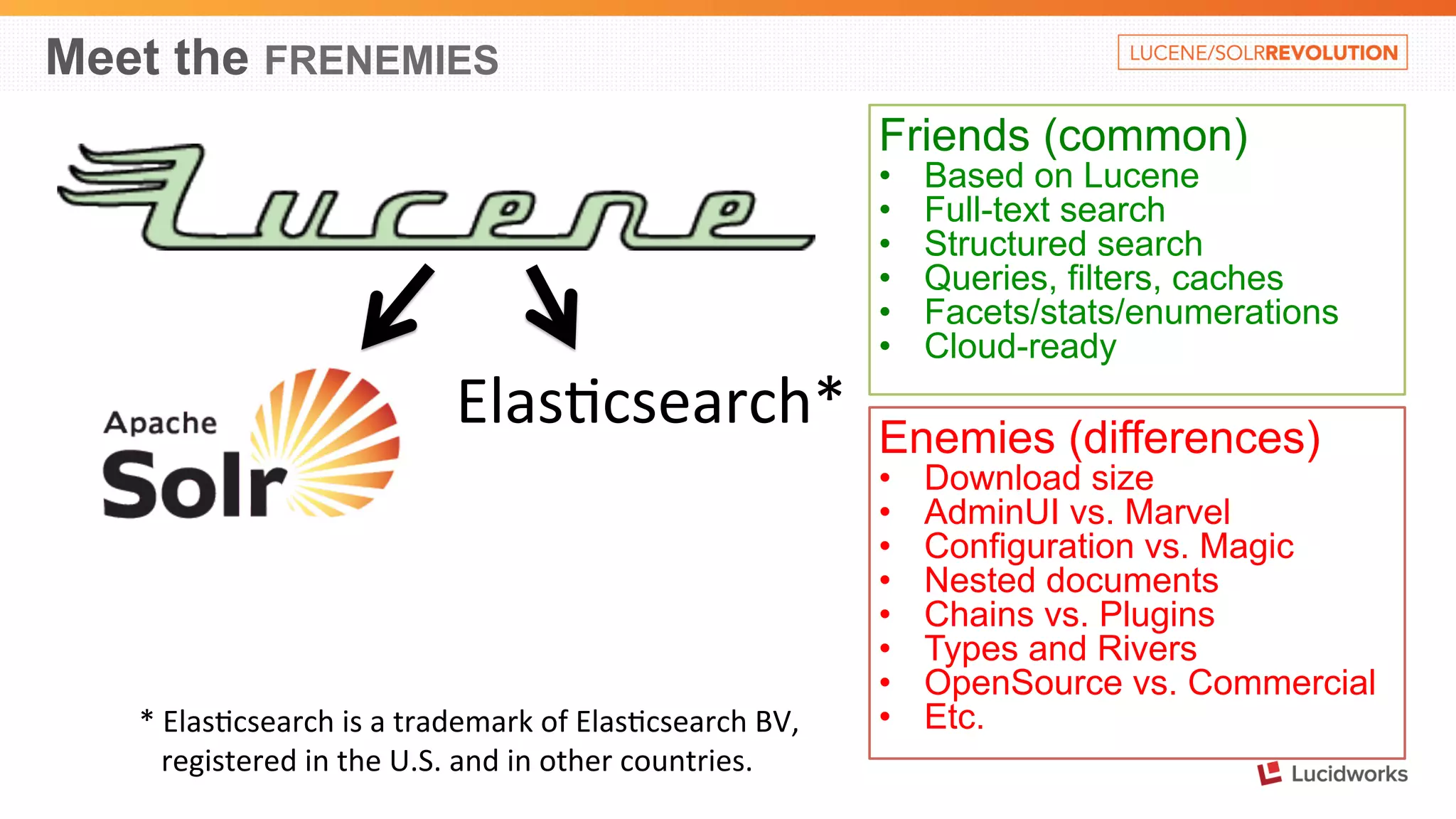
Meet the FRENEMIES 
Friends (common) 
• Based on Lucene 
• Full-text search 
• Structured search 
• Queries, filters, caches 
• Facets/stats/enumerations 
• Cloud-ready 
Elas%csearch* 
* 
Elas%csearch 
is 
a 
trademark 
of 
Elas%csearch 
BV, 
registered 
in 
the 
U.S. 
and 
in 
other 
countries. 
Enemies (differences) 
• Download size 
• AdminUI vs. Marvel 
• Configuration vs. Magic 
• Nested documents 
• Chains vs. Plugins 
• Types and Rivers 
• OpenSource vs. Commercial 
• Etc.
This used to be Solr (now in Lucene/ES) 
• Field 
types 
• Dismax/eDismax 
• Many 
of 
analysis 
filters 
(WordDelimiterFilter, 
Soundex, 
Regex, 
HTML, 
kstem, 
Trim…) 
• Mul%-­‐valued 
field 
cache 
• …. 
(source: 
hOp://heliosearch.org/lucene-­‐solr-­‐history/ 
) 
• Disclaimer: 
Nowadays, 
Elas%csearch 
hires 
awesome 
Lucene 
hackers
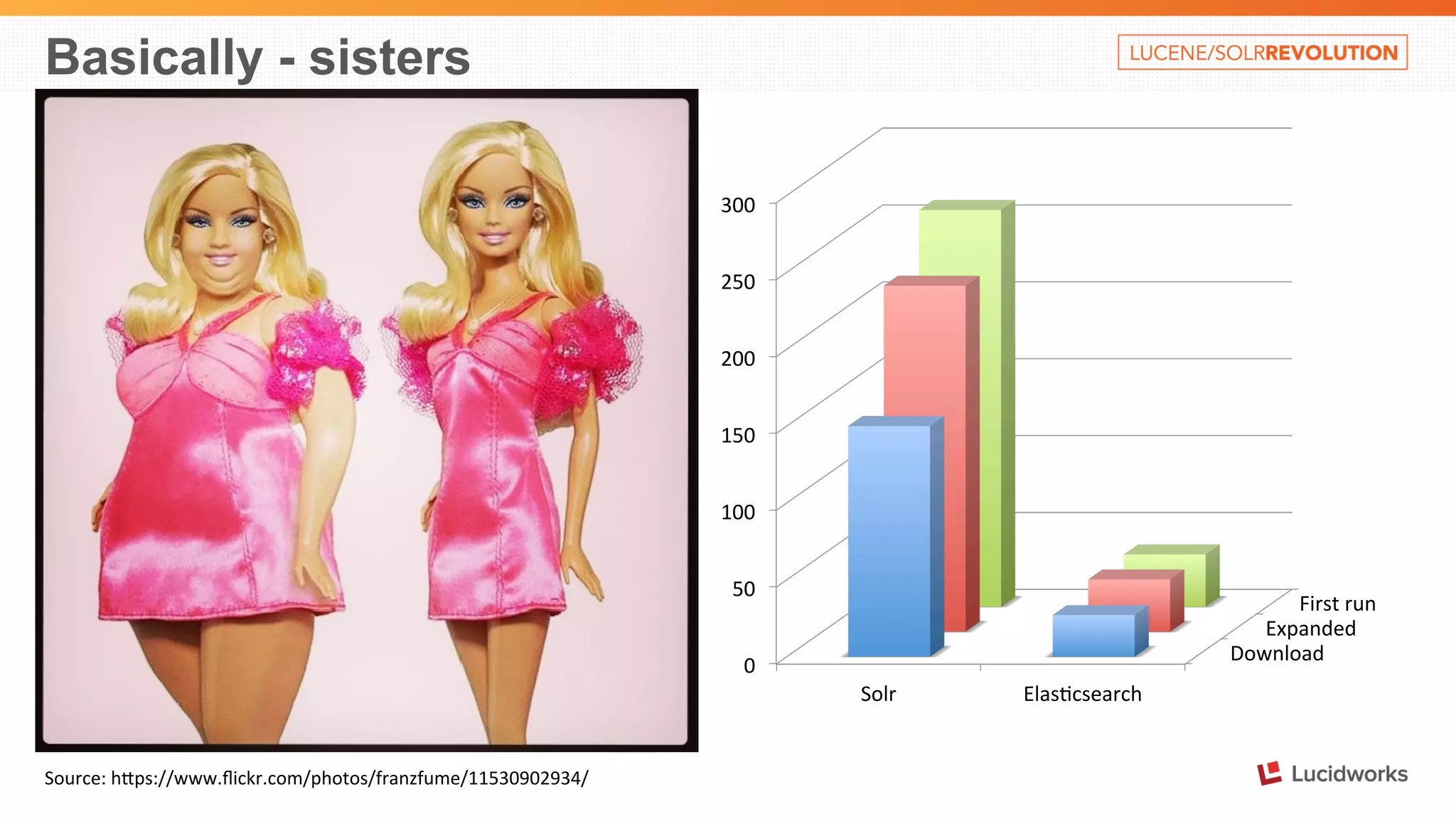
Basically - sisters 
Source: 
hOps://www.flickr.com/photos/franzfume/11530902934/ 
First 
run 
Expanded 
Download 
300 
250 
200 
150 
100 
50 
0 
Solr 
Elas%csearch
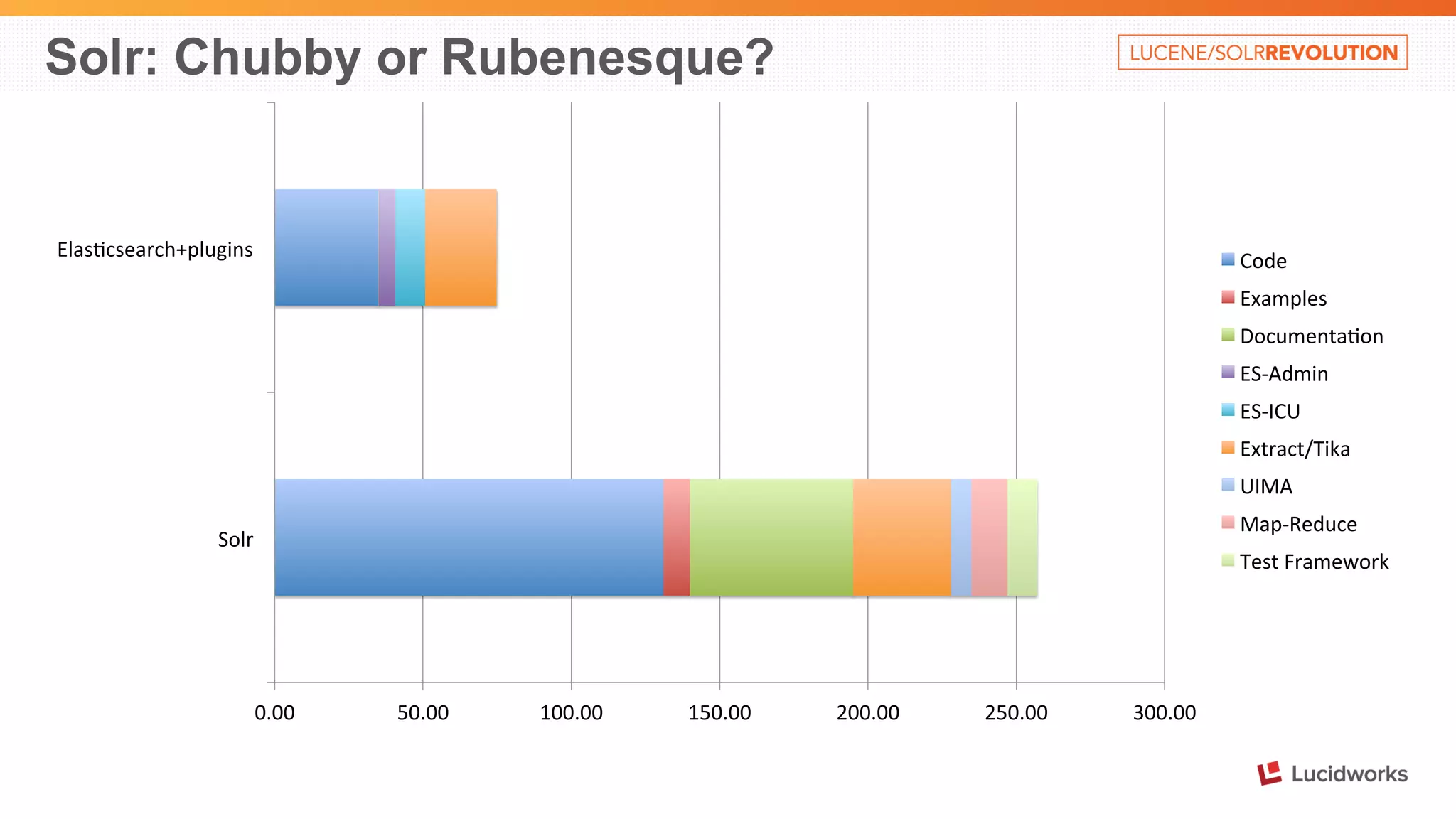
Solr: Chubby or Rubenesque? 
0.00 
50.00 
100.00 
150.00 
200.00 
250.00 
300.00 
Elas%csearch+plugins 
Solr 
Code 
Examples 
Documenta%on 
ES-­‐Admin 
ES-­‐ICU 
Extract/Tika 
UIMA 
Map-­‐Reduce 
Test 
Framework
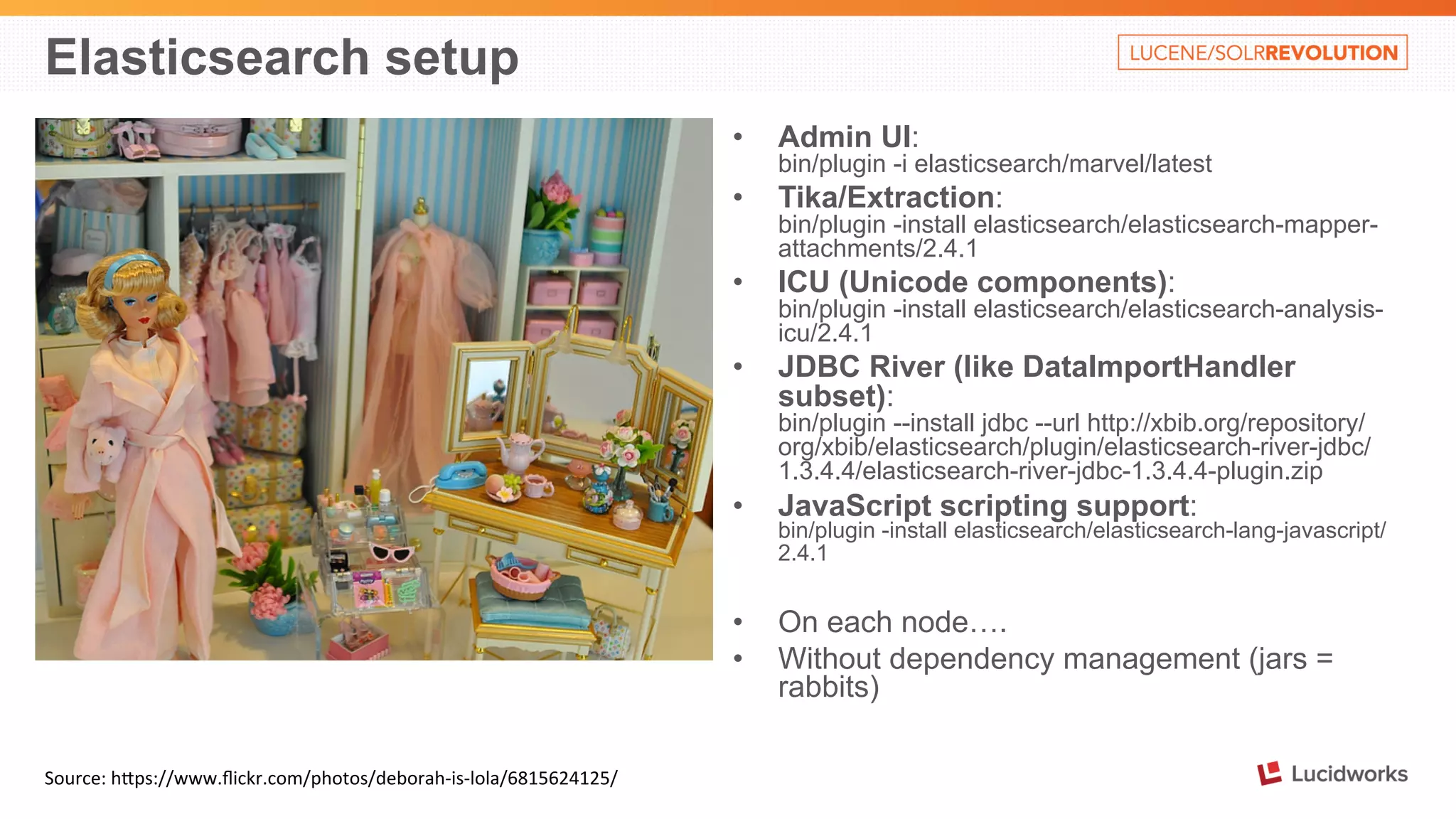
Elasticsearch setup 
Source: 
hOps://www.flickr.com/photos/deborah-­‐is-­‐lola/6815624125/ 
• Admin UI: 
bin/plugin -i elasticsearch/marvel/latest 
• Tika/Extraction: 
bin/plugin -install elasticsearch/elasticsearch-mapper-attachments/ 
2.4.1 
• ICU (Unicode components): 
bin/plugin -install elasticsearch/elasticsearch-analysis-icu/ 
2.4.1 
• JDBC River (like DataImportHandler 
subset): 
bin/plugin --install jdbc --url http://xbib.org/repository/ 
org/xbib/elasticsearch/plugin/elasticsearch-river-jdbc/ 
1.3.4.4/elasticsearch-river-jdbc-1.3.4.4-plugin.zip 
• JavaScript scripting support: 
bin/plugin -install elasticsearch/elasticsearch-lang-javascript/ 
2.4.1 
• On each node…. 
• Without dependency management (jars = 
rabbits)
Index a document - Elasticsearch 
1. Setup an index/collection 
2. Define fields and types 
3. Index content (using Marvel sense): 
POST /test1/hello 
{ 
"msg": "Happy birthday", 
"names": ["Alex", "Mark"], 
"when": "2014-11-01T10:09:08" 
} 
Alternative: 
PUT /test1/hello/id1 
{ 
"msg": "Happy birthday", 
"names": ["Alex", "Mark"], 
"when": "2014-11-01T10:09:08" 
} 
An index, type and definitions are created automatically 
So, 
where 
is 
our 
document: 
GET 
/test1/hello/_search 
{ 
"took": 1, 
"timed_out": false, 
"_shards": { 
"total": 5, 
"successful": 5, 
"failed": 0 
}, 
"hits": { 
"total": 1, 
"max_score": 1, 
"hits": [ 
{ 
"_index": "test1", 
"_type": "hello", 
"_id": "AUmIk4LDF4XvfpxnVJ2g", 
"_score": 1, 
"_source": { 
"msg": "Happy birthday", 
"names": [ 
"Alex", 
"Mark" 
], 
"when": "2014-11-01T10:09:08" 
}} 
] 
}}
Behind the scenes 
GET /test1/hello/_search 
….. 
{ 
"_index": "test1", 
"_type": "hello", 
"_id": "AUmIk4LDF4XvfpxnVJ2g", 
"_score": 1, 
"_source": { 
"msg": "Happy birthday", 
"names": [ 
"Alex", 
"Mark" 
], 
"when": "2014-11-01T10:09:08" 
} 
…. 
GET 
/test1/hello/_mapping 
{ 
"test1": { 
"mappings": { 
"hello": { 
"properties": { 
"msg": { 
"type": "string" 
}, 
"names": { 
"type": "string" 
}, 
"when": { 
"type": "date", 
"format": "dateOptionalTime" 
}}}}}}
Basic search in Elasticsearch 
GET /test1/hello/_search 
….. 
{ 
"_index": "test1", 
"_type": "hello", 
"_id": "AUmIk4LDF4XvfpxnVJ2g", 
"_score": 1, 
"_source": { 
"msg": "Happy birthday", 
"names": [ 
"Alex", 
"Mark" 
], 
"when": "2014-11-01T10:09:08" 
} 
…. 
• GET 
/test1/hello/_search?q=foobar 
– 
no 
results 
• GET 
/test1/hello/_search?q=Alex 
– 
YES 
on 
names? 
• GET 
/test1/hello/_search?q=alex 
– 
YES 
lower 
case 
• GET 
/test1/hello/_search?q=happy 
– 
YES 
on 
msg? 
• GET 
/test1/hello/_search?q=2014 
– 
YES??? 
• GET 
/test1/hello/_search?q="birthday 
alex" 
– 
YES 
• GET 
/test1/hello/_search?q="birthday 
mark" 
– 
NO 
Issues: 
1. Where 
are 
we 
actually 
searching? 
2. Why 
are 
lower-­‐case 
searches 
work? 
3. What's 
so 
special 
about 
Alex?
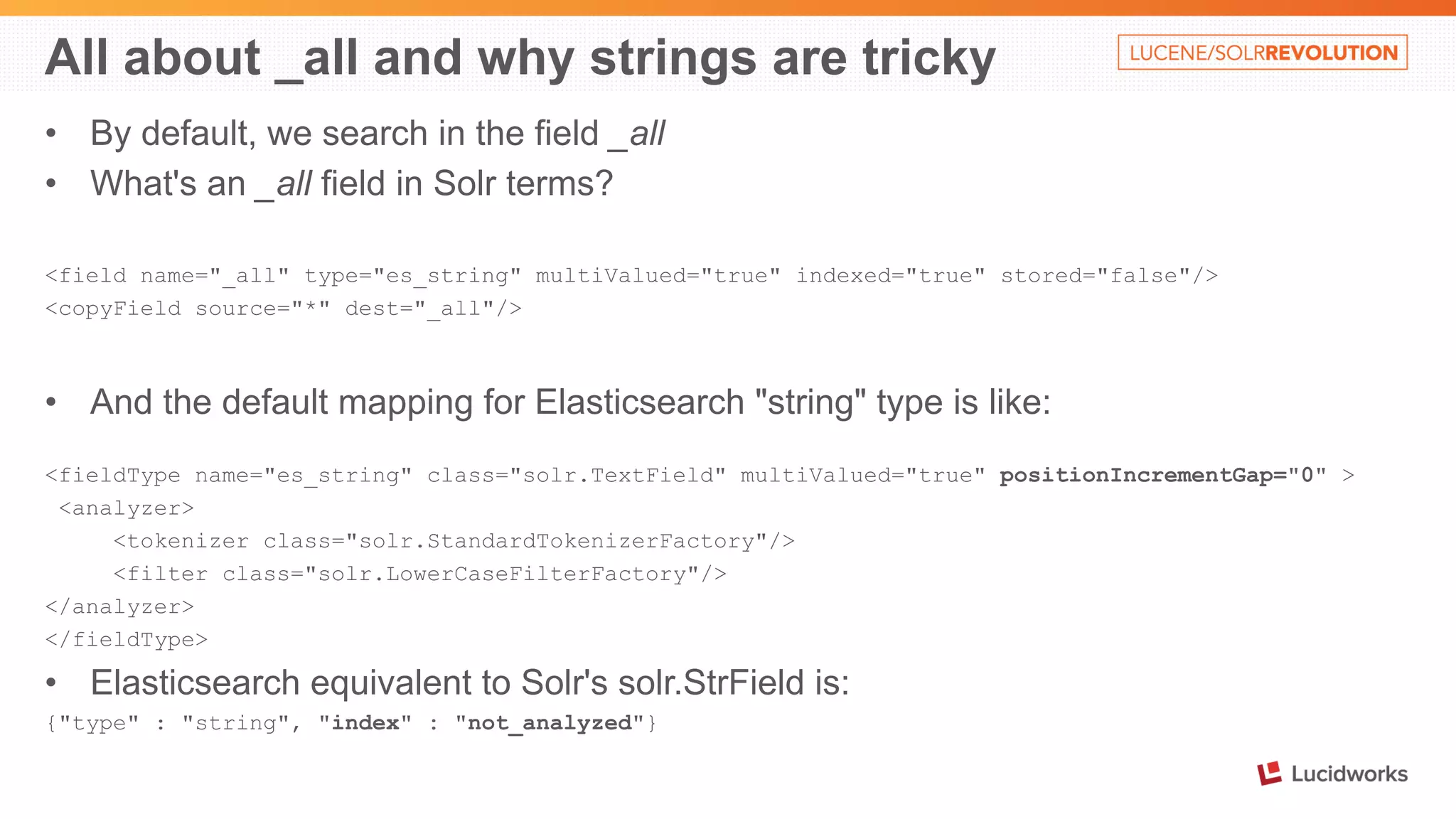
All about _all and why strings are tricky 
• By default, we search in the field _all 
• What's an _all field in Solr terms? 
<field name="_all" type="es_string" multiValued="true" indexed="true" stored="false"/> 
<copyField source="*" dest="_all"/> 
• And the default mapping for Elasticsearch "string" type is like: 
<fieldType name="es_string" class="solr.TextField" multiValued="true" positionIncrementGap="0" > 
<analyzer> 
<tokenizer class="solr.StandardTokenizerFactory"/> 
<filter class="solr.LowerCaseFilterFactory"/> 
</analyzer> 
</fieldType> 
• Elasticsearch equivalent to Solr's solr.StrField is: 
{"type" : "string", "index" : "not_analyzed"}
Can Solr do the same kind of magic? 
• curl 'http://localhost:8983/solr/collection1/update/json/docs' -H 'Content-type: 
application/json' -d @msg.json 
curl 
'hOp://localhost:8983/solr/collec%on1/select' 
{ 
"responseHeader":{ 
"status":0, 
"QTime":18, 
"params":{}}, 
"response":{"numFound":1,"start":0,"docs":[ 
{ 
"msg":["Happy birthday"], 
"names":["Alex", "Mark"], 
"when":["2014-11-01T10:09:08Z"], 
"_id":"e9af682d-e775-42f2-90a5-c932b5fbb691", 
"_version_":1484096406012559360}] 
}} 
curl 
'hOp://localhost:8983/solr/collec%on1/schema/fields' 
{ 
"responseHeader":{ 
"status":0, 
"QTime":1}, 
"fields":[ 
{"name":"_all", "type":"es_string", 
"multiValued":true, 
"indexed":true, "stored":false}, 
{"name":"_id", "type":"string", 
"multiValued":false, 
"indexed":true, "required":true, 
"stored":true, "uniqueKey":true}, 
{"name":"_version_", "type":"long", 
"indexed":true, "stored":true}, 
{"name":"msg", "type":"es_string"}, 
{"name":"names", "type":"es_string"}, 
{"name":"when", "type":"tdates"}]} 
• Output 
slightly 
re-­‐formated
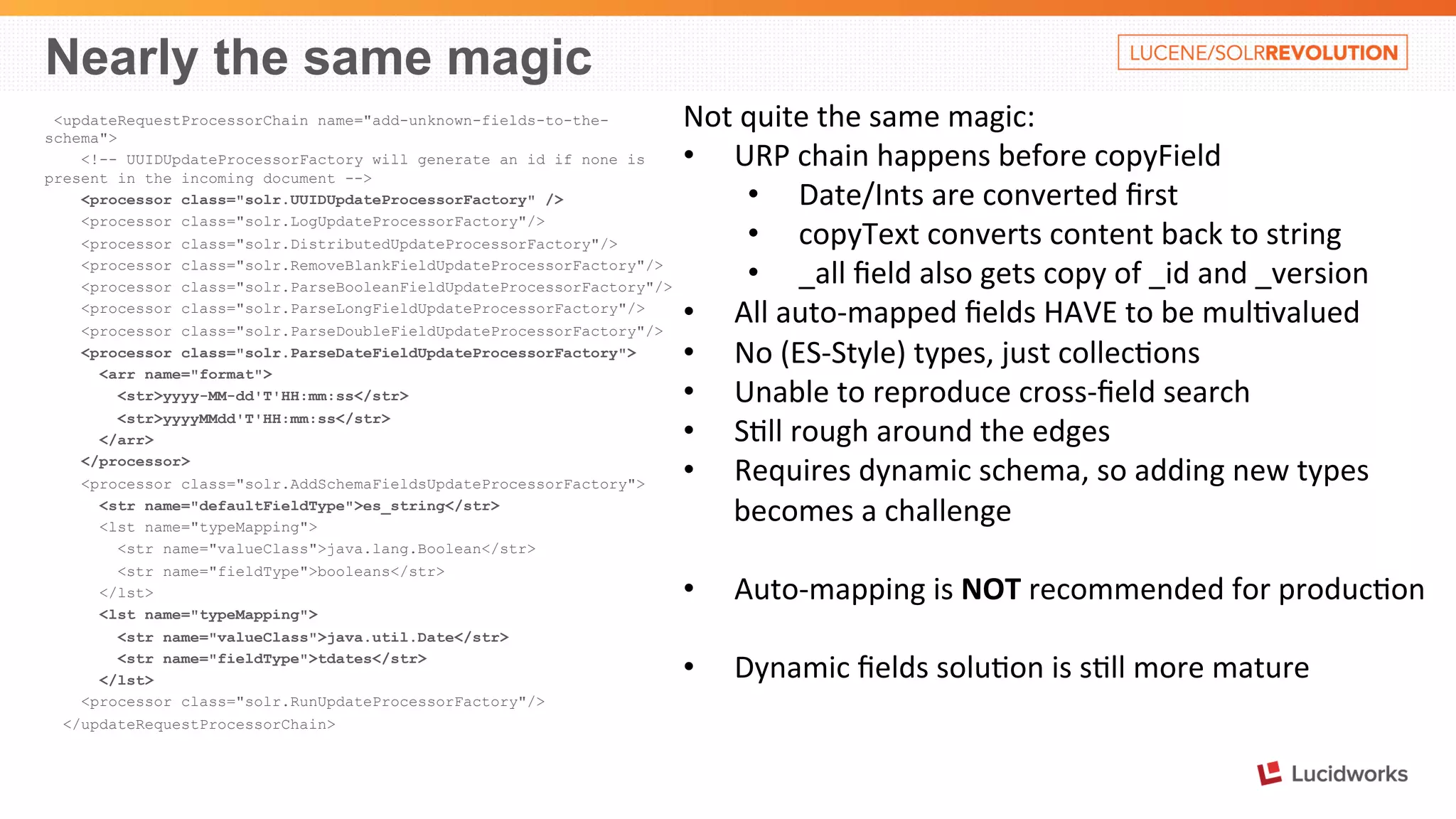
Nearly the same magic 
<updateRequestProcessorChain name="add-unknown-fields-to-the-schema"> 
<!-- UUIDUpdateProcessorFactory will generate an id if none is 
present in the incoming document --> 
<processor class="solr.UUIDUpdateProcessorFactory" /> 
<processor class="solr.LogUpdateProcessorFactory"/> 
<processor class="solr.DistributedUpdateProcessorFactory"/> 
<processor class="solr.RemoveBlankFieldUpdateProcessorFactory"/> 
<processor class="solr.ParseBooleanFieldUpdateProcessorFactory"/> 
<processor class="solr.ParseLongFieldUpdateProcessorFactory"/> 
<processor class="solr.ParseDoubleFieldUpdateProcessorFactory"/> 
<processor class="solr.ParseDateFieldUpdateProcessorFactory"> 
<arr name="format"> 
<str>yyyy-MM-dd'T'HH:mm:ss</str> 
<str>yyyyMMdd'T'HH:mm:ss</str> 
</arr> 
</processor> 
<processor class="solr.AddSchemaFieldsUpdateProcessorFactory"> 
<str name="defaultFieldType">es_string</str> 
<lst name="typeMapping"> 
<str name="valueClass">java.lang.Boolean</str> 
<str name="fieldType">booleans</str> 
</lst> 
<lst name="typeMapping"> 
<str name="valueClass">java.util.Date</str> 
<str name="fieldType">tdates</str> 
</lst> 
<processor class="solr.RunUpdateProcessorFactory"/> 
</updateRequestProcessorChain> 
Not 
quite 
the 
same 
magic: 
• URP 
chain 
happens 
before 
copyField 
• Date/Ints 
are 
converted 
first 
• copyText 
converts 
content 
back 
to 
string 
• _all 
field 
also 
gets 
copy 
of 
_id 
and 
_version 
• All 
auto-­‐mapped 
fields 
HAVE 
to 
be 
mul%valued 
• No 
(ES-­‐Style) 
types, 
just 
collec%ons 
• Unable 
to 
reproduce 
cross-­‐field 
search 
• S%ll 
rough 
around 
the 
edges 
• Requires 
dynamic 
schema, 
so 
adding 
new 
types 
becomes 
a 
challenge 
• Auto-­‐mapping 
is 
NOT 
recommended 
for 
produc%on 
• Dynamic 
fields 
solu%on 
is 
s%ll 
more 
mature
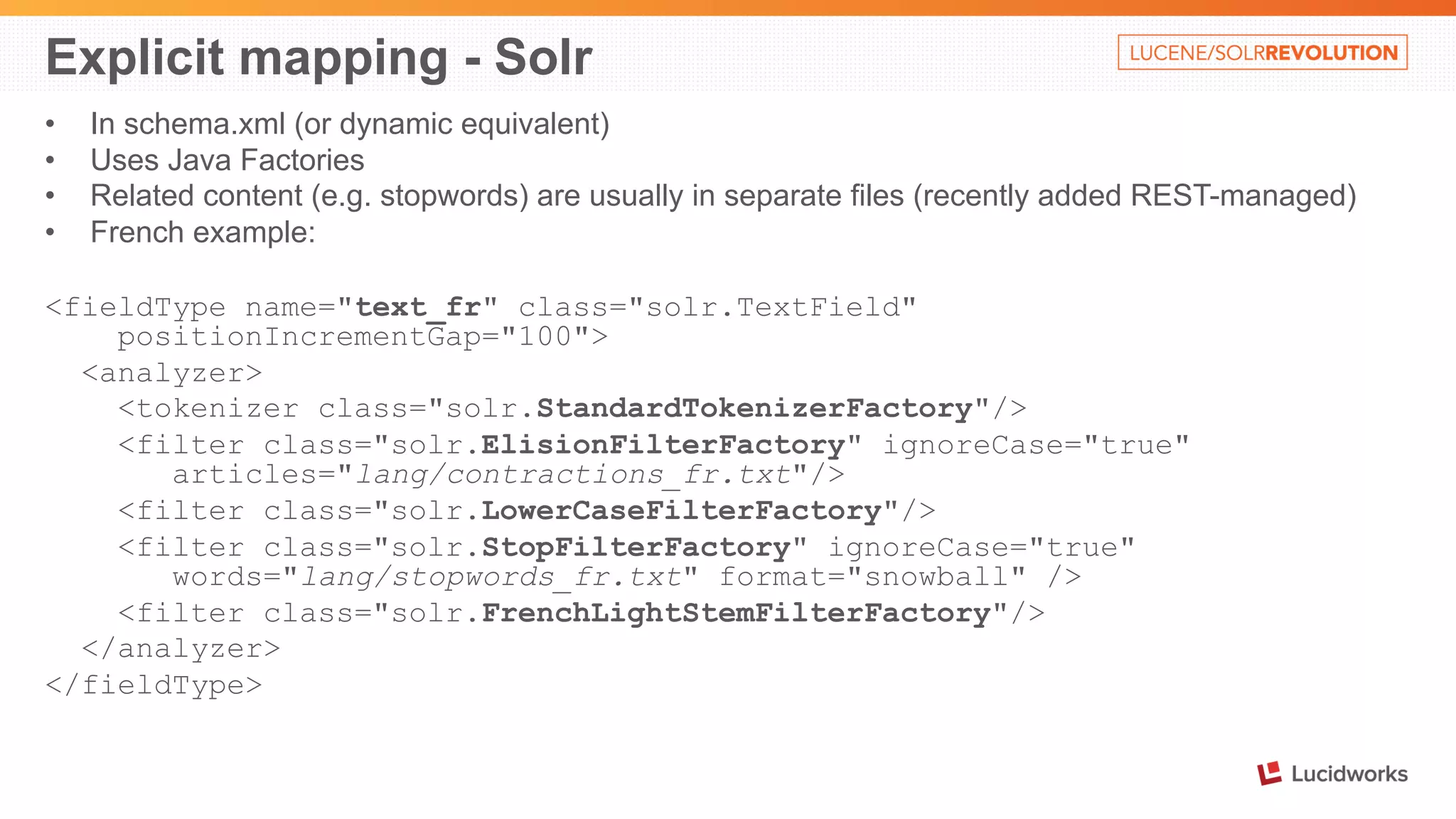
Explicit mapping - Solr 
• In schema.xml (or dynamic equivalent) 
• Uses Java Factories 
• Related content (e.g. stopwords) are usually in separate files (recently added REST-managed) 
• French example: 
<fieldType name="text_fr" class="solr.TextField" 
positionIncrementGap="100"> 
<analyzer> 
<tokenizer class="solr.StandardTokenizerFactory"/> 
<filter class="solr.ElisionFilterFactory" ignoreCase="true" 
articles="lang/contractions_fr.txt"/> 
<filter class="solr.LowerCaseFilterFactory"/> 
<filter class="solr.StopFilterFactory" ignoreCase="true" 
words="lang/stopwords_fr.txt" format="snowball" /> 
<filter class="solr.FrenchLightStemFilterFactory"/> 
</analyzer> 
</fieldType>
Explicit mapping - Elasticsearch 
• Created through PUT command 
• Also can be stored in config/default-mapping.json or config/mappings/[index_name] 
• Mappings for all types in one index should be compatible to avoid problems 
• Usually uses predefined mapping names. Has many names, including for 
languages 
• Explicit mapping is through named cross-references, rather than duplicated in-place 
stack (like Solr) 
• Related content is usually also in the definition. Sometimes in file (e.g. 
stopwords_path – needs to be on all nodes) 
• French example (next slide):
Explicit mapping – Elasticsearch - French 
{ 
"settings": { 
"analysis": { 
"filter": { 
"french_elision": { 
"type": "elision", 
"articles": [ "l", "m", "t", "qu", 
"n", "s", "j", "d", "c", "jusqu", "quoiqu", 
"lorsqu", "puisqu" 
] 
}, 
"french_stop": { 
"type": "stop", 
"stopwords": "_french_" 
}, 
"french_keywords": { 
"type": "keyword_marker", 
"keywords": [] 
}, 
"french_stemmer": { 
"type": "stemmer", 
"language": "light_french" 
} 
}, 
…. 
"analyzer": { 
"french": { 
"tokenizer": "standard", 
"filter": [ 
"french_elision", 
"lowercase", 
"french_stop", 
"french_keywords", 
"french_stemmer" 
] 
} 
} 
} 
} 
}
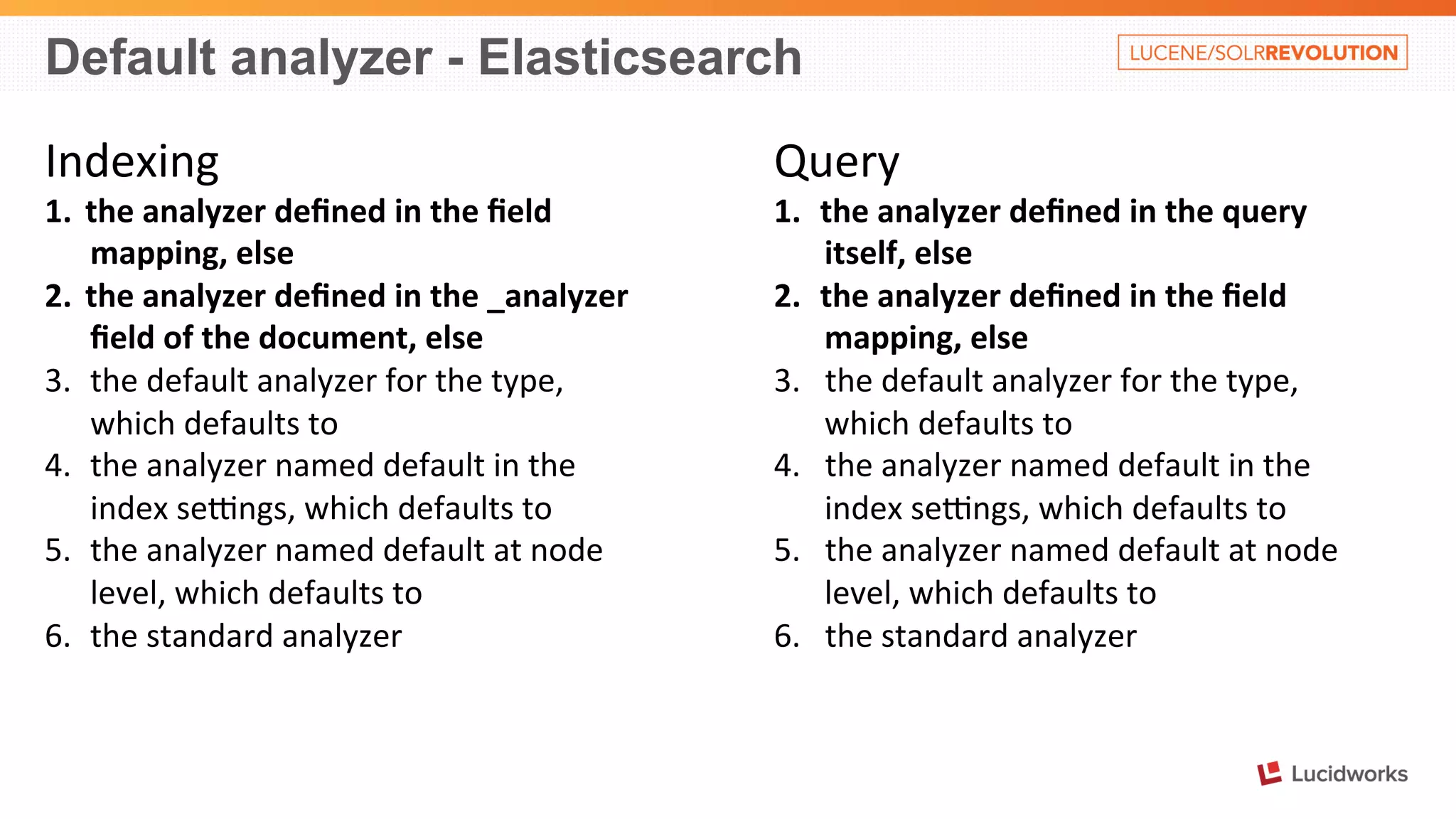
Default analyzer - Elasticsearch 
Indexing 
1. the 
analyzer 
defined 
in 
the 
field 
mapping, 
else 
2. the 
analyzer 
defined 
in 
the 
_analyzer 
field 
of 
the 
document, 
else 
3. the 
default 
analyzer 
for 
the 
type, 
which 
defaults 
to 
4. the 
analyzer 
named 
default 
in 
the 
index 
seongs, 
which 
defaults 
to 
5. the 
analyzer 
named 
default 
at 
node 
level, 
which 
defaults 
to 
6. the 
standard 
analyzer 
Query 
1. the 
analyzer 
defined 
in 
the 
query 
itself, 
else 
2. the 
analyzer 
defined 
in 
the 
field 
mapping, 
else 
3. the 
default 
analyzer 
for 
the 
type, 
which 
defaults 
to 
4. the 
analyzer 
named 
default 
in 
the 
index 
seongs, 
which 
defaults 
to 
5. the 
analyzer 
named 
default 
at 
node 
level, 
which 
defaults 
to 
6. the 
standard 
analyzer
Index many documents – Elasticsearch 
POST 
/test3/entries/_bulk 
{ 
"index": 
{"_id": 
"1" 
} 
} 
{"msg": 
"Hello", 
"names": 
["Jack", 
"Jill"]} 
{ 
"index": 
{"_id": 
"2" 
} 
} 
{"msg": 
"Goodbye", 
"names": 
"Jason"} 
{ 
"delete" 
: 
{"_id" 
: 
"3" 
} 
} 
NOTE: 
Rivers 
(similar 
to 
DIH) 
MAY 
be 
deprecated. 
Use 
Logstash 
instead 
(180Mb 
on 
disk, 
including 
2 
jRuby 
run%mes 
!!!)
Index many documents - Solr 
JSON 
-­‐ 
simple 
[ 
{ 
"_id": "1", 
"msg": "Hello", 
"names": ["Jack", "Jill"] 
}, 
{ 
"_id": "2", 
"msg": "Goodbye", 
"names": "Jason" 
} 
] 
JSON 
– 
with 
commands 
{ 
"add": { "doc": { 
"_id": "1", 
"msg": "Hello", 
"names": ["Jack", "Jill"] 
} }, 
"add": { "doc": { 
"_id": "2", 
"msg": "Goodbye", 
"names": "Jason" 
} }, 
"delete": { "_id":3 } 
} 
Also: 
• CSV 
• XML 
• XML+XSLT 
• JSON+transform 
(4.10) 
• DataImportHandler 
• Map-­‐Reduce 
External 
tools 
• Logstash 
(owned 
by 
ES)
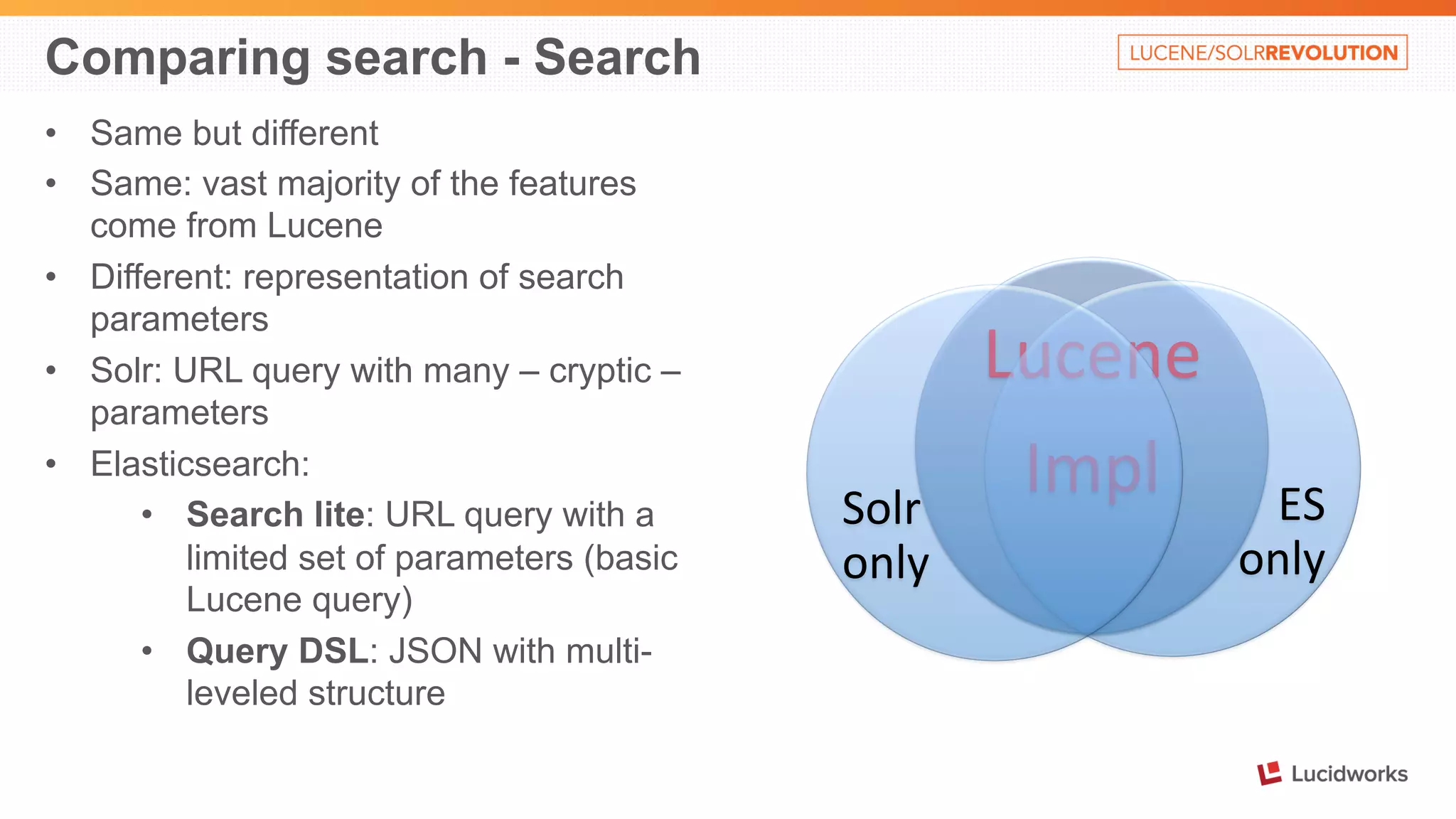
Comparing search - Search 
• Same but different 
• Same: vast majority of the features 
come from Lucene 
• Different: representation of search 
parameters 
• Solr: URL query with many – cryptic – 
parameters 
• Elasticsearch: 
• Search lite: URL query with a 
limited set of parameters (basic 
Lucene query) 
• Query DSL: JSON with multi-leveled 
structure 
Lucene 
Impl 
ES 
only 
Solr 
only
Search compared – Simple searches 
{ 
"msg": "Happy birthday", 
"names": ["Alex", "Mark"], 
"when": "2014-11-01T10:09:08" 
} 
{ 
"msg": "Happy New Year", 
"names": ["Jack", "Jill"], 
"when": "2015-01-01T00:00:01" 
} 
{ 
"msg": "Goodbye", 
"names": ["Jack", "Jason"], 
"when": "2015-06-01T00:00:00" 
} 
Elas%csearch 
(Marvel 
Sense 
GET): 
• /test1/hello/_search 
– 
all 
• /test1/hello/_search?q=happy 
birthday 
Alex– 
2 
• /test1/hello/_search?q=names:Alex 
– 
1 
Solr 
(GET 
hOp://localhost:8983/solr/…): 
• /collec%on1/select 
– 
all 
• /collec%on1/select?q=happy 
birthday 
Alex 
– 
2 
• /test1/hello/_search?q=names:Alex 
– 
1
Search Compared – Query DSL 
Elas%csearch 
GET /test1/hello/_search 
{ 
"query": { 
"query_string": { 
"fields": ["msg^5", "names"], 
"query": "happy birthday Alex", 
"minimum_should_match": "100%" 
} 
} 
} 
Solr 
…/collection1/select 
?q=happy birthday Alex 
&defType=dismax 
&qf=msg^5 names 
&mm=100%
Search Compared – Query DSL - combo 
Elas%csearch 
GET /test1/hello/_search 
{ 
"size" : 1, 
"query": { 
"filtered": { 
"query": { 
"query_string": { 
"query": "jack" 
}}, 
"filter": { 
"range": { 
"when": { 
"gte": "now" 
}}}}}} 
Solr 
…/collection1/select 
?q=jack 
&fq=when:[NOW TO *] 
&rows=1 
Search 
future 
entries 
about 
Jack. 
Return 
only 
the 
best 
one.
Parent/Child structures 
Inner 
objects 
• Mapping: 
Object 
• Dynamic 
mapping 
(default) 
• NOT 
separate 
Lucene 
docs 
• Map 
to 
flaGened 
mul%valued 
fields 
• Search 
matches 
against 
value 
from 
ANY 
of 
inner 
objects 
{ 
"followers.age": [19, 26], 
"followers.name": 
[alex, lisa] 
} 
Elas%csearch 
Nested 
objects 
• Mapping: 
nested 
• Explicit 
mapping 
• Lucene 
block 
storage 
• Inner 
documents 
are 
hidden 
• Cannot 
return 
inner 
docs 
only 
• Can 
do 
nested 
& 
inner 
Parent 
and 
Child 
• Mapping: 
_parent 
• Explicit 
references 
• Separate 
documents 
• In-­‐memory 
join 
• SLOW 
Solr 
Nested 
objects 
• Lucene 
block 
storage 
• All 
documents 
are 
visible 
• Child 
JSON 
is 
less 
natural
Cloud deployment – quick take 
1. General concepts are similar: 
• Node discovery 
• Sharding 
• Replication 
• Routing 
1. Implementations are very, very different (layer above Lucene) 
2. Solr uses Apache Zookeeper 
3. Elasticsearch has its own algorithms 
4. No time to discuss 
5. Let's focus on the critical path: Node discovery/cloud-state management 
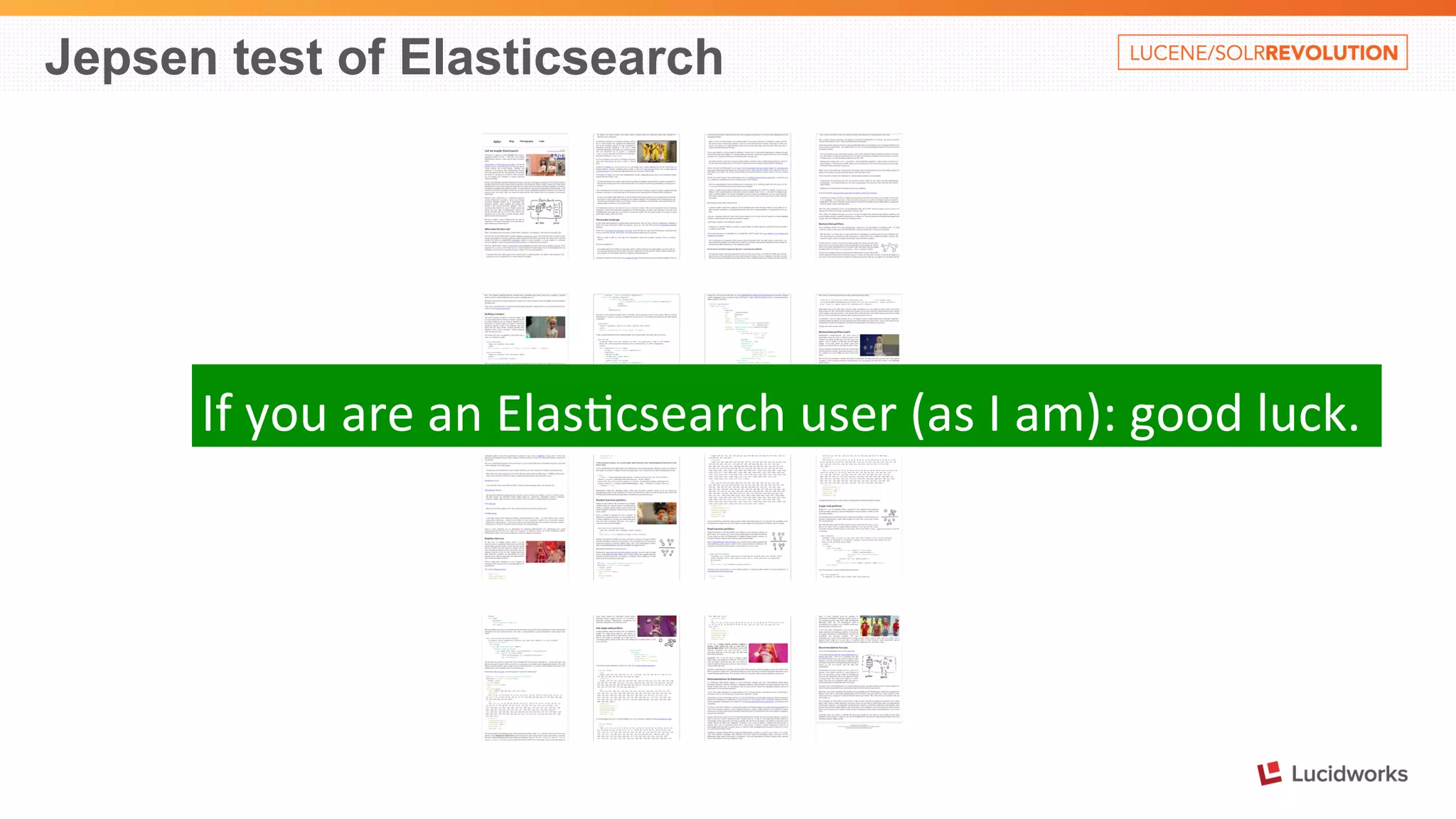
6. Use a 3rd party analysis: Kyle Kingsbury's Jepsen tests
Jepsen test of Zookeper 
Use 
Zookeeper. 
It’s 
mature, 
well-­‐designed, 
and 
baOle-­‐tested.
Jepsen test of Elasticsearch 
If 
you 
are 
an 
Elas%csearch 
user 
(as 
I 
am): 
good 
luck.
Innovator’s dilemma 
• Solr's usual attitude 
• An amazingly useful product for many different uses 
• And wants everybody to know it 
• …Right in the collection1 example 
• “You will need all this eventually, might as well learn it first” 
• Elasticsearch is small and shiny (“trust us, the magic exists”) 
• Elasticsearch + Logstash + Kibana => power-punch triple combo 
• Especially when comparing to Solr (and not another commercial solution) 
• Feature release process 
• Elasticsearch: kimchy: “LGTM” (Looks good to me) 
• Solr: full Apache process around it 
• Solr – needs to buckle down and focus on onboarding experience 
• Solr is getting better (e.g. listen to SolrCluster podcast of October 24, 2014)
Solr vs. Elasticsearch 
Case by Case 
Alexandre Rafalovitch 
www.solr-start.com 
@arafalov 
@SolrStart

Solr vs. Elasticsearch, Case by Case: Presented by Alexandre Rafalovitch, UN

  • 1.
    Solr vs. Elasticsearch Case by Case Alexandre Rafalovitch @arafalov @SolrStart www.solr-start.com
  • 2.
    Meet the FRENEMIES Friends (common) • Based on Lucene • Full-text search • Structured search • Queries, filters, caches • Facets/stats/enumerations • Cloud-ready Elas%csearch* * Elas%csearch is a trademark of Elas%csearch BV, registered in the U.S. and in other countries. Enemies (differences) • Download size • AdminUI vs. Marvel • Configuration vs. Magic • Nested documents • Chains vs. Plugins • Types and Rivers • OpenSource vs. Commercial • Etc.
  • 3.
    This used tobe Solr (now in Lucene/ES) • Field types • Dismax/eDismax • Many of analysis filters (WordDelimiterFilter, Soundex, Regex, HTML, kstem, Trim…) • Mul%-­‐valued field cache • …. (source: hOp://heliosearch.org/lucene-­‐solr-­‐history/ ) • Disclaimer: Nowadays, Elas%csearch hires awesome Lucene hackers
  • 4.
    Basically - sisters Source: hOps://www.flickr.com/photos/franzfume/11530902934/ First run Expanded Download 300 250 200 150 100 50 0 Solr Elas%csearch
  • 5.
    Solr: Chubby orRubenesque? 0.00 50.00 100.00 150.00 200.00 250.00 300.00 Elas%csearch+plugins Solr Code Examples Documenta%on ES-­‐Admin ES-­‐ICU Extract/Tika UIMA Map-­‐Reduce Test Framework
  • 6.
    Elasticsearch setup Source: hOps://www.flickr.com/photos/deborah-­‐is-­‐lola/6815624125/ • Admin UI: bin/plugin -i elasticsearch/marvel/latest • Tika/Extraction: bin/plugin -install elasticsearch/elasticsearch-mapper-attachments/ 2.4.1 • ICU (Unicode components): bin/plugin -install elasticsearch/elasticsearch-analysis-icu/ 2.4.1 • JDBC River (like DataImportHandler subset): bin/plugin --install jdbc --url http://xbib.org/repository/ org/xbib/elasticsearch/plugin/elasticsearch-river-jdbc/ 1.3.4.4/elasticsearch-river-jdbc-1.3.4.4-plugin.zip • JavaScript scripting support: bin/plugin -install elasticsearch/elasticsearch-lang-javascript/ 2.4.1 • On each node…. • Without dependency management (jars = rabbits)
  • 7.
    Index a document- Elasticsearch 1. Setup an index/collection 2. Define fields and types 3. Index content (using Marvel sense): POST /test1/hello { "msg": "Happy birthday", "names": ["Alex", "Mark"], "when": "2014-11-01T10:09:08" } Alternative: PUT /test1/hello/id1 { "msg": "Happy birthday", "names": ["Alex", "Mark"], "when": "2014-11-01T10:09:08" } An index, type and definitions are created automatically So, where is our document: GET /test1/hello/_search { "took": 1, "timed_out": false, "_shards": { "total": 5, "successful": 5, "failed": 0 }, "hits": { "total": 1, "max_score": 1, "hits": [ { "_index": "test1", "_type": "hello", "_id": "AUmIk4LDF4XvfpxnVJ2g", "_score": 1, "_source": { "msg": "Happy birthday", "names": [ "Alex", "Mark" ], "when": "2014-11-01T10:09:08" }} ] }}
  • 8.
    Behind the scenes GET /test1/hello/_search ….. { "_index": "test1", "_type": "hello", "_id": "AUmIk4LDF4XvfpxnVJ2g", "_score": 1, "_source": { "msg": "Happy birthday", "names": [ "Alex", "Mark" ], "when": "2014-11-01T10:09:08" } …. GET /test1/hello/_mapping { "test1": { "mappings": { "hello": { "properties": { "msg": { "type": "string" }, "names": { "type": "string" }, "when": { "type": "date", "format": "dateOptionalTime" }}}}}}
  • 9.
    Basic search inElasticsearch GET /test1/hello/_search ….. { "_index": "test1", "_type": "hello", "_id": "AUmIk4LDF4XvfpxnVJ2g", "_score": 1, "_source": { "msg": "Happy birthday", "names": [ "Alex", "Mark" ], "when": "2014-11-01T10:09:08" } …. • GET /test1/hello/_search?q=foobar – no results • GET /test1/hello/_search?q=Alex – YES on names? • GET /test1/hello/_search?q=alex – YES lower case • GET /test1/hello/_search?q=happy – YES on msg? • GET /test1/hello/_search?q=2014 – YES??? • GET /test1/hello/_search?q="birthday alex" – YES • GET /test1/hello/_search?q="birthday mark" – NO Issues: 1. Where are we actually searching? 2. Why are lower-­‐case searches work? 3. What's so special about Alex?
  • 10.
    All about _alland why strings are tricky • By default, we search in the field _all • What's an _all field in Solr terms? <field name="_all" type="es_string" multiValued="true" indexed="true" stored="false"/> <copyField source="*" dest="_all"/> • And the default mapping for Elasticsearch "string" type is like: <fieldType name="es_string" class="solr.TextField" multiValued="true" positionIncrementGap="0" > <analyzer> <tokenizer class="solr.StandardTokenizerFactory"/> <filter class="solr.LowerCaseFilterFactory"/> </analyzer> </fieldType> • Elasticsearch equivalent to Solr's solr.StrField is: {"type" : "string", "index" : "not_analyzed"}
  • 11.
    Can Solr dothe same kind of magic? • curl 'http://localhost:8983/solr/collection1/update/json/docs' -H 'Content-type: application/json' -d @msg.json curl 'hOp://localhost:8983/solr/collec%on1/select' { "responseHeader":{ "status":0, "QTime":18, "params":{}}, "response":{"numFound":1,"start":0,"docs":[ { "msg":["Happy birthday"], "names":["Alex", "Mark"], "when":["2014-11-01T10:09:08Z"], "_id":"e9af682d-e775-42f2-90a5-c932b5fbb691", "_version_":1484096406012559360}] }} curl 'hOp://localhost:8983/solr/collec%on1/schema/fields' { "responseHeader":{ "status":0, "QTime":1}, "fields":[ {"name":"_all", "type":"es_string", "multiValued":true, "indexed":true, "stored":false}, {"name":"_id", "type":"string", "multiValued":false, "indexed":true, "required":true, "stored":true, "uniqueKey":true}, {"name":"_version_", "type":"long", "indexed":true, "stored":true}, {"name":"msg", "type":"es_string"}, {"name":"names", "type":"es_string"}, {"name":"when", "type":"tdates"}]} • Output slightly re-­‐formated
  • 12.
    Nearly the samemagic <updateRequestProcessorChain name="add-unknown-fields-to-the-schema"> <!-- UUIDUpdateProcessorFactory will generate an id if none is present in the incoming document --> <processor class="solr.UUIDUpdateProcessorFactory" /> <processor class="solr.LogUpdateProcessorFactory"/> <processor class="solr.DistributedUpdateProcessorFactory"/> <processor class="solr.RemoveBlankFieldUpdateProcessorFactory"/> <processor class="solr.ParseBooleanFieldUpdateProcessorFactory"/> <processor class="solr.ParseLongFieldUpdateProcessorFactory"/> <processor class="solr.ParseDoubleFieldUpdateProcessorFactory"/> <processor class="solr.ParseDateFieldUpdateProcessorFactory"> <arr name="format"> <str>yyyy-MM-dd'T'HH:mm:ss</str> <str>yyyyMMdd'T'HH:mm:ss</str> </arr> </processor> <processor class="solr.AddSchemaFieldsUpdateProcessorFactory"> <str name="defaultFieldType">es_string</str> <lst name="typeMapping"> <str name="valueClass">java.lang.Boolean</str> <str name="fieldType">booleans</str> </lst> <lst name="typeMapping"> <str name="valueClass">java.util.Date</str> <str name="fieldType">tdates</str> </lst> <processor class="solr.RunUpdateProcessorFactory"/> </updateRequestProcessorChain> Not quite the same magic: • URP chain happens before copyField • Date/Ints are converted first • copyText converts content back to string • _all field also gets copy of _id and _version • All auto-­‐mapped fields HAVE to be mul%valued • No (ES-­‐Style) types, just collec%ons • Unable to reproduce cross-­‐field search • S%ll rough around the edges • Requires dynamic schema, so adding new types becomes a challenge • Auto-­‐mapping is NOT recommended for produc%on • Dynamic fields solu%on is s%ll more mature
  • 13.
    Explicit mapping -Solr • In schema.xml (or dynamic equivalent) • Uses Java Factories • Related content (e.g. stopwords) are usually in separate files (recently added REST-managed) • French example: <fieldType name="text_fr" class="solr.TextField" positionIncrementGap="100"> <analyzer> <tokenizer class="solr.StandardTokenizerFactory"/> <filter class="solr.ElisionFilterFactory" ignoreCase="true" articles="lang/contractions_fr.txt"/> <filter class="solr.LowerCaseFilterFactory"/> <filter class="solr.StopFilterFactory" ignoreCase="true" words="lang/stopwords_fr.txt" format="snowball" /> <filter class="solr.FrenchLightStemFilterFactory"/> </analyzer> </fieldType>
  • 14.
    Explicit mapping -Elasticsearch • Created through PUT command • Also can be stored in config/default-mapping.json or config/mappings/[index_name] • Mappings for all types in one index should be compatible to avoid problems • Usually uses predefined mapping names. Has many names, including for languages • Explicit mapping is through named cross-references, rather than duplicated in-place stack (like Solr) • Related content is usually also in the definition. Sometimes in file (e.g. stopwords_path – needs to be on all nodes) • French example (next slide):
  • 15.
    Explicit mapping –Elasticsearch - French { "settings": { "analysis": { "filter": { "french_elision": { "type": "elision", "articles": [ "l", "m", "t", "qu", "n", "s", "j", "d", "c", "jusqu", "quoiqu", "lorsqu", "puisqu" ] }, "french_stop": { "type": "stop", "stopwords": "_french_" }, "french_keywords": { "type": "keyword_marker", "keywords": [] }, "french_stemmer": { "type": "stemmer", "language": "light_french" } }, …. "analyzer": { "french": { "tokenizer": "standard", "filter": [ "french_elision", "lowercase", "french_stop", "french_keywords", "french_stemmer" ] } } } } }
  • 16.
    Default analyzer -Elasticsearch Indexing 1. the analyzer defined in the field mapping, else 2. the analyzer defined in the _analyzer field of the document, else 3. the default analyzer for the type, which defaults to 4. the analyzer named default in the index seongs, which defaults to 5. the analyzer named default at node level, which defaults to 6. the standard analyzer Query 1. the analyzer defined in the query itself, else 2. the analyzer defined in the field mapping, else 3. the default analyzer for the type, which defaults to 4. the analyzer named default in the index seongs, which defaults to 5. the analyzer named default at node level, which defaults to 6. the standard analyzer
  • 17.
    Index many documents– Elasticsearch POST /test3/entries/_bulk { "index": {"_id": "1" } } {"msg": "Hello", "names": ["Jack", "Jill"]} { "index": {"_id": "2" } } {"msg": "Goodbye", "names": "Jason"} { "delete" : {"_id" : "3" } } NOTE: Rivers (similar to DIH) MAY be deprecated. Use Logstash instead (180Mb on disk, including 2 jRuby run%mes !!!)
  • 18.
    Index many documents- Solr JSON -­‐ simple [ { "_id": "1", "msg": "Hello", "names": ["Jack", "Jill"] }, { "_id": "2", "msg": "Goodbye", "names": "Jason" } ] JSON – with commands { "add": { "doc": { "_id": "1", "msg": "Hello", "names": ["Jack", "Jill"] } }, "add": { "doc": { "_id": "2", "msg": "Goodbye", "names": "Jason" } }, "delete": { "_id":3 } } Also: • CSV • XML • XML+XSLT • JSON+transform (4.10) • DataImportHandler • Map-­‐Reduce External tools • Logstash (owned by ES)
  • 19.
    Comparing search -Search • Same but different • Same: vast majority of the features come from Lucene • Different: representation of search parameters • Solr: URL query with many – cryptic – parameters • Elasticsearch: • Search lite: URL query with a limited set of parameters (basic Lucene query) • Query DSL: JSON with multi-leveled structure Lucene Impl ES only Solr only
  • 20.
    Search compared –Simple searches { "msg": "Happy birthday", "names": ["Alex", "Mark"], "when": "2014-11-01T10:09:08" } { "msg": "Happy New Year", "names": ["Jack", "Jill"], "when": "2015-01-01T00:00:01" } { "msg": "Goodbye", "names": ["Jack", "Jason"], "when": "2015-06-01T00:00:00" } Elas%csearch (Marvel Sense GET): • /test1/hello/_search – all • /test1/hello/_search?q=happy birthday Alex– 2 • /test1/hello/_search?q=names:Alex – 1 Solr (GET hOp://localhost:8983/solr/…): • /collec%on1/select – all • /collec%on1/select?q=happy birthday Alex – 2 • /test1/hello/_search?q=names:Alex – 1
  • 21.
    Search Compared –Query DSL Elas%csearch GET /test1/hello/_search { "query": { "query_string": { "fields": ["msg^5", "names"], "query": "happy birthday Alex", "minimum_should_match": "100%" } } } Solr …/collection1/select ?q=happy birthday Alex &defType=dismax &qf=msg^5 names &mm=100%
  • 22.
    Search Compared –Query DSL - combo Elas%csearch GET /test1/hello/_search { "size" : 1, "query": { "filtered": { "query": { "query_string": { "query": "jack" }}, "filter": { "range": { "when": { "gte": "now" }}}}}} Solr …/collection1/select ?q=jack &fq=when:[NOW TO *] &rows=1 Search future entries about Jack. Return only the best one.
  • 23.
    Parent/Child structures Inner objects • Mapping: Object • Dynamic mapping (default) • NOT separate Lucene docs • Map to flaGened mul%valued fields • Search matches against value from ANY of inner objects { "followers.age": [19, 26], "followers.name": [alex, lisa] } Elas%csearch Nested objects • Mapping: nested • Explicit mapping • Lucene block storage • Inner documents are hidden • Cannot return inner docs only • Can do nested & inner Parent and Child • Mapping: _parent • Explicit references • Separate documents • In-­‐memory join • SLOW Solr Nested objects • Lucene block storage • All documents are visible • Child JSON is less natural
  • 24.
    Cloud deployment –quick take 1. General concepts are similar: • Node discovery • Sharding • Replication • Routing 1. Implementations are very, very different (layer above Lucene) 2. Solr uses Apache Zookeeper 3. Elasticsearch has its own algorithms 4. No time to discuss 5. Let's focus on the critical path: Node discovery/cloud-state management 6. Use a 3rd party analysis: Kyle Kingsbury's Jepsen tests
  • 25.
    Jepsen test ofZookeper Use Zookeeper. It’s mature, well-­‐designed, and baOle-­‐tested.
  • 26.
    Jepsen test ofElasticsearch If you are an Elas%csearch user (as I am): good luck.
  • 27.
    Innovator’s dilemma •Solr's usual attitude • An amazingly useful product for many different uses • And wants everybody to know it • …Right in the collection1 example • “You will need all this eventually, might as well learn it first” • Elasticsearch is small and shiny (“trust us, the magic exists”) • Elasticsearch + Logstash + Kibana => power-punch triple combo • Especially when comparing to Solr (and not another commercial solution) • Feature release process • Elasticsearch: kimchy: “LGTM” (Looks good to me) • Solr: full Apache process around it • Solr – needs to buckle down and focus on onboarding experience • Solr is getting better (e.g. listen to SolrCluster podcast of October 24, 2014)
  • 28.
    Solr vs. Elasticsearch Case by Case Alexandre Rafalovitch www.solr-start.com @arafalov @SolrStart