



Apache Solr
Search Mastery
Peter Wolanin and Robert Douglass
                               25. aug 13:30
                               Trellon
We	
  hope	
  you	
  will	
  leave	
  having	
  
                learned	
  about:

•   What	
  is	
  Solr	
  and	
  how	
  do	
  you	
  run	
  it	
  locally
•   Ge9ng	
  Drupal	
  data	
  into	
  Solr
•   Changes	
  in	
  Drupal	
  7
•   Field	
  API	
  integraAon
•   Searching	
  Solr	
  from	
  Drupal
•   Modifying	
  what’s	
  searched	
  and	
  the	
  results
•   Theming	
  search	
  results
Drupal	
  Interacts	
  with	
  Solr	
  via	
  HTTP
•    Drupal	
  sends	
  data	
  to	
  Solr	
  as	
  XML	
  documents
•    Solr	
  accepts	
  documents	
  POSTed	
  to	
  /update
•    A	
  different	
  XML	
  can	
  be	
  POSTed	
  to	
  delete
•    Searching,	
  etc	
  are	
  GET	
  requests
•    If	
  something	
  is	
  not	
  working	
  as	
  expected,	
  you	
  
           can	
  try	
  searching	
  directly	
  in	
  Solr	
  via	
  URL
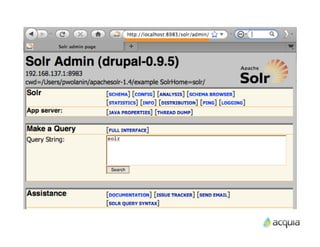
•    Solr	
  also	
  includes	
  admin	
  and	
  analysis	
  interfaces	
  
           (you	
  need	
  to	
  lock	
  this	
  down	
  for	
  producAon).
Run	
  Solr	
  Using	
  the	
  Example	
  Dir


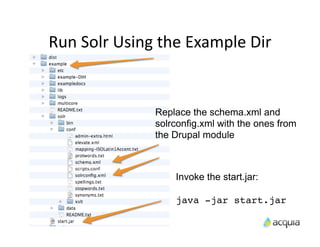
                     Replace the schema.xml and
                     solrconfig.xml with the ones from
                     the Drupal module


                         Invoke the start.jar:

                         java -jar start.jar
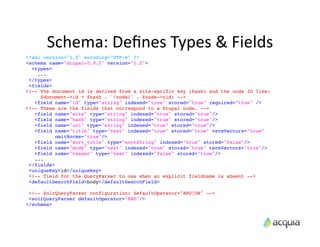
Schema:	
  Defines	
  Types	
  &	
  Fields
<?xml version="1.0" encoding="UTF-8" ?>
<schema name="drupal-0.9.5" version="1.2">
  <types>
    ...
 </types>
 <fields>
<!-- The document id is derived from a site-spcific key (hash) and the node ID like:
     $document->id = $hash . '/node/' . $node->nid; -->
   <field name="id" type="string" indexed="true" stored="true" required="true" />
<!-- These are the fields that correspond to a Drupal node. -->
   <field name="site" type="string" indexed="true" stored="true"/>
   <field name="hash" type="string" indexed="true" stored="true"/>
   <field name="url" type="string" indexed="true" stored="true"/>
   <field name="title" type="text" indexed="true" stored="true" termVectors="true"
           omitNorms="true"/>
   <field name="sort_title" type="sortString" indexed="true" stored="false"/>
   <field name="body" type="text" indexed="true" stored="true" termVectors="true"/>
   <field name="teaser" type="text" indexed="false" stored="true"/>
   ...
 </fields>
 <uniqueKey>id</uniqueKey>
 <!-- field for the QueryParser to use when an explicit fieldname is absent -->
 <defaultSearchField>body</defaultSearchField>

 <!-- SolrQueryParser configuration: defaultOperator="AND|OR" -->
 <solrQueryParser defaultOperator="AND"/>
</schema>
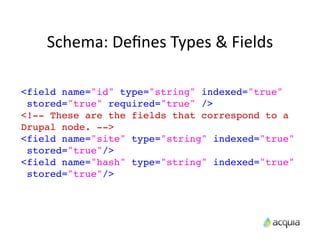
Schema:	
  Defines	
  Types	
  &	
  Fields

<field name="id" type="string" indexed="true"
 stored="true" required="true" />
<!-- These are the fields that correspond to a
Drupal node. -->
<field name="site" type="string" indexed="true"
 stored="true"/>
<field name="hash" type="string" indexed="true"
 stored="true"/>
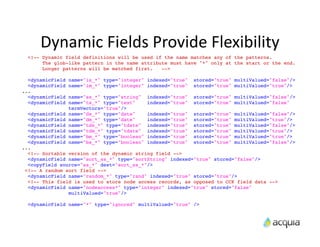
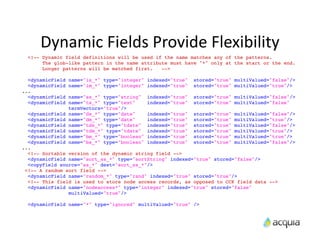
Dynamic	
  Fields	
  Provide	
  Flexibility
  <!-- Dynamic field definitions will be used if the name matches any of the patterns.
       The glob-like pattern in the name attribute must have "*" only at the start or the end.
       Longer patterns will be matched first.   -->

  <dynamicField   name="is_*" type="integer" indexed="true"     stored="true" multiValued="false"/>
  <dynamicField   name="im_*" type="integer" indexed="true"     stored="true" multiValued="true"/>
...
  <dynamicField   name="ss_*" type="string"    indexed="true"   stored="true" multiValued="false"/>
  <dynamicField   name="ts_*" type="text"      indexed="true"   stored="true" multiValued="false"
                  termVectors="true"/>
  <dynamicField   name="ds_*" type="date"  indexed="true" stored="true" multiValued="false"/>
  <dynamicField   name="dm_*" type="date"  indexed="true" stored="true" multiValued="true"/>
  <dynamicField   name="tds_*" type="tdate"indexed="true" stored="true" multiValued="false"/>
  <dynamicField   name="tdm_*" type="tdate"indexed="true" stored="true" multiValued="true"/>
  <dynamicField   name="bm_*" type="boolean"
                                           indexed="true" stored="true" multiValued="true"/>
  <dynamicField   name="bs_*" type="boolean"
                                           indexed="true" stored="true" multiValued="false"/>
...
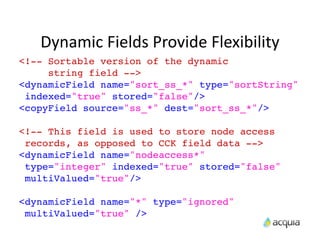
  <!-- Sortable version of the dynamic string field -->
  <dynamicField name="sort_ss_*" type="sortString" indexed="true" stored="false"/>
  <copyField source="ss_*" dest="sort_ss_*"/>
 <!-- A random sort field -->
  <dynamicField name="random_*" type="rand" indexed="true" stored="true"/>
  <!-- This field is used to store node access records, as opposed to CCK field data -->
  <dynamicField name="nodeaccess*" type="integer" indexed="true" stored="false"
                multiValued="true"/>

  <dynamicField name="*" type="ignored" multiValued="true" />
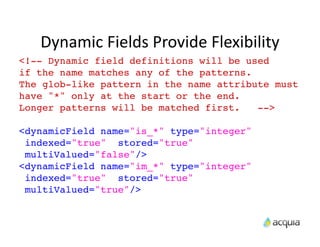
Dynamic	
  Fields	
  Provide	
  Flexibility
<!-- Dynamic field definitions will be used
if the name matches any of the patterns.
The glob-like pattern in the name attribute must
have "*" only at the start or the end.
Longer patterns will be matched first.   -->

<dynamicField name="is_*" type="integer"
 indexed="true" stored="true"
 multiValued="false"/>
<dynamicField name="im_*" type="integer"
 indexed="true" stored="true"
 multiValued="true"/>
Dynamic	
  Fields	
  Provide	
  Flexibility
  <!-- Dynamic field definitions will be used if the name matches any of the patterns.
       The glob-like pattern in the name attribute must have "*" only at the start or the end.
       Longer patterns will be matched first.   -->

  <dynamicField   name="is_*" type="integer" indexed="true"     stored="true" multiValued="false"/>
  <dynamicField   name="im_*" type="integer" indexed="true"     stored="true" multiValued="true"/>
...
  <dynamicField   name="ss_*" type="string"    indexed="true"   stored="true" multiValued="false"/>
  <dynamicField   name="ts_*" type="text"      indexed="true"   stored="true" multiValued="false"
                  termVectors="true"/>
  <dynamicField   name="ds_*" type="date"  indexed="true" stored="true" multiValued="false"/>
  <dynamicField   name="dm_*" type="date"  indexed="true" stored="true" multiValued="true"/>
  <dynamicField   name="tds_*" type="tdate"indexed="true" stored="true" multiValued="false"/>
  <dynamicField   name="tdm_*" type="tdate"indexed="true" stored="true" multiValued="true"/>
  <dynamicField   name="bm_*" type="boolean"
                                           indexed="true" stored="true" multiValued="true"/>
  <dynamicField   name="bs_*" type="boolean"
                                           indexed="true" stored="true" multiValued="false"/>
...
  <!-- Sortable version of the dynamic string field -->
  <dynamicField name="sort_ss_*" type="sortString" indexed="true" stored="false"/>
  <copyField source="ss_*" dest="sort_ss_*"/>
 <!-- A random sort field -->
  <dynamicField name="random_*" type="rand" indexed="true" stored="true"/>
  <!-- This field is used to store node access records, as opposed to CCK field data -->
  <dynamicField name="nodeaccess*" type="integer" indexed="true" stored="false"
                multiValued="true"/>

  <dynamicField name="*" type="ignored" multiValued="true" />
Dynamic	
  Fields	
  Provide	
  Flexibility
<!-- Sortable version of the dynamic
     string field -->
<dynamicField name="sort_ss_*" type="sortString"
 indexed="true" stored="false"/>
<copyField source="ss_*" dest="sort_ss_*"/>

<!-- This field is used to store node access
 records, as opposed to CCK field data -->
<dynamicField name="nodeaccess*"
 type="integer" indexed="true" stored="false"
 multiValued="true"/>

<dynamicField name="*" type="ignored"
 multiValued="true" />
The $query object
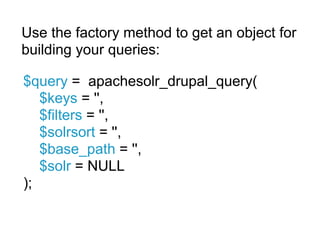
Use the factory method to get an object for
building your queries:

$query = apachesolr_drupal_query(
   $keys = '',
   $filters = '',
   $solrsort = '',
   $base_path = '',
   $solr = NULL
);
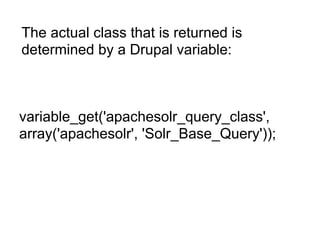
The actual class that is returned is
determined by a Drupal variable:


variable_get('apachesolr_query_class',
array('apachesolr', 'Solr_Base_Query'));
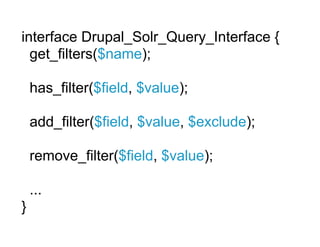
interface Drupal_Solr_Query_Interface {
  get_filters($name);

    has_filter($field, $value);

    add_filter($field, $value, $exclude);

    remove_filter($field, $value);

    ...
}
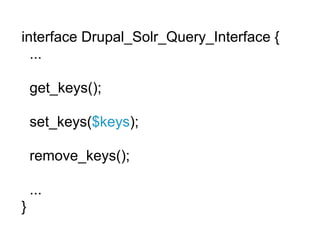
interface Drupal_Solr_Query_Interface {
  ...

    get_keys();

    set_keys($keys);

    remove_keys();

    ...
}
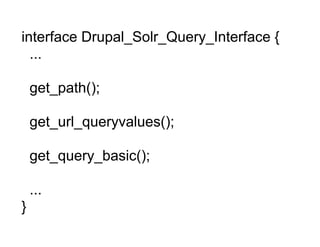
interface Drupal_Solr_Query_Interface {
  ...

    get_path();

    get_url_queryvalues();

    get_query_basic();

    ...
}
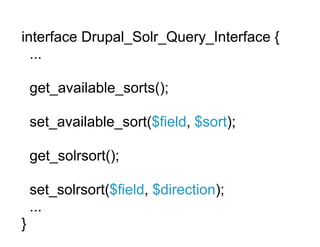
interface Drupal_Solr_Query_Interface {
  ...

    get_available_sorts();

    set_available_sort($field, $sort);

    get_solrsort();

    set_solrsort($field, $direction);
    ...
}
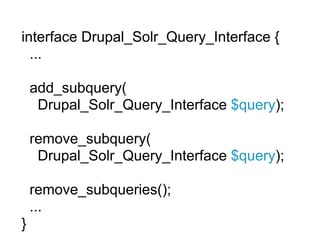
interface Drupal_Solr_Query_Interface {
  ...

    add_subquery(
     Drupal_Solr_Query_Interface $query);

    remove_subquery(
     Drupal_Solr_Query_Interface $query);

    remove_subqueries();
    ...
}
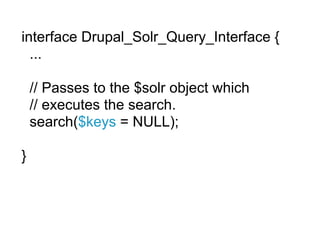
interface Drupal_Solr_Query_Interface {
  ...

    // Passes to the $solr object which
    // executes the search.
    search($keys = NULL);

}
The $solr object
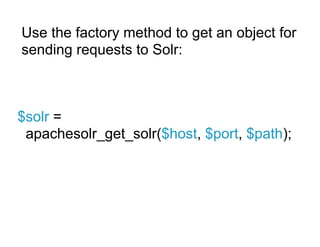
Use the factory method to get an object for
sending requests to Solr:


$solr =
 apachesolr_get_solr($host, $port, $path);
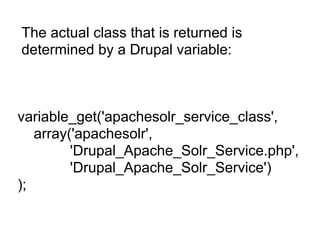
The actual class that is returned is
determined by a Drupal variable:


variable_get('apachesolr_service_class',
   array('apachesolr',
         'Drupal_Apache_Solr_Service.php',
         'Drupal_Apache_Solr_Service')
);
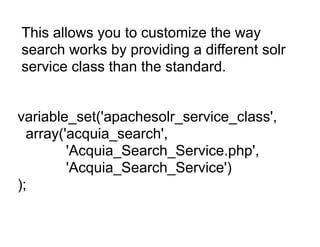
This allows you to customize the way
search works by providing a different solr
service class than the standard.


variable_set('apachesolr_service_class',
  array('acquia_search',
         'Acquia_Search_Service.php',
         'Acquia_Search_Service')
);
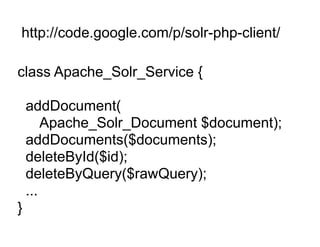
http://code.google.com/p/solr-php-client/

class Apache_Solr_Service {

    addDocument(
        Apache_Solr_Document $document);
    addDocuments($documents);
    deleteById($id);
    deleteByQuery($rawQuery);
    ...
}
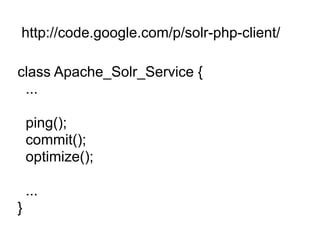
http://code.google.com/p/solr-php-client/

class Apache_Solr_Service {
 ...

    ping();
    commit();
    optimize();

    ...
}
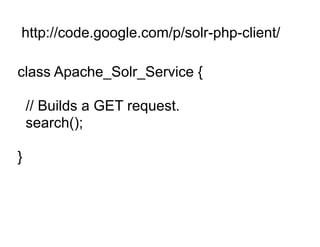
http://code.google.com/p/solr-php-client/

class Apache_Solr_Service {

    // Builds a GET request.
    search();

}
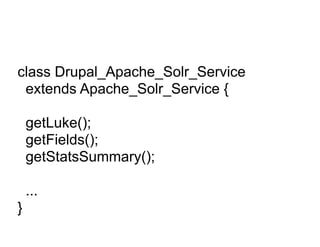
class Drupal_Apache_Solr_Service
 extends Apache_Solr_Service {

    getLuke();
    getFields();
    getStatsSummary();

    ...
}
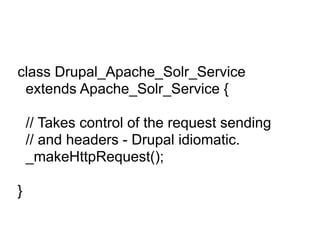
class Drupal_Apache_Solr_Service
 extends Apache_Solr_Service {

    // Takes control of the request sending
    // and headers - Drupal idiomatic.
    _makeHttpRequest();

}
The $document object
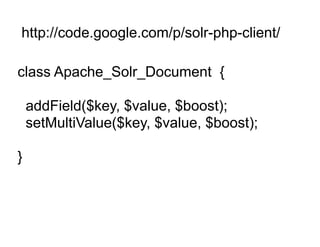
http://code.google.com/p/solr-php-client/

class Apache_Solr_Document {

    addField($key, $value, $boost);
    setMultiValue($key, $value, $boost);

}
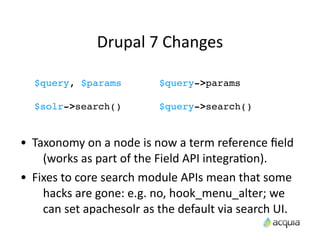
Drupal	
  7	
  Changes	
  

    $query, $params                      $query->params

    $solr->search()                      $query->search()


•   Taxonomy	
  on	
  a	
  node	
  is	
  now	
  a	
  term	
  reference	
  field	
  
      (works	
  as	
  part	
  of	
  the	
  Field	
  API	
  integraAon).
•   Fixes	
  to	
  core	
  search	
  module	
  APIs	
  mean	
  that	
  some	
  
      hacks	
  are	
  gone:	
  e.g.	
  no,	
  hook_menu_alter;	
  we	
  
      can	
  set	
  apachesolr	
  as	
  the	
  default	
  via	
  search	
  UI.
You	
  Can	
  Add	
  Any	
  Data	
  to	
  the	
  Index
hook_apachesolr_update_index(&$document,
$node, $namespace)

•    Used	
  to	
  add	
  more	
  data	
  to	
  a	
  document	
  before	
  
       it’s	
  sent	
  to	
  Solr.
•    Can	
  also	
  be	
  used	
  to	
  alter	
  or	
  replace	
  data	
  added	
  
       by	
  apachesolr	
  or	
  another	
  module.
•    This	
  is	
  it!	
  (it	
  works	
  like	
  an	
  _alter	
  hook).
Image	
  Data	
  Using	
  Dynamic	
  Fields
/**
  * Implementation of hook_apachesolr_update_index().
  */
function apachesolr_image_apachesolr_update_index(&$document, $node, $namespace) {
   if ($node->type == 'image' && $document->entity == 'node') {
     $areas = array();
     $sizes = image_get_derivative_sizes($node->images['_original']);
     foreach ($sizes as $name => $info) {
       $areas[$name] = $info['width'] * $info['height'];
     }
     asort($areas);
     $image_path = FALSE;
     foreach ($areas as $preset => $size) {
       $image_path = $node->images[$preset];
       break;
     }
     if ($image_path) {
       $document->ss_image_relative = $image_path;
       // Support multi-site too.
       $document->ss_image_absolute = file_create_url($image_path);
     }
   }
}

/**
  * Implementation of hook_apachesolr_modify_query().
  */
function apachesolr_image_apachesolr_modify_query($query, $caller) {
   // Also retrieve image thumbnail links.
   $query->params['fl'] .= ',ss_image_relative';
}
Image	
  Data	
  Using	
  Dynamic	
  Fields
 if ($image_path) {
   $document->ss_image_relative = $image_path;
 }

/**
  * Implement hook_apachesolr_modify_query().
  */
function
apachesolr_image_apachesolr_modify_query(
$query, $caller) {
   // Also retrieve image thumbnail links.
   $query->params['fl'] .= ',ss_image_relative';
}
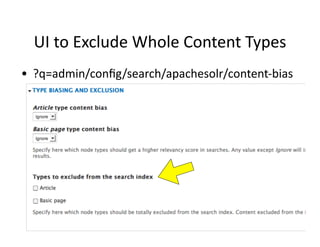
UI	
  to	
  Exclude	
  Whole	
  Content	
  Types
•   ?q=admin/config/search/apachesolr/content-­‐bias
Control	
  Indexing	
  More	
  Precisely	
  
hook_apachesolr_node_exclude($node, $namespace)

in_array($node->type, variable_get(
'apachesolr_exclude_comments_types', array()))

hook_node_update_index($node)

•   hook_node_update_index	
  output	
  added	
  to	
  body.
•   We	
  can	
  create	
  mulAple	
  documents	
  from	
  one	
  node	
  
      (e.g.	
  document	
  per	
  comment).
hook_apachesolr_document_handlers($type,
$namespace)
Field	
  API	
  IntegraAon
•   Most	
  of	
  the	
  Field	
  API	
  integraAon	
  follows	
  
       directly	
  from	
  the	
  6.x-­‐2.x	
  CCK	
  integraAon.
•   In	
  Drupal	
  7,	
  we	
  match	
  field	
  types,	
  rather	
  than	
  
       looking	
  at	
  the	
  widget.
•   By	
  default,	
  the	
  data	
  will	
  be	
  indexed	
  to	
  Solr	
  as	
  
       mulA-­‐valued,	
  and	
  named	
  combining	
  the	
  field	
  
       module	
  and	
  name	
  sm_$module_$fieldname
Typically	
  need	
  4	
  things:
•   What	
  field	
  types	
  (or	
  field	
  instances)	
  to	
  look	
  
         for	
  during	
  indexing.
•   The	
  data	
  type	
  to	
  use	
  in	
  the	
  index	
  
         (index_type)
•   A	
  funcAon	
  for	
  extracAng	
  the	
  data	
  from	
  the	
  
         field	
  while	
  indexing	
  (indexing_callback).
•   A	
  funcAon	
  for	
  displaying	
  the	
  data	
  from	
  the	
  
         field	
  during	
  searches	
  (display_callback).
Field	
  API	
  IntegraAon
hook_apachesolr_field_mappings_alter
(&$mappings)

$mappings['list_text'] = array(
   'display_callback' =>
     'apachesolr_fields_list_display_callback',
   'indexing_callback' =>
     'apachesolr_fields_list_indexing_callback',
   'index_type' =>
     'string',
);
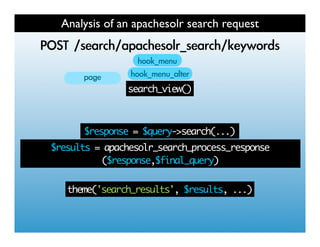
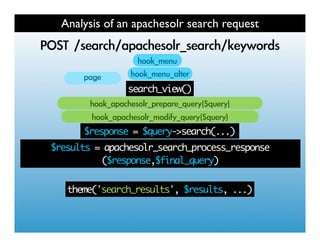
Analysis of an apachesolr search request
   	 
           	 
                search_view()


        $response = $query->search(...)
$results = apachesolr_search_process_response
          ($response,$final_query)


   theme('search_results', $results, ...)
Analysis of an apachesolr search request
   	 
           	 
                search_view()


        $response = $query->search(...)
$results = apachesolr_search_process_response
          ($response,$final_query)


   theme('search_results', $results, ...)
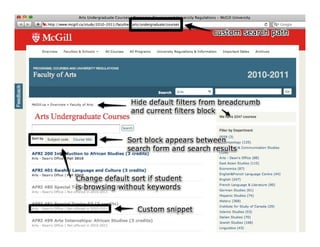
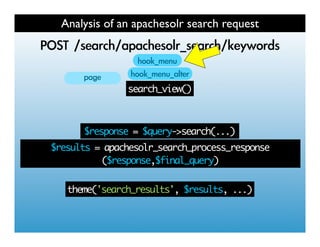
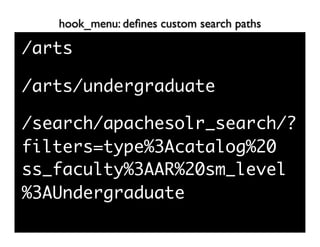
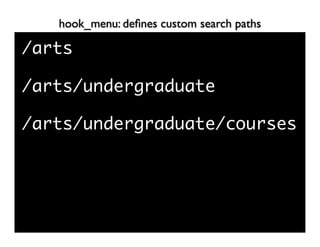
hook_menu: defines custom search paths

/arts

/arts/undergraduate

/search/apachesolr_search/?
filters=type%3Acatalog%20
ss_faculty%3AAR%20sm_level
%3AUndergraduate
hook_menu: defines custom search paths

/arts

/arts/undergraduate

/arts/undergraduate/courses
hook_menu: defines custom search paths


// Implements hook_menu().
function mcgill_menu() {
  $items['arts/undergraduate/courses'] = array(
    'page callback' => 'mcgill_courses_search',
    'access arguments' => array('search content'),
    'type' => MENU_CALLBACK,
  );
   return $items;
}
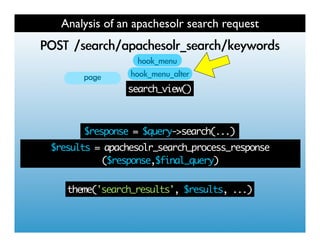
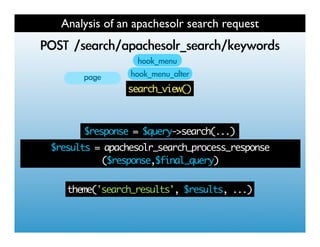
Analysis of an apachesolr search request
   	 
           	 
                search_view()


        $response = $query->search(...)
$results = apachesolr_search_process_response
          ($response,$final_query)


   theme('search_results', $results, ...)
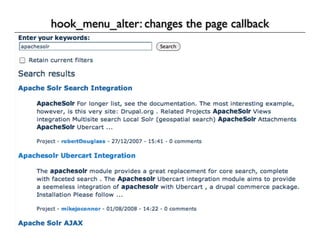
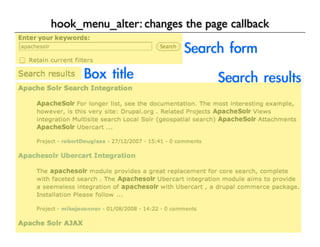
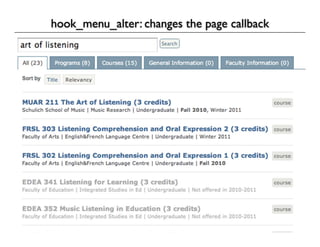
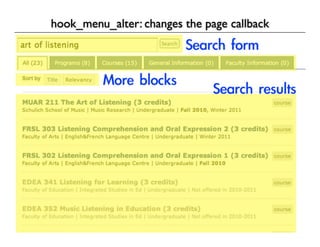
hook_menu_alter: changes the page callback


// Implements hook_menu_alter().
function mcgill_menu_alter(&$items) {
  if (isset($items['search/apachesolr_search/%menu_tail'])) {
    $items['search']['page callback'] = 'mcgill_page';
    $items['search/apachesolr_search/%menu_tail']['page callback'] = 'mcgill_page';
  }
}
Analysis of an apachesolr search request
   	 
           	 
                search_view()


        $response = $query->search(...)
$results = apachesolr_search_process_response
          ($response,$final_query)


   theme('search_results', $results, ...)
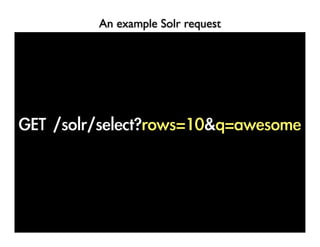
An example Solr request
Analysis of an apachesolr search request
  	 
          	 
               search_view()


       $response = $query->search(...)
$results = apachesolr_search_process_response
          ($response,$final_query)


   theme('search_results', $results, ...)
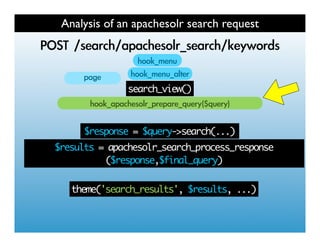
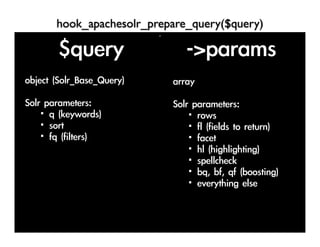
hook_apachesolr_prepare_query($query)
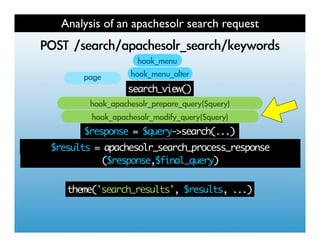
Analysis of an apachesolr search request
        	 
                	 
                     search_view()


             $response = $query->search(...)
$results = apachesolr_process_response($response, ...)
     $results = apachesolr_search_process_response
               ($response,$final_query)


       theme('search_results', $results, ...)
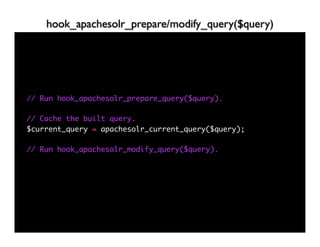
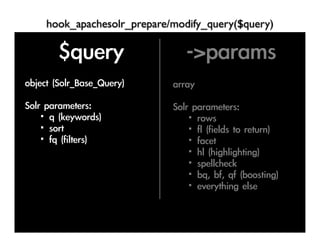
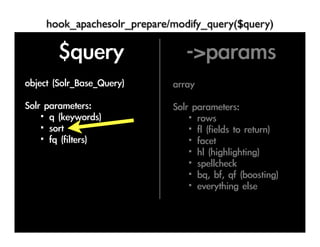
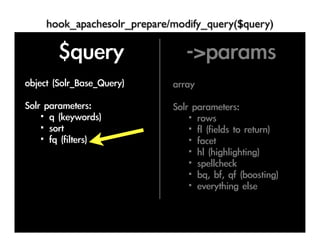
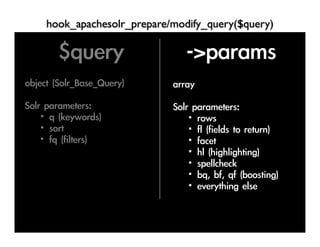
hook_apachesolr_prepare/modify_query($query)


// Run hook_apachesolr_prepare_query($query).

// Cache the built query.
$current_query = apachesolr_current_query($query);

// Run hook_apachesolr_modify_query($query).
hook_apachesolr_prepare/modify_query($query)
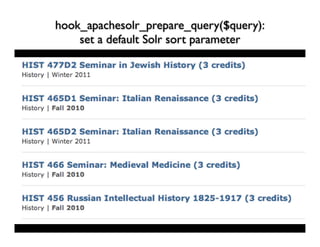
hook_apachesolr_prepare_query($query):
    set a default Solr sort parameter
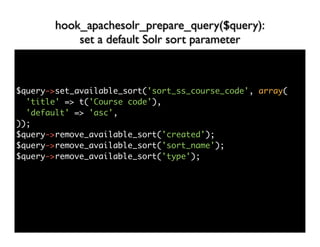
hook_apachesolr_prepare_query($query):
            set a default Solr sort parameter


$query->set_available_sort('sort_ss_course_code', array(
  'title' => t('Course code'),
  'default' => 'asc',
));
$query->remove_available_sort('created');
$query->remove_available_sort('sort_name');
$query->remove_available_sort('type');
hook_apachesolr_prepare_query($query):
            set a default Solr sort parameter


if (!isset($_GET['solrsort'])) {
  if ($query->get_keys()) {
    $query->set_solrsort('score', 'asc');
  }
  else {
    $query->set_solrsort('sort_ss_course_code', 'asc');
  }
}
hook_apachesolr_prepare/modify_query($query)
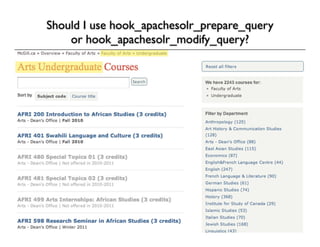
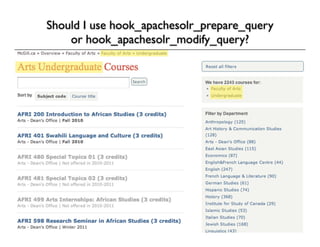
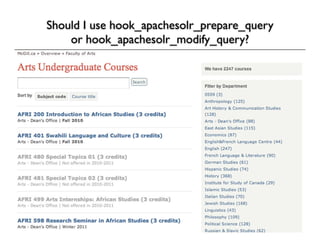
Should I use hook_apachesolr_prepare_query
      or hook_apachesolr_modify_query?


/arts/undergraduate/courses
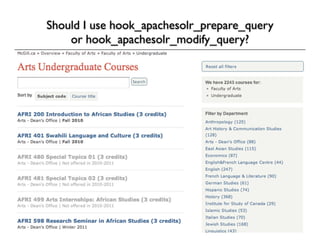
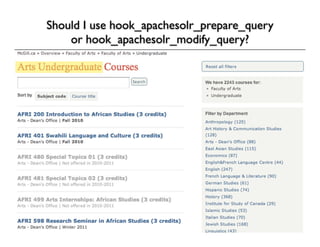
Should I use hook_apachesolr_prepare_query
    or hook_apachesolr_modify_query?
Should I use hook_apachesolr_prepare_query
    or hook_apachesolr_modify_query?
Should I use hook_apachesolr_prepare_query
    or hook_apachesolr_modify_query?
Should I use hook_apachesolr_prepare_query
    or hook_apachesolr_modify_query?
Should I use hook_apachesolr_prepare_query
    or hook_apachesolr_modify_query?
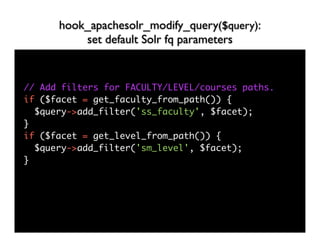
hook_apachesolr_modify_query($query):
          set default Solr fq parameters


// Add filters for FACULTY/LEVEL/courses paths.
if ($facet = get_faculty_from_path()) {
  $query->add_filter('ss_faculty', $facet);
}
if ($facet = get_level_from_path()) {
  $query->add_filter('sm_level', $facet);
}
hook_apachesolr_prepare/modify_query($query)
      Set Solr parameters in $query->params


$query->params['fl'] .=
',ss_course_code';

$query->params['facet.limit'] = -1;
Analysis of an apachesolr search request
   	 
           	 
                search_view()


        $response = $query->search(...)
$results = apachesolr_search_process_response
          ($response,$final_query)


   theme('search_results', $results, ...)
Analysis of an apachesolr search request
   	 
           	 
                search_view()


        $response = $query->search(...)
$results = apachesolr_search_process_response
          ($response,$final_query)
                                   	 
   theme('search_results', $results, ...)
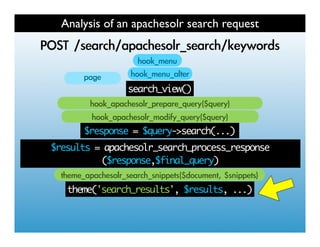
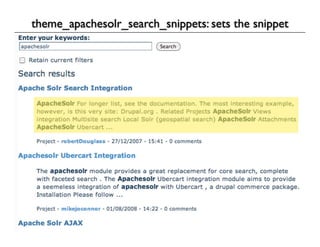
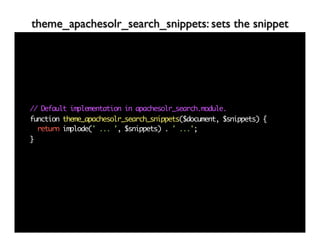
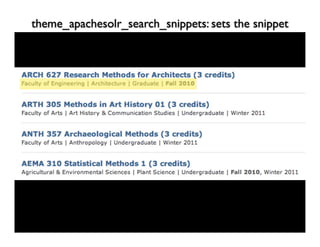
theme_apachesolr_search_snippets: sets the snippet


// Default implementation in apachesolr_search.module.
function theme_apachesolr_search_snippets($document, $snippets) {
  return implode(' ... ', $snippets) . ' ...';
}
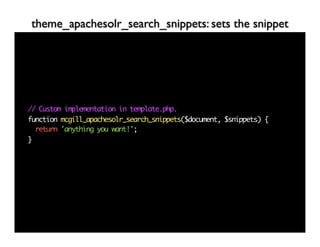
theme_apachesolr_search_snippets: sets the snippet


// Custom implementation in template.php.
function mcgill_apachesolr_search_snippets($document, $snippets) {
  return 'anything you want!';
}
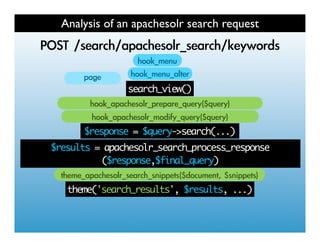
Analysis of an apachesolr search request
   	 
           	 
                search_view()


        $response = $query->search(...)
$results = apachesolr_search_process_response
          ($response,$final_query)
                                   	 
   theme('search_results', $results, ...)
search-result.tpl.php: renders a single search result


<?php print $result['node']->ss_course_code; ?>


If this is user input use check_plain() - Solr can
send you back the same (unsafe) user input you index.
See apachesolr_clean_text() if you want to index text
without tags.
Extra thanks to
     James McKinney
For use of his slides and for ideas.
jpmckinney on drupal.org
http://evolvingweb.ca/
http://cph2010.drupal.org/node/8168

Apache Solr Search Mastery

  • 1.
    Apache Solr Search Mastery PeterWolanin and Robert Douglass 25. aug 13:30 Trellon
  • 2.
    We  hope  you  will  leave  having   learned  about: • What  is  Solr  and  how  do  you  run  it  locally • Ge9ng  Drupal  data  into  Solr • Changes  in  Drupal  7 • Field  API  integraAon • Searching  Solr  from  Drupal • Modifying  what’s  searched  and  the  results • Theming  search  results
  • 3.
    Drupal  Interacts  with  Solr  via  HTTP • Drupal  sends  data  to  Solr  as  XML  documents • Solr  accepts  documents  POSTed  to  /update • A  different  XML  can  be  POSTed  to  delete • Searching,  etc  are  GET  requests • If  something  is  not  working  as  expected,  you   can  try  searching  directly  in  Solr  via  URL • Solr  also  includes  admin  and  analysis  interfaces   (you  need  to  lock  this  down  for  producAon).
  • 4.
    Run  Solr  Using  the  Example  Dir Replace the schema.xml and solrconfig.xml with the ones from the Drupal module Invoke the start.jar: java -jar start.jar
  • 6.
    Schema:  Defines  Types  &  Fields <?xml version="1.0" encoding="UTF-8" ?> <schema name="drupal-0.9.5" version="1.2"> <types> ... </types> <fields> <!-- The document id is derived from a site-spcific key (hash) and the node ID like: $document->id = $hash . '/node/' . $node->nid; --> <field name="id" type="string" indexed="true" stored="true" required="true" /> <!-- These are the fields that correspond to a Drupal node. --> <field name="site" type="string" indexed="true" stored="true"/> <field name="hash" type="string" indexed="true" stored="true"/> <field name="url" type="string" indexed="true" stored="true"/> <field name="title" type="text" indexed="true" stored="true" termVectors="true" omitNorms="true"/> <field name="sort_title" type="sortString" indexed="true" stored="false"/> <field name="body" type="text" indexed="true" stored="true" termVectors="true"/> <field name="teaser" type="text" indexed="false" stored="true"/> ... </fields> <uniqueKey>id</uniqueKey> <!-- field for the QueryParser to use when an explicit fieldname is absent --> <defaultSearchField>body</defaultSearchField> <!-- SolrQueryParser configuration: defaultOperator="AND|OR" --> <solrQueryParser defaultOperator="AND"/> </schema>
  • 7.
    Schema:  Defines  Types  &  Fields <field name="id" type="string" indexed="true" stored="true" required="true" /> <!-- These are the fields that correspond to a Drupal node. --> <field name="site" type="string" indexed="true" stored="true"/> <field name="hash" type="string" indexed="true" stored="true"/>
  • 8.
    Dynamic  Fields  Provide  Flexibility <!-- Dynamic field definitions will be used if the name matches any of the patterns. The glob-like pattern in the name attribute must have "*" only at the start or the end. Longer patterns will be matched first. --> <dynamicField name="is_*" type="integer" indexed="true" stored="true" multiValued="false"/> <dynamicField name="im_*" type="integer" indexed="true" stored="true" multiValued="true"/> ... <dynamicField name="ss_*" type="string" indexed="true" stored="true" multiValued="false"/> <dynamicField name="ts_*" type="text" indexed="true" stored="true" multiValued="false" termVectors="true"/> <dynamicField name="ds_*" type="date" indexed="true" stored="true" multiValued="false"/> <dynamicField name="dm_*" type="date" indexed="true" stored="true" multiValued="true"/> <dynamicField name="tds_*" type="tdate"indexed="true" stored="true" multiValued="false"/> <dynamicField name="tdm_*" type="tdate"indexed="true" stored="true" multiValued="true"/> <dynamicField name="bm_*" type="boolean" indexed="true" stored="true" multiValued="true"/> <dynamicField name="bs_*" type="boolean" indexed="true" stored="true" multiValued="false"/> ... <!-- Sortable version of the dynamic string field --> <dynamicField name="sort_ss_*" type="sortString" indexed="true" stored="false"/> <copyField source="ss_*" dest="sort_ss_*"/> <!-- A random sort field --> <dynamicField name="random_*" type="rand" indexed="true" stored="true"/> <!-- This field is used to store node access records, as opposed to CCK field data --> <dynamicField name="nodeaccess*" type="integer" indexed="true" stored="false" multiValued="true"/> <dynamicField name="*" type="ignored" multiValued="true" />
  • 9.
    Dynamic  Fields  Provide  Flexibility <!-- Dynamic field definitions will be used if the name matches any of the patterns. The glob-like pattern in the name attribute must have "*" only at the start or the end. Longer patterns will be matched first. --> <dynamicField name="is_*" type="integer" indexed="true" stored="true" multiValued="false"/> <dynamicField name="im_*" type="integer" indexed="true" stored="true" multiValued="true"/>
  • 10.
    Dynamic  Fields  Provide  Flexibility <!-- Dynamic field definitions will be used if the name matches any of the patterns. The glob-like pattern in the name attribute must have "*" only at the start or the end. Longer patterns will be matched first. --> <dynamicField name="is_*" type="integer" indexed="true" stored="true" multiValued="false"/> <dynamicField name="im_*" type="integer" indexed="true" stored="true" multiValued="true"/> ... <dynamicField name="ss_*" type="string" indexed="true" stored="true" multiValued="false"/> <dynamicField name="ts_*" type="text" indexed="true" stored="true" multiValued="false" termVectors="true"/> <dynamicField name="ds_*" type="date" indexed="true" stored="true" multiValued="false"/> <dynamicField name="dm_*" type="date" indexed="true" stored="true" multiValued="true"/> <dynamicField name="tds_*" type="tdate"indexed="true" stored="true" multiValued="false"/> <dynamicField name="tdm_*" type="tdate"indexed="true" stored="true" multiValued="true"/> <dynamicField name="bm_*" type="boolean" indexed="true" stored="true" multiValued="true"/> <dynamicField name="bs_*" type="boolean" indexed="true" stored="true" multiValued="false"/> ... <!-- Sortable version of the dynamic string field --> <dynamicField name="sort_ss_*" type="sortString" indexed="true" stored="false"/> <copyField source="ss_*" dest="sort_ss_*"/> <!-- A random sort field --> <dynamicField name="random_*" type="rand" indexed="true" stored="true"/> <!-- This field is used to store node access records, as opposed to CCK field data --> <dynamicField name="nodeaccess*" type="integer" indexed="true" stored="false" multiValued="true"/> <dynamicField name="*" type="ignored" multiValued="true" />
  • 11.
    Dynamic  Fields  Provide  Flexibility <!-- Sortable version of the dynamic string field --> <dynamicField name="sort_ss_*" type="sortString" indexed="true" stored="false"/> <copyField source="ss_*" dest="sort_ss_*"/> <!-- This field is used to store node access records, as opposed to CCK field data --> <dynamicField name="nodeaccess*" type="integer" indexed="true" stored="false" multiValued="true"/> <dynamicField name="*" type="ignored" multiValued="true" />
  • 12.
  • 13.
    Use the factorymethod to get an object for building your queries: $query = apachesolr_drupal_query( $keys = '', $filters = '', $solrsort = '', $base_path = '', $solr = NULL );
  • 14.
    The actual classthat is returned is determined by a Drupal variable: variable_get('apachesolr_query_class', array('apachesolr', 'Solr_Base_Query'));
  • 15.
    interface Drupal_Solr_Query_Interface { get_filters($name); has_filter($field, $value); add_filter($field, $value, $exclude); remove_filter($field, $value); ... }
  • 16.
    interface Drupal_Solr_Query_Interface { ... get_keys(); set_keys($keys); remove_keys(); ... }
  • 17.
    interface Drupal_Solr_Query_Interface { ... get_path(); get_url_queryvalues(); get_query_basic(); ... }
  • 18.
    interface Drupal_Solr_Query_Interface { ... get_available_sorts(); set_available_sort($field, $sort); get_solrsort(); set_solrsort($field, $direction); ... }
  • 19.
    interface Drupal_Solr_Query_Interface { ... add_subquery( Drupal_Solr_Query_Interface $query); remove_subquery( Drupal_Solr_Query_Interface $query); remove_subqueries(); ... }
  • 20.
    interface Drupal_Solr_Query_Interface { ... // Passes to the $solr object which // executes the search. search($keys = NULL); }
  • 21.
  • 22.
    Use the factorymethod to get an object for sending requests to Solr: $solr = apachesolr_get_solr($host, $port, $path);
  • 23.
    The actual classthat is returned is determined by a Drupal variable: variable_get('apachesolr_service_class', array('apachesolr', 'Drupal_Apache_Solr_Service.php', 'Drupal_Apache_Solr_Service') );
  • 24.
    This allows youto customize the way search works by providing a different solr service class than the standard. variable_set('apachesolr_service_class', array('acquia_search', 'Acquia_Search_Service.php', 'Acquia_Search_Service') );
  • 25.
    http://code.google.com/p/solr-php-client/ class Apache_Solr_Service { addDocument( Apache_Solr_Document $document); addDocuments($documents); deleteById($id); deleteByQuery($rawQuery); ... }
  • 26.
  • 27.
  • 28.
    class Drupal_Apache_Solr_Service extendsApache_Solr_Service { getLuke(); getFields(); getStatsSummary(); ... }
  • 29.
    class Drupal_Apache_Solr_Service extendsApache_Solr_Service { // Takes control of the request sending // and headers - Drupal idiomatic. _makeHttpRequest(); }
  • 30.
  • 31.
    http://code.google.com/p/solr-php-client/ class Apache_Solr_Document { addField($key, $value, $boost); setMultiValue($key, $value, $boost); }
  • 32.
    Drupal  7  Changes   $query, $params $query->params $solr->search() $query->search() • Taxonomy  on  a  node  is  now  a  term  reference  field   (works  as  part  of  the  Field  API  integraAon). • Fixes  to  core  search  module  APIs  mean  that  some   hacks  are  gone:  e.g.  no,  hook_menu_alter;  we   can  set  apachesolr  as  the  default  via  search  UI.
  • 33.
    You  Can  Add  Any  Data  to  the  Index hook_apachesolr_update_index(&$document, $node, $namespace) • Used  to  add  more  data  to  a  document  before   it’s  sent  to  Solr. • Can  also  be  used  to  alter  or  replace  data  added   by  apachesolr  or  another  module. • This  is  it!  (it  works  like  an  _alter  hook).
  • 34.
    Image  Data  Using  Dynamic  Fields /** * Implementation of hook_apachesolr_update_index(). */ function apachesolr_image_apachesolr_update_index(&$document, $node, $namespace) { if ($node->type == 'image' && $document->entity == 'node') { $areas = array(); $sizes = image_get_derivative_sizes($node->images['_original']); foreach ($sizes as $name => $info) { $areas[$name] = $info['width'] * $info['height']; } asort($areas); $image_path = FALSE; foreach ($areas as $preset => $size) { $image_path = $node->images[$preset]; break; } if ($image_path) { $document->ss_image_relative = $image_path; // Support multi-site too. $document->ss_image_absolute = file_create_url($image_path); } } } /** * Implementation of hook_apachesolr_modify_query(). */ function apachesolr_image_apachesolr_modify_query($query, $caller) { // Also retrieve image thumbnail links. $query->params['fl'] .= ',ss_image_relative'; }
  • 35.
    Image  Data  Using  Dynamic  Fields if ($image_path) { $document->ss_image_relative = $image_path; } /** * Implement hook_apachesolr_modify_query(). */ function apachesolr_image_apachesolr_modify_query( $query, $caller) { // Also retrieve image thumbnail links. $query->params['fl'] .= ',ss_image_relative'; }
  • 36.
    UI  to  Exclude  Whole  Content  Types • ?q=admin/config/search/apachesolr/content-­‐bias
  • 37.
    Control  Indexing  More  Precisely   hook_apachesolr_node_exclude($node, $namespace) in_array($node->type, variable_get( 'apachesolr_exclude_comments_types', array())) hook_node_update_index($node) • hook_node_update_index  output  added  to  body. • We  can  create  mulAple  documents  from  one  node   (e.g.  document  per  comment). hook_apachesolr_document_handlers($type, $namespace)
  • 38.
    Field  API  IntegraAon • Most  of  the  Field  API  integraAon  follows   directly  from  the  6.x-­‐2.x  CCK  integraAon. • In  Drupal  7,  we  match  field  types,  rather  than   looking  at  the  widget. • By  default,  the  data  will  be  indexed  to  Solr  as   mulA-­‐valued,  and  named  combining  the  field   module  and  name  sm_$module_$fieldname
  • 39.
    Typically  need  4  things: • What  field  types  (or  field  instances)  to  look   for  during  indexing. • The  data  type  to  use  in  the  index   (index_type) • A  funcAon  for  extracAng  the  data  from  the   field  while  indexing  (indexing_callback). • A  funcAon  for  displaying  the  data  from  the   field  during  searches  (display_callback).
  • 40.
    Field  API  IntegraAon hook_apachesolr_field_mappings_alter (&$mappings) $mappings['list_text']= array( 'display_callback' => 'apachesolr_fields_list_display_callback', 'indexing_callback' => 'apachesolr_fields_list_indexing_callback', 'index_type' => 'string', );
  • 43.
    Analysis of anapachesolr search request search_view() $response = $query->search(...) $results = apachesolr_search_process_response ($response,$final_query) theme('search_results', $results, ...)
  • 44.
    Analysis of anapachesolr search request search_view() $response = $query->search(...) $results = apachesolr_search_process_response ($response,$final_query) theme('search_results', $results, ...)
  • 45.
    hook_menu: defines customsearch paths /arts /arts/undergraduate /search/apachesolr_search/? filters=type%3Acatalog%20 ss_faculty%3AAR%20sm_level %3AUndergraduate
  • 46.
    hook_menu: defines customsearch paths /arts /arts/undergraduate /arts/undergraduate/courses
  • 47.
    hook_menu: defines customsearch paths // Implements hook_menu(). function mcgill_menu() { $items['arts/undergraduate/courses'] = array( 'page callback' => 'mcgill_courses_search', 'access arguments' => array('search content'), 'type' => MENU_CALLBACK, ); return $items; }
  • 48.
    Analysis of anapachesolr search request search_view() $response = $query->search(...) $results = apachesolr_search_process_response ($response,$final_query) theme('search_results', $results, ...)
  • 49.
  • 50.
  • 51.
  • 52.
  • 53.
    hook_menu_alter: changes thepage callback // Implements hook_menu_alter(). function mcgill_menu_alter(&$items) { if (isset($items['search/apachesolr_search/%menu_tail'])) { $items['search']['page callback'] = 'mcgill_page'; $items['search/apachesolr_search/%menu_tail']['page callback'] = 'mcgill_page'; } }
  • 54.
    Analysis of anapachesolr search request search_view() $response = $query->search(...) $results = apachesolr_search_process_response ($response,$final_query) theme('search_results', $results, ...)
  • 55.
  • 56.
    Analysis of anapachesolr search request search_view() $response = $query->search(...) $results = apachesolr_search_process_response ($response,$final_query) theme('search_results', $results, ...)
  • 57.
  • 58.
    Analysis of anapachesolr search request search_view() $response = $query->search(...) $results = apachesolr_process_response($response, ...) $results = apachesolr_search_process_response ($response,$final_query) theme('search_results', $results, ...)
  • 59.
    hook_apachesolr_prepare/modify_query($query) // Run hook_apachesolr_prepare_query($query). //Cache the built query. $current_query = apachesolr_current_query($query); // Run hook_apachesolr_modify_query($query).
  • 60.
  • 61.
  • 62.
    hook_apachesolr_prepare_query($query): set a default Solr sort parameter
  • 63.
    hook_apachesolr_prepare_query($query): set a default Solr sort parameter $query->set_available_sort('sort_ss_course_code', array( 'title' => t('Course code'), 'default' => 'asc', )); $query->remove_available_sort('created'); $query->remove_available_sort('sort_name'); $query->remove_available_sort('type');
  • 64.
    hook_apachesolr_prepare_query($query): set a default Solr sort parameter if (!isset($_GET['solrsort'])) { if ($query->get_keys()) { $query->set_solrsort('score', 'asc'); } else { $query->set_solrsort('sort_ss_course_code', 'asc'); } }
  • 65.
  • 66.
    Should I usehook_apachesolr_prepare_query or hook_apachesolr_modify_query? /arts/undergraduate/courses
  • 67.
    Should I usehook_apachesolr_prepare_query or hook_apachesolr_modify_query?
  • 68.
    Should I usehook_apachesolr_prepare_query or hook_apachesolr_modify_query?
  • 69.
    Should I usehook_apachesolr_prepare_query or hook_apachesolr_modify_query?
  • 70.
    Should I usehook_apachesolr_prepare_query or hook_apachesolr_modify_query?
  • 71.
    Should I usehook_apachesolr_prepare_query or hook_apachesolr_modify_query?
  • 72.
    hook_apachesolr_modify_query($query): set default Solr fq parameters // Add filters for FACULTY/LEVEL/courses paths. if ($facet = get_faculty_from_path()) { $query->add_filter('ss_faculty', $facet); } if ($facet = get_level_from_path()) { $query->add_filter('sm_level', $facet); }
  • 73.
  • 74.
    hook_apachesolr_prepare/modify_query($query) Set Solr parameters in $query->params $query->params['fl'] .= ',ss_course_code'; $query->params['facet.limit'] = -1;
  • 75.
    Analysis of anapachesolr search request search_view() $response = $query->search(...) $results = apachesolr_search_process_response ($response,$final_query) theme('search_results', $results, ...)
  • 76.
    Analysis of anapachesolr search request search_view() $response = $query->search(...) $results = apachesolr_search_process_response ($response,$final_query) theme('search_results', $results, ...)
  • 77.
  • 78.
    theme_apachesolr_search_snippets: sets thesnippet // Default implementation in apachesolr_search.module. function theme_apachesolr_search_snippets($document, $snippets) { return implode(' ... ', $snippets) . ' ...'; }
  • 79.
  • 80.
    theme_apachesolr_search_snippets: sets thesnippet // Custom implementation in template.php. function mcgill_apachesolr_search_snippets($document, $snippets) { return 'anything you want!'; }
  • 81.
    Analysis of anapachesolr search request search_view() $response = $query->search(...) $results = apachesolr_search_process_response ($response,$final_query) theme('search_results', $results, ...)
  • 82.
    search-result.tpl.php: renders asingle search result <?php print $result['node']->ss_course_code; ?> If this is user input use check_plain() - Solr can send you back the same (unsafe) user input you index. See apachesolr_clean_text() if you want to index text without tags.
  • 83.
    Extra thanks to James McKinney For use of his slides and for ideas. jpmckinney on drupal.org http://evolvingweb.ca/
  • 84.