ElasticSearch - search engine,
not db!
author: Volodymyr Kraietskyi
Agenda
1. About ElasticSearch
2. Development features
3. Advantages, disadvantages
4. Web plugin
Search engines - programs that
search documents for specified keywords
and returns a list of the documents where
the keywords were found.
Elasticsearch - is a search engine
based on Lucene. It provides a distributed,
multitenant-capable full-text search engine
with an HTTP web interface and
schema-free JSON documents.
Apache Lucene - is a Java full-text
search engine. Lucene is not a complete
application, but rather a code library and
API that can easily be used to add search
capabilities to applications.
Elasticsearch purpose
•full text search;
•analytics store;
•auto completer;
•spell checker;
•alerting engine;
•general purpose document store.
Features
•Real-Time Advanced Analytics
•Multitenancy
•Full-Text Search
•Document-Oriented
•Schema-Free
•Developer-Friendly, RESTful API
•Build on top of Apache Lucene
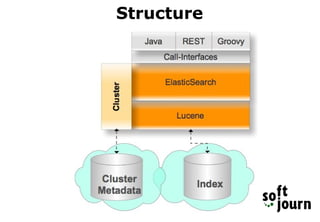
Structure
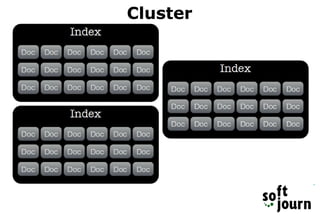
Cluster
Index
An index is a collection of documents that have
somewhat similar characteristics.
Request:
POST /customer HTTP/1.1
Host: localhost:9200
Response:
{
"acknowledged": true
}
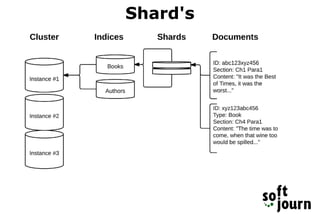
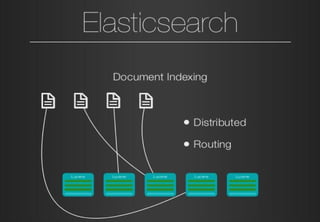
Shard's
What Is a Document?
A document is a JSON document which is stored
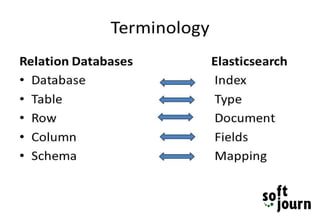
in elasticsearch. It is like a row in a table in a
relational database. Each document is stored in an
index and has a type and an id.
Not bug, but feature
Documents in Elasticsearch are immutable; we
cannot change them. Instead, if we need to
update an existing document, we reindex or
replace it.
Index settings
Static settings:
•index.number_of_shard;
•index.shard.check_on_startup;
•index.codec.
Dynamic settings:
•index.number_of_replicas;
•index.auto_expand_replicas;
•index.refresh_interval;
•index.max_result_window;
•index.blocks.read_only;
•index.blocks.read;
•index.blocks.write;
•index.blocks.metadata;
•index.ttl.disable_purge;
•index.recovery.initial_shards;
Other index settings
• Analysis: Settings to define analyzers, tokenizers, token filters
and character filters.
• Index shard allocation: Control over where, when, and how
shards are allocated to nodes.
• Mapping: Enable or disable dynamic mapping for an index.
• Merging: Control over how shards are merged by the background
merge process.
• Similarities: Configure custom similarity settings to customize
how search results are scored.
• Slowlog: Control over how slow queries and fetch requests are
logged.
• Store: Configure the type of filesystem used to access shard data.
• Translog: Control over the transaction log and background flush
operations.
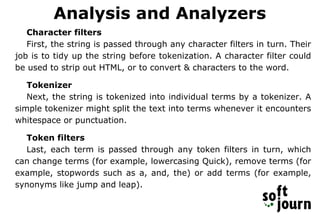
Analysis and Analyzers
Character filters
First, the string is passed through any character filters in turn. Their
job is to tidy up the string before tokenization. A character filter could
be used to strip out HTML, or to convert & characters to the word.
Tokenizer
Next, the string is tokenized into individual terms by a tokenizer. A
simple tokenizer might split the text into terms whenever it encounters
whitespace or punctuation.
Token filters
Last, each term is passed through any token filters in turn, which
can change terms (for example, lowercasing Quick), remove terms (for
example, stopwords such as a, and, the) or add terms (for example,
synonyms like jump and leap).
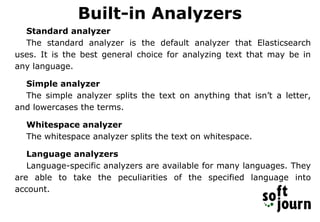
Built-in Analyzers
Standard analyzer
The standard analyzer is the default analyzer that Elasticsearch
uses. It is the best general choice for analyzing text that may be in
any language.
Simple analyzer
The simple analyzer splits the text on anything that isn’t a letter,
and lowercases the terms.
Whitespace analyzer
The whitespace analyzer splits the text on whitespace.
Language analyzers
Language-specific analyzers are available for many languages. They
are able to take the peculiarities of the specified language into
account.
Phrase: "What's new in Ivano-Frankivsk?"
Standard: [{what's}, {new}, {in}, {ivano}, {frankivsk}]
Simple: [{what}, {s}, {new}, {in}, {ivano}, {frankivsk}]
WhiteSpace: [{What's}, {new}, {in}, {Ivano-Frankivsk?}]
English: [{what}, {new}, {in}, {ivano}, {frankivsk}]
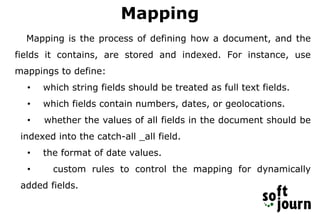
Mapping
Mapping is the process of defining how a document, and the
fields it contains, are stored and indexed. For instance, use
mappings to define:
• which string fields should be treated as full text fields.
• which fields contain numbers, dates, or geolocations.
• whether the values of all fields in the document should be
indexed into the catch-all _all field.
• the format of date values.
• custom rules to control the mapping for dynamically
added fields.
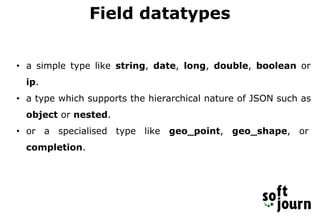
Field datatypes
• a simple type like string, date, long, double, boolean or
ip.
• a type which supports the hierarchical nature of JSON such as
object or nested.
• or a specialised type like geo_point, geo_shape, or
completion.
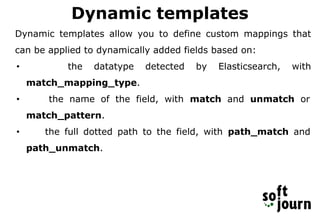
Dynamic templates
Dynamic templates allow you to define custom mappings that
can be applied to dynamically added fields based on:
• the datatype detected by Elasticsearch, with
match_mapping_type.
• the name of the field, with match and unmatch or
match_pattern.
• the full dotted path to the field, with path_match and
path_unmatch.
Dynamic templates example
"dynamic_templates": [ {
"strings": {
"match_mapping_type": "string",
"mapping": {
"type": "string",
"fields": {
"raw": {
"type": "string",
"index": "not_analyzed",
"ignore_above": 256
}}}}}]
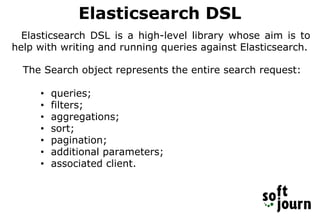
Elasticsearch DSL
Elasticsearch DSL is a high-level library whose aim is to
help with writing and running queries against Elasticsearch.
The Search object represents the entire search request:
• queries;
• filters;
• aggregations;
• sort;
• pagination;
• additional parameters;
• associated client.
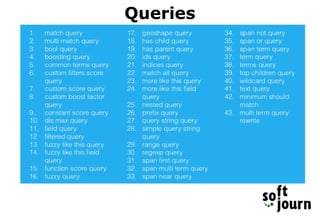
Queries
Query example
{ "from" : 0,
"size" : 10,
"query" : {
"bool" : {
"must" : {
"multi_match" : {
"query" : "Some word",
"fields" : [ "Id",
"phone1", "title", "user" ],
"minimum_should_match" :
"100%"
}},
"filter" : [ {
"multi_match" : {
"query" : "Some report",
"fields" : [ "document
type" ],
"type" : "phrase",
"minimum_should_match" :
"100%"
}},
{ "terms" : {
"user" : [
"user1234@yudu.com", "user2@mail.com",
"user4321@mail.com" ]}
}, {"terms" : {
"id" : [ "123456789",
"123456", "3011163" ]
}} ],
"minimum_should_match" : "1"
}
},
"sort" : [ {
"id.raw" : {
"order" : "desc"
}}, {
"phone1.raw" : {
"order" : "desc"
}}, {
"title.raw" : {
"order" : "desc"
}}, {
"user" : {
"order" : "asc"
}}, {
"type.raw" : {
"order" : "desc"
}
} ]
}
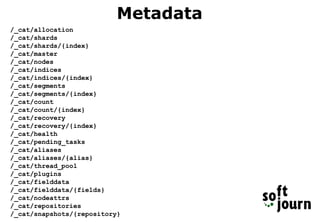
Metadata
/_cat/allocation
/_cat/shards
/_cat/shards/{index}
/_cat/master
/_cat/nodes
/_cat/indices
/_cat/indices/{index}
/_cat/segments
/_cat/segments/{index}
/_cat/count
/_cat/count/{index}
/_cat/recovery
/_cat/recovery/{index}
/_cat/health
/_cat/pending_tasks
/_cat/aliases
/_cat/aliases/{alias}
/_cat/thread_pool
/_cat/plugins
/_cat/fielddata
/_cat/fielddata/{fields}
/_cat/nodeattrs
/_cat/repositories
/_cat/snapshots/{repository}
Document's metadata
{
"took": 49,
"timed_out": false,
"_shards": {
"total": 5,
"successful": 5,
"failed": 0
},
"hits": {
"total": 1,
"max_score": 1,
"hits": [
{
"_index": "out-source",
"_type": "companies",
"_id": "AVX-nPLNu3mBekLrnXXZ",
"_score": 1,
"_source": {
"name": "Softjourn",
"fullName": "Softjourn Inc."
}}
]
}}
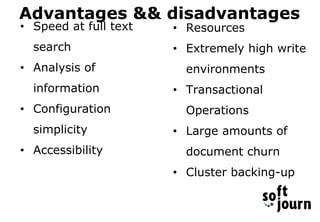
Advantages && disadvantages
• Speed at full text
search
• Analysis of
information
• Configuration
simplicity
• Accessibility
• Resources
• Extremely high write
environments
• Transactional
Operations
• Large amounts of
document churn
• Cluster backing-up
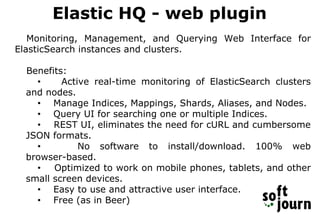
Elastic HQ - web plugin
Monitoring, Management, and Querying Web Interface for
ElasticSearch instances and clusters.
Benefits:
• Active real-time monitoring of ElasticSearch clusters
and nodes.
• Manage Indices, Mappings, Shards, Aliases, and Nodes.
• Query UI for searching one or multiple Indices.
• REST UI, eliminates the need for cURL and cumbersome
JSON formats.
• No software to install/download. 100% web
browser-based.
• Optimized to work on mobile phones, tablets, and other
small screen devices.
• Easy to use and attractive user interface.
• Free (as in Beer)
ElasticSearch
ElasticSearch

ElasticSearch

  • 1.
    ElasticSearch - searchengine, not db! author: Volodymyr Kraietskyi
  • 2.
    Agenda 1. About ElasticSearch 2.Development features 3. Advantages, disadvantages 4. Web plugin
  • 3.
    Search engines -programs that search documents for specified keywords and returns a list of the documents where the keywords were found.
  • 5.
    Elasticsearch - isa search engine based on Lucene. It provides a distributed, multitenant-capable full-text search engine with an HTTP web interface and schema-free JSON documents. Apache Lucene - is a Java full-text search engine. Lucene is not a complete application, but rather a code library and API that can easily be used to add search capabilities to applications.
  • 6.
    Elasticsearch purpose •full textsearch; •analytics store; •auto completer; •spell checker; •alerting engine; •general purpose document store.
  • 7.
    Features •Real-Time Advanced Analytics •Multitenancy •Full-TextSearch •Document-Oriented •Schema-Free •Developer-Friendly, RESTful API •Build on top of Apache Lucene
  • 9.
  • 10.
  • 11.
    Index An index isa collection of documents that have somewhat similar characteristics. Request: POST /customer HTTP/1.1 Host: localhost:9200 Response: { "acknowledged": true }
  • 12.
  • 13.
    What Is aDocument? A document is a JSON document which is stored in elasticsearch. It is like a row in a table in a relational database. Each document is stored in an index and has a type and an id.
  • 15.
    Not bug, butfeature Documents in Elasticsearch are immutable; we cannot change them. Instead, if we need to update an existing document, we reindex or replace it.
  • 16.
    Index settings Static settings: •index.number_of_shard; •index.shard.check_on_startup; •index.codec. Dynamicsettings: •index.number_of_replicas; •index.auto_expand_replicas; •index.refresh_interval; •index.max_result_window; •index.blocks.read_only; •index.blocks.read; •index.blocks.write; •index.blocks.metadata; •index.ttl.disable_purge; •index.recovery.initial_shards;
  • 17.
    Other index settings •Analysis: Settings to define analyzers, tokenizers, token filters and character filters. • Index shard allocation: Control over where, when, and how shards are allocated to nodes. • Mapping: Enable or disable dynamic mapping for an index. • Merging: Control over how shards are merged by the background merge process. • Similarities: Configure custom similarity settings to customize how search results are scored. • Slowlog: Control over how slow queries and fetch requests are logged. • Store: Configure the type of filesystem used to access shard data. • Translog: Control over the transaction log and background flush operations.
  • 18.
    Analysis and Analyzers Characterfilters First, the string is passed through any character filters in turn. Their job is to tidy up the string before tokenization. A character filter could be used to strip out HTML, or to convert & characters to the word. Tokenizer Next, the string is tokenized into individual terms by a tokenizer. A simple tokenizer might split the text into terms whenever it encounters whitespace or punctuation. Token filters Last, each term is passed through any token filters in turn, which can change terms (for example, lowercasing Quick), remove terms (for example, stopwords such as a, and, the) or add terms (for example, synonyms like jump and leap).
  • 19.
    Built-in Analyzers Standard analyzer Thestandard analyzer is the default analyzer that Elasticsearch uses. It is the best general choice for analyzing text that may be in any language. Simple analyzer The simple analyzer splits the text on anything that isn’t a letter, and lowercases the terms. Whitespace analyzer The whitespace analyzer splits the text on whitespace. Language analyzers Language-specific analyzers are available for many languages. They are able to take the peculiarities of the specified language into account.
  • 20.
    Phrase: "What's newin Ivano-Frankivsk?" Standard: [{what's}, {new}, {in}, {ivano}, {frankivsk}] Simple: [{what}, {s}, {new}, {in}, {ivano}, {frankivsk}] WhiteSpace: [{What's}, {new}, {in}, {Ivano-Frankivsk?}] English: [{what}, {new}, {in}, {ivano}, {frankivsk}]
  • 21.
    Mapping Mapping is theprocess of defining how a document, and the fields it contains, are stored and indexed. For instance, use mappings to define: • which string fields should be treated as full text fields. • which fields contain numbers, dates, or geolocations. • whether the values of all fields in the document should be indexed into the catch-all _all field. • the format of date values. • custom rules to control the mapping for dynamically added fields.
  • 22.
    Field datatypes • asimple type like string, date, long, double, boolean or ip. • a type which supports the hierarchical nature of JSON such as object or nested. • or a specialised type like geo_point, geo_shape, or completion.
  • 23.
    Dynamic templates Dynamic templatesallow you to define custom mappings that can be applied to dynamically added fields based on: • the datatype detected by Elasticsearch, with match_mapping_type. • the name of the field, with match and unmatch or match_pattern. • the full dotted path to the field, with path_match and path_unmatch.
  • 24.
    Dynamic templates example "dynamic_templates":[ { "strings": { "match_mapping_type": "string", "mapping": { "type": "string", "fields": { "raw": { "type": "string", "index": "not_analyzed", "ignore_above": 256 }}}}}]
  • 25.
    Elasticsearch DSL Elasticsearch DSLis a high-level library whose aim is to help with writing and running queries against Elasticsearch. The Search object represents the entire search request: • queries; • filters; • aggregations; • sort; • pagination; • additional parameters; • associated client.
  • 26.
  • 27.
    Query example { "from": 0, "size" : 10, "query" : { "bool" : { "must" : { "multi_match" : { "query" : "Some word", "fields" : [ "Id", "phone1", "title", "user" ], "minimum_should_match" : "100%" }}, "filter" : [ { "multi_match" : { "query" : "Some report", "fields" : [ "document type" ], "type" : "phrase", "minimum_should_match" : "100%" }}, { "terms" : { "user" : [ "user1234@yudu.com", "user2@mail.com", "user4321@mail.com" ]} }, {"terms" : { "id" : [ "123456789", "123456", "3011163" ] }} ], "minimum_should_match" : "1" } }, "sort" : [ { "id.raw" : { "order" : "desc" }}, { "phone1.raw" : { "order" : "desc" }}, { "title.raw" : { "order" : "desc" }}, { "user" : { "order" : "asc" }}, { "type.raw" : { "order" : "desc" } } ] }
  • 28.
  • 29.
    Document's metadata { "took": 49, "timed_out":false, "_shards": { "total": 5, "successful": 5, "failed": 0 }, "hits": { "total": 1, "max_score": 1, "hits": [ { "_index": "out-source", "_type": "companies", "_id": "AVX-nPLNu3mBekLrnXXZ", "_score": 1, "_source": { "name": "Softjourn", "fullName": "Softjourn Inc." }} ] }}
  • 30.
    Advantages && disadvantages •Speed at full text search • Analysis of information • Configuration simplicity • Accessibility • Resources • Extremely high write environments • Transactional Operations • Large amounts of document churn • Cluster backing-up
  • 32.
    Elastic HQ -web plugin Monitoring, Management, and Querying Web Interface for ElasticSearch instances and clusters. Benefits: • Active real-time monitoring of ElasticSearch clusters and nodes. • Manage Indices, Mappings, Shards, Aliases, and Nodes. • Query UI for searching one or multiple Indices. • REST UI, eliminates the need for cURL and cumbersome JSON formats. • No software to install/download. 100% web browser-based. • Optimized to work on mobile phones, tablets, and other small screen devices. • Easy to use and attractive user interface. • Free (as in Beer)