Elasticsearch V/s Relational Databases
Agenda
● Basic Difference Between Elasticsearch And Relational Database
● Use Cases where Relational Db are not suitable
● Basic Terminology Of Elasticsearch
● Elasticsearch – CRUD operations
Basic Difference
● Elasticsearch is a No sql Database.
● It has no relations, no constraints, no joins, no transactional
behaviour.
● Easier to scale as compared to a relational Database.
Relational DB Elasticsearch
DataBase Index
Table Type
Row/Record Document
Column Name Field
Usecases where Relational Databases
are not suitable
● Relevance based searching
● Searching when entered spelling of search term is wrong
● Full text search
● Synonym search
● Phonetic search
● Log analysis
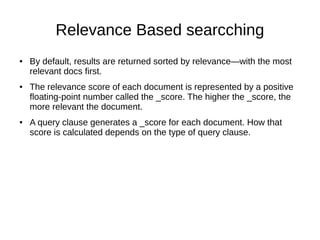
Relevance Based searcching
● By default, results are returned sorted by relevance—with the most
relevant docs first.
● The relevance score of each document is represented by a positive
floating-point number called the _score. The higher the _score, the
more relevant the document.
● A query clause generates a _score for each document. How that
score is calculated depends on the type of query clause.
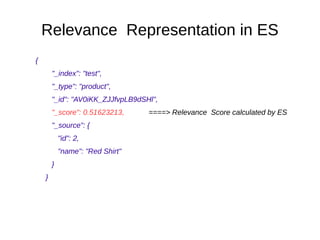
Relevance Representation in ES
{
"_index": "test",
"_type": "product",
"_id": "AV0iKK_ZJJfvpLB9dSHl",
"_score": 0.51623213, ====> Relevance Score calculated by ES
"_source": {
"id": 2,
"name": "Red Shirt"
}
}
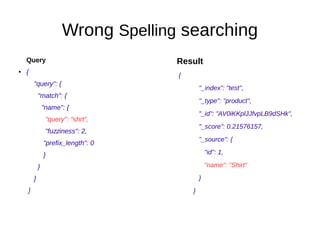
Wrong Spelling searching
Query
● {
"query": {
"match": {
"name": {
"query": "shrt",
"fuzziness": 2,
"prefix_length": 0
}
}
}
}
Result
{
"_index": "test",
"_type": "product",
"_id": "AV0iKKplJJfvpLB9dSHk",
"_score": 0.21576157,
"_source": {
"id": 1,
"name": "Shirt"
}
}
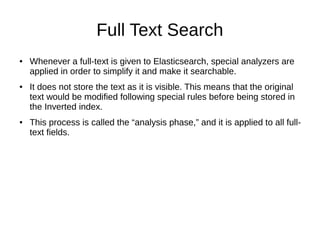
Full Text Search
● Whenever a full-text is given to Elasticsearch, special analyzers are
applied in order to simplify it and make it searchable.
● It does not store the text as it is visible. This means that the original
text would be modified following special rules before being stored in
the Inverted index.
● This process is called the “analysis phase,” and it is applied to all full-
text fields.
Full Text- Analysis Phase
Full Text- Reverse Indexing
Synonym search
● Synonyms are used to broaden the scope of what is considered a
matching document.
● Perhaps no documents match a query for “Top Doctor's College,” but
documents that contain “Top Medical Institutions” would probably be
considered a good match.
Phonetic Searching
● Elasticsearch can search for words that sound similar, even if their
spelling differs.
● The Phonetic Analysis plugin provides token filters which convert
tokens to their phonetic representation using Soundex, Metaphone,
and a variety of other algorithms.
● Generally used while searching for names that sound similar.
Consider 'Smith', 'Smythe'. Elasticsearch analyser will produce same
tokens for both.
Log Analysis Using Elasticsearch
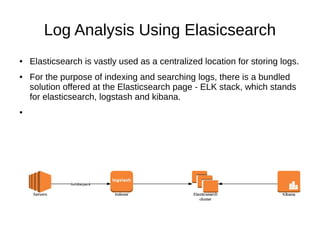
● Elasticsearch is vastly used as a centralized location for storing logs.
● For the purpose of indexing and searching logs, there is a bundled
solution offered at the Elasticsearch page - ELK stack, which stands
for elasticsearch, logstash and kibana.
●
Elasticsearch Terminology
● Elasticsearch: It is a horizontally distributed,data storage, search server,
aggregation engine, based on lucene library. It is written in java. Elasticsearch
5.5 is the latest one.
● Cluster: A cluster consists of one or more nodes which share the same cluster
name. Each cluster has a single master node which can be replaced if the
current master node fails.
● Node: A node is a running instance of elasticsearch which belongs to a cluster.
Multiple nodes can be started on a single server. At startup, a node will use
unicast to discover an existing cluster with the same cluster name and will try
to join that cluster.
● Primary Shard: Each document is stored in a single primary shard. When you
index a document, it is indexed first on the primary shard, then on all replicas
of the primary shard. By default, an index has 5 primary shards.
Elasticsearch Terminology Ctd.
● Replica Shard: Each primary shard can have zero or more replicas. A replica
is a copy of the primary shard. By Default there are 1 replica for each primary
shards.
● Document: A document is a JSON document which is stored in elasticsearch.
It is like a row in a table in a relational database. Each document is stored in
an index and has a type and an id. A document is a JSON object which
contains zero or more fields, or key-value pairs.
● ID: The ID of a document identifies a document. The index/type/id of a
document must be unique. If no ID is provided, then it will be auto-generated.
● Mapping: A mapping is like a schema definition in a relational database. Each
index has a mapping, which defines each type within the index, plus a number
of index-wide settings.
Create Index/Document
● Index Creation:
PUT employee
● Document Creation
POST employee/employee/1
{
"name" : "John"
}
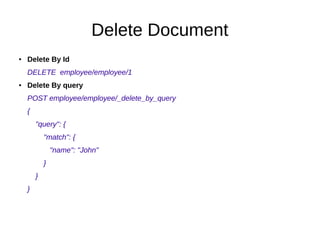
Delete Document
● Delete By Id
DELETE employee/employee/1
● Delete By query
POST employee/employee/_delete_by_query
{
"query": {
"match": {
"name": "John"
}
}
}
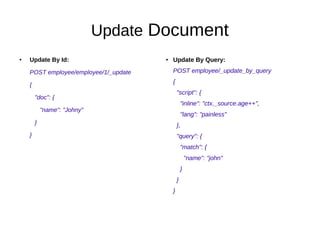
Update Document
● Update By Id:
POST employee/employee/1/_update
{
"doc": {
"name": "Johny"
}
}
● Update By Query:
POST employee/_update_by_query
{
"script": {
"inline": "ctx._source.age++",
"lang": "painless"
},
"query": {
"match": {
"name": "john"
}
}
}
Read/Query Document
● Read By Id
GET employee/employee/1
● Read By query
GET employee/_search
{
"query": {
"match": {
"name": "John"
}
}
}
Thank You :)

Elasticsearch V/s Relational Database

  • 1.
  • 2.
    Agenda ● Basic DifferenceBetween Elasticsearch And Relational Database ● Use Cases where Relational Db are not suitable ● Basic Terminology Of Elasticsearch ● Elasticsearch – CRUD operations
  • 3.
    Basic Difference ● Elasticsearchis a No sql Database. ● It has no relations, no constraints, no joins, no transactional behaviour. ● Easier to scale as compared to a relational Database. Relational DB Elasticsearch DataBase Index Table Type Row/Record Document Column Name Field
  • 4.
    Usecases where RelationalDatabases are not suitable ● Relevance based searching ● Searching when entered spelling of search term is wrong ● Full text search ● Synonym search ● Phonetic search ● Log analysis
  • 5.
    Relevance Based searcching ●By default, results are returned sorted by relevance—with the most relevant docs first. ● The relevance score of each document is represented by a positive floating-point number called the _score. The higher the _score, the more relevant the document. ● A query clause generates a _score for each document. How that score is calculated depends on the type of query clause.
  • 6.
    Relevance Representation inES { "_index": "test", "_type": "product", "_id": "AV0iKK_ZJJfvpLB9dSHl", "_score": 0.51623213, ====> Relevance Score calculated by ES "_source": { "id": 2, "name": "Red Shirt" } }
  • 7.
    Wrong Spelling searching Query ●{ "query": { "match": { "name": { "query": "shrt", "fuzziness": 2, "prefix_length": 0 } } } } Result { "_index": "test", "_type": "product", "_id": "AV0iKKplJJfvpLB9dSHk", "_score": 0.21576157, "_source": { "id": 1, "name": "Shirt" } }
  • 8.
    Full Text Search ●Whenever a full-text is given to Elasticsearch, special analyzers are applied in order to simplify it and make it searchable. ● It does not store the text as it is visible. This means that the original text would be modified following special rules before being stored in the Inverted index. ● This process is called the “analysis phase,” and it is applied to all full- text fields.
  • 9.
  • 10.
  • 11.
    Synonym search ● Synonymsare used to broaden the scope of what is considered a matching document. ● Perhaps no documents match a query for “Top Doctor's College,” but documents that contain “Top Medical Institutions” would probably be considered a good match.
  • 12.
    Phonetic Searching ● Elasticsearchcan search for words that sound similar, even if their spelling differs. ● The Phonetic Analysis plugin provides token filters which convert tokens to their phonetic representation using Soundex, Metaphone, and a variety of other algorithms. ● Generally used while searching for names that sound similar. Consider 'Smith', 'Smythe'. Elasticsearch analyser will produce same tokens for both.
  • 13.
    Log Analysis UsingElasticsearch ● Elasticsearch is vastly used as a centralized location for storing logs. ● For the purpose of indexing and searching logs, there is a bundled solution offered at the Elasticsearch page - ELK stack, which stands for elasticsearch, logstash and kibana. ●
  • 14.
    Elasticsearch Terminology ● Elasticsearch:It is a horizontally distributed,data storage, search server, aggregation engine, based on lucene library. It is written in java. Elasticsearch 5.5 is the latest one. ● Cluster: A cluster consists of one or more nodes which share the same cluster name. Each cluster has a single master node which can be replaced if the current master node fails. ● Node: A node is a running instance of elasticsearch which belongs to a cluster. Multiple nodes can be started on a single server. At startup, a node will use unicast to discover an existing cluster with the same cluster name and will try to join that cluster. ● Primary Shard: Each document is stored in a single primary shard. When you index a document, it is indexed first on the primary shard, then on all replicas of the primary shard. By default, an index has 5 primary shards.
  • 15.
    Elasticsearch Terminology Ctd. ●Replica Shard: Each primary shard can have zero or more replicas. A replica is a copy of the primary shard. By Default there are 1 replica for each primary shards. ● Document: A document is a JSON document which is stored in elasticsearch. It is like a row in a table in a relational database. Each document is stored in an index and has a type and an id. A document is a JSON object which contains zero or more fields, or key-value pairs. ● ID: The ID of a document identifies a document. The index/type/id of a document must be unique. If no ID is provided, then it will be auto-generated. ● Mapping: A mapping is like a schema definition in a relational database. Each index has a mapping, which defines each type within the index, plus a number of index-wide settings.
  • 16.
    Create Index/Document ● IndexCreation: PUT employee ● Document Creation POST employee/employee/1 { "name" : "John" }
  • 17.
    Delete Document ● DeleteBy Id DELETE employee/employee/1 ● Delete By query POST employee/employee/_delete_by_query { "query": { "match": { "name": "John" } } }
  • 18.
    Update Document ● UpdateBy Id: POST employee/employee/1/_update { "doc": { "name": "Johny" } } ● Update By Query: POST employee/_update_by_query { "script": { "inline": "ctx._source.age++", "lang": "painless" }, "query": { "match": { "name": "john" } } }
  • 19.
    Read/Query Document ● ReadBy Id GET employee/employee/1 ● Read By query GET employee/_search { "query": { "match": { "name": "John" } } }
  • 20.