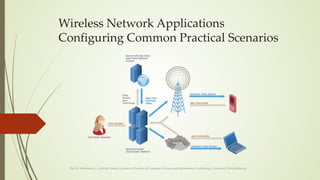
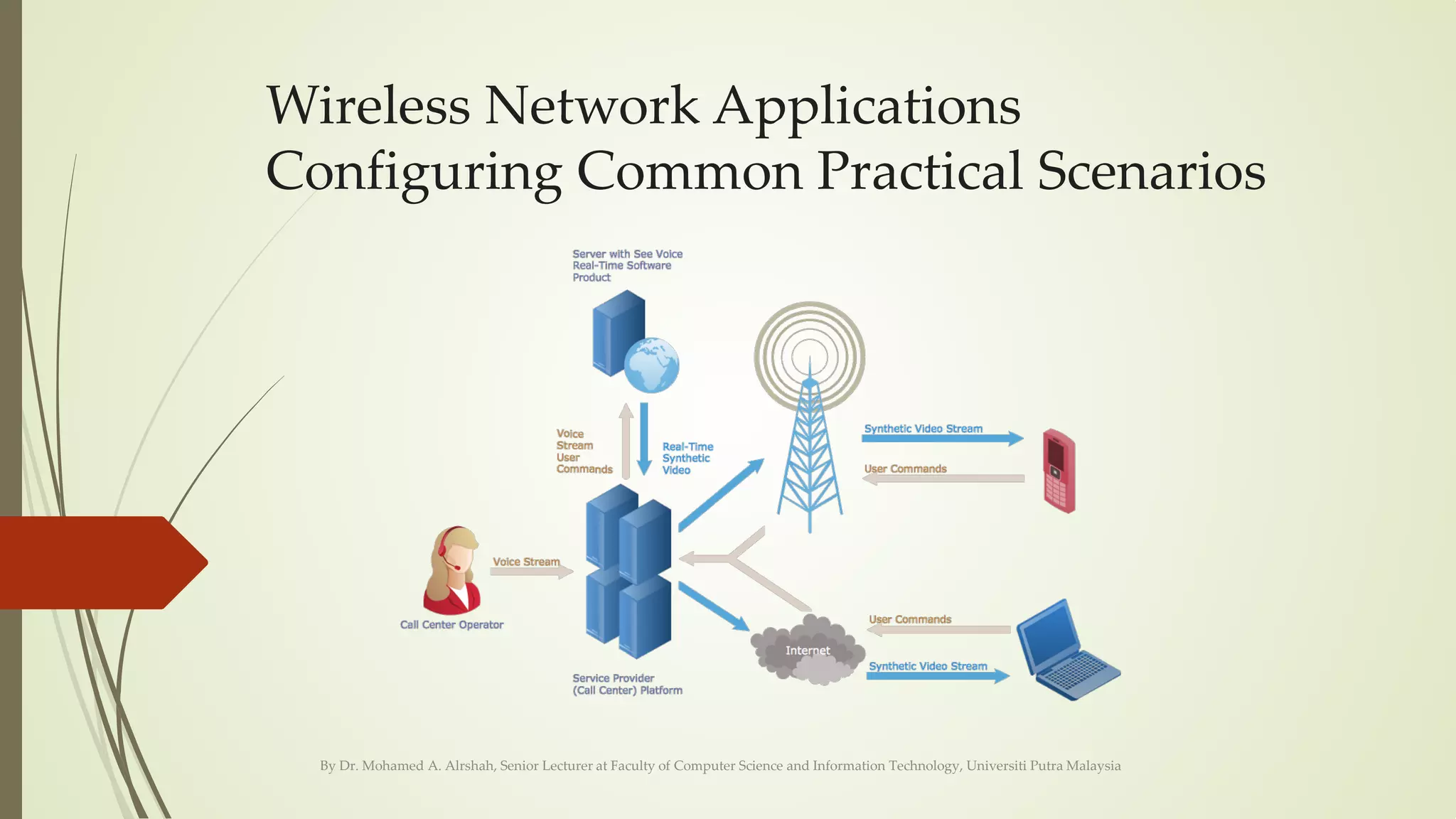
Wireless Network Applications
Configuring Common Practical Scenarios
By Dr. Mohamed A. Alrshah, Senior Lecturer at Faculty of Computer Science and Information Technology, Universiti Putra Malaysia
IEEE 802 Standards
By Dr. Mohamed A. Alrshah, Senior Lecturer at Faculty of Computer Science and Information Technology, Universiti Putra Malaysia
Name Description Name Description Name Description
IEEE 802.1
Higher Layer LAN Protocols
(Bridging)
IEEE 802.13
Reserved for Fast
Ethernet development[3]
IEEE 802.16.2 Coexistence wireless access
IEEE 802.2 LLC IEEE 802.14 Cable modems IEEE 802.17 Resilient packet ring
IEEE 802.3 Ethernet IEEE 802.15 Wireless PAN IEEE 802.18 Radio Regulatory TAG
IEEE 802.4 Token bus IEEE 802.15.1 Bluetooth certification IEEE 802.19 Coexistence TAG
IEEE 802.5 Token ring MAC layer IEEE 802.15.2
IEEE 802.15 and IEEE
802.11 coexistence
IEEE 802.20
Mobile Broadband Wireless
Access
IEEE 802.6 MANs (DQDB) IEEE 802.15.3
High-Rate wireless
PAN (e.g., UWB, etc.)
IEEE 802.21 Media Independent Handoff
IEEE 802.7
Broadband LAN using Coaxial
Cable
IEEE 802.15.4
Low-Rate wireless
PAN (e.g., ZigBee, WirelessHART,
MiWi, etc.)
IEEE 802.22 Wireless Regional Area Network
IEEE 802.8 Fiber Optic TAG IEEE 802.15.5 Mesh networking for WPAN IEEE 802.23
Emergency Services Working
Group
IEEE 802.9
Integrated Services LAN (ISLAN
or isoEthernet)
IEEE 802.15.6 Body area network IEEE 802.24 Smart Grid TAG
IEEE 802.10 Interoperable LAN Security IEEE 802.15.7 Visible light communications IEEE 802.25 Omni-Range Area Network
IEEE 802.11
Wireless LAN (WLAN) & Mesh (Wi-
Fi certification)
IEEE 802.16
Broadband Wireless
Access (WiMAX certification)
IEEE 802.12 100BaseVG IEEE 802.16.1
Local Multipoint Distribution
Service
IEEE 802.11 Standards
By Dr. Mohamed A. Alrshah, Senior Lecturer at Faculty of Computer Science and Information Technology, Universiti Putra Malaysia
802.11 network PHY standards
Approximate range
802.11 protocol Release date[6]
Frequency
(GHz)
Bandwidth
(MHz)
Stream data rate[7] (Mbit/s)
Allowable
MIMO streams Modulation
Indoor Outdoor
802.11-1997 Jun-97 2.4 22 1, 2 N/A DSSS, FHSS 20 m 100 m
802.11a Sep-99
5
20 6, 9, 12, 18, 24, 36, 48, 54 N/A OFDM
35 m 120 m
3.7[A] 5,000 m[A]
802.11b Sep-99 2.4 22 1, 2, 5.5, 11 N/A DSSS 35 m 140 m
802.11g Jun-03 2.4 20 6, 9, 12, 18, 24, 36, 48, 54 N/A OFDM 38 m 140 m
802.11n Oct-09 2.4/5
20 Up to 288.8[B]
4
MIMO-OFDM
70 m 250 m[8]
40 Up to 600[B]
802.11ac 5
20 Up to 346.8[B]
8 35 m[9]
40 Up to 800[B]
80 Up to 1733.2[B]
160 Up to 3466.8[B]
6–8 Up to 568.9[10] 4
802.11ad Dec-12 60 2,160
Up to 6,757[11]
(6.7 Gbit/s)
N/A
OFDM, single carrier,
low-power single carrier
3.3 m[12]
802.11ah Dec-16 0.9 1–16 Up to 347[13] 4 MIMO-OFDM
802.11aj Est. Jul 2017 45/60
802.11ax Est. Dec 2018 2.4/5 Up to 10.53 Gbit/s MIMO-OFDM
802.11ay Est. Nov 2019 60 8000 Up to 20,000 (20 Gbit/s)[14] 4 OFDM, single carrier 10 m 100 m
802.11az Est. Mar 2021 60
802.11 Standard rollups
802.11-2007 Mar-07 2.4, 5 Up to 54 DSSS, OFDM
802.11-2012 Mar-12 2.4, 5 Up to 150[B] DSSS, OFDM
802.11-2016 Dec-16 2.4, 5, 60 Up to 866.7 or 6,757[B] DSSS, OFDM
A1 A2
IEEE 802.11y-2008 extended operation of 802.11a to the licensed 3.7 GHz band. Increased power limits allow a range up to 5,000 m. As of 2009, it is only
being licensed in the United States by the FCC.
B1 B2 B3 B4 B5 B6
Based on short guard interval; standard guard interval is ~10% slower. Rates vary widely based on distance, obstructions, and interference.
C1
IEEE 802.11af about using white space spectrum for WiFi based on the PHY layer of 802.11ac
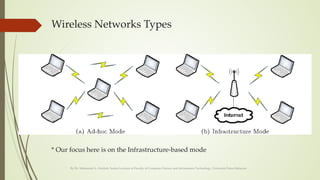
Wireless Networks Types
* Our focus here is on the Infrastructure-based mode
By Dr. Mohamed A. Alrshah, Senior Lecturer at Faculty of Computer Science and Information Technology, Universiti Putra Malaysia
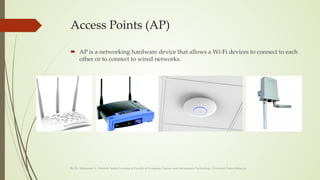
Access Points (AP)
 AP is a networking hardware device that allows a Wi-Fi devices to connect to each
other or to connect to wired networks.
By Dr. Mohamed A. Alrshah, Senior Lecturer at Faculty of Computer Science and Information Technology, Universiti Putra Malaysia
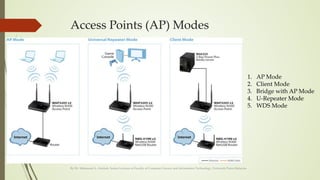
Access Points (AP) Modes
By Dr. Mohamed A. Alrshah, Senior Lecturer at Faculty of Computer Science and Information Technology, Universiti Putra Malaysia
1. AP Mode
2. Client Mode
3. Bridge with AP Mode
4. U-Repeater Mode
5. WDS Mode
What is the appropriate mode for what scenario?
By Dr. Mohamed A. Alrshah, Senior Lecturer at Faculty of Computer Science and Information Technology, Universiti Putra Malaysia
Before we start we must know what is the
appropriate mode for each scenario
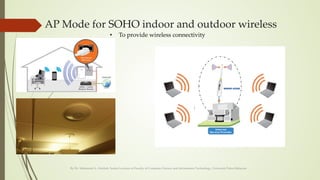
AP Mode for SOHO indoor and outdoor wireless
By Dr. Mohamed A. Alrshah, Senior Lecturer at Faculty of Computer Science and Information Technology, Universiti Putra Malaysia
• To provide wireless connectivity
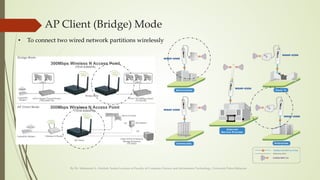
AP Client (Bridge) Mode
By Dr. Mohamed A. Alrshah, Senior Lecturer at Faculty of Computer Science and Information Technology, Universiti Putra Malaysia
• To connect two wired network partitions wirelessly
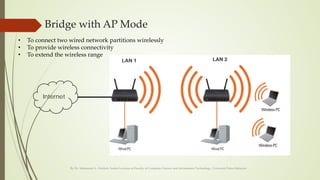
Bridge with AP Mode
By Dr. Mohamed A. Alrshah, Senior Lecturer at Faculty of Computer Science and Information Technology, Universiti Putra Malaysia
Internet
• To connect two wired network partitions wirelessly
• To provide wireless connectivity
• To extend the wireless range
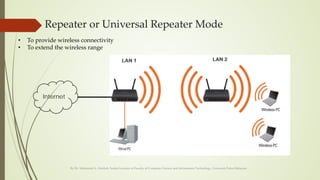
Repeater or Universal Repeater Mode
By Dr. Mohamed A. Alrshah, Senior Lecturer at Faculty of Computer Science and Information Technology, Universiti Putra Malaysia
Internet
• To provide wireless connectivity
• To extend the wireless range
WDS Mode
By Dr. Mohamed A. Alrshah, Senior Lecturer at Faculty of Computer Science and Information Technology, Universiti Putra Malaysia
• To provide wireless connectivity
• To extend the wireless range
• To support mobility
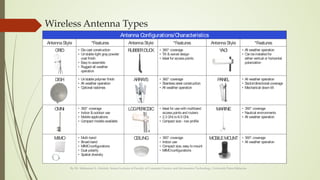
Wireless Antenna Types
By Dr. Mohamed A. Alrshah, Senior Lecturer at Faculty of Computer Science and Information Technology, Universiti Putra Malaysia
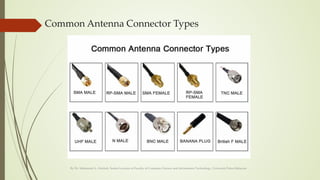
Common Antenna Connector Types
By Dr. Mohamed A. Alrshah, Senior Lecturer at Faculty of Computer Science and Information Technology, Universiti Putra Malaysia
Soho wireless network applications

Soho wireless network applications

  • 1.
    Wireless Network Applications ConfiguringCommon Practical Scenarios By Dr. Mohamed A. Alrshah, Senior Lecturer at Faculty of Computer Science and Information Technology, Universiti Putra Malaysia
  • 2.
    IEEE 802 Standards ByDr. Mohamed A. Alrshah, Senior Lecturer at Faculty of Computer Science and Information Technology, Universiti Putra Malaysia Name Description Name Description Name Description IEEE 802.1 Higher Layer LAN Protocols (Bridging) IEEE 802.13 Reserved for Fast Ethernet development[3] IEEE 802.16.2 Coexistence wireless access IEEE 802.2 LLC IEEE 802.14 Cable modems IEEE 802.17 Resilient packet ring IEEE 802.3 Ethernet IEEE 802.15 Wireless PAN IEEE 802.18 Radio Regulatory TAG IEEE 802.4 Token bus IEEE 802.15.1 Bluetooth certification IEEE 802.19 Coexistence TAG IEEE 802.5 Token ring MAC layer IEEE 802.15.2 IEEE 802.15 and IEEE 802.11 coexistence IEEE 802.20 Mobile Broadband Wireless Access IEEE 802.6 MANs (DQDB) IEEE 802.15.3 High-Rate wireless PAN (e.g., UWB, etc.) IEEE 802.21 Media Independent Handoff IEEE 802.7 Broadband LAN using Coaxial Cable IEEE 802.15.4 Low-Rate wireless PAN (e.g., ZigBee, WirelessHART, MiWi, etc.) IEEE 802.22 Wireless Regional Area Network IEEE 802.8 Fiber Optic TAG IEEE 802.15.5 Mesh networking for WPAN IEEE 802.23 Emergency Services Working Group IEEE 802.9 Integrated Services LAN (ISLAN or isoEthernet) IEEE 802.15.6 Body area network IEEE 802.24 Smart Grid TAG IEEE 802.10 Interoperable LAN Security IEEE 802.15.7 Visible light communications IEEE 802.25 Omni-Range Area Network IEEE 802.11 Wireless LAN (WLAN) & Mesh (Wi- Fi certification) IEEE 802.16 Broadband Wireless Access (WiMAX certification) IEEE 802.12 100BaseVG IEEE 802.16.1 Local Multipoint Distribution Service
  • 3.
    IEEE 802.11 Standards ByDr. Mohamed A. Alrshah, Senior Lecturer at Faculty of Computer Science and Information Technology, Universiti Putra Malaysia 802.11 network PHY standards Approximate range 802.11 protocol Release date[6] Frequency (GHz) Bandwidth (MHz) Stream data rate[7] (Mbit/s) Allowable MIMO streams Modulation Indoor Outdoor 802.11-1997 Jun-97 2.4 22 1, 2 N/A DSSS, FHSS 20 m 100 m 802.11a Sep-99 5 20 6, 9, 12, 18, 24, 36, 48, 54 N/A OFDM 35 m 120 m 3.7[A] 5,000 m[A] 802.11b Sep-99 2.4 22 1, 2, 5.5, 11 N/A DSSS 35 m 140 m 802.11g Jun-03 2.4 20 6, 9, 12, 18, 24, 36, 48, 54 N/A OFDM 38 m 140 m 802.11n Oct-09 2.4/5 20 Up to 288.8[B] 4 MIMO-OFDM 70 m 250 m[8] 40 Up to 600[B] 802.11ac 5 20 Up to 346.8[B] 8 35 m[9] 40 Up to 800[B] 80 Up to 1733.2[B] 160 Up to 3466.8[B] 6–8 Up to 568.9[10] 4 802.11ad Dec-12 60 2,160 Up to 6,757[11] (6.7 Gbit/s) N/A OFDM, single carrier, low-power single carrier 3.3 m[12] 802.11ah Dec-16 0.9 1–16 Up to 347[13] 4 MIMO-OFDM 802.11aj Est. Jul 2017 45/60 802.11ax Est. Dec 2018 2.4/5 Up to 10.53 Gbit/s MIMO-OFDM 802.11ay Est. Nov 2019 60 8000 Up to 20,000 (20 Gbit/s)[14] 4 OFDM, single carrier 10 m 100 m 802.11az Est. Mar 2021 60 802.11 Standard rollups 802.11-2007 Mar-07 2.4, 5 Up to 54 DSSS, OFDM 802.11-2012 Mar-12 2.4, 5 Up to 150[B] DSSS, OFDM 802.11-2016 Dec-16 2.4, 5, 60 Up to 866.7 or 6,757[B] DSSS, OFDM A1 A2 IEEE 802.11y-2008 extended operation of 802.11a to the licensed 3.7 GHz band. Increased power limits allow a range up to 5,000 m. As of 2009, it is only being licensed in the United States by the FCC. B1 B2 B3 B4 B5 B6 Based on short guard interval; standard guard interval is ~10% slower. Rates vary widely based on distance, obstructions, and interference. C1 IEEE 802.11af about using white space spectrum for WiFi based on the PHY layer of 802.11ac
  • 4.
    Wireless Networks Types *Our focus here is on the Infrastructure-based mode By Dr. Mohamed A. Alrshah, Senior Lecturer at Faculty of Computer Science and Information Technology, Universiti Putra Malaysia
  • 5.
    Access Points (AP) AP is a networking hardware device that allows a Wi-Fi devices to connect to each other or to connect to wired networks. By Dr. Mohamed A. Alrshah, Senior Lecturer at Faculty of Computer Science and Information Technology, Universiti Putra Malaysia
  • 6.
    Access Points (AP)Modes By Dr. Mohamed A. Alrshah, Senior Lecturer at Faculty of Computer Science and Information Technology, Universiti Putra Malaysia 1. AP Mode 2. Client Mode 3. Bridge with AP Mode 4. U-Repeater Mode 5. WDS Mode
  • 7.
    What is theappropriate mode for what scenario? By Dr. Mohamed A. Alrshah, Senior Lecturer at Faculty of Computer Science and Information Technology, Universiti Putra Malaysia Before we start we must know what is the appropriate mode for each scenario
  • 8.
    AP Mode forSOHO indoor and outdoor wireless By Dr. Mohamed A. Alrshah, Senior Lecturer at Faculty of Computer Science and Information Technology, Universiti Putra Malaysia • To provide wireless connectivity
  • 9.
    AP Client (Bridge)Mode By Dr. Mohamed A. Alrshah, Senior Lecturer at Faculty of Computer Science and Information Technology, Universiti Putra Malaysia • To connect two wired network partitions wirelessly
  • 10.
    Bridge with APMode By Dr. Mohamed A. Alrshah, Senior Lecturer at Faculty of Computer Science and Information Technology, Universiti Putra Malaysia Internet • To connect two wired network partitions wirelessly • To provide wireless connectivity • To extend the wireless range
  • 11.
    Repeater or UniversalRepeater Mode By Dr. Mohamed A. Alrshah, Senior Lecturer at Faculty of Computer Science and Information Technology, Universiti Putra Malaysia Internet • To provide wireless connectivity • To extend the wireless range
  • 12.
    WDS Mode By Dr.Mohamed A. Alrshah, Senior Lecturer at Faculty of Computer Science and Information Technology, Universiti Putra Malaysia • To provide wireless connectivity • To extend the wireless range • To support mobility
  • 13.
    Wireless Antenna Types ByDr. Mohamed A. Alrshah, Senior Lecturer at Faculty of Computer Science and Information Technology, Universiti Putra Malaysia
  • 14.
    Common Antenna ConnectorTypes By Dr. Mohamed A. Alrshah, Senior Lecturer at Faculty of Computer Science and Information Technology, Universiti Putra Malaysia