RASPBERRY PI
By
VijaykumarVishwakarma
K.J SOMAIYA INSTITUTE OF ENGINEERING AND I.T
1
Today’s Highlight
What is Raspberry Pi ?
How did the Raspberry Pi get its name ?
History .
Launched.(according to year)
Component Of Raspberry Pi
How it works ?
Project developed with the help of Raspberry Pi.
Raspberry Pi in IOT
Advantage & Disadvantage
2
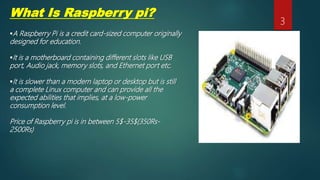
What Is Raspberry pi?
A Raspberry Pi is a credit card-sized computer originally
designed for education.
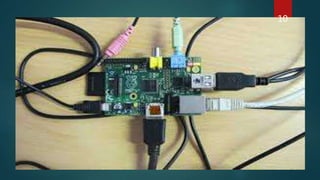
It is a motherboard containing different slots like USB
port, Audio jack, memory slots, and Ethernet port etc.
It is slower than a modern laptop or desktop but is still
a complete Linux computer and can provide all the
expected abilities that implies, at a low-power
consumption level.
Price of Raspberry pi is in between 5$-35$(350Rs-
2500Rs)
3
How did the Raspberry Pi get its name
[ fruit name + python]
A lot of computer companies were named after fruit. There's
Tangerine Computer Systems, Apricot Computers, and the old
British company Acorn, which is a family of fruit. Pi is because
originally we were going to produce a computer that could only
really run Python. So the Pi in there is for Python.
4
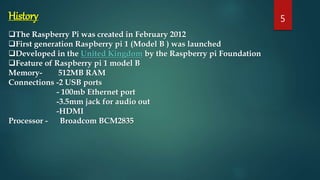
History
The Raspberry Pi was created in February 2012
First generation Raspberry pi 1 (Model B ) was launched
Developed in the United Kingdom by the Raspberry pi Foundation
Feature of Raspberry pi 1 model B
Memory- 512MB RAM
Connections -2 USB ports
- 100mb Ethernet port
-3.5mm jack for audio out
-HDMI
Processor - Broadcom BCM2835
5
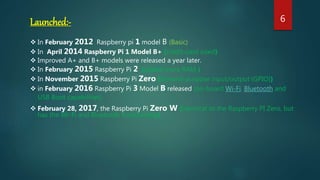
Launched:-
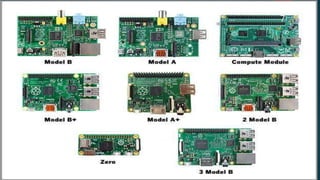
 In February 2012 Raspberry pi 1 model B (Basic)
 In April 2014 Raspberry Pi 1 Model B+ (credit-card sized)
 Improved A+ and B+ models were released a year later.
 In February 2015 Raspberry Pi 2 (added more RAM )
 In November 2015 Raspberry Pi Zero (General-purpose input/output (GPIO))
 in February 2016 Raspberry Pi 3 Model B released (on-board Wi-Fi, Bluetooth and
USB Boot capabilities)
 February 28, 2017, the Raspberry Pi Zero W (identical to the Raspberry PI Zero, but
has the Wi-Fi and Bluetooth functionality)
6
7
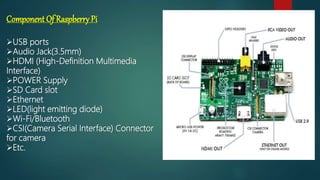
Component Of Raspberry Pi
USB ports
Audio Jack(3.5mm)
HDMI (High-Definition Multimedia
Interface)
POWER Supply
SD Card slot
Ethernet
LED(light emitting diode)
Wi-Fi/Bluetooth
CSI(Camera Serial Interface) Connector
for camera
Etc.
8
HowIt Works
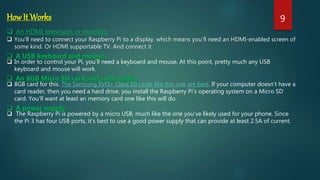
 An HDMI television or monitor:
 You’ll need to connect your Raspberry Pi to a display, which means you’ll need an HDMI-enabled screen of
some kind. Or HDMI supportable TV. And connect it
 A USB keyboard and mouse:
 In order to control your Pi, you’ll need a keyboard and mouse. At this point, pretty much any USB
keyboard and mouse will work.
 An 8GB Micro SD card and card reader:
 8GB card for this. The Samsung EVO+ Class 10 cards like this one are best. If your computer doesn’t have a
card reader, then you need a hard drive, you install the Raspberry Pi’s operating system on a Micro SD
card. You’ll want at least an memory card one like this will do.
 A power supply:
 The Raspberry Pi is powered by a micro USB, much like the one you’ve likely used for your phone. Since
the Pi 3 has four USB ports, it’s best to use a good power supply that can provide at least 2.5A of current.
9
10
Raspberry Pi Raspberry Pi 2
Released February 2012 February 2015 February 2016
CPU ARM1176JZF-S ARM Cortex-A7 ARM Cortex-A53
CPU speed
700MHz
single core
900MHz
quad core
1,200MHz
quad core
RAM
512MB
256MB Rev 1
1GB 1GB
GPU
Broadcom Video core
IV
Broadcom Video core
IV
Broadcom Videocore
IV
Storage
SDHC slot
MicroSDHC Model A+
and B+
MicroSDHC slot MicroSDHC slot
USB Ports 2 on Model B 4 4
WiFi No built-in wifi No built-in wifi
802.11n and
Bluetooth 4.1
Raspberry Pi 3
SDHC stand for Secure Digital High Capacity
11
Project Developed with the help of Raspberry pi
Some of them are here!
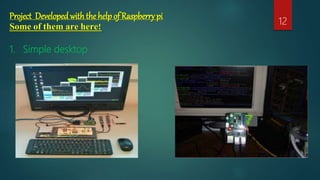
1. Simple desktop
12
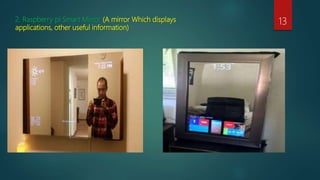
2. Raspberry pi Smart Mirror (A mirror Which displays
applications, other useful information)
13
3. Gaming Device 14
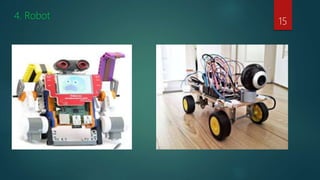
4. Robot
15
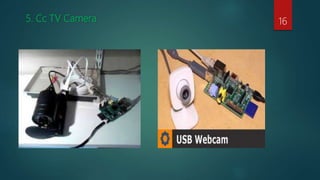
5. Cc TV Camera 16
Raspberry pi in IOT
Using Raspberry pi we can create various sensor of IOT
Examples
1. IoT DoorBell: This projects shows an automatic door bell which sends an sms or email.Thus the
owner can easily monitor from anywhere if someone knock his door.
2. Review on Temperature & Humidity Sensing using IoT: Here is the temperature and humidity
sensing using IOT. This is a novel method using raspberry pi scriptung.
3. Home Automation Using Internet of Things: Internet of Things (IoT) allows us to implement home
automation system that can be controlled remotely through internet. The proposed system can
monitor different parameters like gas, light, motion detection, temperature, etc. using the sensor
data and also trigger a process according to the requirement. The data from the sensors are
uploaded to a cloud server and this data can be used to analyze the parameters.
4. Water proof sensor
5. Etc.
17
18
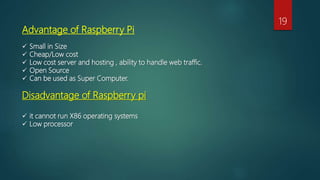
Advantage of Raspberry Pi
 Small in Size
 Cheap/Low cost
 Low cost server and hosting , ability to handle web traffic.
 Open Source
 Can be used as Super Computer.
Disadvantage of Raspberry pi
 it cannot run X86 operating systems
 Low processor
19
Thank You !
20
Q&A
21
Thank You!
22

Raspberry Pi

  • 1.
    RASPBERRY PI By VijaykumarVishwakarma K.J SOMAIYAINSTITUTE OF ENGINEERING AND I.T 1
  • 2.
    Today’s Highlight What isRaspberry Pi ? How did the Raspberry Pi get its name ? History . Launched.(according to year) Component Of Raspberry Pi How it works ? Project developed with the help of Raspberry Pi. Raspberry Pi in IOT Advantage & Disadvantage 2
  • 3.
    What Is Raspberrypi? A Raspberry Pi is a credit card-sized computer originally designed for education. It is a motherboard containing different slots like USB port, Audio jack, memory slots, and Ethernet port etc. It is slower than a modern laptop or desktop but is still a complete Linux computer and can provide all the expected abilities that implies, at a low-power consumption level. Price of Raspberry pi is in between 5$-35$(350Rs- 2500Rs) 3
  • 4.
    How did theRaspberry Pi get its name [ fruit name + python] A lot of computer companies were named after fruit. There's Tangerine Computer Systems, Apricot Computers, and the old British company Acorn, which is a family of fruit. Pi is because originally we were going to produce a computer that could only really run Python. So the Pi in there is for Python. 4
  • 5.
    History The Raspberry Piwas created in February 2012 First generation Raspberry pi 1 (Model B ) was launched Developed in the United Kingdom by the Raspberry pi Foundation Feature of Raspberry pi 1 model B Memory- 512MB RAM Connections -2 USB ports - 100mb Ethernet port -3.5mm jack for audio out -HDMI Processor - Broadcom BCM2835 5
  • 6.
    Launched:-  In February2012 Raspberry pi 1 model B (Basic)  In April 2014 Raspberry Pi 1 Model B+ (credit-card sized)  Improved A+ and B+ models were released a year later.  In February 2015 Raspberry Pi 2 (added more RAM )  In November 2015 Raspberry Pi Zero (General-purpose input/output (GPIO))  in February 2016 Raspberry Pi 3 Model B released (on-board Wi-Fi, Bluetooth and USB Boot capabilities)  February 28, 2017, the Raspberry Pi Zero W (identical to the Raspberry PI Zero, but has the Wi-Fi and Bluetooth functionality) 6
  • 7.
  • 8.
    Component Of RaspberryPi USB ports Audio Jack(3.5mm) HDMI (High-Definition Multimedia Interface) POWER Supply SD Card slot Ethernet LED(light emitting diode) Wi-Fi/Bluetooth CSI(Camera Serial Interface) Connector for camera Etc. 8
  • 9.
    HowIt Works  AnHDMI television or monitor:  You’ll need to connect your Raspberry Pi to a display, which means you’ll need an HDMI-enabled screen of some kind. Or HDMI supportable TV. And connect it  A USB keyboard and mouse:  In order to control your Pi, you’ll need a keyboard and mouse. At this point, pretty much any USB keyboard and mouse will work.  An 8GB Micro SD card and card reader:  8GB card for this. The Samsung EVO+ Class 10 cards like this one are best. If your computer doesn’t have a card reader, then you need a hard drive, you install the Raspberry Pi’s operating system on a Micro SD card. You’ll want at least an memory card one like this will do.  A power supply:  The Raspberry Pi is powered by a micro USB, much like the one you’ve likely used for your phone. Since the Pi 3 has four USB ports, it’s best to use a good power supply that can provide at least 2.5A of current. 9
  • 10.
  • 11.
    Raspberry Pi RaspberryPi 2 Released February 2012 February 2015 February 2016 CPU ARM1176JZF-S ARM Cortex-A7 ARM Cortex-A53 CPU speed 700MHz single core 900MHz quad core 1,200MHz quad core RAM 512MB 256MB Rev 1 1GB 1GB GPU Broadcom Video core IV Broadcom Video core IV Broadcom Videocore IV Storage SDHC slot MicroSDHC Model A+ and B+ MicroSDHC slot MicroSDHC slot USB Ports 2 on Model B 4 4 WiFi No built-in wifi No built-in wifi 802.11n and Bluetooth 4.1 Raspberry Pi 3 SDHC stand for Secure Digital High Capacity 11
  • 12.
    Project Developed withthe help of Raspberry pi Some of them are here! 1. Simple desktop 12
  • 13.
    2. Raspberry piSmart Mirror (A mirror Which displays applications, other useful information) 13
  • 14.
  • 15.
  • 16.
    5. Cc TVCamera 16
  • 17.
    Raspberry pi inIOT Using Raspberry pi we can create various sensor of IOT Examples 1. IoT DoorBell: This projects shows an automatic door bell which sends an sms or email.Thus the owner can easily monitor from anywhere if someone knock his door. 2. Review on Temperature & Humidity Sensing using IoT: Here is the temperature and humidity sensing using IOT. This is a novel method using raspberry pi scriptung. 3. Home Automation Using Internet of Things: Internet of Things (IoT) allows us to implement home automation system that can be controlled remotely through internet. The proposed system can monitor different parameters like gas, light, motion detection, temperature, etc. using the sensor data and also trigger a process according to the requirement. The data from the sensors are uploaded to a cloud server and this data can be used to analyze the parameters. 4. Water proof sensor 5. Etc. 17
  • 18.
  • 19.
    Advantage of RaspberryPi  Small in Size  Cheap/Low cost  Low cost server and hosting , ability to handle web traffic.  Open Source  Can be used as Super Computer. Disadvantage of Raspberry pi  it cannot run X86 operating systems  Low processor 19
  • 20.
  • 21.
  • 22.