SCHOOL​ ​OF​ ​ARCHITECTURE,​ ​BUILDING​ ​AND​ ​DESIGN
BACHELOR​ ​IN​ ​QUANTITY​ ​SURVEYING​ ​(HONOURS)
SOFTWARE​ ​APPLICATION​ ​FOR​ ​​ ​QUANTITY​ ​SURVEYING​ ​(CSC​ ​60603)
ASSIGNMENT​ ​1:​ ​GROUP​ ​REPORT
NAME STUDENT​ ​ID
Ee​ ​Hui​ ​Teng 0322548
Lim​ ​Hong​ ​Wei 0322741
Loo​ ​Siah​ ​Mong 0321995
Pui​ ​Chun​ ​Shian 0323740
Tan​ ​Jia​ ​San 0322406
Yip​ ​Xiao​ ​Jung 0323852
Table​ ​of​ ​Content
Part Title Pages
​ ​Introduction 2
A 1.1​ ​Vico​ ​Office​ ​Takeoff​ ​Manager​ ​Software
​ ​​ ​​ ​​ ​​ ​​ ​1.1.1​ ​Function​ ​of​ ​Vico​ ​Office​ ​Takeoff​ ​Manager
​ ​​ ​​ ​​ ​​ ​​ ​1.1.2​ ​Limitation​ ​of​ ​Vico​ ​Office​ ​Takeoff​ ​Manager
1.2​ ​Cost​ ​X
​ ​​ ​​ ​​ ​​ ​​ ​1.2.1​ ​Function​ ​of​ ​Cost​ ​X
​ ​​ ​​ ​​ ​​ ​​ ​1.2.2​ ​Limitation​ ​of​ ​Cost​ ​X
1.3​ ​Buildsoft​ ​Cubit
​ ​​ ​​ ​​ ​​ ​​ ​1.3.1​ ​Function​ ​of​ ​Buildsoft​ ​Cubit
​ ​​ ​​ ​​ ​​ ​​ ​1.3.2​ ​Limitation​ ​of​ ​Buildsoft​ ​Cubit
1.4​ ​Cubicost​ ​(Glodon)
​ ​​ ​​ ​​ ​​ ​1.4.1​ ​Function​ ​of​ ​Cubicost
​ ​​ ​​ ​​ ​​ ​1.4.2​ ​Limitation​ ​of​ ​Cubicost
1.5​ ​Summary
3-8
9-10
11-12
13-15
15-16
B 2.1​ ​BIM
​ ​​ ​​ ​​ ​​ ​​ ​2.1.1​ ​Preparation​ ​Stage
​ ​​ ​​ ​​ ​​ ​​ ​2.1.2​ ​Design​ ​Stage
​ ​​ ​​ ​​ ​​ ​​ ​2.1.3​ ​Pre-construction​ ​Stage
​ ​​ ​​ ​​ ​​ ​​ ​2.1.4​ ​Construction​ ​Stage
​ ​​ ​​ ​​ ​​ ​​ ​2.1.5​ ​Post​ ​Construction​ ​Stage
17-19
2.2​ ​CAD
​ ​​ ​​ ​​ ​​ ​​ ​2.2.1​ ​Preparation​ ​Stage
​ ​​ ​​ ​​ ​​ ​​ ​2.2.2​ ​Design​ ​Stage
​ ​​ ​​ ​​ ​​ ​​ ​2.2.3​ ​Pre-construction​ ​Stage
​ ​​ ​​ ​​ ​​ ​​ ​2.2.4​ ​Construction​ ​Stage
​ ​​ ​​ ​​ ​​ ​​ ​2.2.5​ ​Post​ ​Construction​ ​Stage
20-23
2.3​ ​Manual​ ​Measurement
​ ​​ ​​ ​​ ​​ ​​ ​2.3.1​ ​Preparation​ ​Stage
​ ​​ ​​ ​​ ​​ ​​ ​2.3.2​ ​Design​ ​Stage
​ ​​ ​​ ​​ ​​ ​​ ​2.3.3​ ​Pre-construction​ ​Stage
​ ​​ ​​ ​​ ​​ ​​ ​2.3.4​ ​Construction​ ​Stage
​ ​​ ​​ ​​ ​​ ​​ ​2.3.5​ ​Post​ ​Construction​ ​Stage
24-26
1
Introduction
Moving forward to the 21st century, the age of Building Information Modeling (BIM) has come.
BIM describes the process of designing a building collaboratively using one coherent system of computer
models rather than as separate sets of drawings.This system is often adopted by construction companies to
improve the 3 most important aspects to their projects, namely time, cost, and quality. BIM covers the
whole construction lifecycle from the briefing stage all the way to the operation and maintenance of a
building. Generally, the application of BIM is divided into 3 levels, starting from Level 1 with minimal
collaboration between parties up to Level 3, where all parties collaborate on the same model and share the
same​ ​data​ ​on​ ​the​ ​same​ ​repository.
As the industry shifts towards the massive use of BIM softwares for construction, the industry
professionals, including the Quantity Surveyor, has taken a step forward to fully utilise the benefits that
can be obtained from BIM. Several BIM QS softwares on the market can now enable a QS to easily take
off quantities and estimate the project costs from any drawings or models available. As BIM is more than
3D-CAD, information such as Schedules and Cost plans can be included in the files. Undoubtedly what
BIM brings is a complete transformation by helping a construction project move from the design desks to
physical reality. It prunes redundant data, erases communication lag and noise, maintains updated
information, brings operational efficiency, improves coordination among departments and gives an
overall​ ​efficiency​ ​to​ ​the​ ​whole​ ​lifespan​ ​of​ ​the​ ​project.​ ​With​ ​large​ ​infrastructural​ ​projects​ ​BIM​ ​is​ ​a​ ​must.
So in this report, we look into massive BIM QS softwares that are available in the market and
analysed their respective functions and limitations. In our opinions, these 4 softwares not only well versed
in the BIM industry compared to others, we are also well exposed to these softwares in terms of
understanding​ ​level​ ​and​ ​functionality​ ​of​ ​the​ ​softwares.
● Vico​ ​Office​ ​Takeoff​ ​Manager
● CostX
● Buildsoft​ ​cubit
● Cubicost​ ​(Glodon)
From these 4 softwares available, a detailed comparison on the functions and limitations as well
as​ ​how​ ​well​ ​it​ ​works​ ​on​ ​measurements​ ​will​ ​be​ ​conveyed​ ​through​ ​this​ ​report.
2
1.1​ ​Vico​ ​Office​ ​Takeoff​ ​Manager
Vico Office is a purpose-built software for construction, provides an integrated BIM workflow
for construction which enables users to perform functions such as extending basic 3D model with
constructability analysis and coordination, 4D location-based scheduling and production control, 5D
estimating, quantity takeoff and layout. Vico Office is designed in a modular way which allows a
consistent and easy use in order to maximize efficiency and achieving the needs of various construction
process​ ​trades​ ​and​ ​stages.
By utilizing Vico Office, building owners and general contractors are able to work together more
efficiently, enhance predictability, manage cost as well as lowering risk and optimizing workflow on
large, complex building projects. Vico Office also provides flexibility in modelling, scheduling and
estimating for project teams and are still able to work together with all stakeholders in terms of
coordination,​ ​budgeting​ ​and​ ​project​ ​control.
3
1.1.1​ ​Functions
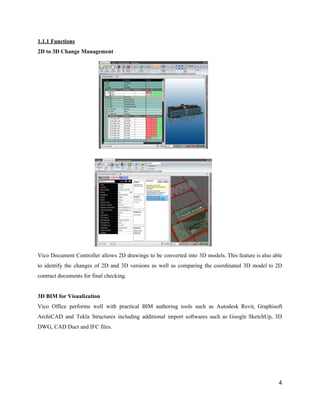
2D​ ​to​ ​3D​ ​Change​ ​Management
Vico Document Controller allows 2D drawings to be converted into 3D models. This feature is also able
to identify the changes of 2D and 3D versions as well as comparing the coordinated 3D model to 2D
contract​ ​documents​ ​for​ ​final​ ​checking.
3D​ ​BIM​ ​for​ ​Visualization
Vico Office performs well with practical BIM authoring tools such as Autodesk Revit, Graphisoft
ArchiCAD and Tekla Structures including additional import softwares such as Google SketchUp, 3D
DWG,​ ​CAD​ ​Duct​ ​and​ ​IFC​ ​files.
4
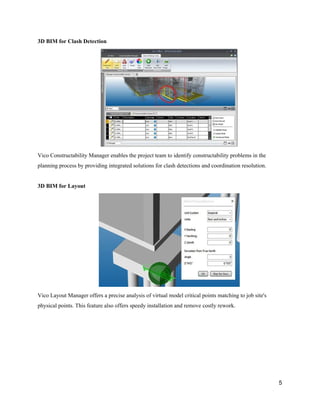
3D​ ​BIM​ ​for​ ​Clash​ ​Detection
Vico​ ​Constructability​ ​Manager​ ​enables​ ​the​ ​project​ ​team​ ​to​ ​identify​ ​constructability​ ​problems​ ​in​ ​the
planning​ ​process​ ​by​ ​providing​ ​integrated​ ​solutions​ ​for​ ​clash​ ​detections​ ​and​ ​coordination​ ​resolution.
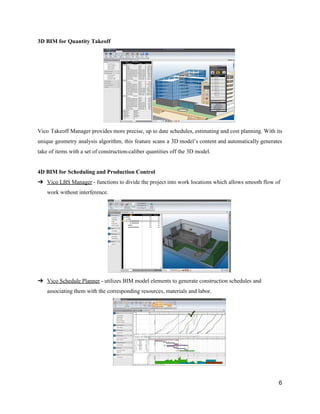
3D​ ​BIM​ ​for​ ​Layout
Vico​ ​Layout​ ​Manager​ ​offers​ ​a​ ​precise​ ​analysis​ ​of​ ​virtual​ ​model​ ​critical​ ​points​ ​matching​ ​to​ ​job​ ​site's
physical​ ​points.​ ​This​ ​feature​ ​also​ ​offers​ ​speedy​ ​installation​ ​and​ ​remove​ ​costly​ ​rework.
5
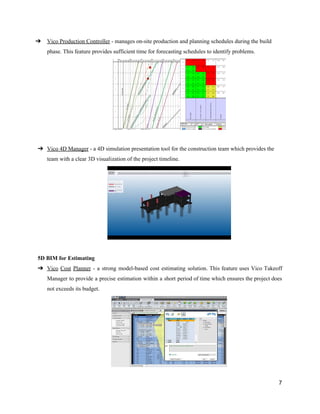
3D​ ​BIM​ ​for​ ​Quantity​ ​Takeoff
Vico Takeoff Manager provides more precise, up to date schedules, estimating and cost planning. With its
unique geometry analysis algorithm, this feature scans a 3D model’s content and automatically generates
take​ ​of​ ​items​ ​with​ ​a​ ​set​ ​of​ ​construction-caliber​ ​quantities​ ​off​ ​the​ ​3D​ ​model.
4D​ ​BIM​ ​for​ ​Scheduling​ ​and​ ​Production​ ​Control
➔ Vico​ ​LBS​ ​Manager​​ ​-​ ​functions​ ​to​ ​divide​ ​the​ ​project​ ​into​ ​work​ ​locations​ ​which​ ​allows​ ​smooth​ ​flow​ ​of
work​ ​without​ ​interference.
➔ Vico​ ​Schedule​ ​Planner​​ ​-​ ​utilizes​ ​BIM​ ​model​ ​elements​ ​to​ ​generate​ ​construction​ ​schedules​ ​and
associating​ ​them​ ​with​ ​the​ ​corresponding​ ​resources,​ ​materials​ ​and​ ​labor.
6
➔ Vico​ ​Production​ ​Controller​​ ​-​ ​manages​ ​on-site​ ​production​ ​and​ ​planning​ ​schedules​ ​during​ ​the​ ​build
phase.​ ​This​ ​feature​ ​provides​ ​sufficient​ ​time​ ​for​ ​forecasting​ ​schedules​ ​to​ ​identify​ ​problems.
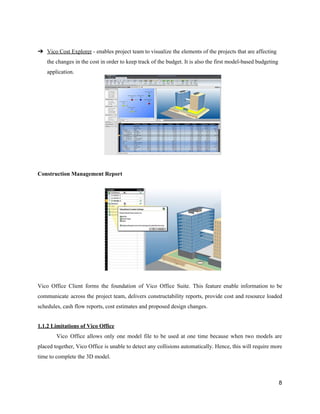
➔ Vico​ ​4D​ ​Manager​​ ​-​ ​a​ ​4D​ ​simulation​ ​presentation​ ​tool​ ​for​ ​the​ ​construction​ ​team​ ​which​ ​provides​ ​the
team​ ​with​ ​a​ ​clear​ ​3D​ ​visualization​ ​of​ ​the​ ​project​ ​timeline.
5D​ ​BIM​ ​for​ ​Estimating
➔ Vico Cost Planner - a strong model-based cost estimating solution. This feature uses Vico Takeoff
Manager to provide a precise estimation within a short period of time which ensures the project does
not​ ​exceeds​ ​its​ ​budget.
7
➔ Vico​ ​Cost​ ​Explorer​​ ​-​ ​enables​ ​project​ ​team​ ​to​ ​visualize​ ​the​ ​elements​ ​of​ ​the​ ​projects​ ​that​ ​are​ ​affecting
the​ ​changes​ ​in​ ​the​ ​cost​ ​in​ ​order​ ​to​ ​keep​ ​track​ ​of​ ​the​ ​budget.​ ​It​ ​is​ ​also​ ​the​ ​first​ ​model-based​ ​budgeting
application.
Construction​ ​Management​ ​Report
Vico Office Client forms the foundation of Vico Office Suite. This feature enable information to be
communicate across the project team, delivers constructability reports, provide cost and resource loaded
schedules,​ ​cash​ ​flow​ ​reports,​ ​cost​ ​estimates​ ​and​ ​proposed​ ​design​ ​changes.
1.1.2​ ​Limitations​ ​of​ ​Vico​ ​Office
Vico Office allows only one model file to be used at one time because when two models are
placed together, Vico Office is unable to detect any collisions automatically. Hence, this will require more
time​ ​to​ ​complete​ ​the​ ​3D​ ​model.
8
1.2​ ​CostX
CostX® is an exciting software innovation developed by award winning software designers and
construction industry professionals. It allows non-CAD users to measure from PDF or CAD files without
running CAD software, and, dependent upon the version of CostX® being used, create detailed workbook
documents such as estimates, cost plans, bills of quantities or tenders – all within a fully integrated,
paperless, electronic environment. A powerful and flexible report writer allows professional quality
output​ ​to​ ​be​ ​produced​ ​and​ ​issued​ ​either​ ​as​ ​paper​ ​documents​ ​or​ ​electronic​ ​files.
1.2.1​ ​Functions​ ​of​ ​CostX
Auto-revisioning
This is one of the unique functions of CostX where it has the ability to compare and review the
contemporary drawings with the previous one and highlight the changes that is being made. This function
allows the user safe plenty of time and fastens the work. Auto- revisioning function will continue by
creating an audit trail likewise revises the previous quantities and workbooks as well as updating the latest
quantities.
Subcontractor​ ​Comparison
Subcontractor comparisons workbooks can be generated in CostX allow the user to compare with the
subcontractors information. Subcontractor Comparison system able to link the report and quotation detail
of every subcontractor and allow the user have better view and make comparison with one another about
the​ ​cost​ ​and​ ​quality.
9
Able​ ​to​ ​support​ ​various​ ​files​ ​types
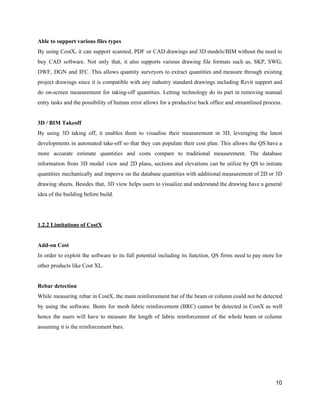
By using CostX, it can support scanned, PDF or CAD drawings and 3D models/BIM without the need to
buy CAD software. Not only that, it also supports various drawing file formats such as, SKP, SWG,
DWF, DGN and IFC. This allows quantity surveyors to extract quantities and measure through existing
project drawings since it is compatible with any industry standard drawings including Revit support and
do on-screen measurement for taking-off quantities. Letting technology do its part in removing manual
entry​ ​tasks​ ​and​ ​the​ ​possibility​ ​of​ ​human​ ​error​ ​allows​ ​for​ ​a​ ​productive​ ​back​ ​office​ ​and​ ​streamlined​ ​process.
3D​ ​/​ ​BIM​ ​Takeoff
By using 3D taking off, it enables them to visualise their measurement in 3D, leveraging the latest
developments in automated take-off so that they can populate their cost plan. This allows the QS have a
more accurate estimate quantities and costs compare to traditional measurement. The database
information from 3D model view and 2D plans, sections and elevations can be utilize by QS to initiate
quantities mechanically and improve on the database quantities with additional measurement of 2D or 3D
drawing sheets. Besides that, 3D view helps users to visualize and understand the drawing have a general
idea​ ​of​ ​the​ ​building​ ​before​ ​build.
1.2.2​ ​Limitations​ ​of​ ​CostX
Add-on​ ​Cost
In order to exploit the software to its full potential including its function, QS firms need to pay more for
other​ ​products​ ​like​ ​Cost​ ​XL.
Rebar​ ​detection
While measuring rebar in CostX, the main reinforcement bar of the beam or column could not be detected
by using the software. Bents for mesh fabric reinforcement (BRC) cannot be detected in CostX as well
hence the users will have to measure the length of fabric reinforcement of the whole beam or column
assuming​ ​it​ ​is​ ​the​ ​reinforcement​ ​bars.
10
1.3​ ​Buildsoft​ ​Cubit
Cubit delivers a unique and natural solution for estimating building and construction projects. By
combining estimating and takeoff in one seamless software package, it will able to save us lots of time
and​ ​money,​ ​plus​ ​its​ ​ease​ ​of​ ​use​ ​means​ ​after​ ​an​ ​hour​ ​of​ ​training​ ​we’ll​ ​be​ ​up​ ​and​ ​running.
1.3.1​ ​Function​ ​of​ ​buildsoft​ ​cubit
Natural​ ​Estimating
Estimating and takeoff, one seamless process as Cubit is a specialised estimating system with flexible
functionality that allows us to estimate the way we wanted. It’s the only application that seamlessly
integrates takeoff with estimating for an all-in-one solution that called Natural Estimating. It’s all laid out
in​ ​one​ ​view,​ ​meaning​ ​the​ ​information​ ​is​ ​where​ ​we​ ​want​ ​it,​ ​when​ ​we​ ​need​ ​it.
3D​ ​Takeoff
Pinpoint accurate takeoff with a review from any angle. By tracing directly over imported plans, simple or
complex quantity takeoffs are performed quickly and accurately. See elements of the takeoff from any
angle in 3D, and use this as a cross-referencing tool to make sure we don’t miss taking off any items, or to
check all your openings. Perform quantity takeoffs from PDF, CAD (DWG, DXF), BIM (DWFx), and
image​ ​files.
Price​ ​Lists
Use template price lists and jobs as the source for new estimates.Collect pricing information and save
them as template price lists (or even import supplier price lists) to control how the company prices jobs,
ensuring accuracy and maximising profitability. Go even further by creating template jobs that collate all
the​ ​common​ ​trades​ ​and​ ​items,​ ​making​ ​it​ ​easier​ ​to​ ​start​ ​next​ ​estimate,​ ​time​ ​and​ ​time​ ​again.
11
Job​ ​Analysis
Group similar information together to increase visibility over jobs. Code our estimate in a way that allows
us to sort data into different formats, giving us the ability to quickly analyse or breakdown a job by cost
code or material. For example, if you were asked the volume of concrete on a particular level of a multi
storey apartment block, this information can be achieved by coding the estimate by material. This handy
feature allows us split the job across different stages and budgets, and export more detailed estimates into
other workflows, like our Subcontractor Comparison Program, Microsoft Excel, and other third-party
applications.
Automatic​ ​Plan​ ​Revisions
Able to save countless hours estimating as revisions to plans are overlaid on an existing plan you’ve
already taken off. Not only that, it allows you to edit plans as part of the revision process.Within the
viewport,​ ​we​ ​can​ ​clearly​ ​see​ ​where​ ​the​ ​differences​ ​occur​ ​and​ ​update​ ​the​ ​takeoff​ ​to​ ​reflect​ ​any​ ​revisions.
1.3.2​ ​Limitation​ ​of​ ​Buildsoft​ ​Cubit
Permanently​ ​deleted
The job file that had been created in Buildsoft will be permanently deleted when we do the amendment on
the existing data. Its mean the amendment that had been done cannot be called back. So the user must be
carefully​ ​in​ ​doing​ ​the​ ​amendment.
Typing​ ​errors
This software has not created to check or identify the typing errors like numbers or figure that already
type in. We have to use human skill to check the errors. For an example; we want to put 6.86m length but
we was type in 6.68m in the computer. So the figure will be wrong because it’s human errors. This
method of BQ preparation will need extra time to key-in the figure into the computer to avoid the
mistakes​ ​or​ ​errors.
Virus​ ​Attack
Virus attack is common problem to all the computer users especially using internet. The user should have
licensed anti-virus software so that the virus definition can be updated daily. The software can detect the
virus attack and quarantined or killed the virus and also protect the computer and system. The problem is
when no anti-virus was installed, the virus can attack the computer system and also all the content of the
computer.​ ​If​ ​this​ ​happen,​ ​the​ ​data​ ​may​ ​be​ ​lost​ ​and​ ​may​ ​be​ ​can​ ​not​ ​be​ ​recovered​ ​by​ ​any​ ​means.
12
1.4​ ​Cubicost​ ​(Glodon)
In Cubicost (Glodon), it is comprised of four individual BIM-based software products (TAS,
TRB, TME, TBQ) that are focused on different needs of quantity surveying business. All these four
products together virtually cover all general requirements in construction cost estimation business.
Moreover, BIM model and related data can be easily transferred between four products, bringing you the
most professional, efficient and accurate BIM cost estimation experience. Not only that, Cubicost
(Glodon) has established its international presence, with US, Finland and UK subsidiaries targeting the
European and American markets as well as Singapore, Hong Kong and Malaysia subsidiaries driving its
development in SEA markets such as Taiwan, Indonesia and Thailand. With that being said, Cubicost
(Glodon)​ ​may​ ​be​ ​the​ ​one​ ​of​ ​the​ ​best​ ​BIM​ ​softwares​ ​technology​ ​that​ ​is​ ​used​ ​by​ ​current​ ​Quantity​ ​Surveyor.
Cubicost​ ​Takeoff​ ​for​ ​Architecture​ ​and​ ​Structure​ ​(TAS)
Cubicost​ ​Takeoff​ ​for​ ​Rebar​ ​(TRB)
Cubicost​ ​TBQ​ ​(TBQ)
Cubicost​ ​Takeoff​ ​for​ ​Mechanical​ ​&​ ​Electric​ ​(TME)
13
1.4.1​ ​Functions​ ​of​ ​Cubicost​ ​(Glodon)
Quick​ ​modelling​ ​and​ ​BIM-based​ ​quantity​ ​takeoff
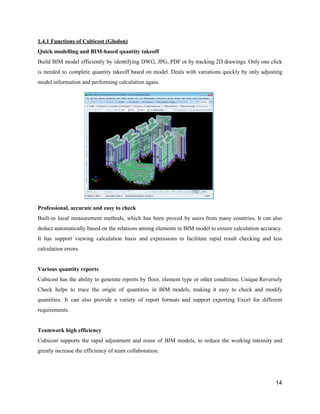
Build BIM model efficiently by identifying DWG, JPG, PDF or by tracking 2D drawings. Only one click
is needed to complete quantity takeoff based on model. Deals with variations quickly by only adjusting
model​ ​information​ ​and​ ​performing​ ​calculation​ ​again.
Professional,​ ​accurate​ ​and​ ​easy​ ​to​ ​check
Built-in local measurement methods, which has been proved by users from many countries. It can also
deduct automatically based on the relations among elements in BIM model to ensure calculation accuracy.
It has support viewing calculation basis and expressions to facilitate rapid result checking and less
calculation​ ​errors.
Various​ ​quantity​ ​reports
Cubicost has the ability to generate reports by floor, element type or other conditions. Unique Reversely
Check helps to trace the origin of quantities in BIM models, making it easy to check and modify
quantities. It can also provide a variety of report formats and support exporting Excel for different
requirements.
Teamwork​ ​high​ ​efficiency
Cubicost supports the rapid adjustment and reuse of BIM models, to reduce the working intensity and
greatly​ ​increase​ ​the​ ​efficiency​ ​of​ ​team​ ​collaboration.
14
1.4.2​ ​Limitations​ ​of​ ​Cubicost​ ​(Glodon)
Cost
The license to own Cubicost (Glodon) installed is extremely costly which resulted some of the smaller
Quantity Surveyor firm not being able to afford. Therefore alternatives like CostX or eTakeoff would be
their choice with a downside of having less functions compared to Cubicost (Glodon). Not only that,
when an update is released to implement new features of functions, a certain amount of fee must be paid
in order to update. This can cause commitment issue in the long run as the price can be far beyond than
the​ ​initial​ ​price​ ​of​ ​the​ ​product.
15
1.5​ ​Summary
Feature Glodon Cost​ ​X Buildsoft​ ​Cubit Vico​ ​Office
3D​ ​Model
Visualization
✓ ✓ ✓ ✓
Simplicity ✓ ✓ ⅹ ⅹ
Auto-revisioning ✓ ✓ ⅹ ⅹ
Able​ ​to​ ​export​ ​into
others​ ​format
✓ ⅹ ⅹ ⅹ
Able​ ​to​ ​read
different​ ​types​ ​of
drawings
✓ ✓ ✓ ✓
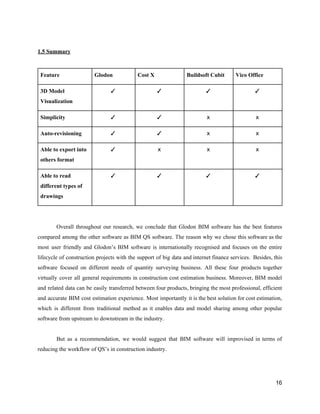
Overall throughout our research, we conclude that Glodon BIM software has the best features
compared among the other software as BIM QS software. The reason why we chose this software as the
most user friendly and Glodon’s BIM software is internationally recognised and focuses on the entire
lifecycle of construction projects with the support of big data and internet finance services. Besides, this
software focused on different needs of quantity surveying business. All these four products together
virtually cover all general requirements in construction cost estimation business. Moreover, BIM model
and related data can be easily transferred between four products, bringing the most professional, efficient
and accurate BIM cost estimation experience. Most importantly it is the best solution for cost estimation,
which is different from traditional method as it enables data and model sharing among other popular
software​ ​from​ ​upstream​ ​to​ ​downstream​ ​in​ ​the​ ​industry.
But as a recommendation, we would suggest that BIM software will improvised in terms of
reducing​ ​the​ ​workflow​ ​of​ ​QS’s​ ​in​ ​construction​ ​industry.
16
2.1​ ​Building​ ​Information​ ​Modelling​ ​(BIM)
2.1.1​ ​Preparation​ ​/​ ​Briefing​ ​Stage
Benefits
Provide​ ​Visualization​ ​of​ ​Project
2D drawings are often hard to visualize and communicated due to imagination constraints. With Building
Information Modelling (BIM), various parties such as the client's, future occupants and site workers are
provided with a visual to know how a building will look like way before the project commences. This
enables​ ​the​ ​parties​ ​to​ ​have​ ​a​ ​better​ ​insight​ ​of​ ​the​ ​project.
Ability​ ​for​ ​Collaboration
Project data are readily accessible to parties such as architects, engineers, quantity surveyors and
contractors. Everyone can address any issues effectively and efficiently. Moreover, all parties are able to
input information and make necessary amendments quickly. Therefore, BIM provides the ability for
different​ ​parties​ ​to​ ​collaborate​ ​together.
Constraints
Cost​ ​of​ ​Software
Building Information Modelling (BIM) software are very costly and is a huge capital investment. This
investment is worthwhile only if it is being used to its fullest potential. Other than that, this expense is a
huge​ ​restriction​ ​for​ ​small​ ​companies​ ​who​ ​have​ ​difficulties​ ​to​ ​afford​ ​it.
Lack​ ​of​ ​Experts
BIM software are rather new to the industry, many were not exposed to it yet. Therefore, there are very
limited number of experts in the field. Moreover, it requires additional investment in time to train and
educate​ ​an​ ​individual​ ​to​ ​be​ ​an​ ​expert.
2.1.2​ ​Design​ ​Stage
Benefits
Amendments​ ​Can​ ​Be​ ​Made​ ​Easily
Building Information Modelling (BIM) software links all data related to the construction together. All
components are interrelated to each other. Therefore, when a change is made, it automatically amend the
other​ ​related​ ​data.​ ​This​ ​saves​ ​time​ ​and​ ​minimise​ ​errors.
17
Ability​ ​to​ ​Design​ ​Complex​ ​Projects
BIM is able to help in designing complex projects. A complex project consist of many different and
connected​ ​parts.​ ​With​ ​the​ ​aid​ ​of​ ​beams,​ ​any​ ​design​ ​complication​ ​and​ ​clashes​ ​can​ ​be​ ​detected​ ​easily.
Constraints
Requires​ ​Adaptation​ ​Period
As Building Information Modelling (BIM) is new to the industry, BIM users require a long period to
adapt and get used to functioning it. Extra time and effort is essential before one can fully operate
effectively​ ​it.
Incompatibility
Due to the high initial cost BIM, it may be a barrier for many especially small scale companies.
Therefore, many do not have the software. This makes it incompatible to be used if one of the parties
involved​ ​in​ ​the​ ​project​ ​do​ ​not​ ​own​ ​the​ ​software.
2.1.3​​ ​​Pre-construction​ ​Stage
Benefits
Effective​ ​and​ ​Efficient
With the aid of Building Information Modelling (BIM), clashes of elements can be detected immediately
and with ease at early stage. It ensures all elements to be perfect fit for each other. This save cost and
minimise​ ​errors.​ ​As​ ​result,​ ​a​ ​better​ ​quality​ ​design​ ​is​ ​produced.
Time​ ​Saving
BIM is able to simplify the process of measurement and pricing as it features an automatic quantity taking
off​ ​and​ ​cost​ ​estimation.​ ​This​ ​will​ ​then​ ​save​ ​time​ ​and​ ​one​ ​can​ ​focus​ ​more​ ​on​ ​other​ ​tasks.
Constraints
Lack​ ​of​ ​Single​ ​Point​ ​of​ ​Responsibility
Any party that made a mistake will be difficult to be identified and the responsibility will be push to one
another. This is because BIM enables all parties to make any amendments easily without consent. This
results​ ​in​ ​the​ ​lack​ ​of​ ​single​ ​point​ ​of​ ​responsibility.
18
2.1.4​ ​Construction​ ​Stage
Benefits
Promote​ ​use​ ​of​ ​Prefabricated​ ​Components
Pre-fabricated components are components manufactured in controlled conditions. This ensures that
better quality product are produced. However, it is rarely used as it only has very minimal allowance for
errors which makes it important for all construction components to be perfect fit for each other if it is
used.​ ​This​ ​can​ ​be​ ​achieved​ ​by​ ​BIM​ ​thus​ ​promote​ ​the​ ​use​ ​of​ ​it.
Waste​ ​Reduction
With the use of BIM, the quantities extracted are very accurate which not only reduces time for
measurement, but also time for ordering. Not only that, it also reduces waste of storage space and labour
cost.​ ​Therefore,​ ​the​ ​usage​ ​of​ ​BIM​ ​can​ ​maximize​ ​waste​ ​reduction​ ​effectively​ ​and​ ​efficiently.
Constraints
Cost​ ​Variation
Despite all the benefits that BIM offers, BIM does not take external factors into consideration. As
example, BIM does not take the price fluctuation of materials throughout the construction period into
account.​ ​Therefore,​ ​extra​ ​effort​ ​is​ ​required​ ​to​ ​ensure​ ​that​ ​all​ ​these​ ​factors​ ​are​ ​being​ ​considered.
2.1.5​ ​Post​ ​Construction​ ​Stage
Benefits
Data​ ​Management
One of the key feature of BIM is the ability to gather all project related data and store it together in one
place. Various information such as architectural drawings, structural drawings, building materials and
models​ ​can​ ​be​ ​kept​ ​in​ ​an​ ​ordering​ ​manner​ ​and​ ​tracked​ ​easily.
Constraints
High​ ​Maintenance
The world of information technology (IT) is constantly and rapidly changing so is BIM. BIM software are
continuously being updated to fulfil client’s needs. Updates of software are fairly costly. In order to get
the most updated version of the software, users need to spend extra money from time to time.This results
in​ ​a​ ​high​ ​maintenance​ ​cost.
19
2.2​ ​Computer​ ​Aided​ ​Design​ ​(​ ​CAD)
2.2.1​ ​Preparation​ ​/​ ​Briefing​ ​Stage
Benefits
Provide​ ​the​ ​data​ ​base​ ​for​ ​manufacturing
Designers will include the data such as dimension, material and details of components in CAD when
creating the documentation for designing purpose. A 2D drafting tool is generally used to design diagrams
and​ ​input​ ​directions​ ​on​ ​the​ ​data.
Visualisation
With CAD, the size and resolution of the drawings can be changed as needed. It helps designer in
visualizing the final product that is to be made, it subassemblies and the constituent parts. The product can
also be given animation and see how the actual product will work, thus helping the designer to
immediately​ ​make​ ​the​ ​modifications​ ​if​ ​required.
Improve​ ​the​ ​quality​ ​of​ ​the​ ​design
CAD offers a large number of tools that help in carrying out through engineering analysis of the proposed
design. The tools help designers to consider large number of investigations. Since the software offers
greater​ ​accuracy,​ ​the​ ​errors​ ​are​ ​reduced​ ​and​ ​leading​ ​to​ ​better​ ​design.
Constraints
High​ ​initial​ ​cos​t
High expenses incurred to implement CAD which includes the cost of software itself, cost of computer
hardware,​ ​software​ ​updates​ ​and​ ​training​ ​cost​ ​for​ ​the​ ​workers.
Training​ ​is​ ​required
Training need to be conducted for the staff to ensure that they know how to use the software effectively
and​ ​efficiently.
Higher​ ​risk​ ​of​ ​loss​ ​of​ ​information
CAD software does not have a backup system so it cannot autosave projects . Hence, the users need to
save their work manually in order to safely back it up and prevent lost or corrupted information in the
software.
20
2.2.2​ ​Design​ ​Stage
Benefits
Higher​ ​accuracy​ ​of​ ​design
With CAD, you can use several methods to obtain exact dimensions. It can draw to scale to produce a
very accurate design. The designer must first decide the unit of measurement to be used , then draw the
model​ ​at​ ​1​ ​:​ ​1​ ​scale.
Easy​ ​to​ ​edit
When you are designing, there wil always the need to make alterations. With CAD, it will be much easier
to make any changes because you can fix the errors and modify the drawings easily. Instead of using
pencils, scales , compasses and other manual drafting tools. CAD has a variety of drawing tools that can
create​ ​straight​ ​lines,​ ​circles,​ ​curves​ ​and​ ​many​ ​more.
Constraints
Lack​ ​of​ ​standardisation​ ​in​ ​design
There are few methods of drawing the plans which are depends on the architect preferences. As different
methods will used, user cannot standardise the methods they need to use and it is very difficult to
standardize all architects to use the same method as they would not be aware of its effect towards quantity
surveyors.
Higher​ ​risk​ ​of​ ​loss​ ​of​ ​information
CAD software does not have a backup system so it cannot autosave projects . Hence, the users need to
save their work manually in order to safely back it up and prevent lost or corrupted information in the
software.
Requires​ ​update​ ​of​ ​skills
With every updates released, the users have to update their skills time to time to ensure that they can use
the​ ​software​ ​properly​ ​and​ ​efficiently.​ ​Therefore,​ ​this​ ​will​ ​consume​ ​more​ ​time​ ​and​ ​money.
21
2.2.3​ ​Pre-Construction​ ​Stage
Benefits
On-screen​ ​takeoff
CAD enables users to do on-screen takeoff from 2D and 3D drawings easily. Since CAD drawings are
produced according to the actual size, hence measurement produced will be accurate. Users can also
choose​ ​to​ ​measure​ ​any​ ​elements​ ​and​ ​several​ ​items​ ​can​ ​be​ ​measured​ ​together​ ​with​ ​one​ ​simple​ ​drawing.
Data​ ​managing
With CAD, it is able to manage data effectively by categorizing it into two categories such as graphic or
non-graphic. Graphic refers to drawings of the project and Non-graphic refers to data such as quantities
and specifications. Both data are grouped and arranged systematically. Cost data can be done in this stage
by​ ​using​ ​the​ ​data​ ​stored​ ​which​ ​is​ ​very​ ​convenient​ ​and​ ​save​ ​time​ ​compared​ ​to​ ​manual​ ​method.
Constraints
Unable​ ​to​ ​produce​ ​bill​ ​of​ ​quantities
CAD software is limited to taking-off only but not production of Bills of Quantities. Therefore, the data
has to be transferred manually or imported to other software to prepare BQ which consume more time.
Mistake​ ​tend​ ​to​ ​occur​ ​when​ ​transferring​ ​data​ ​from​ ​CAD​ ​to​ ​other​ ​software.
2.2.4​ ​Pre-Construction​ ​Stage
Benefits
Improve​ ​communication​ ​process
CAD software improves communication processes due to the easier understanding of the design and
measurement. This can also reduce the misinterpretations and uncertainty in reading plans. CAD can
generate​ ​clear​ ​perspective​ ​views​ ​of​ ​a​ ​structure​ ​to​ ​provide​ ​accurate​ ​information.
Reduce​ ​confusion
By improving the communication process, ability of CAD to show design information clearly and
accurately, it reduces confusion. Also, the dimensions of the complex shapes of the layout can be
accurately​ ​defined​ ​without​ ​error.
22
Increase​ ​the​ ​speed​ ​in​ ​measurement
CAD produces the sem-automatic ability to measure the quantities. Measurement is also more accurate as
CAD drawings are produced in actual size and errors in quantities due to usage of wrong scale will be
reduced.
Constraints
Limited​ ​​ ​measurement
As the drawings are in 2-dimensional, it is just for unit of measurement of 2D only. It is not able to
measure quantities that require three dimensions like volume, it can only measure two-dimensions.
Therefore,​ ​it​ ​may​ ​affect​ ​the​ ​comprehensiveness​ ​of​ ​the​ ​final​ ​quantities.
Higher​ ​expenses​ ​incurred​ ​on​ ​site
The use of CAD at construction site may require a computer, which means extra expenses may require for
a​ ​computer​ ​system.​ ​Hence,​ ​higher​ ​construction​ ​cost​ ​is​ ​needed.
2.2.5​ ​Post​ ​Construction​ ​Stage
Benefits
Extension​ ​of​ ​information
3D CAD files provides information given in the Manual by visualising the various compartments of the
building to create a virtual reality view to client, including the hidden items such as wirings. This will
ease​ ​major​ ​maintenance​ ​works​ ​to​ ​be​ ​carried​ ​out​ ​accurately.
Commonly​ ​usable
CAD files can be read in a variety of software in the market today , most of them even provide free file
readers which is very convenient. The files will be universally accessible and usable by all parties,
including​ ​maintenance​ ​team.
Constraints
Limited​ ​information
CAD files only comprises of the building hardscape, there little to no information provided for the
softscape of a building, which includes the population density and designated space usage. Lack of
information​ ​leads​ ​to​ ​an​ ​inadequate​ ​of​ ​visualisation​ ​of​ ​the​ ​designated​ ​space​ ​usage.
23
2.3​ ​Manual​ ​measurement
2.3.1​ ​Preparation​ ​Stage
Benefits
Cost
In the preparation/briefing stage of a project, using manual measurement can be very beneficial. This is
because manual measurement does not require any purchasing of any specialized software, like BIM or
CAD. Companies would only require purchasing paper, which is cheap when compared to purchasing
softwares.
Training
Furthermore, training is not required as even fresh graduates have plenty experience on manual
measurement. When using the software, training is required to ensure the software is fully utilized. Extra
cost​ ​is​ ​needed​ ​to​ ​teach​ ​them.
Constraints
Experience
During the preparation stage, a cost plan is required to be prepared. This is to help advise the clients about
the budgeting and any variations that may occur on the project. A QS will require cost data to produce the
cost​ ​plan.​ ​An​ ​inexperienced​ ​QS​ ​will​ ​have​ ​trouble​ ​due​ ​to​ ​the​ ​lack​ ​of​ ​previous​ ​projects.
2.3.2​ ​Design​ ​Stage
Constraints
Changes
During the design stage, there can be many changes to the drawings. In this case, the QS will be required
to change their measurements in the taking off & dimension list. The changes might cause the QS to make
human​ ​errors​ ​due​ ​to​ ​the​ ​quick​ ​and​ ​the​ ​possible​ ​small,​ ​unnoticeable​ ​changes​ ​to​ ​the​ ​drawing.
Limitations
It​ ​is​ ​also​ ​much​ ​slower​ ​compared​ ​to​ ​the​ ​software​ ​due​ ​to​ ​the​ ​limitations​ ​of​ ​the​ ​human.
24
2.3.3​ ​Pre-construction​ ​Stage
Benefits
Data​ ​Security
When using manual measurement, any possibility of the files being corrupted or damaged due to
computer error, power loss & others will be nil due to every file being accessible even if there is no
power.​ ​Therefore,​ ​there​ ​will​ ​be​ ​no​ ​risk​ ​of​ ​losing​ ​the​ ​information​ ​due​ ​to​ ​any​ ​unforeseen​ ​circumstances.
Constraints
Human​ ​Error
During the pre-construction stage, the complexity of the projects will start to take shape due to the many
detailed drawings. There is a risk of miscalculating as we humans are not perfect and are prone to make
mistakes,​ ​especially​ ​due​ ​to​ ​external​ ​factors​ ​like​ ​emotion​ ​and​ ​distractions.
2.3.4​ ​Construction​ ​Stage
Constraints
Error​ ​Identification
During the construction stage, any errors will be harder to spot as there is no tools to identify errors,
unlike​ ​the​ ​likes​ ​of​ ​the​ ​superior​ ​software.​ ​It​ ​t​ ​will​ ​take​ ​longer​ ​time​ ​to​ ​spot​ ​any​ ​errors,​ ​may​ ​cause​ ​delays.
Information
Manual​ ​measurement​ ​is​ ​also​ ​not​ ​able​ ​to​ ​provide​ ​the​ ​detailed​ ​information​ ​from​ ​the​ ​4D,​ ​5D​ ​&​ ​6D.
2.3.5​ ​Post​ ​Construction​ ​Stage
Benefits
Experience
The manual information is also very easy to understand, and does not require any knowledge of any
software. The reader must only know basic knowledge of construction and will be able to understand.
This​ ​is​ ​perfect​ ​for​ ​the​ ​senior​ ​QS​ ​which​ ​might​ ​not​ ​have​ ​much​ ​knowledge​ ​on​ ​the​ ​software.
25
Constraints
Time
After the completion of the BQ, dimension sheet & taking-off list, time is needed to scan the documents
and print copies of it. Manual measurement also does not provide the information generated based on
project​ ​like​ ​BIM.
26

Software full

  • 1.
    SCHOOL​ ​OF​ ​ARCHITECTURE,​​BUILDING​ ​AND​ ​DESIGN BACHELOR​ ​IN​ ​QUANTITY​ ​SURVEYING​ ​(HONOURS) SOFTWARE​ ​APPLICATION​ ​FOR​ ​​ ​QUANTITY​ ​SURVEYING​ ​(CSC​ ​60603) ASSIGNMENT​ ​1:​ ​GROUP​ ​REPORT NAME STUDENT​ ​ID Ee​ ​Hui​ ​Teng 0322548 Lim​ ​Hong​ ​Wei 0322741 Loo​ ​Siah​ ​Mong 0321995 Pui​ ​Chun​ ​Shian 0323740 Tan​ ​Jia​ ​San 0322406 Yip​ ​Xiao​ ​Jung 0323852
  • 2.
    Table​ ​of​ ​Content PartTitle Pages ​ ​Introduction 2 A 1.1​ ​Vico​ ​Office​ ​Takeoff​ ​Manager​ ​Software ​ ​​ ​​ ​​ ​​ ​​ ​1.1.1​ ​Function​ ​of​ ​Vico​ ​Office​ ​Takeoff​ ​Manager ​ ​​ ​​ ​​ ​​ ​​ ​1.1.2​ ​Limitation​ ​of​ ​Vico​ ​Office​ ​Takeoff​ ​Manager 1.2​ ​Cost​ ​X ​ ​​ ​​ ​​ ​​ ​​ ​1.2.1​ ​Function​ ​of​ ​Cost​ ​X ​ ​​ ​​ ​​ ​​ ​​ ​1.2.2​ ​Limitation​ ​of​ ​Cost​ ​X 1.3​ ​Buildsoft​ ​Cubit ​ ​​ ​​ ​​ ​​ ​​ ​1.3.1​ ​Function​ ​of​ ​Buildsoft​ ​Cubit ​ ​​ ​​ ​​ ​​ ​​ ​1.3.2​ ​Limitation​ ​of​ ​Buildsoft​ ​Cubit 1.4​ ​Cubicost​ ​(Glodon) ​ ​​ ​​ ​​ ​​ ​1.4.1​ ​Function​ ​of​ ​Cubicost ​ ​​ ​​ ​​ ​​ ​1.4.2​ ​Limitation​ ​of​ ​Cubicost 1.5​ ​Summary 3-8 9-10 11-12 13-15 15-16 B 2.1​ ​BIM ​ ​​ ​​ ​​ ​​ ​​ ​2.1.1​ ​Preparation​ ​Stage ​ ​​ ​​ ​​ ​​ ​​ ​2.1.2​ ​Design​ ​Stage ​ ​​ ​​ ​​ ​​ ​​ ​2.1.3​ ​Pre-construction​ ​Stage ​ ​​ ​​ ​​ ​​ ​​ ​2.1.4​ ​Construction​ ​Stage ​ ​​ ​​ ​​ ​​ ​​ ​2.1.5​ ​Post​ ​Construction​ ​Stage 17-19 2.2​ ​CAD ​ ​​ ​​ ​​ ​​ ​​ ​2.2.1​ ​Preparation​ ​Stage ​ ​​ ​​ ​​ ​​ ​​ ​2.2.2​ ​Design​ ​Stage ​ ​​ ​​ ​​ ​​ ​​ ​2.2.3​ ​Pre-construction​ ​Stage ​ ​​ ​​ ​​ ​​ ​​ ​2.2.4​ ​Construction​ ​Stage ​ ​​ ​​ ​​ ​​ ​​ ​2.2.5​ ​Post​ ​Construction​ ​Stage 20-23 2.3​ ​Manual​ ​Measurement ​ ​​ ​​ ​​ ​​ ​​ ​2.3.1​ ​Preparation​ ​Stage ​ ​​ ​​ ​​ ​​ ​​ ​2.3.2​ ​Design​ ​Stage ​ ​​ ​​ ​​ ​​ ​​ ​2.3.3​ ​Pre-construction​ ​Stage ​ ​​ ​​ ​​ ​​ ​​ ​2.3.4​ ​Construction​ ​Stage ​ ​​ ​​ ​​ ​​ ​​ ​2.3.5​ ​Post​ ​Construction​ ​Stage 24-26 1
  • 3.
    Introduction Moving forward tothe 21st century, the age of Building Information Modeling (BIM) has come. BIM describes the process of designing a building collaboratively using one coherent system of computer models rather than as separate sets of drawings.This system is often adopted by construction companies to improve the 3 most important aspects to their projects, namely time, cost, and quality. BIM covers the whole construction lifecycle from the briefing stage all the way to the operation and maintenance of a building. Generally, the application of BIM is divided into 3 levels, starting from Level 1 with minimal collaboration between parties up to Level 3, where all parties collaborate on the same model and share the same​ ​data​ ​on​ ​the​ ​same​ ​repository. As the industry shifts towards the massive use of BIM softwares for construction, the industry professionals, including the Quantity Surveyor, has taken a step forward to fully utilise the benefits that can be obtained from BIM. Several BIM QS softwares on the market can now enable a QS to easily take off quantities and estimate the project costs from any drawings or models available. As BIM is more than 3D-CAD, information such as Schedules and Cost plans can be included in the files. Undoubtedly what BIM brings is a complete transformation by helping a construction project move from the design desks to physical reality. It prunes redundant data, erases communication lag and noise, maintains updated information, brings operational efficiency, improves coordination among departments and gives an overall​ ​efficiency​ ​to​ ​the​ ​whole​ ​lifespan​ ​of​ ​the​ ​project.​ ​With​ ​large​ ​infrastructural​ ​projects​ ​BIM​ ​is​ ​a​ ​must. So in this report, we look into massive BIM QS softwares that are available in the market and analysed their respective functions and limitations. In our opinions, these 4 softwares not only well versed in the BIM industry compared to others, we are also well exposed to these softwares in terms of understanding​ ​level​ ​and​ ​functionality​ ​of​ ​the​ ​softwares. ● Vico​ ​Office​ ​Takeoff​ ​Manager ● CostX ● Buildsoft​ ​cubit ● Cubicost​ ​(Glodon) From these 4 softwares available, a detailed comparison on the functions and limitations as well as​ ​how​ ​well​ ​it​ ​works​ ​on​ ​measurements​ ​will​ ​be​ ​conveyed​ ​through​ ​this​ ​report. 2
  • 4.
    1.1​ ​Vico​ ​Office​​Takeoff​ ​Manager Vico Office is a purpose-built software for construction, provides an integrated BIM workflow for construction which enables users to perform functions such as extending basic 3D model with constructability analysis and coordination, 4D location-based scheduling and production control, 5D estimating, quantity takeoff and layout. Vico Office is designed in a modular way which allows a consistent and easy use in order to maximize efficiency and achieving the needs of various construction process​ ​trades​ ​and​ ​stages. By utilizing Vico Office, building owners and general contractors are able to work together more efficiently, enhance predictability, manage cost as well as lowering risk and optimizing workflow on large, complex building projects. Vico Office also provides flexibility in modelling, scheduling and estimating for project teams and are still able to work together with all stakeholders in terms of coordination,​ ​budgeting​ ​and​ ​project​ ​control. 3
  • 5.
    1.1.1​ ​Functions 2D​ ​to​​3D​ ​Change​ ​Management Vico Document Controller allows 2D drawings to be converted into 3D models. This feature is also able to identify the changes of 2D and 3D versions as well as comparing the coordinated 3D model to 2D contract​ ​documents​ ​for​ ​final​ ​checking. 3D​ ​BIM​ ​for​ ​Visualization Vico Office performs well with practical BIM authoring tools such as Autodesk Revit, Graphisoft ArchiCAD and Tekla Structures including additional import softwares such as Google SketchUp, 3D DWG,​ ​CAD​ ​Duct​ ​and​ ​IFC​ ​files. 4
  • 6.
    3D​ ​BIM​ ​for​​Clash​ ​Detection Vico​ ​Constructability​ ​Manager​ ​enables​ ​the​ ​project​ ​team​ ​to​ ​identify​ ​constructability​ ​problems​ ​in​ ​the planning​ ​process​ ​by​ ​providing​ ​integrated​ ​solutions​ ​for​ ​clash​ ​detections​ ​and​ ​coordination​ ​resolution. 3D​ ​BIM​ ​for​ ​Layout Vico​ ​Layout​ ​Manager​ ​offers​ ​a​ ​precise​ ​analysis​ ​of​ ​virtual​ ​model​ ​critical​ ​points​ ​matching​ ​to​ ​job​ ​site's physical​ ​points.​ ​This​ ​feature​ ​also​ ​offers​ ​speedy​ ​installation​ ​and​ ​remove​ ​costly​ ​rework. 5
  • 7.
    3D​ ​BIM​ ​for​​Quantity​ ​Takeoff Vico Takeoff Manager provides more precise, up to date schedules, estimating and cost planning. With its unique geometry analysis algorithm, this feature scans a 3D model’s content and automatically generates take​ ​of​ ​items​ ​with​ ​a​ ​set​ ​of​ ​construction-caliber​ ​quantities​ ​off​ ​the​ ​3D​ ​model. 4D​ ​BIM​ ​for​ ​Scheduling​ ​and​ ​Production​ ​Control ➔ Vico​ ​LBS​ ​Manager​​ ​-​ ​functions​ ​to​ ​divide​ ​the​ ​project​ ​into​ ​work​ ​locations​ ​which​ ​allows​ ​smooth​ ​flow​ ​of work​ ​without​ ​interference. ➔ Vico​ ​Schedule​ ​Planner​​ ​-​ ​utilizes​ ​BIM​ ​model​ ​elements​ ​to​ ​generate​ ​construction​ ​schedules​ ​and associating​ ​them​ ​with​ ​the​ ​corresponding​ ​resources,​ ​materials​ ​and​ ​labor. 6
  • 8.
    ➔ Vico​ ​Production​​Controller​​ ​-​ ​manages​ ​on-site​ ​production​ ​and​ ​planning​ ​schedules​ ​during​ ​the​ ​build phase.​ ​This​ ​feature​ ​provides​ ​sufficient​ ​time​ ​for​ ​forecasting​ ​schedules​ ​to​ ​identify​ ​problems. ➔ Vico​ ​4D​ ​Manager​​ ​-​ ​a​ ​4D​ ​simulation​ ​presentation​ ​tool​ ​for​ ​the​ ​construction​ ​team​ ​which​ ​provides​ ​the team​ ​with​ ​a​ ​clear​ ​3D​ ​visualization​ ​of​ ​the​ ​project​ ​timeline. 5D​ ​BIM​ ​for​ ​Estimating ➔ Vico Cost Planner - a strong model-based cost estimating solution. This feature uses Vico Takeoff Manager to provide a precise estimation within a short period of time which ensures the project does not​ ​exceeds​ ​its​ ​budget. 7
  • 9.
    ➔ Vico​ ​Cost​​Explorer​​ ​-​ ​enables​ ​project​ ​team​ ​to​ ​visualize​ ​the​ ​elements​ ​of​ ​the​ ​projects​ ​that​ ​are​ ​affecting the​ ​changes​ ​in​ ​the​ ​cost​ ​in​ ​order​ ​to​ ​keep​ ​track​ ​of​ ​the​ ​budget.​ ​It​ ​is​ ​also​ ​the​ ​first​ ​model-based​ ​budgeting application. Construction​ ​Management​ ​Report Vico Office Client forms the foundation of Vico Office Suite. This feature enable information to be communicate across the project team, delivers constructability reports, provide cost and resource loaded schedules,​ ​cash​ ​flow​ ​reports,​ ​cost​ ​estimates​ ​and​ ​proposed​ ​design​ ​changes. 1.1.2​ ​Limitations​ ​of​ ​Vico​ ​Office Vico Office allows only one model file to be used at one time because when two models are placed together, Vico Office is unable to detect any collisions automatically. Hence, this will require more time​ ​to​ ​complete​ ​the​ ​3D​ ​model. 8
  • 10.
    1.2​ ​CostX CostX® isan exciting software innovation developed by award winning software designers and construction industry professionals. It allows non-CAD users to measure from PDF or CAD files without running CAD software, and, dependent upon the version of CostX® being used, create detailed workbook documents such as estimates, cost plans, bills of quantities or tenders – all within a fully integrated, paperless, electronic environment. A powerful and flexible report writer allows professional quality output​ ​to​ ​be​ ​produced​ ​and​ ​issued​ ​either​ ​as​ ​paper​ ​documents​ ​or​ ​electronic​ ​files. 1.2.1​ ​Functions​ ​of​ ​CostX Auto-revisioning This is one of the unique functions of CostX where it has the ability to compare and review the contemporary drawings with the previous one and highlight the changes that is being made. This function allows the user safe plenty of time and fastens the work. Auto- revisioning function will continue by creating an audit trail likewise revises the previous quantities and workbooks as well as updating the latest quantities. Subcontractor​ ​Comparison Subcontractor comparisons workbooks can be generated in CostX allow the user to compare with the subcontractors information. Subcontractor Comparison system able to link the report and quotation detail of every subcontractor and allow the user have better view and make comparison with one another about the​ ​cost​ ​and​ ​quality. 9
  • 11.
    Able​ ​to​ ​support​​various​ ​files​ ​types By using CostX, it can support scanned, PDF or CAD drawings and 3D models/BIM without the need to buy CAD software. Not only that, it also supports various drawing file formats such as, SKP, SWG, DWF, DGN and IFC. This allows quantity surveyors to extract quantities and measure through existing project drawings since it is compatible with any industry standard drawings including Revit support and do on-screen measurement for taking-off quantities. Letting technology do its part in removing manual entry​ ​tasks​ ​and​ ​the​ ​possibility​ ​of​ ​human​ ​error​ ​allows​ ​for​ ​a​ ​productive​ ​back​ ​office​ ​and​ ​streamlined​ ​process. 3D​ ​/​ ​BIM​ ​Takeoff By using 3D taking off, it enables them to visualise their measurement in 3D, leveraging the latest developments in automated take-off so that they can populate their cost plan. This allows the QS have a more accurate estimate quantities and costs compare to traditional measurement. The database information from 3D model view and 2D plans, sections and elevations can be utilize by QS to initiate quantities mechanically and improve on the database quantities with additional measurement of 2D or 3D drawing sheets. Besides that, 3D view helps users to visualize and understand the drawing have a general idea​ ​of​ ​the​ ​building​ ​before​ ​build. 1.2.2​ ​Limitations​ ​of​ ​CostX Add-on​ ​Cost In order to exploit the software to its full potential including its function, QS firms need to pay more for other​ ​products​ ​like​ ​Cost​ ​XL. Rebar​ ​detection While measuring rebar in CostX, the main reinforcement bar of the beam or column could not be detected by using the software. Bents for mesh fabric reinforcement (BRC) cannot be detected in CostX as well hence the users will have to measure the length of fabric reinforcement of the whole beam or column assuming​ ​it​ ​is​ ​the​ ​reinforcement​ ​bars. 10
  • 12.
    1.3​ ​Buildsoft​ ​Cubit Cubitdelivers a unique and natural solution for estimating building and construction projects. By combining estimating and takeoff in one seamless software package, it will able to save us lots of time and​ ​money,​ ​plus​ ​its​ ​ease​ ​of​ ​use​ ​means​ ​after​ ​an​ ​hour​ ​of​ ​training​ ​we’ll​ ​be​ ​up​ ​and​ ​running. 1.3.1​ ​Function​ ​of​ ​buildsoft​ ​cubit Natural​ ​Estimating Estimating and takeoff, one seamless process as Cubit is a specialised estimating system with flexible functionality that allows us to estimate the way we wanted. It’s the only application that seamlessly integrates takeoff with estimating for an all-in-one solution that called Natural Estimating. It’s all laid out in​ ​one​ ​view,​ ​meaning​ ​the​ ​information​ ​is​ ​where​ ​we​ ​want​ ​it,​ ​when​ ​we​ ​need​ ​it. 3D​ ​Takeoff Pinpoint accurate takeoff with a review from any angle. By tracing directly over imported plans, simple or complex quantity takeoffs are performed quickly and accurately. See elements of the takeoff from any angle in 3D, and use this as a cross-referencing tool to make sure we don’t miss taking off any items, or to check all your openings. Perform quantity takeoffs from PDF, CAD (DWG, DXF), BIM (DWFx), and image​ ​files. Price​ ​Lists Use template price lists and jobs as the source for new estimates.Collect pricing information and save them as template price lists (or even import supplier price lists) to control how the company prices jobs, ensuring accuracy and maximising profitability. Go even further by creating template jobs that collate all the​ ​common​ ​trades​ ​and​ ​items,​ ​making​ ​it​ ​easier​ ​to​ ​start​ ​next​ ​estimate,​ ​time​ ​and​ ​time​ ​again. 11
  • 13.
    Job​ ​Analysis Group similarinformation together to increase visibility over jobs. Code our estimate in a way that allows us to sort data into different formats, giving us the ability to quickly analyse or breakdown a job by cost code or material. For example, if you were asked the volume of concrete on a particular level of a multi storey apartment block, this information can be achieved by coding the estimate by material. This handy feature allows us split the job across different stages and budgets, and export more detailed estimates into other workflows, like our Subcontractor Comparison Program, Microsoft Excel, and other third-party applications. Automatic​ ​Plan​ ​Revisions Able to save countless hours estimating as revisions to plans are overlaid on an existing plan you’ve already taken off. Not only that, it allows you to edit plans as part of the revision process.Within the viewport,​ ​we​ ​can​ ​clearly​ ​see​ ​where​ ​the​ ​differences​ ​occur​ ​and​ ​update​ ​the​ ​takeoff​ ​to​ ​reflect​ ​any​ ​revisions. 1.3.2​ ​Limitation​ ​of​ ​Buildsoft​ ​Cubit Permanently​ ​deleted The job file that had been created in Buildsoft will be permanently deleted when we do the amendment on the existing data. Its mean the amendment that had been done cannot be called back. So the user must be carefully​ ​in​ ​doing​ ​the​ ​amendment. Typing​ ​errors This software has not created to check or identify the typing errors like numbers or figure that already type in. We have to use human skill to check the errors. For an example; we want to put 6.86m length but we was type in 6.68m in the computer. So the figure will be wrong because it’s human errors. This method of BQ preparation will need extra time to key-in the figure into the computer to avoid the mistakes​ ​or​ ​errors. Virus​ ​Attack Virus attack is common problem to all the computer users especially using internet. The user should have licensed anti-virus software so that the virus definition can be updated daily. The software can detect the virus attack and quarantined or killed the virus and also protect the computer and system. The problem is when no anti-virus was installed, the virus can attack the computer system and also all the content of the computer.​ ​If​ ​this​ ​happen,​ ​the​ ​data​ ​may​ ​be​ ​lost​ ​and​ ​may​ ​be​ ​can​ ​not​ ​be​ ​recovered​ ​by​ ​any​ ​means. 12
  • 14.
    1.4​ ​Cubicost​ ​(Glodon) InCubicost (Glodon), it is comprised of four individual BIM-based software products (TAS, TRB, TME, TBQ) that are focused on different needs of quantity surveying business. All these four products together virtually cover all general requirements in construction cost estimation business. Moreover, BIM model and related data can be easily transferred between four products, bringing you the most professional, efficient and accurate BIM cost estimation experience. Not only that, Cubicost (Glodon) has established its international presence, with US, Finland and UK subsidiaries targeting the European and American markets as well as Singapore, Hong Kong and Malaysia subsidiaries driving its development in SEA markets such as Taiwan, Indonesia and Thailand. With that being said, Cubicost (Glodon)​ ​may​ ​be​ ​the​ ​one​ ​of​ ​the​ ​best​ ​BIM​ ​softwares​ ​technology​ ​that​ ​is​ ​used​ ​by​ ​current​ ​Quantity​ ​Surveyor. Cubicost​ ​Takeoff​ ​for​ ​Architecture​ ​and​ ​Structure​ ​(TAS) Cubicost​ ​Takeoff​ ​for​ ​Rebar​ ​(TRB) Cubicost​ ​TBQ​ ​(TBQ) Cubicost​ ​Takeoff​ ​for​ ​Mechanical​ ​&​ ​Electric​ ​(TME) 13
  • 15.
    1.4.1​ ​Functions​ ​of​​Cubicost​ ​(Glodon) Quick​ ​modelling​ ​and​ ​BIM-based​ ​quantity​ ​takeoff Build BIM model efficiently by identifying DWG, JPG, PDF or by tracking 2D drawings. Only one click is needed to complete quantity takeoff based on model. Deals with variations quickly by only adjusting model​ ​information​ ​and​ ​performing​ ​calculation​ ​again. Professional,​ ​accurate​ ​and​ ​easy​ ​to​ ​check Built-in local measurement methods, which has been proved by users from many countries. It can also deduct automatically based on the relations among elements in BIM model to ensure calculation accuracy. It has support viewing calculation basis and expressions to facilitate rapid result checking and less calculation​ ​errors. Various​ ​quantity​ ​reports Cubicost has the ability to generate reports by floor, element type or other conditions. Unique Reversely Check helps to trace the origin of quantities in BIM models, making it easy to check and modify quantities. It can also provide a variety of report formats and support exporting Excel for different requirements. Teamwork​ ​high​ ​efficiency Cubicost supports the rapid adjustment and reuse of BIM models, to reduce the working intensity and greatly​ ​increase​ ​the​ ​efficiency​ ​of​ ​team​ ​collaboration. 14
  • 16.
    1.4.2​ ​Limitations​ ​of​​Cubicost​ ​(Glodon) Cost The license to own Cubicost (Glodon) installed is extremely costly which resulted some of the smaller Quantity Surveyor firm not being able to afford. Therefore alternatives like CostX or eTakeoff would be their choice with a downside of having less functions compared to Cubicost (Glodon). Not only that, when an update is released to implement new features of functions, a certain amount of fee must be paid in order to update. This can cause commitment issue in the long run as the price can be far beyond than the​ ​initial​ ​price​ ​of​ ​the​ ​product. 15
  • 17.
    1.5​ ​Summary Feature GlodonCost​ ​X Buildsoft​ ​Cubit Vico​ ​Office 3D​ ​Model Visualization ✓ ✓ ✓ ✓ Simplicity ✓ ✓ ⅹ ⅹ Auto-revisioning ✓ ✓ ⅹ ⅹ Able​ ​to​ ​export​ ​into others​ ​format ✓ ⅹ ⅹ ⅹ Able​ ​to​ ​read different​ ​types​ ​of drawings ✓ ✓ ✓ ✓ Overall throughout our research, we conclude that Glodon BIM software has the best features compared among the other software as BIM QS software. The reason why we chose this software as the most user friendly and Glodon’s BIM software is internationally recognised and focuses on the entire lifecycle of construction projects with the support of big data and internet finance services. Besides, this software focused on different needs of quantity surveying business. All these four products together virtually cover all general requirements in construction cost estimation business. Moreover, BIM model and related data can be easily transferred between four products, bringing the most professional, efficient and accurate BIM cost estimation experience. Most importantly it is the best solution for cost estimation, which is different from traditional method as it enables data and model sharing among other popular software​ ​from​ ​upstream​ ​to​ ​downstream​ ​in​ ​the​ ​industry. But as a recommendation, we would suggest that BIM software will improvised in terms of reducing​ ​the​ ​workflow​ ​of​ ​QS’s​ ​in​ ​construction​ ​industry. 16
  • 18.
    2.1​ ​Building​ ​Information​​Modelling​ ​(BIM) 2.1.1​ ​Preparation​ ​/​ ​Briefing​ ​Stage Benefits Provide​ ​Visualization​ ​of​ ​Project 2D drawings are often hard to visualize and communicated due to imagination constraints. With Building Information Modelling (BIM), various parties such as the client's, future occupants and site workers are provided with a visual to know how a building will look like way before the project commences. This enables​ ​the​ ​parties​ ​to​ ​have​ ​a​ ​better​ ​insight​ ​of​ ​the​ ​project. Ability​ ​for​ ​Collaboration Project data are readily accessible to parties such as architects, engineers, quantity surveyors and contractors. Everyone can address any issues effectively and efficiently. Moreover, all parties are able to input information and make necessary amendments quickly. Therefore, BIM provides the ability for different​ ​parties​ ​to​ ​collaborate​ ​together. Constraints Cost​ ​of​ ​Software Building Information Modelling (BIM) software are very costly and is a huge capital investment. This investment is worthwhile only if it is being used to its fullest potential. Other than that, this expense is a huge​ ​restriction​ ​for​ ​small​ ​companies​ ​who​ ​have​ ​difficulties​ ​to​ ​afford​ ​it. Lack​ ​of​ ​Experts BIM software are rather new to the industry, many were not exposed to it yet. Therefore, there are very limited number of experts in the field. Moreover, it requires additional investment in time to train and educate​ ​an​ ​individual​ ​to​ ​be​ ​an​ ​expert. 2.1.2​ ​Design​ ​Stage Benefits Amendments​ ​Can​ ​Be​ ​Made​ ​Easily Building Information Modelling (BIM) software links all data related to the construction together. All components are interrelated to each other. Therefore, when a change is made, it automatically amend the other​ ​related​ ​data.​ ​This​ ​saves​ ​time​ ​and​ ​minimise​ ​errors. 17
  • 19.
    Ability​ ​to​ ​Design​​Complex​ ​Projects BIM is able to help in designing complex projects. A complex project consist of many different and connected​ ​parts.​ ​With​ ​the​ ​aid​ ​of​ ​beams,​ ​any​ ​design​ ​complication​ ​and​ ​clashes​ ​can​ ​be​ ​detected​ ​easily. Constraints Requires​ ​Adaptation​ ​Period As Building Information Modelling (BIM) is new to the industry, BIM users require a long period to adapt and get used to functioning it. Extra time and effort is essential before one can fully operate effectively​ ​it. Incompatibility Due to the high initial cost BIM, it may be a barrier for many especially small scale companies. Therefore, many do not have the software. This makes it incompatible to be used if one of the parties involved​ ​in​ ​the​ ​project​ ​do​ ​not​ ​own​ ​the​ ​software. 2.1.3​​ ​​Pre-construction​ ​Stage Benefits Effective​ ​and​ ​Efficient With the aid of Building Information Modelling (BIM), clashes of elements can be detected immediately and with ease at early stage. It ensures all elements to be perfect fit for each other. This save cost and minimise​ ​errors.​ ​As​ ​result,​ ​a​ ​better​ ​quality​ ​design​ ​is​ ​produced. Time​ ​Saving BIM is able to simplify the process of measurement and pricing as it features an automatic quantity taking off​ ​and​ ​cost​ ​estimation.​ ​This​ ​will​ ​then​ ​save​ ​time​ ​and​ ​one​ ​can​ ​focus​ ​more​ ​on​ ​other​ ​tasks. Constraints Lack​ ​of​ ​Single​ ​Point​ ​of​ ​Responsibility Any party that made a mistake will be difficult to be identified and the responsibility will be push to one another. This is because BIM enables all parties to make any amendments easily without consent. This results​ ​in​ ​the​ ​lack​ ​of​ ​single​ ​point​ ​of​ ​responsibility. 18
  • 20.
    2.1.4​ ​Construction​ ​Stage Benefits Promote​​use​ ​of​ ​Prefabricated​ ​Components Pre-fabricated components are components manufactured in controlled conditions. This ensures that better quality product are produced. However, it is rarely used as it only has very minimal allowance for errors which makes it important for all construction components to be perfect fit for each other if it is used.​ ​This​ ​can​ ​be​ ​achieved​ ​by​ ​BIM​ ​thus​ ​promote​ ​the​ ​use​ ​of​ ​it. Waste​ ​Reduction With the use of BIM, the quantities extracted are very accurate which not only reduces time for measurement, but also time for ordering. Not only that, it also reduces waste of storage space and labour cost.​ ​Therefore,​ ​the​ ​usage​ ​of​ ​BIM​ ​can​ ​maximize​ ​waste​ ​reduction​ ​effectively​ ​and​ ​efficiently. Constraints Cost​ ​Variation Despite all the benefits that BIM offers, BIM does not take external factors into consideration. As example, BIM does not take the price fluctuation of materials throughout the construction period into account.​ ​Therefore,​ ​extra​ ​effort​ ​is​ ​required​ ​to​ ​ensure​ ​that​ ​all​ ​these​ ​factors​ ​are​ ​being​ ​considered. 2.1.5​ ​Post​ ​Construction​ ​Stage Benefits Data​ ​Management One of the key feature of BIM is the ability to gather all project related data and store it together in one place. Various information such as architectural drawings, structural drawings, building materials and models​ ​can​ ​be​ ​kept​ ​in​ ​an​ ​ordering​ ​manner​ ​and​ ​tracked​ ​easily. Constraints High​ ​Maintenance The world of information technology (IT) is constantly and rapidly changing so is BIM. BIM software are continuously being updated to fulfil client’s needs. Updates of software are fairly costly. In order to get the most updated version of the software, users need to spend extra money from time to time.This results in​ ​a​ ​high​ ​maintenance​ ​cost. 19
  • 21.
    2.2​ ​Computer​ ​Aided​​Design​ ​(​ ​CAD) 2.2.1​ ​Preparation​ ​/​ ​Briefing​ ​Stage Benefits Provide​ ​the​ ​data​ ​base​ ​for​ ​manufacturing Designers will include the data such as dimension, material and details of components in CAD when creating the documentation for designing purpose. A 2D drafting tool is generally used to design diagrams and​ ​input​ ​directions​ ​on​ ​the​ ​data. Visualisation With CAD, the size and resolution of the drawings can be changed as needed. It helps designer in visualizing the final product that is to be made, it subassemblies and the constituent parts. The product can also be given animation and see how the actual product will work, thus helping the designer to immediately​ ​make​ ​the​ ​modifications​ ​if​ ​required. Improve​ ​the​ ​quality​ ​of​ ​the​ ​design CAD offers a large number of tools that help in carrying out through engineering analysis of the proposed design. The tools help designers to consider large number of investigations. Since the software offers greater​ ​accuracy,​ ​the​ ​errors​ ​are​ ​reduced​ ​and​ ​leading​ ​to​ ​better​ ​design. Constraints High​ ​initial​ ​cos​t High expenses incurred to implement CAD which includes the cost of software itself, cost of computer hardware,​ ​software​ ​updates​ ​and​ ​training​ ​cost​ ​for​ ​the​ ​workers. Training​ ​is​ ​required Training need to be conducted for the staff to ensure that they know how to use the software effectively and​ ​efficiently. Higher​ ​risk​ ​of​ ​loss​ ​of​ ​information CAD software does not have a backup system so it cannot autosave projects . Hence, the users need to save their work manually in order to safely back it up and prevent lost or corrupted information in the software. 20
  • 22.
    2.2.2​ ​Design​ ​Stage Benefits Higher​​accuracy​ ​of​ ​design With CAD, you can use several methods to obtain exact dimensions. It can draw to scale to produce a very accurate design. The designer must first decide the unit of measurement to be used , then draw the model​ ​at​ ​1​ ​:​ ​1​ ​scale. Easy​ ​to​ ​edit When you are designing, there wil always the need to make alterations. With CAD, it will be much easier to make any changes because you can fix the errors and modify the drawings easily. Instead of using pencils, scales , compasses and other manual drafting tools. CAD has a variety of drawing tools that can create​ ​straight​ ​lines,​ ​circles,​ ​curves​ ​and​ ​many​ ​more. Constraints Lack​ ​of​ ​standardisation​ ​in​ ​design There are few methods of drawing the plans which are depends on the architect preferences. As different methods will used, user cannot standardise the methods they need to use and it is very difficult to standardize all architects to use the same method as they would not be aware of its effect towards quantity surveyors. Higher​ ​risk​ ​of​ ​loss​ ​of​ ​information CAD software does not have a backup system so it cannot autosave projects . Hence, the users need to save their work manually in order to safely back it up and prevent lost or corrupted information in the software. Requires​ ​update​ ​of​ ​skills With every updates released, the users have to update their skills time to time to ensure that they can use the​ ​software​ ​properly​ ​and​ ​efficiently.​ ​Therefore,​ ​this​ ​will​ ​consume​ ​more​ ​time​ ​and​ ​money. 21
  • 23.
    2.2.3​ ​Pre-Construction​ ​Stage Benefits On-screen​​takeoff CAD enables users to do on-screen takeoff from 2D and 3D drawings easily. Since CAD drawings are produced according to the actual size, hence measurement produced will be accurate. Users can also choose​ ​to​ ​measure​ ​any​ ​elements​ ​and​ ​several​ ​items​ ​can​ ​be​ ​measured​ ​together​ ​with​ ​one​ ​simple​ ​drawing. Data​ ​managing With CAD, it is able to manage data effectively by categorizing it into two categories such as graphic or non-graphic. Graphic refers to drawings of the project and Non-graphic refers to data such as quantities and specifications. Both data are grouped and arranged systematically. Cost data can be done in this stage by​ ​using​ ​the​ ​data​ ​stored​ ​which​ ​is​ ​very​ ​convenient​ ​and​ ​save​ ​time​ ​compared​ ​to​ ​manual​ ​method. Constraints Unable​ ​to​ ​produce​ ​bill​ ​of​ ​quantities CAD software is limited to taking-off only but not production of Bills of Quantities. Therefore, the data has to be transferred manually or imported to other software to prepare BQ which consume more time. Mistake​ ​tend​ ​to​ ​occur​ ​when​ ​transferring​ ​data​ ​from​ ​CAD​ ​to​ ​other​ ​software. 2.2.4​ ​Pre-Construction​ ​Stage Benefits Improve​ ​communication​ ​process CAD software improves communication processes due to the easier understanding of the design and measurement. This can also reduce the misinterpretations and uncertainty in reading plans. CAD can generate​ ​clear​ ​perspective​ ​views​ ​of​ ​a​ ​structure​ ​to​ ​provide​ ​accurate​ ​information. Reduce​ ​confusion By improving the communication process, ability of CAD to show design information clearly and accurately, it reduces confusion. Also, the dimensions of the complex shapes of the layout can be accurately​ ​defined​ ​without​ ​error. 22
  • 24.
    Increase​ ​the​ ​speed​​in​ ​measurement CAD produces the sem-automatic ability to measure the quantities. Measurement is also more accurate as CAD drawings are produced in actual size and errors in quantities due to usage of wrong scale will be reduced. Constraints Limited​ ​​ ​measurement As the drawings are in 2-dimensional, it is just for unit of measurement of 2D only. It is not able to measure quantities that require three dimensions like volume, it can only measure two-dimensions. Therefore,​ ​it​ ​may​ ​affect​ ​the​ ​comprehensiveness​ ​of​ ​the​ ​final​ ​quantities. Higher​ ​expenses​ ​incurred​ ​on​ ​site The use of CAD at construction site may require a computer, which means extra expenses may require for a​ ​computer​ ​system.​ ​Hence,​ ​higher​ ​construction​ ​cost​ ​is​ ​needed. 2.2.5​ ​Post​ ​Construction​ ​Stage Benefits Extension​ ​of​ ​information 3D CAD files provides information given in the Manual by visualising the various compartments of the building to create a virtual reality view to client, including the hidden items such as wirings. This will ease​ ​major​ ​maintenance​ ​works​ ​to​ ​be​ ​carried​ ​out​ ​accurately. Commonly​ ​usable CAD files can be read in a variety of software in the market today , most of them even provide free file readers which is very convenient. The files will be universally accessible and usable by all parties, including​ ​maintenance​ ​team. Constraints Limited​ ​information CAD files only comprises of the building hardscape, there little to no information provided for the softscape of a building, which includes the population density and designated space usage. Lack of information​ ​leads​ ​to​ ​an​ ​inadequate​ ​of​ ​visualisation​ ​of​ ​the​ ​designated​ ​space​ ​usage. 23
  • 25.
    2.3​ ​Manual​ ​measurement 2.3.1​​Preparation​ ​Stage Benefits Cost In the preparation/briefing stage of a project, using manual measurement can be very beneficial. This is because manual measurement does not require any purchasing of any specialized software, like BIM or CAD. Companies would only require purchasing paper, which is cheap when compared to purchasing softwares. Training Furthermore, training is not required as even fresh graduates have plenty experience on manual measurement. When using the software, training is required to ensure the software is fully utilized. Extra cost​ ​is​ ​needed​ ​to​ ​teach​ ​them. Constraints Experience During the preparation stage, a cost plan is required to be prepared. This is to help advise the clients about the budgeting and any variations that may occur on the project. A QS will require cost data to produce the cost​ ​plan.​ ​An​ ​inexperienced​ ​QS​ ​will​ ​have​ ​trouble​ ​due​ ​to​ ​the​ ​lack​ ​of​ ​previous​ ​projects. 2.3.2​ ​Design​ ​Stage Constraints Changes During the design stage, there can be many changes to the drawings. In this case, the QS will be required to change their measurements in the taking off & dimension list. The changes might cause the QS to make human​ ​errors​ ​due​ ​to​ ​the​ ​quick​ ​and​ ​the​ ​possible​ ​small,​ ​unnoticeable​ ​changes​ ​to​ ​the​ ​drawing. Limitations It​ ​is​ ​also​ ​much​ ​slower​ ​compared​ ​to​ ​the​ ​software​ ​due​ ​to​ ​the​ ​limitations​ ​of​ ​the​ ​human. 24
  • 26.
    2.3.3​ ​Pre-construction​ ​Stage Benefits Data​​Security When using manual measurement, any possibility of the files being corrupted or damaged due to computer error, power loss & others will be nil due to every file being accessible even if there is no power.​ ​Therefore,​ ​there​ ​will​ ​be​ ​no​ ​risk​ ​of​ ​losing​ ​the​ ​information​ ​due​ ​to​ ​any​ ​unforeseen​ ​circumstances. Constraints Human​ ​Error During the pre-construction stage, the complexity of the projects will start to take shape due to the many detailed drawings. There is a risk of miscalculating as we humans are not perfect and are prone to make mistakes,​ ​especially​ ​due​ ​to​ ​external​ ​factors​ ​like​ ​emotion​ ​and​ ​distractions. 2.3.4​ ​Construction​ ​Stage Constraints Error​ ​Identification During the construction stage, any errors will be harder to spot as there is no tools to identify errors, unlike​ ​the​ ​likes​ ​of​ ​the​ ​superior​ ​software.​ ​It​ ​t​ ​will​ ​take​ ​longer​ ​time​ ​to​ ​spot​ ​any​ ​errors,​ ​may​ ​cause​ ​delays. Information Manual​ ​measurement​ ​is​ ​also​ ​not​ ​able​ ​to​ ​provide​ ​the​ ​detailed​ ​information​ ​from​ ​the​ ​4D,​ ​5D​ ​&​ ​6D. 2.3.5​ ​Post​ ​Construction​ ​Stage Benefits Experience The manual information is also very easy to understand, and does not require any knowledge of any software. The reader must only know basic knowledge of construction and will be able to understand. This​ ​is​ ​perfect​ ​for​ ​the​ ​senior​ ​QS​ ​which​ ​might​ ​not​ ​have​ ​much​ ​knowledge​ ​on​ ​the​ ​software. 25
  • 27.
    Constraints Time After the completionof the BQ, dimension sheet & taking-off list, time is needed to scan the documents and print copies of it. Manual measurement also does not provide the information generated based on project​ ​like​ ​BIM. 26