SMSQ&ACourse EvaluationsStephen Marquardstephen.marquard@uct.ac.zahttp://twitter.com/stephenmarquardCentre for Educational Technology, University of Cape TownJune 2010
3 Sakai contrib tools	SMSMobile messaging from SakaiQ&AQuestions and Answers	Course EvaluationsOnline course evaluations and surveys211th Sakai Conference - June 15-17, 2010
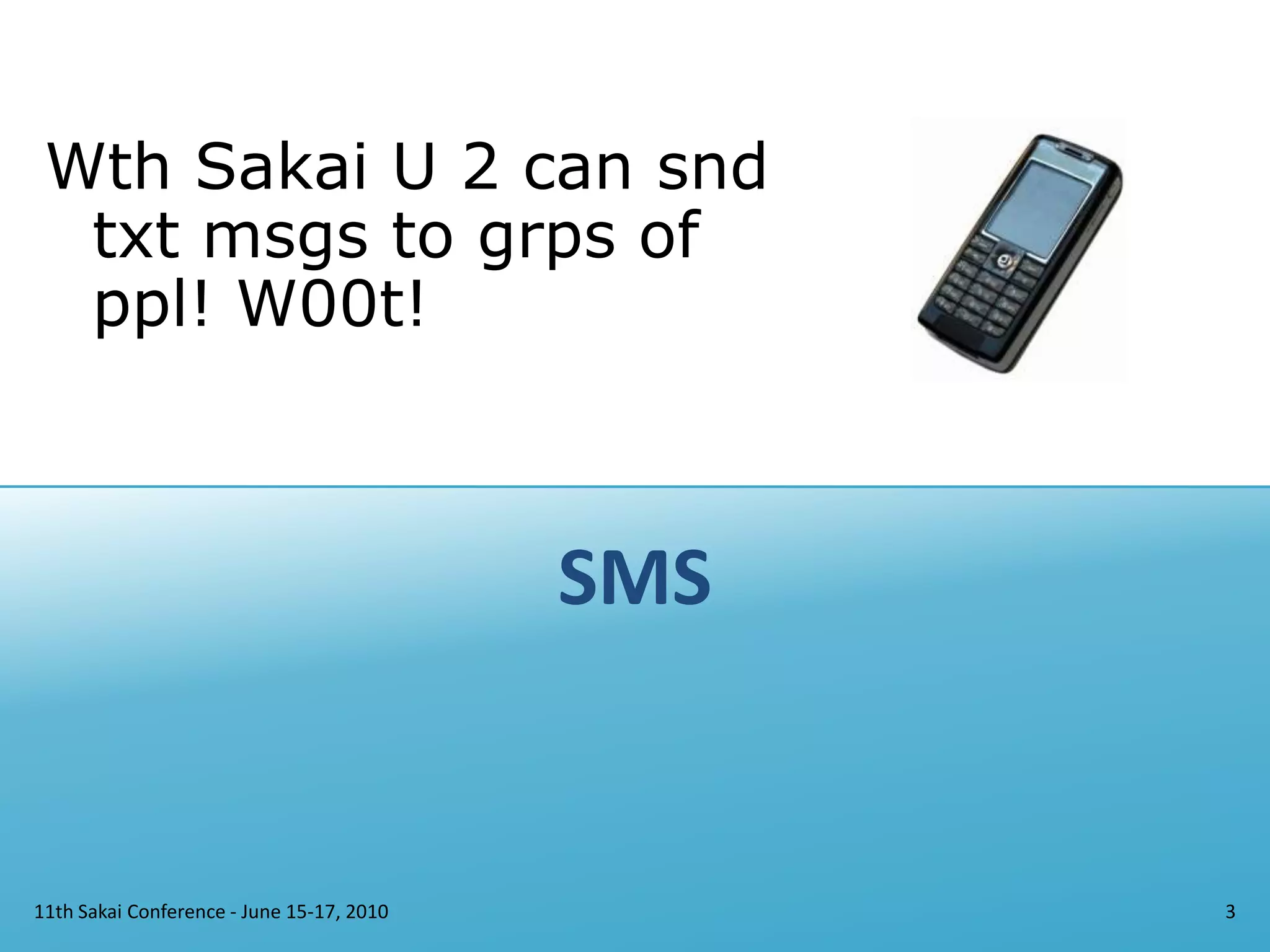
SMS11th Sakai Conference - June 15-17, 20103Wth Sakai U 2 can snd txt msgs to grps of ppl! W00t!
SMS Overview	What is it?	SMS provides mobile text messaging in Sakai, including a tool for sending messages, and a “switchboard” for handing incoming messages to tools or scripts.	Where do I find it?	http://confluence.sakaiproject.org/display/SMS/https://source.sakaiproject.org/contrib/sms/http://jira.sakaiproject.org/browse/SMS	More information?	Screenshots on Confluence. Ask questions on the sakai-dev list, or contact UCT.411th Sakai Conference - June 15-17, 2010
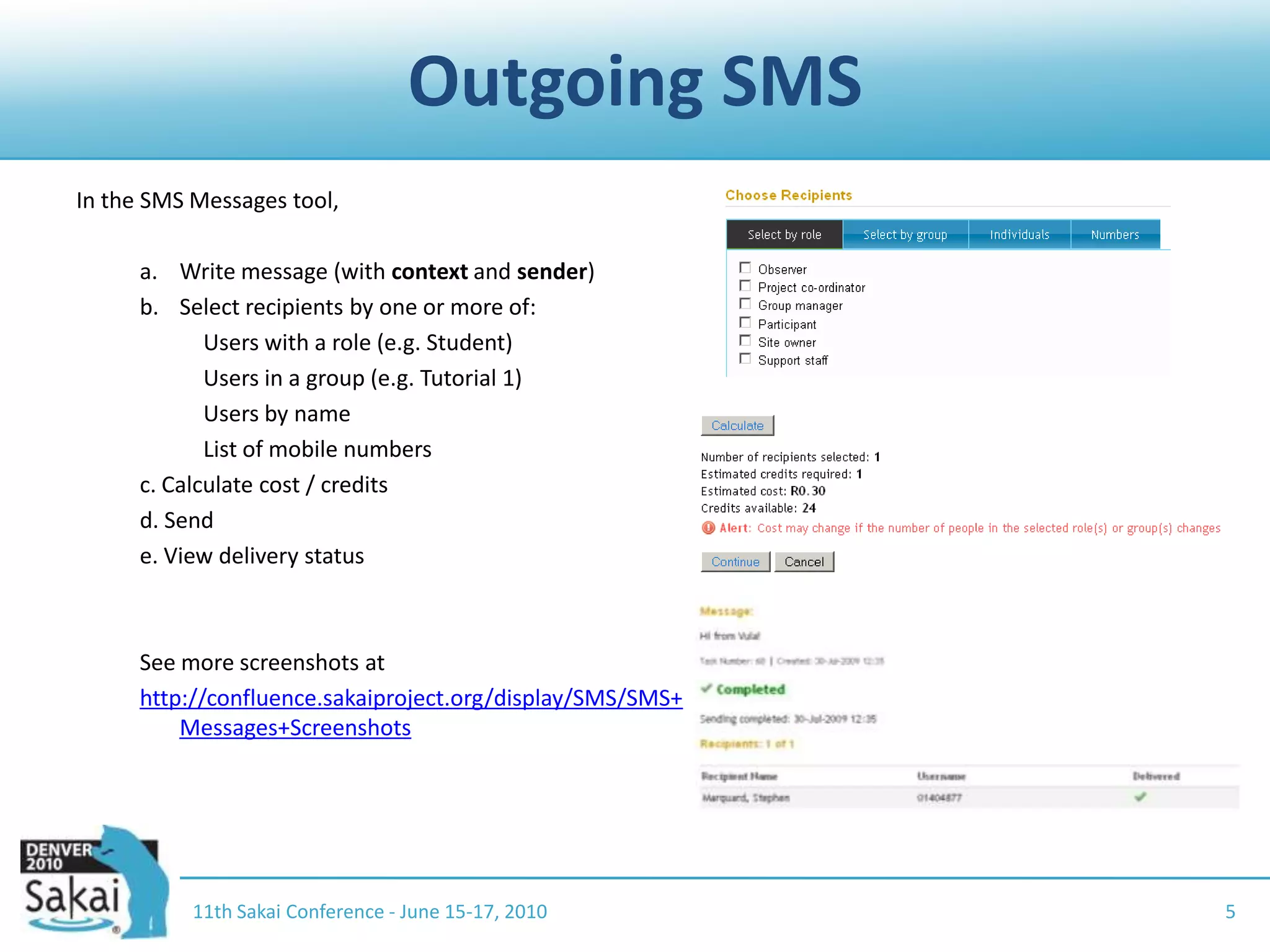
Outgoing SMS11th Sakai Conference - June 15-17, 20105In the SMS Messages tool,Write message (with context and sender)Select recipients by one or more of:		Users with a role (e.g. Student)		Users in a group (e.g. Tutorial 1)		Users by name		List of mobile numbersc. Calculate cost / creditsd. Sende. View delivery statusSee more screenshots at http://confluence.sakaiproject.org/display/SMS/SMS+Messages+Screenshots
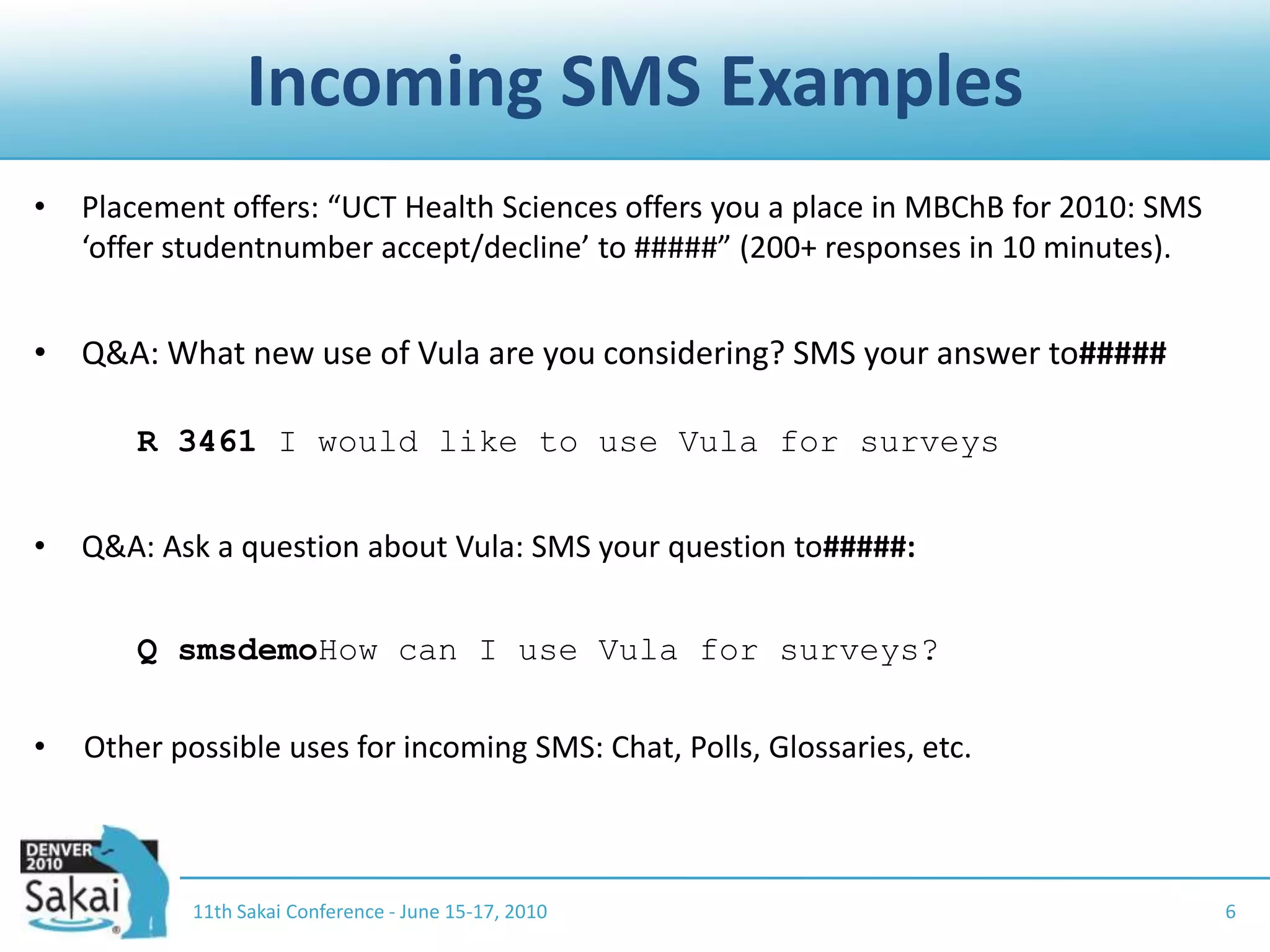
Incoming SMS Examples11th Sakai Conference - June 15-17, 20106Placement offers: “UCT Health Sciences offers you a place in MBChB for 2010: SMS ‘offer studentnumber accept/decline’ to #####” (200+ responses in 10 minutes).Q&A: What new use of Vula are you considering? SMS your answer to#####R 3461 I would like to use Vula for surveysQ&A: Ask a question about Vula: SMS your question to#####:	Q smsdemoHow can I use Vula for surveys?Other possible uses for incoming SMS: Chat, Polls, Glossaries, etc.
Incoming SMSAny tool/service can accept incoming articles by registering a command prefix with the SMS service.Either implement ShortMessageCommand or configure a REST endpoint for incoming messages.	Example code:https://source.sakaiproject.org/contrib/qna/trunk/impl/src/java/org/sakaiproject/qna/logic/impl/sms/QuestionSmsCommand.java	Example REST registration: see http://confluence.sakaiproject.org/display/SMS/Incoming+SMS11th Sakai Conference - June 15-17, 20107
Deployment considerations	Service provider	You need a service provider with an SMPP gateway (e.g. http://www.clickatell.com). What destination networks / countries are supported, and at what cost per message?	Mobile numbersPopulate user numbers in the user profile, or implement a provider (e.g. for LDAP lookup or some external source).	Privacy and defaults	Opt-in or opt-out, private or visible.	Cost and accounting model	Who incurs costs for sending messages? Prepaid or postpaid? Default implementation supports a prepaid model, with credit allocation per site.11th Sakai Conference - June 15-17, 20108
SMS: Privacy	Our approach at UCT (Vula = our Sakai):	Student, staff and third party cell numbers in Vula come from Peoplesoft, SAP HR, Third Party system	Default My Workspace / Profile settings:	Allow Vula users to send SMS messages to my cellphone: Yes	Hide my cellphone number from other Vula users: Yes	Users can opt out (0.5% so far)	People sending messages see only the username, not the user’s cell number	Use SMS wisely  Otherwise people will opt out which makes it less useful for everyone.
Q&A11th Sakai Conference - June 15-17, 201010
Q&A Overview	What is it?	A tool which supports question-driven interaction (optionally anonymous) with web, email and SMS workflows (comparisons: Yahoo Answers, StackOverflow, Purdue Hotseat).	Where do I find it?http://confluence.sakaiproject.org/display/QNA/Homehttps://source.sakaiproject.org/contrib/qna/	More information?	“A question is worth a thousand answers” (Paris Sakai conference presentation):http://confluence.sakaiproject.org/download/attachments/39616558/paris-sakai-qna.pdf	Ask questions on the sakai-dev list, or contact UCT.1111th Sakai Conference - June 15-17, 2010
Why questions?Many students ask the same questionStudents will ask a question online which they wouldn’t or couldn’t ask face-to-faceStudents may ask a question differently (or at all) if they can ask it anonymouslyStudents answer each other’s questionsThe student questions and answers provide a window into student thought processes, their difficulties, confusions, misconceptions and successes.Questions and answers provide academic support, peer support, and diagnostic insights.
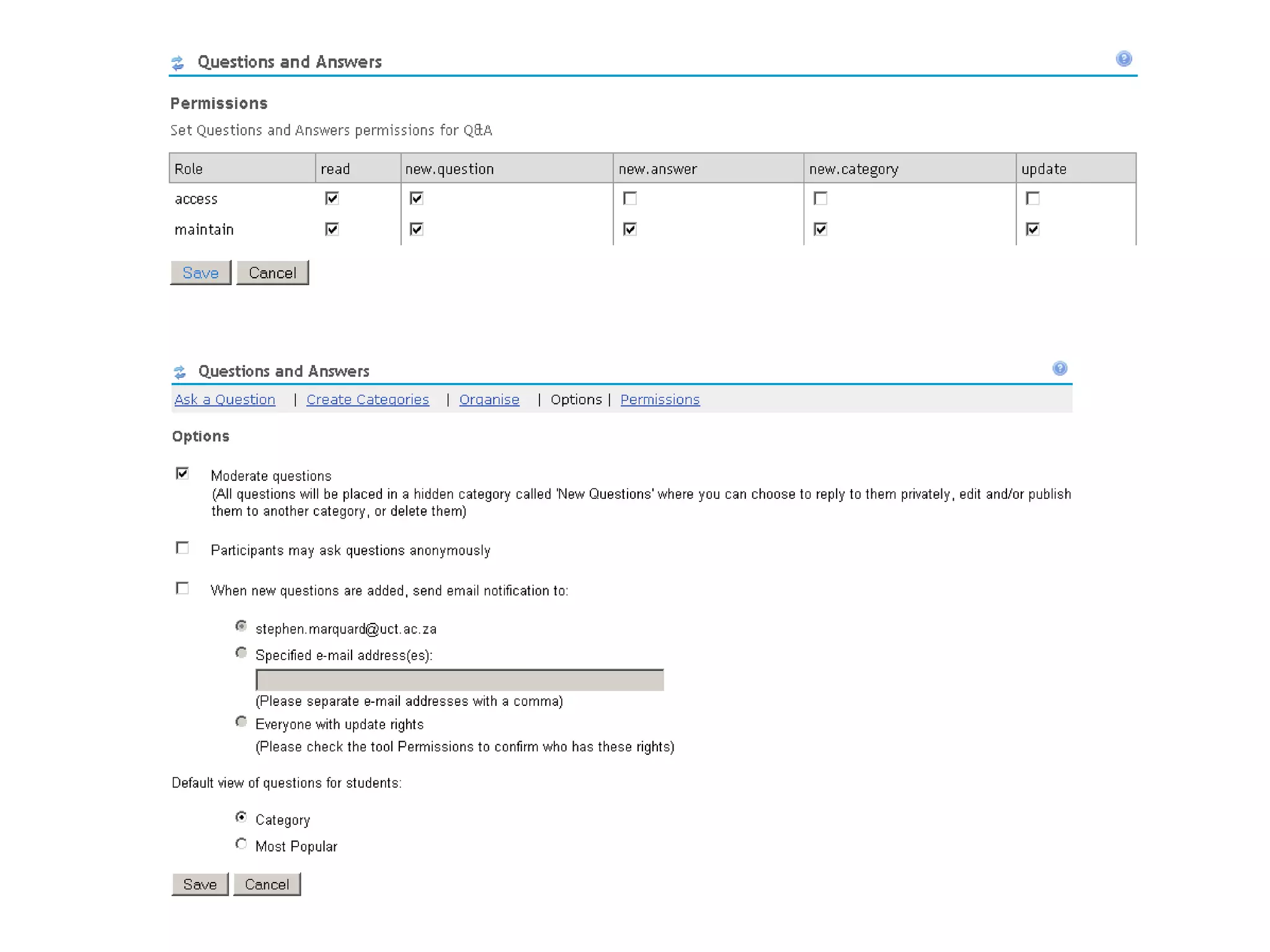
Supported workflowsInstructor-led: Student asks question > instructor responds privately (by email), and/or publicly (in the site)Collaborative: Student asks question > peers respond > (optional) instructor / TA provides or nominates a definitive answerQuestions may be moderated, i.e. only become visible in the site once reviewed by an instructor / TASite members may be allowed to ask questions anonymously
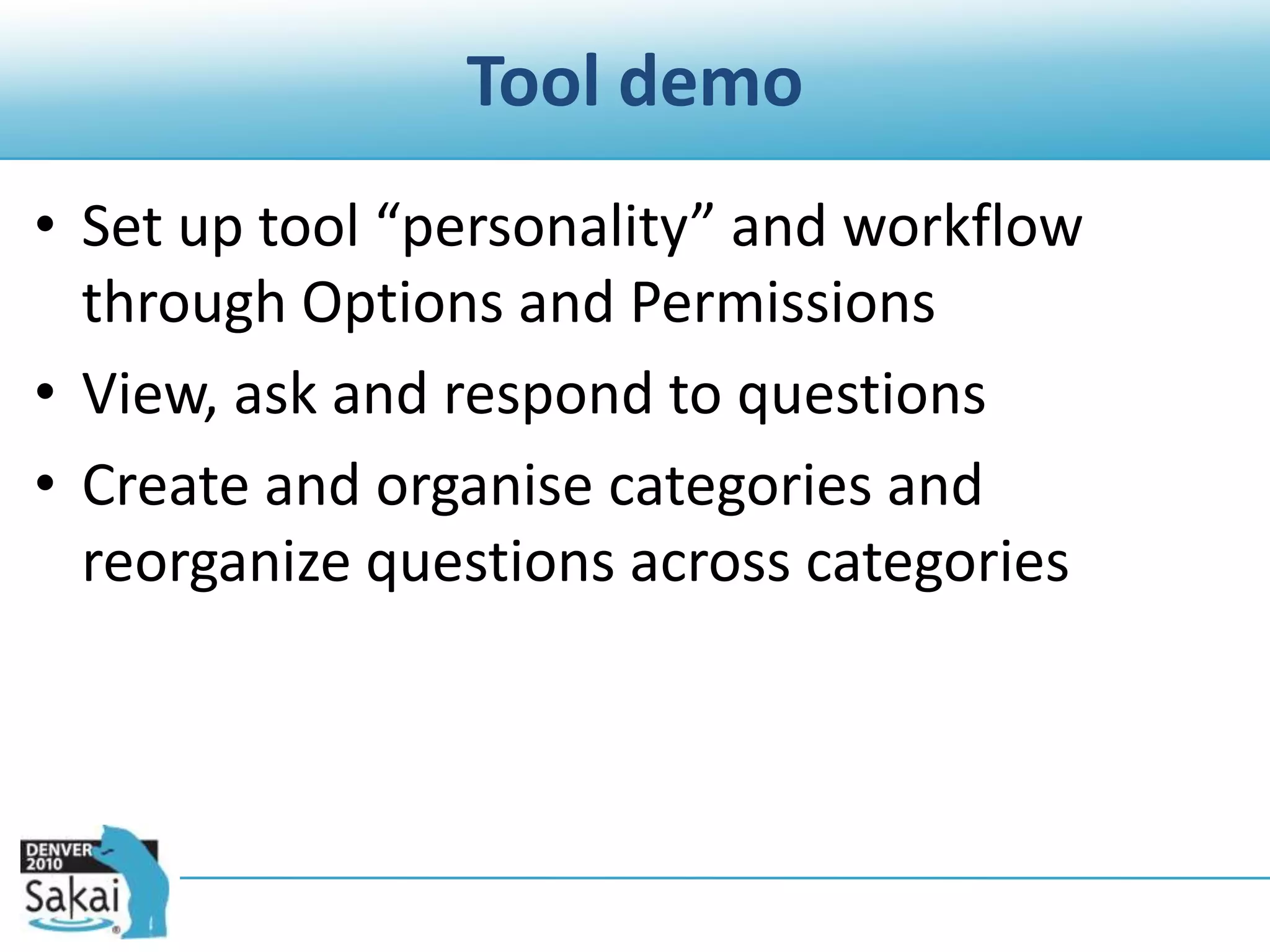
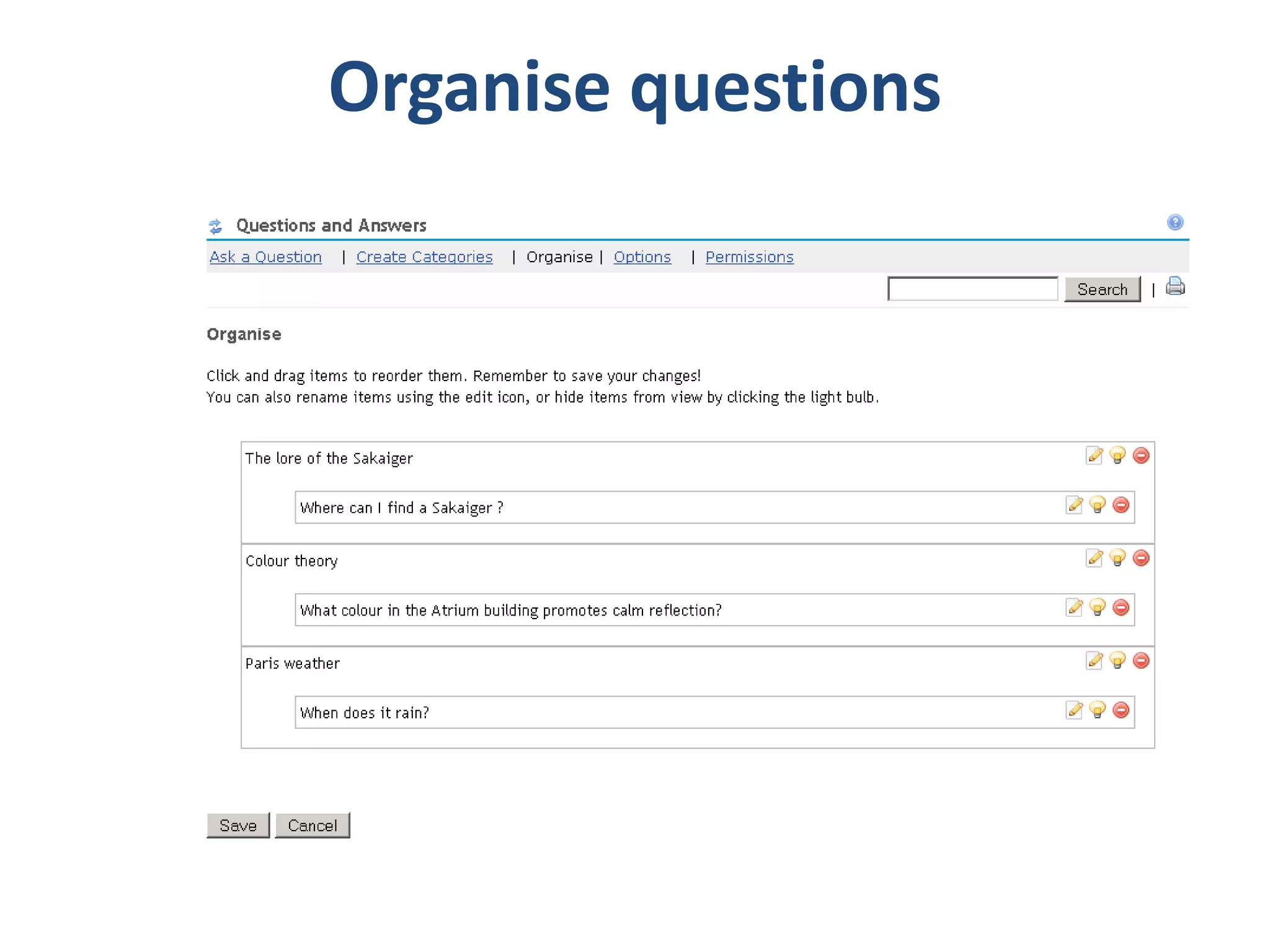
Tool demoSet up tool “personality” and workflow through Options and PermissionsView, ask and respond to questionsCreate and organise categories and reorganize questions across categories
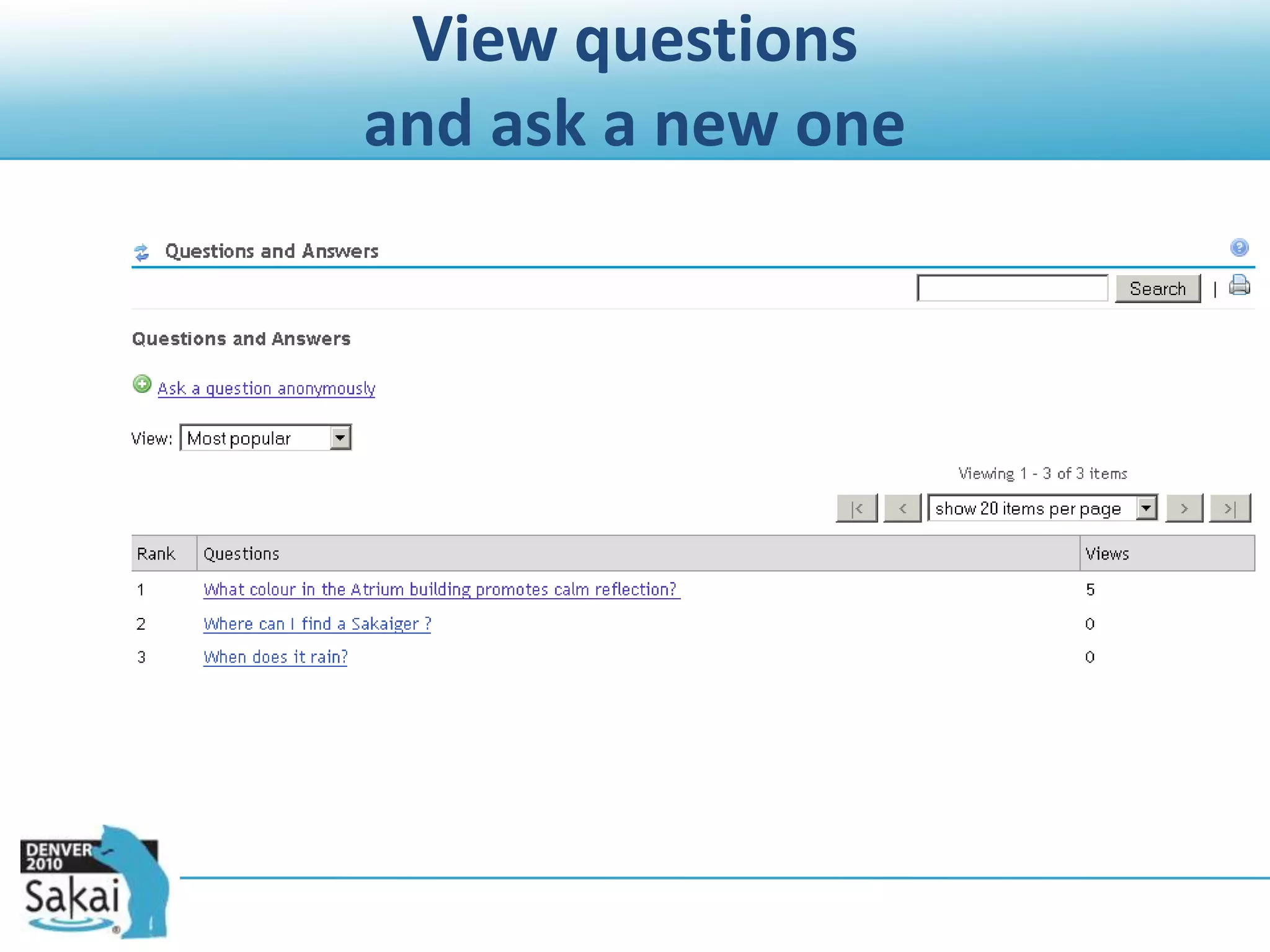
View questions and ask a new one
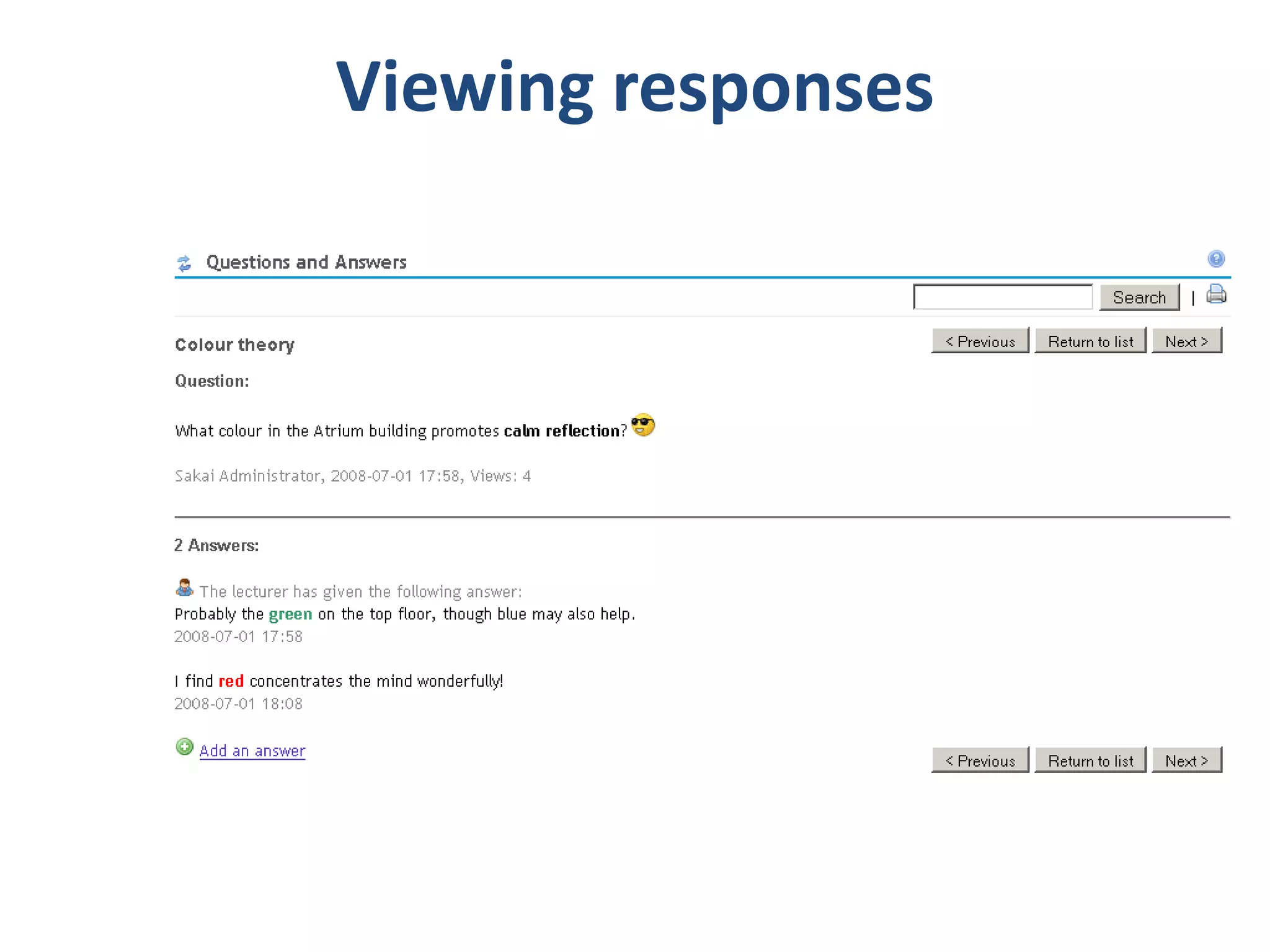
Viewing responses
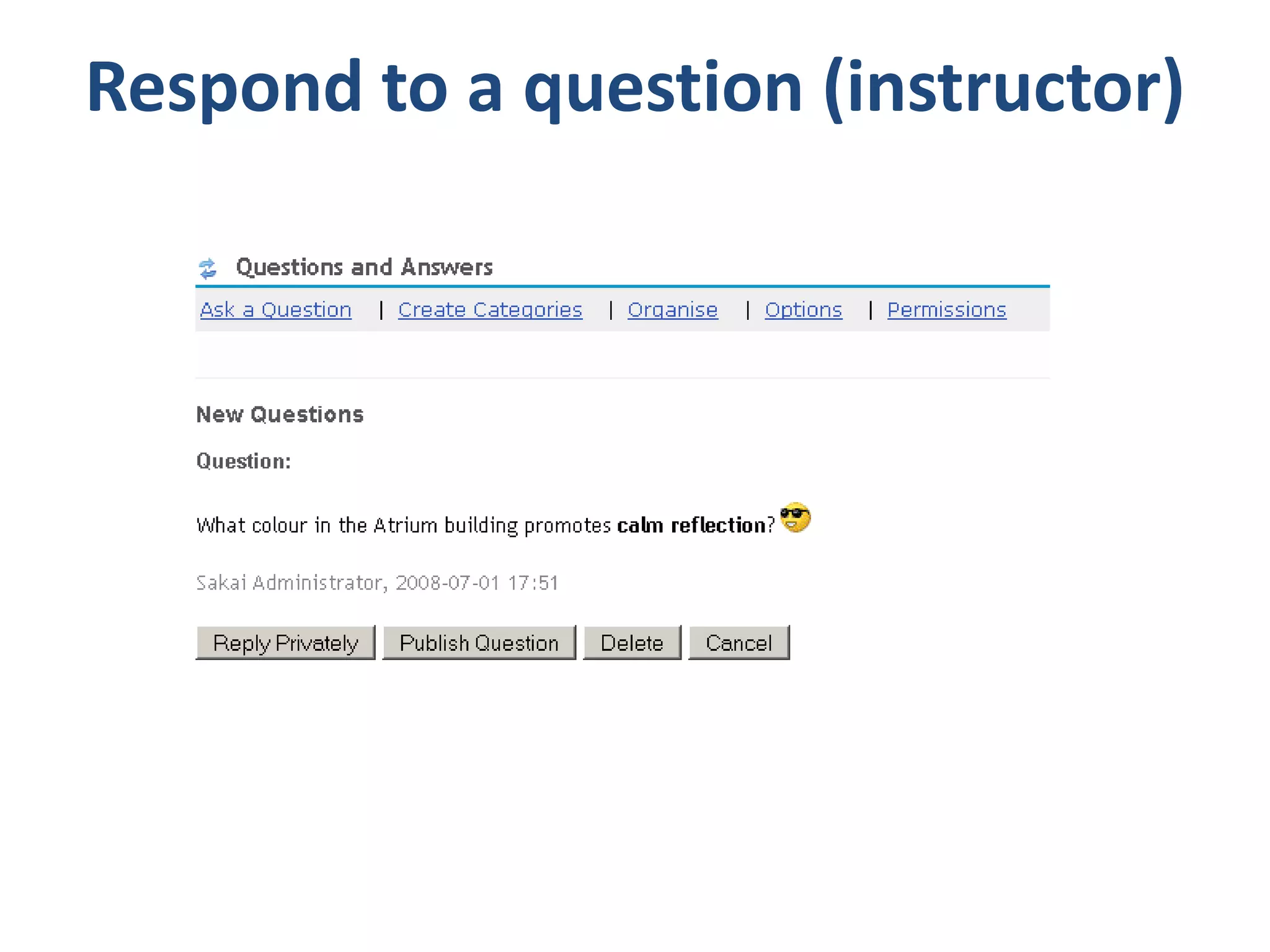
Respond to a question (instructor)
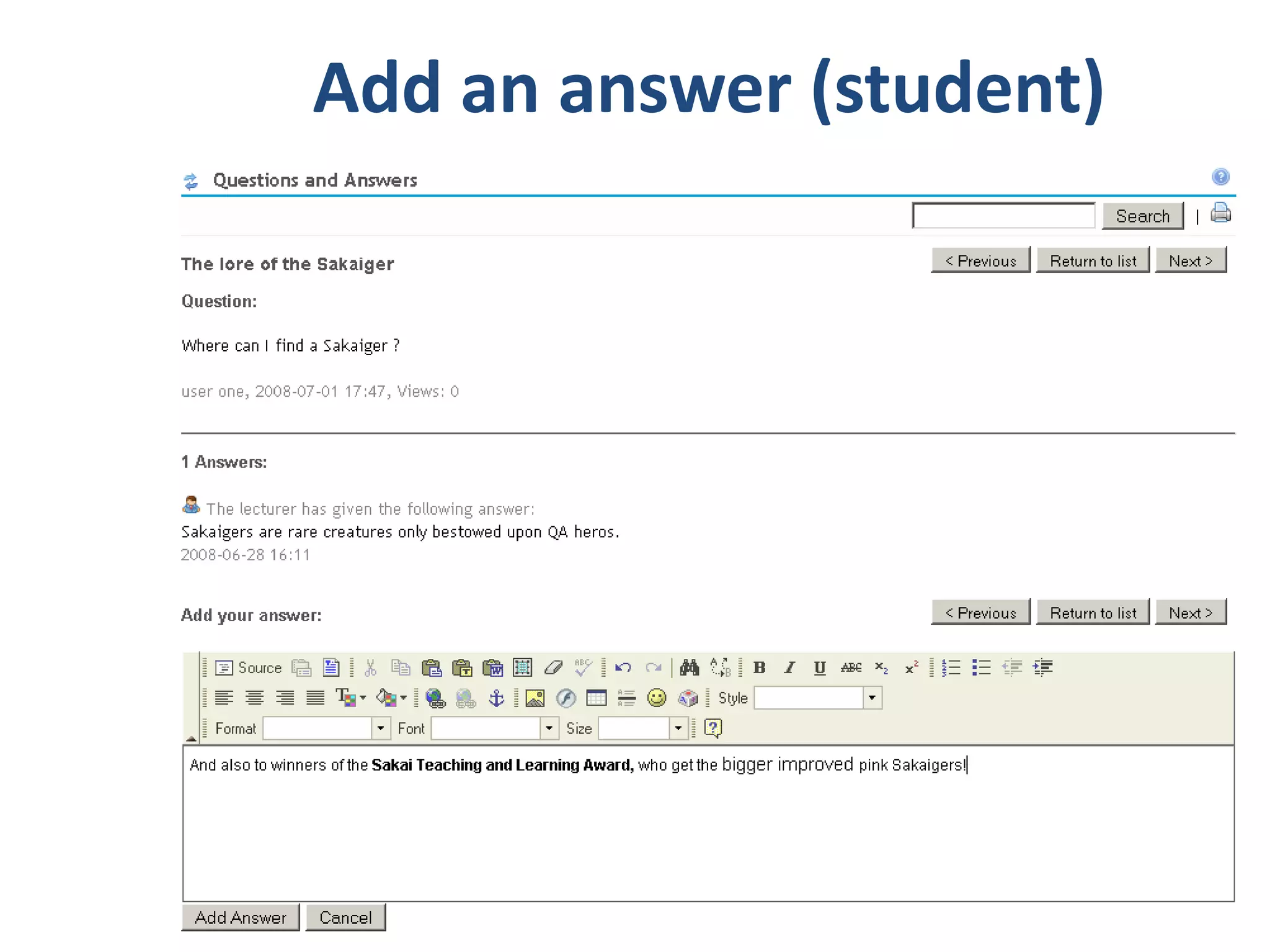
Add an answer (student)
Organise questions
SMS supportQ&A is minimally SMS-enabledSupports asking questions by SMS, receiving answers and/or retrieving answersNot really exposed in UI yet (except for Options)
Course Evaluation11th Sakai Conference - June 15-17, 201022
Course Evaluation Overview	What is it?	A tool for delivering course evaluations or surveys.	Where do I find it?http://confluence.sakaiproject.org/display/EVALSYS/Home	https://source.sakaiproject.org/contrib/evaluation/	More information?	Ask on the evaluation@collab.sakaiproject.org mailing list.	UCT screencast (instructor-managed evaluations) http://confluence.sakaiproject.org/display/EVALSYS/Course+Evaluations+video+tutorial2311th Sakai Conference - June 15-17, 2010
CaveatsHow you might implement this depends heavily on institutional processes and policy.Evaluation System is a complex tool which has support for different institutional models of delivering evaluations.The information in Confluence is not up-to-date.No 2 sites run the tool in exactly the same way.Ask on the evaluations list!11th Sakai Conference - June 15-17, 201024
Generic issues and concernsResponse rates may be lower (dependent on lecturer involvement and feedback)… but students give more written feedback online than in paper-based evaluationsMoving from paper to online does not lead to less favourable ratings (U. Michigan)The set of respondents is representative of the course cohort by race, gender, final course mark: lower response rates do not skew results (IPD, UCT)Online evaluation is popular with students and provides more opportunities for student feedbackDifferent opinions and strategies about incentivesWhat happens to the results?
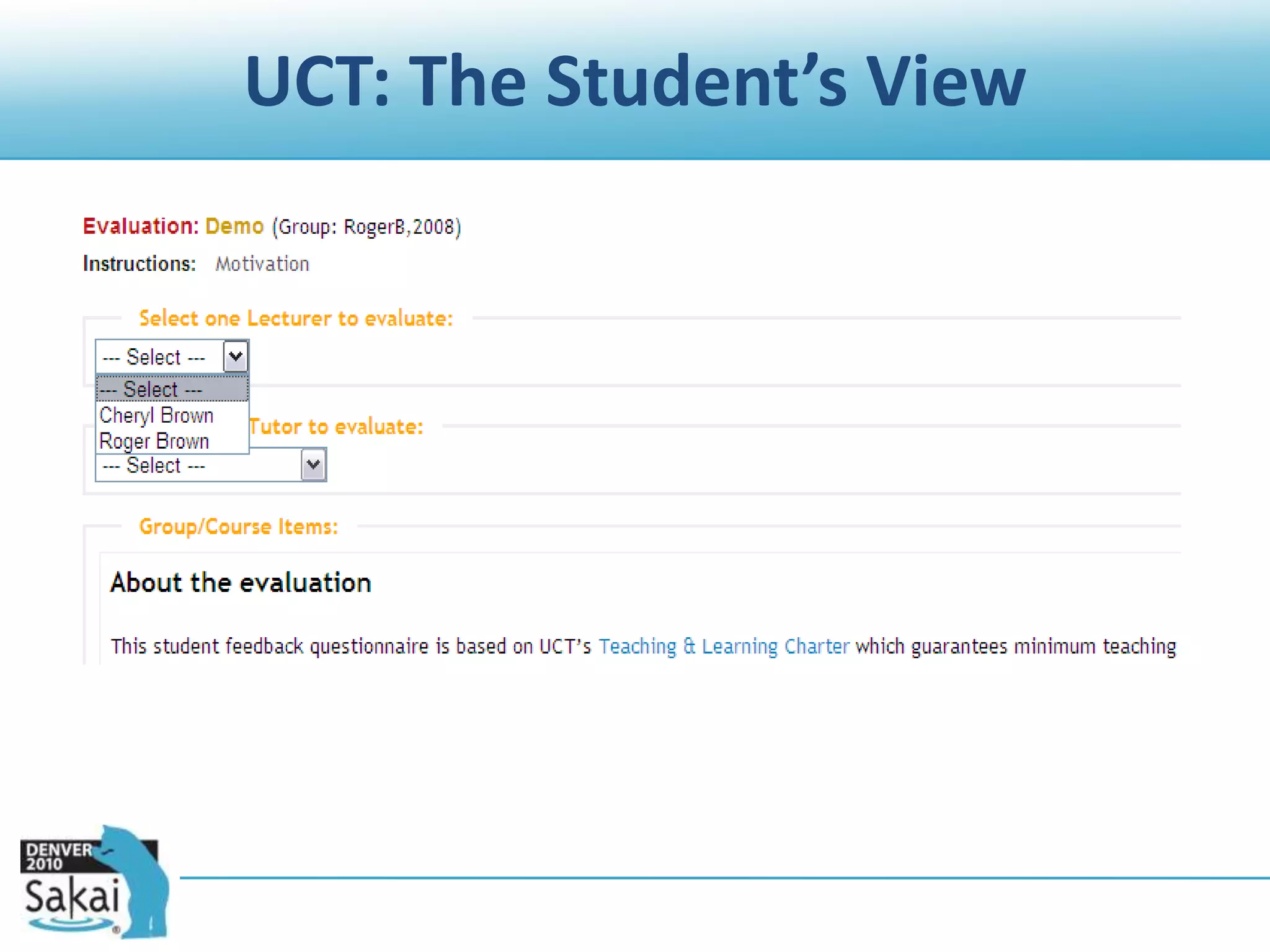
UCT self-service modelSite Owners or Support Staff can create and assign evaluations to one or more of their Vula sites. The evaluation owner decides:Who is evaluated (lecturers and tutors)
The questions
Start and end dates
How to encourage students to respond
What to do with the results(subject to Department or Faculty processes or guidelines)
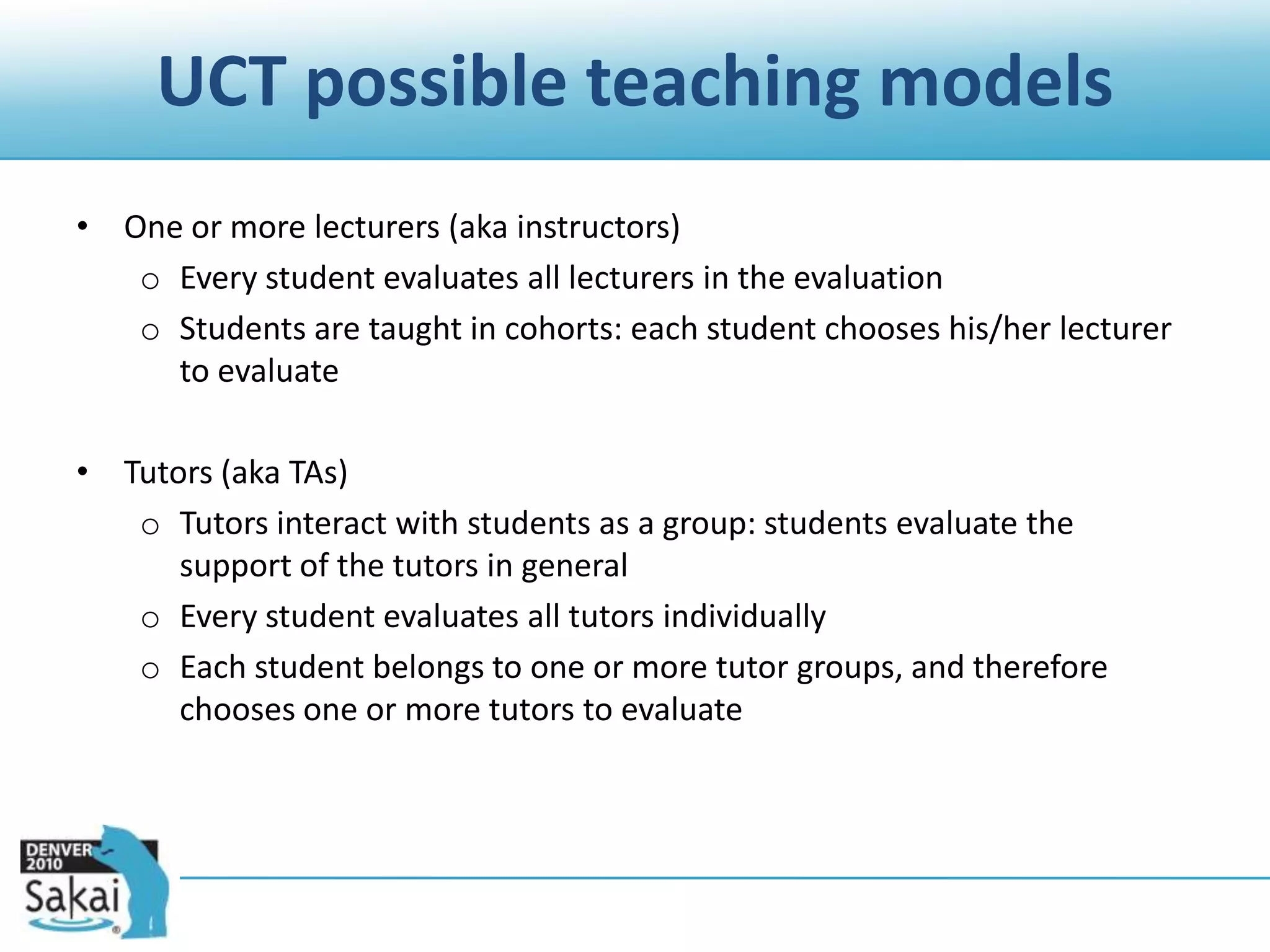
UCT possible teaching modelsOne or more lecturers (aka instructors)Every student evaluates all lecturers in the evaluation
Students are taught in cohorts: each student chooses his/her lecturer to evaluateTutors (aka TAs)Tutors interact with students as a group: students evaluate the support of the tutors in general
Every student evaluates all tutors individually
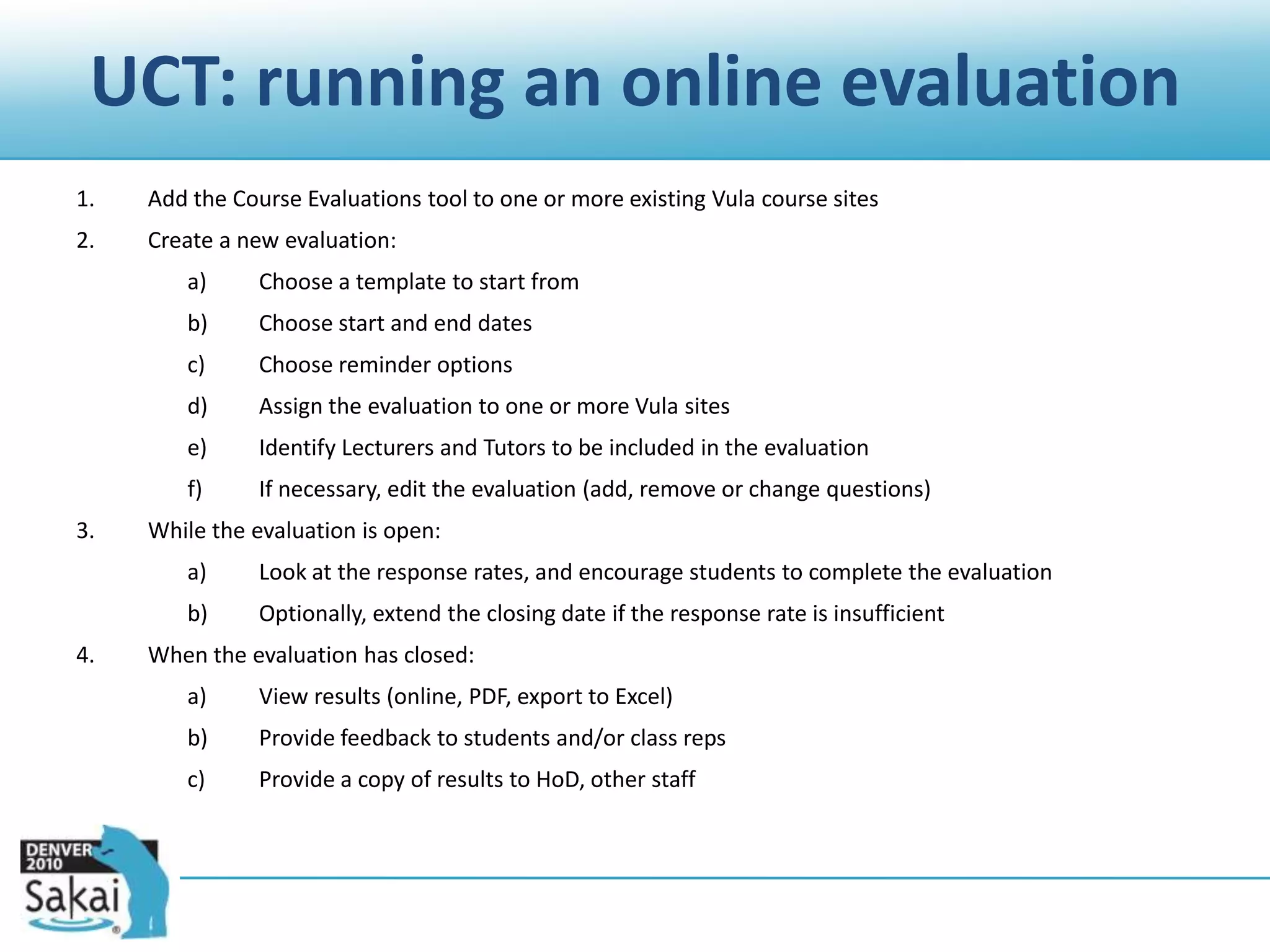
Each student belongs to one or more tutor groups, and therefore chooses one or more tutors to evaluateUCT: running an online evaluationAdd the Course Evaluations tool to one or more existing Vula course sites Create a new evaluation:Choose a template to start fromChoose start and end datesChoose reminder optionsAssign the evaluation to one or more Vula sitesIdentify Lecturers and Tutors to be included in the evaluationIf necessary, edit the evaluation (add, remove or change questions)While the evaluation is open:Look at the response rates, and encourage students to complete the evaluationOptionally, extend the closing date if the response rate is insufficientWhen the evaluation has closed:View results (online, PDF, export to Excel)Provide feedback to students and/or class repsProvide a copy of results to HoD, other staff
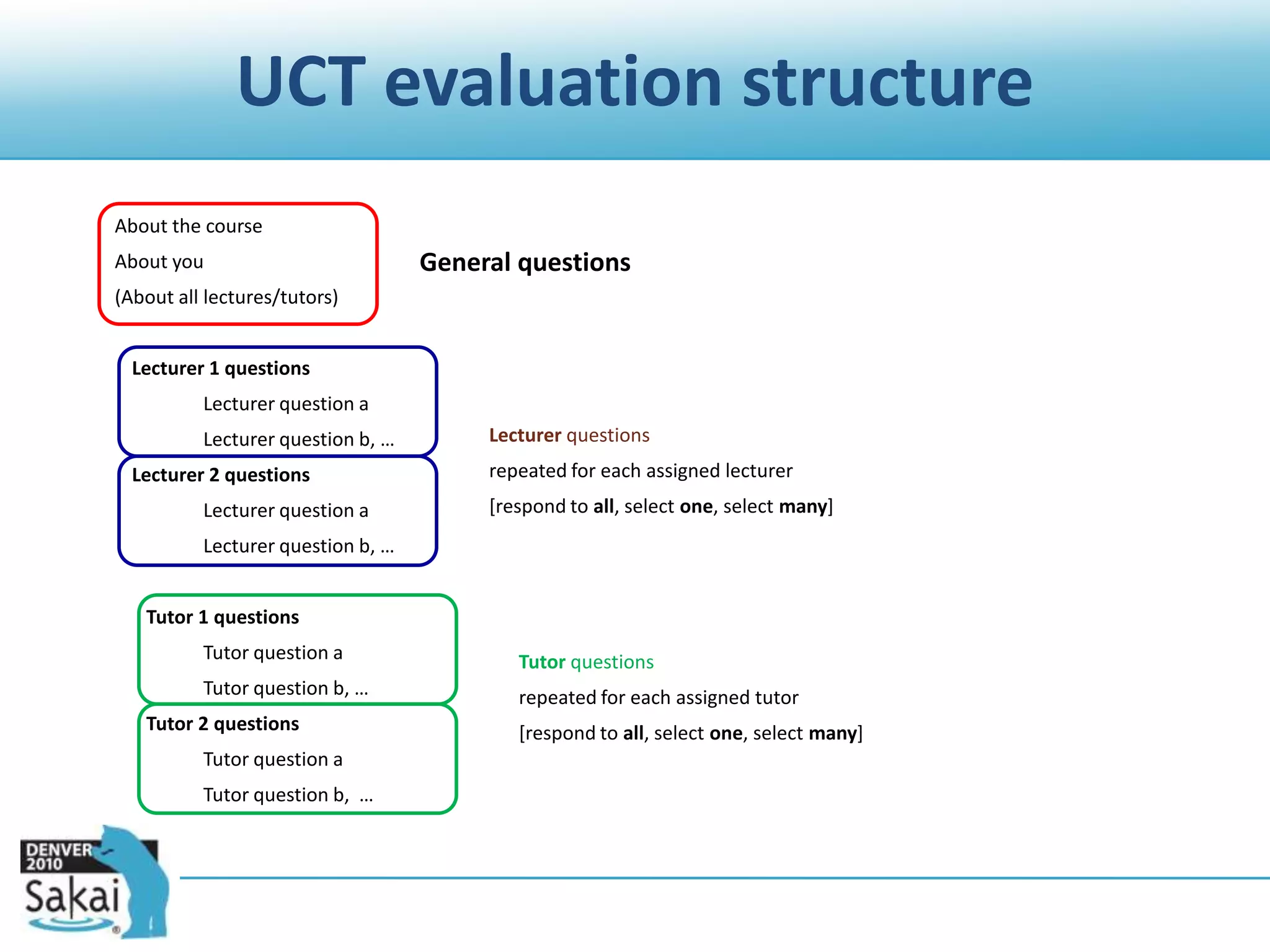
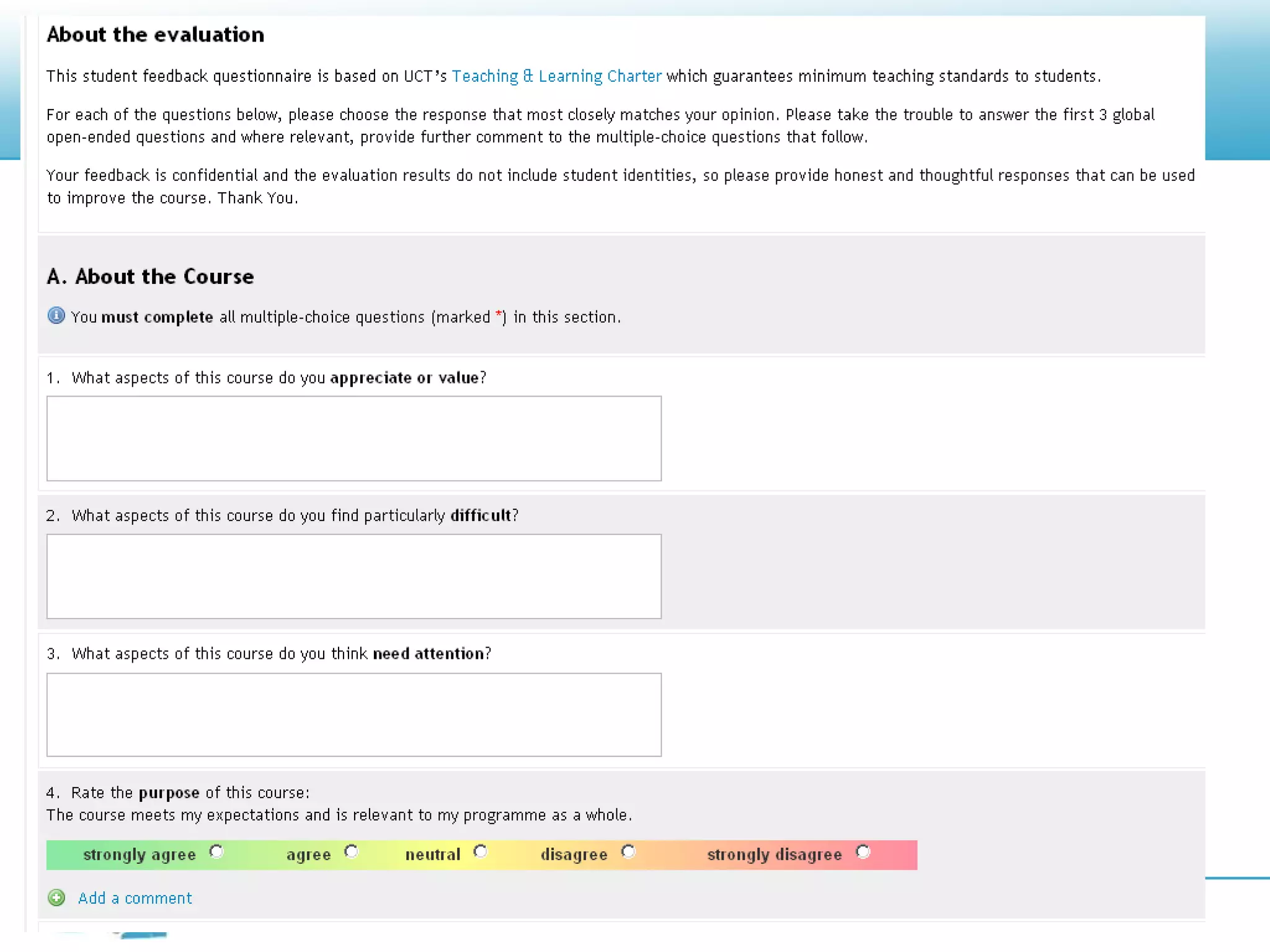
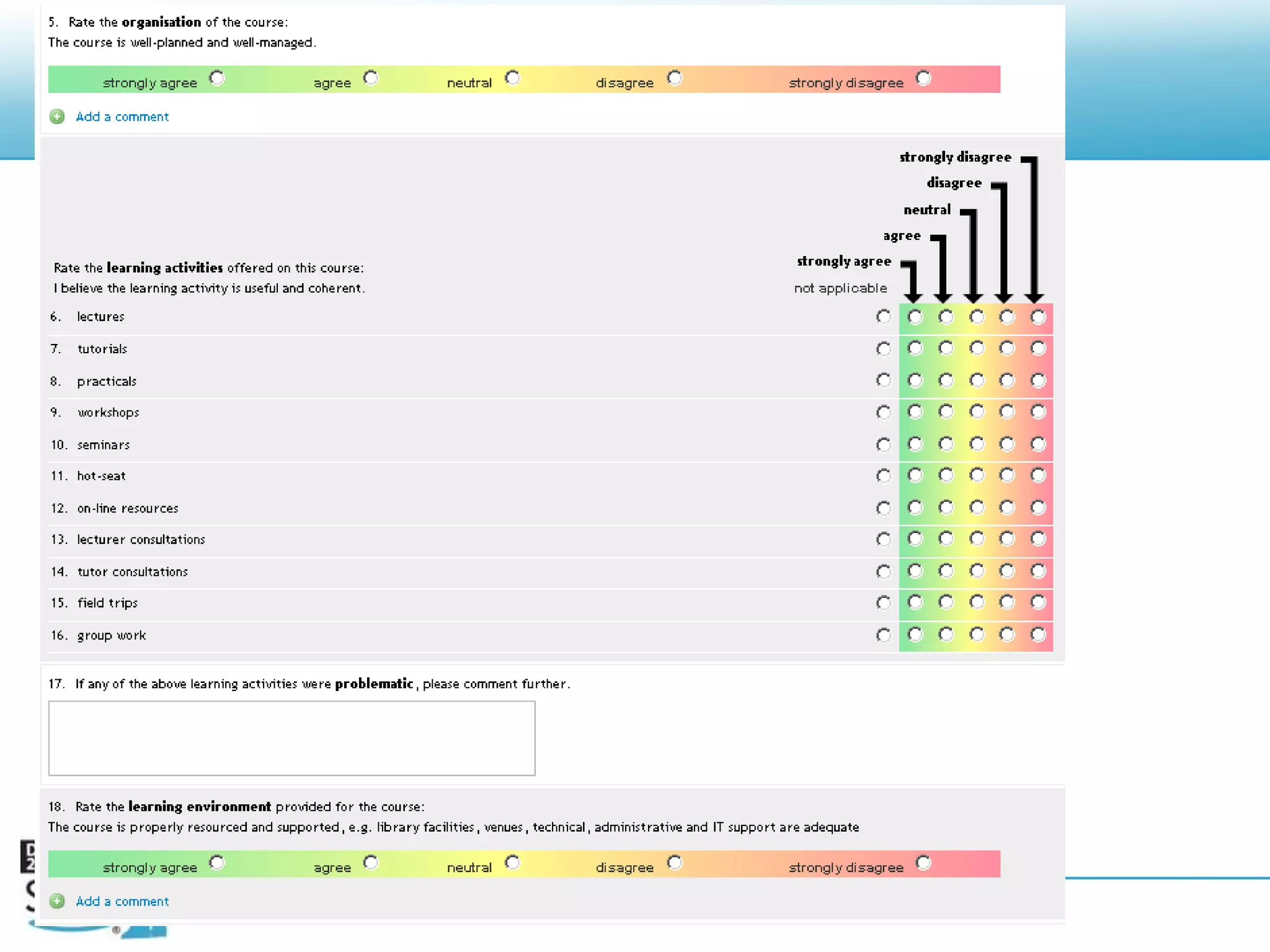
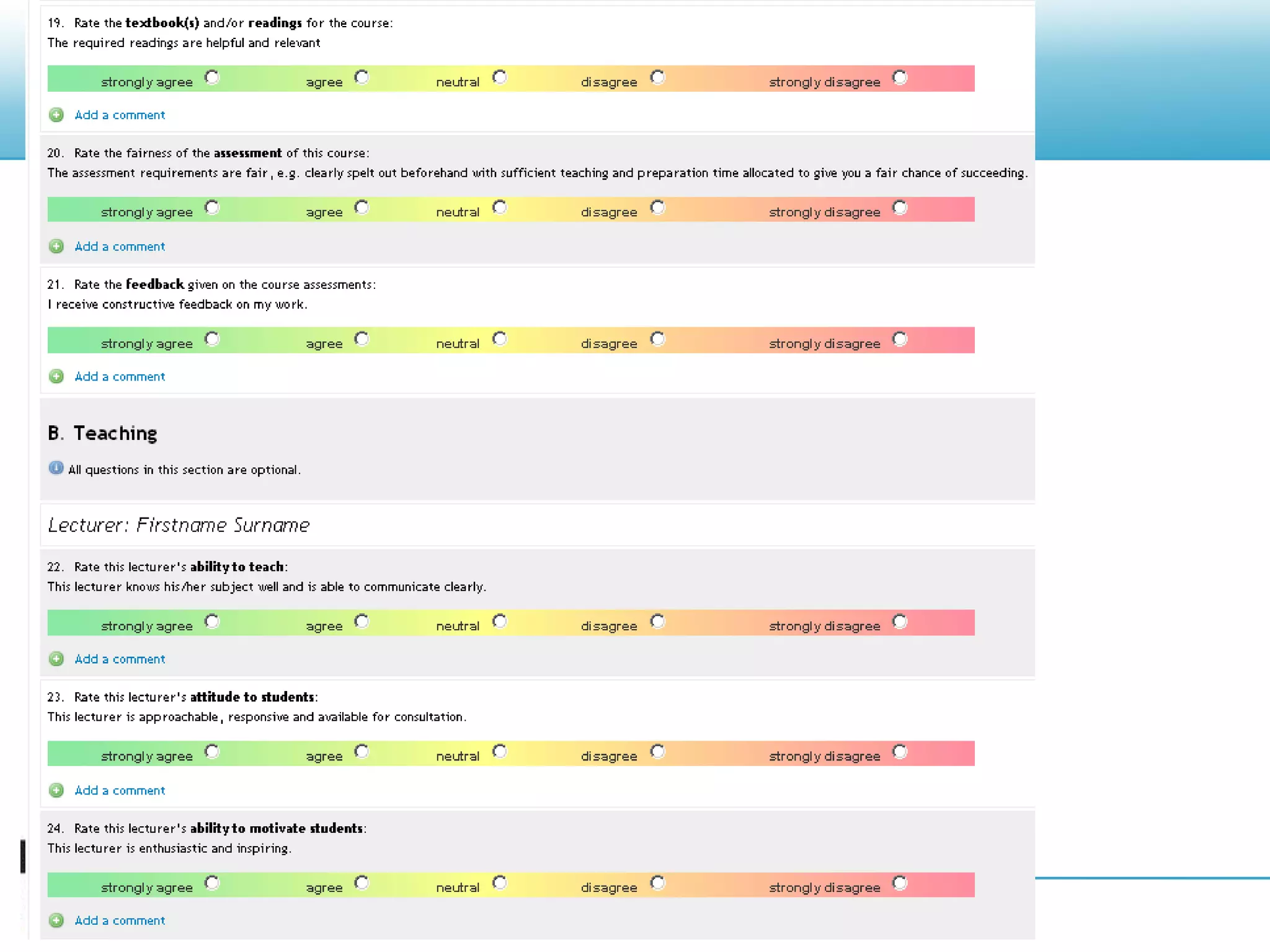
UCT evaluation structure        About the course        About you        (About all lectures/tutors)Lecturer 1 questions	Lecturer question a	Lecturer question b, …Lecturer 2 questions	Lecturer question a	Lecturer question b, …   Tutor 1 questions	Tutor question a	Tutor question b, …   Tutor 2 questions	Tutor question a	Tutor question b,  …General questionsLecturer questionsrepeated for each assigned lecturer[respond to all, select one, select many]Tutor questionsrepeated for each assigned tutor[respond to all, select one, select many]

SMS, Q&A, Course Evaluation tools in Sakai

  • 1.
  • 2.
    3 Sakai contribtools SMSMobile messaging from SakaiQ&AQuestions and Answers Course EvaluationsOnline course evaluations and surveys211th Sakai Conference - June 15-17, 2010
  • 3.
    SMS11th Sakai Conference- June 15-17, 20103Wth Sakai U 2 can snd txt msgs to grps of ppl! W00t!
  • 4.
    SMS Overview What isit? SMS provides mobile text messaging in Sakai, including a tool for sending messages, and a “switchboard” for handing incoming messages to tools or scripts. Where do I find it? http://confluence.sakaiproject.org/display/SMS/https://source.sakaiproject.org/contrib/sms/http://jira.sakaiproject.org/browse/SMS More information? Screenshots on Confluence. Ask questions on the sakai-dev list, or contact UCT.411th Sakai Conference - June 15-17, 2010
  • 5.
    Outgoing SMS11th SakaiConference - June 15-17, 20105In the SMS Messages tool,Write message (with context and sender)Select recipients by one or more of: Users with a role (e.g. Student) Users in a group (e.g. Tutorial 1) Users by name List of mobile numbersc. Calculate cost / creditsd. Sende. View delivery statusSee more screenshots at http://confluence.sakaiproject.org/display/SMS/SMS+Messages+Screenshots
  • 6.
    Incoming SMS Examples11thSakai Conference - June 15-17, 20106Placement offers: “UCT Health Sciences offers you a place in MBChB for 2010: SMS ‘offer studentnumber accept/decline’ to #####” (200+ responses in 10 minutes).Q&A: What new use of Vula are you considering? SMS your answer to#####R 3461 I would like to use Vula for surveysQ&A: Ask a question about Vula: SMS your question to#####: Q smsdemoHow can I use Vula for surveys?Other possible uses for incoming SMS: Chat, Polls, Glossaries, etc.
  • 7.
    Incoming SMSAny tool/servicecan accept incoming articles by registering a command prefix with the SMS service.Either implement ShortMessageCommand or configure a REST endpoint for incoming messages. Example code:https://source.sakaiproject.org/contrib/qna/trunk/impl/src/java/org/sakaiproject/qna/logic/impl/sms/QuestionSmsCommand.java Example REST registration: see http://confluence.sakaiproject.org/display/SMS/Incoming+SMS11th Sakai Conference - June 15-17, 20107
  • 8.
    Deployment considerations Service provider Youneed a service provider with an SMPP gateway (e.g. http://www.clickatell.com). What destination networks / countries are supported, and at what cost per message? Mobile numbersPopulate user numbers in the user profile, or implement a provider (e.g. for LDAP lookup or some external source). Privacy and defaults Opt-in or opt-out, private or visible. Cost and accounting model Who incurs costs for sending messages? Prepaid or postpaid? Default implementation supports a prepaid model, with credit allocation per site.11th Sakai Conference - June 15-17, 20108
  • 9.
    SMS: Privacy Our approachat UCT (Vula = our Sakai): Student, staff and third party cell numbers in Vula come from Peoplesoft, SAP HR, Third Party system Default My Workspace / Profile settings: Allow Vula users to send SMS messages to my cellphone: Yes Hide my cellphone number from other Vula users: Yes Users can opt out (0.5% so far) People sending messages see only the username, not the user’s cell number Use SMS wisely Otherwise people will opt out which makes it less useful for everyone.
  • 10.
    Q&A11th Sakai Conference- June 15-17, 201010
  • 11.
    Q&A Overview What isit? A tool which supports question-driven interaction (optionally anonymous) with web, email and SMS workflows (comparisons: Yahoo Answers, StackOverflow, Purdue Hotseat). Where do I find it?http://confluence.sakaiproject.org/display/QNA/Homehttps://source.sakaiproject.org/contrib/qna/ More information? “A question is worth a thousand answers” (Paris Sakai conference presentation):http://confluence.sakaiproject.org/download/attachments/39616558/paris-sakai-qna.pdf Ask questions on the sakai-dev list, or contact UCT.1111th Sakai Conference - June 15-17, 2010
  • 12.
    Why questions?Many studentsask the same questionStudents will ask a question online which they wouldn’t or couldn’t ask face-to-faceStudents may ask a question differently (or at all) if they can ask it anonymouslyStudents answer each other’s questionsThe student questions and answers provide a window into student thought processes, their difficulties, confusions, misconceptions and successes.Questions and answers provide academic support, peer support, and diagnostic insights.
  • 13.
    Supported workflowsInstructor-led: Studentasks question > instructor responds privately (by email), and/or publicly (in the site)Collaborative: Student asks question > peers respond > (optional) instructor / TA provides or nominates a definitive answerQuestions may be moderated, i.e. only become visible in the site once reviewed by an instructor / TASite members may be allowed to ask questions anonymously
  • 14.
    Tool demoSet uptool “personality” and workflow through Options and PermissionsView, ask and respond to questionsCreate and organise categories and reorganize questions across categories
  • 16.
    View questions andask a new one
  • 17.
  • 18.
    Respond to aquestion (instructor)
  • 19.
    Add an answer(student)
  • 20.
  • 21.
    SMS supportQ&A isminimally SMS-enabledSupports asking questions by SMS, receiving answers and/or retrieving answersNot really exposed in UI yet (except for Options)
  • 22.
    Course Evaluation11th SakaiConference - June 15-17, 201022
  • 23.
    Course Evaluation Overview Whatis it? A tool for delivering course evaluations or surveys. Where do I find it?http://confluence.sakaiproject.org/display/EVALSYS/Home https://source.sakaiproject.org/contrib/evaluation/ More information? Ask on the evaluation@collab.sakaiproject.org mailing list. UCT screencast (instructor-managed evaluations) http://confluence.sakaiproject.org/display/EVALSYS/Course+Evaluations+video+tutorial2311th Sakai Conference - June 15-17, 2010
  • 24.
    CaveatsHow you mightimplement this depends heavily on institutional processes and policy.Evaluation System is a complex tool which has support for different institutional models of delivering evaluations.The information in Confluence is not up-to-date.No 2 sites run the tool in exactly the same way.Ask on the evaluations list!11th Sakai Conference - June 15-17, 201024
  • 25.
    Generic issues andconcernsResponse rates may be lower (dependent on lecturer involvement and feedback)… but students give more written feedback online than in paper-based evaluationsMoving from paper to online does not lead to less favourable ratings (U. Michigan)The set of respondents is representative of the course cohort by race, gender, final course mark: lower response rates do not skew results (IPD, UCT)Online evaluation is popular with students and provides more opportunities for student feedbackDifferent opinions and strategies about incentivesWhat happens to the results?
  • 26.
    UCT self-service modelSiteOwners or Support Staff can create and assign evaluations to one or more of their Vula sites. The evaluation owner decides:Who is evaluated (lecturers and tutors)
  • 27.
  • 28.
  • 29.
    How to encouragestudents to respond
  • 30.
    What to dowith the results(subject to Department or Faculty processes or guidelines)
  • 31.
    UCT possible teachingmodelsOne or more lecturers (aka instructors)Every student evaluates all lecturers in the evaluation
  • 32.
    Students are taughtin cohorts: each student chooses his/her lecturer to evaluateTutors (aka TAs)Tutors interact with students as a group: students evaluate the support of the tutors in general
  • 33.
    Every student evaluatesall tutors individually
  • 34.
    Each student belongsto one or more tutor groups, and therefore chooses one or more tutors to evaluateUCT: running an online evaluationAdd the Course Evaluations tool to one or more existing Vula course sites Create a new evaluation:Choose a template to start fromChoose start and end datesChoose reminder optionsAssign the evaluation to one or more Vula sitesIdentify Lecturers and Tutors to be included in the evaluationIf necessary, edit the evaluation (add, remove or change questions)While the evaluation is open:Look at the response rates, and encourage students to complete the evaluationOptionally, extend the closing date if the response rate is insufficientWhen the evaluation has closed:View results (online, PDF, export to Excel)Provide feedback to students and/or class repsProvide a copy of results to HoD, other staff
  • 35.
    UCT evaluation structure About the course About you (About all lectures/tutors)Lecturer 1 questions Lecturer question a Lecturer question b, …Lecturer 2 questions Lecturer question a Lecturer question b, … Tutor 1 questions Tutor question a Tutor question b, … Tutor 2 questions Tutor question a Tutor question b, …General questionsLecturer questionsrepeated for each assigned lecturer[respond to all, select one, select many]Tutor questionsrepeated for each assigned tutor[respond to all, select one, select many]
  • 36.
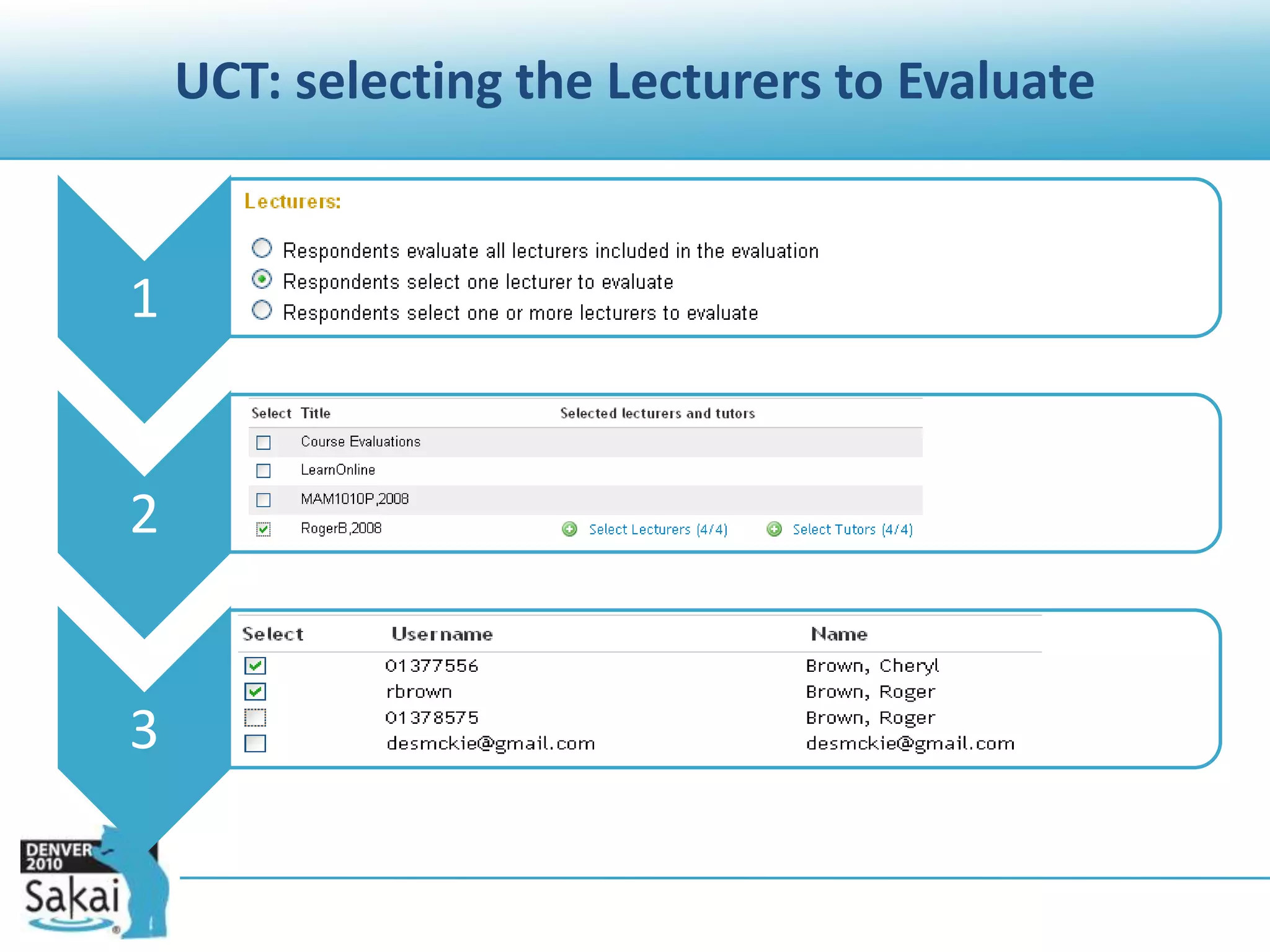
    UCT: selecting theLecturers to Evaluate
  • 37.