Using Dashboards to
Engage Your Board
& Staff
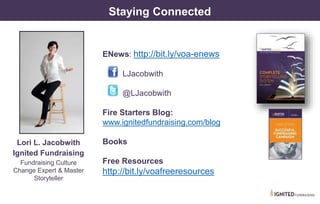
Lori L. Jacobwith, President/Founder Ignited Fundraising
About Lori
Lori L. Jacobwith
Ignited Fundraising
www.IgnitedFundraising.com
• 25 + years as Master storyteller, fundraising
culture change expert, trainer & coach.
• Recognized as one of the top 30 most Effective
Fundraising Consultants in the US.
by The Giving Show on the Wall Street Network
• Since 2001 has helped nonprofit organizations
raise nearly $300 million from individual
donors. And counting.
LJacobwith
@LJacobwith
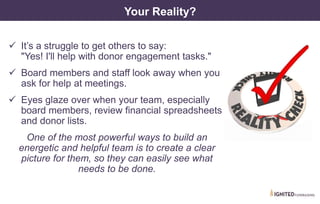
Your Reality?
It’s a struggle to get others to say:
"Yes! I'll help with donor engagement tasks."
Board members and staff look away when you
ask for help at meetings.
Eyes glaze over when your team, especially
board members, review financial spreadsheets
and donor lists.
One of the most powerful ways to build an
energetic and helpful team is to create a clear
picture for them, so they can easily see what
needs to be done.
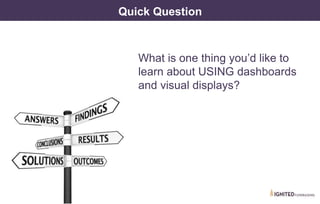
Quick Question
What is one thing you’d like to
learn about USING dashboards
and visual displays?
What We Will Cover Today
1. What are visual displays &dashboards
& what should they do?
2. Common mistakes designing graphs
& dashboards
3. Categories of nonprofit dashboards
4. Using dashboards to cause action
5. Sample financial dashboards
6. What will YOU include in your dashboards?
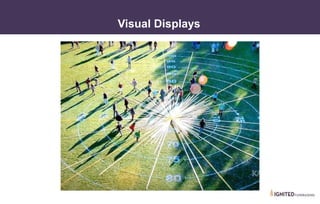
Visual Displays
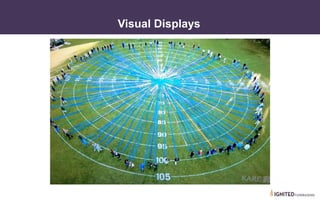
Visual Displays
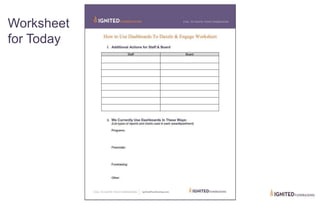
Worksheet
for Today
What Actions Do You Want Board & Staff to Take?
Make a list…
On your worksheet
Actions for Board & Staff?
Make your list…
On your worksheet
How do you CURRENTLY use Dashboards?
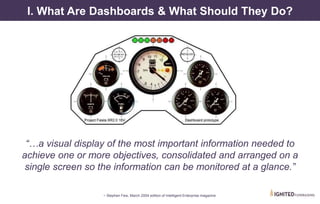
I. What Are Dashboards & What Should They Do?
“…a visual display of the most important information needed to
achieve one or more objectives, consolidated and arranged on a
single screen so the information can be monitored at a glance.”
~ Stephen Few, March 2004 edition of Intelligent Enterprise magazine
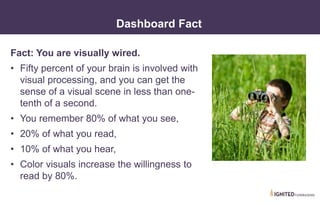
Fact: You are visually wired.
• Fifty percent of your brain is involved with
visual processing, and you can get the
sense of a visual scene in less than one-
tenth of a second.
• You remember 80% of what you see,
• 20% of what you read,
• 10% of what you hear,
• Color visuals increase the willingness to
read by 80%.
Dashboard Fact
• I. What Are Dashboards?
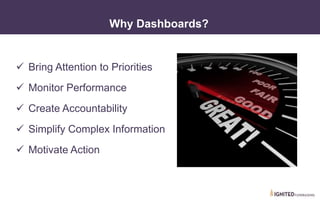
Why Dashboards?
Bring Attention to Priorities
Monitor Performance
Create Accountability
Simplify Complex Information
Motivate Action
• I. What Are Dashboards?
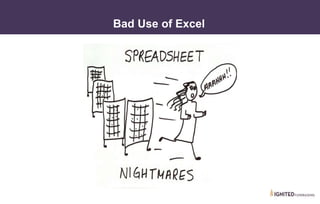
Bad Use of Excel
• I. What Are Dashboards?
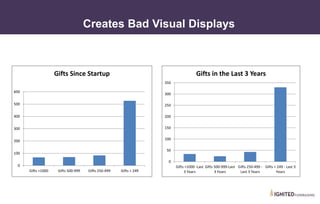
Creates Bad Visual Displays
0
100
200
300
400
500
600
Gifts >1000 Gifts 500-999 Gifts 250-499 Gifts < 249
Gifts Since Startup
0
50
100
150
200
250
300
350
Gifts >1000 -Last
3 Years
Gifts 500-999-Last
3 Years
Gifts 250-499 -
Last 3 Years
Gifts < 249 - Last 3
Years
Gifts in the Last 3 Years
• I. What Are Dashboards?
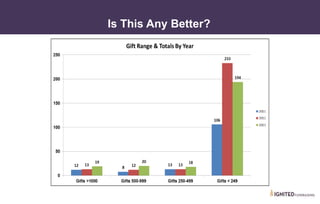
Is This Any Better?
• I. What Are Dashboards?
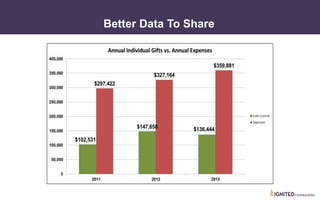
Better Data To Share
II. Common Mistakes Designing Graphs & Dashboards
• II. Common Mistakes
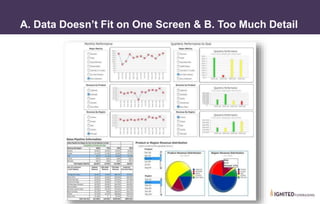
A. Data Doesn’t Fit on One Screen & B. Too Much Detail
• II. Common Mistakes
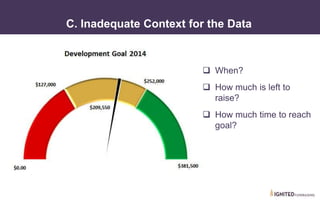
C. Inadequate Context for the Data
When?
How much is left to
raise?
How much time to reach
goal?
• II. Common Mistakes
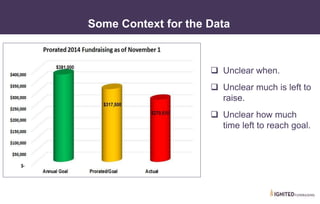
Some Context for the Data
Unclear when.
Unclear much is left to
raise.
Unclear how much
time left to reach goal.
• II. Common Mistakes
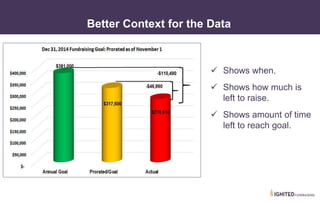
Better Context for the Data
Shows when.
Shows how much is
left to raise.
Shows amount of time
left to reach goal.
• I. Common Mistakes
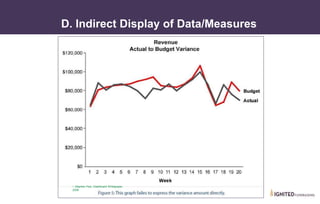
D. Indirect Display of Data/Measures
~ Stephen Few, Dashboard Whitepaper,
2006
• I. Common Mistakes
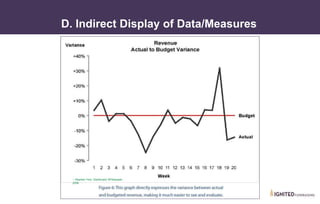
D. Indirect Display of Data/Measures
~ Stephen Few, Dashboard Whitepaper,
2006
~ Stephen Few, Dashboard Whitepaper,
2006
• II. Common Mistakes
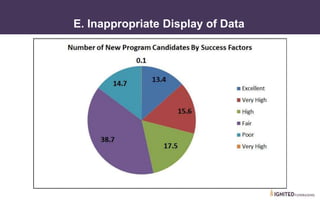
E. Inappropriate Display of Data
• II. Common Mistakes
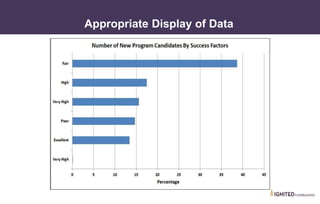
Appropriate Display of Data
• II. Common Mistakes
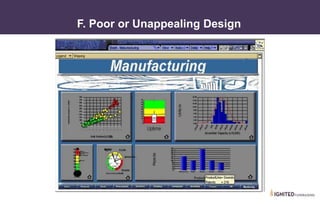
F. Poor or Unappealing Design
• II. Common Mistakes
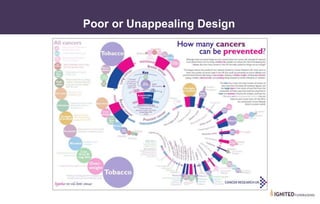
Poor or Unappealing Design
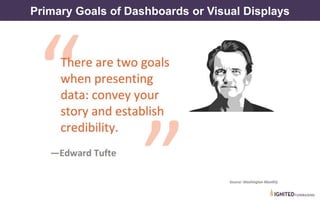
Primary Goals of Dashboards or Visual Displays
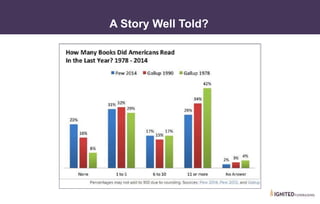
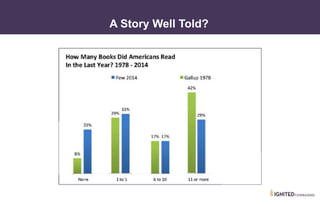
A Story Well Told?
A Story Well Told?
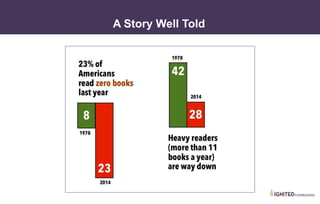
A Story Well Told
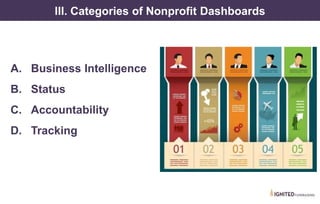
III. Categories of Nonprofit Dashboards
A. Business Intelligence
B. Status
C. Accountability
D. Tracking
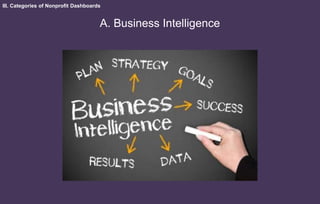
III. Categories of Nonprofit Dashboards
A. Business Intelligence
• III. Categories of Nonprofit Dashboards
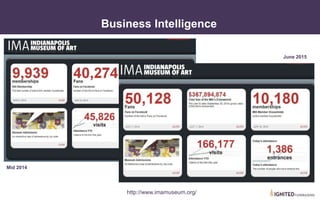
Business Intelligence
http://www.imamuseum.org/
June 2015
Mid 2014
• Business Intelligence
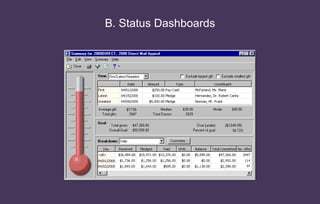
B. Status Dashboards
• III. Categories of Nonprofit Dashboards
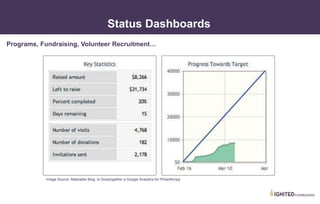
Status Dashboards
Image Source: Mashable Blog: Is Give2ogether a Google Analytics for Philanthropy
Programs, Fundraising, Volunteer Recruitment…
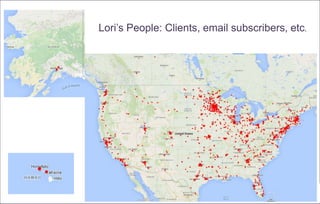
Lori’s People: Clients, email subscribers, etc.
• III. Categories of Nonprofit Dashboards
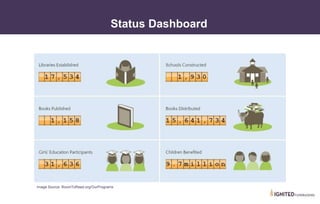
Status Dashboard
Image Source: RoomToRead.org/OurPrograms
III. Categories of Nonprofit Dashboards
C. Accountability Dashboards
“Accountability…
Being held responsible
for one's actions…
.
• III. Categories of Nonprofit Dashboards
Accountability = Success
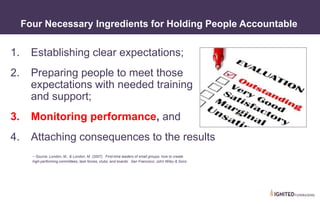
1. Establishing clear expectations;
2. Preparing people to meet those
expectations with needed training
and support;
3. Monitoring performance, and
4. Attaching consequences to the results
~ Source: London, M., & London, M. (2007). First-time leaders of small groups: how to create
high-performing committees, task forces, clubs, and boards. San Francisco: John Wiley & Sons
• III. Categories of Nonprofit Dashboards
Four Necessary Ingredients for Holding People Accountable
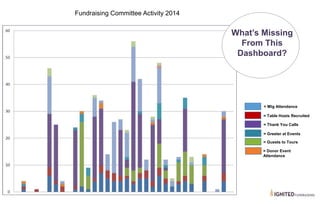
Fundraising Committee Activity 2014
What’s Missing
From This
Dashboard?
= Mtg Attendance
= Table Hosts Recruited
= Thank You Calls
= Greeter at Events
= Guests to Tours
= Donor Event
Attendance
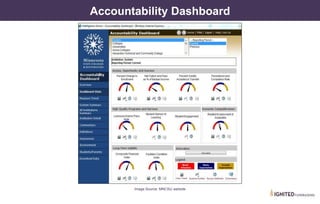
Image Source: MNCSU website
Accountability Dashboard
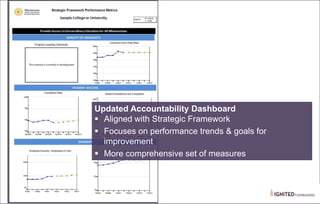
Updated Accountability Dashboard
Aligned with Strategic Framework
Focuses on performance trends & goals for
improvement
More comprehensive set of measures
• III. Categories of Nonprofit Dashboards
Determining Measures
• Strategic Planning Discussion
• Governance Committee
• Fund Development Staff & Committee
• Program Staff & Committee
• Where else?
III. Categories of Nonprofit Dashboards
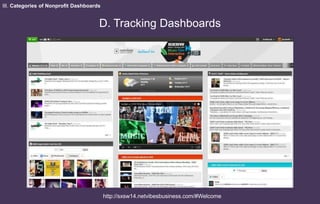
D. Tracking Dashboards
http://sxsw14.netvibesbusiness.com/#Welcome
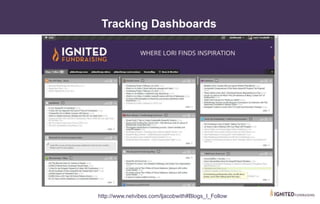
http://www.netvibes.com/ljacobwith#Blogs_I_Follow/
• III. Categories of Nonprofit Dashboards
Tracking Dashboards
Discussion
1. What fundraising metrics do you
feel are important to track?
2. What metrics do you feel are
important to track for board
engagement?
3. What program metrics do you
feel are important to track?
IV. Using Dashboards to Cause Others To Take Action
• III. Categories of Nonprofit Dashboards
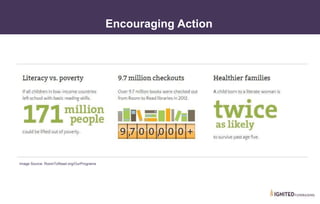
Encouraging Action
Image Source: RoomToRead.org/OurPrograms
• IV. Using Dashboards to Cause Action
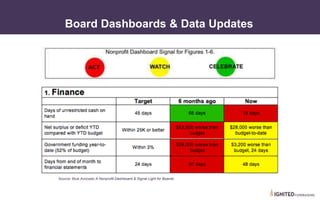
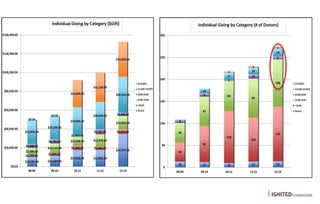
Board Dashboards & Data Updates
Source: Blue Avocado A Nonprofit Dashboard & Signal Light for Boards
• IV. Using Dashboards to Cause Action
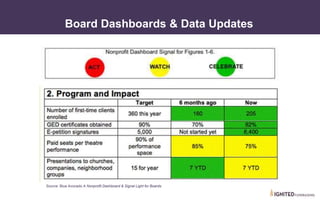
Board Dashboards & Data Updates
Source: Blue Avocado A Nonprofit Dashboard & Signal Light for Boards
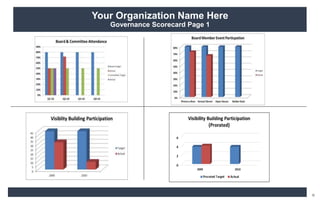
Your Organization Name Here
Governance Scorecard Page 1
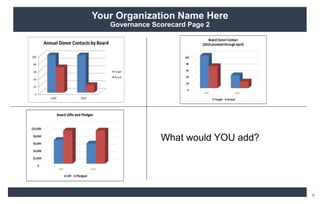
Your Organization Name Here
Governance Scorecard Page 2
What would YOU add?
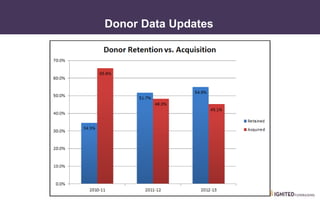
Donor Data Updates
Donor Data Updates
Donor Data Updates
• IV. Using Dashboards to Cause Action
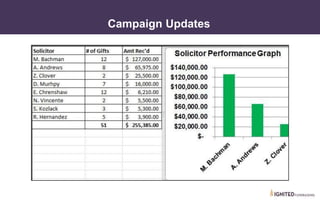
Campaign Updates
• IV. Using Dashboards to Cause Action
Donor Data Updates
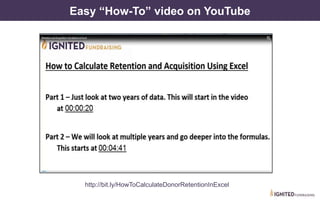
http://bit.ly/HowToCalculateDonorRetentionInExcel
Easy “How-To” video on YouTube
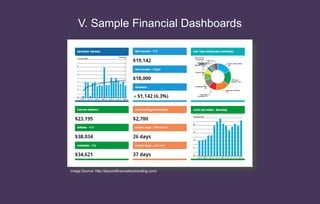
V. Sample Financial Dashboards
Image Source: http://beyondfinancialsconsulting.com/
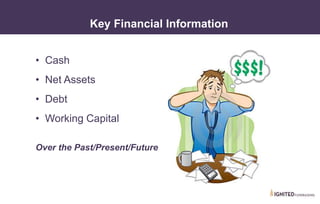
• Cash
• Net Assets
• Debt
• Working Capital
Over the Past/Present/Future
• V. Sample Financial Dashboards
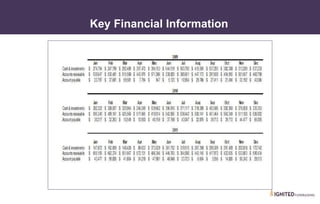
Key Financial Information
• V. Sample Financial Dashboards
Key Financial Information
• V. Sample Financial Dashboards
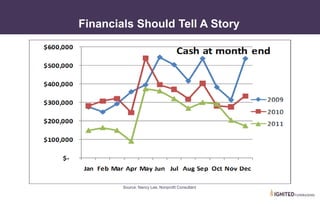
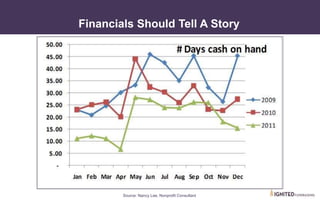
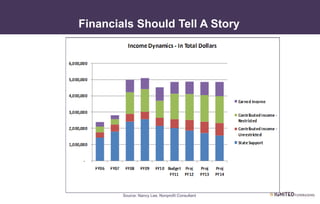
Financials Should Tell A Story
Source: Nancy Lee, Nonprofit Consultant
• V. Sample Financial Dashboards
Financials Should Tell A Story
Source: Nancy Lee, Nonprofit Consultant
• V. Sample Financial Dashboards
Financials Should Tell A Story
Source: Nancy Lee, Nonprofit Consultant
List them on your
worksheet
Additional Ways YOU Could Use Dashboards?
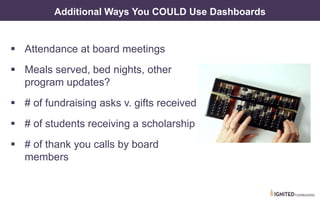
Additional Ways You COULD Use Dashboards
Attendance at board meetings
Meals served, bed nights, other
program updates?
# of fundraising asks v. gifts received
# of students receiving a scholarship
# of thank you calls by board
members
VII. What Will YOU Include In a Dashboard?
• What To Include In a Dashboard
Agency Priorities
1. Program & financial drivers
2. What will move you forward
3. What will hold you back
4. Changes
5. Actions that need to be encouraged
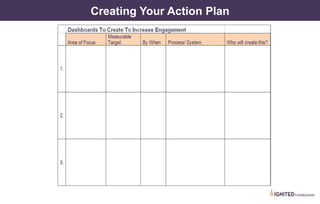
Creating Your Action Plan
• IV. Creating An Action Plan
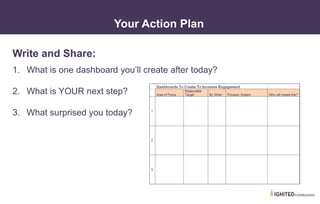
Your Action Plan
Write and Share:
1. What is one dashboard you’ll create after today?
2. What is YOUR next step?
3. What surprised you today?
Staying Connected
Lori L. Jacobwith
Ignited Fundraising
Fundraising Culture
Change Expert & Master
Storyteller
ENews: http://bit.ly/voa-enews
LJacobwith
@LJacobwith
Fire Starters Blog:
www.ignitedfundraising.com/blog
Books
Free Resources
http://bit.ly/voafreeresources
What Gets Measured is What Gets Done
Additional Resources
• http://www.ignitedfundraising.com/accountability-success/
• http://bit.ly/HowToCalculateDonorRetentionInExcel
• http://annkemery.com/portfolio/dataviz-for-philanthropists/
• http://www.effectivephilanthropy.org/getting-beyond-nonprofit-
performance-assessment-with-data/
• http://blog.kurtosys.com/storytelling-data-visualization/
• http://forums.techsoup.org/cs/community/b/tsblog/archive/2015/
06/9/how-to-visually-show-your-impact-to-funders-with-silk.aspx
• https://www.silk.co/ - free for Nonprofits
• IV. Creating An Action Plan
Using Dashboards to
Engage Your Board
& Staff
Thank You!

Using Dashboards To Engage Your Board & Staff

  • 1.
    Using Dashboards to EngageYour Board & Staff Lori L. Jacobwith, President/Founder Ignited Fundraising
  • 2.
    About Lori Lori L.Jacobwith Ignited Fundraising www.IgnitedFundraising.com • 25 + years as Master storyteller, fundraising culture change expert, trainer & coach. • Recognized as one of the top 30 most Effective Fundraising Consultants in the US. by The Giving Show on the Wall Street Network • Since 2001 has helped nonprofit organizations raise nearly $300 million from individual donors. And counting. LJacobwith @LJacobwith
  • 3.
    Your Reality? It’s astruggle to get others to say: "Yes! I'll help with donor engagement tasks." Board members and staff look away when you ask for help at meetings. Eyes glaze over when your team, especially board members, review financial spreadsheets and donor lists. One of the most powerful ways to build an energetic and helpful team is to create a clear picture for them, so they can easily see what needs to be done.
  • 4.
    Quick Question What isone thing you’d like to learn about USING dashboards and visual displays?
  • 5.
    What We WillCover Today 1. What are visual displays &dashboards & what should they do? 2. Common mistakes designing graphs & dashboards 3. Categories of nonprofit dashboards 4. Using dashboards to cause action 5. Sample financial dashboards 6. What will YOU include in your dashboards?
  • 6.
  • 7.
  • 8.
  • 9.
    What Actions DoYou Want Board & Staff to Take?
  • 10.
    Make a list… Onyour worksheet Actions for Board & Staff?
  • 11.
    Make your list… Onyour worksheet How do you CURRENTLY use Dashboards?
  • 12.
    I. What AreDashboards & What Should They Do? “…a visual display of the most important information needed to achieve one or more objectives, consolidated and arranged on a single screen so the information can be monitored at a glance.” ~ Stephen Few, March 2004 edition of Intelligent Enterprise magazine
  • 13.
    Fact: You arevisually wired. • Fifty percent of your brain is involved with visual processing, and you can get the sense of a visual scene in less than one- tenth of a second. • You remember 80% of what you see, • 20% of what you read, • 10% of what you hear, • Color visuals increase the willingness to read by 80%. Dashboard Fact
  • 14.
    • I. WhatAre Dashboards? Why Dashboards? Bring Attention to Priorities Monitor Performance Create Accountability Simplify Complex Information Motivate Action
  • 15.
    • I. WhatAre Dashboards? Bad Use of Excel
  • 16.
    • I. WhatAre Dashboards? Creates Bad Visual Displays 0 100 200 300 400 500 600 Gifts >1000 Gifts 500-999 Gifts 250-499 Gifts < 249 Gifts Since Startup 0 50 100 150 200 250 300 350 Gifts >1000 -Last 3 Years Gifts 500-999-Last 3 Years Gifts 250-499 - Last 3 Years Gifts < 249 - Last 3 Years Gifts in the Last 3 Years
  • 17.
    • I. WhatAre Dashboards? Is This Any Better?
  • 18.
    • I. WhatAre Dashboards? Better Data To Share
  • 19.
    II. Common MistakesDesigning Graphs & Dashboards
  • 20.
    • II. CommonMistakes A. Data Doesn’t Fit on One Screen & B. Too Much Detail
  • 21.
    • II. CommonMistakes C. Inadequate Context for the Data When? How much is left to raise? How much time to reach goal?
  • 22.
    • II. CommonMistakes Some Context for the Data Unclear when. Unclear much is left to raise. Unclear how much time left to reach goal.
  • 23.
    • II. CommonMistakes Better Context for the Data Shows when. Shows how much is left to raise. Shows amount of time left to reach goal.
  • 24.
    • I. CommonMistakes D. Indirect Display of Data/Measures ~ Stephen Few, Dashboard Whitepaper, 2006
  • 25.
    • I. CommonMistakes D. Indirect Display of Data/Measures ~ Stephen Few, Dashboard Whitepaper, 2006 ~ Stephen Few, Dashboard Whitepaper, 2006
  • 26.
    • II. CommonMistakes E. Inappropriate Display of Data
  • 27.
    • II. CommonMistakes Appropriate Display of Data
  • 28.
    • II. CommonMistakes F. Poor or Unappealing Design
  • 29.
    • II. CommonMistakes Poor or Unappealing Design
  • 30.
    Primary Goals ofDashboards or Visual Displays
  • 31.
  • 32.
  • 33.
  • 34.
    III. Categories ofNonprofit Dashboards A. Business Intelligence B. Status C. Accountability D. Tracking
  • 35.
    III. Categories ofNonprofit Dashboards A. Business Intelligence
  • 36.
    • III. Categoriesof Nonprofit Dashboards Business Intelligence http://www.imamuseum.org/ June 2015 Mid 2014
  • 37.
  • 38.
  • 39.
    • III. Categoriesof Nonprofit Dashboards Status Dashboards Image Source: Mashable Blog: Is Give2ogether a Google Analytics for Philanthropy Programs, Fundraising, Volunteer Recruitment…
  • 40.
    Lori’s People: Clients,email subscribers, etc.
  • 41.
    • III. Categoriesof Nonprofit Dashboards Status Dashboard Image Source: RoomToRead.org/OurPrograms
  • 42.
    III. Categories ofNonprofit Dashboards C. Accountability Dashboards
  • 43.
    “Accountability… Being held responsible forone's actions… . • III. Categories of Nonprofit Dashboards Accountability = Success
  • 44.
    1. Establishing clearexpectations; 2. Preparing people to meet those expectations with needed training and support; 3. Monitoring performance, and 4. Attaching consequences to the results ~ Source: London, M., & London, M. (2007). First-time leaders of small groups: how to create high-performing committees, task forces, clubs, and boards. San Francisco: John Wiley & Sons • III. Categories of Nonprofit Dashboards Four Necessary Ingredients for Holding People Accountable
  • 45.
    Fundraising Committee Activity2014 What’s Missing From This Dashboard? = Mtg Attendance = Table Hosts Recruited = Thank You Calls = Greeter at Events = Guests to Tours = Donor Event Attendance
  • 46.
    Image Source: MNCSUwebsite Accountability Dashboard
  • 47.
    Updated Accountability Dashboard Alignedwith Strategic Framework Focuses on performance trends & goals for improvement More comprehensive set of measures
  • 48.
    • III. Categoriesof Nonprofit Dashboards Determining Measures • Strategic Planning Discussion • Governance Committee • Fund Development Staff & Committee • Program Staff & Committee • Where else?
  • 49.
    III. Categories ofNonprofit Dashboards D. Tracking Dashboards http://sxsw14.netvibesbusiness.com/#Welcome
  • 50.
  • 51.
    Discussion 1. What fundraisingmetrics do you feel are important to track? 2. What metrics do you feel are important to track for board engagement? 3. What program metrics do you feel are important to track?
  • 52.
    IV. Using Dashboardsto Cause Others To Take Action
  • 54.
    • III. Categoriesof Nonprofit Dashboards Encouraging Action Image Source: RoomToRead.org/OurPrograms
  • 55.
    • IV. UsingDashboards to Cause Action Board Dashboards & Data Updates Source: Blue Avocado A Nonprofit Dashboard & Signal Light for Boards
  • 56.
    • IV. UsingDashboards to Cause Action Board Dashboards & Data Updates Source: Blue Avocado A Nonprofit Dashboard & Signal Light for Boards
  • 57.
    Your Organization NameHere Governance Scorecard Page 1
  • 58.
    Your Organization NameHere Governance Scorecard Page 2 What would YOU add?
  • 59.
  • 60.
  • 61.
  • 62.
    • IV. UsingDashboards to Cause Action Campaign Updates
  • 63.
    • IV. UsingDashboards to Cause Action Donor Data Updates
  • 64.
  • 65.
    V. Sample FinancialDashboards Image Source: http://beyondfinancialsconsulting.com/
  • 66.
    • Cash • NetAssets • Debt • Working Capital Over the Past/Present/Future • V. Sample Financial Dashboards Key Financial Information
  • 67.
    • V. SampleFinancial Dashboards Key Financial Information
  • 68.
    • V. SampleFinancial Dashboards Financials Should Tell A Story Source: Nancy Lee, Nonprofit Consultant
  • 69.
    • V. SampleFinancial Dashboards Financials Should Tell A Story Source: Nancy Lee, Nonprofit Consultant
  • 70.
    • V. SampleFinancial Dashboards Financials Should Tell A Story Source: Nancy Lee, Nonprofit Consultant
  • 71.
    List them onyour worksheet Additional Ways YOU Could Use Dashboards?
  • 72.
    Additional Ways YouCOULD Use Dashboards Attendance at board meetings Meals served, bed nights, other program updates? # of fundraising asks v. gifts received # of students receiving a scholarship # of thank you calls by board members
  • 73.
    VII. What WillYOU Include In a Dashboard?
  • 74.
    • What ToInclude In a Dashboard Agency Priorities 1. Program & financial drivers 2. What will move you forward 3. What will hold you back 4. Changes 5. Actions that need to be encouraged
  • 75.
  • 76.
    • IV. CreatingAn Action Plan Your Action Plan Write and Share: 1. What is one dashboard you’ll create after today? 2. What is YOUR next step? 3. What surprised you today?
  • 77.
    Staying Connected Lori L.Jacobwith Ignited Fundraising Fundraising Culture Change Expert & Master Storyteller ENews: http://bit.ly/voa-enews LJacobwith @LJacobwith Fire Starters Blog: www.ignitedfundraising.com/blog Books Free Resources http://bit.ly/voafreeresources
  • 78.
    What Gets Measuredis What Gets Done
  • 79.
    Additional Resources • http://www.ignitedfundraising.com/accountability-success/ •http://bit.ly/HowToCalculateDonorRetentionInExcel • http://annkemery.com/portfolio/dataviz-for-philanthropists/ • http://www.effectivephilanthropy.org/getting-beyond-nonprofit- performance-assessment-with-data/ • http://blog.kurtosys.com/storytelling-data-visualization/ • http://forums.techsoup.org/cs/community/b/tsblog/archive/2015/ 06/9/how-to-visually-show-your-impact-to-funders-with-silk.aspx • https://www.silk.co/ - free for Nonprofits • IV. Creating An Action Plan
  • 80.
    Using Dashboards to EngageYour Board & Staff Thank You!