Visual Studio 2010:
A Perspective
David Chappell
Chappell & Associates
Tools for Software Development
An evolution


        1970s-1980s             1980s-1990s   1990s-2000s

          Editors               Integrated
                               development
                               environments
        Compilers                  (IDEs)
                                                 Team
                                              development
                                                 tools
                      Build tools

               Version control tools

                    Testing tools

           Reporting and tracking tools
Tools for Software Development
The real goal: Optimizing the end-to-end process


                               Development
                                  Tools

Architecture                                                    Testing
   Tools                                                         Tools

                 Design
               Documents
                                    Version     Test Cases
                                    Control/
                                   Build Tool
                Requirements                      Project
                                                 Statistics

                                                               Reporting
Requirements                    Shared Server
                                                              and Tracking
   Tools                                                         Tools
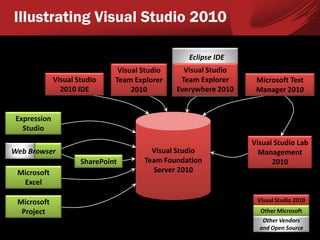
Illustrating Visual Studio 2010

                                                   Eclipse IDE
                                Visual Studio     Visual Studio
              Visual Studio    Team Explorer     Team Explorer     Microsoft Test
                2010 IDE            2010        Everywhere 2010    Manager 2010


 Expression
   Studio
                                                                  Visual Studio Lab
Web Browser                              Visual Studio              Management
                      SharePoint       Team Foundation                  2010
 Microsoft                               Server 2010
  Excel

 Microsoft                                                         Visual Studio 2010
  Project                                                           Other Microsoft
                                                                     Other Vendors
                                                                    and Open Source
Illustrating TFS
                                      Visual Studio
                               Team Foundation Server 2010


                                 Work Item         Version
                                 Tracking          Control
                               • Requirements/
                                 User stories
                               • Tasks
                               • Test cases
                               • Bugs
                               •…

                               Reports and          Build
          Process              Dashboards        Management
         Templates
    • MSF for Agile Software
      Development
    • MSF for CMMI Process
      Improvement
    •…
Using Visual Studio 2010
Managing Requirements/User Stories

 VS 2010 doesn’t define how
  requirements/user stories should be gathered
 It does define how they’re managed
   – Using Requirement/User Story work items
   – Which can be linked to other work items

        Requirement X                    Requirement Y
                                                                Bug
   Task         Test Case              Task      Test Case
                                                                Bug
  Task           Test Case            Task        Test Case
                                Bug
 Task              Test Case                        Test Case    Bug
                                Bug
                    Test Case
Managing Requirements/User Stories
Example: Accessing User Story work items from Excel
Architecting the Solution

 Visual Studio 2010 supports UML modeling
  – With Class, Sequence, UseCase, Activity, and
    Component diagrams
  – A UML diagram can be linked to a TFS work item
     • Such as linking a UseCase diagram to a
       Requirement
 Other design/visualization tools include:
  – Layer Explorer for creating layer diagrams
  – Architecture Explorer for creating dependency
    graphs
  – More
Architecting the Solution
An example layer diagram
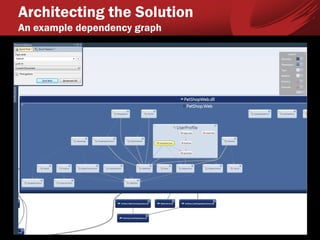
Architecting the Solution
An example dependency graph
Writing Code
Toolkits and designers

 VS 2010 includes toolkits for:
   – SharePoint development
   – Office development
   – Windows Azure development
 It also includes:
   – The WPF and Silverlight Designer
   – The Workflow Designer for creating WF workflows
   – The O/R Designer for creating LINQ to SQL object
     model mappings
   – More
Writing Code
Tools for writing better code

 Refactoring support
 Static code analysis
   – Examines code for security holes and more
 Dynamic code analysis
   – Performance profiling
   – Code coverage, showing what’s being tested
 Code metrics
   – Measuring complexity and maintainability
 Debugging support
   – Including IntelliTrace
Testing Code

 VS 2010 has lots of support for testing
  – It’s important


 This release introduces Microsoft Test
  Manager (MTM), supporting:
  – Creating and managing test suites
  – Running manual tests
  – Running automated tests
  – More
Testing Code
Gathering test results


                                      1) Run
              Visual Studio            test    T
                2010 IDE
                                                   Application
              Microsoft Test                       Under Test
                Manager
    Tester
                                                Diagnostic
                        R       2) Return      Data Adapters
                               test results       (DDAs)

                                 Computer
Testing Code
Example DDAs

 IntelliTrace: Creates a detailed trace of an
  application’s execution, which a developer can
  replay
 Action Recording: allows recording and
  replaying a manual test
 Event Log: Collects information written to
  event logs during the test
 Video Recorder: Records the screen of the
  computer the tested app is running on
 Test Impact: Allows test impact analysis
Testing Code
Using MTM: Examining a requirement’s test cases
Testing Code
Illustrating Lab Management

 Visual Studio Lab Management 2010 allows
  creating and managing VMs for a test lab
    – VMs can be created from predefined templates
    – The Lab Management client is part of MTM

                                           System Center
                     Visual Studio
Lab Manager                               Virtual Machine
                   Lab Management
                                           Manager 2008
Microsoft Test
  Manager
                                               VM
Testing Code
  Using MTM and Lab Management: Preparing to run tests


                              Visual Studio
                                  Lab
                                                           VM
                 1) Create    Management
                  test lab
                    VMs                       3) Deploy
                                              test build

Lab Manager                      TT   TT
                 2) Create
                 test suite      TT   TT
   Test
Management                                                       Test    Test    Test
                                                                Agent   Agent   Agent
Microsoft Test                   Team
  Manager                     Foundation
                                Server
Testing Code
  Using MTM: Running tests


Lab Manager                       TT       TT
                                  TT       TT
                 1) Run test                                   DDAs         DDAs             DDAs
   Test                                           Test
                    cases
Management                                      Controller      Test       Test           Test
                                       R
                  4) Access                                    Agent      Agent          Agent
                 test results                    3) Return
Microsoft Test                     Team         test results
  Manager                       Foundation
                                  Server                          2) Run tests and collect
                                                                        test results
Testing Code
Using MTM: Running a manual test
Testing Code
Options for automated tests

 Visual Studio 2010 supports several kinds of
  automated tests
           Coded       Web
            UI     Performance
                                   Unit Tests
           Tests      Tests
                                                          Database
                                      T   T   T
             T         T   T                              Unit Tests
             T         T   T      T   T       T   T   T    T   T   T   T


             User                Business                 Database
           Interface              Logic
Testing Code
 Illustrating load testing


                                 Web
                             Performance
 Load Test                      Tests
Virtual User      Test          T   T

    Pack         Agent          T   T


                  Test          T   T

  Test           Agent          T   T

Controller
                  Test          T   T

                 Agent          T   T


                  Test          T   T

                 Agent          T   T
Managing and Tracking the Project

 VS 2010 provides:
  – Reports created using Excel or SQL Server
    Reporting Services
  – Dashboards created using SharePoint


 The available reports and dashboards depend
  on what process template is used
  – They can also be customized
Managing and Tracking the Project
Example report: Stories Overview
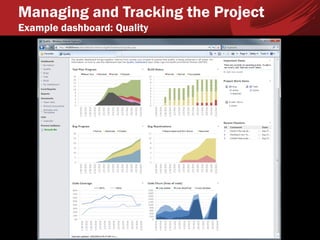
Managing and Tracking the Project
Example dashboard: Quality
Adopting Visual Studio 2010
How Visual Studio 2010 is Packaged
     Mapping software to SKUs


                                                            Visual     Microsoft                      Visual
                         Visual Studio        Visual                               Visual Studio
                                                         Studio Team     Test                      Studio Team
                       Team Foundation      Studio IDE                                 Lab
                                                           Explorer    Manager                       Explorer
                            Server                                                 Management
                                                                                                   Everywhere


                              x                 x            x            x                            x
  Visual Studio
  2010 Ultimate*


                              x                 x            x
   Visual Studio
  2010 Premium*


                              x                 x            x
  Visual Studio
2010 Professional*


                              x                              x            x
Visual Studio Test
Professional 2010 *


                                                                                        x
Visual Studio Lab
Management 2010
Visual Studio Team
     Explorer
 Everywhere 2010
                                                                                                       x

                      *With MSDN subscription
How Visual Studio 2010 is Packaged
 Options for the IDE

Visual Studio                                  Microsoft Test Manager
2010 Ultimate                         Test Case              Manual           Fast Forward for
                                     Management              Testing          Manual Testing

                                            Web Performance              Load              UML
                           IntelliTrace
                                                Testing                 Testing           Modeling
                           Dependency            Layer                 Sequence             Class
                             Graphs            Diagrams                Diagrams            Designer


   Visual Studio           Remote Test       Diagnostic Data           Coded UI           Test Impact
   2010 Premium             Execution           Adapters                Testing            Analysis
                           Performance         Static Code               Code                Code
                             Profiling          Analysis               Coverage             Metrics
                         Database Change     Database Unit         Database Test          Database
                          Management            Testing           Data Generators        Deployment


       Visual Studio     C#, VB, C++, F#,      Windows                 Web                SharePoint
     2010 Professional        JScript         Development          Development           Development
                         Windows Azure           Office             Multi-Core               Unit
                          Development         Development          Development              Testing
                         WPF/Silverlight    Object/Relational          Workflow          XML Schema
                           Designer             Designer               Designer           Designer
Conclusions

 Modern software development requires a
  diverse set of tools
  – Integrating those tools makes sense


 Visual Studio 2010 provides an integrated set
  of diverse development tools
  – For large teams, small teams, and solo developers
About the Speaker
    David Chappell is Principal of Chappell & Associates
    (www.davidchappell.com) in San Francisco, California. Through
    his speaking, writing, and consulting, he helps people around the
    world understand, use, and make better decisions about new
    technology. David has been the keynote speaker for many events
    and conferences on five continents, and his seminars have been
    attended by tens of thousands of IT decision makers, architects,
    and developers in more than forty countries. His books have been
    published in a dozen languages and used regularly in courses at
    MIT, ETH Zurich, and other universities. In his consulting practice,
    he has helped clients such as Hewlett-Packard, IBM, Microsoft,
    Stanford University, and Target Corporation adopt new
    technologies, market new products, train their sales staffs, and
    create business plans. Earlier in his career, David wrote
    networking software, chaired a U.S. national standards working
    group, and played keyboards with the Peabody-award-winning
    Children’s Radio Theater. He holds a B.S. in Economics and an
    M.S. in Computer Science, both from the University of Wisconsin-
    Madison.
Copyright © 2010 David Chappell
Chappell & Associates


www.davidchappell.comSOAP/WS-*

Visual Studio 2010: A Perspective - David Chappell

  • 1.
    Visual Studio 2010: APerspective David Chappell Chappell & Associates
  • 2.
    Tools for SoftwareDevelopment An evolution 1970s-1980s 1980s-1990s 1990s-2000s Editors Integrated development environments Compilers (IDEs) Team development tools Build tools Version control tools Testing tools Reporting and tracking tools
  • 3.
    Tools for SoftwareDevelopment The real goal: Optimizing the end-to-end process Development Tools Architecture Testing Tools Tools Design Documents Version Test Cases Control/ Build Tool Requirements Project Statistics Reporting Requirements Shared Server and Tracking Tools Tools
  • 4.
    Illustrating Visual Studio2010 Eclipse IDE Visual Studio Visual Studio Visual Studio Team Explorer Team Explorer Microsoft Test 2010 IDE 2010 Everywhere 2010 Manager 2010 Expression Studio Visual Studio Lab Web Browser Visual Studio Management SharePoint Team Foundation 2010 Microsoft Server 2010 Excel Microsoft Visual Studio 2010 Project Other Microsoft Other Vendors and Open Source
  • 5.
    Illustrating TFS Visual Studio Team Foundation Server 2010 Work Item Version Tracking Control • Requirements/ User stories • Tasks • Test cases • Bugs •… Reports and Build Process Dashboards Management Templates • MSF for Agile Software Development • MSF for CMMI Process Improvement •…
  • 6.
  • 7.
    Managing Requirements/User Stories VS 2010 doesn’t define how requirements/user stories should be gathered  It does define how they’re managed – Using Requirement/User Story work items – Which can be linked to other work items Requirement X Requirement Y Bug Task Test Case Task Test Case Bug Task Test Case Task Test Case Bug Task Test Case Test Case Bug Bug Test Case
  • 8.
    Managing Requirements/User Stories Example:Accessing User Story work items from Excel
  • 9.
    Architecting the Solution Visual Studio 2010 supports UML modeling – With Class, Sequence, UseCase, Activity, and Component diagrams – A UML diagram can be linked to a TFS work item • Such as linking a UseCase diagram to a Requirement  Other design/visualization tools include: – Layer Explorer for creating layer diagrams – Architecture Explorer for creating dependency graphs – More
  • 10.
    Architecting the Solution Anexample layer diagram
  • 11.
    Architecting the Solution Anexample dependency graph
  • 12.
    Writing Code Toolkits anddesigners  VS 2010 includes toolkits for: – SharePoint development – Office development – Windows Azure development  It also includes: – The WPF and Silverlight Designer – The Workflow Designer for creating WF workflows – The O/R Designer for creating LINQ to SQL object model mappings – More
  • 13.
    Writing Code Tools forwriting better code  Refactoring support  Static code analysis – Examines code for security holes and more  Dynamic code analysis – Performance profiling – Code coverage, showing what’s being tested  Code metrics – Measuring complexity and maintainability  Debugging support – Including IntelliTrace
  • 14.
    Testing Code  VS2010 has lots of support for testing – It’s important  This release introduces Microsoft Test Manager (MTM), supporting: – Creating and managing test suites – Running manual tests – Running automated tests – More
  • 15.
    Testing Code Gathering testresults 1) Run Visual Studio test T 2010 IDE Application Microsoft Test Under Test Manager Tester Diagnostic R 2) Return Data Adapters test results (DDAs) Computer
  • 16.
    Testing Code Example DDAs IntelliTrace: Creates a detailed trace of an application’s execution, which a developer can replay  Action Recording: allows recording and replaying a manual test  Event Log: Collects information written to event logs during the test  Video Recorder: Records the screen of the computer the tested app is running on  Test Impact: Allows test impact analysis
  • 17.
    Testing Code Using MTM:Examining a requirement’s test cases
  • 18.
    Testing Code Illustrating LabManagement  Visual Studio Lab Management 2010 allows creating and managing VMs for a test lab – VMs can be created from predefined templates – The Lab Management client is part of MTM System Center Visual Studio Lab Manager Virtual Machine Lab Management Manager 2008 Microsoft Test Manager VM
  • 19.
    Testing Code Using MTM and Lab Management: Preparing to run tests Visual Studio Lab VM 1) Create Management test lab VMs 3) Deploy test build Lab Manager TT TT 2) Create test suite TT TT Test Management Test Test Test Agent Agent Agent Microsoft Test Team Manager Foundation Server
  • 20.
    Testing Code Using MTM: Running tests Lab Manager TT TT TT TT 1) Run test DDAs DDAs DDAs Test Test cases Management Controller Test Test Test R 4) Access Agent Agent Agent test results 3) Return Microsoft Test Team test results Manager Foundation Server 2) Run tests and collect test results
  • 21.
    Testing Code Using MTM:Running a manual test
  • 22.
    Testing Code Options forautomated tests  Visual Studio 2010 supports several kinds of automated tests Coded Web UI Performance Unit Tests Tests Tests Database T T T T T T Unit Tests T T T T T T T T T T T T User Business Database Interface Logic
  • 23.
    Testing Code Illustratingload testing Web Performance Load Test Tests Virtual User Test T T Pack Agent T T Test T T Test Agent T T Controller Test T T Agent T T Test T T Agent T T
  • 24.
    Managing and Trackingthe Project  VS 2010 provides: – Reports created using Excel or SQL Server Reporting Services – Dashboards created using SharePoint  The available reports and dashboards depend on what process template is used – They can also be customized
  • 25.
    Managing and Trackingthe Project Example report: Stories Overview
  • 26.
    Managing and Trackingthe Project Example dashboard: Quality
  • 27.
  • 28.
    How Visual Studio2010 is Packaged Mapping software to SKUs Visual Microsoft Visual Visual Studio Visual Visual Studio Studio Team Test Studio Team Team Foundation Studio IDE Lab Explorer Manager Explorer Server Management Everywhere x x x x x Visual Studio 2010 Ultimate* x x x Visual Studio 2010 Premium* x x x Visual Studio 2010 Professional* x x x Visual Studio Test Professional 2010 * x Visual Studio Lab Management 2010 Visual Studio Team Explorer Everywhere 2010 x *With MSDN subscription
  • 29.
    How Visual Studio2010 is Packaged Options for the IDE Visual Studio Microsoft Test Manager 2010 Ultimate Test Case Manual Fast Forward for Management Testing Manual Testing Web Performance Load UML IntelliTrace Testing Testing Modeling Dependency Layer Sequence Class Graphs Diagrams Diagrams Designer Visual Studio Remote Test Diagnostic Data Coded UI Test Impact 2010 Premium Execution Adapters Testing Analysis Performance Static Code Code Code Profiling Analysis Coverage Metrics Database Change Database Unit Database Test Database Management Testing Data Generators Deployment Visual Studio C#, VB, C++, F#, Windows Web SharePoint 2010 Professional JScript Development Development Development Windows Azure Office Multi-Core Unit Development Development Development Testing WPF/Silverlight Object/Relational Workflow XML Schema Designer Designer Designer Designer
  • 30.
    Conclusions  Modern softwaredevelopment requires a diverse set of tools – Integrating those tools makes sense  Visual Studio 2010 provides an integrated set of diverse development tools – For large teams, small teams, and solo developers
  • 31.
    About the Speaker David Chappell is Principal of Chappell & Associates (www.davidchappell.com) in San Francisco, California. Through his speaking, writing, and consulting, he helps people around the world understand, use, and make better decisions about new technology. David has been the keynote speaker for many events and conferences on five continents, and his seminars have been attended by tens of thousands of IT decision makers, architects, and developers in more than forty countries. His books have been published in a dozen languages and used regularly in courses at MIT, ETH Zurich, and other universities. In his consulting practice, he has helped clients such as Hewlett-Packard, IBM, Microsoft, Stanford University, and Target Corporation adopt new technologies, market new products, train their sales staffs, and create business plans. Earlier in his career, David wrote networking software, chaired a U.S. national standards working group, and played keyboards with the Peabody-award-winning Children’s Radio Theater. He holds a B.S. in Economics and an M.S. in Computer Science, both from the University of Wisconsin- Madison.
  • 32.
    Copyright © 2010David Chappell Chappell & Associates www.davidchappell.comSOAP/WS-*