



Workflow Evolution For SharePoint 2013
                             Alan Richards
About Me


   Worked in the education sector for over 17 years

   Speaker / Blogger

   SharePoint MVP
Agenda


   What's New


   Configuration


   Demo ?
What's New
   Expressive
     SharePoint      Designer 2013 can do more


   Connected
     Cloud     ready
     Uses    SharePoint app model
           Authorisation


   Unbounded
     onPrem

     In    the cloud
     Scalable
Expressive
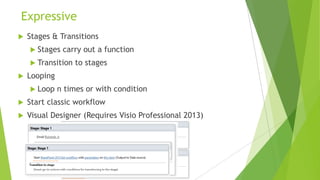
   Stages & Transitions
     Stages   carry out a function
     Transition   to stages
   Looping
     Loop    n times or with condition
   Start classic workflow
   Visual Designer (Requires Visio Professional 2013)
Connected
   Cloud ready
     Runs   onPrem or in SharePoint online
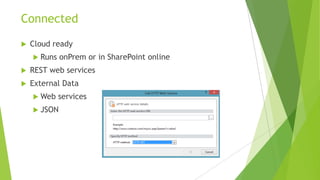
   REST web services
   External Data
     Web    services
     JSON
Connected
   SP2010 – Workflows ran as the initiator or as publisher
    (Impersonation step)
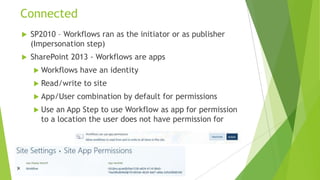
   SharePoint 2013 - Workflows are apps
     Workflows   have an identity
     Read/write   to site
     App/User   combination by default for permissions
     Use an App Step to use Workflow as app for permission
      to a location the user does not have permission for
Unbounded


   Loosely coupled
     Runs   a separate server
        Workflow   Manager
     Manageable    & scalable
Configuration
Workflow Manager
     Downloadable product
          Install with SharePoint
          Install separate to SharePoint
          Powershell command to connect the two together
     Workflow client
          Installed to SharePoint server if Workflow manager on separate server
     Service Bus
          Azure service now used onPrem
          Manages communication
     Uses oAuth for communication
          http or https
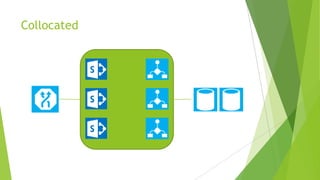
Collocated
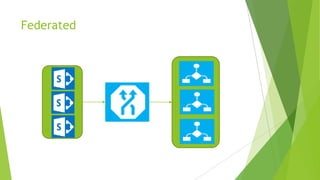
Federated
   Topology is your choice
        Install on same server as SharePoint
        Install on standalone Server (Install workflow client to SharePoint server)
   Scale as necessary
        First workflow server creates the farm
        Add servers to workflow farm
        Load balance
   http or https communication
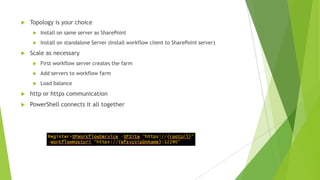
   PowerShell connects it all together
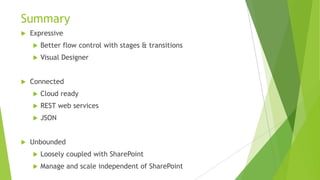
Summary
   Expressive
       Better flow control with stages & transitions
       Visual Designer


   Connected
       Cloud ready
       REST web services
       JSON


   Unbounded
       Loosely coupled with SharePoint
       Manage and scale independent of SharePoint
   arichards@edutechnow.com


   www.edutechnow.com


   twitter.com/arichards_Saruk

SharePoint Saturday UK - Workflow Evolution

  • 1.
    Workflow Evolution ForSharePoint 2013 Alan Richards
  • 2.
    About Me  Worked in the education sector for over 17 years  Speaker / Blogger  SharePoint MVP
  • 3.
    Agenda  What's New  Configuration  Demo ?
  • 4.
  • 5.
    Expressive  SharePoint Designer 2013 can do more  Connected  Cloud ready  Uses SharePoint app model  Authorisation  Unbounded  onPrem  In the cloud  Scalable
  • 6.
    Expressive  Stages & Transitions  Stages carry out a function  Transition to stages  Looping  Loop n times or with condition  Start classic workflow  Visual Designer (Requires Visio Professional 2013)
  • 7.
    Connected  Cloud ready  Runs onPrem or in SharePoint online  REST web services  External Data  Web services  JSON
  • 8.
    Connected  SP2010 – Workflows ran as the initiator or as publisher (Impersonation step)  SharePoint 2013 - Workflows are apps  Workflows have an identity  Read/write to site  App/User combination by default for permissions  Use an App Step to use Workflow as app for permission to a location the user does not have permission for
  • 9.
    Unbounded  Loosely coupled  Runs a separate server  Workflow Manager  Manageable & scalable
  • 10.
  • 11.
    Workflow Manager  Downloadable product  Install with SharePoint  Install separate to SharePoint  Powershell command to connect the two together  Workflow client  Installed to SharePoint server if Workflow manager on separate server  Service Bus  Azure service now used onPrem  Manages communication  Uses oAuth for communication  http or https
  • 12.
  • 13.
  • 14.
    Topology is your choice  Install on same server as SharePoint  Install on standalone Server (Install workflow client to SharePoint server)  Scale as necessary  First workflow server creates the farm  Add servers to workflow farm  Load balance  http or https communication  PowerShell connects it all together
  • 15.
    Summary  Expressive  Better flow control with stages & transitions  Visual Designer  Connected  Cloud ready  REST web services  JSON  Unbounded  Loosely coupled with SharePoint  Manage and scale independent of SharePoint
  • 16.
    arichards@edutechnow.com  www.edutechnow.com  twitter.com/arichards_Saruk