







Deep Dive Building Office Mail
Add-ins with the Microsoft Graph
Bram de Jager
Lead Architect, Delaware Consulting, Netherlands
Agenda
› Microsoft Graph overview
› Office Add-ins overview
› Office Fabric UI overview
› Authentication
› Demo Contact Synchronization
› Wrap-up
Microsoft
Graph
overview
Deep Dive Building Office
Mail Add-ins with the
Microsoft Graph
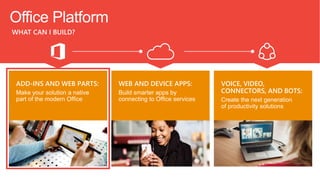
WHAT CAN I BUILD?
Office Platform
ADD-INS AND WEB PARTS:
Make your solution a native
part of the modern Office
WEB AND DEVICE APPS:
Build smarter apps by
connecting to Office services
VOICE, VIDEO,
CONNECTORS, AND BOTS:
Create the next generation
of productivity solutions
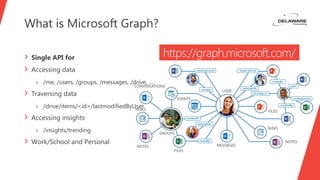
What is Microsoft Graph?
› Single API for
› Accessing data
› /me, /users, /groups, /messages, /drive, ….
› Traversing data
› /drive/items/<id>/lastmodifiedByUser
› Accessing insights
› /insights/trending
› Work/School and Personal
https://graph.microsoft.com/
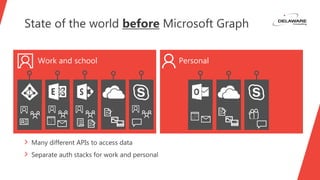
State of the world before Microsoft Graph
› Many different APIs to access data
› Separate auth stacks for work and personal
Work and school Personal
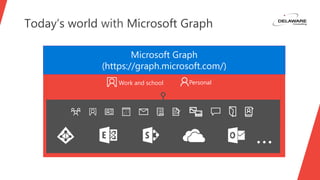
Today’s world with Microsoft Graph
Microsoft Graph
(https://graph.microsoft.com/)
Work and school Personal
…
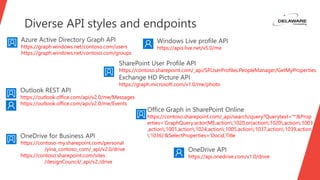
Diverse API styles and endpoints
https://graph.windows.net/contoso.com/users
https://graph.windows.net/contoso.com/groups
https://apis.live.net/v5.0/me
https://contoso.sharepoint.com/_api/SP.UserProfiles.PeopleManager/GetMyProperties
https://graph.microsoft.com/v1.0/me/photo
https://outlook.office.com/api/v2.0/me/Messages
https://outlook.office.com/api/v2.0/me/Events
https://contoso-my.sharepoint.com/personal
/yina_contoso_com/_api/v2.0/drive
https://contoso.sharepoint.com/sites
/designCouncil/_api/v2./drive
https://api.onedrive.com/v1.0/drive
https://contoso.sharepoint.com/_api/search/query?Querytext='*'&Prop
erties='GraphQuery:actor(ME,action:1020,or(action:1020,action:1003
,action:1001,action:1024,action:1005,action:1037,action:1039,action
:1036)'&SelectProperties='Docid,Title
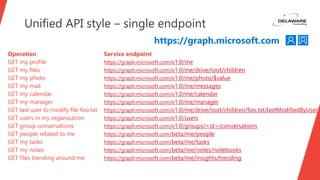
Operation Service endpoint
GET my profile https://graph.microsoft.com/v1.0/me
GET my files https://graph.microsoft.com/v1.0/me/drive/root/children
GET my photo https://graph.microsoft.com/v1.0/me/photo/$value
GET my mail https://graph.microsoft.com/v1.0/me/messages
GET my calendar https://graph.microsoft.com/v1.0/me/calendar
GET my manager https://graph.microsoft.com/v1.0/me/manager
GET last user to modify file foo.txt https://graph.microsoft.com/v1.0/me/drive/root/children/foo.txt/lastModifiedByUser
GET users in my organization https://graph.microsoft.com/v1.0/users
GET group conversations https://graph.microsoft.com/v1.0/groups/<id>/conversations
GET people related to me https://graph.microsoft.com/beta/me/people
GET my tasks https://graph.microsoft.com/beta/me/tasks
GET my notes https://graph.microsoft.com/beta/me/notes/notebooks
GET files trending around me https://graph.microsoft.com/beta/me/insights/trending
Unified API style – single endpoint
https://graph.microsoft.com
Office Add-
ins overview
Deep Dive Building Office
Mail Add-ins with the
Microsoft Graph
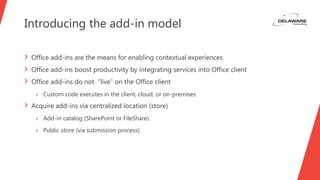
Introducing the add-in model
› Office add-ins are the means for enabling contextual experiences
› Office add-ins boost productivity by integrating services into Office client
› Office add-ins do not “live” on the Office client
› Custom code executes in the client, cloud, or on-premises
› Acquire add-ins via centralized location (store)
› Add-in catalog (SharePoint or FileShare)
› Public store (via submission process)
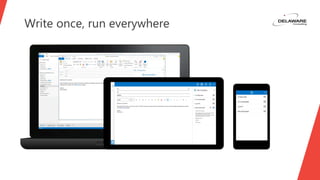
Write once, run everywhere
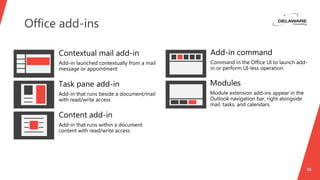
Office add-ins
14
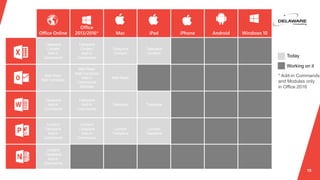
15
Taskpane
Content
Add-in
Commands
Taskpane
Content
Add-in
Commands
Taskpane
Content
Taskpane
Content
Mail Read
Mail Compose
Mail Read
Mail Compose
Add-in
Commands
Modules
Mail Read
Taskpane
Add-in
Commands
Taskpane
Add-in
Commands
Taskpane Taskpane
Content
Taskpane
Add-in
Commands
Content
Taskpane
Add-in
Commands
Content
Taskpane
Content
Taskpane
Content
Taskpane
Add-in
Commands
* Add-in Commands
and Modules only
in Office 2016
Office UI
Fabric
overview
Deep Dive Building Office
Mail Add-ins with the
Microsoft Graph
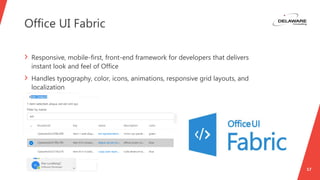
Office UI Fabric
17
› Responsive, mobile-first, front-end framework for developers that delivers
instant look and feel of Office
› Handles typography, color, icons, animations, responsive grid layouts, and
localization
Authentication
Deep Dive Building Office
Mail Add-ins with the
Microsoft Graph
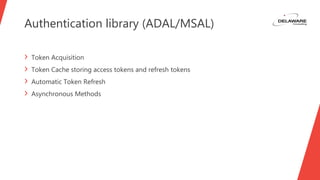
Authentication library (ADAL/MSAL)
› Token Acquisition
› Token Cache storing access tokens and refresh tokens
› Automatic Token Refresh
› Asynchronous Methods
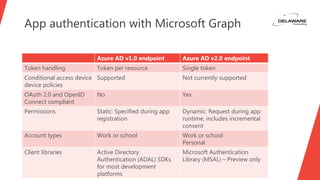
App authentication with Microsoft Graph
Azure AD v1.0 endpoint Azure AD v2.0 endpoint
Token handling Token per resource Single token
Conditional access device
device policies
Supported Not currently supported
OAuth 2.0 and OpenID
Connect compliant
No Yes
Permissions Static: Specified during app
registration
Dynamic: Request during app
runtime; includes incremental
consent
Account types Work or school Work or school
Personal
Client libraries Active Directory
Authentication (ADAL) SDKs
for most development
platforms
Microsoft Authentication
Library (MSAL) – Preview only
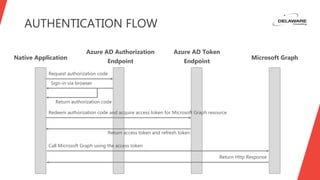
AUTHENTICATION FLOW
Native Application
Azure AD Authorization
Endpoint
Azure AD Token
Endpoint
Microsoft Graph
Return authorization code
Sign-in via browser
Redeem authorization code and acquire access token for Microsoft Graph resource
Return access token and refresh token
Call Microsoft Graph using the access token
Return Http Response
Request authorization code
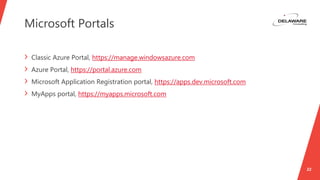
Microsoft Portals
22
› Classic Azure Portal, https://manage.windowsazure.com
› Azure Portal, https://portal.azure.com
› Microsoft Application Registration portal, https://apps.dev.microsoft.com
› MyApps portal, https://myapps.microsoft.com
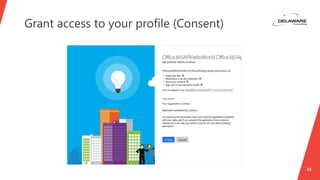
Grant access to your profile (Consent)
23
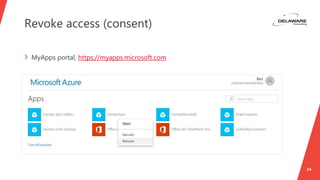
Revoke access (consent)
24
› MyApps portal, https://myapps.microsoft.com
Demo Contact
Synchronizatio
n
Deep Dive Building Office
Mail Add-ins with the
Microsoft Graph
Demo scenario
› Build a Outlook Web Add-in to synchronize AD users with your personal
Contacts
› Steps
› Setup the basics for the Office Web Add-in
› Add Office UI Fabric
› Provide plumbing for authentication
› Support synchronization of Contacts
› Augment Contact with SharePoint User Profile info (Birthday)
27
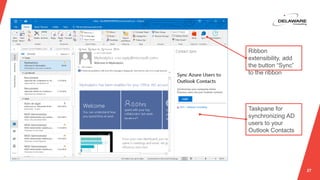
Ribbon
extensibility, add
the button “Sync”
to the ribbon
Taskpane for
synchronizing AD
users to your
Outlook Contacts
Wrap-up
Deep Dive Building Office
Mail Add-ins with the
Microsoft Graph
Key take-aways
30
› Microsoft Graph is the API to rule them all
› Single repeatable pattern for
› Mail, Contact, Calendar, OneDrive, SharePoint, Insights, …
› Reuse of Access Token for SharePoint CSOM / REST calls
› Office Web Add-ins provide contextual experience
› Office UI Fabric is the official UX design framework for Office Add-ins
Thank you
31
@bramdejager
bram.dejager@delawareconsulting.com
http://bramdejager.wordpress.com

Deep Dive Building Office Mail Add-ins with the Microsoft Graph

  • 1.
    Deep Dive BuildingOffice Mail Add-ins with the Microsoft Graph Bram de Jager Lead Architect, Delaware Consulting, Netherlands
  • 2.
    Agenda › Microsoft Graphoverview › Office Add-ins overview › Office Fabric UI overview › Authentication › Demo Contact Synchronization › Wrap-up
  • 3.
    Microsoft Graph overview Deep Dive BuildingOffice Mail Add-ins with the Microsoft Graph
  • 4.
    WHAT CAN IBUILD? Office Platform ADD-INS AND WEB PARTS: Make your solution a native part of the modern Office WEB AND DEVICE APPS: Build smarter apps by connecting to Office services VOICE, VIDEO, CONNECTORS, AND BOTS: Create the next generation of productivity solutions
  • 5.
    What is MicrosoftGraph? › Single API for › Accessing data › /me, /users, /groups, /messages, /drive, …. › Traversing data › /drive/items/<id>/lastmodifiedByUser › Accessing insights › /insights/trending › Work/School and Personal https://graph.microsoft.com/
  • 6.
    State of theworld before Microsoft Graph › Many different APIs to access data › Separate auth stacks for work and personal Work and school Personal
  • 7.
    Today’s world withMicrosoft Graph Microsoft Graph (https://graph.microsoft.com/) Work and school Personal …
  • 8.
    Diverse API stylesand endpoints https://graph.windows.net/contoso.com/users https://graph.windows.net/contoso.com/groups https://apis.live.net/v5.0/me https://contoso.sharepoint.com/_api/SP.UserProfiles.PeopleManager/GetMyProperties https://graph.microsoft.com/v1.0/me/photo https://outlook.office.com/api/v2.0/me/Messages https://outlook.office.com/api/v2.0/me/Events https://contoso-my.sharepoint.com/personal /yina_contoso_com/_api/v2.0/drive https://contoso.sharepoint.com/sites /designCouncil/_api/v2./drive https://api.onedrive.com/v1.0/drive https://contoso.sharepoint.com/_api/search/query?Querytext='*'&Prop erties='GraphQuery:actor(ME,action:1020,or(action:1020,action:1003 ,action:1001,action:1024,action:1005,action:1037,action:1039,action :1036)'&SelectProperties='Docid,Title
  • 9.
    Operation Service endpoint GETmy profile https://graph.microsoft.com/v1.0/me GET my files https://graph.microsoft.com/v1.0/me/drive/root/children GET my photo https://graph.microsoft.com/v1.0/me/photo/$value GET my mail https://graph.microsoft.com/v1.0/me/messages GET my calendar https://graph.microsoft.com/v1.0/me/calendar GET my manager https://graph.microsoft.com/v1.0/me/manager GET last user to modify file foo.txt https://graph.microsoft.com/v1.0/me/drive/root/children/foo.txt/lastModifiedByUser GET users in my organization https://graph.microsoft.com/v1.0/users GET group conversations https://graph.microsoft.com/v1.0/groups/<id>/conversations GET people related to me https://graph.microsoft.com/beta/me/people GET my tasks https://graph.microsoft.com/beta/me/tasks GET my notes https://graph.microsoft.com/beta/me/notes/notebooks GET files trending around me https://graph.microsoft.com/beta/me/insights/trending Unified API style – single endpoint https://graph.microsoft.com
  • 10.
    Office Add- ins overview DeepDive Building Office Mail Add-ins with the Microsoft Graph
  • 11.
    Introducing the add-inmodel › Office add-ins are the means for enabling contextual experiences › Office add-ins boost productivity by integrating services into Office client › Office add-ins do not “live” on the Office client › Custom code executes in the client, cloud, or on-premises › Acquire add-ins via centralized location (store) › Add-in catalog (SharePoint or FileShare) › Public store (via submission process)
  • 12.
    Write once, runeverywhere
  • 13.
  • 14.
    15 Taskpane Content Add-in Commands Taskpane Content Add-in Commands Taskpane Content Taskpane Content Mail Read Mail Compose MailRead Mail Compose Add-in Commands Modules Mail Read Taskpane Add-in Commands Taskpane Add-in Commands Taskpane Taskpane Content Taskpane Add-in Commands Content Taskpane Add-in Commands Content Taskpane Content Taskpane Content Taskpane Add-in Commands * Add-in Commands and Modules only in Office 2016
  • 15.
    Office UI Fabric overview Deep DiveBuilding Office Mail Add-ins with the Microsoft Graph
  • 16.
    Office UI Fabric 17 ›Responsive, mobile-first, front-end framework for developers that delivers instant look and feel of Office › Handles typography, color, icons, animations, responsive grid layouts, and localization
  • 17.
    Authentication Deep Dive BuildingOffice Mail Add-ins with the Microsoft Graph
  • 18.
    Authentication library (ADAL/MSAL) ›Token Acquisition › Token Cache storing access tokens and refresh tokens › Automatic Token Refresh › Asynchronous Methods
  • 19.
    App authentication withMicrosoft Graph Azure AD v1.0 endpoint Azure AD v2.0 endpoint Token handling Token per resource Single token Conditional access device device policies Supported Not currently supported OAuth 2.0 and OpenID Connect compliant No Yes Permissions Static: Specified during app registration Dynamic: Request during app runtime; includes incremental consent Account types Work or school Work or school Personal Client libraries Active Directory Authentication (ADAL) SDKs for most development platforms Microsoft Authentication Library (MSAL) – Preview only
  • 20.
    AUTHENTICATION FLOW Native Application AzureAD Authorization Endpoint Azure AD Token Endpoint Microsoft Graph Return authorization code Sign-in via browser Redeem authorization code and acquire access token for Microsoft Graph resource Return access token and refresh token Call Microsoft Graph using the access token Return Http Response Request authorization code
  • 21.
    Microsoft Portals 22 › ClassicAzure Portal, https://manage.windowsazure.com › Azure Portal, https://portal.azure.com › Microsoft Application Registration portal, https://apps.dev.microsoft.com › MyApps portal, https://myapps.microsoft.com
  • 22.
    Grant access toyour profile (Consent) 23
  • 23.
    Revoke access (consent) 24 ›MyApps portal, https://myapps.microsoft.com
  • 24.
    Demo Contact Synchronizatio n Deep DiveBuilding Office Mail Add-ins with the Microsoft Graph
  • 25.
    Demo scenario › Builda Outlook Web Add-in to synchronize AD users with your personal Contacts › Steps › Setup the basics for the Office Web Add-in › Add Office UI Fabric › Provide plumbing for authentication › Support synchronization of Contacts › Augment Contact with SharePoint User Profile info (Birthday)
  • 26.
    27 Ribbon extensibility, add the button“Sync” to the ribbon Taskpane for synchronizing AD users to your Outlook Contacts
  • 27.
    Wrap-up Deep Dive BuildingOffice Mail Add-ins with the Microsoft Graph
  • 28.
    Key take-aways 30 › MicrosoftGraph is the API to rule them all › Single repeatable pattern for › Mail, Contact, Calendar, OneDrive, SharePoint, Insights, … › Reuse of Access Token for SharePoint CSOM / REST calls › Office Web Add-ins provide contextual experience › Office UI Fabric is the official UX design framework for Office Add-ins
  • 29.

Editor's Notes

  • #16 Source: https://dev.office.com/add-in-availability Modules in Outlook 2016: https://dev.office.com/docs/add-ins/outlook/extension-module-outlook-add-ins?product=outlook
  • #22 Authentication to Office 365 APIs using resource id Authorization Code Grant Flow The client application starts the flow by redirecting the user agent to the Azure AD authorization endpoint. The user authenticates and consents, if consent is required. The Azure AD authorization endpoint redirects the user agent back to the client application with an authorization code. The user agent returns authorization code to the client application’s redirect URI. The client application requests an access token from the Azure AD token issuance endpoint. It presents the authorization code to prove that the user has consented. The Azure AD token issuance endpoint returns an access token and a refresh token. The refresh token can be used to request additional access tokens. The client application uses the access token to authenticate to the Web API. After authenticating the client application, the web API returns the requested data. https://msdn.microsoft.com/en-us/library/azure/dn645542.aspx
  • #23 https://graph.microsoft.io/en-us/docs/authorization/auth_register_app_v2 Should I use the v2.0 endpoint? » https://docs.microsoft.com/en-us/azure/active-directory/active-directory-v2-limitations