Bhakthi Liyanage
SPS Toronto 2016
07 July 2016
GOLDBRONZE/
PRIZES
SILVE
R
3
 Who am I?
 Objectives
 Overview
 Workflow Configuration
 Demo
4
Sr. SharePoint Architect
16+ years in the IT industry
11+ years in SharePoint
bhakthil@gmail.com
@bhakthil
https://www.linkedin.com/pub/bhakthi-liyanage/14/15/912
https://github.com/bhakthil
Learn what’s new in Workflow Setup in
SharePoint 2013
Learn how to authenticate from Workflow
Manager via SharePointWorkflow App
Learn how to leverage SharePoint 2013
REST API to extend workflow capabilities
5
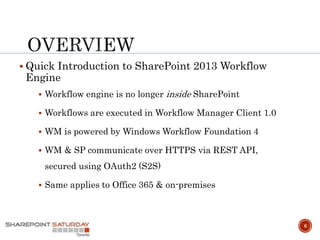
 Quick Introduction to SharePoint 2013 Workflow
Engine
 Workflow engine is no longer inside SharePoint
 Workflows are executed in Workflow Manager Client 1.0
 WM is powered by Windows Workflow Foundation 4
 WM & SP communicate over HTTPS via REST API,
secured using OAuth2 (S2S)
 Same applies to Office 365 & on-premises
6
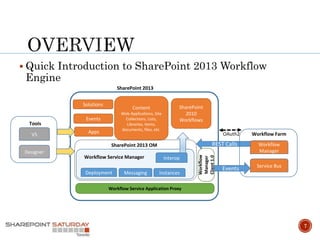
 Quick Introduction to SharePoint 2013 Workflow
Engine
7
Apps
Solutions
Events
Content
Web Applications, Site
Collections, Lists,
Libraries, items,
documents, files, etc.
SharePoint
2010
Workflows
SharePoint 2013 OM
Deployment InstancesMessaging
InteropWorkflow Service Manager
Workflow
Manager
Client1.0
Workflow Service Application Proxy
REST Calls
Workflow Farm
Workflow
Manager
Service Bus
Events
OAuth2
SharePoint 2013
Tools
VS
Designer
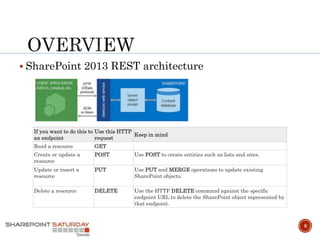
 SharePoint 2013 REST architecture
8
If you want to do this to
an endpoint
Use this HTTP
request
Keep in mind
Read a resource GET
Create or update a
resource
POST Use POST to create entities such as lists and sites.
Update or insert a
resource
PUT Use PUT and MERGE operations to update existing
SharePoint objects.
Delete a resource DELETE Use the HTTP DELETE command against the specific
endpoint URL to delete the SharePoint object represented by
that endpoint.
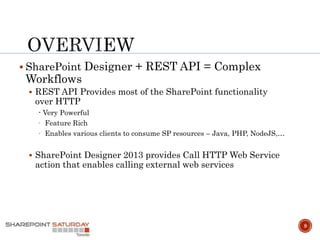
 SharePoint Designer + REST API = Complex
Workflows
 REST API Provides most of the SharePoint functionality
over HTTP
- Very Powerful
- Feature Rich
- Enables various clients to consume SP resources – Java, PHP, NodeJS,…
 SharePoint Designer 2013 provides Call HTTP Web Service
action that enables calling external web services
9
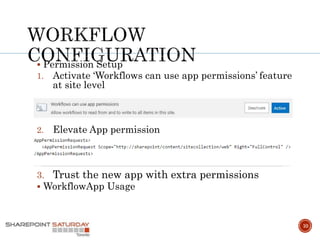
 Permission Setup
1. Activate ‘Workflows can use app permissions’ feature
at site level
2. Elevate App permission
3. Trust the new app with extra permissions
 WorkflowApp Usage
10
11
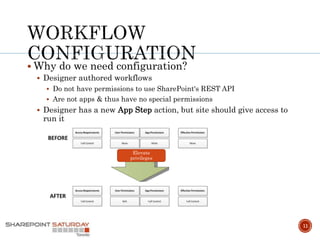
 Why do we need configuration?
 Designer authored workflows
 Do not have permissions to use SharePoint's REST API
 Are not apps & thus have no special permissions
 Designer has a new App Step action, but site should give access to
run it
Elevate
privileges
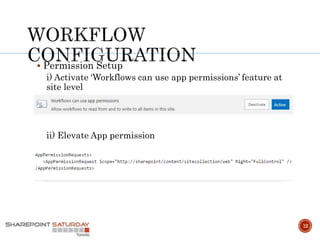
 Permission Setup
i) Activate ‘Workflows can use app permissions’ feature at
site level
ii) Elevate App permission
12
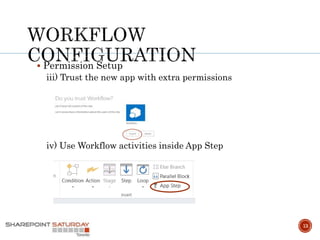
 Permission Setup
iii) Trust the new app with extra permissions
iv) Use Workflow activities inside App Step
13
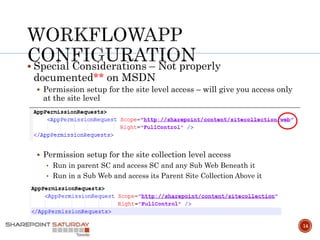
 Special Considerations – Not properly
documented** on MSDN
 Permission setup for the site level access – will give you access only
at the site level
 Permission setup for the site collection level access
• Run in parent SC and access SC and any Sub Web Beneath it
• Run in a Sub Web and access its Parent Site Collection Above it
14
15
 Site provisioning WF
 User Provisioning WF
16
 Get to know the SharePoint 2013 REST service
https://msdn.microsoft.com/en-us/library/office/fp142380.aspx
 Create a workflow with elevated permissions by using the SharePoint 2013 Workflow platform
https://msdn.microsoft.com/en-us/library/office/jj822159.aspx
 REST API reference and samples
https://msdn.microsoft.com/en-us/library/office/jj860569.aspx
 SharePoint 2013 workflow fundamentals
https://msdn.microsoft.com/en-us/library/office/jj163181.aspx
Thank you!
Toronto Enterprise Collaboration User Group
Change Management, Governance, SharePoint, Office 365,
Yammer, PowerBI, etc
http://www.meetup.com/TSPBUG/
Toronto SharePoint Users Group
http://tspug.com/
THANK YOU & See you next year!
Join us for SharePint after the event @ 5:30pm
6982 Financial Dr. and don’t forget to submit feedback
after each session for your chance to win great prizes
at the end of the day!
https://www.surveymonkey.com/r/spstoronto2016

Solving business problems: No-code approach with SharePoint designer workflows and REST API

  • 1.
  • 2.
  • 3.
    3  Who amI?  Objectives  Overview  Workflow Configuration  Demo
  • 4.
    4 Sr. SharePoint Architect 16+years in the IT industry 11+ years in SharePoint bhakthil@gmail.com @bhakthil https://www.linkedin.com/pub/bhakthi-liyanage/14/15/912 https://github.com/bhakthil
  • 5.
    Learn what’s newin Workflow Setup in SharePoint 2013 Learn how to authenticate from Workflow Manager via SharePointWorkflow App Learn how to leverage SharePoint 2013 REST API to extend workflow capabilities 5
  • 6.
     Quick Introductionto SharePoint 2013 Workflow Engine  Workflow engine is no longer inside SharePoint  Workflows are executed in Workflow Manager Client 1.0  WM is powered by Windows Workflow Foundation 4  WM & SP communicate over HTTPS via REST API, secured using OAuth2 (S2S)  Same applies to Office 365 & on-premises 6
  • 7.
     Quick Introductionto SharePoint 2013 Workflow Engine 7 Apps Solutions Events Content Web Applications, Site Collections, Lists, Libraries, items, documents, files, etc. SharePoint 2010 Workflows SharePoint 2013 OM Deployment InstancesMessaging InteropWorkflow Service Manager Workflow Manager Client1.0 Workflow Service Application Proxy REST Calls Workflow Farm Workflow Manager Service Bus Events OAuth2 SharePoint 2013 Tools VS Designer
  • 8.
     SharePoint 2013REST architecture 8 If you want to do this to an endpoint Use this HTTP request Keep in mind Read a resource GET Create or update a resource POST Use POST to create entities such as lists and sites. Update or insert a resource PUT Use PUT and MERGE operations to update existing SharePoint objects. Delete a resource DELETE Use the HTTP DELETE command against the specific endpoint URL to delete the SharePoint object represented by that endpoint.
  • 9.
     SharePoint Designer+ REST API = Complex Workflows  REST API Provides most of the SharePoint functionality over HTTP - Very Powerful - Feature Rich - Enables various clients to consume SP resources – Java, PHP, NodeJS,…  SharePoint Designer 2013 provides Call HTTP Web Service action that enables calling external web services 9
  • 10.
     Permission Setup 1.Activate ‘Workflows can use app permissions’ feature at site level 2. Elevate App permission 3. Trust the new app with extra permissions  WorkflowApp Usage 10
  • 11.
    11  Why dowe need configuration?  Designer authored workflows  Do not have permissions to use SharePoint's REST API  Are not apps & thus have no special permissions  Designer has a new App Step action, but site should give access to run it Elevate privileges
  • 12.
     Permission Setup i)Activate ‘Workflows can use app permissions’ feature at site level ii) Elevate App permission 12
  • 13.
     Permission Setup iii)Trust the new app with extra permissions iv) Use Workflow activities inside App Step 13
  • 14.
     Special Considerations– Not properly documented** on MSDN  Permission setup for the site level access – will give you access only at the site level  Permission setup for the site collection level access • Run in parent SC and access SC and any Sub Web Beneath it • Run in a Sub Web and access its Parent Site Collection Above it 14
  • 15.
    15  Site provisioningWF  User Provisioning WF
  • 16.
    16  Get toknow the SharePoint 2013 REST service https://msdn.microsoft.com/en-us/library/office/fp142380.aspx  Create a workflow with elevated permissions by using the SharePoint 2013 Workflow platform https://msdn.microsoft.com/en-us/library/office/jj822159.aspx  REST API reference and samples https://msdn.microsoft.com/en-us/library/office/jj860569.aspx  SharePoint 2013 workflow fundamentals https://msdn.microsoft.com/en-us/library/office/jj163181.aspx
  • 17.
    Thank you! Toronto EnterpriseCollaboration User Group Change Management, Governance, SharePoint, Office 365, Yammer, PowerBI, etc http://www.meetup.com/TSPBUG/ Toronto SharePoint Users Group http://tspug.com/ THANK YOU & See you next year! Join us for SharePint after the event @ 5:30pm 6982 Financial Dr. and don’t forget to submit feedback after each session for your chance to win great prizes at the end of the day! https://www.surveymonkey.com/r/spstoronto2016