SharePoint Server 2013 Farm Office Web Apps Server Farm
Physical host A Physical host B
Load balancer
Physical host E
SQL Server installed and configured to support SQL clustering, mirroring, or AlwaysOn
(AlwaysOn Availability Groups is a feature of SQL Server 2012)
Physical host F
Web server
Physical host C Physical host D
Databases
Microsoft SharePoint Server 2013 Architecture
Repopulation
1
2
3
A
B
1
2
3 A C
Activity Generators
Microblog features
Likes Posts/Replies
@ Mentions ...
Document
Edits
Document
Sharing
Community
Posts
Timer Jobs
Birthdays ...
Feeds
Following
Likes Newsfeed
Everyone
Newsfeed
Mentions
Newsfeed
Activities
Newsfeed
Site Feeds
Distributed Cache
Feeds Cache
Recent User
Activities
Recent Sites
Activities
Recent Tag
Activities
Recent
Document
Activities
Last Modified Time Cache
Last Modified
Time of
Activities
B
Content Databases
All User
Activities
All Site
Activities
My Sites
Content Databases
Sites
Content Databases
© 2014 Microsoft Corporation. All rights reserved. To send feedback about this documentation, please write to us at ITSPDocs@microsoft.com.
SharePoint Server 2013
Visual Studio
2012
SharePoint 2010
Workflow Platform
SharePoint
Designer 2013
Windows Server SQL Server
Windows Server
Workflow Manager
(SharePoint 2013
Workflow Platform)
SQL Server
Virtual Environment
High availability:
· Virtual machine placement on
different virtualization host
servers
· Windows Server Failover
Clustering on host servers
· Live migration enabled
Hyper-V
virtualization
host servers
A1
A3
A4
A2
W2
W3
W1
W4
Disaster recovery to standby recovery farm
· Asynchronous mirroring
· Log shipping
· AlwaysOn replica with asynchronous commit
Cold
standby
Warm
standby
Hot
standby
Primary Data Center
(www.contoso.com)
Redundant and fault tolerant design:
· Data center
· Network devices such as switches and routers
· Servers and peripherals such as power supply,
network adapters, local storage, and remote
storage
· Facilities – Power, cooling, and
communications
· Local and regional – alternate power, WAN,
and communications
Data center backup and restore strategy:
· Best practice policies and procedures
· Monitoring and reporting tools
· Backup and recovery tools and architecture
· Off-site storage – physical or in the cloud
Physical Environment
High availability:
· Virtual machine placement on different virtualization host servers
· Windows Server Failover Clustering on host servers
· Live migration enabled
All SharePoint Databases
High availability options:
· Database mirroring
· AlwaysOn Availability Group
· Database clustering
· AlwaysOn Failover Cluster Instance
· Live migration enabled
Web Servers Application Servers
Other search
components and
application roles
W1
W2
W3
W4
A1
A3
A4
A2
Query and index
Query and index
Other search
components and
application roles
Crawler
Crawler
Index Partition 1
Replica
Replica
Highly available architecture
Redundant
Services
Service applications
Application components
Redundant
Farm server roles
Crawler
Application Server—
Query & Index
Index partition 1
http://contoso.com/sites/web1
http://prefix-apphash.contosoapps.com/sites/web1/appname
Isolated domain
Main SharePoint site
App1 SharePoint site
SharePoint Site
App1
App2 App2 Isolated SharePoint Subsite (spweb)
List1
List2
Workflow
External server
Custom Business Logic
Logical architecture High availability and disaster recovery
Physical architecture
Monitoring and manageability
Architecture improvements for WAN
environments and offline scenarios
Social architecture
App management
Workflow
Office Web Apps Server
Distributed cache
Newsfeeds
SharePoint Health Analyzer System Center 2012
OneDrive for Business for SharePoint libraries
Minimal download
Bandwidth engineering improvements Efficient File I/O
Sites
Service applications
Saving and synchronizing content Community sites
Search PowerPoint Automation Service
Translation services Work Management
SharePoint system databases
User profile service databases
Search Service Application
databases
Other service application databases SQL Server 2008 R2 (SP1) and
SQL Server 2012 system databases
Microsoft SQL Server Reporting
Services databases
When deployed, a user's My Site document library is the default location for
files that Microsoft Office 2013 client applications save. A discovery service
identifies the URL of the user's My Site and offers it as the default location in
addition to other locations available for saving files. This promotes the
concept of storing files in the document library of a user's My Site where
items can be managed, governed, shared, and moved. This helps reduce the
amount of content that other systems, such as email or personal drives,
store.
A new site template named Community Sites offers a forum experience to
categorize and cultivate discussions with a broad group of people across
organizations within a company. You can deploy a stand-alone community
(shown). Or, you can activate community features on any site, which provides
the core Community Site pages, moderation, membership, and reputation
functionality within the existing site without creating a separate Community
Site.
Search is better integrated with enterprise infrastructure, based on an
entirely new engine that combines the simplicity and great default relevance
provided by SharePoint Search with the massive scale and extensibility
offered by FAST technology. IT can deploy a scalable search architecture
that enables users to search remote data sources, navigate enterprise
repositories rapidly, and bring more information within reach through new
individual search results that are based on how individuals interact with
information in their daily work.
Information is at SharePoint’s core and making that information in a variety of
formats leads to broader collaboration and access to improvements in
software. SharePoint Server 2013 provides a new PowerPoint Automation
Service, which is similar to the current Word Automation Service. The
PowerPoint Automation Service can automate conversation of Microsoft
PowerPoint presentations to many formats, which promotes a high degree of
accessibility, from converting older Office formats to newer Office formats, or
to web pages, or PDFs.
Reach more people with new cloud-based translation services that can
translate sites and site content. With a full set of API’s, REST, and CSOM
support, content can be pre-translated when needed, or on the fly by users
— asynchronously, synchronously, or streaming,
The Work Management Service provides task aggregation across work
management systems, including Microsoft SharePoint, Microsoft Exchange
Server, and Microsoft Project Server. For example, users can edit tasks from
Exchange Server on a mobile phone, and the Work Management Service
aggregates tasks from Exchange Server in the My tasks SharePoint list.
· Configuration
· Central Administration Content
· Content (many databases)
· Profile
· Synchronization
· Social Tagging
· Search Administration
· Analytics Reporting
· Crawl
· Link
· App Management
· Apps for SharePoint
· Business Data Connectivity
· Machine Translation Services
· Managed Metadata Service
· PerformancePoint Services
· Secure Store Service
· SQL Server PowerPivot Service Application
· State Service
· Subscription Settings Service
· Taxonomy
· Usage
· Word Automation Services
· Word Conversion
· Master
· Model
· Msdb
· tempdb
· Reporting Server Catalog
· ReportServerTempDB
· Report Server Alerting
SharePoint Server 2013 brings major advancements to workflows: enterprise features such as fully
declarative authoring, REST and Service Bus messaging, elastic scalability, and managed service
reliability.
SharePoint Server 2013 can use a new workflow service built on the Windows Workflow Foundation
components of the .NET Framework 4.5. This new service is called Workflow Manager and it is designed
to play a central role in the enterprise. Processes are central to any organization and workflow is the
orchestrator of processes.
The SharePoint 2010 Workflow platform has been carried forward to SharePoint Server 2013.
Workflows that you built by using SharePoint Server 2010 will continue to work in SharePoint Server
2013.
Site owners can add apps for SharePoint to their sites. If an app contains SharePoint components, those
components are stored in a subweb of the site that is automatically created when you install the app. If the
app is a developer self-hosted or Azure auto-provisioned app, the app components are stored in those
locations. For example, in the preceding diagram, App1 contains custom business logic and is stored on an
external server — it is an Azure auto-provisioned app and does not store content in a subweb of the site.
App2 is a SharePoint hosted app with only SharePoint components. App2's content is stored in a subweb of
the site on which it is installed.
By default, apps are deployed to their own web site in a special, isolated domain, instead of to your farm or
a sandbox. Processes run in that domain.
The apps for SharePoint provide a new method to deliver specific information or functionality to a
SharePoint site. An app for SharePoint is a small, easy-to-use, stand-alone app that solves a specific end-
user or business need. Site owners can discover and download apps for SharePoint from a public
SharePoint Store or from an organization's internal App Catalog and install them on their SharePoint sites.
Microsoft hosts and controls a public online store, where developers around the world publish and sell
their custom apps for SharePoint. End users and IT professionals can obtain these custom apps for personal
or corporate use. This online store handles the end-to-end acquisition experience from discovery to
purchase, upgrades, and updates. (http://office.microsoft.com/en-us/store)
Company-developed and approved apps can also be deployed to an organization's internal App Catalog
that is hosted on SharePoint Server 2013 or SharePoint Online. This controls the visibility of apps within
organizations.
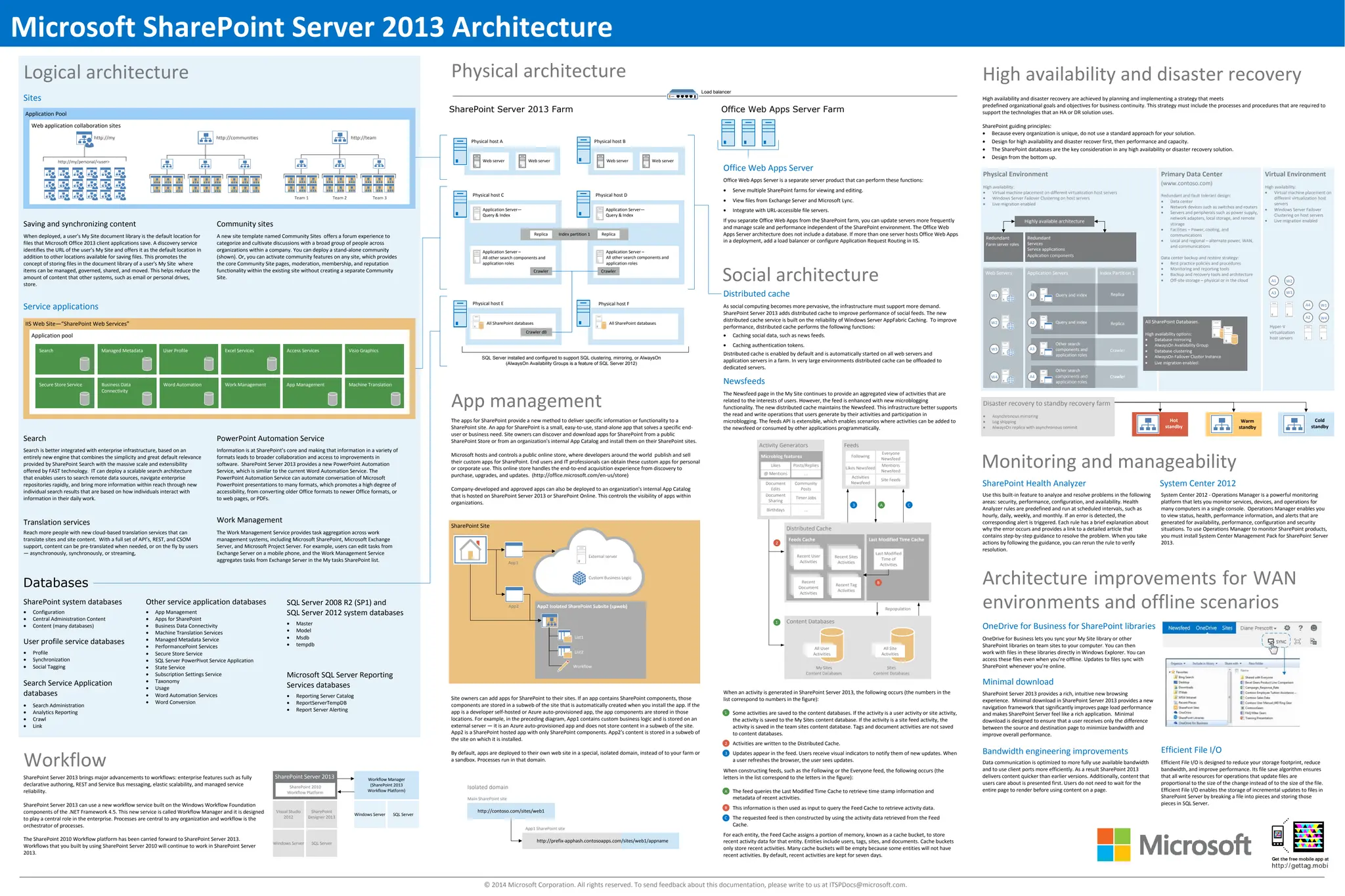
Office Web Apps Server is a separate server product that can perform these functions:
· Serve multiple SharePoint farms for viewing and editing.
· View files from Exchange Server and Microsoft Lync.
· Integrate with URL-accessible file servers.
If you separate Office Web Apps from the SharePoint farm, you can update servers more frequently
and manage scale and performance independent of the SharePoint environment. The Office Web
Apps Server architecture does not include a database. If more than one server hosts Office Web Apps
in a deployment, add a load balancer or configure Application Request Routing in IIS.
As social computing becomes more pervasive, the infrastructure must support more demand.
SharePoint Server 2013 adds distributed cache to improve performance of social feeds. The new
distributed cache service is built on the reliability of Windows Server AppFabric Caching. To improve
performance, distributed cache performs the following functions:
· Caching social data, such as news feeds.
· Caching authentication tokens.
Distributed cache is enabled by default and is automatically started on all web servers and
application servers in a farm. In very large environments distributed cache can be offloaded to
dedicated servers.
The Newsfeed page in the My Site continues to provide an aggregated view of activities that are
related to the interests of users. However, the feed is enhanced with new microblogging
functionality. The new distributed cache maintains the Newsfeed. This infrastructure better supports
the read and write operations that users generate by their activities and participation in
microblogging. The feeds API is extensible, which enables scenarios where activities can be added to
the newsfeed or consumed by other applications programmatically.
Use this built-in feature to analyze and resolve problems in the following
areas: security, performance, configuration, and availability. Health
Analyzer rules are predefined and run at scheduled intervals, such as
hourly, daily, weekly, and monthly. If an error is detected, the
corresponding alert is triggered. Each rule has a brief explanation about
why the error occurs and provides a link to a detailed article that
contains step-by-step guidance to resolve the problem. When you take
actions by following the guidance, you can rerun the rule to verify
resolution.
System Center 2012 - Operations Manager is a powerful monitoring
platform that lets you monitor services, devices, and operations for
many computers in a single console. Operations Manager enables you
to view status, health, performance information, and alerts that are
generated for availability, performance, configuration and security
situations. To use Operations Manager to monitor SharePoint products,
you must install System Center Management Pack for SharePoint Server
2013.
High availability and disaster recovery are achieved by planning and implementing a strategy that meets
predefined organizational goals and objectives for business continuity. This strategy must include the processes and procedures that are required to
support the technologies that an HA or DR solution uses.
SharePoint guiding principles:
· Because every organization is unique, do not use a standard approach for your solution.
· Design for high availability and disaster recover first, then performance and capacity.
· The SharePoint databases are the key consideration in any high availability or disaster recovery solution.
· Design from the bottom up.
OneDrive for Business lets you sync your My Site library or other
SharePoint libraries on team sites to your computer. You can then
work with files in these libraries directly in Windows Explorer. You can
access these files even when you’re offline. Updates to files sync with
SharePoint whenever you’re online.
SharePoint Server 2013 provides a rich, intuitive new browsing
experience. Minimal download in SharePoint Server 2013 provides a new
navigation framework that significantly improves page load performance
and makes SharePoint Server feel like a rich application. Minimal
download is designed to ensure that a user receives only the difference
between the source and destination page to minimize bandwidth and
improve overall performance.
Data communication is optimized to more fully use available bandwidth
and to use client ports more efficiently. As a result SharePoint 2013
delivers content quicker than earlier versions. Additionally, content that
users care about is presented first. Users do not need to wait for the
entire page to render before using content on a page.
Efficient File I/O is designed to reduce your storage footprint, reduce
bandwidth, and improve performance. Its file save algorithm ensures
that all write resources for operations that update files are
proportional to the size of the change instead of to the size of the file.
Efficient File I/O enables the storage of incremental updates to files in
SharePoint Server by breaking a file into pieces and storing those
pieces in SQL Server.
When an activity is generated in SharePoint Server 2013, the following occurs (the numbers in the
list correspond to numbers in the figure):
Some activities are saved to the content databases. If the activity is a user activity or site activity,
the activity is saved to the My Sites content database. If the activity is a site feed activity, the
activity is saved in the team sites content database. Tags and document activities are not saved
to content databases.
Activities are written to the Distributed Cache.
Updates appear in the feed. Users receive visual indicators to notify them of new updates. When
a user refreshes the browser, the user sees updates.
When constructing feeds, such as the Following or the Everyone feed, the following occurs (the
letters in the list correspond to the letters in the figure):
The feed queries the Last Modified Time Cache to retrieve time stamp information and
metadata of recent activities.
This information is then used as input to query the Feed Cache to retrieve activity data.
The requested feed is then constructed by using the activity data retrieved from the Feed
Cache.
For each entity, the Feed Cache assigns a portion of memory, known as a cache bucket, to store
recent activity data for that entity. Entities include users, tags, sites, and documents. Cache buckets
only store recent activities. Many cache buckets will be empty because some entities will not have
recent activities. By default, recent activities are kept for seven days.
C
Web server Web server
Web server
Application Server –
All other search components and
application roles
Replica Replica
Application Server—
Query & Index
Application Server –
All other search components and
application roles
Crawler Crawler
All SharePoint databases
IIS Web Site—“SharePoint Web Services”
Application pool
Search Managed Metadata User Profile Excel Services Access Services Visio Graphics
Secure Store Service Business Data
Connectivity
Word Automation Work Management App Management Machine Translation
Application Pool
Web application collaboration sites
http://my/personal/<user>
http://my http://communities
Team 1
http://team
Team 2 Team 3
Crawler dB
All SharePoint databases

sps-2013-architecture-overview.pdf

  • 1.
    SharePoint Server 2013Farm Office Web Apps Server Farm Physical host A Physical host B Load balancer Physical host E SQL Server installed and configured to support SQL clustering, mirroring, or AlwaysOn (AlwaysOn Availability Groups is a feature of SQL Server 2012) Physical host F Web server Physical host C Physical host D Databases Microsoft SharePoint Server 2013 Architecture Repopulation 1 2 3 A B 1 2 3 A C Activity Generators Microblog features Likes Posts/Replies @ Mentions ... Document Edits Document Sharing Community Posts Timer Jobs Birthdays ... Feeds Following Likes Newsfeed Everyone Newsfeed Mentions Newsfeed Activities Newsfeed Site Feeds Distributed Cache Feeds Cache Recent User Activities Recent Sites Activities Recent Tag Activities Recent Document Activities Last Modified Time Cache Last Modified Time of Activities B Content Databases All User Activities All Site Activities My Sites Content Databases Sites Content Databases © 2014 Microsoft Corporation. All rights reserved. To send feedback about this documentation, please write to us at ITSPDocs@microsoft.com. SharePoint Server 2013 Visual Studio 2012 SharePoint 2010 Workflow Platform SharePoint Designer 2013 Windows Server SQL Server Windows Server Workflow Manager (SharePoint 2013 Workflow Platform) SQL Server Virtual Environment High availability: · Virtual machine placement on different virtualization host servers · Windows Server Failover Clustering on host servers · Live migration enabled Hyper-V virtualization host servers A1 A3 A4 A2 W2 W3 W1 W4 Disaster recovery to standby recovery farm · Asynchronous mirroring · Log shipping · AlwaysOn replica with asynchronous commit Cold standby Warm standby Hot standby Primary Data Center (www.contoso.com) Redundant and fault tolerant design: · Data center · Network devices such as switches and routers · Servers and peripherals such as power supply, network adapters, local storage, and remote storage · Facilities – Power, cooling, and communications · Local and regional – alternate power, WAN, and communications Data center backup and restore strategy: · Best practice policies and procedures · Monitoring and reporting tools · Backup and recovery tools and architecture · Off-site storage – physical or in the cloud Physical Environment High availability: · Virtual machine placement on different virtualization host servers · Windows Server Failover Clustering on host servers · Live migration enabled All SharePoint Databases High availability options: · Database mirroring · AlwaysOn Availability Group · Database clustering · AlwaysOn Failover Cluster Instance · Live migration enabled Web Servers Application Servers Other search components and application roles W1 W2 W3 W4 A1 A3 A4 A2 Query and index Query and index Other search components and application roles Crawler Crawler Index Partition 1 Replica Replica Highly available architecture Redundant Services Service applications Application components Redundant Farm server roles Crawler Application Server— Query & Index Index partition 1 http://contoso.com/sites/web1 http://prefix-apphash.contosoapps.com/sites/web1/appname Isolated domain Main SharePoint site App1 SharePoint site SharePoint Site App1 App2 App2 Isolated SharePoint Subsite (spweb) List1 List2 Workflow External server Custom Business Logic Logical architecture High availability and disaster recovery Physical architecture Monitoring and manageability Architecture improvements for WAN environments and offline scenarios Social architecture App management Workflow Office Web Apps Server Distributed cache Newsfeeds SharePoint Health Analyzer System Center 2012 OneDrive for Business for SharePoint libraries Minimal download Bandwidth engineering improvements Efficient File I/O Sites Service applications Saving and synchronizing content Community sites Search PowerPoint Automation Service Translation services Work Management SharePoint system databases User profile service databases Search Service Application databases Other service application databases SQL Server 2008 R2 (SP1) and SQL Server 2012 system databases Microsoft SQL Server Reporting Services databases When deployed, a user's My Site document library is the default location for files that Microsoft Office 2013 client applications save. A discovery service identifies the URL of the user's My Site and offers it as the default location in addition to other locations available for saving files. This promotes the concept of storing files in the document library of a user's My Site where items can be managed, governed, shared, and moved. This helps reduce the amount of content that other systems, such as email or personal drives, store. A new site template named Community Sites offers a forum experience to categorize and cultivate discussions with a broad group of people across organizations within a company. You can deploy a stand-alone community (shown). Or, you can activate community features on any site, which provides the core Community Site pages, moderation, membership, and reputation functionality within the existing site without creating a separate Community Site. Search is better integrated with enterprise infrastructure, based on an entirely new engine that combines the simplicity and great default relevance provided by SharePoint Search with the massive scale and extensibility offered by FAST technology. IT can deploy a scalable search architecture that enables users to search remote data sources, navigate enterprise repositories rapidly, and bring more information within reach through new individual search results that are based on how individuals interact with information in their daily work. Information is at SharePoint’s core and making that information in a variety of formats leads to broader collaboration and access to improvements in software. SharePoint Server 2013 provides a new PowerPoint Automation Service, which is similar to the current Word Automation Service. The PowerPoint Automation Service can automate conversation of Microsoft PowerPoint presentations to many formats, which promotes a high degree of accessibility, from converting older Office formats to newer Office formats, or to web pages, or PDFs. Reach more people with new cloud-based translation services that can translate sites and site content. With a full set of API’s, REST, and CSOM support, content can be pre-translated when needed, or on the fly by users — asynchronously, synchronously, or streaming, The Work Management Service provides task aggregation across work management systems, including Microsoft SharePoint, Microsoft Exchange Server, and Microsoft Project Server. For example, users can edit tasks from Exchange Server on a mobile phone, and the Work Management Service aggregates tasks from Exchange Server in the My tasks SharePoint list. · Configuration · Central Administration Content · Content (many databases) · Profile · Synchronization · Social Tagging · Search Administration · Analytics Reporting · Crawl · Link · App Management · Apps for SharePoint · Business Data Connectivity · Machine Translation Services · Managed Metadata Service · PerformancePoint Services · Secure Store Service · SQL Server PowerPivot Service Application · State Service · Subscription Settings Service · Taxonomy · Usage · Word Automation Services · Word Conversion · Master · Model · Msdb · tempdb · Reporting Server Catalog · ReportServerTempDB · Report Server Alerting SharePoint Server 2013 brings major advancements to workflows: enterprise features such as fully declarative authoring, REST and Service Bus messaging, elastic scalability, and managed service reliability. SharePoint Server 2013 can use a new workflow service built on the Windows Workflow Foundation components of the .NET Framework 4.5. This new service is called Workflow Manager and it is designed to play a central role in the enterprise. Processes are central to any organization and workflow is the orchestrator of processes. The SharePoint 2010 Workflow platform has been carried forward to SharePoint Server 2013. Workflows that you built by using SharePoint Server 2010 will continue to work in SharePoint Server 2013. Site owners can add apps for SharePoint to their sites. If an app contains SharePoint components, those components are stored in a subweb of the site that is automatically created when you install the app. If the app is a developer self-hosted or Azure auto-provisioned app, the app components are stored in those locations. For example, in the preceding diagram, App1 contains custom business logic and is stored on an external server — it is an Azure auto-provisioned app and does not store content in a subweb of the site. App2 is a SharePoint hosted app with only SharePoint components. App2's content is stored in a subweb of the site on which it is installed. By default, apps are deployed to their own web site in a special, isolated domain, instead of to your farm or a sandbox. Processes run in that domain. The apps for SharePoint provide a new method to deliver specific information or functionality to a SharePoint site. An app for SharePoint is a small, easy-to-use, stand-alone app that solves a specific end- user or business need. Site owners can discover and download apps for SharePoint from a public SharePoint Store or from an organization's internal App Catalog and install them on their SharePoint sites. Microsoft hosts and controls a public online store, where developers around the world publish and sell their custom apps for SharePoint. End users and IT professionals can obtain these custom apps for personal or corporate use. This online store handles the end-to-end acquisition experience from discovery to purchase, upgrades, and updates. (http://office.microsoft.com/en-us/store) Company-developed and approved apps can also be deployed to an organization's internal App Catalog that is hosted on SharePoint Server 2013 or SharePoint Online. This controls the visibility of apps within organizations. Office Web Apps Server is a separate server product that can perform these functions: · Serve multiple SharePoint farms for viewing and editing. · View files from Exchange Server and Microsoft Lync. · Integrate with URL-accessible file servers. If you separate Office Web Apps from the SharePoint farm, you can update servers more frequently and manage scale and performance independent of the SharePoint environment. The Office Web Apps Server architecture does not include a database. If more than one server hosts Office Web Apps in a deployment, add a load balancer or configure Application Request Routing in IIS. As social computing becomes more pervasive, the infrastructure must support more demand. SharePoint Server 2013 adds distributed cache to improve performance of social feeds. The new distributed cache service is built on the reliability of Windows Server AppFabric Caching. To improve performance, distributed cache performs the following functions: · Caching social data, such as news feeds. · Caching authentication tokens. Distributed cache is enabled by default and is automatically started on all web servers and application servers in a farm. In very large environments distributed cache can be offloaded to dedicated servers. The Newsfeed page in the My Site continues to provide an aggregated view of activities that are related to the interests of users. However, the feed is enhanced with new microblogging functionality. The new distributed cache maintains the Newsfeed. This infrastructure better supports the read and write operations that users generate by their activities and participation in microblogging. The feeds API is extensible, which enables scenarios where activities can be added to the newsfeed or consumed by other applications programmatically. Use this built-in feature to analyze and resolve problems in the following areas: security, performance, configuration, and availability. Health Analyzer rules are predefined and run at scheduled intervals, such as hourly, daily, weekly, and monthly. If an error is detected, the corresponding alert is triggered. Each rule has a brief explanation about why the error occurs and provides a link to a detailed article that contains step-by-step guidance to resolve the problem. When you take actions by following the guidance, you can rerun the rule to verify resolution. System Center 2012 - Operations Manager is a powerful monitoring platform that lets you monitor services, devices, and operations for many computers in a single console. Operations Manager enables you to view status, health, performance information, and alerts that are generated for availability, performance, configuration and security situations. To use Operations Manager to monitor SharePoint products, you must install System Center Management Pack for SharePoint Server 2013. High availability and disaster recovery are achieved by planning and implementing a strategy that meets predefined organizational goals and objectives for business continuity. This strategy must include the processes and procedures that are required to support the technologies that an HA or DR solution uses. SharePoint guiding principles: · Because every organization is unique, do not use a standard approach for your solution. · Design for high availability and disaster recover first, then performance and capacity. · The SharePoint databases are the key consideration in any high availability or disaster recovery solution. · Design from the bottom up. OneDrive for Business lets you sync your My Site library or other SharePoint libraries on team sites to your computer. You can then work with files in these libraries directly in Windows Explorer. You can access these files even when you’re offline. Updates to files sync with SharePoint whenever you’re online. SharePoint Server 2013 provides a rich, intuitive new browsing experience. Minimal download in SharePoint Server 2013 provides a new navigation framework that significantly improves page load performance and makes SharePoint Server feel like a rich application. Minimal download is designed to ensure that a user receives only the difference between the source and destination page to minimize bandwidth and improve overall performance. Data communication is optimized to more fully use available bandwidth and to use client ports more efficiently. As a result SharePoint 2013 delivers content quicker than earlier versions. Additionally, content that users care about is presented first. Users do not need to wait for the entire page to render before using content on a page. Efficient File I/O is designed to reduce your storage footprint, reduce bandwidth, and improve performance. Its file save algorithm ensures that all write resources for operations that update files are proportional to the size of the change instead of to the size of the file. Efficient File I/O enables the storage of incremental updates to files in SharePoint Server by breaking a file into pieces and storing those pieces in SQL Server. When an activity is generated in SharePoint Server 2013, the following occurs (the numbers in the list correspond to numbers in the figure): Some activities are saved to the content databases. If the activity is a user activity or site activity, the activity is saved to the My Sites content database. If the activity is a site feed activity, the activity is saved in the team sites content database. Tags and document activities are not saved to content databases. Activities are written to the Distributed Cache. Updates appear in the feed. Users receive visual indicators to notify them of new updates. When a user refreshes the browser, the user sees updates. When constructing feeds, such as the Following or the Everyone feed, the following occurs (the letters in the list correspond to the letters in the figure): The feed queries the Last Modified Time Cache to retrieve time stamp information and metadata of recent activities. This information is then used as input to query the Feed Cache to retrieve activity data. The requested feed is then constructed by using the activity data retrieved from the Feed Cache. For each entity, the Feed Cache assigns a portion of memory, known as a cache bucket, to store recent activity data for that entity. Entities include users, tags, sites, and documents. Cache buckets only store recent activities. Many cache buckets will be empty because some entities will not have recent activities. By default, recent activities are kept for seven days. C Web server Web server Web server Application Server – All other search components and application roles Replica Replica Application Server— Query & Index Application Server – All other search components and application roles Crawler Crawler All SharePoint databases IIS Web Site—“SharePoint Web Services” Application pool Search Managed Metadata User Profile Excel Services Access Services Visio Graphics Secure Store Service Business Data Connectivity Word Automation Work Management App Management Machine Translation Application Pool Web application collaboration sites http://my/personal/<user> http://my http://communities Team 1 http://team Team 2 Team 3 Crawler dB All SharePoint databases