WHERE DID I PUT THAT?
SHAREPOINT 2010 DOCUMENT
MANAGEMENT WITH CONTENT TYPES,
TAXONOMY & SEARCH
        Patrick Tucker
        tuckersnet@live.com
Bio

   Patrick Tucker
     Strategic Data Systems, MS Gold Partner
     Principal Consultant, SharePoint
     MCT, MCTS, MCPD, MCITP, MCSD, MCAD,
      MCDBA
     tuckersnet@live.com
     Blog: www.tuckersnet.com
     Twitter: @TuckersNet
About SDS

SDS Custom SharePoint Solutions
Specializing in Agile development and SharePoint coding experience to
create an optimal solution for your unique SharePoint application and
integration needs.

·   Workflow & InfoPath Forms for Business Process Automation
·   SharePoint Reports & BI Integration
·   Portals & Collaboration
·   Content Management

(Agile Practices for proven faster delivery, higher quality, & increased business value.)
Today’s Conversation
   How to use Content Types to apply consistent
    metadata columns across documents, items &
    pages
   How to use the Taxonomy Term store to apply
    consistent values across documents, items &
    pages
   How to use SharePoint Search to locate and
    aggregate content based on metadata by
    customizing search results and refiners
Where to begin?
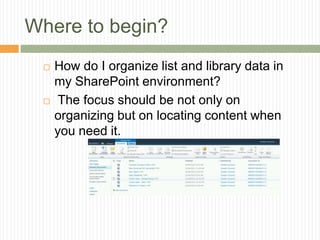
    How do I organize list and library data in
     my SharePoint environment?
     The focus should be not only on
     organizing but on locating content when
     you need it.
Reduce, Reuse and Recycle
   First determine what kind of information to
    store along with your data.
   Reduce business requirements and
    definitions into reusable types to be used
    in libraries, sites and the Enterprise
   Content Types are the reusable building
    blocks for SharePoint data
   Content can be recycled (or moved)
What Are Content Types?

   definitions, schemas
   collections of site columns
   are all about metadata – another
    tasty layer of data on top of the
    content

   This metadata can be surfaced in the
SharePoint UI, Document Information Panel,
   workflows, pages and InfoPath forms
Creating and Using Content
Types
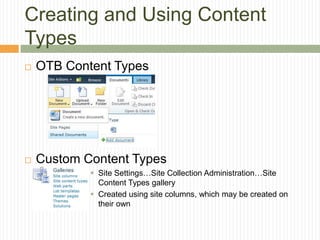
   OTB Content Types


   Custom Content Types
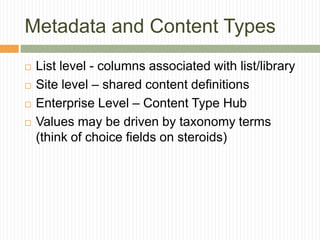
             Site Settings…Site Collection Administration…Site
              Content Types gallery
             Created using site columns, which may be created on
              their own
Metadata and Content Types
   List level - columns associated with list/library
   Site level – shared content definitions
   Enterprise Level – Content Type Hub
   Values may be driven by taxonomy terms
    (think of choice fields on steroids)
Applied Metadata

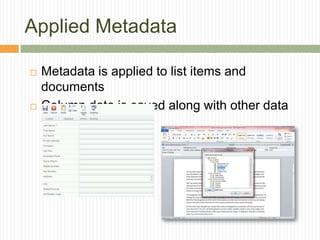
   Metadata is applied to list items and
    documents
   Column data is saved along with other data
Pages Too!
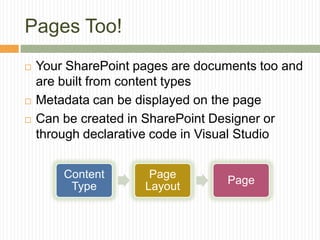
   Your SharePoint pages are documents too and
    are built from content types
   Metadata can be displayed on the page
   Can be created in SharePoint Designer or
    through declarative code in Visual Studio


        Content       Page
                                  Page
         Type        Layout
DEMO
   Content Types in action!
Reusing Content Types
   Reuse the definition by building on it through
    inheritance
     Document    Specialized Document
     List Item  Specialized List Item

   Reuse content types across the enterprise with
    Content Type Syndication
     Enforces  governance – consistent use of content
      types across the enterprise
     One site creates and shares Content Types
     Other sites are subscribers to those types
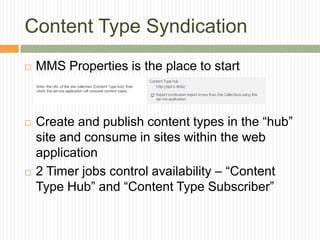
Content Type Syndication
   MMS Properties is the place to start


   Create and publish content types in the “hub”
    site and consume in sites within the web
    application
   2 Timer jobs control availability – “Content
    Type Hub” and “Content Type Subscriber”
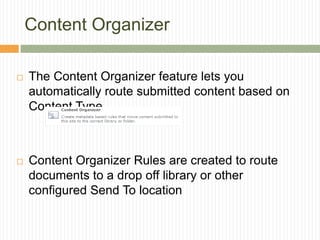
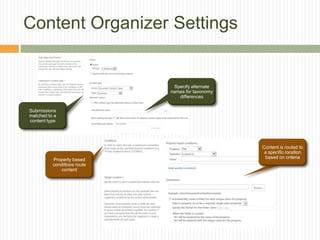
Content Organizer

   The Content Organizer feature lets you
    automatically route submitted content based on
    Content Type


   Content Organizer Rules are created to route
    documents to a drop off library or other
    configured Send To location
Content Organizer Settings
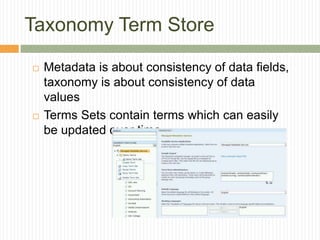
Taxonomy Term Store

   Metadata is about consistency of data fields,
    taxonomy is about consistency of data
    values
   Terms Sets contain terms which can easily
    be updated over time
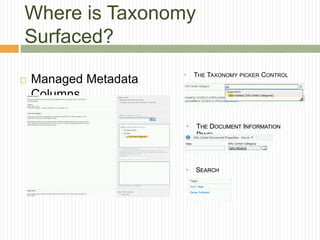
Where is Taxonomy
Surfaced?
                       •       THE TAXONOMY PICKER CONTROL
   Managed Metadata
    Columns

                           •   THE DOCUMENT INFORMATION
                               PANEL


                       •       SEARCH
Demo
   Content Type Reuse and Managed Metadata
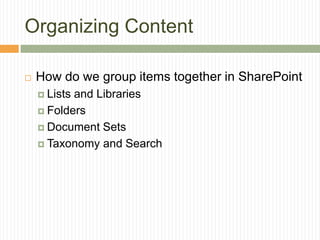
Organizing Content

   How do we group items together in SharePoint
     Listsand Libraries
     Folders

     Document Sets

     Taxonomy and Search
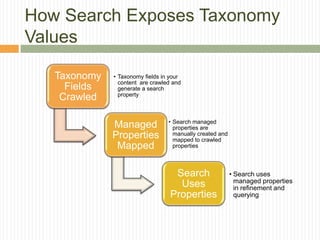
How Search Exposes Taxonomy
Values

   Taxonomy   • Taxonomy fields in your
                content are crawled and
     Fields     generate a search
                property
    Crawled

                                  • Search managed
              Managed               properties are
              Properties            manually created and
                                    mapped to crawled
               Mapped               properties


                                    Search                 • Search uses
                                                             managed properties
                                     Uses                    in refinement and
                                   Properties                querying
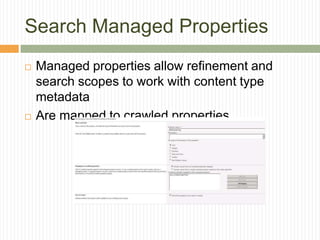
Search Managed Properties
   Managed properties allow refinement and
    search scopes to work with content type
    metadata
   Are mapped to crawled properties
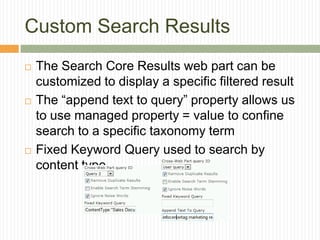
Custom Search Results
   The Search Core Results web part can be
    customized to display a specific filtered result
   The “append text to query” property allows us
    to use managed property = value to confine
    search to a specific taxonomy term
   Fixed Keyword Query used to search by
    content type
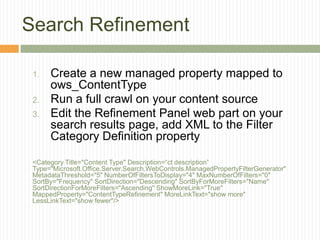
Search Refinement

 1.   Create a new managed property mapped to
      ows_ContentType
 2.   Run a full crawl on your content source
 3.   Edit the Refinement Panel web part on your
      search results page, add XML to the Filter
      Category Definition property

 <Category Title="Content Type" Description=“ct description”
 Type="Microsoft.Office.Server.Search.WebControls.ManagedPropertyFilterGenerator"
 MetadataThreshold="5" NumberOfFiltersToDisplay="4" MaxNumberOfFilters="0"
 SortBy="Frequency" SortDirection="Descending" SortByForMoreFilters="Name"
 SortDirectionForMoreFilters="Ascending" ShowMoreLink="True"
 MappedProperty="ContentTypeRefinement" MoreLinkText="show more"
 LessLinkText="show fewer"/>
Questions

         Patrick Tucker
           tuckersnet@live.com

           @TuckersNet

           www.tuckersnet.com

SharePoint Fest - Document Management with Content Types, Taxonomy and Search

  • 1.
    WHERE DID IPUT THAT? SHAREPOINT 2010 DOCUMENT MANAGEMENT WITH CONTENT TYPES, TAXONOMY & SEARCH Patrick Tucker tuckersnet@live.com
  • 2.
    Bio  Patrick Tucker  Strategic Data Systems, MS Gold Partner  Principal Consultant, SharePoint  MCT, MCTS, MCPD, MCITP, MCSD, MCAD, MCDBA  tuckersnet@live.com  Blog: www.tuckersnet.com  Twitter: @TuckersNet
  • 3.
    About SDS SDS CustomSharePoint Solutions Specializing in Agile development and SharePoint coding experience to create an optimal solution for your unique SharePoint application and integration needs. · Workflow & InfoPath Forms for Business Process Automation · SharePoint Reports & BI Integration · Portals & Collaboration · Content Management (Agile Practices for proven faster delivery, higher quality, & increased business value.)
  • 4.
    Today’s Conversation  How to use Content Types to apply consistent metadata columns across documents, items & pages  How to use the Taxonomy Term store to apply consistent values across documents, items & pages  How to use SharePoint Search to locate and aggregate content based on metadata by customizing search results and refiners
  • 5.
    Where to begin?  How do I organize list and library data in my SharePoint environment?  The focus should be not only on organizing but on locating content when you need it.
  • 6.
    Reduce, Reuse andRecycle  First determine what kind of information to store along with your data.  Reduce business requirements and definitions into reusable types to be used in libraries, sites and the Enterprise  Content Types are the reusable building blocks for SharePoint data  Content can be recycled (or moved)
  • 7.
    What Are ContentTypes?  definitions, schemas  collections of site columns  are all about metadata – another tasty layer of data on top of the content This metadata can be surfaced in the SharePoint UI, Document Information Panel, workflows, pages and InfoPath forms
  • 8.
    Creating and UsingContent Types  OTB Content Types  Custom Content Types  Site Settings…Site Collection Administration…Site Content Types gallery  Created using site columns, which may be created on their own
  • 9.
    Metadata and ContentTypes  List level - columns associated with list/library  Site level – shared content definitions  Enterprise Level – Content Type Hub  Values may be driven by taxonomy terms (think of choice fields on steroids)
  • 10.
    Applied Metadata  Metadata is applied to list items and documents  Column data is saved along with other data
  • 11.
    Pages Too!  Your SharePoint pages are documents too and are built from content types  Metadata can be displayed on the page  Can be created in SharePoint Designer or through declarative code in Visual Studio Content Page Page Type Layout
  • 12.
    DEMO  Content Types in action!
  • 13.
    Reusing Content Types  Reuse the definition by building on it through inheritance  Document  Specialized Document  List Item  Specialized List Item  Reuse content types across the enterprise with Content Type Syndication  Enforces governance – consistent use of content types across the enterprise  One site creates and shares Content Types  Other sites are subscribers to those types
  • 14.
    Content Type Syndication  MMS Properties is the place to start  Create and publish content types in the “hub” site and consume in sites within the web application  2 Timer jobs control availability – “Content Type Hub” and “Content Type Subscriber”
  • 15.
    Content Organizer  The Content Organizer feature lets you automatically route submitted content based on Content Type  Content Organizer Rules are created to route documents to a drop off library or other configured Send To location
  • 16.
  • 17.
    Taxonomy Term Store  Metadata is about consistency of data fields, taxonomy is about consistency of data values  Terms Sets contain terms which can easily be updated over time
  • 18.
    Where is Taxonomy Surfaced? • THE TAXONOMY PICKER CONTROL  Managed Metadata Columns • THE DOCUMENT INFORMATION PANEL • SEARCH
  • 19.
    Demo  Content Type Reuse and Managed Metadata
  • 20.
    Organizing Content  How do we group items together in SharePoint  Listsand Libraries  Folders  Document Sets  Taxonomy and Search
  • 21.
    How Search ExposesTaxonomy Values Taxonomy • Taxonomy fields in your content are crawled and Fields generate a search property Crawled • Search managed Managed properties are Properties manually created and mapped to crawled Mapped properties Search • Search uses managed properties Uses in refinement and Properties querying
  • 22.
    Search Managed Properties  Managed properties allow refinement and search scopes to work with content type metadata  Are mapped to crawled properties
  • 23.
    Custom Search Results  The Search Core Results web part can be customized to display a specific filtered result  The “append text to query” property allows us to use managed property = value to confine search to a specific taxonomy term  Fixed Keyword Query used to search by content type
  • 24.
    Search Refinement 1. Create a new managed property mapped to ows_ContentType 2. Run a full crawl on your content source 3. Edit the Refinement Panel web part on your search results page, add XML to the Filter Category Definition property <Category Title="Content Type" Description=“ct description” Type="Microsoft.Office.Server.Search.WebControls.ManagedPropertyFilterGenerator" MetadataThreshold="5" NumberOfFiltersToDisplay="4" MaxNumberOfFilters="0" SortBy="Frequency" SortDirection="Descending" SortByForMoreFilters="Name" SortDirectionForMoreFilters="Ascending" ShowMoreLink="True" MappedProperty="ContentTypeRefinement" MoreLinkText="show more" LessLinkText="show fewer"/>
  • 25.
    Questions  Patrick Tucker  tuckersnet@live.com  @TuckersNet  www.tuckersnet.com

Editor's Notes

  • #4 The webinar is brought to you by SDS Custom SharePoint Solutions.We specialize in custom SharePoint development, leveraged by agile practices and SharePoint coding best practices. By bringing these elements together, we focus on building custom solutions that help teams move more quickly and deliver higher quality experiences through SharePoint.Custom areas we focus on include:·  Workflow &amp; InfoPath Forms for Business Process Automation·  SharePoint Reports &amp; BI Integration·  Portals &amp; Collaboration·  Content ManagementAgain, I am your host today, and I am a Principal Consultant in our SharePoint practice.Our presenter is Scott Brickey, Manager of our SharePoint practice.Scott has16 years of experience in the IT industry and has been consulting for 8 years. In that time, he has performed solution architecture, administration, and development, and training. He has focused on SharePoint solutions over the past three years, offering SharePoint custom development, specialized training, and embedded expertise in client teams while earning his MCTS and MCP certifications. Scott’s experience has provided technical solutions and consulting across many industries utilizing various platforms including ASP, SQL, .Net, and SharePoint. He is a frequent speaker at SharePoint Saturday events and other groups.Welcome Scott....[hand over to Scott]
  • #15 stsadm -o activatefeature -id 73EF14B1-13A9-416b-A9B5-ECECA2B0604C -url http://&lt;yourserver&gt;
  • #26 An opportunity for questions and discussions.