SharePoint Saturday New York City 2014
#SPSNYC
Fotopedia.com
Must Love Term Sets: The New and Improved Managed Metadata Service in SharePoint 2013
Jonathan Ralton
Jonathan Ralton
BlueMetal Architects
Must Love Term Sets:
The New and Improved Managed
Metadata Service in SharePoint 2013
Agenda
Setting the Stage
Content Management
Services Architecture
Information Architecture
Managed Metadata Service
Term Store
What’s New
Content Type Syndication
Wrapping Up
Questions
Setting the Stage
Must Love Term Sets
ME
Presenter
Jonathan Ralton
• Senior Information Architect
• SharePoint IT Pro since 2005
(WSS/SPS)

• No code!
• Document Management,
Content Management,
Knowledge Management…
@jonralton
jonathanr@bluemetal.com
blog.jonralton.net
YOU
Audience
What role are
you in?
What are you hoping
to learn?
Content Management
Must Love Term Sets
Content Management
SharePoint does
this thing called
Content Management
Content Management
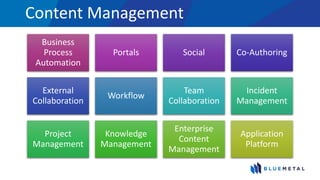
Business
Process
Automation
Portals Social Co-Authoring
External
Collaboration
Workflow
Team
Collaboration
Incident
Management
Project
Management
Knowledge
Management
Enterprise
Content
Management
Application
Platform
Content Management
50%50%
FINDING CONTENT
Navigation Search
Content Management
• What is it?
• Is it useful to me?
Content Management
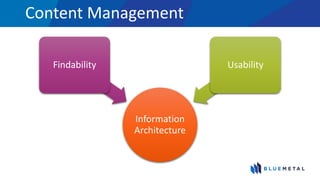
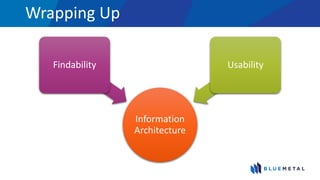
Information
Architecture
Findability Usability
Pleasantville
© 1998 New Line Cinema
Wild Wild West
© 2014 Universal Studios
Content Management
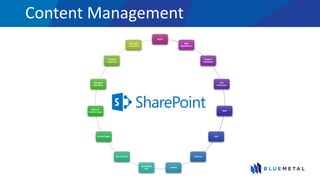
Farms
Web
Applications
Content
Databases
Site
Collections
Sites
Lists
Libraries
Folders
Document
Sets
Site Columns
Content Types
External
Content Types
Managed
Metadata
Crawled
Properties
Managed
Properties
Content Management
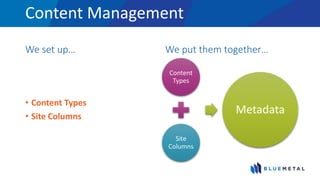
We set up…
• Content Types
• Site Columns
We put them together…
Content
Types
Site
Columns
Metadata
Services Architecture
Must Love Term Sets
Shared Service Provider (SSP)
A web application that
provides all of the
services for SharePoint
such as:
• Search
• User Profile
• Excel Services
• InfoPath Forms Services
Shared Service
A component of the
Shared Services
Framework such as:
• Search
• User Profile
• Managed Metadata
Service Application
• In order to use a Shared Service, a Service Application must be
provisioned
• Automatically using the Configuration Wizard
• Manually via Central Administration or Power Shell
• It consists of some or all of the following:
• An administrative interface
• An application pool
• One or more databases
• A physical instance (a running web service)
Service Application Proxy
• All Service Applications have a corresponding Service Application
Proxy
• An object that a service consumer (i.e.: web part, object model,
code) uses to connect to a Service Application
QUICK EXPLORATION
Service Application Description SharePoint Foundation SharePoint Server Standard SharePoint Server Enterprise
Access Services Lets users view, edit, and interact with
Access databases in a Web browser.
⃝
Business Data Connectivity Service Gives access to line-of-business data
systems.
⃝ ⃝ ⃝
Excel Services Application Lets users view and interact with Excel
files in a Web browser.
⃝
Managed Metadata Service Manages taxonomy hierarchies,
keywords and social tagging
infrastructure, and publish content types
across site collections.
⃝ ⃝
PerformancePoint Service Application Provides the capabilities of
PerformancePoint.
⃝
Search Service Crawls content, produces index
partitions, and serves search queries.
⃝ ⃝
Secure Store Service Provides single sign-on authentication to
access multiple applications or services.
⃝ ⃝
State Service Provides temporary storage of user
session data for SharePoint Server
components.
⃝ ⃝
Usage and Health Data Collection
Service
Collects farm wide usage and health
data, and provides the ability to view
various usage and health reports.
⃝ ⃝ ⃝
User Profile Service Adds support for My Sites, profile pages,
social tagging and other social computing
features.
⃝ ⃝
Visio Graphics Service Lets users view and refresh published
Visio diagrams in a Web browser.
⃝
Web Analytics Service Provides Web service interfaces. ⃝ ⃝
Word Automation Services Performs automated bulk document
conversions.
⃝ ⃝
Microsoft SharePoint Foundation
Subscription Settings Service
Provides multi-tenant functionality for
service applications. Tracks subscription
IDs and settings for services that are
deployed in partitioned mode. Deployed
through Windows PowerShell only.
⃝ ⃝ ⃝
http://technet.microsoft.com/en-us/library/cc560988(v=office.14).aspx
Advancements ⓬ → ⓮⓯
Redundancy
• Multiple application servers can
have a physical instance (a
running web service) of the
same service application
Isolation
• No longer a single point of
failure as with SSP
• A web application does not have
to consume all the available
service applications
Advancements ⓬ → ⓮⓯
Delegation
• Can give users access to manage
only certain service applications
Flexibility
• A single web application can
consume multiple instances of
the same type of service
application
Advancements ⓬ → ⓮⓯
Performance/Resources
• Only the services needed must
be deployed
Reuse
• Some service applications can
be consumed across farms
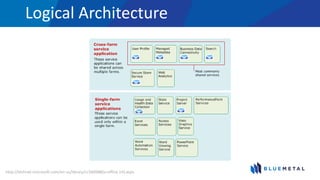
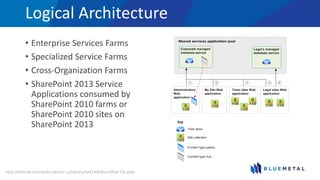
Logical Architecture
http://technet.microsoft.com/en-us/library/cc560988(v=office.14).aspx
Logical Architecture
1. You can deploy only the service applications that are needed to a
farm.
2. Web applications can be configured to use only the service
applications that are needed, instead of all the services that have
been deployed.
3. You can deploy multiple instances of the same service in a farm
and assign unique names to the resulting service applications.
4. You can share service applications across multiple Web
applications within the same farm.
http://technet.microsoft.com/en-us/library/cc560988(v=office.14).aspx
Logical Architecture
• Enterprise Services Farms
• Specialized Service Farms
• Cross-Organization Farms
• SharePoint 2013 Service
Applications consumed by
SharePoint 2010 farms or
SharePoint 2010 sites on
SharePoint 2013
http://technet.microsoft.com/en-us/library/ee424403(v=office.15).aspx
Service Architecture
The Managed Metadata Service is a
Service Application
Information Architecture
Must Love Term Sets
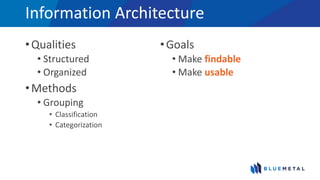
Information Architecture
•Qualities
• Structured
• Organized
•Methods
• Grouping
• Classification
• Categorization
•Goals
• Make findable
• Make usable
TAXONOMY
def·i·ni·tion [dèffə nísh'n]
Taxonomy
“a classification into ordered categories”
– dictionary.com
Taxonomy
“a hierarchical classification of
words, labels, or terms
that are organized into groups
based on similarities”
– Microsoft
Taxonomy
A way to group things together
Taxonomies
• May be defined and centrally managed by one or more individuals
• Useful because they provide a logical, hierarchical structure of
metadata that can be used to classify information consistently
FOLKSONOMY
def·i·ni·tion [dèffə nísh'n]
Folksonomy
“the classification that results when Web site users
collaboratively apply words, labels, or terms to
content on a site”
– Microsoft
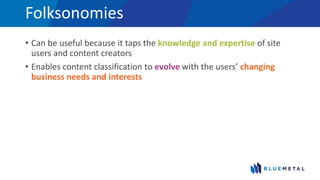
Folksonomies
• Can be useful because it taps the knowledge and expertise of site
users and content creators
• Enables content classification to evolve with the users’ changing
business needs and interests
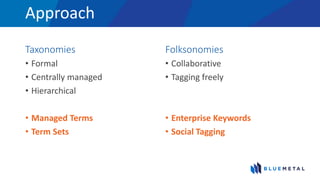
Approach
Taxonomies
• Formal
• Centrally managed
• Hierarchical
• Managed Terms
• Term Sets
Folksonomies
• Collaborative
• Tagging freely
• Enterprise Keywords
• Social Tagging
Managed Metadata Service
Must Love Term Sets
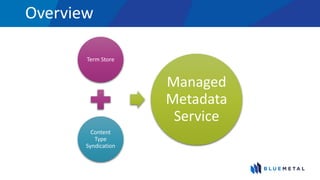
Overview
Term Store
Content
Type
Syndication
Managed
Metadata
Service
Overview
Term Store
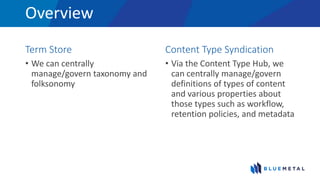
• We can centrally
manage/govern taxonomy and
folksonomy
Content Type Syndication
• Via the Content Type Hub, we
can centrally manage/govern
definitions of types of content
and various properties about
those types such as workflow,
retention policies, and metadata
Term Store
Must Love Term Sets
Anatomy
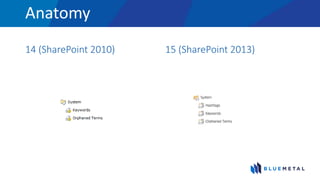
14 (SharePoint 2010) 15 (SharePoint 2013)
TERM
def·i·ni·tion [dèffə nísh'n]
Term
“a word or a phrase that can be associated
with an item”
– Microsoft
Terms
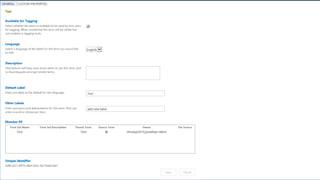
• Has a unique ID (GUID)
• Can have many different text labels (synonyms)
• On a multi-lingual site, it can have labels in different languages
Terms
1. Managed Terms
• Usually pre-defined
• Can only be created by users who have the appropriate permissions
• Often organized into a hierarchy
2. Enterprise Keywords
• Words or phrases that were added to SharePoint items
• Part of a single, non-hierarchical term set that is named the keyword set
3. Hashtags
• Words or phrases that were added to Office documents
• Part of a single, non-hierarchical term set that is named the hashtag set
QUICK EXPLORATION
TERM SET
def·i·ni·tion [dèffə nísh'n]
Term Set
“a collection of related terms”
– Microsoft
Term Sets
• Has a unique ID (GUID)
• Can specify that a column must contain a term from a specific term
set
Term Sets
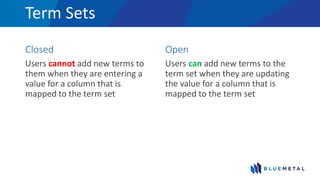
Closed
Users cannot add new terms to
them when they are entering a
value for a column that is
mapped to the term set
Open
Users can add new terms to the
term set when they are updating
the value for a column that is
mapped to the term set
Term Sets
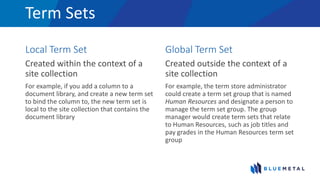
Local Term Set
Created within the context of a
site collection
For example, if you add a column to a
document library, and create a new term set
to bind the column to, the new term set is
local to the site collection that contains the
document library
Global Term Set
Created outside the context of a
site collection
For example, the term store administrator
could create a term set group that is named
Human Resources and designate a person to
manage the term set group. The group
manager would create term sets that relate
to Human Resources, such as job titles and
pay grades in the Human Resources term set
group
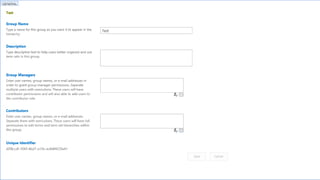
GROUP
def·i·ni·tion [dèffə nísh'n]
Group
“a set of term sets that all share
common security requirements”
– Microsoft
Groups
• Has a unique ID (GUID)
• Only users who are designated as contributors to a specific group can
manage term sets that belong to the group or create new term sets
within it
• Organizations should create unique groups for term sets that will
have different access/security needs
Term Store
Centralize Management
• We can set up a centrally
managed/unified structure for
metadata for multiple farms
Delegate Management
• We can isolate different
structures for metadata and give
certain users the ability to
manage their own areas of
expertise/interest
Term Store
Make your life easier
• We can use tags and term sets
across SDLC levels
• Requires being strict
• Introduce DEV elements carefully
Make your life complicated
• We can isolate the tags and
term sets at each SDLC level
• May be desired
• Requires migration
QUICK EXPLORATION
MANAGED METADATA
def·i·ni·tion [dèffə nísh'n]
Managed Metadata
“a way to refer to the fact that terms and term sets
can be created and managed independently from
the columns themselves”
– Microsoft
Managed Metadata
A service application
group can include
multiple Managed
Metadata service
applications
• The sites within the Web
applications display taxonomy,
social tagging, and other
features from both Managed
Metadata service applications
• Unlike other cross-farm
services, Web parts by default
include data from multiple
Managed Metadata service
applications
Managed Metadata
Managed Metadata is
one of the service
applications that is
typically deployed for
dedicated use by a
specific team or
department
• To allow a team or department
to manage their own taxonomy,
hierarchies, keywords...
• SharePoint combines the results
of multiple Managed Metadata
service applications, so
taxonomies, content types, and
other elements can be shared
across an organization
TAGGING
def·i·ni·tion [dèffə nísh'n]
Tagging
“the act of applying metadata to an item”
– Microsoft
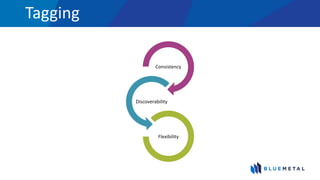
Tagging
Consistency
Discoverability
Flexibility
What’s New
Must Love Term Sets
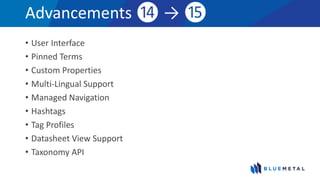
Advancements ⓮ → ⓯
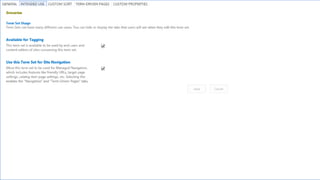
• User Interface
• Pinned Terms
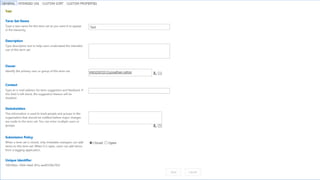
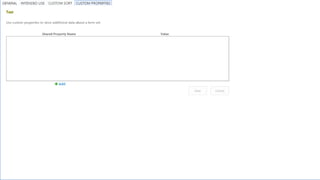
• Custom Properties
• Multi-Lingual Support
• Managed Navigation
• Hashtags
• Tag Profiles
• Datasheet View Support
• Taxonomy API
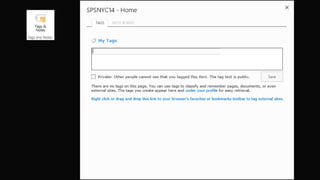
User Interface
• Buttons have moved from persistent on every page to the ribbon
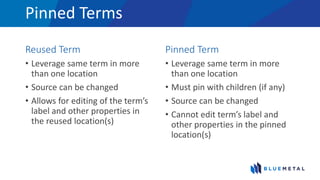
Pinned Terms
Reused Term
• Leverage same term in more
than one location
• Source can be changed
• Allows for editing of the term’s
label and other properties in
the reused location(s)
Pinned Term
• Leverage same term in more
than one location
• Must pin with children (if any)
• Source can be changed
• Cannot edit term’s label and
other properties in the pinned
location(s)
QUICK EXPLORATION
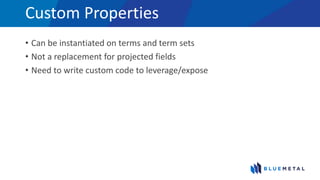
Custom Properties
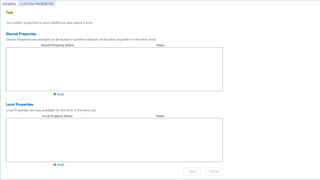
• Can be instantiated on terms and term sets
• Not a replacement for projected fields
• Need to write custom code to leverage/expose
QUICK EXPLORATION
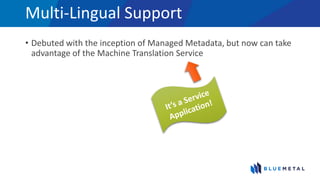
Multi-Lingual Support
• Debuted with the inception of Managed Metadata, but now can take
advantage of the Machine Translation Service
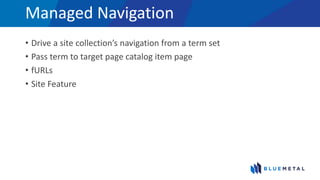
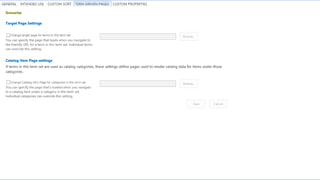
Managed Navigation
• Drive a site collection’s navigation from a term set
• Pass term to target page catalog item page
• fURLs
• Site Feature
QUICK EXPLORATION
Hashtags
• Aggregation similar to Twitter
• No Yammer Support
QUICK EXPLORATION
Tag Profiles
• Now use search
QUICK EXPLORATION
Datasheet View Support
• Finally can input/edit managed metadata columns in datasheet view
QUICK EXPLORATION
Taxonomy API
• Access via
• Client Side Object Model (CSOM)
• REST
• Power Shell
Content Type Syndication
Must Love Term Sets
Content Type Publishing
Advantages
• Manage ‘Enterprise Content
Types’ across site collections,
web applications, and farms
• High governance/control
• Higher reuse
Disadvantages
• Inheritance/Publishing
• Workflows
• Lookup Columns
• Backup/Restore/Disaster
Recovery
Site Based Retention Policies
• Compliance features of SharePoint have been extended to sites
• We can create and manage retention policies, and they will apply to
SharePoint sites and any Exchange Server 2013 team mailboxes that
are associated with the sites
Additional Considerations
Must Love Term Sets
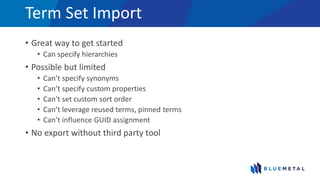
Term Set Import
• Great way to get started
• Can specify hierarchies
• Possible but limited
• Can’t specify synonyms
• Can’t specify custom properties
• Can’t set custom sort order
• Can’t leverage reused terms, pinned terms
• Can’t influence GUID assignment
• No export without third party tool
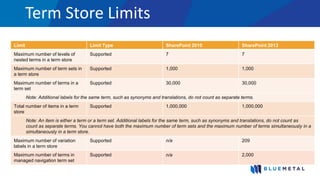
Term Store Limits
Limit Limit Type SharePoint 2010 SharePoint 2013
Maximum number of levels of
nested terms in a term store
Supported 7 7
Maximum number of term sets in
a term store
Supported 1,000 1,000
Maximum number of terms in a
term set
Supported 30,000 30,000
Note: Additional labels for the same term, such as synonyms and translations, do not count as separate terms.
Total number of items in a term
store
Supported 1,000,000 1,000,000
Note: An item is either a term or a term set. Additional labels for the same term, such as synonyms and translations, do not count as
count as separate terms. You cannot have both the maximum number of term sets and the maximum number of terms simultaneously in a
simultaneously in a term store.
Maximum number of variation
labels in a term store
Supported n/a 209
Maximum number of terms in
managed navigation term set
Supported n/a 2,000
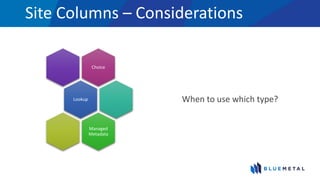
Site Columns – Considerations
Choice
Lookup
Managed
Metadata
When to use which type?
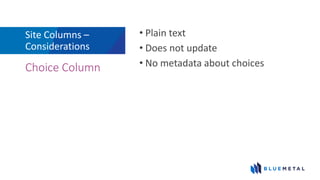
Site Columns –
Considerations
• Plain text
• Does not update
• No metadata about choicesChoice Column
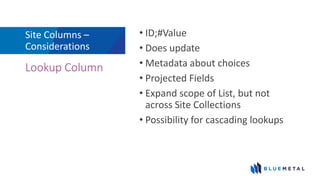
Site Columns –
Considerations
• ID;#Value
• Does update
• Metadata about choices
• Projected Fields
• Expand scope of List, but not
across Site Collections
• Possibility for cascading lookups
Lookup Column
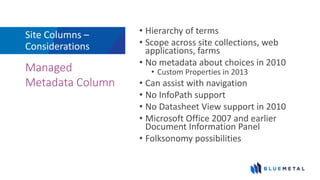
Site Columns –
Considerations
• Hierarchy of terms
• Scope across site collections, web
applications, farms
• No metadata about choices in 2010
• Custom Properties in 2013
• Can assist with navigation
• No InfoPath support
• No Datasheet View support in 2010
• Microsoft Office 2007 and earlier
Document Information Panel
• Folksonomy possibilities
Managed
Metadata Column
Wrapping Up
Must Love Term Sets
Wrapping Up
Information
Architecture
Findability Usability
Wrapping Up
The Managed Metadata Service can be used
to advance your content management and social
goals via taxonomies and folksonomies
as well as content type syndication
Content accumulates
pretty fast. If you don’t
stop to think about this
stuff and talk with your
users, you could end up
with a mess.
© 1986 Paramount Pictures
INFORMATION
ARCHITECTURE
1. WORK WITH YOUR
USERS
2. FOLLOW THE CULTURE
3. GAUGE EFFECTIVENESS
AND ADJUST AS NEEDED
© 1986 Paramount Pictures
They’ll all think
you’re a righteous
dude.
© 1986 Paramount Pictures
Blog Article
SharePoint Managed Metadata Import Files
bit.ly/SPMMImport
Questions
Must Love Term Sets
We Are Hiring
in NYC!
SharePoint Developer
Technical Designer / Front End Developer
UX Software Engineer
UX Software Architect
Java Architect
Software Operations Mgr (Norwalk, CT)
Learn more:
https://www.linkedin.com/company/bluemetal-architects/careers
THANK YOU EVENT
SPONSORS
• Please visit them and inquire about
their products & services
• To win prizes make sure to get your
bingo card stamped by ALL sponsors
Reference
Must Love Term Sets
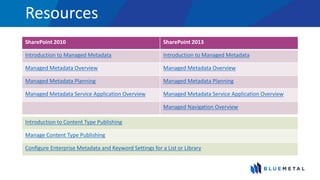
Resources
SharePoint 2010 SharePoint 2013
Introduction to Managed Metadata Introduction to Managed Metadata
Managed Metadata Overview Managed Metadata Overview
Managed Metadata Planning Managed Metadata Planning
Managed Metadata Service Application Overview Managed Metadata Service Application Overview
Managed Navigation Overview
Introduction to Content Type Publishing
Manage Content Type Publishing
Configure Enterprise Metadata and Keyword Settings for a List or Library
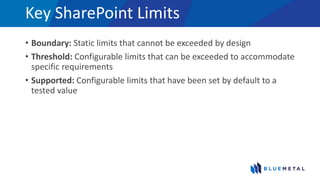
Key SharePoint Limits
• Boundary: Static limits that cannot be exceeded by design
• Threshold: Configurable limits that can be exceeded to accommodate
specific requirements
• Supported: Configurable limits that have been set by default to a
tested value
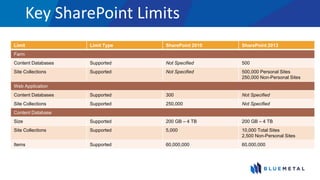
Key SharePoint Limits
Limit Limit Type SharePoint 2010 SharePoint 2013
Farm
Content Databases Supported Not Specified 500
Site Collections Supported Not Specified 500,000 Personal Sites
250,000 Non-Personal Sites
Web Application
Content Databases Supported 300 Not Specified
Site Collections Supported 250,000 Not Specified
Content Database
Size Supported 200 GB – 4 TB 200 GB – 4 TB
Site Collections Supported 5,000 10,000 Total Sites
2,500 Non-Personal Sites
Items Supported 60,000,000 60,000,000
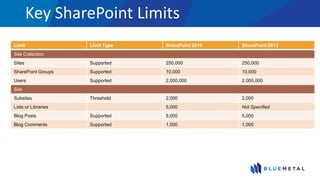
Key SharePoint Limits
Limit Limit Type SharePoint 2010 SharePoint 2013
Site Collection
Sites Supported 250,000 250,000
SharePoint Groups Supported 10,000 10,000
Users Supported 2,000,000 2,000,000
Site
Subsites Threshold 2,000 2,000
Lists or Libraries 5,000 Not Specified
Blog Posts Supported 5,000 5,000
Blog Comments Supported 1,000 1,000
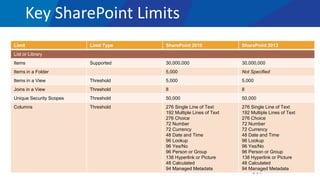
Key SharePoint Limits
Limit Limit Type SharePoint 2010 SharePoint 2013
List or Library
Items Supported 30,000,000 30,000,000
Items in a Folder 5,000 Not Specified
Items in a View Threshold 5,000 5,000
Joins in a View Threshold 8 8
Unique Security Scopes Threshold 50,000 50,000
Columns Threshold 276 Single Line of Text
192 Multiple Lines of Text
276 Choice
72 Number
72 Currency
48 Date and Time
96 Lookup
96 Yes/No
96 Person or Group
138 Hyperlink or Picture
48 Calculated
94 Managed Metadata
276 Single Line of Text
192 Multiple Lines of Text
276 Choice
72 Number
72 Currency
48 Date and Time
96 Lookup
96 Yes/No
96 Person or Group
138 Hyperlink or Picture
48 Calculated
94 Managed Metadata
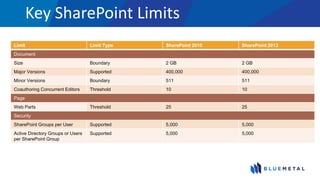
Key SharePoint Limits
Limit Limit Type SharePoint 2010 SharePoint 2013
Document
Size Boundary 2 GB 2 GB
Major Versions Supported 400,000 400,000
Minor Versions Boundary 511 511
Coauthoring Concurrent Editors Threshold 10 10
Page
Web Parts Threshold 25 25
Security
SharePoint Groups per User Supported 5,000 5,000
Active Directory Groups or Users
per SharePoint Group
Supported 5,000 5,000
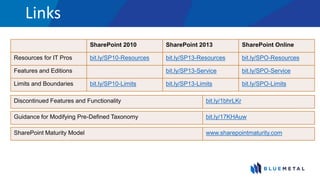
Links
SharePoint 2010 SharePoint 2013 SharePoint Online
Resources for IT Pros bit.ly/SP10-Resources bit.ly/SP13-Resources bit.ly/SPO-Resources
Features and Editions bit.ly/SP13-Service bit.ly/SPO-Service
Limits and Boundaries bit.ly/SP10-Limits bit.ly/SP13-Limits bit.ly/SPO-Limits
SharePoint Maturity Model www.sharepointmaturity.com
Guidance for Modifying Pre-Defined Taxonomy bit.ly/17KHAuw
Discontinued Features and Functionality bit.ly/1bhrLKr
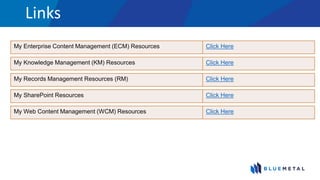
Links
My Knowledge Management (KM) Resources Click Here
My Enterprise Content Management (ECM) Resources Click Here
My Web Content Management (WCM) Resources Click Here
My SharePoint Resources Click Here
My Records Management Resources (RM) Click Here

SPSNYC14 - Must Love Term Sets: The New and Improved Managed Metadata Service in SharePoint 2013

  • 1.
    SharePoint Saturday NewYork City 2014 #SPSNYC Fotopedia.com Must Love Term Sets: The New and Improved Managed Metadata Service in SharePoint 2013 Jonathan Ralton
  • 2.
    Jonathan Ralton BlueMetal Architects MustLove Term Sets: The New and Improved Managed Metadata Service in SharePoint 2013
  • 3.
    Agenda Setting the Stage ContentManagement Services Architecture Information Architecture Managed Metadata Service Term Store What’s New Content Type Syndication Wrapping Up Questions
  • 4.
    Setting the Stage MustLove Term Sets
  • 5.
  • 6.
    Presenter Jonathan Ralton • SeniorInformation Architect • SharePoint IT Pro since 2005 (WSS/SPS) • No code! • Document Management, Content Management, Knowledge Management… @jonralton jonathanr@bluemetal.com blog.jonralton.net
  • 7.
  • 8.
    Audience What role are youin? What are you hoping to learn?
  • 9.
  • 10.
    Content Management SharePoint does thisthing called Content Management
  • 11.
    Content Management Business Process Automation Portals SocialCo-Authoring External Collaboration Workflow Team Collaboration Incident Management Project Management Knowledge Management Enterprise Content Management Application Platform
  • 12.
  • 13.
    Content Management • Whatis it? • Is it useful to me?
  • 14.
  • 15.
  • 16.
    Wild Wild West ©2014 Universal Studios
  • 17.
  • 18.
    Content Management We setup… • Content Types • Site Columns We put them together… Content Types Site Columns Metadata
  • 19.
  • 20.
    Shared Service Provider(SSP) A web application that provides all of the services for SharePoint such as: • Search • User Profile • Excel Services • InfoPath Forms Services
  • 21.
    Shared Service A componentof the Shared Services Framework such as: • Search • User Profile • Managed Metadata
  • 22.
    Service Application • Inorder to use a Shared Service, a Service Application must be provisioned • Automatically using the Configuration Wizard • Manually via Central Administration or Power Shell • It consists of some or all of the following: • An administrative interface • An application pool • One or more databases • A physical instance (a running web service)
  • 23.
    Service Application Proxy •All Service Applications have a corresponding Service Application Proxy • An object that a service consumer (i.e.: web part, object model, code) uses to connect to a Service Application
  • 24.
  • 25.
    Service Application DescriptionSharePoint Foundation SharePoint Server Standard SharePoint Server Enterprise Access Services Lets users view, edit, and interact with Access databases in a Web browser. ⃝ Business Data Connectivity Service Gives access to line-of-business data systems. ⃝ ⃝ ⃝ Excel Services Application Lets users view and interact with Excel files in a Web browser. ⃝ Managed Metadata Service Manages taxonomy hierarchies, keywords and social tagging infrastructure, and publish content types across site collections. ⃝ ⃝ PerformancePoint Service Application Provides the capabilities of PerformancePoint. ⃝ Search Service Crawls content, produces index partitions, and serves search queries. ⃝ ⃝ Secure Store Service Provides single sign-on authentication to access multiple applications or services. ⃝ ⃝ State Service Provides temporary storage of user session data for SharePoint Server components. ⃝ ⃝ Usage and Health Data Collection Service Collects farm wide usage and health data, and provides the ability to view various usage and health reports. ⃝ ⃝ ⃝ User Profile Service Adds support for My Sites, profile pages, social tagging and other social computing features. ⃝ ⃝ Visio Graphics Service Lets users view and refresh published Visio diagrams in a Web browser. ⃝ Web Analytics Service Provides Web service interfaces. ⃝ ⃝ Word Automation Services Performs automated bulk document conversions. ⃝ ⃝ Microsoft SharePoint Foundation Subscription Settings Service Provides multi-tenant functionality for service applications. Tracks subscription IDs and settings for services that are deployed in partitioned mode. Deployed through Windows PowerShell only. ⃝ ⃝ ⃝ http://technet.microsoft.com/en-us/library/cc560988(v=office.14).aspx
  • 26.
    Advancements ⓬ →⓮⓯ Redundancy • Multiple application servers can have a physical instance (a running web service) of the same service application Isolation • No longer a single point of failure as with SSP • A web application does not have to consume all the available service applications
  • 27.
    Advancements ⓬ →⓮⓯ Delegation • Can give users access to manage only certain service applications Flexibility • A single web application can consume multiple instances of the same type of service application
  • 28.
    Advancements ⓬ →⓮⓯ Performance/Resources • Only the services needed must be deployed Reuse • Some service applications can be consumed across farms
  • 29.
  • 30.
    Logical Architecture 1. Youcan deploy only the service applications that are needed to a farm. 2. Web applications can be configured to use only the service applications that are needed, instead of all the services that have been deployed. 3. You can deploy multiple instances of the same service in a farm and assign unique names to the resulting service applications. 4. You can share service applications across multiple Web applications within the same farm. http://technet.microsoft.com/en-us/library/cc560988(v=office.14).aspx
  • 31.
    Logical Architecture • EnterpriseServices Farms • Specialized Service Farms • Cross-Organization Farms • SharePoint 2013 Service Applications consumed by SharePoint 2010 farms or SharePoint 2010 sites on SharePoint 2013 http://technet.microsoft.com/en-us/library/ee424403(v=office.15).aspx
  • 32.
    Service Architecture The ManagedMetadata Service is a Service Application
  • 33.
  • 34.
    Information Architecture •Qualities • Structured •Organized •Methods • Grouping • Classification • Categorization •Goals • Make findable • Make usable
  • 35.
  • 36.
    Taxonomy “a classification intoordered categories” – dictionary.com
  • 37.
    Taxonomy “a hierarchical classificationof words, labels, or terms that are organized into groups based on similarities” – Microsoft
  • 38.
    Taxonomy A way togroup things together
  • 39.
    Taxonomies • May bedefined and centrally managed by one or more individuals • Useful because they provide a logical, hierarchical structure of metadata that can be used to classify information consistently
  • 40.
  • 41.
    Folksonomy “the classification thatresults when Web site users collaboratively apply words, labels, or terms to content on a site” – Microsoft
  • 42.
    Folksonomies • Can beuseful because it taps the knowledge and expertise of site users and content creators • Enables content classification to evolve with the users’ changing business needs and interests
  • 43.
    Approach Taxonomies • Formal • Centrallymanaged • Hierarchical • Managed Terms • Term Sets Folksonomies • Collaborative • Tagging freely • Enterprise Keywords • Social Tagging
  • 44.
  • 45.
  • 46.
    Overview Term Store • Wecan centrally manage/govern taxonomy and folksonomy Content Type Syndication • Via the Content Type Hub, we can centrally manage/govern definitions of types of content and various properties about those types such as workflow, retention policies, and metadata
  • 47.
  • 48.
    Anatomy 14 (SharePoint 2010)15 (SharePoint 2013)
  • 49.
  • 50.
    Term “a word ora phrase that can be associated with an item” – Microsoft
  • 53.
    Terms • Has aunique ID (GUID) • Can have many different text labels (synonyms) • On a multi-lingual site, it can have labels in different languages
  • 54.
    Terms 1. Managed Terms •Usually pre-defined • Can only be created by users who have the appropriate permissions • Often organized into a hierarchy 2. Enterprise Keywords • Words or phrases that were added to SharePoint items • Part of a single, non-hierarchical term set that is named the keyword set 3. Hashtags • Words or phrases that were added to Office documents • Part of a single, non-hierarchical term set that is named the hashtag set
  • 55.
  • 56.
  • 57.
    Term Set “a collectionof related terms” – Microsoft
  • 62.
    Term Sets • Hasa unique ID (GUID) • Can specify that a column must contain a term from a specific term set
  • 63.
    Term Sets Closed Users cannotadd new terms to them when they are entering a value for a column that is mapped to the term set Open Users can add new terms to the term set when they are updating the value for a column that is mapped to the term set
  • 64.
    Term Sets Local TermSet Created within the context of a site collection For example, if you add a column to a document library, and create a new term set to bind the column to, the new term set is local to the site collection that contains the document library Global Term Set Created outside the context of a site collection For example, the term store administrator could create a term set group that is named Human Resources and designate a person to manage the term set group. The group manager would create term sets that relate to Human Resources, such as job titles and pay grades in the Human Resources term set group
  • 66.
  • 67.
    Group “a set ofterm sets that all share common security requirements” – Microsoft
  • 69.
    Groups • Has aunique ID (GUID) • Only users who are designated as contributors to a specific group can manage term sets that belong to the group or create new term sets within it • Organizations should create unique groups for term sets that will have different access/security needs
  • 70.
    Term Store Centralize Management •We can set up a centrally managed/unified structure for metadata for multiple farms Delegate Management • We can isolate different structures for metadata and give certain users the ability to manage their own areas of expertise/interest
  • 71.
    Term Store Make yourlife easier • We can use tags and term sets across SDLC levels • Requires being strict • Introduce DEV elements carefully Make your life complicated • We can isolate the tags and term sets at each SDLC level • May be desired • Requires migration
  • 72.
  • 73.
  • 74.
    Managed Metadata “a wayto refer to the fact that terms and term sets can be created and managed independently from the columns themselves” – Microsoft
  • 75.
    Managed Metadata A serviceapplication group can include multiple Managed Metadata service applications • The sites within the Web applications display taxonomy, social tagging, and other features from both Managed Metadata service applications • Unlike other cross-farm services, Web parts by default include data from multiple Managed Metadata service applications
  • 76.
    Managed Metadata Managed Metadatais one of the service applications that is typically deployed for dedicated use by a specific team or department • To allow a team or department to manage their own taxonomy, hierarchies, keywords... • SharePoint combines the results of multiple Managed Metadata service applications, so taxonomies, content types, and other elements can be shared across an organization
  • 77.
  • 78.
    Tagging “the act ofapplying metadata to an item” – Microsoft
  • 79.
  • 80.
  • 81.
    Advancements ⓮ →⓯ • User Interface • Pinned Terms • Custom Properties • Multi-Lingual Support • Managed Navigation • Hashtags • Tag Profiles • Datasheet View Support • Taxonomy API
  • 82.
    User Interface • Buttonshave moved from persistent on every page to the ribbon
  • 85.
    Pinned Terms Reused Term •Leverage same term in more than one location • Source can be changed • Allows for editing of the term’s label and other properties in the reused location(s) Pinned Term • Leverage same term in more than one location • Must pin with children (if any) • Source can be changed • Cannot edit term’s label and other properties in the pinned location(s)
  • 86.
  • 87.
    Custom Properties • Canbe instantiated on terms and term sets • Not a replacement for projected fields • Need to write custom code to leverage/expose
  • 88.
  • 89.
    Multi-Lingual Support • Debutedwith the inception of Managed Metadata, but now can take advantage of the Machine Translation Service
  • 90.
    Managed Navigation • Drivea site collection’s navigation from a term set • Pass term to target page catalog item page • fURLs • Site Feature
  • 94.
  • 95.
    Hashtags • Aggregation similarto Twitter • No Yammer Support
  • 96.
  • 97.
  • 98.
  • 99.
    Datasheet View Support •Finally can input/edit managed metadata columns in datasheet view
  • 100.
  • 101.
    Taxonomy API • Accessvia • Client Side Object Model (CSOM) • REST • Power Shell
  • 102.
  • 103.
    Content Type Publishing Advantages •Manage ‘Enterprise Content Types’ across site collections, web applications, and farms • High governance/control • Higher reuse Disadvantages • Inheritance/Publishing • Workflows • Lookup Columns • Backup/Restore/Disaster Recovery
  • 104.
    Site Based RetentionPolicies • Compliance features of SharePoint have been extended to sites • We can create and manage retention policies, and they will apply to SharePoint sites and any Exchange Server 2013 team mailboxes that are associated with the sites
  • 105.
  • 106.
    Term Set Import •Great way to get started • Can specify hierarchies • Possible but limited • Can’t specify synonyms • Can’t specify custom properties • Can’t set custom sort order • Can’t leverage reused terms, pinned terms • Can’t influence GUID assignment • No export without third party tool
  • 107.
    Term Store Limits LimitLimit Type SharePoint 2010 SharePoint 2013 Maximum number of levels of nested terms in a term store Supported 7 7 Maximum number of term sets in a term store Supported 1,000 1,000 Maximum number of terms in a term set Supported 30,000 30,000 Note: Additional labels for the same term, such as synonyms and translations, do not count as separate terms. Total number of items in a term store Supported 1,000,000 1,000,000 Note: An item is either a term or a term set. Additional labels for the same term, such as synonyms and translations, do not count as count as separate terms. You cannot have both the maximum number of term sets and the maximum number of terms simultaneously in a simultaneously in a term store. Maximum number of variation labels in a term store Supported n/a 209 Maximum number of terms in managed navigation term set Supported n/a 2,000
  • 108.
    Site Columns –Considerations Choice Lookup Managed Metadata When to use which type?
  • 109.
    Site Columns – Considerations •Plain text • Does not update • No metadata about choicesChoice Column
  • 110.
    Site Columns – Considerations •ID;#Value • Does update • Metadata about choices • Projected Fields • Expand scope of List, but not across Site Collections • Possibility for cascading lookups Lookup Column
  • 111.
    Site Columns – Considerations •Hierarchy of terms • Scope across site collections, web applications, farms • No metadata about choices in 2010 • Custom Properties in 2013 • Can assist with navigation • No InfoPath support • No Datasheet View support in 2010 • Microsoft Office 2007 and earlier Document Information Panel • Folksonomy possibilities Managed Metadata Column
  • 112.
  • 113.
  • 114.
    Wrapping Up The ManagedMetadata Service can be used to advance your content management and social goals via taxonomies and folksonomies as well as content type syndication
  • 115.
    Content accumulates pretty fast.If you don’t stop to think about this stuff and talk with your users, you could end up with a mess. © 1986 Paramount Pictures
  • 116.
    INFORMATION ARCHITECTURE 1. WORK WITHYOUR USERS 2. FOLLOW THE CULTURE 3. GAUGE EFFECTIVENESS AND ADJUST AS NEEDED © 1986 Paramount Pictures
  • 117.
    They’ll all think you’rea righteous dude. © 1986 Paramount Pictures
  • 118.
    Blog Article SharePoint ManagedMetadata Import Files bit.ly/SPMMImport
  • 119.
  • 121.
    We Are Hiring inNYC! SharePoint Developer Technical Designer / Front End Developer UX Software Engineer UX Software Architect Java Architect Software Operations Mgr (Norwalk, CT) Learn more: https://www.linkedin.com/company/bluemetal-architects/careers
  • 122.
    THANK YOU EVENT SPONSORS •Please visit them and inquire about their products & services • To win prizes make sure to get your bingo card stamped by ALL sponsors
  • 123.
  • 124.
    Resources SharePoint 2010 SharePoint2013 Introduction to Managed Metadata Introduction to Managed Metadata Managed Metadata Overview Managed Metadata Overview Managed Metadata Planning Managed Metadata Planning Managed Metadata Service Application Overview Managed Metadata Service Application Overview Managed Navigation Overview Introduction to Content Type Publishing Manage Content Type Publishing Configure Enterprise Metadata and Keyword Settings for a List or Library
  • 125.
    Key SharePoint Limits •Boundary: Static limits that cannot be exceeded by design • Threshold: Configurable limits that can be exceeded to accommodate specific requirements • Supported: Configurable limits that have been set by default to a tested value
  • 126.
    Key SharePoint Limits LimitLimit Type SharePoint 2010 SharePoint 2013 Farm Content Databases Supported Not Specified 500 Site Collections Supported Not Specified 500,000 Personal Sites 250,000 Non-Personal Sites Web Application Content Databases Supported 300 Not Specified Site Collections Supported 250,000 Not Specified Content Database Size Supported 200 GB – 4 TB 200 GB – 4 TB Site Collections Supported 5,000 10,000 Total Sites 2,500 Non-Personal Sites Items Supported 60,000,000 60,000,000
  • 127.
    Key SharePoint Limits LimitLimit Type SharePoint 2010 SharePoint 2013 Site Collection Sites Supported 250,000 250,000 SharePoint Groups Supported 10,000 10,000 Users Supported 2,000,000 2,000,000 Site Subsites Threshold 2,000 2,000 Lists or Libraries 5,000 Not Specified Blog Posts Supported 5,000 5,000 Blog Comments Supported 1,000 1,000
  • 128.
    Key SharePoint Limits LimitLimit Type SharePoint 2010 SharePoint 2013 List or Library Items Supported 30,000,000 30,000,000 Items in a Folder 5,000 Not Specified Items in a View Threshold 5,000 5,000 Joins in a View Threshold 8 8 Unique Security Scopes Threshold 50,000 50,000 Columns Threshold 276 Single Line of Text 192 Multiple Lines of Text 276 Choice 72 Number 72 Currency 48 Date and Time 96 Lookup 96 Yes/No 96 Person or Group 138 Hyperlink or Picture 48 Calculated 94 Managed Metadata 276 Single Line of Text 192 Multiple Lines of Text 276 Choice 72 Number 72 Currency 48 Date and Time 96 Lookup 96 Yes/No 96 Person or Group 138 Hyperlink or Picture 48 Calculated 94 Managed Metadata
  • 129.
    Key SharePoint Limits LimitLimit Type SharePoint 2010 SharePoint 2013 Document Size Boundary 2 GB 2 GB Major Versions Supported 400,000 400,000 Minor Versions Boundary 511 511 Coauthoring Concurrent Editors Threshold 10 10 Page Web Parts Threshold 25 25 Security SharePoint Groups per User Supported 5,000 5,000 Active Directory Groups or Users per SharePoint Group Supported 5,000 5,000
  • 130.
    Links SharePoint 2010 SharePoint2013 SharePoint Online Resources for IT Pros bit.ly/SP10-Resources bit.ly/SP13-Resources bit.ly/SPO-Resources Features and Editions bit.ly/SP13-Service bit.ly/SPO-Service Limits and Boundaries bit.ly/SP10-Limits bit.ly/SP13-Limits bit.ly/SPO-Limits SharePoint Maturity Model www.sharepointmaturity.com Guidance for Modifying Pre-Defined Taxonomy bit.ly/17KHAuw Discontinued Features and Functionality bit.ly/1bhrLKr
  • 131.
    Links My Knowledge Management(KM) Resources Click Here My Enterprise Content Management (ECM) Resources Click Here My Web Content Management (WCM) Resources Click Here My SharePoint Resources Click Here My Records Management Resources (RM) Click Here

Editor's Notes

  • #5 Good Morning… Who’s wide awake and ready to go for a great Saturday of SharePoint? Who hasn’t really woken up yet and you hope that you picked a good session to catch some extra sleep in? Well I hope this isn’t too boring… I get excited about this stuff. And please ask questions as we go if something isn’t clear or you want to dive a little deeper into something. We’ve got about 75 minutes or so… so we should have plenty of time to adjust We’re going to do some quick getting-to-know each other, then we’ll get into the nuts and bolts, and finish up hopefully with some extra time for Q&A SOUND GOOD?
  • #7 VERY BRIEFLY about me…
  • #8 Currently I’m with a really great company in Boston—we have a New York office as well, and we’re a sponsor today And if you haven’t heard, Jornata has just joined us! So it’s an exiting time for BlueMetal. I’m just over a year into this role; I’ve had about five years of consulting under my belt at this point and previously I’ve been in a corporate role as well Been working with SharePoint for coming up on nine years now I’m not a developer! Major focus is on wrestling with all the ‘m’ acronyms… DM, ECM, WCM, KM… Here’s how to ping me But enough about me…
  • #9 Let’s find out a little about all y’all.
  • #10 Just so I get an idea who I’m talking to… Do we have Developers? Administrators? Business people/end users? What made you come tonight? What do you wanna know? Why should you care about the managed metadata service? Just because it’s a neat thing and has some cool new features in 2013?
  • #12 You may have heard SharePoint does this thing called CM—whatever flavor it may be
  • #13 Microsoft tells us that SharePoint can handle a LOT of different things—many even more not up here on the screen. Well… Do you want to turn these things on and hope for the best? We’re talking about the Managed Metadata Service of course today… the capabilities provided by the MMS don’t fit into all of these, but they can certainly help in quite a few of these scenarios
  • #14 People usually will say that content management is about, what else, the content. It’s also about your USERS. If you look at how people arrive at stuff… it’s about half and half… Some people like to follow a map and street signs along the way to get to where they want to go. Others like to search for their content and expect it to come up pretty high in the result set. What kind of person are you? Think about your email. If you’re a filer and have tons of nested folders that you put your emails into, you’re probably an green ‘navigation’ person. If you’ve got all your emails in your Inbox and anytime you want to find something you type in a keyword or you group and sort by sender, you’re probably a purple ‘search’ person. You have to consider both approaches in building out your IA, and it just so happens that features of the MMS can assist with both of these
  • #15 Once you’ve located some content… We want some qualitative data about the content to differentiate it from the sea of other documents… Perhaps filter out what you’re looking for to find that needle in the haystack of documents MMS can help with this!
  • #16 The goals, again, are helping users FIND their stuff and USE it effectively.
  • #17 The goal is to create Pleasantville.
  • #18 But you’re going to end up in the Wild West if you don’t think carefully about how to leverage some of these capabilities.
  • #19 We have ALL these things to build with in SharePoint, and more… How do we do it right?
  • #20 Well… I just so happens that I do a whole other talk on diving deep into formulating your taxonomy and properly taking advantage of content type inheritance I just want to give you the very bare minimum concept here We usually set up some content types and some site columns We put them together to be able to track metadata on our content Some of these columns can be sourced from the term store, which is part of the MMS Some of these content types can be sourced from a content type hub and published to different site collections, and this facility is *also* part of the MMS In fact, one of the best ways to govern information architecture across an organization is to use the term store and content type publishing, again, both of which are provided for in SharePoint by the Managed Metadata Service
  • #22 I did think it would be valuable to spend some time talking about the nature of the MMS and how it operates within SharePoint So first, let’s talk about what we USED to have And that was a Shared Service Provider I should say THE Shared Service Provider because there was only one and it provided EVERY service within SharePoint This was built into the MOSS framework actually, so WSS didn’t get anything like this
  • #23 With the fourth major release of SharePoint we got an entirely new architecture for a Shared Service No longer tightly coupled with EVERY OTHER SERVICE And… this was now built into the WSS framework, so even Foundation uses this model Which services are available depends on the SKU: Foundation Standard Enterprise
  • #24 So how do we ‘share’ these shared services without the SSP? We have a Shared Services Application This is at the farm level Some of these might be provisioned automatically by using the Configuration Wizard, you can manually get them going via Central Admin, and you can use Power Shell High level understanding… The SA could be made up of an admin interface, an app pool, some databases, and most importantly what is called a physical instance, which is a running web service
  • #25 But wait, there is yet something else that SharePoint needs to deliver these shared services as an SA, and that is a proxy Every SA has one, and it’s how SharePoint componentry connects to it
  • #26 Let’s go take a look at this.
  • #27 Here is a chart of which Service Applications are available with which SKUs
  • #28 So why are things better since 2007?
  • #30 This is pretty cool
  • #43 Microsoft
  • #45 So… SharePoint supports both extremes of this continuum, as well as points along the way. At one end, you can implement formal taxonomies through managed terms and term sets. At the other end, there is support for enterprise keywords and social tagging, both of which enable site users to tag content with keywords of their choosing. In between these extremes, you can apply flexible degrees of structure and control to metadata, and you can adjust the scope at which you apply this control by choosing to make it global across sites or local to specific sites. For example, you have the ability to configure term sets to be closed or open to user contributions. You can choose to use enterprise keywords and social tagging in conjunction with managed terms, or not. SharePoint, what a surprise, can be customized to your particular organization and culture.
  • #47 There are two components that make up the MMS, and we can use them to help craft our IA These are not the only aspects of SharePoint that contribute to a well thought out and effective IA, keep in mind So let’s get into the MMS itself
  • #48 We’ve got the term store We’ve got Content Type Syndication
  • #50 OOTB, this is what you get. Blank term sets ready and waiting for you
  • #52 What exactly is a term? TechNet
  • #55 What do GUIDS mean? Tags do not move around easily In terms of backing up and restoring to different environments In terms of migrations You’ll want to seek out third party tool, custom code, or, hey! My company to help you with that
  • #56 Really three kinds of terms… Tag Hierarchies Managed terms are typically pre-defined and organized into a hierarchical term set by a Term Store Administrator or another person with permissions to work with managed metadata. An enterprise keyword is a word or phrase that is added to items on a SharePoint site. Enterprise keywords are organized into a single, non-hierarchical term set within the Term Store Management Tool called the Keywords set. Because users can typically add any word or phrase to an item as a keyword, enterprise keywords can be used for folksonomy-style tagging. Term store administrators, or other individuals with permission to manage metadata, can opt to move keywords out of the Keywords term set and into a specific managed term set, at which point the keywords will become available within the context of a specific term set. Term store administrators can also opt to make the Keywords set closed, so that users cannot submit new keywords and are restricted to the use of existing keywords.
  • #59 TechNet
  • #64 Again, GUIDs
  • #65 Can be configured to be closed Or, can be configured to be open
  • #66 TechNet
  • #69 Microsoft Groups define security boundaries
  • #71 Microsoft
  • #72 OR
  • #73 Either way, because we’re dealing behind the scenes with GUIDs, we can… Development, Test, Production… In that case you maintain the term store in PRD and have DEV and TST consume it
  • #76 So to sum up… the term MM
  • #77 Keep in mind if you wanna get really fancy…
  • #78 And to customize/bend to your needs,
  • #80 Microsoft
  • #81 Why do we bother creating constructs and encourage our users to tag? The managed metadata features in SharePoint enable you to apply adjustable degrees of control to the metadata that is added to content. With term sets and managed terms you can establish control over the types of terms that are available to be added to content, and you can control who has the ability to add new terms. You can also limit the use of enterprise keywords to a specific list of keywords by configuring the Keywords term set as closed. When the same terms are used consistently across sites, it is easier to build robust processes or solutions that rely on metadata. Additionally, the user experience for working with metadata on sites, in lists and libraries, as well as in the Office client programs makes it easy for site users to apply consistent metadata to their content. When the content across sites in an organization has consistent metadata, it is easier to find and access business information and data by using search. New search features, such as the refinement panel, which displays on the left-hand side of the search results page, enable users to filter search results based on metadata. Additionally, you can configure metadata navigation for lists and libraries to enable users to create dynamic views of information based on specific metadata fields. Users can navigate libraries by folder or by metadata pivot, and they can then refine the results by using additional Key Filters. The managed metadata features make it easy for Term Store Administrators (or other individuals with permission to update managed metadata) to maintain and adapt your metadata as business needs evolve. You can update a term set easily in the Term Store Management tool, and new or updated terms will automatically become available for use wherever a Managed Metadata column associated with that term set is available. If you merge multiple terms into one term, content that is tagged with these terms is automatically updated to reflect this change. You can specify multiple synonyms (or labels) for individual terms. If your site is multi-lingual, you can also specify multilingual labels for individual terms.
  • #83 2013 5th major release of SharePoint 2nd release of MM
  • #105 A few words about Content Type Publishing and the Content Type Hub… GUIDs Same situation as using one term store
  • #110 One of the decisions you often have to make is when to employ one of these types for giving users a selection of things to pick from
  • #111 Choice Easy text Never updated
  • #112 Lookup Can’t use across site collections Has a scope If you need to store additional metadata ABOUT the choices Can help you with things called projected fields Not all columns will project
  • #113 Managed Metadata Got this in SharePoint 2010 Only way OOTB to use a consistent set of terms across site collections—even web applications and farms What’s altered this decision a bit is SharePoint 2013’s managed metadata extended properties.
  • #115 I want you to understand the goals for working with your taxonomy.
  • #117 I want you to think about this stuff BEFORE you let content pile up in your sites.
  • #118 Talk to them! They know your content! IT’s role should be to set up all the gears and plumbing. The business knows its content better than you do. Don’t try to insert a folksonomy into a highly governed environment Try to use search analytics or other means to see if people are finding their stuff, and don’t let your tags go stale
  • #119 If you do…