BUILDING SEARCH
DRIVEN APPLICATIONS
BRIAN CAAUWE
PORTALS & COLLABORATION MANAGER
January 21st, 2017
2
• Search Schema
• Search Settings
• Search Patterns
• Display Templates
Session Agenda
3
• Brian Caauwe
– Manager, Consultant, Speaker and new dad
• Email: bcaauwe@avtex.com
• Twitter: @bcaauwe
– Technical Editor
• Professional SharePoint 2013 Administration
– Certifications
• MCM: SharePoint Server 2010
• MCSM: SharePoint
Who am I?
You can use the hashtag #SPSSTL & follow us @SPSStlouis
Gold Sponsors
Silver Sponsors
Thank You Sponsors for
participating in SPS St. Louis 2017!
6
Search Schema
7
Properties Power
the Search Experience
8
Crawled Property
vs.
Managed Property
9
Search Schema
Crawled Property
• ALL crawled metadata available into Categories
– Basic
– Business Data
– Document Parser
– Internal
– Mail
– MetadataExtractor
– Notes
– Office
– People
– SharePoint
– Tiff
– Web
– XML
10
Search Schema
Managed Property
If it’s not a managed property, you can’t use it in search
• Identify what you can do with it
– Searchable
– Queryable
– Retrievable
– Allow Multiple Values
– Refinable
– Sortable
– Safe for Anonymous
• Map one or many crawled properties
11
Configuration Options
• Service Application (Central Administration)
• Tenant (SharePoint Online Administration)
• Site Collection (Site Collection Administrators)
• Site (Site Owners)
Search Schema
Managed Properties
12Search Settings
13
• Predefined starting place
– Thing “Scopes” previously
• Settings
– Protocol
– Type
– Query Transform
• Query Examples
– Local SharePoint results (Everything but people)
{?{searchTerms} -ContentClass=urn:content-class:SPSPeople}
– Pictures
{?path:{Scope}} {?owstaxIdMetadataAllTagsInfo:{Tag}}
(ContentTypeId:0x0101009148F5A04DDD49cbA7127AADA5FB792B00AADE34325A8B49cdA8BB4DB53328F214*
OR ContentTypeId:0x010102*)
Search Settings
Result Source
14
Used in Search web parts
• Quick Mode
• Advanced Mode
Search Settings
Result Source
15
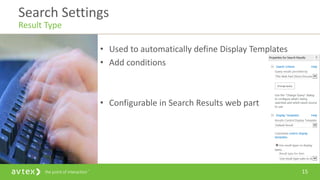
• Used to automatically define Display Templates
• Add conditions
• Configurable in Search Results web part
Search Settings
Result Type
16
• Think Best Bets
• Context: Bound to Result Sources
• Query Conditions
– Example: ContentTypeId:0x0102* (e.g. Event)
Search Settings
Query Rules
17
• Actions
– Promoted results
• Best Bet
• Visual Best Bet
Search Settings
Query Rules
18
• Actions
– Result Blocks
– Tune Ranking
• Change sorting (e.g. Promote PDF to top
Search Settings
Query Rules
Search Patterns
20
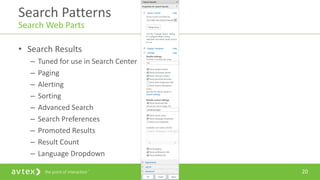
• Search Results
– Tuned for use in Search Center
– Paging
– Alerting
– Sorting
– Advanced Search
– Search Preferences
– Promoted Results
– Result Count
– Language Dropdown
Search Patterns
Search Web Parts
21
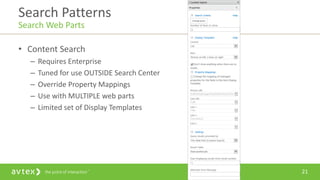
• Content Search
– Requires Enterprise
– Tuned for use OUTSIDE Search Center
– Override Property Mappings
– Use with MULTIPLE web parts
– Limited set of Display Templates
Search Patterns
Search Web Parts
22
• Query String Parameters
{QueryString.QueryParameter}
• URL Tokens
{URLToken.1}
• User Profile Properties
{User.UserProfilePropertyInternalName}
• Site Properties
{Site.Url}
{Site.PropertyBagProperty}
• Site Collection Properties
{SiteCollection.Url}
{SiteCollection.PropertyBagProperty}
• Page Properties
{Page.InternalFieldName}
TechNet - https://technet.microsoft.com/en-us/library/jj683123.aspx
Search Patterns
Query Variables
23
• Query the SharePoint Index using JavaScript
• Troubleshooting - View results in XML format in browser
Search Patterns
REST API
24
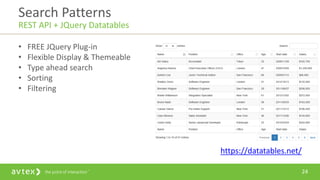
• FREE JQuery Plug-in
• Flexible Display & Themeable
• Type ahead search
• Sorting
• Filtering
https://datatables.net/
Search Patterns
REST API + JQuery Datatables
25
Search Pattern Demo
26
Display Templates
27
• Stored in the Master Page Gallery
– ~sitecollection/_catalogs/masterpage/Display Templates
• Javascript & HTML mockup
– Utilizes Retrievable Managed Properties
– Upload the HTML file and it generates the JS file
– DON’T TOUCH THE JS FILE
• Different Usage Patterns
– Search Results
– Search Hover Panel
– Content Web Parts
– Refinement
– Search Box
– Custom
Display Templates
Different Locations
28
• Specifies the outer container
– Example
• List with Paging
• Slideshow
– Extensibility
• Grid
• Sharegate Slider
Display Templates
Control Template
29
• Specifies the inner container
– Examples
• Search Results (Item_Picture, Item_PDF)
– Specifies the Hover Panel Template
• Content Search (Item_LargePicture)
– Extensibility
• Change hover panel template
• Add / Change Properties
• Integrate with 3rd party services
– Specify ALL managed properties needed in Item AND Hover templates
Display Templates
Item Template
30
• Specifies the hover container
– Examples
• Item_PDF_HoverPanel
• Item_Person_HoverPanel
– Extensibility
• Add additional properties
• Change Actions
Display Templates
Hover Template
31
• Specifies the refinement container
– Example
• Filter_Default
– Extensibility
• Add Counts
• Swap text for images
• Display in Dropdown
• MORE
Display Templates
Filter Template
32
Display Template Demo
33
Questions
34
http://www.spsevents.org/city/StLouis/stlouis2017/Lists/SPSSessionFeedback/N
ewForm.aspx
Give Me Feedback
SPS Events
35
• Brian Caauwe
– Email: bcaauwe@avtex.com
– Twitter: @bcaauwe
How to get ahold of me?
36http://webinars.avtex.com/
37
• Search Schema Overview - https://technet.microsoft.com/en-
us/library/jj219669(office.15).aspx
• Query Variables - https://technet.microsoft.com/en-us/library/jj683123.aspx
• SharePoint Search REST API - https://msdn.microsoft.com/en-
us/library/office/jj163876.aspx
• DataTables Plug-in - https://datatables.net/
• Sharegate Slider - http://en.share-gate.com/blog/sharepoint-slider-display-
template
• Bing Maps Integration - https://www.bingmapsportal.com/
• Dropdown Search Refiner Control - https://www.eliostruyf.com/part-4-
create-dropdown-search-refiner-control/
Resources

Building Search Driven Applications

  • 1.
    BUILDING SEARCH DRIVEN APPLICATIONS BRIANCAAUWE PORTALS & COLLABORATION MANAGER January 21st, 2017
  • 2.
    2 • Search Schema •Search Settings • Search Patterns • Display Templates Session Agenda
  • 3.
    3 • Brian Caauwe –Manager, Consultant, Speaker and new dad • Email: bcaauwe@avtex.com • Twitter: @bcaauwe – Technical Editor • Professional SharePoint 2013 Administration – Certifications • MCM: SharePoint Server 2010 • MCSM: SharePoint Who am I?
  • 4.
    You can usethe hashtag #SPSSTL & follow us @SPSStlouis Gold Sponsors Silver Sponsors Thank You Sponsors for participating in SPS St. Louis 2017!
  • 5.
  • 6.
  • 7.
  • 8.
    9 Search Schema Crawled Property •ALL crawled metadata available into Categories – Basic – Business Data – Document Parser – Internal – Mail – MetadataExtractor – Notes – Office – People – SharePoint – Tiff – Web – XML
  • 9.
    10 Search Schema Managed Property Ifit’s not a managed property, you can’t use it in search • Identify what you can do with it – Searchable – Queryable – Retrievable – Allow Multiple Values – Refinable – Sortable – Safe for Anonymous • Map one or many crawled properties
  • 10.
    11 Configuration Options • ServiceApplication (Central Administration) • Tenant (SharePoint Online Administration) • Site Collection (Site Collection Administrators) • Site (Site Owners) Search Schema Managed Properties
  • 11.
  • 12.
    13 • Predefined startingplace – Thing “Scopes” previously • Settings – Protocol – Type – Query Transform • Query Examples – Local SharePoint results (Everything but people) {?{searchTerms} -ContentClass=urn:content-class:SPSPeople} – Pictures {?path:{Scope}} {?owstaxIdMetadataAllTagsInfo:{Tag}} (ContentTypeId:0x0101009148F5A04DDD49cbA7127AADA5FB792B00AADE34325A8B49cdA8BB4DB53328F214* OR ContentTypeId:0x010102*) Search Settings Result Source
  • 13.
    14 Used in Searchweb parts • Quick Mode • Advanced Mode Search Settings Result Source
  • 14.
    15 • Used toautomatically define Display Templates • Add conditions • Configurable in Search Results web part Search Settings Result Type
  • 15.
    16 • Think BestBets • Context: Bound to Result Sources • Query Conditions – Example: ContentTypeId:0x0102* (e.g. Event) Search Settings Query Rules
  • 16.
    17 • Actions – Promotedresults • Best Bet • Visual Best Bet Search Settings Query Rules
  • 17.
    18 • Actions – ResultBlocks – Tune Ranking • Change sorting (e.g. Promote PDF to top Search Settings Query Rules
  • 18.
  • 19.
    20 • Search Results –Tuned for use in Search Center – Paging – Alerting – Sorting – Advanced Search – Search Preferences – Promoted Results – Result Count – Language Dropdown Search Patterns Search Web Parts
  • 20.
    21 • Content Search –Requires Enterprise – Tuned for use OUTSIDE Search Center – Override Property Mappings – Use with MULTIPLE web parts – Limited set of Display Templates Search Patterns Search Web Parts
  • 21.
    22 • Query StringParameters {QueryString.QueryParameter} • URL Tokens {URLToken.1} • User Profile Properties {User.UserProfilePropertyInternalName} • Site Properties {Site.Url} {Site.PropertyBagProperty} • Site Collection Properties {SiteCollection.Url} {SiteCollection.PropertyBagProperty} • Page Properties {Page.InternalFieldName} TechNet - https://technet.microsoft.com/en-us/library/jj683123.aspx Search Patterns Query Variables
  • 22.
    23 • Query theSharePoint Index using JavaScript • Troubleshooting - View results in XML format in browser Search Patterns REST API
  • 23.
    24 • FREE JQueryPlug-in • Flexible Display & Themeable • Type ahead search • Sorting • Filtering https://datatables.net/ Search Patterns REST API + JQuery Datatables
  • 24.
  • 25.
  • 26.
    27 • Stored inthe Master Page Gallery – ~sitecollection/_catalogs/masterpage/Display Templates • Javascript & HTML mockup – Utilizes Retrievable Managed Properties – Upload the HTML file and it generates the JS file – DON’T TOUCH THE JS FILE • Different Usage Patterns – Search Results – Search Hover Panel – Content Web Parts – Refinement – Search Box – Custom Display Templates Different Locations
  • 27.
    28 • Specifies theouter container – Example • List with Paging • Slideshow – Extensibility • Grid • Sharegate Slider Display Templates Control Template
  • 28.
    29 • Specifies theinner container – Examples • Search Results (Item_Picture, Item_PDF) – Specifies the Hover Panel Template • Content Search (Item_LargePicture) – Extensibility • Change hover panel template • Add / Change Properties • Integrate with 3rd party services – Specify ALL managed properties needed in Item AND Hover templates Display Templates Item Template
  • 29.
    30 • Specifies thehover container – Examples • Item_PDF_HoverPanel • Item_Person_HoverPanel – Extensibility • Add additional properties • Change Actions Display Templates Hover Template
  • 30.
    31 • Specifies therefinement container – Example • Filter_Default – Extensibility • Add Counts • Swap text for images • Display in Dropdown • MORE Display Templates Filter Template
  • 31.
  • 32.
  • 33.
  • 34.
    35 • Brian Caauwe –Email: bcaauwe@avtex.com – Twitter: @bcaauwe How to get ahold of me?
  • 35.
  • 36.
    37 • Search SchemaOverview - https://technet.microsoft.com/en- us/library/jj219669(office.15).aspx • Query Variables - https://technet.microsoft.com/en-us/library/jj683123.aspx • SharePoint Search REST API - https://msdn.microsoft.com/en- us/library/office/jj163876.aspx • DataTables Plug-in - https://datatables.net/ • Sharegate Slider - http://en.share-gate.com/blog/sharepoint-slider-display- template • Bing Maps Integration - https://www.bingmapsportal.com/ • Dropdown Search Refiner Control - https://www.eliostruyf.com/part-4- create-dropdown-search-refiner-control/ Resources

Editor's Notes

  • #2 TIMING [01:30 – 01:32]
  • #7 TIMING [01:32 – 01:40]
  • #10 Category Examples Basic – Basic:16  LastModifiedTime or DAV:contentclass  contentclass Business Data – Mapped from the BCS … EntityName & EntityNamespace includes fields from ReadList Operations Document Parser – Author and FileType Internal – Yet another set of Author properties Mail – If crawling Exchange MetadataExtractor – Extractor properties for Title and Author Notes Office – Embedded MSFT Office document properties such as Office:2  Title People – SharePoint User Profile Properties INTERNAL names SharePoint – ALL list / library columns follow pattern of ows_InternalName Tiff – N/A out of the box Web – Used for crawling external web sites XML – N/A out of the box
  • #11 Managed Property Settings Searchable – Add values of this property to the full text index. Can find information on this property without needing to do keyword based searching Queryable – Do you want to be able to use this property in keyword based searches (e.g. propertyname:”value”) Retrieveable – Do you want to use this property in Display templates Allow Multiple Values – Is there a potential that this property may have multiple values Refinable – Do you want to be able to setup a refiner for this property (if used, also needs to be Queryable) Sortable – Do you want to be able to sort on this property Safe for Anonymous – Can this property be used / seen from an anonymous user
  • #12 Configuration Options Service Application – Full control… create, delete change all settings. Changes effect the ENTIRE farm Tenant – Create new TEXT properties, add alias to existing properties. Changes effect the ENTIRE SharePoint Online Tenant Site Collection – Create new TEXT properties, add alias to existing properties. Changes effect the site collection and can override the Service Application / Tenant Configuration Site - Create new TEXT properties, add alias to existing properties. Changes effect the site collection and can override the Site Collection Configuration
  • #13 TIMING [01:40 – 01:50]
  • #15 Quick Mode – Uses result sources that utilize the {Scope} placeholder Advanced Mode – All other result sources
  • #20 TIMING [01:50 – 01:55]
  • #26 Demo [TIMING ~01:55 - 02:05] Content Search web part Query String Variables REST API Show results in the UI Data Tables Show the FULL code Show Stores
  • #27 TIMING [02:05 – 2:15]
  • #33 Demo [TIMING ~02:15 - 02:30] Stores Store Demographics (Content Search - Simple Item Template) Bing Maps Integration (Content Search - Complex Item Template) Store Contacts (Control Template) Pez Photo Horizontal (Search Result Item Template) Photo Hover Panel (Hover Template) Refiners (Counts, Dropdown, Image Replacement) General Search Home Page People Search (Sorting) Everything Result Block (Panel) Promoted Result Pez –Simple Avtex – Visual
  • #34 TIMING [02:30]