

Session No 1

Developed by: Saif Ullah Dar

1/7/2014

1
1)
2)

3)
4)
5)
6)
7)
8)
9)

Getting Started With HTML
Introducing HTML
How Web pages work
Introduction to Tags.
Structure of HTML page
Creating a Web Page
Introduction table, tr, td tags.
Paragraphs
Preformatted Paragraphs

Developed by: Saif Ullah Dar

1/7/2014

2
 The

World Wide Web (Web) is a network of
information resources. The Web relies on
three mechanisms to make these resources
readily available to the widest possible
audience:




A uniform naming scheme for locating resources
on the Web (e.g., URIs).
Protocols, for access to named resources over
the Web (e.g., HTTP).
Hypertext, for easy navigation among resources
(e.g., HTML).

Developed by: Saif Ullah Dar

1/7/2014

3
To publish information for global distribution, one
needs a universally understood language, a kind of
publishing mother tongue that all computers may
potentially understand. The publishing language used
by the World Wide Web is HTML (from Hypertext
Markup Language).

Developed by: Saif Ullah Dar

1/7/2014

4
A. HTML contains special markers, or tags, which
B.

define the style and structure of the page
Tags are also referred to as elements.

Developed by: Saif Ullah Dar

1/7/2014

5
 Publish

online documents with
headings, texts, tables, lists, photos, etc.
 Retrieve online information via hypertexts
links.
 Design forms for conducting transactions
with remote services, for use in searching for
information, making reservations, ordering
products, etc.
 Include spread-sheets, video clips, sound
clips, and other applications directly in their
documents.
Developed by: Saif Ullah Dar

1/7/2014

6
Click To
Proceed With
The Steps

Developed by: Saif Ullah Dar

1/7/2014

7
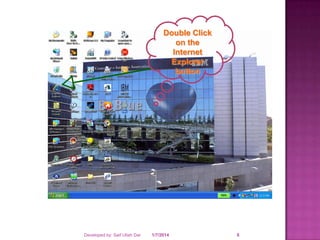
Double Click
on the
Internet
Explorer
button

Developed by: Saif Ullah Dar

1/7/2014

8
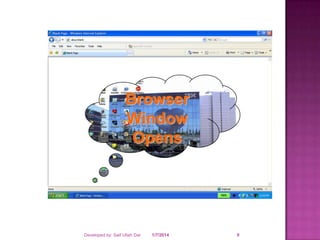
Browser
Window
Opens

Developed by: Saif Ullah Dar

1/7/2014

9
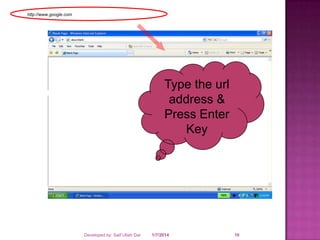
http://www.google.com

Type the url
address &
Press Enter
Key

Developed by: Saif Ullah Dar

1/7/2014

10
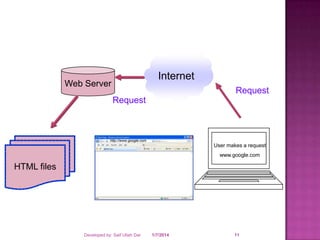
Internet

Web Server

Request
Request

http://www.google.com

User makes a request
www.google.com

HTML files

Developed by: Saif Ullah Dar

1/7/2014

11
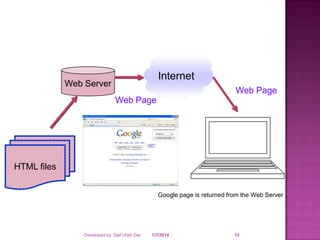
Internet

Web Server

Web Page
Web Page

HTML files
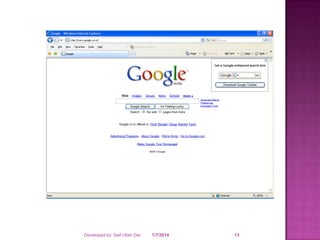
Google page is returned from the Web Server

Developed by: Saif Ullah Dar

1/7/2014

12
Developed by: Saif Ullah Dar

1/7/2014

13
 A tag is a reference in an HTML document which
describes the style and structure of the document.

 All tag start with < (less than symbol) and end with

> (greater than symbol)

 Tags which mark a beginning have no / (front
slash).
 Tags which mark an ending have a / immediately
after <, as in </.

Developed by: Saif Ullah Dar

1/7/2014

14
 <HTML>,

<BODY>
, <TITLE>
 </HTML>, </BODY
>, </TITLE>

Developed by: Saif Ullah Dar

 STARTING

TAGS /

ELEMENTS
 ENDING

TAGS /
ELEMENTS

1/7/2014

15
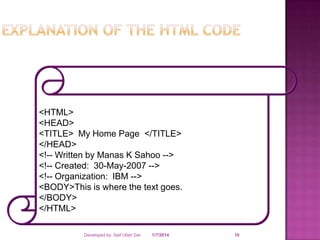
<HTML>
<HEAD>
<TITLE> My Home Page </TITLE>
</HEAD>
<!-- Written by Manas K Sahoo -->
<!-- Created: 30-May-2007 -->
<!-- Organization: IBM -->
<BODY>This is where the text goes.
</BODY>
</HTML>
Developed by: Saif Ullah Dar

1/7/2014

16
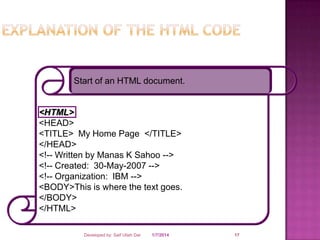
Start of an HTML document.

<HTML>
<HEAD>
<TITLE> My Home Page </TITLE>
</HEAD>
<!-- Written by Manas K Sahoo -->
<!-- Created: 30-May-2007 -->
<!-- Organization: IBM -->
<BODY>This is where the text goes.
</BODY>
</HTML>
Developed by: Saif Ullah Dar

1/7/2014

17
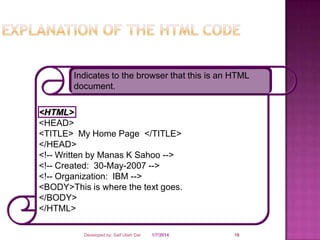
Indicates to the browser that this is an HTML
document.

<HTML>
<HEAD>
<TITLE> My Home Page </TITLE>
</HEAD>
<!-- Written by Manas K Sahoo -->
<!-- Created: 30-May-2007 -->
<!-- Organization: IBM -->
<BODY>This is where the text goes.
</BODY>
</HTML>
Developed by: Saif Ullah Dar

1/7/2014

18
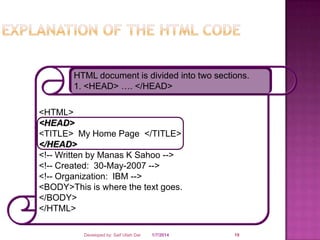
HTML document is divided into two sections.
1. <HEAD> …. </HEAD>

<HTML>
<HEAD>
<TITLE> My Home Page </TITLE>
</HEAD>
<!-- Written by Manas K Sahoo -->
<!-- Created: 30-May-2007 -->
<!-- Organization: IBM -->
<BODY>This is where the text goes.
</BODY>
</HTML>
Developed by: Saif Ullah Dar

1/7/2014

19
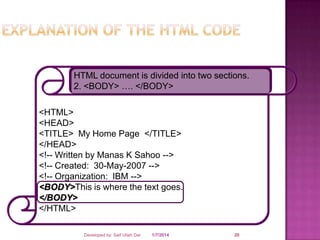
HTML document is divided into two sections.
2. <BODY> …. </BODY>

<HTML>
<HEAD>
<TITLE> My Home Page </TITLE>
</HEAD>
<!-- Written by Manas K Sahoo -->
<!-- Created: 30-May-2007 -->
<!-- Organization: IBM -->
<BODY>This is where the text goes.
</BODY>
</HTML>
Developed by: Saif Ullah Dar

1/7/2014

20
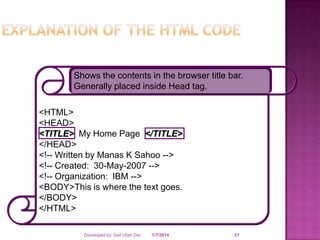
Shows the contents in the browser title bar.
Generally placed inside Head tag.

<HTML>
<HEAD>
<TITLE> My Home Page </TITLE>
</HEAD>
<!-- Written by Manas K Sahoo -->
<!-- Created: 30-May-2007 -->
<!-- Organization: IBM -->
<BODY>This is where the text goes.
</BODY>
</HTML>
Developed by: Saif Ullah Dar

1/7/2014

21
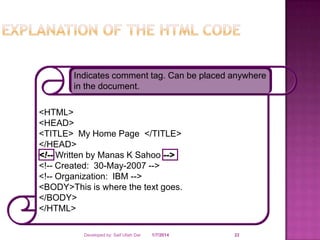
Indicates comment tag. Can be placed anywhere
in the document.

<HTML>
<HEAD>
<TITLE> My Home Page </TITLE>
</HEAD>
<!-- Written by Manas K Sahoo -->
<!-- Created: 30-May-2007 -->
<!-- Organization: IBM -->
<BODY>This is where the text goes.
</BODY>
</HTML>
Developed by: Saif Ullah Dar

1/7/2014

22
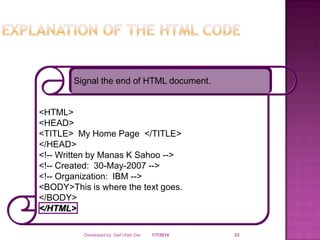
Signal the end of HTML document.

<HTML>
<HEAD>
<TITLE> My Home Page </TITLE>
</HEAD>
<!-- Written by Manas K Sahoo -->
<!-- Created: 30-May-2007 -->
<!-- Organization: IBM -->
<BODY>This is where the text goes.
</BODY>
</HTML>
Developed by: Saif Ullah Dar

1/7/2014

23
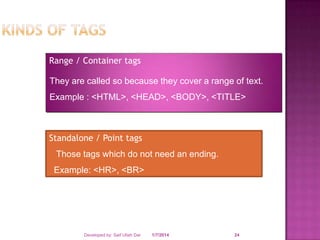
Range / Container tags

They are called so because they cover a range of text.
Example : <HTML>, <HEAD>, <BODY>, <TITLE>

Standalone / Point tags
Those tags which do not need an ending.
Example: <HR>, <BR>

Developed by: Saif Ullah Dar

1/7/2014

24
Developed by: Saif Ullah Dar

1/7/2014

25


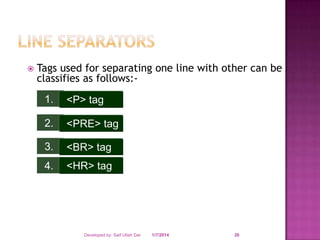
Tags used for separating one line with other can be
classifies as follows:1.

<P> tag

2.

<PRE> tag

3.

<BR> tag

4.

<HR> tag

Developed by: Saif Ullah Dar

1/7/2014

26
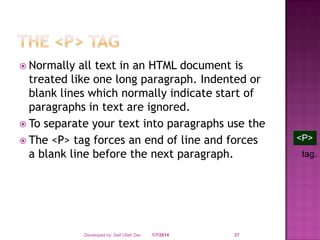
 Normally

all text in an HTML document is
treated like one long paragraph. Indented or
blank lines which normally indicate start of
paragraphs in text are ignored.
 To separate your text into paragraphs use the
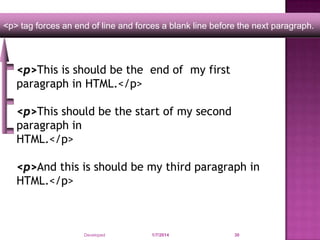
 The <P> tag forces an end of line and forces
a blank line before the next paragraph.

Developed by: Saif Ullah Dar

1/7/2014

27

<P>
tag.
Developed by: Saif Ullah Dar

1/7/2014

28
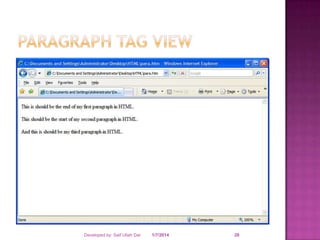
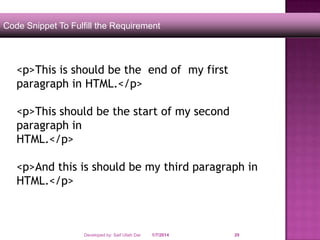
Code Snippet To Fulfill the Requirement

<p>This is should be the end of my first
paragraph in HTML.</p>
<p>This should be the start of my second
paragraph in
HTML.</p>
<p>And this is should be my third paragraph in
HTML.</p>

Developed by: Saif Ullah Dar

1/7/2014

29
<p> tag forces an end of line and forces a blank line before the next paragraph.

<p>This is should be the end of my first
paragraph in HTML.</p>
<p>This should be the start of my second
paragraph in
HTML.</p>
<p>And this is should be my third paragraph in
HTML.</p>

Developed by: Saif Ullah Dar

1/7/2014

30
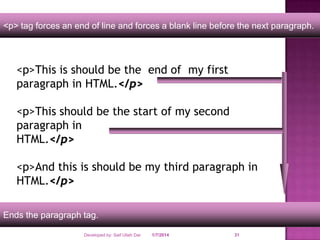
<p> tag forces an end of line and forces a blank line before the next paragraph.

<p>This is should be the end of my first
paragraph in HTML.</p>
<p>This should be the start of my second
paragraph in
HTML.</p>
<p>And this is should be my third paragraph in
HTML.</p>
Ends the paragraph tag.
Developed by: Saif Ullah Dar

1/7/2014

31
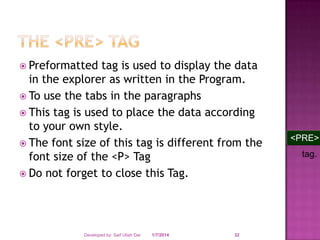
 Preformatted

tag is used to display the data
in the explorer as written in the Program.
 To use the tabs in the paragraphs
 This tag is used to place the data according
to your own style.
 The font size of this tag is different from the
font size of the <P> Tag
 Do not forget to close this Tag.

Developed by: Saif Ullah Dar

1/7/2014

32

<PRE>
tag.
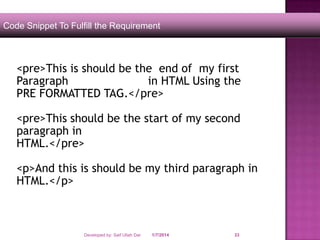
Code Snippet To Fulfill the Requirement

<pre>This is should be the end of my first
Paragraph
in HTML Using the
PRE FORMATTED TAG.</pre>
<pre>This should be the start of my second
paragraph in
HTML.</pre>
<p>And this is should be my third paragraph in
HTML.</p>

Developed by: Saif Ullah Dar

1/7/2014

33
SAIF ULLAH DAR

Developed by: Saif Ullah Dar

1/7/2014

34

Session no 1

  • 1.
    Session No 1 Developedby: Saif Ullah Dar 1/7/2014 1
  • 2.
    1) 2) 3) 4) 5) 6) 7) 8) 9) Getting Started WithHTML Introducing HTML How Web pages work Introduction to Tags. Structure of HTML page Creating a Web Page Introduction table, tr, td tags. Paragraphs Preformatted Paragraphs Developed by: Saif Ullah Dar 1/7/2014 2
  • 3.
     The World WideWeb (Web) is a network of information resources. The Web relies on three mechanisms to make these resources readily available to the widest possible audience:    A uniform naming scheme for locating resources on the Web (e.g., URIs). Protocols, for access to named resources over the Web (e.g., HTTP). Hypertext, for easy navigation among resources (e.g., HTML). Developed by: Saif Ullah Dar 1/7/2014 3
  • 4.
    To publish informationfor global distribution, one needs a universally understood language, a kind of publishing mother tongue that all computers may potentially understand. The publishing language used by the World Wide Web is HTML (from Hypertext Markup Language). Developed by: Saif Ullah Dar 1/7/2014 4
  • 5.
    A. HTML containsspecial markers, or tags, which B. define the style and structure of the page Tags are also referred to as elements. Developed by: Saif Ullah Dar 1/7/2014 5
  • 6.
     Publish online documentswith headings, texts, tables, lists, photos, etc.  Retrieve online information via hypertexts links.  Design forms for conducting transactions with remote services, for use in searching for information, making reservations, ordering products, etc.  Include spread-sheets, video clips, sound clips, and other applications directly in their documents. Developed by: Saif Ullah Dar 1/7/2014 6
  • 7.
    Click To Proceed With TheSteps Developed by: Saif Ullah Dar 1/7/2014 7
  • 8.
  • 9.
  • 10.
    http://www.google.com Type the url address& Press Enter Key Developed by: Saif Ullah Dar 1/7/2014 10
  • 11.
    Internet Web Server Request Request http://www.google.com User makesa request www.google.com HTML files Developed by: Saif Ullah Dar 1/7/2014 11
  • 12.
    Internet Web Server Web Page WebPage HTML files Google page is returned from the Web Server Developed by: Saif Ullah Dar 1/7/2014 12
  • 13.
    Developed by: SaifUllah Dar 1/7/2014 13
  • 14.
     A tagis a reference in an HTML document which describes the style and structure of the document.  All tag start with < (less than symbol) and end with > (greater than symbol)  Tags which mark a beginning have no / (front slash).  Tags which mark an ending have a / immediately after <, as in </. Developed by: Saif Ullah Dar 1/7/2014 14
  • 15.
     <HTML>, <BODY> , <TITLE> </HTML>, </BODY >, </TITLE> Developed by: Saif Ullah Dar  STARTING TAGS / ELEMENTS  ENDING TAGS / ELEMENTS 1/7/2014 15
  • 16.
    <HTML> <HEAD> <TITLE> My HomePage </TITLE> </HEAD> <!-- Written by Manas K Sahoo --> <!-- Created: 30-May-2007 --> <!-- Organization: IBM --> <BODY>This is where the text goes. </BODY> </HTML> Developed by: Saif Ullah Dar 1/7/2014 16
  • 17.
    Start of anHTML document. <HTML> <HEAD> <TITLE> My Home Page </TITLE> </HEAD> <!-- Written by Manas K Sahoo --> <!-- Created: 30-May-2007 --> <!-- Organization: IBM --> <BODY>This is where the text goes. </BODY> </HTML> Developed by: Saif Ullah Dar 1/7/2014 17
  • 18.
    Indicates to thebrowser that this is an HTML document. <HTML> <HEAD> <TITLE> My Home Page </TITLE> </HEAD> <!-- Written by Manas K Sahoo --> <!-- Created: 30-May-2007 --> <!-- Organization: IBM --> <BODY>This is where the text goes. </BODY> </HTML> Developed by: Saif Ullah Dar 1/7/2014 18
  • 19.
    HTML document isdivided into two sections. 1. <HEAD> …. </HEAD> <HTML> <HEAD> <TITLE> My Home Page </TITLE> </HEAD> <!-- Written by Manas K Sahoo --> <!-- Created: 30-May-2007 --> <!-- Organization: IBM --> <BODY>This is where the text goes. </BODY> </HTML> Developed by: Saif Ullah Dar 1/7/2014 19
  • 20.
    HTML document isdivided into two sections. 2. <BODY> …. </BODY> <HTML> <HEAD> <TITLE> My Home Page </TITLE> </HEAD> <!-- Written by Manas K Sahoo --> <!-- Created: 30-May-2007 --> <!-- Organization: IBM --> <BODY>This is where the text goes. </BODY> </HTML> Developed by: Saif Ullah Dar 1/7/2014 20
  • 21.
    Shows the contentsin the browser title bar. Generally placed inside Head tag. <HTML> <HEAD> <TITLE> My Home Page </TITLE> </HEAD> <!-- Written by Manas K Sahoo --> <!-- Created: 30-May-2007 --> <!-- Organization: IBM --> <BODY>This is where the text goes. </BODY> </HTML> Developed by: Saif Ullah Dar 1/7/2014 21
  • 22.
    Indicates comment tag.Can be placed anywhere in the document. <HTML> <HEAD> <TITLE> My Home Page </TITLE> </HEAD> <!-- Written by Manas K Sahoo --> <!-- Created: 30-May-2007 --> <!-- Organization: IBM --> <BODY>This is where the text goes. </BODY> </HTML> Developed by: Saif Ullah Dar 1/7/2014 22
  • 23.
    Signal the endof HTML document. <HTML> <HEAD> <TITLE> My Home Page </TITLE> </HEAD> <!-- Written by Manas K Sahoo --> <!-- Created: 30-May-2007 --> <!-- Organization: IBM --> <BODY>This is where the text goes. </BODY> </HTML> Developed by: Saif Ullah Dar 1/7/2014 23
  • 24.
    Range / Containertags They are called so because they cover a range of text. Example : <HTML>, <HEAD>, <BODY>, <TITLE> Standalone / Point tags Those tags which do not need an ending. Example: <HR>, <BR> Developed by: Saif Ullah Dar 1/7/2014 24
  • 25.
    Developed by: SaifUllah Dar 1/7/2014 25
  • 26.
     Tags used forseparating one line with other can be classifies as follows:1. <P> tag 2. <PRE> tag 3. <BR> tag 4. <HR> tag Developed by: Saif Ullah Dar 1/7/2014 26
  • 27.
     Normally all textin an HTML document is treated like one long paragraph. Indented or blank lines which normally indicate start of paragraphs in text are ignored.  To separate your text into paragraphs use the  The <P> tag forces an end of line and forces a blank line before the next paragraph. Developed by: Saif Ullah Dar 1/7/2014 27 <P> tag.
  • 28.
    Developed by: SaifUllah Dar 1/7/2014 28
  • 29.
    Code Snippet ToFulfill the Requirement <p>This is should be the end of my first paragraph in HTML.</p> <p>This should be the start of my second paragraph in HTML.</p> <p>And this is should be my third paragraph in HTML.</p> Developed by: Saif Ullah Dar 1/7/2014 29
  • 30.
    <p> tag forcesan end of line and forces a blank line before the next paragraph. <p>This is should be the end of my first paragraph in HTML.</p> <p>This should be the start of my second paragraph in HTML.</p> <p>And this is should be my third paragraph in HTML.</p> Developed by: Saif Ullah Dar 1/7/2014 30
  • 31.
    <p> tag forcesan end of line and forces a blank line before the next paragraph. <p>This is should be the end of my first paragraph in HTML.</p> <p>This should be the start of my second paragraph in HTML.</p> <p>And this is should be my third paragraph in HTML.</p> Ends the paragraph tag. Developed by: Saif Ullah Dar 1/7/2014 31
  • 32.
     Preformatted tag isused to display the data in the explorer as written in the Program.  To use the tabs in the paragraphs  This tag is used to place the data according to your own style.  The font size of this tag is different from the font size of the <P> Tag  Do not forget to close this Tag. Developed by: Saif Ullah Dar 1/7/2014 32 <PRE> tag.
  • 33.
    Code Snippet ToFulfill the Requirement <pre>This is should be the end of my first Paragraph in HTML Using the PRE FORMATTED TAG.</pre> <pre>This should be the start of my second paragraph in HTML.</pre> <p>And this is should be my third paragraph in HTML.</p> Developed by: Saif Ullah Dar 1/7/2014 33
  • 34.
    SAIF ULLAH DAR Developedby: Saif Ullah Dar 1/7/2014 34