

Session No 4

Developed by: Saif Ullah Dar

1/7/2014

1
1.
2.
3.
4.
5.
6.
7.
8.
9.
10.

USING IMAGES
IMAGE ATTRIBUTES
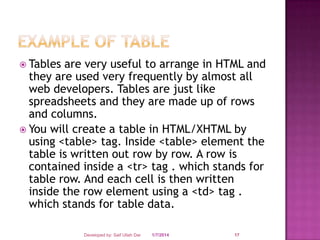
WRAPPING TEXT AROUND IMAGE
SUITABLE IMAGE FORMATS
USING TABLE
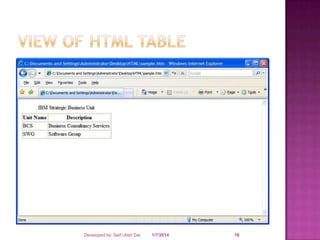
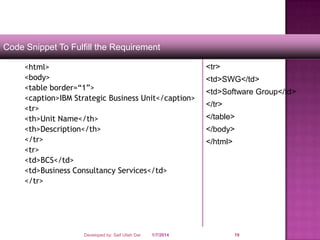
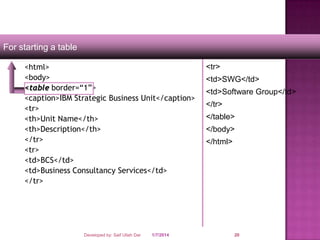
TABLE TAGS
TABLE CAPTION
TABLE HEADING <TH> TAG
TABLE ROW <TR> TAG
TABLE DATA <TD> TAG

Developed by: Saif Ullah Dar

1/7/2014

2
 The






image tag

In Html images are defined by using the <img>
tag
Images are very important to beautify as well as
to depicts many concepts on your web page. Its
is true that one single image is worth than
thousands of words. So as a Web Developer you
should have clear understanding on how to use
images in your web pages.
The <img> tag is a open tag ( does not have a
</img>)
<img src="image URL"
attr_name="attr_value"...more attributes />
Developed by: Saif Ullah Dar

1/7/2014

3
Following are most frequently used attributes for
<img> tag.
 width: sets width of the image. This will have a
value like 10 or 20%etc.
 height: sets height of the image. This will have a
value like 10 or 20% etc.
 border: sets a border around the image. This
will have a value like 1 or 2 etc.
 src: specifies URL of the image file.
 alt: this is an alternate text which will be
displayed if image is missing.
 align: this sets horizontal alignment of the image
and takes value either left, right or center.


Developed by: Saif Ullah Dar

1/7/2014

4
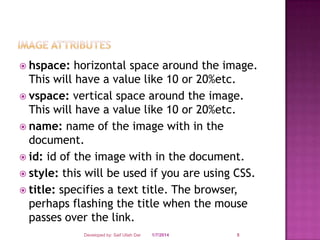
 hspace:

horizontal space around the image.
This will have a value like 10 or 20%etc.
 vspace: vertical space around the image.
This will have a value like 10 or 20%etc.
 name: name of the image with in the
document.
 id: id of the image with in the document.
 style: this will be used if you are using CSS.
 title: specifies a text title. The browser,
perhaps flashing the title when the mouse
passes over the link.
Developed by: Saif Ullah Dar

1/7/2014

5
 Attributes







of <img> tag

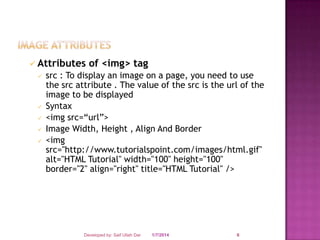
src : To display an image on a page, you need to use
the src attribute . The value of the src is the url of the
image to be displayed
Syntax
<img src=“url”>
Image Width, Height , Align And Border
<img
src="http://www.tutorialspoint.com/images/html.gif"
alt="HTML Tutorial" width="100" height="100"
border="2" align="right" title="HTML Tutorial" />

Developed by: Saif Ullah Dar

1/7/2014

6


Attributes of <img> tag
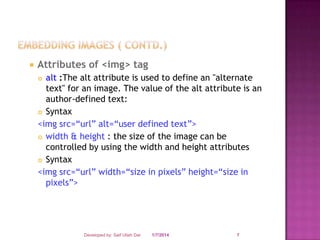
alt :The alt attribute is used to define an "alternate
text" for an image. The value of the alt attribute is an
author-defined text:
 Syntax
<img src=“url” alt=“user defined text”>
 width & height : the size of the image can be
controlled by using the width and height attributes
 Syntax
<img src=“url” width=“size in pixels” height=“size in
pixels”>


Developed by: Saif Ullah Dar

1/7/2014

7


Attributes of <img> tag
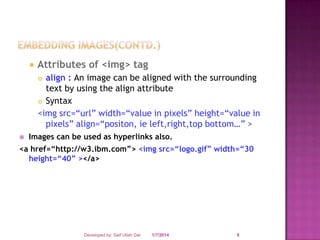
align : An image can be aligned with the surrounding
text by using the align attribute
 Syntax
<img src=“url” width=“value in pixels” height=“value in
pixels” align=“positon, ie left,right,top bottom…” >




Images can be used as hyperlinks also.

<a href=“http://w3.ibm.com”> <img src=“logo.gif” width=“30
height=“40” ></a>

Developed by: Saif Ullah Dar

1/7/2014

8
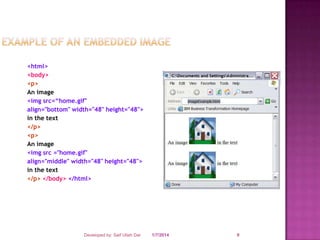
<html>
<body>
<p>
An image
<img src=“home.gif"
align="bottom" width="48" height="48">
in the text
</p>
<p>
An image
<img src ="home.gif"
align="middle" width="48" height="48">
in the text
</p> </body> </html>

Developed by: Saif Ullah Dar

1/7/2014

9
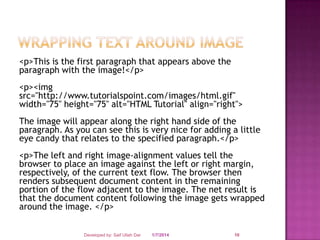
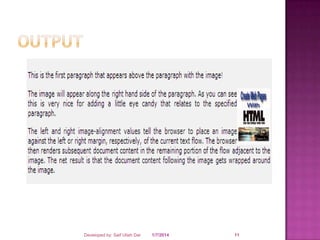
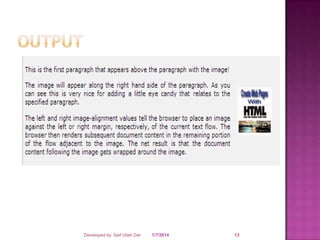
<p>This is the first paragraph that appears above the
paragraph with the image!</p>
<p><img
src="http://www.tutorialspoint.com/images/html.gif"
width="75" height="75" alt="HTML Tutorial" align="right">

The image will appear along the right hand side of the
paragraph. As you can see this is very nice for adding a little
eye candy that relates to the specified paragraph.</p>
<p>The left and right image-alignment values tell the
browser to place an image against the left or right margin,
respectively, of the current text flow. The browser then
renders subsequent document content in the remaining
portion of the flow adjacent to the image. The net result is
that the document content following the image gets wrapped
around the image. </p>
Developed by: Saif Ullah Dar

1/7/2014

10
Developed by: Saif Ullah Dar

1/7/2014

11
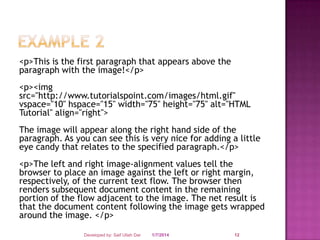
<p>This is the first paragraph that appears above the
paragraph with the image!</p>
<p><img
src="http://www.tutorialspoint.com/images/html.gif"
vspace="10" hspace="15" width="75" height="75" alt="HTML
Tutorial" align="right">
The image will appear along the right hand side of the
paragraph. As you can see this is very nice for adding a little
eye candy that relates to the specified paragraph.</p>
<p>The left and right image-alignment values tell the
browser to place an image against the left or right margin,
respectively, of the current text flow. The browser then
renders subsequent document content in the remaining
portion of the flow adjacent to the image. The net result is
that the document content following the image gets wrapped
around the image. </p>
Developed by: Saif Ullah Dar

1/7/2014

12
Developed by: Saif Ullah Dar

1/7/2014

13






The images in Graphics Interchange Format - GIF format are best used for
banners, clip art, and buttons. The main reason for this is that gifs can
have a transparent background which is priceless when it comes to web
design. On the down side, gifs are usually larger files, not as compressed
as a jpeg, which calls for slow load times and large transfer rates. Gifs
are also limited to the 256 color scheme.
This images in Joint Photographic Experts Group - JPEG format have an
unlimited color wheel, and have a high compression rate downsizing your
load times and saving hard drive space. JPEGs don't allow for transparent
backgrounds, but their size/quality ratio is outstanding. Its best to use
JPEG format for photo galleries, or artwork to allow the viewer to catch
that extra bit of detail. Avoid Jpegs for graphical design, stick to using
them for thumbnails and backgrounds.
The images in Portable Network Graphics - PNG format is an extensible
file format for the lossless, portable, well-compressed storage of raster
images. PNG provides a patent-free replacement for GIF and can also
replace many common uses of TIFF. Indexed-color, gray scale, and true
color images are supported, plus an optional alpha channel. Sample
depths range from 1 to 16 bits. PNG also compresses better than GIF in
almost every case (5% to 25% in typical cases).

Developed by: Saif Ullah Dar

1/7/2014

14
 Table

allows to organize and present data in
an orderly and concise manner.
 Tabular structures were introduced with
HTML 3.2.
 A table can contains wide variety of
information, such as headers, anchors, lists,
paragraphs, forms, images, preformatted
text and even nested tables.
 HTML tables are composed of rows and
columns.

Developed by: Saif Ullah Dar

1/7/2014

15
 Tables

are very useful to arrange in HTML and
they are used very frequently by almost all
web developers. Tables are just like
spreadsheets and they are made up of rows
and columns.
 You will create a table in HTML/XHTML by
using <table> tag. Inside <table> element the
table is written out row by row. A row is
contained inside a <tr> tag . which stands for
table row. And each cell is then written
inside the row element using a <td> tag .
which stands for table data.
Developed by: Saif Ullah Dar

1/7/2014

16
 Tables

are very useful to arrange in HTML and
they are used very frequently by almost all
web developers. Tables are just like
spreadsheets and they are made up of rows
and columns.
 You will create a table in HTML/XHTML by
using <table> tag. Inside <table> element the
table is written out row by row. A row is
contained inside a <tr> tag . which stands for
table row. And each cell is then written
inside the row element using a <td> tag .
which stands for table data.
Developed by: Saif Ullah Dar

1/7/2014

17
Developed by: Saif Ullah Dar

1/7/2014

18
Code Snippet To Fulfill the Requirement
<html>
<body>
<table border=“1”>
<caption>IBM Strategic Business Unit</caption>
<tr>
<th>Unit Name</th>
<th>Description</th>
</tr>
<tr>
<td>BCS</td>
<td>Business Consultancy Services</td>
</tr>

Developed by: Saif Ullah Dar

1/7/2014

<tr>

<td>SWG</td>
<td>Software Group</td>
</tr>
</table>

</body>
</html>

19
For starting a table
<html>
<body>
<table border=“1”>
<caption>IBM Strategic Business Unit</caption>
<tr>
<th>Unit Name</th>
<th>Description</th>
</tr>
<tr>
<td>BCS</td>
<td>Business Consultancy Services</td>
</tr>

Developed by: Saif Ullah Dar

1/7/2014

<tr>

<td>SWG</td>
<td>Software Group</td>
</tr>
</table>

</body>
</html>

20
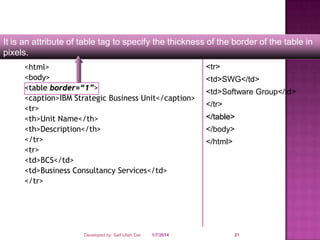
It is an attribute of table tag to specify the thickness of the border of the table in
pixels.
<html>
<body>
<table border=“1”>
<caption>IBM Strategic Business Unit</caption>
<tr>
<th>Unit Name</th>
<th>Description</th>
</tr>
<tr>
<td>BCS</td>
<td>Business Consultancy Services</td>
</tr>

Developed by: Saif Ullah Dar

1/7/2014

<tr>

<td>SWG</td>
<td>Software Group</td>
</tr>
</table>

</body>
</html>

21
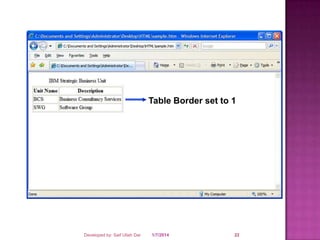
Table Border set to 1

Developed by: Saif Ullah Dar

1/7/2014

22
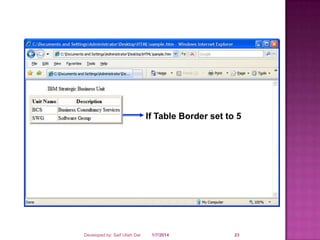
If Table Border set to 5

Developed by: Saif Ullah Dar

1/7/2014

23
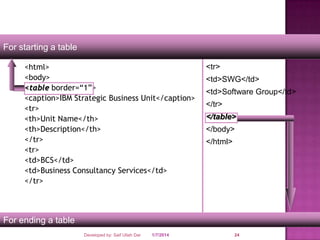
For starting a table
<html>
<body>
<table border=“1”>
<caption>IBM Strategic Business Unit</caption>
<tr>
<th>Unit Name</th>
<th>Description</th>
</tr>
<tr>
<td>BCS</td>
<td>Business Consultancy Services</td>
</tr>

<tr>

<td>SWG</td>
<td>Software Group</td>
</tr>
</table>

</body>
</html>

For ending a table
Developed by: Saif Ullah Dar

1/7/2014

24
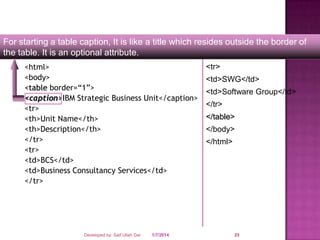
For starting a table caption, It is like a title which resides outside the border of
the table. It is an optional attribute.
<html>
<body>
<table border=“1”>
<caption>IBM Strategic Business Unit</caption>
<tr>
<th>Unit Name</th>
<th>Description</th>
</tr>
<tr>
<td>BCS</td>
<td>Business Consultancy Services</td>
</tr>

Developed by: Saif Ullah Dar

1/7/2014

<tr>

<td>SWG</td>
<td>Software Group</td>
</tr>
</table>

</body>
</html>

25
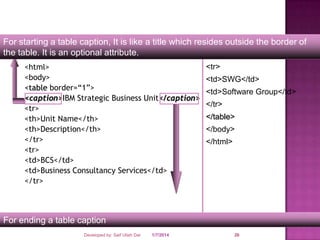
For starting a table caption, It is like a title which resides outside the border of
the table. It is an optional attribute.
<html>
<body>
<table border=“1”>
<caption>IBM Strategic Business Unit</caption>
<tr>
<th>Unit Name</th>
<th>Description</th>
</tr>
<tr>
<td>BCS</td>
<td>Business Consultancy Services</td>
</tr>

<tr>

<td>SWG</td>
<td>Software Group</td>
</tr>
</table>

</body>
</html>

For ending a table caption
Developed by: Saif Ullah Dar

1/7/2014

26
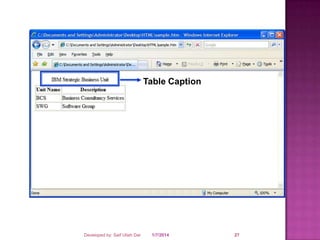
Table Caption

Developed by: Saif Ullah Dar

1/7/2014

27
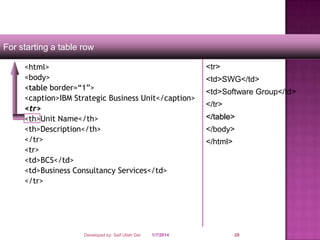
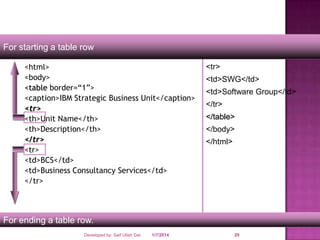
For starting a table row
<html>
<body>
<table border=“1”>
<caption>IBM Strategic Business Unit</caption>
<tr>
<th>Unit Name</th>
<th>Description</th>
</tr>
<tr>
<td>BCS</td>
<td>Business Consultancy Services</td>
</tr>

Developed by: Saif Ullah Dar

1/7/2014

<tr>

<td>SWG</td>
<td>Software Group</td>
</tr>
</table>

</body>
</html>

28
For starting a table row
<html>
<body>
<table border=“1”>
<caption>IBM Strategic Business Unit</caption>
<tr>
<th>Unit Name</th>
<th>Description</th>
</tr>
<tr>
<td>BCS</td>
<td>Business Consultancy Services</td>
</tr>

<tr>

<td>SWG</td>
<td>Software Group</td>
</tr>
</table>

</body>
</html>

For ending a table row.
Developed by: Saif Ullah Dar

1/7/2014

29
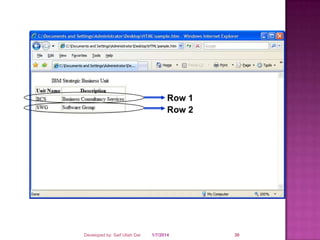
Row 1
Row 2

Developed by: Saif Ullah Dar

1/7/2014

30
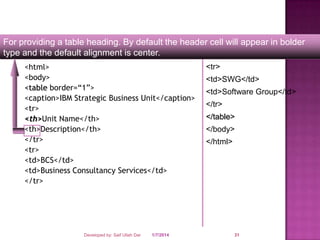
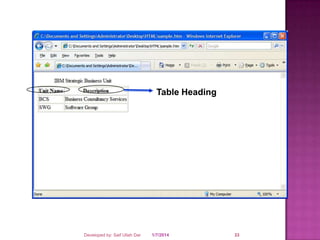
For providing a table heading. By default the header cell will appear in bolder
type and the default alignment is center.
<html>
<body>
<table border=“1”>
<caption>IBM Strategic Business Unit</caption>
<tr>
<th>Unit Name</th>
<th>Description</th>
</tr>
<tr>
<td>BCS</td>
<td>Business Consultancy Services</td>
</tr>

Developed by: Saif Ullah Dar

1/7/2014

<tr>

<td>SWG</td>
<td>Software Group</td>
</tr>
</table>

</body>
</html>

31
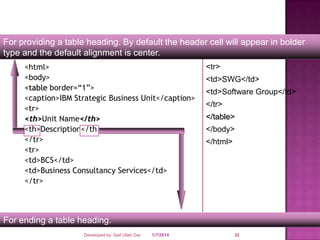
For providing a table heading. By default the header cell will appear in bolder
type and the default alignment is center.
<html>
<body>
<table border=“1”>
<caption>IBM Strategic Business Unit</caption>
<tr>
<th>Unit Name</th>
<th>Description</th>
</tr>
<tr>
<td>BCS</td>
<td>Business Consultancy Services</td>
</tr>

<tr>

<td>SWG</td>
<td>Software Group</td>
</tr>
</table>

</body>
</html>

For ending a table heading.
Developed by: Saif Ullah Dar

1/7/2014

32
Table Heading

Developed by: Saif Ullah Dar

1/7/2014

33
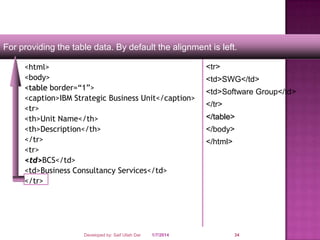
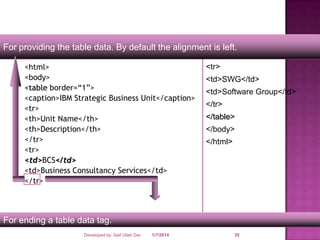
For providing the table data. By default the alignment is left.
<html>
<body>
<table border=“1”>
<caption>IBM Strategic Business Unit</caption>
<tr>
<th>Unit Name</th>
<th>Description</th>
</tr>
<tr>
<td>BCS</td>
<td>Business Consultancy Services</td>
</tr>

Developed by: Saif Ullah Dar

1/7/2014

<tr>

<td>SWG</td>
<td>Software Group</td>
</tr>
</table>

</body>
</html>

34
For providing the table data. By default the alignment is left.
<html>
<body>
<table border=“1”>
<caption>IBM Strategic Business Unit</caption>
<tr>
<th>Unit Name</th>
<th>Description</th>
</tr>
<tr>
<td>BCS</td>
<td>Business Consultancy Services</td>
</tr>

<tr>

<td>SWG</td>
<td>Software Group</td>
</tr>
</table>

</body>
</html>

For ending a table data tag.
Developed by: Saif Ullah Dar

1/7/2014

35
SAIF ULLAH DAR

Developed by: Saif Ullah Dar

1/7/2014

36

Session no 4

  • 1.
    Session No 4 Developedby: Saif Ullah Dar 1/7/2014 1
  • 2.
    1. 2. 3. 4. 5. 6. 7. 8. 9. 10. USING IMAGES IMAGE ATTRIBUTES WRAPPINGTEXT AROUND IMAGE SUITABLE IMAGE FORMATS USING TABLE TABLE TAGS TABLE CAPTION TABLE HEADING <TH> TAG TABLE ROW <TR> TAG TABLE DATA <TD> TAG Developed by: Saif Ullah Dar 1/7/2014 2
  • 3.
     The     image tag InHtml images are defined by using the <img> tag Images are very important to beautify as well as to depicts many concepts on your web page. Its is true that one single image is worth than thousands of words. So as a Web Developer you should have clear understanding on how to use images in your web pages. The <img> tag is a open tag ( does not have a </img>) <img src="image URL" attr_name="attr_value"...more attributes /> Developed by: Saif Ullah Dar 1/7/2014 3
  • 4.
    Following are mostfrequently used attributes for <img> tag.  width: sets width of the image. This will have a value like 10 or 20%etc.  height: sets height of the image. This will have a value like 10 or 20% etc.  border: sets a border around the image. This will have a value like 1 or 2 etc.  src: specifies URL of the image file.  alt: this is an alternate text which will be displayed if image is missing.  align: this sets horizontal alignment of the image and takes value either left, right or center.  Developed by: Saif Ullah Dar 1/7/2014 4
  • 5.
     hspace: horizontal spacearound the image. This will have a value like 10 or 20%etc.  vspace: vertical space around the image. This will have a value like 10 or 20%etc.  name: name of the image with in the document.  id: id of the image with in the document.  style: this will be used if you are using CSS.  title: specifies a text title. The browser, perhaps flashing the title when the mouse passes over the link. Developed by: Saif Ullah Dar 1/7/2014 5
  • 6.
     Attributes      of <img>tag src : To display an image on a page, you need to use the src attribute . The value of the src is the url of the image to be displayed Syntax <img src=“url”> Image Width, Height , Align And Border <img src="http://www.tutorialspoint.com/images/html.gif" alt="HTML Tutorial" width="100" height="100" border="2" align="right" title="HTML Tutorial" /> Developed by: Saif Ullah Dar 1/7/2014 6
  • 7.
     Attributes of <img>tag alt :The alt attribute is used to define an "alternate text" for an image. The value of the alt attribute is an author-defined text:  Syntax <img src=“url” alt=“user defined text”>  width & height : the size of the image can be controlled by using the width and height attributes  Syntax <img src=“url” width=“size in pixels” height=“size in pixels”>  Developed by: Saif Ullah Dar 1/7/2014 7
  • 8.
     Attributes of <img>tag align : An image can be aligned with the surrounding text by using the align attribute  Syntax <img src=“url” width=“value in pixels” height=“value in pixels” align=“positon, ie left,right,top bottom…” >   Images can be used as hyperlinks also. <a href=“http://w3.ibm.com”> <img src=“logo.gif” width=“30 height=“40” ></a> Developed by: Saif Ullah Dar 1/7/2014 8
  • 9.
    <html> <body> <p> An image <img src=“home.gif" align="bottom"width="48" height="48"> in the text </p> <p> An image <img src ="home.gif" align="middle" width="48" height="48"> in the text </p> </body> </html> Developed by: Saif Ullah Dar 1/7/2014 9
  • 10.
    <p>This is thefirst paragraph that appears above the paragraph with the image!</p> <p><img src="http://www.tutorialspoint.com/images/html.gif" width="75" height="75" alt="HTML Tutorial" align="right"> The image will appear along the right hand side of the paragraph. As you can see this is very nice for adding a little eye candy that relates to the specified paragraph.</p> <p>The left and right image-alignment values tell the browser to place an image against the left or right margin, respectively, of the current text flow. The browser then renders subsequent document content in the remaining portion of the flow adjacent to the image. The net result is that the document content following the image gets wrapped around the image. </p> Developed by: Saif Ullah Dar 1/7/2014 10
  • 11.
    Developed by: SaifUllah Dar 1/7/2014 11
  • 12.
    <p>This is thefirst paragraph that appears above the paragraph with the image!</p> <p><img src="http://www.tutorialspoint.com/images/html.gif" vspace="10" hspace="15" width="75" height="75" alt="HTML Tutorial" align="right"> The image will appear along the right hand side of the paragraph. As you can see this is very nice for adding a little eye candy that relates to the specified paragraph.</p> <p>The left and right image-alignment values tell the browser to place an image against the left or right margin, respectively, of the current text flow. The browser then renders subsequent document content in the remaining portion of the flow adjacent to the image. The net result is that the document content following the image gets wrapped around the image. </p> Developed by: Saif Ullah Dar 1/7/2014 12
  • 13.
    Developed by: SaifUllah Dar 1/7/2014 13
  • 14.
       The images inGraphics Interchange Format - GIF format are best used for banners, clip art, and buttons. The main reason for this is that gifs can have a transparent background which is priceless when it comes to web design. On the down side, gifs are usually larger files, not as compressed as a jpeg, which calls for slow load times and large transfer rates. Gifs are also limited to the 256 color scheme. This images in Joint Photographic Experts Group - JPEG format have an unlimited color wheel, and have a high compression rate downsizing your load times and saving hard drive space. JPEGs don't allow for transparent backgrounds, but their size/quality ratio is outstanding. Its best to use JPEG format for photo galleries, or artwork to allow the viewer to catch that extra bit of detail. Avoid Jpegs for graphical design, stick to using them for thumbnails and backgrounds. The images in Portable Network Graphics - PNG format is an extensible file format for the lossless, portable, well-compressed storage of raster images. PNG provides a patent-free replacement for GIF and can also replace many common uses of TIFF. Indexed-color, gray scale, and true color images are supported, plus an optional alpha channel. Sample depths range from 1 to 16 bits. PNG also compresses better than GIF in almost every case (5% to 25% in typical cases). Developed by: Saif Ullah Dar 1/7/2014 14
  • 15.
     Table allows toorganize and present data in an orderly and concise manner.  Tabular structures were introduced with HTML 3.2.  A table can contains wide variety of information, such as headers, anchors, lists, paragraphs, forms, images, preformatted text and even nested tables.  HTML tables are composed of rows and columns. Developed by: Saif Ullah Dar 1/7/2014 15
  • 16.
     Tables are veryuseful to arrange in HTML and they are used very frequently by almost all web developers. Tables are just like spreadsheets and they are made up of rows and columns.  You will create a table in HTML/XHTML by using <table> tag. Inside <table> element the table is written out row by row. A row is contained inside a <tr> tag . which stands for table row. And each cell is then written inside the row element using a <td> tag . which stands for table data. Developed by: Saif Ullah Dar 1/7/2014 16
  • 17.
     Tables are veryuseful to arrange in HTML and they are used very frequently by almost all web developers. Tables are just like spreadsheets and they are made up of rows and columns.  You will create a table in HTML/XHTML by using <table> tag. Inside <table> element the table is written out row by row. A row is contained inside a <tr> tag . which stands for table row. And each cell is then written inside the row element using a <td> tag . which stands for table data. Developed by: Saif Ullah Dar 1/7/2014 17
  • 18.
    Developed by: SaifUllah Dar 1/7/2014 18
  • 19.
    Code Snippet ToFulfill the Requirement <html> <body> <table border=“1”> <caption>IBM Strategic Business Unit</caption> <tr> <th>Unit Name</th> <th>Description</th> </tr> <tr> <td>BCS</td> <td>Business Consultancy Services</td> </tr> Developed by: Saif Ullah Dar 1/7/2014 <tr> <td>SWG</td> <td>Software Group</td> </tr> </table> </body> </html> 19
  • 20.
    For starting atable <html> <body> <table border=“1”> <caption>IBM Strategic Business Unit</caption> <tr> <th>Unit Name</th> <th>Description</th> </tr> <tr> <td>BCS</td> <td>Business Consultancy Services</td> </tr> Developed by: Saif Ullah Dar 1/7/2014 <tr> <td>SWG</td> <td>Software Group</td> </tr> </table> </body> </html> 20
  • 21.
    It is anattribute of table tag to specify the thickness of the border of the table in pixels. <html> <body> <table border=“1”> <caption>IBM Strategic Business Unit</caption> <tr> <th>Unit Name</th> <th>Description</th> </tr> <tr> <td>BCS</td> <td>Business Consultancy Services</td> </tr> Developed by: Saif Ullah Dar 1/7/2014 <tr> <td>SWG</td> <td>Software Group</td> </tr> </table> </body> </html> 21
  • 22.
    Table Border setto 1 Developed by: Saif Ullah Dar 1/7/2014 22
  • 23.
    If Table Borderset to 5 Developed by: Saif Ullah Dar 1/7/2014 23
  • 24.
    For starting atable <html> <body> <table border=“1”> <caption>IBM Strategic Business Unit</caption> <tr> <th>Unit Name</th> <th>Description</th> </tr> <tr> <td>BCS</td> <td>Business Consultancy Services</td> </tr> <tr> <td>SWG</td> <td>Software Group</td> </tr> </table> </body> </html> For ending a table Developed by: Saif Ullah Dar 1/7/2014 24
  • 25.
    For starting atable caption, It is like a title which resides outside the border of the table. It is an optional attribute. <html> <body> <table border=“1”> <caption>IBM Strategic Business Unit</caption> <tr> <th>Unit Name</th> <th>Description</th> </tr> <tr> <td>BCS</td> <td>Business Consultancy Services</td> </tr> Developed by: Saif Ullah Dar 1/7/2014 <tr> <td>SWG</td> <td>Software Group</td> </tr> </table> </body> </html> 25
  • 26.
    For starting atable caption, It is like a title which resides outside the border of the table. It is an optional attribute. <html> <body> <table border=“1”> <caption>IBM Strategic Business Unit</caption> <tr> <th>Unit Name</th> <th>Description</th> </tr> <tr> <td>BCS</td> <td>Business Consultancy Services</td> </tr> <tr> <td>SWG</td> <td>Software Group</td> </tr> </table> </body> </html> For ending a table caption Developed by: Saif Ullah Dar 1/7/2014 26
  • 27.
    Table Caption Developed by:Saif Ullah Dar 1/7/2014 27
  • 28.
    For starting atable row <html> <body> <table border=“1”> <caption>IBM Strategic Business Unit</caption> <tr> <th>Unit Name</th> <th>Description</th> </tr> <tr> <td>BCS</td> <td>Business Consultancy Services</td> </tr> Developed by: Saif Ullah Dar 1/7/2014 <tr> <td>SWG</td> <td>Software Group</td> </tr> </table> </body> </html> 28
  • 29.
    For starting atable row <html> <body> <table border=“1”> <caption>IBM Strategic Business Unit</caption> <tr> <th>Unit Name</th> <th>Description</th> </tr> <tr> <td>BCS</td> <td>Business Consultancy Services</td> </tr> <tr> <td>SWG</td> <td>Software Group</td> </tr> </table> </body> </html> For ending a table row. Developed by: Saif Ullah Dar 1/7/2014 29
  • 30.
    Row 1 Row 2 Developedby: Saif Ullah Dar 1/7/2014 30
  • 31.
    For providing atable heading. By default the header cell will appear in bolder type and the default alignment is center. <html> <body> <table border=“1”> <caption>IBM Strategic Business Unit</caption> <tr> <th>Unit Name</th> <th>Description</th> </tr> <tr> <td>BCS</td> <td>Business Consultancy Services</td> </tr> Developed by: Saif Ullah Dar 1/7/2014 <tr> <td>SWG</td> <td>Software Group</td> </tr> </table> </body> </html> 31
  • 32.
    For providing atable heading. By default the header cell will appear in bolder type and the default alignment is center. <html> <body> <table border=“1”> <caption>IBM Strategic Business Unit</caption> <tr> <th>Unit Name</th> <th>Description</th> </tr> <tr> <td>BCS</td> <td>Business Consultancy Services</td> </tr> <tr> <td>SWG</td> <td>Software Group</td> </tr> </table> </body> </html> For ending a table heading. Developed by: Saif Ullah Dar 1/7/2014 32
  • 33.
    Table Heading Developed by:Saif Ullah Dar 1/7/2014 33
  • 34.
    For providing thetable data. By default the alignment is left. <html> <body> <table border=“1”> <caption>IBM Strategic Business Unit</caption> <tr> <th>Unit Name</th> <th>Description</th> </tr> <tr> <td>BCS</td> <td>Business Consultancy Services</td> </tr> Developed by: Saif Ullah Dar 1/7/2014 <tr> <td>SWG</td> <td>Software Group</td> </tr> </table> </body> </html> 34
  • 35.
    For providing thetable data. By default the alignment is left. <html> <body> <table border=“1”> <caption>IBM Strategic Business Unit</caption> <tr> <th>Unit Name</th> <th>Description</th> </tr> <tr> <td>BCS</td> <td>Business Consultancy Services</td> </tr> <tr> <td>SWG</td> <td>Software Group</td> </tr> </table> </body> </html> For ending a table data tag. Developed by: Saif Ullah Dar 1/7/2014 35
  • 36.
    SAIF ULLAH DAR Developedby: Saif Ullah Dar 1/7/2014 36