1
BASIC HTML
LAB WORK GUIDE
A Programme Under the compumitra Series
“HTML is stands for 'HyperText Markup Language', it is the predominant
markup language for designing web pages .”
2
OUTLINE
BASIC HTML.
Code Creation.
Output View.
Modification Trials.
Error Trials.
HTML TABLES AND LISTS.
Code Creation.
Output View.
Modification Trials.
Error Trials.
Practice Exercise.
Summary Review.
References.
3
Open source file by
typing
http://www.sunmitra.co
m/cmaspnet/HTMLBasi
c/HTMLBasic1/HTMLB
asic1.html address
here
BASIC HTML1 – Go to Sample Source
4
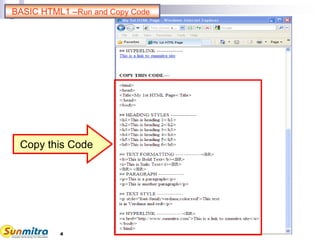
Copy this Code
BASIC HTML1 –Run and Copy Code
5
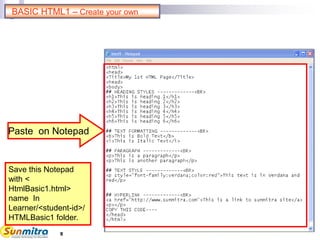
Paste on Notepad
Save this Notepad
with <
HtmlBasic1.html>
name In
Learner/<student-id>/
HTMLBasic1 folder.
BASIC HTML1 – Create your own
6
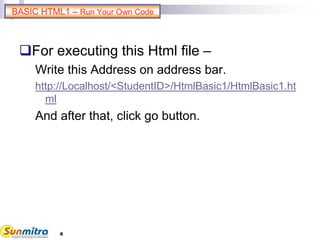
For executing this Html file –
Write this Address on address bar.
http://Localhost/<StudentID>/HtmlBasic1/HtmlBasic1.ht
ml
And after that, click go button.
BASIC HTML1 – Run Your Own Code
7
BASIC HTML1 : Modification Trials
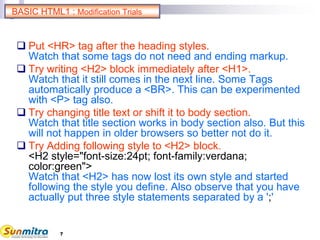
 Put <HR> tag after the heading styles.
Watch that some tags do not need and ending markup.
 Try writing <H2> block immediately after <H1>.
Watch that it still comes in the next line. Some Tags
automatically produce a <BR>. This can be experimented
with <P> tag also.
 Try changing title text or shift it to body section.
Watch that title section works in body section also. But this
will not happen in older browsers so better not do it.
 Try Adding following style to <H2> block.
<H2 style="font-size:24pt; font-family:verdana;
color:green">
Watch that <H2> has now lost its own style and started
following the style you define. Also observe that you have
actually put three style statements separated by a ';'
8
BASIC HTML1 : Error Trials
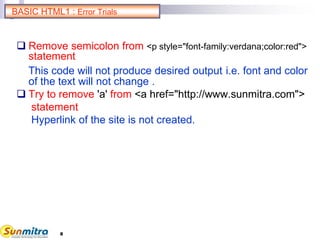
 Remove semicolon from <p style="font-family:verdana;color:red">
statement
This code will not produce desired output i.e. font and color
of the text will not change .
 Try to remove 'a' from <a href="http://www.sunmitra.com">
statement
Hyperlink of the site is not created.
9
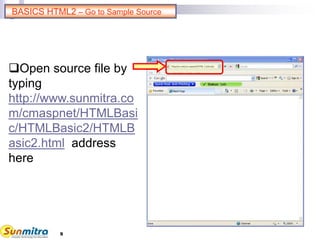
Open source file by
typing
http://www.sunmitra.co
m/cmaspnet/HTMLBasi
c/HTMLBasic2/HTMLB
asic2.html address
here
BASICS HTML2 – Go to Sample Source
10
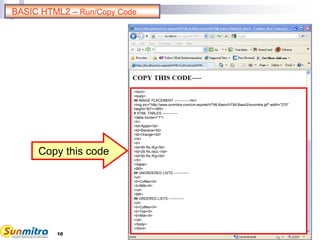
Copy this code
BASIC HTML2 – Run/Copy Code
<html>
<body>
## IMAGE PLACEMENT -------------<br>
<img src="http://www.sunmitra.com/cm-aspnet/HTMLBasic/HTMLBasic2/sunmitra.gif" width="270"
height="83"><BR>
# HTML TABLES -------------
<table border="1">
<tr>
<td>Apple</td>
<td>Banana</td>
<td>Orange</td>
</tr>
<tr>
<td>60 Rs./Kg</td>
<td>25 Rs./doz.</td>
<td>50 Rs./Kg</td>
</tr>
</table>
<BR>
## UNORDERED LISTS -------------
<ul>
<li>Coffee</li>
<li>Milk</li>
</ul>
<BR>
## ORDERED LISTS -------------
<ol>
<li>Coffee</li>
<li>Tea</li>
<li>Milk</li>
</ol>
</body>
</html>
11
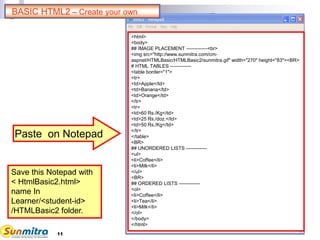
Paste on Notepad
Save this Notepad with
< HtmlBasic2.html>
name In
Learner/<student-id>
/HTMLBasic2 folder.
BASIC HTML2 – Create your own
<html>
<body>
## IMAGE PLACEMENT -------------<br>
<img src="http://www.sunmitra.com/cm-
aspnet/HTMLBasic/HTMLBasic2/sunmitra.gif" width="270" height="83"><BR>
# HTML TABLES -------------
<table border="1">
<tr>
<td>Apple</td>
<td>Banana</td>
<td>Orange</td>
</tr>
<tr>
<td>60 Rs./Kg</td>
<td>25 Rs./doz.</td>
<td>50 Rs./Kg</td>
</tr>
</table>
<BR>
## UNORDERED LISTS -------------
<ul>
<li>Coffee</li>
<li>Milk</li>
</ul>
<BR>
## ORDERED LISTS -------------
<ol>
<li>Coffee</li>
<li>Tea</li>
<li>Milk</li>
</ol>
</body>
</html>
12
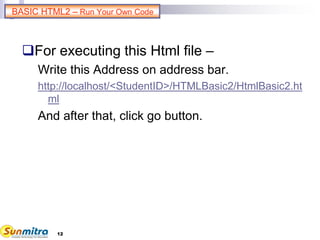
For executing this Html file –
Write this Address on address bar.
http://localhost/<StudentID>/HTMLBasic2/HtmlBasic2.ht
ml
And after that, click go button.
BASIC HTML2 – Run Your Own Code
13
BASIC HTML2: Modification Trials
 Try changing image height and width values. May also try to put %
values like 20% and 10%.
Watch the effect by changing the browser window size.
 Change table border size to 8 or 15.
Watch the change.
 Add table tag atrributes cellspacing and cellpadding and observe
the difference with different values.
Understand the difference between border, padding and spacing.
 Delete full cell <td>orange</td> and try adding the attribute <td
colspan=“2”>banana</td> .
Watch the newly formed table.
 Add attribute type=“A” in ordered list.
Watch various type of ordering patterns by changing this value
further to “a” “i”(lower case i) “I” (uppercase I) etc..
14
BASIC HTML2: Error Trials
Remove <li> tag from <li>Coffee</li>
statement in ordered list.
Order of listing is sifted one below.
15
BASIC HTML : Learning Summary Review
Use of different basic HTML tag
like Heading, Text style,
Paragraph etc.
Using properties of different Tag.
Image placement.
Creation of Table in HTML.
Creation of Lists in HTML.
Use of different attributes of Table
and list.
16
BASIC HTML: Bibliography
www.ncsu.edu/it/edu/html_trng/basic_commands.
html
www.w3schools.com/html/html_primary.asp
www.pageresource.com/html/basic.htm
http://www.w3schools.com/html/html_tables.asp
http://msdn.microsoft.com/en-
us/library/system.web.ui.htmlcontrols.htmltable
http://www.w3schools.com/html/html_lists.asp
http://www.w3.org/TR/html401/struct/lists.html
17
Ask and guide me at
sunmitraeducation@gmail.com
Share this information with as
many people as possible.
Keep visiting www.sunmitra.com
for programme updates.

Basic HTML

  • 1.
    1 BASIC HTML LAB WORKGUIDE A Programme Under the compumitra Series “HTML is stands for 'HyperText Markup Language', it is the predominant markup language for designing web pages .”
  • 2.
    2 OUTLINE BASIC HTML. Code Creation. OutputView. Modification Trials. Error Trials. HTML TABLES AND LISTS. Code Creation. Output View. Modification Trials. Error Trials. Practice Exercise. Summary Review. References.
  • 3.
    3 Open source fileby typing http://www.sunmitra.co m/cmaspnet/HTMLBasi c/HTMLBasic1/HTMLB asic1.html address here BASIC HTML1 – Go to Sample Source
  • 4.
    4 Copy this Code BASICHTML1 –Run and Copy Code
  • 5.
    5 Paste on Notepad Savethis Notepad with < HtmlBasic1.html> name In Learner/<student-id>/ HTMLBasic1 folder. BASIC HTML1 – Create your own
  • 6.
    6 For executing thisHtml file – Write this Address on address bar. http://Localhost/<StudentID>/HtmlBasic1/HtmlBasic1.ht ml And after that, click go button. BASIC HTML1 – Run Your Own Code
  • 7.
    7 BASIC HTML1 :Modification Trials  Put <HR> tag after the heading styles. Watch that some tags do not need and ending markup.  Try writing <H2> block immediately after <H1>. Watch that it still comes in the next line. Some Tags automatically produce a <BR>. This can be experimented with <P> tag also.  Try changing title text or shift it to body section. Watch that title section works in body section also. But this will not happen in older browsers so better not do it.  Try Adding following style to <H2> block. <H2 style="font-size:24pt; font-family:verdana; color:green"> Watch that <H2> has now lost its own style and started following the style you define. Also observe that you have actually put three style statements separated by a ';'
  • 8.
    8 BASIC HTML1 :Error Trials  Remove semicolon from <p style="font-family:verdana;color:red"> statement This code will not produce desired output i.e. font and color of the text will not change .  Try to remove 'a' from <a href="http://www.sunmitra.com"> statement Hyperlink of the site is not created.
  • 9.
    9 Open source fileby typing http://www.sunmitra.co m/cmaspnet/HTMLBasi c/HTMLBasic2/HTMLB asic2.html address here BASICS HTML2 – Go to Sample Source
  • 10.
    10 Copy this code BASICHTML2 – Run/Copy Code <html> <body> ## IMAGE PLACEMENT -------------<br> <img src="http://www.sunmitra.com/cm-aspnet/HTMLBasic/HTMLBasic2/sunmitra.gif" width="270" height="83"><BR> # HTML TABLES ------------- <table border="1"> <tr> <td>Apple</td> <td>Banana</td> <td>Orange</td> </tr> <tr> <td>60 Rs./Kg</td> <td>25 Rs./doz.</td> <td>50 Rs./Kg</td> </tr> </table> <BR> ## UNORDERED LISTS ------------- <ul> <li>Coffee</li> <li>Milk</li> </ul> <BR> ## ORDERED LISTS ------------- <ol> <li>Coffee</li> <li>Tea</li> <li>Milk</li> </ol> </body> </html>
  • 11.
    11 Paste on Notepad Savethis Notepad with < HtmlBasic2.html> name In Learner/<student-id> /HTMLBasic2 folder. BASIC HTML2 – Create your own <html> <body> ## IMAGE PLACEMENT -------------<br> <img src="http://www.sunmitra.com/cm- aspnet/HTMLBasic/HTMLBasic2/sunmitra.gif" width="270" height="83"><BR> # HTML TABLES ------------- <table border="1"> <tr> <td>Apple</td> <td>Banana</td> <td>Orange</td> </tr> <tr> <td>60 Rs./Kg</td> <td>25 Rs./doz.</td> <td>50 Rs./Kg</td> </tr> </table> <BR> ## UNORDERED LISTS ------------- <ul> <li>Coffee</li> <li>Milk</li> </ul> <BR> ## ORDERED LISTS ------------- <ol> <li>Coffee</li> <li>Tea</li> <li>Milk</li> </ol> </body> </html>
  • 12.
    12 For executing thisHtml file – Write this Address on address bar. http://localhost/<StudentID>/HTMLBasic2/HtmlBasic2.ht ml And after that, click go button. BASIC HTML2 – Run Your Own Code
  • 13.
    13 BASIC HTML2: ModificationTrials  Try changing image height and width values. May also try to put % values like 20% and 10%. Watch the effect by changing the browser window size.  Change table border size to 8 or 15. Watch the change.  Add table tag atrributes cellspacing and cellpadding and observe the difference with different values. Understand the difference between border, padding and spacing.  Delete full cell <td>orange</td> and try adding the attribute <td colspan=“2”>banana</td> . Watch the newly formed table.  Add attribute type=“A” in ordered list. Watch various type of ordering patterns by changing this value further to “a” “i”(lower case i) “I” (uppercase I) etc..
  • 14.
    14 BASIC HTML2: ErrorTrials Remove <li> tag from <li>Coffee</li> statement in ordered list. Order of listing is sifted one below.
  • 15.
    15 BASIC HTML :Learning Summary Review Use of different basic HTML tag like Heading, Text style, Paragraph etc. Using properties of different Tag. Image placement. Creation of Table in HTML. Creation of Lists in HTML. Use of different attributes of Table and list.
  • 16.
  • 17.
    17 Ask and guideme at sunmitraeducation@gmail.com Share this information with as many people as possible. Keep visiting www.sunmitra.com for programme updates.