Webinar: Server Virtualization: SuccessVDI: Not So Much…Why?Ron OglesbyVMware vExpertCitrix CTPMicrosoft MVPChief Solution ArchitectTom CroweInformationTechnology ManagerDave HurlburtTerritory Manager
Server Virtualization: SuccessVDI: Not So Much…Why?
So why has server virtualizationbeen so successful?
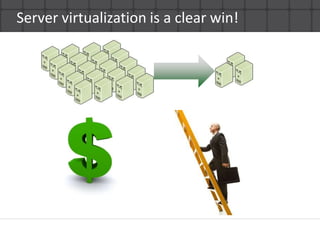
Server virtualization is a clear win!
Server virtualization is easy!CAPEX savings is EASY to showSavings are HUGE!Already in the datacenter – it’s a form factor change!Standardization is a GOOD THING!OPEX is simply a nice byproductLet’s face it – a P2V is a simple migration process
So why is VDI ‘on hold’ in so many organizations?
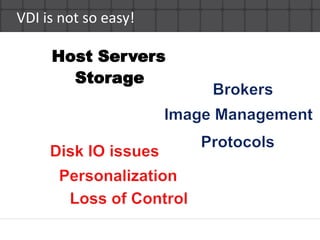
VDI is not so easy!Host ServersStorageBrokersImage ManagementProtocolsDisk IO issuesPersonalizationLoss of Control
VDI ROI isn’t as clear CAPEX is tough to showOPEX is pretty much the only savings availableDesktops have to be “moved”Users don’t like “standardization”Let’s face it, there isn’t an “easy” migration process to virtual desktopsA number of “secondary” products are needed
So what are the key issues inVDI projects?
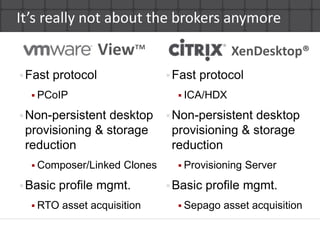
It’s really not about the brokers anymoreView™XenDesktop®Fast protocolPCoIPNon-persistent desktop provisioning & storage reductionComposer/Linked ClonesBasic profile mgmt.RTO asset acquisitionFast protocolICA/HDXNon-persistent desktop provisioning & storage reductionProvisioning ServerBasic profile mgmt.Sepago asset acquisition
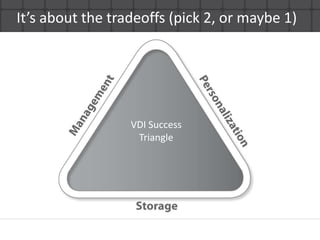
It’s about the tradeoffs (pick 2, or maybe 1)VDI SuccessTriangle
Key issues in more detailSingle image management comes with a pricePersonalization means loss of single image managementPersonalized desktops increase storage costs(footprint)VDI itself has higher IO requirements than servers!All of this on top of user acceptance issuesNo good offline tools todayBrokers don’t always scale to the thousands very well
Do you have a desktopvirtualization strategy?
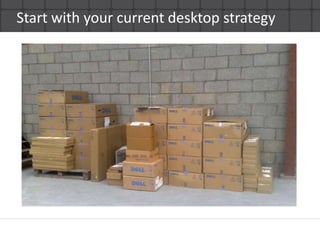
Start with your current desktop strategy
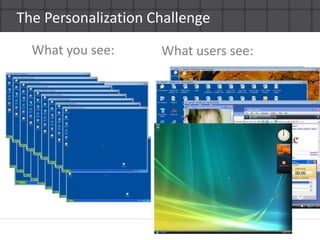
The Personalization ChallengeWhat you see:What users see:
The Storage ChallengeCapacity footprint can be reduced via numerous technologiesIO… not so muchDesktop IOPS rules of thumb?Low: 3-4            Med: 6-12            Heavy:16-20What is all this RAID penalty stuff?Must design to handle the IO load
The Management ChallengeGenerally there are big trade-offsAim for single image management and you lose “persistent” desktops that sustain user personaUse persistent desktops and you lose single image management (and move right back to traditional,higher OpEx desktop management)Single image management reduces storage footprint(linked clones, PVS) but at the cost of personalization Do existing management tools fit the VDI world or your use case?
So what should I be on thelook out for?
Common mistakes in VDIDesigning the hardware firstToo many variables to choose hardware out of the gateJust duplicating server virtualization hardware won’t workBelieving everything the vendors say“The vendor said I could easily virtualize all of my apps.”“The vendor said I could get 120 desktops per host.”Not configuring the disk subsystem properlyForgetting about “personalization” of the desktop
Key “check boxes” for your designDefine what you are delivering and for whomEnsure your design covers the following:Base OS delivery and updatingApplication delivery and updating (even the complex apps)Personalization (including user-installed apps)Broker configuration and requirementsNon-persistent vs. persistent desktop use casesStorage configuration (capacity footprint AND IO load)WAN, LAN, and offline use cases
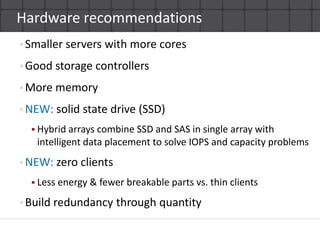
Hardware recommendationsSmaller servers with more coresGood storage controllersMore memoryNEW: solid state drive (SSD)Hybrid arrays combineSSD and SAS in single array with intelligent data placement to solve IOPS and capacity problemsNEW:zero clientsLess energy & fewer breakable parts vs. thin clientsBuild redundancy through quantity
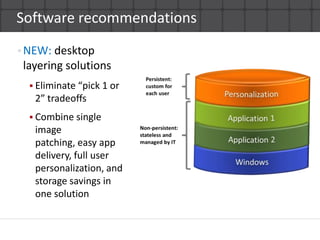
Software recommendationsNEW: desktop layering solutionsEliminate “pick 1 or 2” tradeoffsCombine single image patching, easy app delivery, full user personalization, and storage savings in one solution
VDI @ WycheTom Crowe, IT Manager
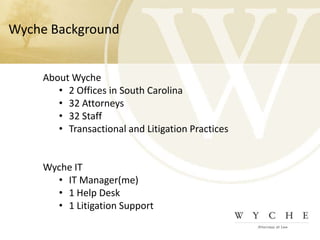
Wyche BackgroundAbout Wyche2 Offices in South Carolina
32 Attorneys
32 Staff
Transactional and Litigation PracticesWyche ITIT Manager(me)
1 Help Desk
1 Litigation SupportVDI MotivationLooming PC lease return deadline
Decrease rollout cycle for new machines
New users
New/Updated software
Potentially move away from 3 year refresh cycle
Replace ancient remote access solution
Green initiative within firmVDI ConcernsIn mid 2009, still new in the marketTotal cost of ownershipHow to handle mobile attorneysDesktop performanceAll “eggs” in a single basket
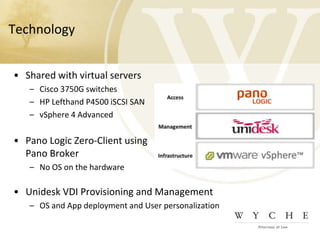
Technology	Shared with virtual serversCisco 3750G switchesHP Lefthand P4500 iSCSI SANvSphere 4 AdvancedPano Logic Zero-Client usingPano BrokerNo OS on the hardwareUnidesk VDI Provisioning and Management OS and App deployment and User personalization
TechnologyServersHP Proliant DL360 G62 x Xeon E5504 @ 2 Ghz (8 cores total)36 GB memory2 x 72 GB SAS for boot and logging6 x 1 Gb NIC portsHP Lefthand P4500 SAN2 nodes12 x 450 GB SAS per node2 x 1 GB NICsDesktop VMsWindows XP SP31 GB memory30 GB “hard drive” thin 8 GB user dataConsolidation of ~25 desktops per vSphere host
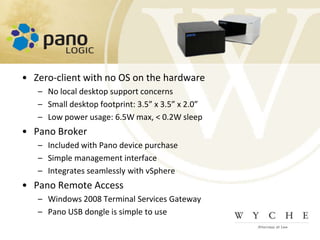
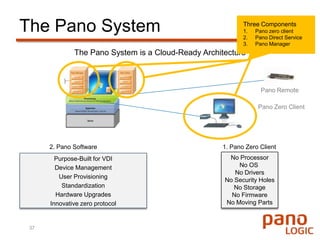
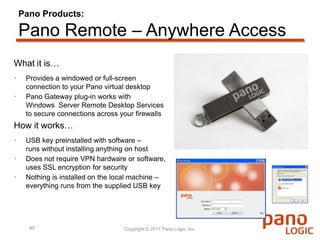
Zero-client with no OS on the hardwareNo local desktop support concernsSmall desktop footprint: 3.5” x 3.5” x 2.0”Low power usage: 6.5W max, < 0.2W sleepPano BrokerIncluded with Pano device purchaseSimple management interfaceIntegrates seamlessly with vSpherePano Remote AccessWindows 2008 Terminal Services GatewayPano USB dongle is simple to use
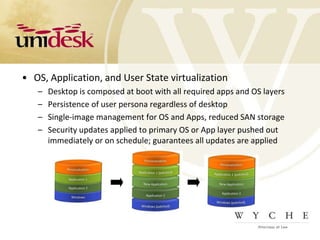
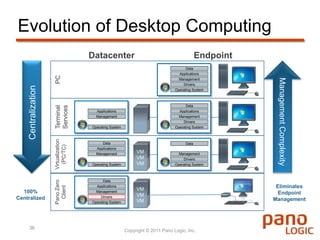
OS, Application, and User State virtualizationDesktop is composed at boot with all required apps and OS layersPersistence of user persona regardless of desktopSingle-image management for OS and Apps, reduced SAN storageSecurity updates applied to primary OS or App layer pushed out immediately or on schedule; guarantees all updates are applied
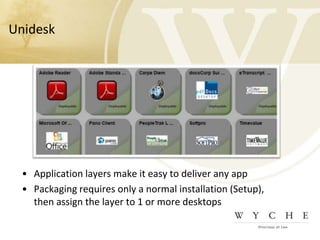
UnideskApplication layers make it easy to deliver any appPackaging requires only a normal installation (Setup), then assign the layer to 1 or more desktops
Testing and RolloutPilot group was pivotal - ~2 monthsRollout to groups, do not convert an entire practice area at a time.  ~ 1 month to deliver to all usersMonitor host performance closelyperformance with 25 VMs is different than 5.Be aware of specific apps and how they impact a host.  Anti-virus adds 3-5% to idle CPU of VM, x25 VMs can be a problem.

Server Virtualization - Smashing Success! Desktop Virtualization - Not So Much. Why?

  • 1.
    Webinar: Server Virtualization:SuccessVDI: Not So Much…Why?Ron OglesbyVMware vExpertCitrix CTPMicrosoft MVPChief Solution ArchitectTom CroweInformationTechnology ManagerDave HurlburtTerritory Manager
  • 2.
  • 3.
    So why hasserver virtualizationbeen so successful?
  • 4.
  • 5.
    Server virtualization iseasy!CAPEX savings is EASY to showSavings are HUGE!Already in the datacenter – it’s a form factor change!Standardization is a GOOD THING!OPEX is simply a nice byproductLet’s face it – a P2V is a simple migration process
  • 6.
    So why isVDI ‘on hold’ in so many organizations?
  • 7.
    VDI is notso easy!Host ServersStorageBrokersImage ManagementProtocolsDisk IO issuesPersonalizationLoss of Control
  • 8.
    VDI ROI isn’tas clear CAPEX is tough to showOPEX is pretty much the only savings availableDesktops have to be “moved”Users don’t like “standardization”Let’s face it, there isn’t an “easy” migration process to virtual desktopsA number of “secondary” products are needed
  • 9.
    So what arethe key issues inVDI projects?
  • 10.
    It’s really notabout the brokers anymoreView™XenDesktop®Fast protocolPCoIPNon-persistent desktop provisioning & storage reductionComposer/Linked ClonesBasic profile mgmt.RTO asset acquisitionFast protocolICA/HDXNon-persistent desktop provisioning & storage reductionProvisioning ServerBasic profile mgmt.Sepago asset acquisition
  • 11.
    It’s about thetradeoffs (pick 2, or maybe 1)VDI SuccessTriangle
  • 12.
    Key issues inmore detailSingle image management comes with a pricePersonalization means loss of single image managementPersonalized desktops increase storage costs(footprint)VDI itself has higher IO requirements than servers!All of this on top of user acceptance issuesNo good offline tools todayBrokers don’t always scale to the thousands very well
  • 13.
    Do you havea desktopvirtualization strategy?
  • 14.
    Start with yourcurrent desktop strategy
  • 15.
    The Personalization ChallengeWhatyou see:What users see:
  • 16.
    The Storage ChallengeCapacityfootprint can be reduced via numerous technologiesIO… not so muchDesktop IOPS rules of thumb?Low: 3-4 Med: 6-12 Heavy:16-20What is all this RAID penalty stuff?Must design to handle the IO load
  • 17.
    The Management ChallengeGenerallythere are big trade-offsAim for single image management and you lose “persistent” desktops that sustain user personaUse persistent desktops and you lose single image management (and move right back to traditional,higher OpEx desktop management)Single image management reduces storage footprint(linked clones, PVS) but at the cost of personalization Do existing management tools fit the VDI world or your use case?
  • 18.
    So what shouldI be on thelook out for?
  • 19.
    Common mistakes inVDIDesigning the hardware firstToo many variables to choose hardware out of the gateJust duplicating server virtualization hardware won’t workBelieving everything the vendors say“The vendor said I could easily virtualize all of my apps.”“The vendor said I could get 120 desktops per host.”Not configuring the disk subsystem properlyForgetting about “personalization” of the desktop
  • 20.
    Key “check boxes”for your designDefine what you are delivering and for whomEnsure your design covers the following:Base OS delivery and updatingApplication delivery and updating (even the complex apps)Personalization (including user-installed apps)Broker configuration and requirementsNon-persistent vs. persistent desktop use casesStorage configuration (capacity footprint AND IO load)WAN, LAN, and offline use cases
  • 21.
    Hardware recommendationsSmaller serverswith more coresGood storage controllersMore memoryNEW: solid state drive (SSD)Hybrid arrays combineSSD and SAS in single array with intelligent data placement to solve IOPS and capacity problemsNEW:zero clientsLess energy & fewer breakable parts vs. thin clientsBuild redundancy through quantity
  • 22.
    Software recommendationsNEW: desktoplayering solutionsEliminate “pick 1 or 2” tradeoffsCombine single image patching, easy app delivery, full user personalization, and storage savings in one solution
  • 23.
    VDI @ WycheTomCrowe, IT Manager
  • 24.
    Wyche BackgroundAbout Wyche2Offices in South Carolina
  • 25.
  • 26.
  • 27.
    Transactional and LitigationPracticesWyche ITIT Manager(me)
  • 28.
  • 29.
    1 Litigation SupportVDIMotivationLooming PC lease return deadline
  • 30.
    Decrease rollout cyclefor new machines
  • 31.
  • 32.
  • 33.
    Potentially move awayfrom 3 year refresh cycle
  • 34.
    Replace ancient remoteaccess solution
  • 35.
    Green initiative withinfirmVDI ConcernsIn mid 2009, still new in the marketTotal cost of ownershipHow to handle mobile attorneysDesktop performanceAll “eggs” in a single basket
  • 36.
    Technology Shared with virtualserversCisco 3750G switchesHP Lefthand P4500 iSCSI SANvSphere 4 AdvancedPano Logic Zero-Client usingPano BrokerNo OS on the hardwareUnidesk VDI Provisioning and Management OS and App deployment and User personalization
  • 37.
    TechnologyServersHP Proliant DL360G62 x Xeon E5504 @ 2 Ghz (8 cores total)36 GB memory2 x 72 GB SAS for boot and logging6 x 1 Gb NIC portsHP Lefthand P4500 SAN2 nodes12 x 450 GB SAS per node2 x 1 GB NICsDesktop VMsWindows XP SP31 GB memory30 GB “hard drive” thin 8 GB user dataConsolidation of ~25 desktops per vSphere host
  • 38.
    Zero-client with noOS on the hardwareNo local desktop support concernsSmall desktop footprint: 3.5” x 3.5” x 2.0”Low power usage: 6.5W max, < 0.2W sleepPano BrokerIncluded with Pano device purchaseSimple management interfaceIntegrates seamlessly with vSpherePano Remote AccessWindows 2008 Terminal Services GatewayPano USB dongle is simple to use
  • 39.
    OS, Application, andUser State virtualizationDesktop is composed at boot with all required apps and OS layersPersistence of user persona regardless of desktopSingle-image management for OS and Apps, reduced SAN storageSecurity updates applied to primary OS or App layer pushed out immediately or on schedule; guarantees all updates are applied
  • 40.
    UnideskApplication layers makeit easy to deliver any appPackaging requires only a normal installation (Setup), then assign the layer to 1 or more desktops
  • 41.
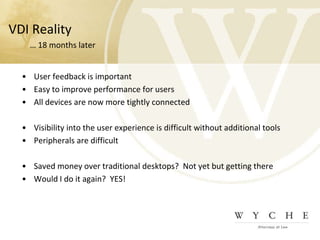
    Testing and RolloutPilotgroup was pivotal - ~2 monthsRollout to groups, do not convert an entire practice area at a time. ~ 1 month to deliver to all usersMonitor host performance closelyperformance with 25 VMs is different than 5.Be aware of specific apps and how they impact a host. Anti-virus adds 3-5% to idle CPU of VM, x25 VMs can be a problem.

Editor's Notes

  • #35 Hello and thank you for your interest learning more about how pano logic is radically changing how businesses manage their desktop computing.
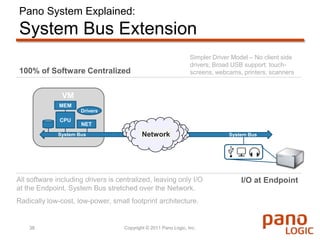
  • #39 The Secret sauce. Stretching the I/O bus. The applications and peripherals are basically faked as being local to virtual server you have installed our solution on. Hence, no endpoint drivers to install, or firmware updates to deploy at the end point. If your applications and peripherals are Windows native, they just work 99% of the time.
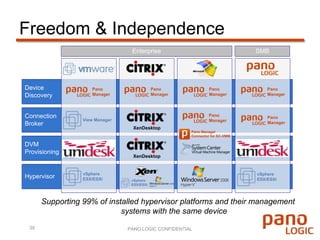
  • #40 We built the solution to support VMware with the long term objective of being agnostic to the Hypervisor in the data center. We recently introduced support for Citrix XenDesktop 4 &amp; 5, as well as Microsoft’s HypervV. We have saved 100’s of organizations thousands of dollars in License fees by deploying the our own broker that is inclusive of the solution. However, we can also hand off the broker functionality to products like VMware View. The goal is to allow the customer freedom of choice on the back end, we would like to be the end point regardless of your back end virtual infrastructure.