
Infrastructure Optimization for the FutureDave KawulaPrincipal ConsultantTriCon Technical Services Inc.dkawula@triconts.com
Traditional data centers are proving to be too rigid for evolving business needsTime absorbed maintaining status quoInflexible“I need to be able to respond to business fluctuations instantly.”“I want to focus my staff on strategic IT initiatives.”Virtualization ceilingsSoaring costs,CapEx limits“I need to offload or automate time consuming and staff intensive tasks”“I want to deploy virtualization in more of my environment”80% of most companies’ IT budgets are spent simply ‘keeping the lights on’.2
Industry answers focus on technology… and that is a good start Inflexible IT can’t meet business needs Automate Time absorbed maintaining status quo Move to the cloud Virtualization ceilings Optimize virtualization Soaring costs, capex limits Consolidate /Unify
The efficient data center provides CIOs better results“I need to avoid busting my budget with IT surprises” “I need to decrease the time and money spent on maintaining IT so we can focus on our core business”  “I need to be responsiveto changing business conditions”
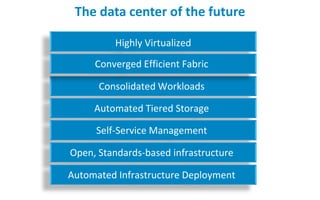
The data center of the futureHighly VirtualizedConverged Efficient FabricConsolidated WorkloadsAutomated Tiered StorageSelf-Service ManagementOpen, Standards-based infrastructureAutomated Infrastructure Deployment
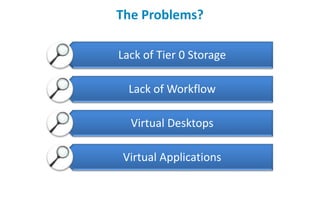
The Problems?
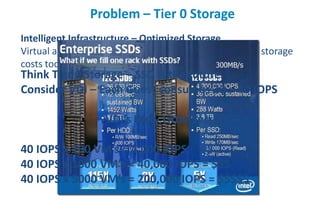
Problem – Tier 0 StorageIntelligent Infrastructure – Optimized StorageVirtual and tiering optimized storage solutions to lower storage costs today and in the futureThink Tier 0 Storage – SSD is the future.  Consider VDI – Each Guest consumes 20 – 40 IOPSVDI’s Dirty Little Secret!40 IOPS x 100 VM’s = 4,000 IOPS    = $40 IOPS x 1000 VM’s = 40,000 IOPS = $$$40 IOPS x 5000 VM’s = 200,000 IOPS = $$$$$
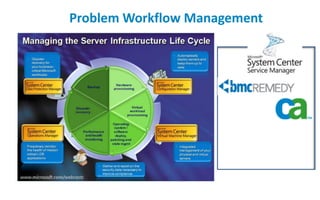
Problem Workflow Management
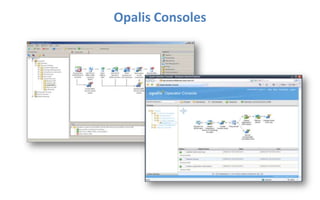
Opalis Consoles
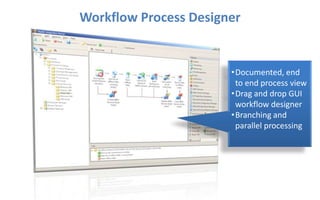
Workflow Process DesignerDocumented, end to end process view
Drag and drop GUI workflow designer
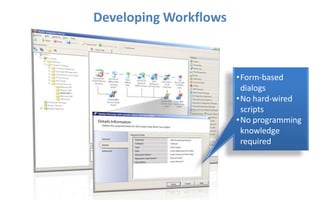
Branching and parallel processingDeveloping WorkflowsForm-based dialogs
No hard-wired scripts
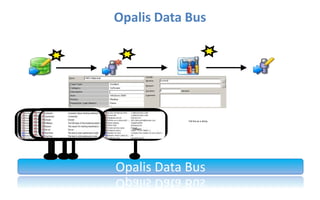
No programming knowledge requiredOpalis Data Bus Full line as a stringFull line as a stringCategoryOpalis Data Bus
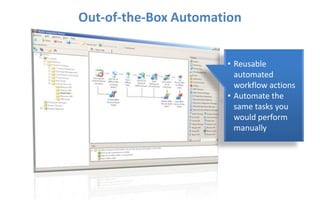
Out-of-the-Box AutomationReusable automated workflow actions
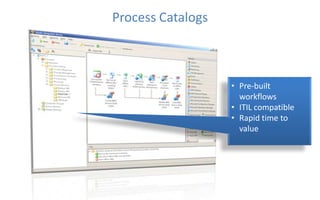
Automate the same tasks you would perform manuallyProcess CatalogsPre-built workflows
ITIL compatible
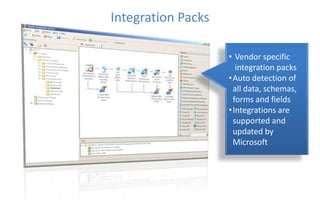
Rapid time to valueIntegration PacksVendor specific integration packs
Auto detection of all data, schemas, forms and fields
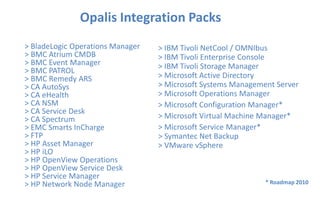
Integrations are supported and updated by MicrosoftOpalis Integration Packs	> BladeLogic Operations Manager > BMC Atrium CMDB > BMC Event Manager > BMC PATROL > BMC Remedy ARS> CA AutoSys> CA eHealth> CA NSM > CA Service Desk > CA Spectrum > EMC Smarts InCharge> FTP> HP Asset Manager > HP iLO> HP OpenView Operations > HP OpenView Service Desk > HP Service Manager> HP Network Node Manager > IBM Tivoli NetCool / OMNIbus> IBM Tivoli Enterprise Console > IBM Tivoli Storage Manager > Microsoft Active Directory > Microsoft Systems Management Server > Microsoft Operations Manager > Microsoft Configuration Manager*> Microsoft Virtual Machine Manager*> Microsoft Service Manager*> Symantec Net Backup > VMware vSphere* Roadmap 2010
Change the way you manageyour Infrastructure!DEMO
But what about my Applications and Desktops?=++SUCCESS!
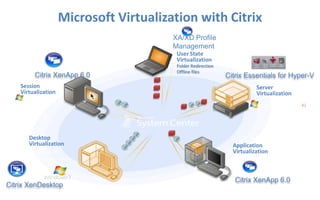
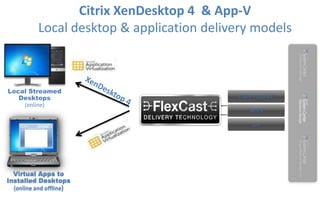
Microsoft Virtualization with CitrixXA/XD Profile ManagementUser StateVirtualizationFolder RedirectionOffline filesCitrix Essentials for Hyper-VCitrix XenApp6.0Citrix XenApp6.0Server VirtualizationSession VirtualizationDesktop VirtualizationApplication VirtualizationCitrix XenDesktop
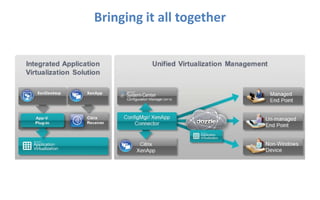
Bringing it all together
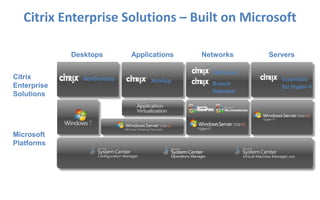
Citrix Enterprise Solutions – Built on MicrosoftDesktopsApplicationsServersNetworksCitrix EnterpriseSolutionsNetScalerXenAppEssentials for Hyper-VXenDesktopBranch Repeater Microsoft Platforms
Delivering the Windows desktop
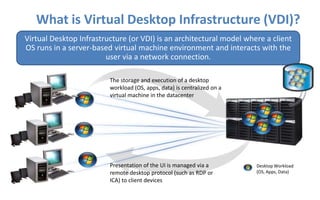
What is Virtual Desktop Infrastructure (VDI)?Virtual Desktop Infrastructure (or VDI) is an architectural model where a client OS runs in a server-based virtual machine environment and interacts with the user via a network connection.The storage and execution of a desktop workload (OS, apps, data) is centralized on a virtual machine in the datacenterPresentation of the UI is managed via a remote desktop protocol (such as RDP or ICA) to client devicesDesktop Workload(OS, Apps, Data)
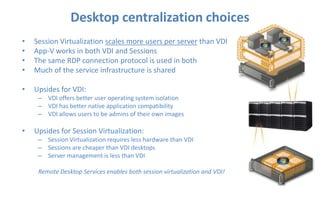
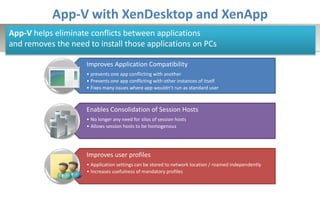
Desktop centralization choicesSession Virtualization scales more users per server than VDIApp-V works in both VDI and SessionsThe same RDP connection protocol is used in bothMuch of the service infrastructure is sharedUpsides for VDI:VDI offers better user operating system isolationVDI has better native application compatibilityVDI allows users to be admins of their own imagesUpsides for Session Virtualization:Session Virtualization requires less hardware than VDISessions are cheaper than VDI desktopsServer management is less than VDIRemote Desktop Services enables both session virtualization and VDI!
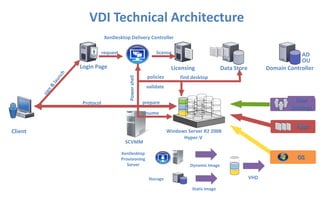
VDI Technical ArchitectureXenDesktop Delivery ControllerrequestlicenseADOULogin PageLicensingDomain ControllerData Storepoliciesfind desktopsign & launchPower shellvalidateUser SettingsProtocolprepareresumeAppsClient Windows Server R2 2008Hyper-VOSSCVMMXenDesktopProvisioningServerDynamic ImageVHDStorageStatic Image
The Application Layer

Opalis - Infrastructure Optimization for the Future

  • 1.
    Infrastructure Optimization forthe FutureDave KawulaPrincipal ConsultantTriCon Technical Services Inc.dkawula@triconts.com
  • 2.
    Traditional data centersare proving to be too rigid for evolving business needsTime absorbed maintaining status quoInflexible“I need to be able to respond to business fluctuations instantly.”“I want to focus my staff on strategic IT initiatives.”Virtualization ceilingsSoaring costs,CapEx limits“I need to offload or automate time consuming and staff intensive tasks”“I want to deploy virtualization in more of my environment”80% of most companies’ IT budgets are spent simply ‘keeping the lights on’.2
  • 3.
    Industry answers focuson technology… and that is a good start Inflexible IT can’t meet business needs Automate Time absorbed maintaining status quo Move to the cloud Virtualization ceilings Optimize virtualization Soaring costs, capex limits Consolidate /Unify
  • 4.
    The efficient datacenter provides CIOs better results“I need to avoid busting my budget with IT surprises” “I need to decrease the time and money spent on maintaining IT so we can focus on our core business” “I need to be responsiveto changing business conditions”
  • 5.
    The data centerof the futureHighly VirtualizedConverged Efficient FabricConsolidated WorkloadsAutomated Tiered StorageSelf-Service ManagementOpen, Standards-based infrastructureAutomated Infrastructure Deployment
  • 6.
  • 7.
    Problem – Tier0 StorageIntelligent Infrastructure – Optimized StorageVirtual and tiering optimized storage solutions to lower storage costs today and in the futureThink Tier 0 Storage – SSD is the future. Consider VDI – Each Guest consumes 20 – 40 IOPSVDI’s Dirty Little Secret!40 IOPS x 100 VM’s = 4,000 IOPS = $40 IOPS x 1000 VM’s = 40,000 IOPS = $$$40 IOPS x 5000 VM’s = 200,000 IOPS = $$$$$
  • 8.
  • 10.
  • 11.
    Workflow Process DesignerDocumented,end to end process view
  • 12.
    Drag and dropGUI workflow designer
  • 13.
    Branching and parallelprocessingDeveloping WorkflowsForm-based dialogs
  • 14.
  • 15.
    No programming knowledgerequiredOpalis Data Bus Full line as a stringFull line as a stringCategoryOpalis Data Bus
  • 16.
  • 17.
    Automate the sametasks you would perform manuallyProcess CatalogsPre-built workflows
  • 18.
  • 19.
    Rapid time tovalueIntegration PacksVendor specific integration packs
  • 20.
    Auto detection ofall data, schemas, forms and fields
  • 21.
    Integrations are supportedand updated by MicrosoftOpalis Integration Packs > BladeLogic Operations Manager > BMC Atrium CMDB > BMC Event Manager > BMC PATROL > BMC Remedy ARS> CA AutoSys> CA eHealth> CA NSM > CA Service Desk > CA Spectrum > EMC Smarts InCharge> FTP> HP Asset Manager > HP iLO> HP OpenView Operations > HP OpenView Service Desk > HP Service Manager> HP Network Node Manager > IBM Tivoli NetCool / OMNIbus> IBM Tivoli Enterprise Console > IBM Tivoli Storage Manager > Microsoft Active Directory > Microsoft Systems Management Server > Microsoft Operations Manager > Microsoft Configuration Manager*> Microsoft Virtual Machine Manager*> Microsoft Service Manager*> Symantec Net Backup > VMware vSphere* Roadmap 2010
  • 22.
    Change the wayyou manageyour Infrastructure!DEMO
  • 23.
    But what aboutmy Applications and Desktops?=++SUCCESS!
  • 24.
    Microsoft Virtualization withCitrixXA/XD Profile ManagementUser StateVirtualizationFolder RedirectionOffline filesCitrix Essentials for Hyper-VCitrix XenApp6.0Citrix XenApp6.0Server VirtualizationSession VirtualizationDesktop VirtualizationApplication VirtualizationCitrix XenDesktop
  • 25.
  • 26.
    Citrix Enterprise Solutions– Built on MicrosoftDesktopsApplicationsServersNetworksCitrix EnterpriseSolutionsNetScalerXenAppEssentials for Hyper-VXenDesktopBranch Repeater Microsoft Platforms
  • 27.
  • 28.
    What is VirtualDesktop Infrastructure (VDI)?Virtual Desktop Infrastructure (or VDI) is an architectural model where a client OS runs in a server-based virtual machine environment and interacts with the user via a network connection.The storage and execution of a desktop workload (OS, apps, data) is centralized on a virtual machine in the datacenterPresentation of the UI is managed via a remote desktop protocol (such as RDP or ICA) to client devicesDesktop Workload(OS, Apps, Data)
  • 29.
    Desktop centralization choicesSessionVirtualization scales more users per server than VDIApp-V works in both VDI and SessionsThe same RDP connection protocol is used in bothMuch of the service infrastructure is sharedUpsides for VDI:VDI offers better user operating system isolationVDI has better native application compatibilityVDI allows users to be admins of their own imagesUpsides for Session Virtualization:Session Virtualization requires less hardware than VDISessions are cheaper than VDI desktopsServer management is less than VDIRemote Desktop Services enables both session virtualization and VDI!
  • 30.
    VDI Technical ArchitectureXenDesktopDelivery ControllerrequestlicenseADOULogin PageLicensingDomain ControllerData Storepoliciesfind desktopsign & launchPower shellvalidateUser SettingsProtocolprepareresumeAppsClient Windows Server R2 2008Hyper-VOSSCVMMXenDesktopProvisioningServerDynamic ImageVHDStorageStatic Image
  • 31.

Editor's Notes

  • #3 Today companies struggle with the evergrowing complexity and fragility/age of their environments. The cost associated with keeping their current environment running, as well as the cost for new technology, staffing, space, security, and more is breaking IT Budgets. Dell listens to its customers and is focused on creating solutions that solve real IT challenges To help customers achieve efficiency in their enterprise To help customers control and drive down the growing costs of IT management To help customers refocus their IT efforts on R and D and innovation
  • #4 The next movement in the efficiency evolution is the unification of your network fabric and the You can by creating a flexible infrastructure, orchestrated through a unified infrastructure management. You can take the path to efficiency to a new level, by unifying and optimizing your data center infrastructure and networks. Many claim to be able to do this. There are a number of offerings out there today that intend to solve this challenge and to offer customers a proprietary, non-standard solution that was cobbled together from existing solutions. In fact, most promise the same savings in cost and complexity but the truth is……
  • #5 Highly flexible and scalable infrastructure to better meet business demandsRapid deployment of business workloadsNew capabilities added automaticallyMetered charge-backs to business usersThe resiliency, limitless capacity and low CapEx of public and private cloudsStreamlined process that cut across networking, storage, and computing silos
  • #6 Highly VirtualizedIncreased availability and scalabilityAutomated Business Continuance Reduced energy and space requirementsCoverged Efficient FabricFewer proprietary single-use networksSimplified network managementReduced cost and complexityConsolidated WorkloadsDecreased software licensing costsEnhanced application availability,Shorter time to market for new apps/functionalityAutomated Tiered StorageControl ever increasing data volumeEliminate one-size-fits-all cost structure Improved data managementSelf-Service ManagementManage infrastructure, workloads and appsDecrease the time-to-value for strategic initiativesOpen, Standards-based infrastructureLower hardware costsIncreased workload flexibilityAutomated Infrastructure DeploymentManage more infrastructure per adminFree up resources for innovation
  • #11 There are two Consoles provided with Opalis. The first is the client designer (Workflow process designer) which allows customers to build, test, modify, execute and monitor their workflows. This is a windows-based client. The second is a web-based Operator Console which allows operators to execute and view (but not create or modify) the workflows. Both consoles are tied in with Active directory and offer access-based control.
  • #14 This slide gives a visual example of how the data bus works. This concept is hard to explain without some visualization. The animation shows how after an object is executed all the relevant details about its execution are placed into the bus. As later objects execute they can draw their information from one or more previous object’s details which are already in the bus.SLIDE ANIMATION CLICK THROUGHSlide Opens: Simple Opalis WorkflowClick 1:The first object executesIt generates data and it gets put on the Opalis Data BusClick 2: The second object utilizes information from the first object (via the Opalis Data Bus)It executesIt generates data and it gets put on the Opalis Data Bus (along with the data from the first object)Click 3: The third object utilizes information from the first and second objects (via the Opalis Data Bus)ItexecutesItgenerates data and it gets put on the Opalis Data Bus (along with the data from the first and second objects)No coding is required to make this happen!As objects are added to the product all their output is categorized and made available to the bus so the end-user can access it with ease
  • #18 List of the currently available Integration Packs29 Integration PacksFrom 8 different VendorsNOTE: SC Configuration Manager is listed with SMS since the SMS IP can operate against SCCM but with a reduced function set when compared to the final SCCM IP.(as of 2/1/10 no new information on dates of additional IPs on roadmap)
  • #19 List of the currently available Integration Packs29 Integration PacksFrom 8 different VendorsNOTE: SC Configuration Manager is listed with SMS since the SMS IP can operate against SCCM but with a reduced function set when compared to the final SCCM IP.(as of 2/1/10 no new information on dates of additional IPs on roadmap)
  • #20 List of the currently available Integration Packs29 Integration PacksFrom 8 different VendorsNOTE: SC Configuration Manager is listed with SMS since the SMS IP can operate against SCCM but with a reduced function set when compared to the final SCCM IP.(as of 2/1/10 no new information on dates of additional IPs on roadmap)