Server VirtualizationPresented by:AkankshaShukla(0716510006)Akhilesh Kumar Jha(0716510007)
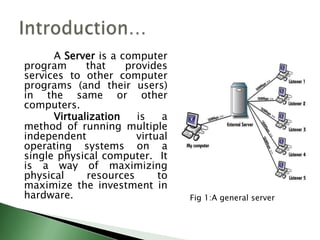
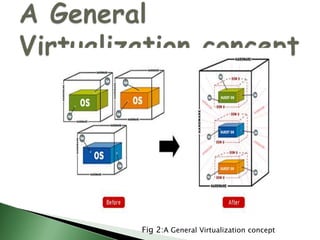
            A Server is a computer program that provides services to other computer programs (and their users) in the same or other computers.            Virtualization is a method of running multiple independent virtual operating systems on a single physical computer.  It is a way of maximizing physical resources to maximize the investment in hardware.Introduction…Fig 1:A general server
A General Virtualization conceptFig 2:A General Virtualization concept
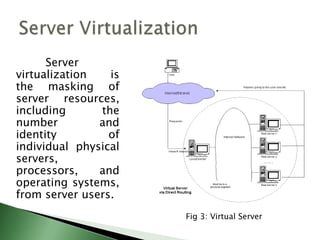
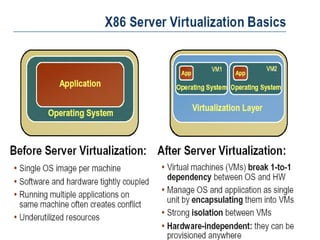
           Server virtualization is the masking of server resources, including the number and identity of individual physical servers, processors, and operating systems, from server users.Server VirtualizationFig 3: Virtual Server
There are three popular approaches to server virtualization: The virtual machine model,
 The paravirtual machine model, and
 Virtualization at the operating system (OS) layer. Approaches to Server Virtualization
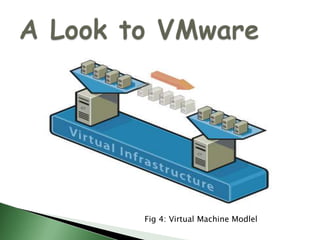
A).The virtual machine model:            Virtual machines are based on the host/guest paradigm. Each guest runs on a virtual imitation of the hardware layer. This approach allows the guest operating system to run without modifications. It's not running on real hardware. It uses a hypervisor to coordinate instructions to the CPU. The hypervisor is called a virtual machine monitor (VMM).           VMware and Microsoft Virtual Server both use the virtual machine model.
A Look to VMwareFig 4: Virtual Machine Modlel
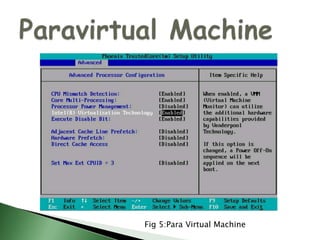
		   The paravirtual machine (PVM) model is also based on the host/guest paradigm. The VMM actually modifies the guest operating system's code. This modification is called porting. Porting supports the VMM so it can utilize privileged systems calls sparingly.Xenand UML both use the paravirtual machine model.B).The paravirtual machine model:
Paravirtual MachineFig 5:Para Virtual Machine
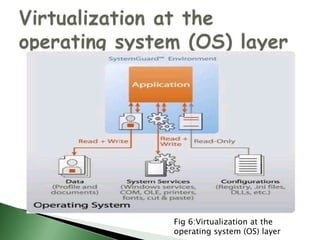
Virtualization at the OS level works a little differently. It isn't based on the host/guest paradigm. In the OS level model, the host runs a single OS kernel as its core and exports operating system functionality to each of the guests.Virtuozzoand Solaris Zones both use OS-level virtualization.C).Virtualization at the operating system layer
Virtualization at the operating system (OS) layerFig 6:Virtualization at the operating system (OS) layer
		  Server virtualization can be viewed as part of an overall virtualization trend in enterprise IT that includes storage virtualization, network virtualization, and workload management. Server virtualization can be used to eliminate server sprawl, to make more efficient use of server resources, to improve server availability, to assist in disaster recovery, testing and development, and to centralize server administrationScope of virtualization
Reduces administrative effortsLowers operational costsFewer servers to manageSpeeds deploymentNow 1-6 weeks (requisition, setup, software, test)Virtual reduces this to hoursReduced hardware and infrastructure costsImproves resource utilizationIncreases availabilityTools to enhance securityVirtualization Benefits
Server consolidationMultiple OS & application supportLab and deployment testingTrainingHelp deskDisaster recoveryApplication isolationIntrusion detectionSecurityServer Virtualization Scenarios
Fewer servers to manage and recover/restoreReduces costsServer VMs are hardware independentCan be restored to other platforms No need to match primary site and secondary site hardwareVMs are encapsulatedFasterCan be replicated between sitesNo need for bare-metal installsDisaster Recovery
Physical-to-VM recoveryRestore physical backup to running VMLower costs – no need for 1-to-1 physical serversVM-to-VM recovery Protects against operating system/application failureRecover failed VM on another server Disaster Recovery
		    Server Virtualization is the perfect solution for applications that are meant for small- to medium-scale usage .Munich - Fujitsu announced a new initiative aimed at helping small and mid-size businesses (SMBs) take advantage of the business-boosting benefits of switching to server virtualization. ‘My Very First Hyper-V’ combines hardware and software components to provide an affordable, easy-to-manage entry point to server virtualization, offering SMBs significantly-reduced fixed and operational costs, as well as increased system flexibility and availability.Implementation:
		    The future of virtualization is really about the future of the OS. Abstractly speaking, virtualization is just the latest development in the operating system's ongoing adaptation to different forms of multitenancy (protected memory and multiuser support being two earlier points on this trend). Future Scope

Server Virtualization

  • 1.
  • 2.
    A Server is a computer program that provides services to other computer programs (and their users) in the same or other computers. Virtualization is a method of running multiple independent virtual operating systems on a single physical computer.  It is a way of maximizing physical resources to maximize the investment in hardware.Introduction…Fig 1:A general server
  • 3.
    A General VirtualizationconceptFig 2:A General Virtualization concept
  • 4.
    Server virtualization is the masking of server resources, including the number and identity of individual physical servers, processors, and operating systems, from server users.Server VirtualizationFig 3: Virtual Server
  • 5.
    There are threepopular approaches to server virtualization: The virtual machine model,
  • 6.
    The paravirtualmachine model, and
  • 7.
    Virtualization atthe operating system (OS) layer. Approaches to Server Virtualization
  • 8.
    A).The virtual machinemodel: Virtual machines are based on the host/guest paradigm. Each guest runs on a virtual imitation of the hardware layer. This approach allows the guest operating system to run without modifications. It's not running on real hardware. It uses a hypervisor to coordinate instructions to the CPU. The hypervisor is called a virtual machine monitor (VMM). VMware and Microsoft Virtual Server both use the virtual machine model.
  • 9.
    A Look toVMwareFig 4: Virtual Machine Modlel
  • 10.
    The paravirtual machine (PVM) model is also based on the host/guest paradigm. The VMM actually modifies the guest operating system's code. This modification is called porting. Porting supports the VMM so it can utilize privileged systems calls sparingly.Xenand UML both use the paravirtual machine model.B).The paravirtual machine model:
  • 11.
  • 12.
    Virtualization at theOS level works a little differently. It isn't based on the host/guest paradigm. In the OS level model, the host runs a single OS kernel as its core and exports operating system functionality to each of the guests.Virtuozzoand Solaris Zones both use OS-level virtualization.C).Virtualization at the operating system layer
  • 13.
    Virtualization at theoperating system (OS) layerFig 6:Virtualization at the operating system (OS) layer
  • 14.
    Servervirtualization can be viewed as part of an overall virtualization trend in enterprise IT that includes storage virtualization, network virtualization, and workload management. Server virtualization can be used to eliminate server sprawl, to make more efficient use of server resources, to improve server availability, to assist in disaster recovery, testing and development, and to centralize server administrationScope of virtualization
  • 15.
    Reduces administrative effortsLowersoperational costsFewer servers to manageSpeeds deploymentNow 1-6 weeks (requisition, setup, software, test)Virtual reduces this to hoursReduced hardware and infrastructure costsImproves resource utilizationIncreases availabilityTools to enhance securityVirtualization Benefits
  • 16.
    Server consolidationMultiple OS& application supportLab and deployment testingTrainingHelp deskDisaster recoveryApplication isolationIntrusion detectionSecurityServer Virtualization Scenarios
  • 17.
    Fewer servers tomanage and recover/restoreReduces costsServer VMs are hardware independentCan be restored to other platforms No need to match primary site and secondary site hardwareVMs are encapsulatedFasterCan be replicated between sitesNo need for bare-metal installsDisaster Recovery
  • 18.
    Physical-to-VM recoveryRestore physicalbackup to running VMLower costs – no need for 1-to-1 physical serversVM-to-VM recovery Protects against operating system/application failureRecover failed VM on another server Disaster Recovery
  • 19.
    Server Virtualization is the perfect solution for applications that are meant for small- to medium-scale usage .Munich - Fujitsu announced a new initiative aimed at helping small and mid-size businesses (SMBs) take advantage of the business-boosting benefits of switching to server virtualization. ‘My Very First Hyper-V’ combines hardware and software components to provide an affordable, easy-to-manage entry point to server virtualization, offering SMBs significantly-reduced fixed and operational costs, as well as increased system flexibility and availability.Implementation:
  • 20.
    The future of virtualization is really about the future of the OS. Abstractly speaking, virtualization is just the latest development in the operating system's ongoing adaptation to different forms of multitenancy (protected memory and multiuser support being two earlier points on this trend). Future Scope