Important SEO HTML tags
Title Tag
<head>
<title>Keyword</title>
</head>
H1,H2,H3
<h1>Most Important</h1>
<h2>Second Most Important</h2>
<h3>Third Most Important</h3>
Bold, Strong
(Same Worth)
<b>Keyword</b>
<strong>Keyword</strong>
Image
(XHTML)
<img src=”keyword.jpg” alt=”keyword” />
Hyperlink
<a href=”http://www.mysite.com/webpage.html” title=”keyword”>Keyword
in Anchor Text</a>
Hyperlink
(No Followed)
<a href=”http://www.mysite.com/webpage.html” title=”keyword”
rel=”nofollow”>Keyword in Anchor Text</a>
Search Engine Indexing Limits
*Does not apply to websites with significant authority
Page File Size No more than 150 kilobytes (Before Images, CSS and other Attachments)
Amount of
links
No more than 100 unique links per page
Title Tag No more than 70 characters
Meta
Description
No more than 155 characters
Parameters in
URL
No more than 2
Bad Example:
http://www.mysite.com/brands.php?
object=1&type=2&kind=3&node=5&arg=6
Good Example:
http://www.mysite.com/brands.php?nike
Depth of URL No more than 4
Bad Example:
http://www.mysite.com/people/places/things/
noun/danny/car
*Best Practice
Good Example:
http://www.mysite.com/people/danny/
Common Canonical Homepage Issue
Bad
http://www.mysite.com
http://mysite.com
http://www.mysite.com/index.html
http://mysite.com/index.html
Good http://www.mysite.com/
To condense the four default homepages into one homepage, use
301 redirects (See table on right) to correct for erroneous incoming
links and make all internal links point to your domain using the
syntax ‘http://www.mysite.com/’.Always include trailing “/” on folders.
RecommendedTitleTag Syntax
Keyword < Category | Website Title
301 Redirect for Apache
Write to file called ‘.htaccess’.The file is named only as an extension.
Hidden files must be viewable in operating system. mod_rewrite must be enabled
Command Description
Redirect 301 /oldpage.html http://www.newdomain.com/
newpage.html
Redirect single file or directory to a new
file or directory on a different domain
RewriteEngine on
RewriteCond %{HTTP_HOST} ^mysite.com [NC]
RewriteRule (.*) http://www.mysite.com/$1 [L,R=301]
Redirect http://mysite.com to http://
www.mysite.com.Affects entire domain.
Entire site:
Redirect 301 / http://www.newdomain.com/
Redirect permanent /old http://www.newdomain.com/new
Redirect entire domain to a new domain
as either a 301 (recommended) or 302
The Web Developer’s SEO Cheat Sheet
Revision 09
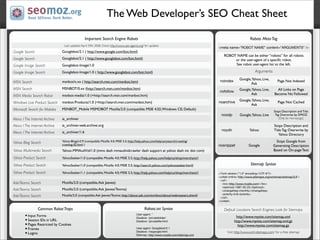
Important Search Engine Robots
Last updated April 29th 2008. Check http://www.user-agents.org/ for updates
Google Search Googlebot/2.1 ( http://www.google.com/bot.html)
Google Search Googlebot/2.1 ( http://www.googlebot.com/bot.html)
Google Image Search Googlebot-Image/1.0
Google Image Search Googlebot-Image/1.0 ( http://www.googlebot.com/bot.html)
MSN Search msnbot/x.xx ( http://search.msn.com/msnbot.htm)
MSN Search MSNBOT/0.xx (http://search.msn.com/msnbot.htm) 
MSN Media Search Robot msnbot-media/1.0 (+http://search.msn.com/msnbot.htm)
Windows Live Product Search msnbot-Products/1.0 (+http://search.msn.com/msnbot.htm) 
Microsoft Search for Mobiles MSNBOT_Mobile MSMOBOT Mozilla/2.0 (compatible; MSIE 4.02;Windows CE; Default)
Alexa / The Internet Archive ia_archiver
Alexa / The Internet Archive ia_archiver-web.archive.org
Alexa / The Internet Archive ia_archiver/1.6
Yahoo Blog Search Yahoo-Blogs/v3.9 (compatible; Mozilla 4.0; MSIE 5.5; http://help.yahoo.com/help/us/ysearch/crawling/
crawling-02.html )
Yahoo Multimedia Search Yahoo-MMAudVid/1.0 (mms dash mmaudvidcrawler dash support at yahoo dash inc dot com)
Yahoo Product Search YahooSeeker/1.0 (compatible; Mozilla 4.0; MSIE 5.5; http://help.yahoo.com/help/us/shop/merchant/)
Yahoo Product Search YahooSeeker/1.0 (compatible; Mozilla 4.0; MSIE 5.5; http://search.yahoo.com/yahooseeker.html)
Yahoo Product Search YahooSeeker/1.1 (compatible; Mozilla 4.0; MSIE 5.5; http://help.yahoo.com/help/us/shop/merchant/)
Ask/Teoma Search Mozilla/2.0 (compatible;Ask Jeeves)
Ask/Teoma Search Mozilla/2.0 (compatible;Ask Jeeves/Teoma)
Ask/Teoma Search Mozilla/2.0 (compatible;Ask Jeeves/Teoma; http://about.ask.com/en/docs/about/webmasters.shtml)
Robots MetaTag
<meta name=”ROBOT NAME” content=”ARGUMENTS” />
ROBOT NAME can be either “robots” for all robots
or the user-agent of a specific robot.
See robot user-agent list to the left.
Arguments
noindex
Google,Yahoo, Live,
Ask
Page Not Indexed
nofollow
Google,Yahoo, Live,
Ask
All Links on Page
Become No Followed
noarchive
Google,Yahoo, Live,
Ask
Page Not Cached
noodp Google,Yahoo, Live
Stops Description and Title
Tag Overwrite by DMOZ
(Only for Homepage)
noydir Yahoo
Stops Description and
Title Tag Overwrite by
Yahoo Directory
nosnippet Google
Stops Google from
Generating Description
Based on On-page Text
Sitemap Syntax
<?xml version=”1.0” encoding=’UTF-8’?>
<urlset xmlns=’http://www.sitemaps.org/schemas/sitemap/0.9’>
<url>
<loc>http://www.mysite.com/</loc>
<lastmod>1987-05-25</lastmod>
<changefreq>monthly</changefreq>
<priority>0.8</priority>
</url>
</urlset>
Default Locations Search Engines Look for Sitemaps
http://www.mysite.com/sitemap.xml
http://www.mysite.com/sitemap.xml.gz
http://www.mysite.com/sitemap.gz
Visit http://www.xml-sitemaps.com/ for a free sitemap
Common RobotTraps
Input Forms
Session IDs in URL
Pages Restricted by Cookies
Frames
Logins
Robots.txt Syntax
User-agent: *
Disallow: /privatefolder/
Disallow: /privatefile.html
User-agent: Googlebot/2.1
Disallow: /nogoogle.html
Sitemap: http://www.mysite.com/sitemap.xml
The Web Developer’s SEO Cheat Sheet

SEO web developer cheat sheet

  • 1.
    Important SEO HTMLtags Title Tag <head> <title>Keyword</title> </head> H1,H2,H3 <h1>Most Important</h1> <h2>Second Most Important</h2> <h3>Third Most Important</h3> Bold, Strong (Same Worth) <b>Keyword</b> <strong>Keyword</strong> Image (XHTML) <img src=”keyword.jpg” alt=”keyword” /> Hyperlink <a href=”http://www.mysite.com/webpage.html” title=”keyword”>Keyword in Anchor Text</a> Hyperlink (No Followed) <a href=”http://www.mysite.com/webpage.html” title=”keyword” rel=”nofollow”>Keyword in Anchor Text</a> Search Engine Indexing Limits *Does not apply to websites with significant authority Page File Size No more than 150 kilobytes (Before Images, CSS and other Attachments) Amount of links No more than 100 unique links per page Title Tag No more than 70 characters Meta Description No more than 155 characters Parameters in URL No more than 2 Bad Example: http://www.mysite.com/brands.php? object=1&type=2&kind=3&node=5&arg=6 Good Example: http://www.mysite.com/brands.php?nike Depth of URL No more than 4 Bad Example: http://www.mysite.com/people/places/things/ noun/danny/car *Best Practice Good Example: http://www.mysite.com/people/danny/ Common Canonical Homepage Issue Bad http://www.mysite.com http://mysite.com http://www.mysite.com/index.html http://mysite.com/index.html Good http://www.mysite.com/ To condense the four default homepages into one homepage, use 301 redirects (See table on right) to correct for erroneous incoming links and make all internal links point to your domain using the syntax ‘http://www.mysite.com/’.Always include trailing “/” on folders. RecommendedTitleTag Syntax Keyword < Category | Website Title 301 Redirect for Apache Write to file called ‘.htaccess’.The file is named only as an extension. Hidden files must be viewable in operating system. mod_rewrite must be enabled Command Description Redirect 301 /oldpage.html http://www.newdomain.com/ newpage.html Redirect single file or directory to a new file or directory on a different domain RewriteEngine on RewriteCond %{HTTP_HOST} ^mysite.com [NC] RewriteRule (.*) http://www.mysite.com/$1 [L,R=301] Redirect http://mysite.com to http:// www.mysite.com.Affects entire domain. Entire site: Redirect 301 / http://www.newdomain.com/ Redirect permanent /old http://www.newdomain.com/new Redirect entire domain to a new domain as either a 301 (recommended) or 302 The Web Developer’s SEO Cheat Sheet Revision 09
  • 2.
    Important Search EngineRobots Last updated April 29th 2008. Check http://www.user-agents.org/ for updates Google Search Googlebot/2.1 ( http://www.google.com/bot.html) Google Search Googlebot/2.1 ( http://www.googlebot.com/bot.html) Google Image Search Googlebot-Image/1.0 Google Image Search Googlebot-Image/1.0 ( http://www.googlebot.com/bot.html) MSN Search msnbot/x.xx ( http://search.msn.com/msnbot.htm) MSN Search MSNBOT/0.xx (http://search.msn.com/msnbot.htm)  MSN Media Search Robot msnbot-media/1.0 (+http://search.msn.com/msnbot.htm) Windows Live Product Search msnbot-Products/1.0 (+http://search.msn.com/msnbot.htm)  Microsoft Search for Mobiles MSNBOT_Mobile MSMOBOT Mozilla/2.0 (compatible; MSIE 4.02;Windows CE; Default) Alexa / The Internet Archive ia_archiver Alexa / The Internet Archive ia_archiver-web.archive.org Alexa / The Internet Archive ia_archiver/1.6 Yahoo Blog Search Yahoo-Blogs/v3.9 (compatible; Mozilla 4.0; MSIE 5.5; http://help.yahoo.com/help/us/ysearch/crawling/ crawling-02.html ) Yahoo Multimedia Search Yahoo-MMAudVid/1.0 (mms dash mmaudvidcrawler dash support at yahoo dash inc dot com) Yahoo Product Search YahooSeeker/1.0 (compatible; Mozilla 4.0; MSIE 5.5; http://help.yahoo.com/help/us/shop/merchant/) Yahoo Product Search YahooSeeker/1.0 (compatible; Mozilla 4.0; MSIE 5.5; http://search.yahoo.com/yahooseeker.html) Yahoo Product Search YahooSeeker/1.1 (compatible; Mozilla 4.0; MSIE 5.5; http://help.yahoo.com/help/us/shop/merchant/) Ask/Teoma Search Mozilla/2.0 (compatible;Ask Jeeves) Ask/Teoma Search Mozilla/2.0 (compatible;Ask Jeeves/Teoma) Ask/Teoma Search Mozilla/2.0 (compatible;Ask Jeeves/Teoma; http://about.ask.com/en/docs/about/webmasters.shtml) Robots MetaTag <meta name=”ROBOT NAME” content=”ARGUMENTS” /> ROBOT NAME can be either “robots” for all robots or the user-agent of a specific robot. See robot user-agent list to the left. Arguments noindex Google,Yahoo, Live, Ask Page Not Indexed nofollow Google,Yahoo, Live, Ask All Links on Page Become No Followed noarchive Google,Yahoo, Live, Ask Page Not Cached noodp Google,Yahoo, Live Stops Description and Title Tag Overwrite by DMOZ (Only for Homepage) noydir Yahoo Stops Description and Title Tag Overwrite by Yahoo Directory nosnippet Google Stops Google from Generating Description Based on On-page Text Sitemap Syntax <?xml version=”1.0” encoding=’UTF-8’?> <urlset xmlns=’http://www.sitemaps.org/schemas/sitemap/0.9’> <url> <loc>http://www.mysite.com/</loc> <lastmod>1987-05-25</lastmod> <changefreq>monthly</changefreq> <priority>0.8</priority> </url> </urlset> Default Locations Search Engines Look for Sitemaps http://www.mysite.com/sitemap.xml http://www.mysite.com/sitemap.xml.gz http://www.mysite.com/sitemap.gz Visit http://www.xml-sitemaps.com/ for a free sitemap Common RobotTraps Input Forms Session IDs in URL Pages Restricted by Cookies Frames Logins Robots.txt Syntax User-agent: * Disallow: /privatefolder/ Disallow: /privatefile.html User-agent: Googlebot/2.1 Disallow: /nogoogle.html Sitemap: http://www.mysite.com/sitemap.xml The Web Developer’s SEO Cheat Sheet