
Ashish Chavan 
Abhijeet Karve 
Tejas Wadke 
Omkar Shelar 
Snehal Patel
# Malware 
# Antivirus 
# FireWall
What are Malware's ? 
What are its types ? 
What Malware can do ? 
How to prevent Malwares ?
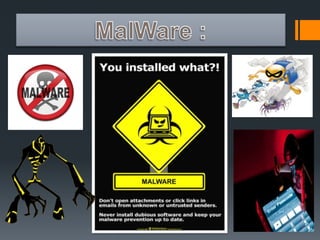
What are Malwares ? 
 "Malware" is short for malicious software and used as a 
single term to refer to virus, spy ware, worm etc. Malware is 
designed to cause damage to a stand alone computer or a 
networked pc. So wherever a malware term is used it means 
a program which is designed to damage your computer it 
may be a virus, worm or Trojan.
What are its types ? 
Virus 
Worms 
Trojans 
Adware 
Spywares
Virus: 
A virus is a piece of code(malicious code) that is 
usually made to harm software or the OS(operating 
system). 
 They can infect a computer and can 
spread through the network. 
Some are so powerful that they can even 
damage the hardware of the system!!!!!
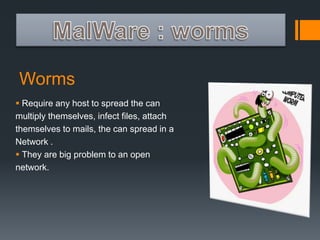
Worms 
 Require any host to spread the can 
multiply themselves, infect files, attach 
themselves to mails, the can spread in a 
Network . 
 They are big problem to an open 
network.
Trojans 
 The most common of all malware's. 
 Main intention is control victims PC them. 
 Ones infected the attacker have full control of your PC. 
 Intended to steal confidential data.
Adwares 
 Used for advertising a product. 
 They might contain harmful virus or spying software. 
 Can automatically get downloaded to your system while and 
can be viewed through pop-up windows. 
 Adwares are used by companies for marketing purpose.
Spyware 
 Collect information about users, their computer or 
browsing habits tracks each and everything that victim does. 
 Can download other malicious programs and install them. 
 Spy’s the host computer.
What Malware can do ? 
 A malware can steal your credentials. 
 They can steal your credit card details. 
 They can control your PC. 
 They can look through your webcams. 
 They can harm your hardware and software.
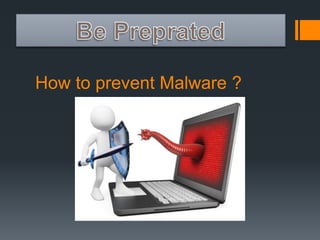
How to prevent Malware ?
Keep Your Windows updated :
Use a good Firewall : 
What firewall basically do is that is monitor's the 
traffic that is coming to your system and blocks 
the malicious traffic and allows the clean. There 
are basically two type's of firewall Software 
Firewall and Hardware Firewall. But for home 
use it is better to stick with software.
Use Antivirus : 
Antivirus are the software which are responsible 
to protect your PC's from viruses and all other 
threads. Antivirus software is used to prevent, 
detect, and remove malware and other 
Computer viruses.
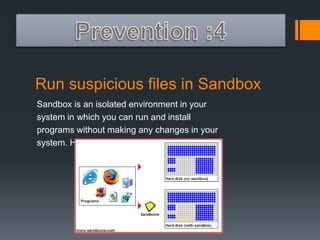
Run suspicious files in Sandbox 
Sandbox is an isolated environment in your 
system in which you can run and install 
programs without making any changes in your 
system. Here is a image that explain 's it well.
Common Sense : 
This is what you can't find on any website or any 
file-hosting server nither at any shop. Think you find 
a videao on youtube that about let's say Bitcoin 
hacker with comment disabled or enable or 
whatever. You downloaded it runed it and got 
infected. Don't you have thought that this is impossible. 
People infect themselves by using Facebook hacker, G 
mail hacker, etc without thinking for a minute. I the can 
hack Facebook , G-mail password means that they have 
access to the database these high security website.
Antivirus 
What is an Antivirus ? 
What Antivirus do ? 
What are its types and how do 
they works ? 
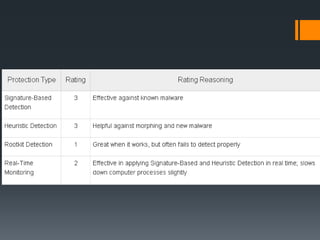
Antivirus Rating System.
What is an Antivirus ? 
Antivirus software identifies, prevents, and 
removes malware from a computer system. 
Malware is any number of viruses and software 
bits that intend to harm the computer or steal 
information, such as viruses, adware, rootkits, 
backdoors, hijackers, keyloggers, spyware, 
trojans, and worms.
What Antivirus do ?
What are its types and how do 
they work ? 
 Signature Based Detection 
 Heuristics 
 Rootkit Detection 
 Real Time Protection
Signature Based Detection : 
Nearly all antivirus software uses signature-based 
detection as part of its virus detection process. Each virus 
has a digital signature; a code that causes the virus to 
perform the functions it was designed to perform. On a 
regular schedule, or at the user’s instruction, antivirus 
software downloads an updated database of known virus 
signatures. The antivirus software can then scan each file 
on the computer’s hardware and memory and compare 
the entire file, as well as small sections of each file, 
against the virus signature database
Heuristics : 
To help protect computers against new and 
unknown malware, heuristic detection algorithms 
were created. Heuristic methods allow antivirus 
software to detect variants of existing malware and 
new, never before seen malware. Heuristics use 
virus signature databases to find viruses, but do not 
require an exact match to identify a virus. Heuristic 
detection algorithms scan files for random 
combinations of signatures to detect malware.
Rootkit Detection : 
Rootkits can alter the operating system of a 
computer to change how it works and even alter 
antivirus software itself to make it inoperable. In 
some extreme cases, rootkits can destroy an 
operating system, making it completely 
unrecoverable.
Real Time Protection : 
Most antivirus software provides real-time 
protection, often under any number of clever 
synonyms such as resident shield, background 
guard, auto-pilot, and so on. In this method 
the antivirus software detects malwares by their 
behaviour.
Antivirus Rating System.
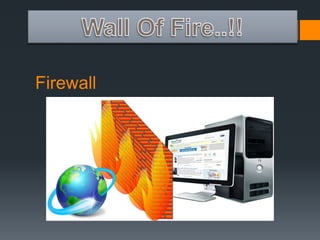
Firewall
Firewall 
 What is Firewall ? 
 Why should I use Firewall ? 
 What are its types ? 
 How do they work ?
What is Firewall ? 
A firewall is a system designed to prevent 
unauthorized access to or from a private 
network. Firewalls can be implemented in both 
hardware and software, or a combination of 
both. Firewalls are frequently used to prevent 
unauthorized Internet users from accessing 
private networks connected to the Internet, 
especially intranets.
Why should I use Firewall ? 
Firewall allows the user to monitor the inbound 
and outbound traffic in the network. I stops 
intruders form accessing your system or 
network. It also have a set of rules to prevent 
the attacks on the system. All messages entering 
or leaving the intranet pass through the firewall, 
which examines each message and blocks those 
that do not meet the specified security criteria.
What are its types : 
 Hardware Firewall 
 Software Firewall
Hardware Firewall 
Hardware firewall are a stand-alone product 
which are available as a whole but in the recent 
years they are integrated in Routers. Hardware 
firewall are very effective and easy to setup. And 
they are not dependent on the system resources 
for their functionality.
Software Firewall : 
Software Firewall are most suited for personal use. They can 
be easily downloaded and install. They come for both 
advanced and basic users. Software Firewall are usually 
cheap and mostly free. The main drawback is that the 
consume system resources for their functionality and slow 
down the host system.
How do they work ? 
There are many ways in which Firewall works 
namely : 
 Packet Filter 
 Application Layer 
 Circuit-level Gateway 
 Proxy Server
Packet Filter Firewall 
These firewalls are the simplest of firewalls, and 
only allow information packets to pass through 
the firewall if the packet matches a specific set 
of rules. A user can define his or her own rules, 
but these software packages often come with a 
list of default rules already provided. Within this 
type of firewall, there are stateless firewalls and 
stateful firewalls.
Application Layer Firewall 
Application layer firewalls are the most powerful 
firewalls, but add delay to network traffic. These 
firewalls inspect all packets for specific 
protocols, such as FTP and browser traffic. Each 
packet is deeply inspected for content that does 
not match the header information. Because of this, 
application layer firewalls are often effective at 
restricting or completely blocking the spread of 
worms and trojans.
Circuit-level Gateway 
Circuit level gateways are deployed at the 
session layer of the OSI model and they monitor 
sessions like TCP 3 way handshake to see 
whether a requested connection is legitimate or 
not. Major Screening happens before the 
Connection is Established.
Proxy Server 
Proxy servers act as a firewall in that they 
inspect incoming packets for specific 
applications and block all other requests. They 
act as gateway monitors between the computer 
and the Internet connection and makes 
connection decisions for the user. This type of 
firewall can make accessing a computer more 
difficult from an external network, such as the 
Internet.
Next Generation Firewall (NGFW) 
A class of firewalls designed to filter network 
and Internet traffic based upon the applications 
or traffic types using specific ports. The 
application-specific granular security policies 
provided by Next Generation Firewalls help 
them detect application-specific attacks, giving 
them the potential to catch more malicious 
activity than more traditional firewalls.
Thank You 
Created by : 
Abhijeet Karve 
Designed by : 
Tejas Wadke

Security threats explained

  • 2.
    Ashish Chavan AbhijeetKarve Tejas Wadke Omkar Shelar Snehal Patel
  • 3.
    # Malware #Antivirus # FireWall
  • 5.
    What are Malware's? What are its types ? What Malware can do ? How to prevent Malwares ?
  • 6.
    What are Malwares?  "Malware" is short for malicious software and used as a single term to refer to virus, spy ware, worm etc. Malware is designed to cause damage to a stand alone computer or a networked pc. So wherever a malware term is used it means a program which is designed to damage your computer it may be a virus, worm or Trojan.
  • 7.
    What are itstypes ? Virus Worms Trojans Adware Spywares
  • 8.
    Virus: A virusis a piece of code(malicious code) that is usually made to harm software or the OS(operating system).  They can infect a computer and can spread through the network. Some are so powerful that they can even damage the hardware of the system!!!!!
  • 9.
    Worms  Requireany host to spread the can multiply themselves, infect files, attach themselves to mails, the can spread in a Network .  They are big problem to an open network.
  • 10.
    Trojans  Themost common of all malware's.  Main intention is control victims PC them.  Ones infected the attacker have full control of your PC.  Intended to steal confidential data.
  • 11.
    Adwares  Usedfor advertising a product.  They might contain harmful virus or spying software.  Can automatically get downloaded to your system while and can be viewed through pop-up windows.  Adwares are used by companies for marketing purpose.
  • 12.
    Spyware  Collectinformation about users, their computer or browsing habits tracks each and everything that victim does.  Can download other malicious programs and install them.  Spy’s the host computer.
  • 13.
    What Malware cando ?  A malware can steal your credentials.  They can steal your credit card details.  They can control your PC.  They can look through your webcams.  They can harm your hardware and software.
  • 14.
    How to preventMalware ?
  • 15.
  • 16.
    Use a goodFirewall : What firewall basically do is that is monitor's the traffic that is coming to your system and blocks the malicious traffic and allows the clean. There are basically two type's of firewall Software Firewall and Hardware Firewall. But for home use it is better to stick with software.
  • 17.
    Use Antivirus : Antivirus are the software which are responsible to protect your PC's from viruses and all other threads. Antivirus software is used to prevent, detect, and remove malware and other Computer viruses.
  • 18.
    Run suspicious filesin Sandbox Sandbox is an isolated environment in your system in which you can run and install programs without making any changes in your system. Here is a image that explain 's it well.
  • 19.
    Common Sense : This is what you can't find on any website or any file-hosting server nither at any shop. Think you find a videao on youtube that about let's say Bitcoin hacker with comment disabled or enable or whatever. You downloaded it runed it and got infected. Don't you have thought that this is impossible. People infect themselves by using Facebook hacker, G mail hacker, etc without thinking for a minute. I the can hack Facebook , G-mail password means that they have access to the database these high security website.
  • 21.
    Antivirus What isan Antivirus ? What Antivirus do ? What are its types and how do they works ? Antivirus Rating System.
  • 22.
    What is anAntivirus ? Antivirus software identifies, prevents, and removes malware from a computer system. Malware is any number of viruses and software bits that intend to harm the computer or steal information, such as viruses, adware, rootkits, backdoors, hijackers, keyloggers, spyware, trojans, and worms.
  • 23.
  • 24.
    What are itstypes and how do they work ?  Signature Based Detection  Heuristics  Rootkit Detection  Real Time Protection
  • 25.
    Signature Based Detection: Nearly all antivirus software uses signature-based detection as part of its virus detection process. Each virus has a digital signature; a code that causes the virus to perform the functions it was designed to perform. On a regular schedule, or at the user’s instruction, antivirus software downloads an updated database of known virus signatures. The antivirus software can then scan each file on the computer’s hardware and memory and compare the entire file, as well as small sections of each file, against the virus signature database
  • 26.
    Heuristics : Tohelp protect computers against new and unknown malware, heuristic detection algorithms were created. Heuristic methods allow antivirus software to detect variants of existing malware and new, never before seen malware. Heuristics use virus signature databases to find viruses, but do not require an exact match to identify a virus. Heuristic detection algorithms scan files for random combinations of signatures to detect malware.
  • 27.
    Rootkit Detection : Rootkits can alter the operating system of a computer to change how it works and even alter antivirus software itself to make it inoperable. In some extreme cases, rootkits can destroy an operating system, making it completely unrecoverable.
  • 28.
    Real Time Protection: Most antivirus software provides real-time protection, often under any number of clever synonyms such as resident shield, background guard, auto-pilot, and so on. In this method the antivirus software detects malwares by their behaviour.
  • 29.
  • 31.
  • 32.
    Firewall  Whatis Firewall ?  Why should I use Firewall ?  What are its types ?  How do they work ?
  • 33.
    What is Firewall? A firewall is a system designed to prevent unauthorized access to or from a private network. Firewalls can be implemented in both hardware and software, or a combination of both. Firewalls are frequently used to prevent unauthorized Internet users from accessing private networks connected to the Internet, especially intranets.
  • 34.
    Why should Iuse Firewall ? Firewall allows the user to monitor the inbound and outbound traffic in the network. I stops intruders form accessing your system or network. It also have a set of rules to prevent the attacks on the system. All messages entering or leaving the intranet pass through the firewall, which examines each message and blocks those that do not meet the specified security criteria.
  • 35.
    What are itstypes :  Hardware Firewall  Software Firewall
  • 36.
    Hardware Firewall Hardwarefirewall are a stand-alone product which are available as a whole but in the recent years they are integrated in Routers. Hardware firewall are very effective and easy to setup. And they are not dependent on the system resources for their functionality.
  • 37.
    Software Firewall : Software Firewall are most suited for personal use. They can be easily downloaded and install. They come for both advanced and basic users. Software Firewall are usually cheap and mostly free. The main drawback is that the consume system resources for their functionality and slow down the host system.
  • 38.
    How do theywork ? There are many ways in which Firewall works namely :  Packet Filter  Application Layer  Circuit-level Gateway  Proxy Server
  • 39.
    Packet Filter Firewall These firewalls are the simplest of firewalls, and only allow information packets to pass through the firewall if the packet matches a specific set of rules. A user can define his or her own rules, but these software packages often come with a list of default rules already provided. Within this type of firewall, there are stateless firewalls and stateful firewalls.
  • 40.
    Application Layer Firewall Application layer firewalls are the most powerful firewalls, but add delay to network traffic. These firewalls inspect all packets for specific protocols, such as FTP and browser traffic. Each packet is deeply inspected for content that does not match the header information. Because of this, application layer firewalls are often effective at restricting or completely blocking the spread of worms and trojans.
  • 41.
    Circuit-level Gateway Circuitlevel gateways are deployed at the session layer of the OSI model and they monitor sessions like TCP 3 way handshake to see whether a requested connection is legitimate or not. Major Screening happens before the Connection is Established.
  • 42.
    Proxy Server Proxyservers act as a firewall in that they inspect incoming packets for specific applications and block all other requests. They act as gateway monitors between the computer and the Internet connection and makes connection decisions for the user. This type of firewall can make accessing a computer more difficult from an external network, such as the Internet.
  • 43.
    Next Generation Firewall(NGFW) A class of firewalls designed to filter network and Internet traffic based upon the applications or traffic types using specific ports. The application-specific granular security policies provided by Next Generation Firewalls help them detect application-specific attacks, giving them the potential to catch more malicious activity than more traditional firewalls.
  • 44.
    Thank You Createdby : Abhijeet Karve Designed by : Tejas Wadke