
Submitted By
V.V.KAUSHIK
312106410035
What is computerVirus?
 Malware, on the other hand, is a much broader
term. Malware is simply short for "malicious
software” and it is defined as any type of software
that does mischief or permanent damage to your
computer.
 A computer virus is a piece of malicious computer
code that attaches itself to a software program,
email or computer file which damages your
software, hardware or files.
What can virus do?
 Viruses can trick you into buying fake software,
steal your personal information and use it to get to
your money, or be sold on the digital equivalent of
the black market. Powerful viruses are valuable and
potentially lucrative tools.
 Damage Software
 Slow your system
 Can take Control
 Steal Information
 Damage Data
 Traditional computer viruses were first widely seen
in the late 1980s, and came about because of
several factors. The main factor was the spread
of personal computers (PCs)
 Early viruses were pieces of code embedded in a
larger, legitimate program, such as a game or
word processor.When the user downloads and
runs the legitimate program, it looks around to
see if it can find any other programs ,modifies the
program to add the virus's code into that
program.Then the virus launches the "real
program.".The virus has now reproduced itself, so
two programs are infected.
Types
 Spyware
 Virus
 Worms
 Trojan Horse
 Bots
 Rootkit
 Adware
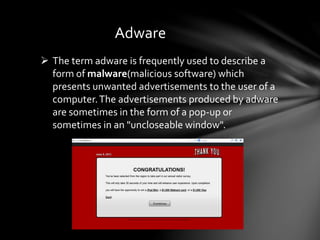
Adware
 The term adware is frequently used to describe a
form of malware(malicious software) which
presents unwanted advertisements to the user of a
computer.The advertisements produced by adware
are sometimes in the form of a pop-up or
sometimes in an "uncloseable window".
Spyware
 Spyware is a type of malware that is installed on a
computer without the knowledge of the owner in
order to collect the owner’s private information
 Spyware is often hidden from the user in order to
gather information about internet interaction,
keystrokes ,passwords without the knowledge of
the owner in order to collect the owner’s private
information
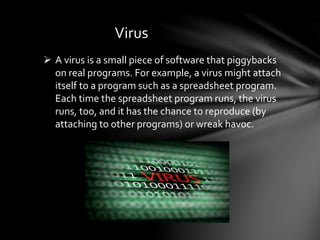
Virus
 A virus is a small piece of software that piggybacks
on real programs. For example, a virus might attach
itself to a program such as a spreadsheet program.
Each time the spreadsheet program runs, the virus
runs, too, and it has the chance to reproduce (by
attaching to other programs) or wreak havoc.
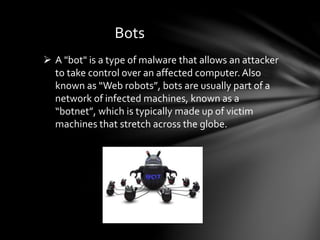
Bots
 A "bot" is a type of malware that allows an attacker
to take control over an affected computer.Also
known as “Web robots”, bots are usually part of a
network of infected machines, known as a
“botnet”, which is typically made up of victim
machines that stretch across the globe.
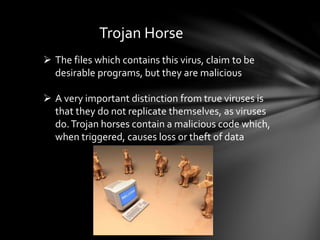
Trojan Horse
 The files which contains this virus, claim to be
desirable programs, but they are malicious
 A very important distinction from true viruses is
that they do not replicate themselves, as viruses
do.Trojan horses contain a malicious code which,
when triggered, causes loss or theft of data
Worm
 A type of computer virus that can replicate itself
over a computer network and perform destructive
tasks such as using up computer memory
resources.
 Worms do not infect other files as viruses typically
do, but instead worms make copies of themselves
over and over depleting system resources (hard
drive space) or depleting bandwidth (by spreading
over shared network resources
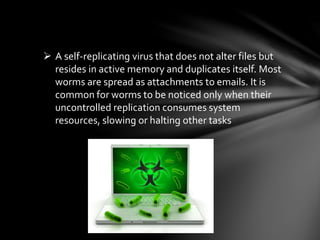
 A self-replicating virus that does not alter files but
resides in active memory and duplicates itself. Most
worms are spread as attachments to emails. It is
common for worms to be noticed only when their
uncontrolled replication consumes system
resources, slowing or halting other tasks
Rootkit
 A rootkit is a type of software designed to hide the
fact that an operating system has been
compromised, sometimes by replacing vital
executables.
 Rootkits allow viruses and malware to “hide in plain
sight” by disguising as necessary files that your
antivirus software will overlook.
 Rootkits themselves are not harmful; they are
simply used to hide malware, bots and worms.
How to Identify virus
 First you need to determine if your computer has
a virus at all.You might suspect your computer of
having a virus if it seems to be sluggish.
 If yourWeb browser suddenly looks different or
automatically goes to a site you don't recognize,
that's a good indication that you've got some
malware.
 If your computer is unstable and crashes fairly
often, you may have a problem. And if you try to
access files but receive a message saying they're
corrupted, that's another sign.
 If you do think your computer has a virus, you need
to run antivirus software to weed it out. Some
viruses disable antivirus software -- they're clever
that way.
 A few malware variants will try to block you from
downloading antivirus software. If that's the case,
you may need to download the software on
another computer and transfer it to disk or a flash
drive.
How to protect from virus
Anti-virus
 An antivirus program is an essential part of a multi-
layered security strategy – even if you’re a smart
computer user, the constant stream of
vulnerabilities for browsers, plug-ins, and the
Windows operating system itself make antivirus
protection important.
 Antivirus programs are powerful pieces of software
that are essential onWindows computers.
 There are a lot anti-virus software available in the
market for purchase.
Types of Antivirus
On-Access Scanning
 Antivirus software runs in the background on your
computer, checking every file you open.This is
generally known as on-access scanning,
background scanning, resident scanning, real-time
protection, or something else, depending on your
antivirus program
 Antivirus programs also scan other types of files
that can contain viruses. For example, a .zip archive
file may contain compressed viruses, or aWord
document can contain a malicious macro.
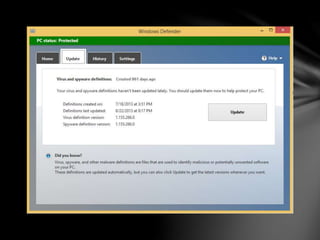
Virus Definitions
 Your antivirus software relies on virus definitions to
detect malware.That’s why it automatically
downloads new, updated definition files – once a
day or even more often.
 The definition files contain signatures for viruses
and other malware that have been encountered in
the wild
 When an antivirus program scans a file and notices
that the file matches a known piece of malware, the
antivirus program stops the file from running,
putting it into “quarantine.” Depending on your
antivirus program’s settings, the antivirus program
may automatically delete the file
Heuristics
 Antivirus programs also employ heuristics.
Heuristics allow an antivirus program to identify
new or modified types of malware, even without
virus definition files.
 For example, if an antivirus program notices that a
program running on your system is trying to open
every EXE file on your system, infecting it by
writing a copy of the original program into it, the
antivirus program can detect this program as a
new, unknown type of virus.
Detection Rates
 Different antivirus programs have different
detection rates, which both virus definitions and
heuristics are involved in.
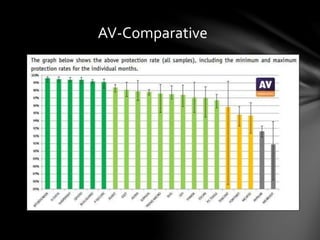
 AV-Comparative regularly releases studies that
compare the current state of antivirus detection
rates.The detection rates tend to fluctuate over
time – there’s no one best product that’s
consistently on top
 If you’re really looking to see just how effective an
antivirus program is and which are the best out
there, detection rate studies are the place to look.
AV-Comparative
Testing an Antivirus Program
 If you ever want to test whether an antivirus
program is working properly, you can use the EICAR
test file.
 The EICAR file is a standard way to test antivirus
programs – it isn’t actually dangerous, but antivirus
programs behave as if it’s dangerous, identifying it
as a virus.
THANK
YOU

Computer virus

  • 1.
  • 2.
    What is computerVirus? Malware, on the other hand, is a much broader term. Malware is simply short for "malicious software” and it is defined as any type of software that does mischief or permanent damage to your computer.  A computer virus is a piece of malicious computer code that attaches itself to a software program, email or computer file which damages your software, hardware or files.
  • 3.
    What can virusdo?  Viruses can trick you into buying fake software, steal your personal information and use it to get to your money, or be sold on the digital equivalent of the black market. Powerful viruses are valuable and potentially lucrative tools.  Damage Software  Slow your system  Can take Control  Steal Information  Damage Data
  • 4.
     Traditional computerviruses were first widely seen in the late 1980s, and came about because of several factors. The main factor was the spread of personal computers (PCs)  Early viruses were pieces of code embedded in a larger, legitimate program, such as a game or word processor.When the user downloads and runs the legitimate program, it looks around to see if it can find any other programs ,modifies the program to add the virus's code into that program.Then the virus launches the "real program.".The virus has now reproduced itself, so two programs are infected.
  • 5.
    Types  Spyware  Virus Worms  Trojan Horse  Bots  Rootkit  Adware
  • 6.
    Adware  The termadware is frequently used to describe a form of malware(malicious software) which presents unwanted advertisements to the user of a computer.The advertisements produced by adware are sometimes in the form of a pop-up or sometimes in an "uncloseable window".
  • 7.
    Spyware  Spyware isa type of malware that is installed on a computer without the knowledge of the owner in order to collect the owner’s private information  Spyware is often hidden from the user in order to gather information about internet interaction, keystrokes ,passwords without the knowledge of the owner in order to collect the owner’s private information
  • 8.
    Virus  A virusis a small piece of software that piggybacks on real programs. For example, a virus might attach itself to a program such as a spreadsheet program. Each time the spreadsheet program runs, the virus runs, too, and it has the chance to reproduce (by attaching to other programs) or wreak havoc.
  • 9.
    Bots  A "bot"is a type of malware that allows an attacker to take control over an affected computer.Also known as “Web robots”, bots are usually part of a network of infected machines, known as a “botnet”, which is typically made up of victim machines that stretch across the globe.
  • 10.
    Trojan Horse  Thefiles which contains this virus, claim to be desirable programs, but they are malicious  A very important distinction from true viruses is that they do not replicate themselves, as viruses do.Trojan horses contain a malicious code which, when triggered, causes loss or theft of data
  • 11.
    Worm  A typeof computer virus that can replicate itself over a computer network and perform destructive tasks such as using up computer memory resources.  Worms do not infect other files as viruses typically do, but instead worms make copies of themselves over and over depleting system resources (hard drive space) or depleting bandwidth (by spreading over shared network resources
  • 12.
     A self-replicatingvirus that does not alter files but resides in active memory and duplicates itself. Most worms are spread as attachments to emails. It is common for worms to be noticed only when their uncontrolled replication consumes system resources, slowing or halting other tasks
  • 13.
    Rootkit  A rootkitis a type of software designed to hide the fact that an operating system has been compromised, sometimes by replacing vital executables.  Rootkits allow viruses and malware to “hide in plain sight” by disguising as necessary files that your antivirus software will overlook.  Rootkits themselves are not harmful; they are simply used to hide malware, bots and worms.
  • 14.
    How to Identifyvirus  First you need to determine if your computer has a virus at all.You might suspect your computer of having a virus if it seems to be sluggish.  If yourWeb browser suddenly looks different or automatically goes to a site you don't recognize, that's a good indication that you've got some malware.  If your computer is unstable and crashes fairly often, you may have a problem. And if you try to access files but receive a message saying they're corrupted, that's another sign.
  • 15.
     If youdo think your computer has a virus, you need to run antivirus software to weed it out. Some viruses disable antivirus software -- they're clever that way.  A few malware variants will try to block you from downloading antivirus software. If that's the case, you may need to download the software on another computer and transfer it to disk or a flash drive. How to protect from virus
  • 16.
    Anti-virus  An antivirusprogram is an essential part of a multi- layered security strategy – even if you’re a smart computer user, the constant stream of vulnerabilities for browsers, plug-ins, and the Windows operating system itself make antivirus protection important.  Antivirus programs are powerful pieces of software that are essential onWindows computers.  There are a lot anti-virus software available in the market for purchase.
  • 17.
  • 18.
    On-Access Scanning  Antivirussoftware runs in the background on your computer, checking every file you open.This is generally known as on-access scanning, background scanning, resident scanning, real-time protection, or something else, depending on your antivirus program  Antivirus programs also scan other types of files that can contain viruses. For example, a .zip archive file may contain compressed viruses, or aWord document can contain a malicious macro.
  • 19.
    Virus Definitions  Yourantivirus software relies on virus definitions to detect malware.That’s why it automatically downloads new, updated definition files – once a day or even more often.  The definition files contain signatures for viruses and other malware that have been encountered in the wild  When an antivirus program scans a file and notices that the file matches a known piece of malware, the antivirus program stops the file from running, putting it into “quarantine.” Depending on your antivirus program’s settings, the antivirus program may automatically delete the file
  • 21.
    Heuristics  Antivirus programsalso employ heuristics. Heuristics allow an antivirus program to identify new or modified types of malware, even without virus definition files.  For example, if an antivirus program notices that a program running on your system is trying to open every EXE file on your system, infecting it by writing a copy of the original program into it, the antivirus program can detect this program as a new, unknown type of virus.
  • 22.
    Detection Rates  Differentantivirus programs have different detection rates, which both virus definitions and heuristics are involved in.  AV-Comparative regularly releases studies that compare the current state of antivirus detection rates.The detection rates tend to fluctuate over time – there’s no one best product that’s consistently on top  If you’re really looking to see just how effective an antivirus program is and which are the best out there, detection rate studies are the place to look.
  • 23.
  • 24.
    Testing an AntivirusProgram  If you ever want to test whether an antivirus program is working properly, you can use the EICAR test file.  The EICAR file is a standard way to test antivirus programs – it isn’t actually dangerous, but antivirus programs behave as if it’s dangerous, identifying it as a virus.
  • 25.