









Securing SharePoint:
5 SharePoint Security Essentials You Cannot Afford to Ignore
CHRISTIAN BUCKLEY
SHAREPOINT MVP
& CHIEF EVANGELIST
SHAUN NICHOLS
LEAD SOLUTIONS
ENGINEER
Christian Buckley
Chief Evangelist & SharePoint MVP
Metalogix
www.buckleyplanet.com
@buckleyplanet
cbuck@metalogix.com
Shaun Nichols
Lead Solutions Engineer
Metalogix
www.metalogix.com
@SharePointGiant
snichols@metalogix.com
For over a decade, Metalogix has developed the
industry’s best and most trusted management
tools for SharePoint, Exchange, and Office 365,
backed by our live 24x7 support.
Over 14,000 clients rely on Metalogix tools every
minute of every day to monitor, migrate, store,
synchronize, archive, secure, and backup their
collaboration platforms.
We are committed to your
Success with SharePoint!
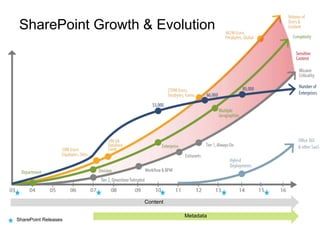
SharePoint Growth & Evolution
SharePoint Releases
Metadata
Content
Readiness
o How important is governance in your
organization/company today?
o Do you know who is getting access to what information?
o Do you store any financial or legal records in SharePoint?
o Do you know who can access or has accessed it?
o Do you have compliance regulations that you have to adhere to?
o If there was a security breach, who would be held responsible?
o Do you regularly run audits on usage, security, content, or permissions?
o Do you have an IS department that is asking for reports?
o How do you respond to compliance requirements for Audits?
o What does the process look like today?
What is Governance?
A 2012 CIO survey by Gartner shows an increasing
push in collaboration, analytics, and cloud computing.
They predict that by 2016, 20% of CIOs in regulated
industries will lose their jobs for failing to implement the
discipline of information governance successfully.
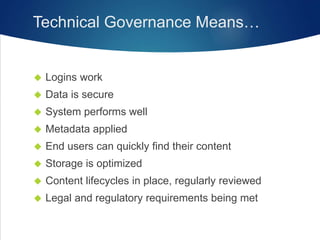
Technical Governance Means…
 Logins work
 Data is secure
 System performs well
 Metadata applied
 End users can quickly find their content
 Storage is optimized
 Content lifecycles in place, regularly reviewed
 Legal and regulatory requirements being met
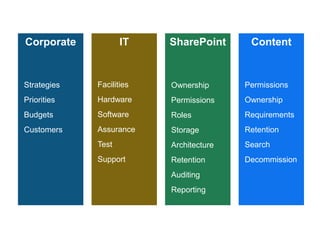
Corporate IT SharePoint Content
Strategies
Priorities
Budgets
Customers
Facilities
Hardware
Software
Assurance
Test
Support
Ownership
Permissions
Roles
Storage
Architecture
Retention
Auditing
Reporting
Permissions
Ownership
Requirements
Retention
Search
Decommission
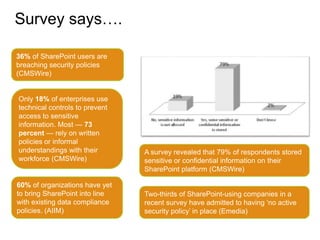
Survey says….
36% of SharePoint users are
breaching security policies
(CMSWire)
Only 18% of enterprises use
technical controls to prevent
access to sensitive
information. Most — 73
percent — rely on written
policies or informal
understandings with their
workforce (CMSWire)
60% of organizations have yet
to bring SharePoint into line
with existing data compliance
policies. (AIIM)
Two-thirds of SharePoint-using companies in a
recent survey have admitted to having ‘no active
security policy’ in place (Emedia)
A survey revealed that 79% of respondents stored
sensitive or confidential information on their
SharePoint platform (CMSWire)
What are the 5 most
common SharePoint
security concerns?
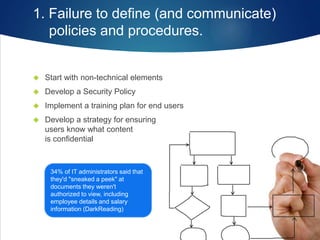
1. Failure to define (and communicate)
policies and procedures.
 Start with non-technical elements
 Develop a Security Policy
 Implement a training plan for end users
 Develop a strategy for ensuring
users know what content
is confidential
34% of IT administrators said that
they'd "sneaked a peek" at
documents they weren't
authorized to view, including
employee details and salary
information (DarkReading)
2. Failure to implement any kind of
permissions best practices.
 Apply permissions using Least Privileged principles
 Don’t give users Direct Access
 Embrace SharePoint Groups and/or Active Directory Groups
 Ensure Appropriate Use of the Authenticated Users Group
 Clean up Orphan Users
 Use Broken Inheritance Responsibly
 Revoke permissions quickly
3. Failure to regularly audit access
to content and sites.
 Are we adhering to Compliance or Governance requirements?
 Who has been accessing specific content?
 How often are specific sites being accessed?
 What features of SharePoint are being used?
 Are we managing the volume of log data?
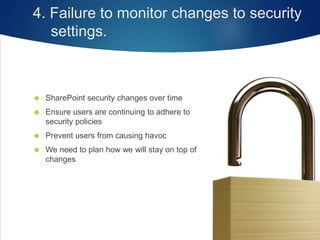
4. Failure to monitor changes to security
settings.
 SharePoint security changes over time
 Ensure users are continuing to adhere to
security policies
 Prevent users from causing havoc
 We need to plan how we will stay on top of
changes
5. Failure to empower users and admins with
the right permissions.
 Find your responsible business content owners
 Enable and Equip them to manage access to their
content
 Ensure management access is limited to those
with appropriate permissions
 Segment your administration responsibilities –
Power Users, business owners
Everyone wants
an easy button
Apply the Top 5 Security Essentials
using ControlPoint
 Easily make changes to or revoke permissions across
any scope – even between farms
 Audit Permissions to ensure only the right people
have access
 Meet compliance and governance requirements
with regular scheduled reports
 Monitor what users are doing – receive Alerts for unexpected
security changes
 Permissions Management wizard for the casual user
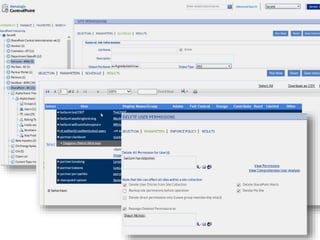
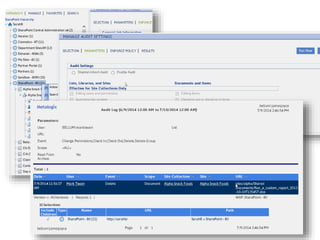
ControlPoint demo
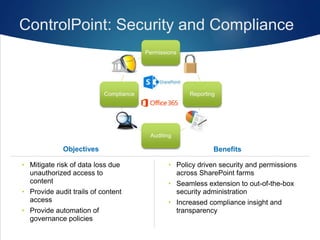
Permissions
Reporting
Auditing
Compliance
ControlPoint: Security and Compliance
BenefitsObjectives
• Policy driven security and permissions
across SharePoint farms
• Seamless extension to out-of-the-box
security administration
• Increased compliance insight and
transparency
• Mitigate risk of data loss due
unauthorized access to
content
• Provide audit trails of content
access
• Provide automation of
governance policies
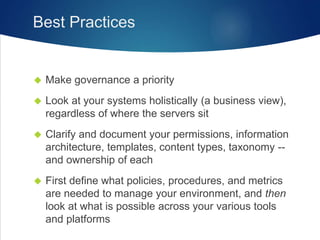
Best Practices
 Make governance a priority
 Look at your systems holistically (a business view),
regardless of where the servers sit
 Clarify and document your permissions, information
architecture, templates, content types, taxonomy --
and ownership of each
 First define what policies, procedures, and metrics
are needed to manage your environment, and then
look at what is possible across your various tools
and platforms
Thank you!
www.buckleyplanet.com
@buckleyplanet
cbuck@metalogix.com
30 Day Trial of ControlPoint
www.metalogix.com/controlpoint

Securing SharePoint -- 5 SharePoint Security Essentials You Cannot Afford to Ignore

  • 1.
    Securing SharePoint: 5 SharePointSecurity Essentials You Cannot Afford to Ignore CHRISTIAN BUCKLEY SHAREPOINT MVP & CHIEF EVANGELIST SHAUN NICHOLS LEAD SOLUTIONS ENGINEER
  • 2.
    Christian Buckley Chief Evangelist& SharePoint MVP Metalogix www.buckleyplanet.com @buckleyplanet cbuck@metalogix.com
  • 3.
    Shaun Nichols Lead SolutionsEngineer Metalogix www.metalogix.com @SharePointGiant snichols@metalogix.com
  • 4.
    For over adecade, Metalogix has developed the industry’s best and most trusted management tools for SharePoint, Exchange, and Office 365, backed by our live 24x7 support. Over 14,000 clients rely on Metalogix tools every minute of every day to monitor, migrate, store, synchronize, archive, secure, and backup their collaboration platforms. We are committed to your Success with SharePoint!
  • 5.
    SharePoint Growth &Evolution SharePoint Releases Metadata Content
  • 7.
    Readiness o How importantis governance in your organization/company today? o Do you know who is getting access to what information? o Do you store any financial or legal records in SharePoint? o Do you know who can access or has accessed it? o Do you have compliance regulations that you have to adhere to? o If there was a security breach, who would be held responsible? o Do you regularly run audits on usage, security, content, or permissions? o Do you have an IS department that is asking for reports? o How do you respond to compliance requirements for Audits? o What does the process look like today?
  • 8.
  • 12.
    A 2012 CIOsurvey by Gartner shows an increasing push in collaboration, analytics, and cloud computing. They predict that by 2016, 20% of CIOs in regulated industries will lose their jobs for failing to implement the discipline of information governance successfully.
  • 13.
    Technical Governance Means… Logins work  Data is secure  System performs well  Metadata applied  End users can quickly find their content  Storage is optimized  Content lifecycles in place, regularly reviewed  Legal and regulatory requirements being met
  • 14.
    Corporate IT SharePointContent Strategies Priorities Budgets Customers Facilities Hardware Software Assurance Test Support Ownership Permissions Roles Storage Architecture Retention Auditing Reporting Permissions Ownership Requirements Retention Search Decommission
  • 15.
    Survey says…. 36% ofSharePoint users are breaching security policies (CMSWire) Only 18% of enterprises use technical controls to prevent access to sensitive information. Most — 73 percent — rely on written policies or informal understandings with their workforce (CMSWire) 60% of organizations have yet to bring SharePoint into line with existing data compliance policies. (AIIM) Two-thirds of SharePoint-using companies in a recent survey have admitted to having ‘no active security policy’ in place (Emedia) A survey revealed that 79% of respondents stored sensitive or confidential information on their SharePoint platform (CMSWire)
  • 16.
    What are the5 most common SharePoint security concerns?
  • 17.
    1. Failure todefine (and communicate) policies and procedures.  Start with non-technical elements  Develop a Security Policy  Implement a training plan for end users  Develop a strategy for ensuring users know what content is confidential 34% of IT administrators said that they'd "sneaked a peek" at documents they weren't authorized to view, including employee details and salary information (DarkReading)
  • 18.
    2. Failure toimplement any kind of permissions best practices.  Apply permissions using Least Privileged principles  Don’t give users Direct Access  Embrace SharePoint Groups and/or Active Directory Groups  Ensure Appropriate Use of the Authenticated Users Group  Clean up Orphan Users  Use Broken Inheritance Responsibly  Revoke permissions quickly
  • 19.
    3. Failure toregularly audit access to content and sites.  Are we adhering to Compliance or Governance requirements?  Who has been accessing specific content?  How often are specific sites being accessed?  What features of SharePoint are being used?  Are we managing the volume of log data?
  • 20.
    4. Failure tomonitor changes to security settings.  SharePoint security changes over time  Ensure users are continuing to adhere to security policies  Prevent users from causing havoc  We need to plan how we will stay on top of changes
  • 21.
    5. Failure toempower users and admins with the right permissions.  Find your responsible business content owners  Enable and Equip them to manage access to their content  Ensure management access is limited to those with appropriate permissions  Segment your administration responsibilities – Power Users, business owners
  • 22.
  • 23.
    Apply the Top5 Security Essentials using ControlPoint  Easily make changes to or revoke permissions across any scope – even between farms  Audit Permissions to ensure only the right people have access  Meet compliance and governance requirements with regular scheduled reports  Monitor what users are doing – receive Alerts for unexpected security changes  Permissions Management wizard for the casual user
  • 24.
  • 27.
    Permissions Reporting Auditing Compliance ControlPoint: Security andCompliance BenefitsObjectives • Policy driven security and permissions across SharePoint farms • Seamless extension to out-of-the-box security administration • Increased compliance insight and transparency • Mitigate risk of data loss due unauthorized access to content • Provide audit trails of content access • Provide automation of governance policies
  • 28.
    Best Practices  Makegovernance a priority  Look at your systems holistically (a business view), regardless of where the servers sit  Clarify and document your permissions, information architecture, templates, content types, taxonomy -- and ownership of each  First define what policies, procedures, and metrics are needed to manage your environment, and then look at what is possible across your various tools and platforms
  • 29.
    Thank you! www.buckleyplanet.com @buckleyplanet cbuck@metalogix.com 30 DayTrial of ControlPoint www.metalogix.com/controlpoint

Editor's Notes

  • #19 Demo – Permissions Report Highlight how someone gets permissions Show users with Direct Permissions Show Cleanup User Permissions Show Authenticated Users Orphan User Revoke Permissions From pervious slide – show tagging sites to show confidential, etc
  • #20 Demo Audit log report Site or Site Collection features Talk about archiving the audit log
  • #21 Demo CP alerts for permissions changes - Receive alerts when changes are made CP policies - Prevent users from causing havoc
  • #24 Cleanup permissions – like users with direct permissions
  • #28 Presentation Title