© 2013 Imperva, Inc. All rights reserved.
SharePoint Governance:
4 Security Guidelines
1
Carrie McDaniel, File Security Team
© 2013 Imperva, Inc. All rights reserved.
Agenda
2
§  Introduction to SharePoint governance
§  Common business drivers
§  4 guidelines for SharePoint governance and security
§  SecureSphere for SharePoint
§  Q&A
© 2013 Imperva, Inc. All rights reserved.
Carrie McDaniel – File Security Team
3
§  Product Marketing Manager for File
Security; focus on SharePoint security
§  Previously held product marketing
position at Moody’s Analytics in San
Francisco
§  Past experience in finance and tech
industries at Wells Fargo and NetApp
§  Holds degrees in Marketing and French
from Santa Clara University
© 2013 Imperva, Inc. All rights reserved.
Efficient & Effective Use of Business Data
4
BUILD
Build	
  sites	
  
Build	
  apps	
  
Publish	
  apps	


MANAGE
Manage	
  costs	
  
Manage	
  risk	
  
Manage	
  6me	
  
DISCOVER
Connect	
  across	
  the	
  organiza6on	
  
Draw	
  insights	
  from	
  reports	
  
Customizable	
  search
ORGANIZE
Keep	
  projects	
  on	
  track	
  
Connect	
  with	
  your	
  team	
  
Store	
  and	
  sync	
  documents	
  
SHARE
Share	
  ideas	
  with	
  social	
  features	
  
Share	
  content	
  internally	
  and	
  
externally	
  	
  
microsoft.com
© 2013 Imperva, Inc. All rights reserved.
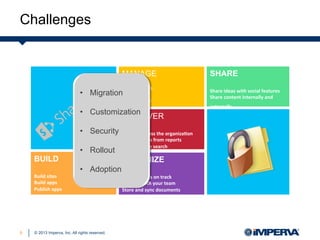
Challenges
5
BUILD
Build	
  sites	
  
Build	
  apps	
  
Publish	
  apps	


MANAGE
Manage	
  costs	
  
Manage	
  risk	
  
Manage	
  6me	
  
DISCOVER
Connect	
  across	
  the	
  organiza6on	
  
Draw	
  insights	
  from	
  reports	
  
Customizable	
  search
ORGANIZE
Keep	
  projects	
  on	
  track	
  
Connect	
  with	
  your	
  team	
  
Store	
  and	
  sync	
  documents	
  
SHARE
Share	
  ideas	
  with	
  social	
  features	
  
Share	
  content	
  internally	
  and	
  
externally	
  	
  
•  Migration
•  Customization
•  Security
•  Rollout
•  Adoption
© 2013 Imperva, Inc. All rights reserved.
Microsoft’s View of SharePoint Governance
6
§  Streamlining the deployment
of products and technologies
§  Helping protect your
enterprise from security
threats or noncompliance
liability
§  Helping ensure the best
return on your investment in
technologies
Governance is the set of
policies, roles, responsibilities,
and processes that guide, direct,
and control how an
organization's business divisions
and IT teams cooperate to
achieve business goals.
© 2013 Imperva, Inc. All rights reserved.
Governance From The Start, Or…
7
© 2013 Imperva, Inc. All rights reserved.
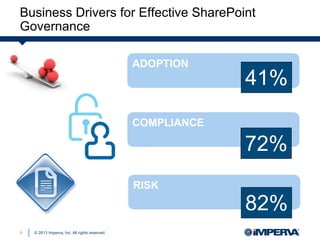
Business Drivers for Effective SharePoint
Governance
8
ADOPTION
COMPLIANCE
RISK
41%
72%
82%
© 2013 Imperva, Inc. All rights reserved.
4 Steps to Streamline SharePoint
Security Governance Efforts
9
© 2013 Imperva, Inc. All rights reserved.
Step 1:
Identify and Secure Critical Business Assets
10
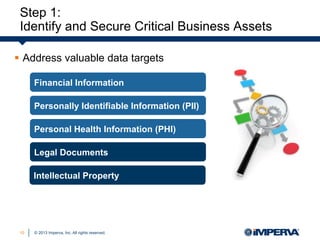
§  Address valuable data targets
Financial Information
Personal Health Information (PHI)
Legal Documents
Intellectual Property
Personally Identifiable Information (PII)
© 2013 Imperva, Inc. All rights reserved.
Step 1:
Identify and Secure Critical Business Assets
11
§  Identify valuable data targets
You need to identify the data
assets that generate value for the
business that are high-risk targets
for cybercriminals, or that are
subject to regulatory compliance,
and then focus your efforts there.
Forrester Research, Inc.
© 2013 Imperva, Inc. All rights reserved.
Step 1:
Identify and Secure Critical Business Assets
12
§  Address valuable data targets
§  Secure business critical assets with automation
Financial Information
Personal Health Information (PHI)
Legal Documents
Intellectual Property
Personally Identifiable Information (PII)
© 2013 Imperva, Inc. All rights reserved.
Step 2:
Establish a User Rights Management Framework
13
§  Sensitive content accessible to everyone
§  Access rights granted but not used
§  Data where individual users have rights,
not groups
§  Dormant user accounts and stale files
Common Access Rights Risks
© 2013 Imperva, Inc. All rights reserved.
Step 2:
Establish a User Rights Management Framework
14
§  Sensitive content accessible to everyone
§  Access rights granted but not used
§  Data where individual users have rights,
not groups
§  Dormant user accounts and stale files
Common Access Rights Risks
The top four internal and
external audit findings relate to
access management, with
excessive access rights being
the top audit finding.
Deloitte
© 2013 Imperva, Inc. All rights reserved.
Step 2:
Establish a User Rights Management Framework
15
§  Streamline access processes
§  Formalize the approval cycle
§  Report on effective permissions, usage, and permissions
changes
§  Send permissions and usage reports on a scheduled
basis for review
§  Identify data owners
§  Track approval tasks
Benefits of Automating User Rights Management
© 2013 Imperva, Inc. All rights reserved.
Step 2:
Establish a User Rights Management Framework
16
Understanding How Access is Granted
§  Gain insight into how access was granted
§  Align access with business need-to-know
§  Minimize business interruptions
© 2013 Imperva, Inc. All rights reserved.
Step 2:
Establish a User Rights Management Framework
17
Unauthorized Access Scenarios
A high volume of activity within a short period of
time
Operations outside of normal business hours or
maintenance windows
Activity from suspicious or external IPs
Access of sensitive data from different departments
or by administrators
Creation of new sites or administrative accounts
© 2013 Imperva, Inc. All rights reserved.
Step 3:
Defend Applications from Web Attacks and Code Exploits
18
§  Test SharePoint applications
§  Scan for vulnerabilities
§  Perform virtual patching
© 2013 Imperva, Inc. All rights reserved.
Step 3:
Defend Applications from Web Attacks and Code Exploits
19
§  Test SharePoint applications
§  Scan for vulnerabilities
§  Perform virtual patching
Web Application Firewalls
genuinely raise the bar on
application security…they
‘virtually’ patch the application
faster than code fixes can be
implemented.
Adrian Lane, CTO, Securosis
© 2013 Imperva, Inc. All rights reserved.
Step 4:
Trust, But Verify, User Behavior
20
§  Establish a complete audit trail
§  Leverage sophisticated analytics and reporting capabilities
Address compliance requirements
Monitor activity in real-time
Store data in a secured, centralized repository
Enrich native audit information
© 2013 Imperva, Inc. All rights reserved.
Step 4:
Trust, But Verify, User Behavior
21
§  Establish a complete audit trail
§  Leverage sophisticated analytics and reporting capabilities
Address compliance requirements
Monitor activity in real-time
Store data in a secured, centralized repository
Enrich native audit information
© 2013 Imperva, Inc. All rights reserved.22
© 2013 Imperva, Inc. All rights reserved.
Where Native SharePoint Security and
Controls Fall Short
23
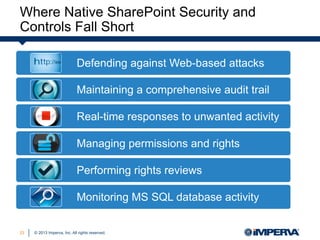
Defending against Web-based attacks
Maintaining a comprehensive audit trail
Real-time responses to unwanted activity
Managing permissions and rights
Performing rights reviews
Monitoring MS SQL database activity
© 2013 Imperva, Inc. All rights reserved.
Imperva Data Security
24
External
Customers
Staff, Partners
Hackers
Internal
Employees
Malicious Insiders
Compromised Insiders
Data Center
Systems and Admins
Tech. Attack
Protection
Logic Attack
Protection
Fraud
Prevention
Usage
Audit
User Rights
Management
Access
Control
© 2013 Imperva, Inc. All rights reserved.
Security for SharePoint’s File, Web and
Database Resources
25
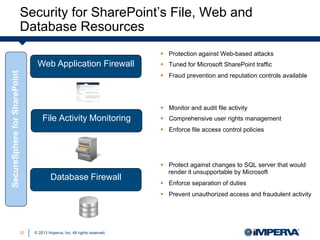
Web Application Firewall
File Activity Monitoring
Database Firewall
§  Protection against Web-based attacks
§  Tuned for Microsoft SharePoint traffic
§  Fraud prevention and reputation controls available
§  Protect against changes to SQL server that would
render it unsupportable by Microsoft
§  Enforce separation of duties
§  Prevent unauthorized access and fraudulent activity
§  Monitor and audit file activity
§  Comprehensive user rights management
§  Enforce file access control policies
SecureSphereforSharePoint
© 2013 Imperva, Inc. All rights reserved.
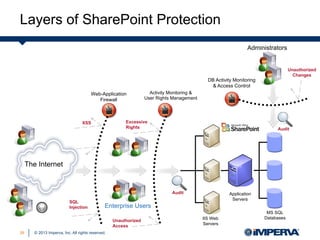
Audit
Enterprise Users
The Internet
SQL
Injection
XSS
IIS Web
Servers
Application
Servers
MS SQL
Databases
Web-Application
Firewall
Activity Monitoring &
User Rights Management
Excessive
Rights
Administrators
DB Activity Monitoring
& Access Control
Unauthorized
Changes
Audit
Unauthorized
Access
Layers of SharePoint Protection
26
© 2013 Imperva, Inc. All rights reserved.
Additional Resources
27
© 2013 Imperva, Inc. All rights reserved.
Additional Resources
28
DOWNLOAD SHAREPOINT
GOVERNANCE & SECURITY
WHITE PAPER
VIEW SHAREPOINT SECURITY
CUSTOMER STORY
© 2013 Imperva, Inc. All rights reserved.
www.imperva.com
29

4 Security Guidelines for SharePoint Governance

  • 1.
    © 2013 Imperva,Inc. All rights reserved. SharePoint Governance: 4 Security Guidelines 1 Carrie McDaniel, File Security Team
  • 2.
    © 2013 Imperva,Inc. All rights reserved. Agenda 2 §  Introduction to SharePoint governance §  Common business drivers §  4 guidelines for SharePoint governance and security §  SecureSphere for SharePoint §  Q&A
  • 3.
    © 2013 Imperva,Inc. All rights reserved. Carrie McDaniel – File Security Team 3 §  Product Marketing Manager for File Security; focus on SharePoint security §  Previously held product marketing position at Moody’s Analytics in San Francisco §  Past experience in finance and tech industries at Wells Fargo and NetApp §  Holds degrees in Marketing and French from Santa Clara University
  • 4.
    © 2013 Imperva,Inc. All rights reserved. Efficient & Effective Use of Business Data 4 BUILD Build  sites   Build  apps   Publish  apps       MANAGE Manage  costs   Manage  risk   Manage  6me   DISCOVER Connect  across  the  organiza6on   Draw  insights  from  reports   Customizable  search ORGANIZE Keep  projects  on  track   Connect  with  your  team   Store  and  sync  documents   SHARE Share  ideas  with  social  features   Share  content  internally  and   externally     microsoft.com
  • 5.
    © 2013 Imperva,Inc. All rights reserved. Challenges 5 BUILD Build  sites   Build  apps   Publish  apps       MANAGE Manage  costs   Manage  risk   Manage  6me   DISCOVER Connect  across  the  organiza6on   Draw  insights  from  reports   Customizable  search ORGANIZE Keep  projects  on  track   Connect  with  your  team   Store  and  sync  documents   SHARE Share  ideas  with  social  features   Share  content  internally  and   externally     •  Migration •  Customization •  Security •  Rollout •  Adoption
  • 6.
    © 2013 Imperva,Inc. All rights reserved. Microsoft’s View of SharePoint Governance 6 §  Streamlining the deployment of products and technologies §  Helping protect your enterprise from security threats or noncompliance liability §  Helping ensure the best return on your investment in technologies Governance is the set of policies, roles, responsibilities, and processes that guide, direct, and control how an organization's business divisions and IT teams cooperate to achieve business goals.
  • 7.
    © 2013 Imperva,Inc. All rights reserved. Governance From The Start, Or… 7
  • 8.
    © 2013 Imperva,Inc. All rights reserved. Business Drivers for Effective SharePoint Governance 8 ADOPTION COMPLIANCE RISK 41% 72% 82%
  • 9.
    © 2013 Imperva,Inc. All rights reserved. 4 Steps to Streamline SharePoint Security Governance Efforts 9
  • 10.
    © 2013 Imperva,Inc. All rights reserved. Step 1: Identify and Secure Critical Business Assets 10 §  Address valuable data targets Financial Information Personal Health Information (PHI) Legal Documents Intellectual Property Personally Identifiable Information (PII)
  • 11.
    © 2013 Imperva,Inc. All rights reserved. Step 1: Identify and Secure Critical Business Assets 11 §  Identify valuable data targets You need to identify the data assets that generate value for the business that are high-risk targets for cybercriminals, or that are subject to regulatory compliance, and then focus your efforts there. Forrester Research, Inc.
  • 12.
    © 2013 Imperva,Inc. All rights reserved. Step 1: Identify and Secure Critical Business Assets 12 §  Address valuable data targets §  Secure business critical assets with automation Financial Information Personal Health Information (PHI) Legal Documents Intellectual Property Personally Identifiable Information (PII)
  • 13.
    © 2013 Imperva,Inc. All rights reserved. Step 2: Establish a User Rights Management Framework 13 §  Sensitive content accessible to everyone §  Access rights granted but not used §  Data where individual users have rights, not groups §  Dormant user accounts and stale files Common Access Rights Risks
  • 14.
    © 2013 Imperva,Inc. All rights reserved. Step 2: Establish a User Rights Management Framework 14 §  Sensitive content accessible to everyone §  Access rights granted but not used §  Data where individual users have rights, not groups §  Dormant user accounts and stale files Common Access Rights Risks The top four internal and external audit findings relate to access management, with excessive access rights being the top audit finding. Deloitte
  • 15.
    © 2013 Imperva,Inc. All rights reserved. Step 2: Establish a User Rights Management Framework 15 §  Streamline access processes §  Formalize the approval cycle §  Report on effective permissions, usage, and permissions changes §  Send permissions and usage reports on a scheduled basis for review §  Identify data owners §  Track approval tasks Benefits of Automating User Rights Management
  • 16.
    © 2013 Imperva,Inc. All rights reserved. Step 2: Establish a User Rights Management Framework 16 Understanding How Access is Granted §  Gain insight into how access was granted §  Align access with business need-to-know §  Minimize business interruptions
  • 17.
    © 2013 Imperva,Inc. All rights reserved. Step 2: Establish a User Rights Management Framework 17 Unauthorized Access Scenarios A high volume of activity within a short period of time Operations outside of normal business hours or maintenance windows Activity from suspicious or external IPs Access of sensitive data from different departments or by administrators Creation of new sites or administrative accounts
  • 18.
    © 2013 Imperva,Inc. All rights reserved. Step 3: Defend Applications from Web Attacks and Code Exploits 18 §  Test SharePoint applications §  Scan for vulnerabilities §  Perform virtual patching
  • 19.
    © 2013 Imperva,Inc. All rights reserved. Step 3: Defend Applications from Web Attacks and Code Exploits 19 §  Test SharePoint applications §  Scan for vulnerabilities §  Perform virtual patching Web Application Firewalls genuinely raise the bar on application security…they ‘virtually’ patch the application faster than code fixes can be implemented. Adrian Lane, CTO, Securosis
  • 20.
    © 2013 Imperva,Inc. All rights reserved. Step 4: Trust, But Verify, User Behavior 20 §  Establish a complete audit trail §  Leverage sophisticated analytics and reporting capabilities Address compliance requirements Monitor activity in real-time Store data in a secured, centralized repository Enrich native audit information
  • 21.
    © 2013 Imperva,Inc. All rights reserved. Step 4: Trust, But Verify, User Behavior 21 §  Establish a complete audit trail §  Leverage sophisticated analytics and reporting capabilities Address compliance requirements Monitor activity in real-time Store data in a secured, centralized repository Enrich native audit information
  • 22.
    © 2013 Imperva,Inc. All rights reserved.22
  • 23.
    © 2013 Imperva,Inc. All rights reserved. Where Native SharePoint Security and Controls Fall Short 23 Defending against Web-based attacks Maintaining a comprehensive audit trail Real-time responses to unwanted activity Managing permissions and rights Performing rights reviews Monitoring MS SQL database activity
  • 24.
    © 2013 Imperva,Inc. All rights reserved. Imperva Data Security 24 External Customers Staff, Partners Hackers Internal Employees Malicious Insiders Compromised Insiders Data Center Systems and Admins Tech. Attack Protection Logic Attack Protection Fraud Prevention Usage Audit User Rights Management Access Control
  • 25.
    © 2013 Imperva,Inc. All rights reserved. Security for SharePoint’s File, Web and Database Resources 25 Web Application Firewall File Activity Monitoring Database Firewall §  Protection against Web-based attacks §  Tuned for Microsoft SharePoint traffic §  Fraud prevention and reputation controls available §  Protect against changes to SQL server that would render it unsupportable by Microsoft §  Enforce separation of duties §  Prevent unauthorized access and fraudulent activity §  Monitor and audit file activity §  Comprehensive user rights management §  Enforce file access control policies SecureSphereforSharePoint
  • 26.
    © 2013 Imperva,Inc. All rights reserved. Audit Enterprise Users The Internet SQL Injection XSS IIS Web Servers Application Servers MS SQL Databases Web-Application Firewall Activity Monitoring & User Rights Management Excessive Rights Administrators DB Activity Monitoring & Access Control Unauthorized Changes Audit Unauthorized Access Layers of SharePoint Protection 26
  • 27.
    © 2013 Imperva,Inc. All rights reserved. Additional Resources 27
  • 28.
    © 2013 Imperva,Inc. All rights reserved. Additional Resources 28 DOWNLOAD SHAREPOINT GOVERNANCE & SECURITY WHITE PAPER VIEW SHAREPOINT SECURITY CUSTOMER STORY
  • 29.
    © 2013 Imperva,Inc. All rights reserved. www.imperva.com 29