Best Practices for Security in
Microsoft SharePoint 2013
Antonio Maio Senior Product Manager, TITUS
Microsoft SharePoint Server MVP
Email: Antonio.maio@titus.com
Blog: www.trustsharepoint.com
Twitter: @AntonioMaio2
www.sharepointsummit.org
2
Introduction
Goal: Inform and Educate on Key SharePoint Security Features
 We know its critical in government and military deployments
 We know its critical consideration in business
 Security is still often its an after thought for many deployments
 Requires good planning
 Requires good awareness of the capabilities available
 Requires knowledge of what SharePoint cannot do
www.sharepointsummit.org
3
Introduction
Topics
• What Drives our Security Needs in SharePoint?
• Deployment Planning & Accounts
• Authentication
• Permissions
• Web Application Policies & Anonymous Access
• Security Considerations for Public Facing Web Sites
• Other Security Features
www.sharepointsummit.org
What Drives our Information Security Needs?
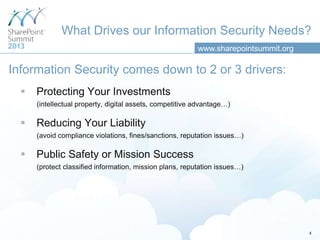
Information Security comes down to 2 or 3 drivers:
 Protecting Your Investments
(intellectual property, digital assets, competitive advantage…)
 Reducing Your Liability
(avoid compliance violations, fines/sanctions, reputation issues…)
 Public Safety or Mission Success
(protect classified information, mission plans, reputation issues…)
4
www.sharepointsummit.org
What Drives our Information Security Needs?
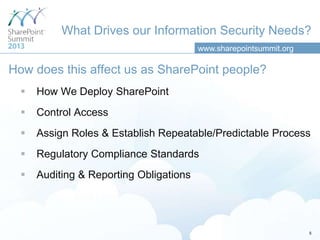
How does this affect us as SharePoint people?
 How We Deploy SharePoint
 Control Access
 Assign Roles & Establish Repeatable/Predictable Process
 Regulatory Compliance Standards
 Auditing & Reporting Obligations
5
www.sharepointsummit.org
Deployment Planning/Managed Accounts
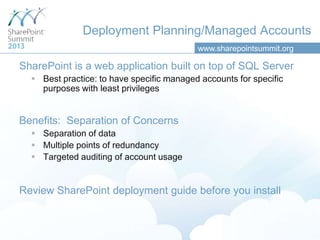
SharePoint is a web application built on top of SQL Server
 Best practice: to have specific managed accounts for specific
purposes with least privileges
Benefits: Separation of Concerns
 Separation of data
 Multiple points of redundancy
 Targeted auditing of account usage
Review SharePoint deployment guide before you install
www.sharepointsummit.org
Examples of Managed Accounts
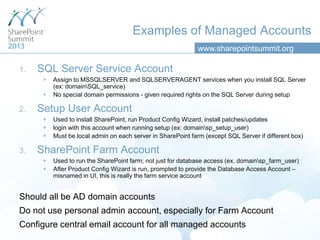
1. SQL Server Service Account
 Assign to MSSQLSERVER and SQLSERVERAGENT services when you install SQL Server
(ex: domainSQL_service)
 No special domain permissions - given required rights on the SQL Server during setup
2. Setup User Account
 Used to install SharePoint, run Product Config Wizard, install patches/updates
 login with this account when running setup (ex: domainsp_setup_user)
 Must be local admin on each server in SharePoint farm (except SQL Server if different box)
3. SharePoint Farm Account
 Used to run the SharePoint farm; not just for database access (ex. domainsp_farm_user)
 After Product Config Wizard is run, prompted to provide the Database Access Account –
misnamed in UI, this is really the farm service account
Should all be AD domain accounts
Do not use personal admin account, especially for Farm Account
Configure central email account for all managed accounts
www.sharepointsummit.org
Authentication
Determine that users are who they say they are (login)
 Configured on each web app
 Multiple authentication methods per web app
SharePoint 2010 Options
 Classic Mode Authentication (Integrated Auth, NTLM, Kerberos)
 Claims Based Authentication
 Forms Based Authentication available- done through Claims Based Auth.
UI configuration only available in UI upon web app creation
To convert non-claims based web app to claims will require PowerShell
SharePoint 2013 Options
 Claims Based Authentication - default
 Classic Mode Configuration UI has been removed
(Only configurable through PowerShell)
www.sharepointsummit.org
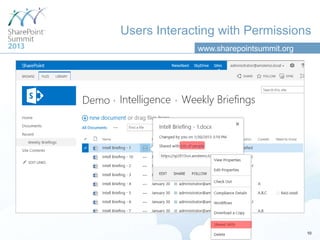
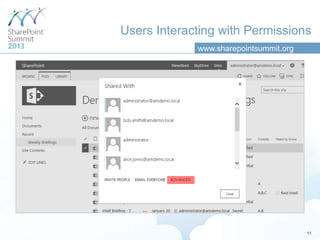
Permissions
Allow you to secure any information object or container
 Determine who gets access to what information objects and what type of
access
 Apply to items, folders, lists, libraries, sites, site collection…
 Do not apply to individual column field values (not a securable object)
Assigning Permissions Includes
 The user or group we are enabling with access
 The information object in question
 The permission level we are granting as part of that access
Examples
 Finance AD Group has Full Control on Library
 ProjectX-Contractor SP Group has Read access on site
 Antonio.Maio AD user has Contribute access on Document
www.sharepointsummit.org
Users Interacting with Permissions
10
www.sharepointsummit.org
Users Interacting with Permissions
11
www.sharepointsummit.org
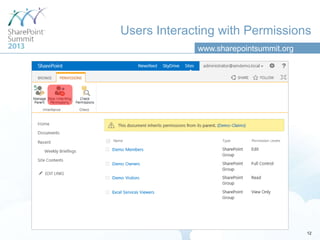
Users Interacting with Permissions
12
www.sharepointsummit.org
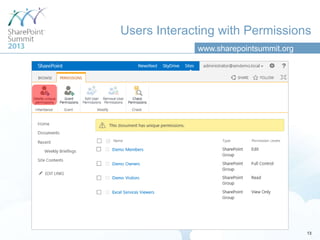
Users Interacting with Permissions
13
www.sharepointsummit.org
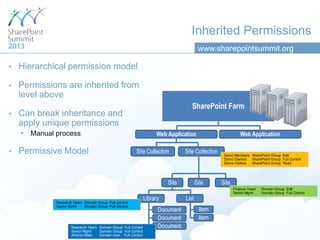
Inherited Permissions
 Hierarchical permission model
 Permissions are inherited from
level above
 Can break inheritance and
apply unique permissions
 Manual process
 Permissive Model
SharePoint Farm
Web Application
Site Collection Site Collection
Site Site
Library List
Document
Web Application
Item
Site
Document
Document
Item
Demo Members SharePoint Group Edit
Demo Owners SharePoint Group Full Control
Demo Visitors SharePoint Group Read
Finance Team Domain Group Edit
Senior Mgmt Domain Group Full Control
Research Team Domain Group Full Control
Senior Mgmt Domain Group Full Control
Research Team Domain Group Full Control
Senior Mgmt Domain Group Full Control
Antonio.Maio Domain User Full Control
www.sharepointsummit.org
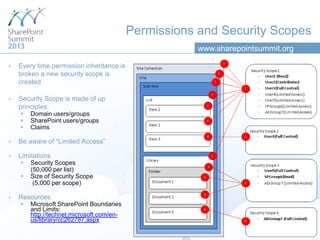
Permissions and Security Scopes
 Every time permission inheritance is
broken a new security scope is
created
 Security Scope is made of up
principles:
 Domain users/groups
 SharePoint users/groups
 Claims
 Be aware of “Limited Access”
 Limitations
 Security Scopes
(50,000 per list)
 Size of Security Scope
(5,000 per scope)
 Resources
 Microsoft SharePoint Boundaries
and Limits:
http://technet.microsoft.com/en-
us/library/cc262787.aspx
www.sharepointsummit.org
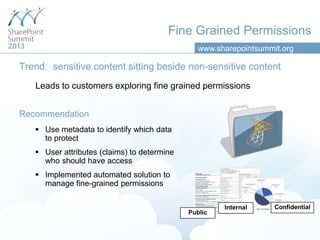
Fine Grained Permissions
Trend: sensitive content sitting beside non-sensitive content
Leads to customers exploring fine grained permissions
Confidential
Public
Internal
Recommendation
 Use metadata to identify which data
to protect
 User attributes (claims) to determine
who should have access
 Implemented automated solution to
manage fine-grained permissions
www.sharepointsummit.org
Web Application Policies
User Permissions
 Permissions available within permission levels at site collection level
Permission Policies
 Define groups of permissions (similar to permission levels)
 Control if site collection admins have full control on any object in site col.
 Only place with a “Deny” capability (default: deny write, deny all)
User Policies
 Assign permission policies to users and groups for the entire web app
 Ex. Deny group from deleting items within an entire web app – applicable to
public facing web app
Blocked File Types
 Prevent specific files types from being added to libraries within web app
www.sharepointsummit.org
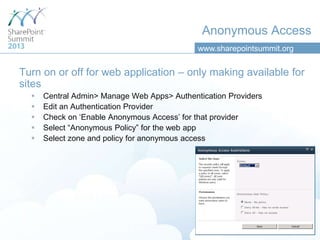
Anonymous Access
Turn on or off for web application – only making available for
sites
 Central Admin> Manage Web Apps> Authentication Providers
 Edit an Authentication Provider
 Check on „Enable Anonymous Access‟ for that provider
 Select “Anonymous Policy” for the web app
 Select zone and policy for anonymous access
www.sharepointsummit.org
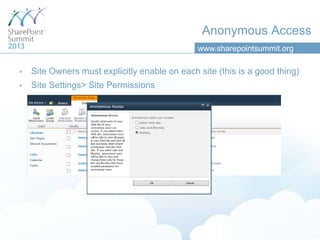
 Site Owners must explicitly enable on each site (this is a good thing)
 Site Settings> Site Permissions
Anonymous Access
www.sharepointsummit.org
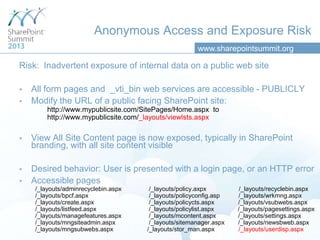
Risk: Inadvertent exposure of internal data on a public web site
 All form pages and _vti_bin web services are accessible - PUBLICLY
 Modify the URL of a public facing SharePoint site:
http://www.mypublicsite.com/SitePages/Home.aspx to
http://www.mypublicsite.com/_layouts/viewlsts.aspx
 View All Site Content page is now exposed, typically in SharePoint
branding, with all site content visible
 Desired behavior: User is presented with a login page, or an HTTP error
 Accessible pages
/_layouts/adminrecyclebin.aspx /_layouts/policy.axpx /_layouts/recyclebin.aspx
/_layouts/bpcf.aspx /_layouts/policyconfig.asp /_layouts/wrkmng.aspx
/_layouts/create.aspx /_layouts/policycts.aspx /_layouts/vsubwebs.aspx
/_layouts/listfeed.aspx /_layouts/policylist.aspx /_layouts/pagesettings.aspx
/_layouts/managefeatures.aspx /_layouts/mcontent.aspx /_layouts/settings.aspx
/_layouts/mngsiteadmin.aspx /_layouts/sitemanager.aspx /_layouts/newsbweb.aspx
/_layouts/mngsubwebs.aspx /_layouts/stor_man.aspx /_layouts/userdisp.aspx
Anonymous Access and Exposure Risk
www.sharepointsummit.org
Anonymous Access and Public Facing Sites
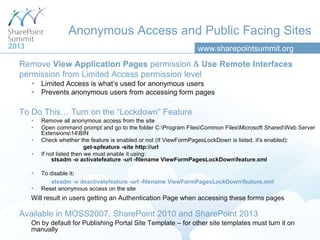
Remove View Application Pages permission & Use Remote Interfaces
permission from Limited Access permission level
 Limited Access is what‟s used for anonymous users
 Prevents anonymous users from accessing form pages
To Do This… Turn on the “Lockdown” Feature
 Remove all anonymous access from the site
 Open command prompt and go to the folder C:Program FilesCommon FilesMicrosoft SharedWeb Server
Extensions14BIN
 Check whether the feature is enabled or not (If ViewFormPagesLockDown is listed, it's enabled):
get-spfeature -site http://url
 If not listed then we must enable it using:
stsadm -o activatefeature -url -filename ViewFormPagesLockDownfeature.xml
 To disable it:
stsadm -o deactivatefeature -url -filename ViewFormPagesLockDownfeature.xml
 Reset anonymous access on the site
Will result in users getting an Authentication Page when accessing these forms pages
Available in MOSS2007, SharePoint 2010 and SharePoint 2013
On by default for Publishing Portal Site Template – for other site templates must turn it on
manually
www.sharepointsummit.org
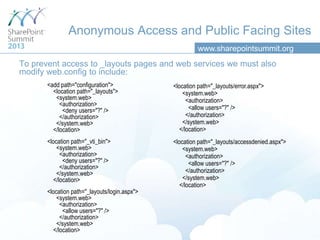
To prevent access to _layouts pages and web services we must also
modify web.config to include:
<location path="_layouts/error.aspx">
<system.web>
<authorization>
<allow users="?" />
</authorization>
</system.web>
</location>
<location path="_layouts/accessdenied.aspx">
<system.web>
<authorization>
<allow users="?" />
</authorization>
</system.web>
</location>
<add path="configuration">
<location path="_layouts">
<system.web>
<authorization>
<deny users="?" />
</authorization>
</system.web>
</location>
<location path="_vti_bin">
<system.web>
<authorization>
<deny users="?" />
</authorization>
</system.web>
</location>
<location path="_layouts/login.aspx">
<system.web>
<authorization>
<allow users="?" />
</authorization>
</system.web>
</location>
Anonymous Access and Public Facing Sites
www.sharepointsummit.org
Other Security Features
 Information Rights Management
 Event Auditing
 Privileged Users
Thank you for your attention!
This presentation will be available on the Toronto
SharePoint Summit web site a few days after the event.
Antonio Maio Senior Product Manager, TITUS
Microsoft SharePoint Server MVP
Email: Antonio.maio@titus.com
Blog: www.trustsharepoint.com
Twitter: @AntonioMaio2
Please rate this session!
Fill out the survey and get a chance to win a Surface

Best Practices for Security in Microsoft SharePoint 2013

  • 1.
    Best Practices forSecurity in Microsoft SharePoint 2013 Antonio Maio Senior Product Manager, TITUS Microsoft SharePoint Server MVP Email: Antonio.maio@titus.com Blog: www.trustsharepoint.com Twitter: @AntonioMaio2
  • 2.
    www.sharepointsummit.org 2 Introduction Goal: Inform andEducate on Key SharePoint Security Features  We know its critical in government and military deployments  We know its critical consideration in business  Security is still often its an after thought for many deployments  Requires good planning  Requires good awareness of the capabilities available  Requires knowledge of what SharePoint cannot do
  • 3.
    www.sharepointsummit.org 3 Introduction Topics • What Drivesour Security Needs in SharePoint? • Deployment Planning & Accounts • Authentication • Permissions • Web Application Policies & Anonymous Access • Security Considerations for Public Facing Web Sites • Other Security Features
  • 4.
    www.sharepointsummit.org What Drives ourInformation Security Needs? Information Security comes down to 2 or 3 drivers:  Protecting Your Investments (intellectual property, digital assets, competitive advantage…)  Reducing Your Liability (avoid compliance violations, fines/sanctions, reputation issues…)  Public Safety or Mission Success (protect classified information, mission plans, reputation issues…) 4
  • 5.
    www.sharepointsummit.org What Drives ourInformation Security Needs? How does this affect us as SharePoint people?  How We Deploy SharePoint  Control Access  Assign Roles & Establish Repeatable/Predictable Process  Regulatory Compliance Standards  Auditing & Reporting Obligations 5
  • 6.
    www.sharepointsummit.org Deployment Planning/Managed Accounts SharePointis a web application built on top of SQL Server  Best practice: to have specific managed accounts for specific purposes with least privileges Benefits: Separation of Concerns  Separation of data  Multiple points of redundancy  Targeted auditing of account usage Review SharePoint deployment guide before you install
  • 7.
    www.sharepointsummit.org Examples of ManagedAccounts 1. SQL Server Service Account  Assign to MSSQLSERVER and SQLSERVERAGENT services when you install SQL Server (ex: domainSQL_service)  No special domain permissions - given required rights on the SQL Server during setup 2. Setup User Account  Used to install SharePoint, run Product Config Wizard, install patches/updates  login with this account when running setup (ex: domainsp_setup_user)  Must be local admin on each server in SharePoint farm (except SQL Server if different box) 3. SharePoint Farm Account  Used to run the SharePoint farm; not just for database access (ex. domainsp_farm_user)  After Product Config Wizard is run, prompted to provide the Database Access Account – misnamed in UI, this is really the farm service account Should all be AD domain accounts Do not use personal admin account, especially for Farm Account Configure central email account for all managed accounts
  • 8.
    www.sharepointsummit.org Authentication Determine that usersare who they say they are (login)  Configured on each web app  Multiple authentication methods per web app SharePoint 2010 Options  Classic Mode Authentication (Integrated Auth, NTLM, Kerberos)  Claims Based Authentication  Forms Based Authentication available- done through Claims Based Auth. UI configuration only available in UI upon web app creation To convert non-claims based web app to claims will require PowerShell SharePoint 2013 Options  Claims Based Authentication - default  Classic Mode Configuration UI has been removed (Only configurable through PowerShell)
  • 9.
    www.sharepointsummit.org Permissions Allow you tosecure any information object or container  Determine who gets access to what information objects and what type of access  Apply to items, folders, lists, libraries, sites, site collection…  Do not apply to individual column field values (not a securable object) Assigning Permissions Includes  The user or group we are enabling with access  The information object in question  The permission level we are granting as part of that access Examples  Finance AD Group has Full Control on Library  ProjectX-Contractor SP Group has Read access on site  Antonio.Maio AD user has Contribute access on Document
  • 10.
  • 11.
  • 12.
  • 13.
  • 14.
    www.sharepointsummit.org Inherited Permissions  Hierarchicalpermission model  Permissions are inherited from level above  Can break inheritance and apply unique permissions  Manual process  Permissive Model SharePoint Farm Web Application Site Collection Site Collection Site Site Library List Document Web Application Item Site Document Document Item Demo Members SharePoint Group Edit Demo Owners SharePoint Group Full Control Demo Visitors SharePoint Group Read Finance Team Domain Group Edit Senior Mgmt Domain Group Full Control Research Team Domain Group Full Control Senior Mgmt Domain Group Full Control Research Team Domain Group Full Control Senior Mgmt Domain Group Full Control Antonio.Maio Domain User Full Control
  • 15.
    www.sharepointsummit.org Permissions and SecurityScopes  Every time permission inheritance is broken a new security scope is created  Security Scope is made of up principles:  Domain users/groups  SharePoint users/groups  Claims  Be aware of “Limited Access”  Limitations  Security Scopes (50,000 per list)  Size of Security Scope (5,000 per scope)  Resources  Microsoft SharePoint Boundaries and Limits: http://technet.microsoft.com/en- us/library/cc262787.aspx
  • 16.
    www.sharepointsummit.org Fine Grained Permissions Trend:sensitive content sitting beside non-sensitive content Leads to customers exploring fine grained permissions Confidential Public Internal Recommendation  Use metadata to identify which data to protect  User attributes (claims) to determine who should have access  Implemented automated solution to manage fine-grained permissions
  • 17.
    www.sharepointsummit.org Web Application Policies UserPermissions  Permissions available within permission levels at site collection level Permission Policies  Define groups of permissions (similar to permission levels)  Control if site collection admins have full control on any object in site col.  Only place with a “Deny” capability (default: deny write, deny all) User Policies  Assign permission policies to users and groups for the entire web app  Ex. Deny group from deleting items within an entire web app – applicable to public facing web app Blocked File Types  Prevent specific files types from being added to libraries within web app
  • 18.
    www.sharepointsummit.org Anonymous Access Turn onor off for web application – only making available for sites  Central Admin> Manage Web Apps> Authentication Providers  Edit an Authentication Provider  Check on „Enable Anonymous Access‟ for that provider  Select “Anonymous Policy” for the web app  Select zone and policy for anonymous access
  • 19.
    www.sharepointsummit.org  Site Ownersmust explicitly enable on each site (this is a good thing)  Site Settings> Site Permissions Anonymous Access
  • 20.
    www.sharepointsummit.org Risk: Inadvertent exposureof internal data on a public web site  All form pages and _vti_bin web services are accessible - PUBLICLY  Modify the URL of a public facing SharePoint site: http://www.mypublicsite.com/SitePages/Home.aspx to http://www.mypublicsite.com/_layouts/viewlsts.aspx  View All Site Content page is now exposed, typically in SharePoint branding, with all site content visible  Desired behavior: User is presented with a login page, or an HTTP error  Accessible pages /_layouts/adminrecyclebin.aspx /_layouts/policy.axpx /_layouts/recyclebin.aspx /_layouts/bpcf.aspx /_layouts/policyconfig.asp /_layouts/wrkmng.aspx /_layouts/create.aspx /_layouts/policycts.aspx /_layouts/vsubwebs.aspx /_layouts/listfeed.aspx /_layouts/policylist.aspx /_layouts/pagesettings.aspx /_layouts/managefeatures.aspx /_layouts/mcontent.aspx /_layouts/settings.aspx /_layouts/mngsiteadmin.aspx /_layouts/sitemanager.aspx /_layouts/newsbweb.aspx /_layouts/mngsubwebs.aspx /_layouts/stor_man.aspx /_layouts/userdisp.aspx Anonymous Access and Exposure Risk
  • 21.
    www.sharepointsummit.org Anonymous Access andPublic Facing Sites Remove View Application Pages permission & Use Remote Interfaces permission from Limited Access permission level  Limited Access is what‟s used for anonymous users  Prevents anonymous users from accessing form pages To Do This… Turn on the “Lockdown” Feature  Remove all anonymous access from the site  Open command prompt and go to the folder C:Program FilesCommon FilesMicrosoft SharedWeb Server Extensions14BIN  Check whether the feature is enabled or not (If ViewFormPagesLockDown is listed, it's enabled): get-spfeature -site http://url  If not listed then we must enable it using: stsadm -o activatefeature -url -filename ViewFormPagesLockDownfeature.xml  To disable it: stsadm -o deactivatefeature -url -filename ViewFormPagesLockDownfeature.xml  Reset anonymous access on the site Will result in users getting an Authentication Page when accessing these forms pages Available in MOSS2007, SharePoint 2010 and SharePoint 2013 On by default for Publishing Portal Site Template – for other site templates must turn it on manually
  • 22.
    www.sharepointsummit.org To prevent accessto _layouts pages and web services we must also modify web.config to include: <location path="_layouts/error.aspx"> <system.web> <authorization> <allow users="?" /> </authorization> </system.web> </location> <location path="_layouts/accessdenied.aspx"> <system.web> <authorization> <allow users="?" /> </authorization> </system.web> </location> <add path="configuration"> <location path="_layouts"> <system.web> <authorization> <deny users="?" /> </authorization> </system.web> </location> <location path="_vti_bin"> <system.web> <authorization> <deny users="?" /> </authorization> </system.web> </location> <location path="_layouts/login.aspx"> <system.web> <authorization> <allow users="?" /> </authorization> </system.web> </location> Anonymous Access and Public Facing Sites
  • 23.
    www.sharepointsummit.org Other Security Features Information Rights Management  Event Auditing  Privileged Users
  • 24.
    Thank you foryour attention! This presentation will be available on the Toronto SharePoint Summit web site a few days after the event. Antonio Maio Senior Product Manager, TITUS Microsoft SharePoint Server MVP Email: Antonio.maio@titus.com Blog: www.trustsharepoint.com Twitter: @AntonioMaio2
  • 25.
    Please rate thissession! Fill out the survey and get a chance to win a Surface

Editor's Notes

  • #7 Minimize risk of compromised accountsMinimize risk of information leaks
  • #8 SharePoint Farm account is sometimes referred to as the “Database Access Account”
  • #9 Each web application can have different methods of authentication enabled… and multipleSharePoint 2013 – Forms Based Auth is still available, through Claims
  • #10 Permissions relate to a process called “Authorization”Authorization is different from AuthenticationAuthorization is the process of determining what content is a user permitted to access and which actions are they permitted to perform