danielgr@microsoft.com
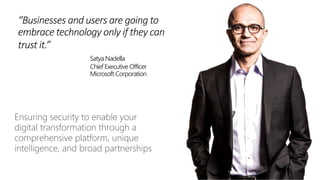
“Businesses and users are going to
embrace technology only if they can
trust it.”
Satya Nadella
Chief Executive Officer
Microsoft Corporation
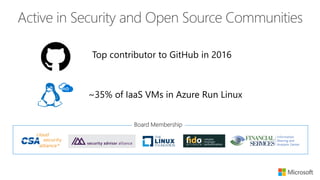
~35% of IaaS VMs in Azure Run Linux
Top contributor to GitHub in 2016
Board Membership
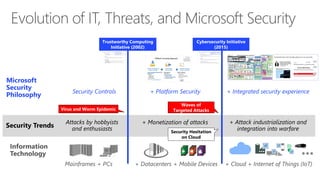
Security Trends
Microsoft
Security
Philosophy
Attacks by hobbyists
and enthusiasts
+ Monetization of attacks + Attack industrialization and
integration into warfare
Security Controls + Platform Security + Integrated security experience
Virus and Worm Epidemic
Waves of
Targeted Attacks
Trustworthy Computing
Initiative (2002)
Cybersecurity Initiative
(2015)
Security Hesitation
on Cloud
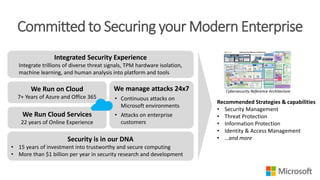
Committed to Securing your Modern Enterprise
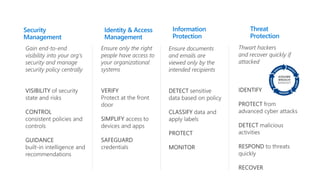
Recommended Strategies & capabilities
• Security Management
• Threat Protection
• Information Protection
• Identity & Access Management
• …and more
Integrated Security Experience
Integrate trillions of diverse threat signals, TPM hardware isolation,
machine learning, and human analysis into platform and tools
We manage attacks 24x7
• Continuous attacks on
Microsoft environments
• Attacks on enterprise
customers
We Run on Cloud
7+ Years of Azure and Office 365
Security is in our DNA
• 15 years of investment into trustworthy and secure computing
• More than $1 billion per year in security research and development
We Run Cloud Services
22 years of Online Experience
Cybersecurity Reference Architecture
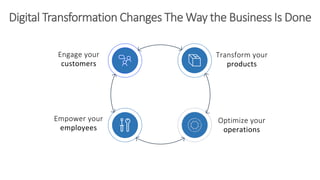
Engage your
customers
Empower your
employees
Optimize your
operations
Transform your
products
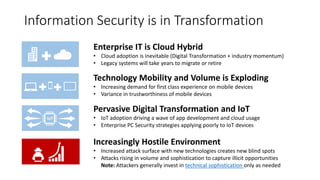
Information Security is in Transformation
Increasingly Hostile Environment
• Increased attack surface with new technologies creates new blind spots
• Attacks rising in volume and sophistication to capture illicit opportunities
Note: Attackers generally invest in technical sophistication only as needed
Enterprise IT is Cloud Hybrid
• Cloud adoption is inevitable (Digital Transformation + industry momentum)
• Legacy systems will take years to migrate or retire
Technology Mobility and Volume is Exploding
• Increasing demand for first class experience on mobile devices
• Variance in trustworthiness of mobile devices
Pervasive Digital Transformation and IoT
• IoT adoption driving a wave of app development and cloud usage
• Enterprise PC Security strategies applying poorly to IoT devices
IoT
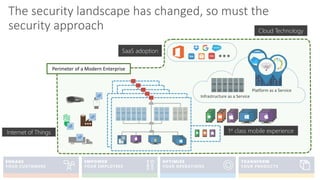
Infrastructure as a Service
Platform as a Service
Internet of Things 1st class mobile experience
Cloud Technology
SaaS adoption
Perimeter of a Modern Enterprise
Apps and Data
SaaS
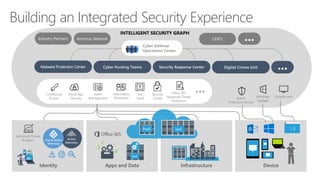
Building an Integrated Security Experience
Malware Protection Center Cyber Hunting Teams Security Response Center
DeviceInfrastructure
CERTs
Identity
INTELLIGENT SECURITY GRAPH
Cyber Defense
Operations Center
Digital Crimes Unit
Antivirus NetworkIndustry Partners
PaaS IaaS
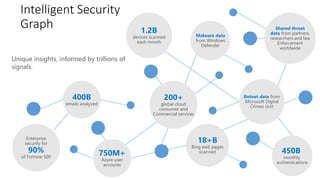
Unique insights, informed by trillions of
signals.
450B
monthly
authentications
18+B
Bing web pages
scanned750M+
Azure user
accounts
Enterprise
security for
90%
of Fortune 500
Malware data
from Windows
Defender
Shared threat
data from partners,
researchers and law
Enforcement
worldwide
Botnet data from
Microsoft Digital
Crimes Unit
1.2B
devices scanned
each month
400B
emails analyzed
200+
global cloud
consumer and
Commercial services
Intelligent Security
Graph
Microsoft Trust Center
[ Privacy/Compliance boundary ]
{ }
PRODUCT & SERVICE TELEMETRY
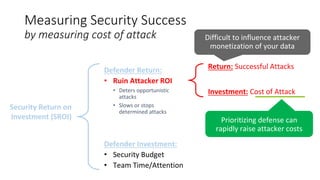
Measuring Security Success
by measuring cost of attack
Defender Investment:
Defender Return:
• Ruin Attacker ROI
• Deters opportunistic
attacks
• Slows or stops
determined attacks
Investment: Cost of Attack
Return: Successful Attacks
Security Return on
Investment (SROI)
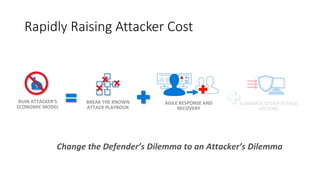
Rapidly Raising Attacker Cost
RUIN ATTACKER’S
ECONOMIC MODEL
BREAK THE KNOWN
ATTACK PLAYBOOK
ELIMINATE OTHER ATTACK
VECTORS
AGILE RESPONSE AND
RECOVERY
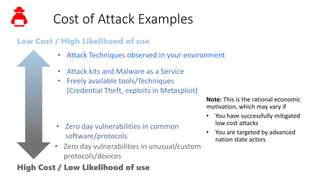
Cost of Attack Examples
• Zero day vulnerabilities in common
software/protocols
Low Cost / High Likelihood of use
High Cost / Low Likelihood of use
• Attack Techniques observed in your environment
• Freely available tools/Techniques
(Credential Theft, exploits in Metasploit)
• Zero day vulnerabilities in unusual/custom
protocols/devices
• Attack kits and Malware as a Service
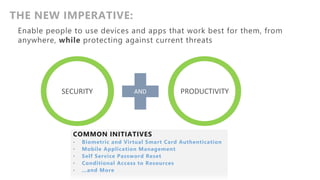
SECURITY
THE NEW IMPERATIVE:
OR PRODUCTIVITY
COMMON INITIATIVES
• Biometric and Virtual Smart Card Authentication
• Mobile Application Management
• Self Service Password Reset
• Conditional Access to Resources
• …and More
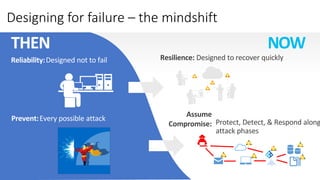
Designing for failure – the mindshift
Resilience: Designed to recover quickly
THEN NOW
Reliability:Designed not to fail
!
!
!
!
Prevent:Every possible attack Protect, Detect, & Respond along
attack phases
!
!
!
!
!
!
Assume
Compromise:
Internet of Things
Unmanaged & Mobile Clients
Sensitive
Workloads
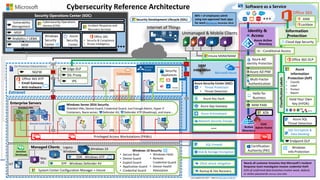
Cybersecurity Reference Architecture
Extranet
Azure Key Vault
Microsoft Azure
On Premises Datacenter(s)
NGFW
Nearly all customer breaches that Microsoft’s Incident
Response team investigates involve credential theft
63% of confirmed data breaches involve weak, default,
or stolen passwords (Verizon 2016 DBR)
Colocation
$
Mac
OS
Multi-Factor
Authentication
MIM PAM
Network Security Groups
Azure AD PIM
Windows
Info Protection
Enterprise Servers
VPN
VPN
VMs VMs
Certification
Authority (PKI)
Security Operations Center (SOC)
WEF
SIEM
Integration
IoT
Identity &
Access
Windows 10Managed Clients
Software as a Service
ATA
Azure
Information
Protection (AIP)
• Classify
• Label
• Protect
• Report
Endpoint DLP
ClassificationLabels
Office 365
Information
Protection
Legacy
Windows
Hold Your Own
Key (HYOK)
80% + of employees admit
using non-approved SaaS apps
for work (Stratecast, December 2013)
IPS
Edge DLP
SSL Proxy
Azure AD
Identity Protection
Security
Appliances
Last updated July 2017 – latest at http://aka.ms/MCRA
EPP - Windows Defender AV
EDR - Windows ATP
Azure SQL
Threat Detection
Windows Server 2016 Security
Shielded VMs, Device Guard, Credential Guard, Just Enough Admin, Hyper-V
Containers, Nano server, Defender AV, Defender ATP (Roadmap), and more…
Azure App Gateway
Azure Antimalware
SQL Encryption &
Data Masking
SQL Firewall
Disk & Storage Encryption
Conditional Access
Office 365 ATP
• Email Gateway
• Anti-malware • Threat Protection
• Threat Detection
Azure Security Center (ASC)
Analytics / UEBA
MSSP
Windows
Security
Center
Azure
Security
Center
Vulnerability
Management
SIEM
Office 365
• Security & Compliance
• Threat Intelligence
Hello for
Business
Windows 10 Security
• Secure Boot
• Device Guard
• Exploit Guard
• Application Guard
• Credential Guard
• Windows Hello
• Remote
Credential Guard
• Device Health
Attestation
Security Development Lifecycle (SDL)
Cybersecurity Operations
Service (COS) Incident Response and
Recovery Services
Office 365 DLP
Cloud App Security
Lockbox
ASM
Intune MDM/MAM
DDoS attack mitigation
Backup & Site RecoverySystem Center Configuration Manager + Intune
Privileged Access Workstations (PAWs)
Shielded VMs
ESAE
Admin Forest
Domain Controllers
3 Access Data
Threat Actors exfiltrate PII and
other sensitive business data
Phishing Email
Threat Actor targets employee(s)
via phishing campaign
1
Credential Theft & Abuse
Gathers credentials stolen credentials to
move laterally
2a
Compromise Device/Account
Employee opens attachment/link
or types credentials into fake web page
Office 365 Advanced Threat
Protection (ATP)
(requires E5)
EMS Technology
• Azure Information Protection (requires E5)
• Cloud App Security (CASB) (requires E5)
Office 365 Data Loss Prevention features
Windows Information Protection
Azure Technology
• Multi-Factor Authentication
• Azure Identity Protection
• Disk, Storage, SQL Encryption
• Key Vault
• …
2
EMS Technology
• Intune conditional access
Windows 10 Technology
• Device Guard
• Application Guard
• Defender Advanced Threat Protection (requires E5)
• SmartScreen URL and App reputation
Securing Privileged Access
(http://aka.ms/SPAroadmap) Roadmap
Professional Services
•Incident Response
•Security Foundation (Major Breach Protections)
Credential Guard
Advanced Threat Analytics (in EMS E3)
Azure Security Center
Operations Management Suite (OMS)
…and more
 Access same data as employee
Increase access to your environment
Daniel Grabski | Microsofts cybersecurity story

Daniel Grabski | Microsofts cybersecurity story

  • 1.
  • 4.
    “Businesses and usersare going to embrace technology only if they can trust it.” Satya Nadella Chief Executive Officer Microsoft Corporation
  • 5.
    ~35% of IaaSVMs in Azure Run Linux Top contributor to GitHub in 2016 Board Membership
  • 6.
    Security Trends Microsoft Security Philosophy Attacks byhobbyists and enthusiasts + Monetization of attacks + Attack industrialization and integration into warfare Security Controls + Platform Security + Integrated security experience Virus and Worm Epidemic Waves of Targeted Attacks Trustworthy Computing Initiative (2002) Cybersecurity Initiative (2015) Security Hesitation on Cloud
  • 7.
    Committed to Securingyour Modern Enterprise Recommended Strategies & capabilities • Security Management • Threat Protection • Information Protection • Identity & Access Management • …and more Integrated Security Experience Integrate trillions of diverse threat signals, TPM hardware isolation, machine learning, and human analysis into platform and tools We manage attacks 24x7 • Continuous attacks on Microsoft environments • Attacks on enterprise customers We Run on Cloud 7+ Years of Azure and Office 365 Security is in our DNA • 15 years of investment into trustworthy and secure computing • More than $1 billion per year in security research and development We Run Cloud Services 22 years of Online Experience Cybersecurity Reference Architecture
  • 9.
    Engage your customers Empower your employees Optimizeyour operations Transform your products
  • 10.
    Information Security isin Transformation Increasingly Hostile Environment • Increased attack surface with new technologies creates new blind spots • Attacks rising in volume and sophistication to capture illicit opportunities Note: Attackers generally invest in technical sophistication only as needed Enterprise IT is Cloud Hybrid • Cloud adoption is inevitable (Digital Transformation + industry momentum) • Legacy systems will take years to migrate or retire Technology Mobility and Volume is Exploding • Increasing demand for first class experience on mobile devices • Variance in trustworthiness of mobile devices Pervasive Digital Transformation and IoT • IoT adoption driving a wave of app development and cloud usage • Enterprise PC Security strategies applying poorly to IoT devices IoT
  • 11.
    Infrastructure as aService Platform as a Service Internet of Things 1st class mobile experience Cloud Technology SaaS adoption Perimeter of a Modern Enterprise
  • 14.
    Apps and Data SaaS Buildingan Integrated Security Experience Malware Protection Center Cyber Hunting Teams Security Response Center DeviceInfrastructure CERTs Identity INTELLIGENT SECURITY GRAPH Cyber Defense Operations Center Digital Crimes Unit Antivirus NetworkIndustry Partners PaaS IaaS
  • 15.
    Unique insights, informedby trillions of signals. 450B monthly authentications 18+B Bing web pages scanned750M+ Azure user accounts Enterprise security for 90% of Fortune 500 Malware data from Windows Defender Shared threat data from partners, researchers and law Enforcement worldwide Botnet data from Microsoft Digital Crimes Unit 1.2B devices scanned each month 400B emails analyzed 200+ global cloud consumer and Commercial services Intelligent Security Graph
  • 16.
    Microsoft Trust Center [Privacy/Compliance boundary ] { } PRODUCT & SERVICE TELEMETRY
  • 18.
    Measuring Security Success bymeasuring cost of attack Defender Investment: Defender Return: • Ruin Attacker ROI • Deters opportunistic attacks • Slows or stops determined attacks Investment: Cost of Attack Return: Successful Attacks Security Return on Investment (SROI)
  • 19.
    Rapidly Raising AttackerCost RUIN ATTACKER’S ECONOMIC MODEL BREAK THE KNOWN ATTACK PLAYBOOK ELIMINATE OTHER ATTACK VECTORS AGILE RESPONSE AND RECOVERY
  • 20.
    Cost of AttackExamples • Zero day vulnerabilities in common software/protocols Low Cost / High Likelihood of use High Cost / Low Likelihood of use • Attack Techniques observed in your environment • Freely available tools/Techniques (Credential Theft, exploits in Metasploit) • Zero day vulnerabilities in unusual/custom protocols/devices • Attack kits and Malware as a Service
  • 21.
    SECURITY THE NEW IMPERATIVE: ORPRODUCTIVITY COMMON INITIATIVES • Biometric and Virtual Smart Card Authentication • Mobile Application Management • Self Service Password Reset • Conditional Access to Resources • …and More
  • 22.
    Designing for failure– the mindshift Resilience: Designed to recover quickly THEN NOW Reliability:Designed not to fail ! ! ! ! Prevent:Every possible attack Protect, Detect, & Respond along attack phases ! ! ! ! ! ! Assume Compromise:
  • 24.
    Internet of Things Unmanaged& Mobile Clients Sensitive Workloads Cybersecurity Reference Architecture Extranet Azure Key Vault Microsoft Azure On Premises Datacenter(s) NGFW Nearly all customer breaches that Microsoft’s Incident Response team investigates involve credential theft 63% of confirmed data breaches involve weak, default, or stolen passwords (Verizon 2016 DBR) Colocation $ Mac OS Multi-Factor Authentication MIM PAM Network Security Groups Azure AD PIM Windows Info Protection Enterprise Servers VPN VPN VMs VMs Certification Authority (PKI) Security Operations Center (SOC) WEF SIEM Integration IoT Identity & Access Windows 10Managed Clients Software as a Service ATA Azure Information Protection (AIP) • Classify • Label • Protect • Report Endpoint DLP ClassificationLabels Office 365 Information Protection Legacy Windows Hold Your Own Key (HYOK) 80% + of employees admit using non-approved SaaS apps for work (Stratecast, December 2013) IPS Edge DLP SSL Proxy Azure AD Identity Protection Security Appliances Last updated July 2017 – latest at http://aka.ms/MCRA EPP - Windows Defender AV EDR - Windows ATP Azure SQL Threat Detection Windows Server 2016 Security Shielded VMs, Device Guard, Credential Guard, Just Enough Admin, Hyper-V Containers, Nano server, Defender AV, Defender ATP (Roadmap), and more… Azure App Gateway Azure Antimalware SQL Encryption & Data Masking SQL Firewall Disk & Storage Encryption Conditional Access Office 365 ATP • Email Gateway • Anti-malware • Threat Protection • Threat Detection Azure Security Center (ASC) Analytics / UEBA MSSP Windows Security Center Azure Security Center Vulnerability Management SIEM Office 365 • Security & Compliance • Threat Intelligence Hello for Business Windows 10 Security • Secure Boot • Device Guard • Exploit Guard • Application Guard • Credential Guard • Windows Hello • Remote Credential Guard • Device Health Attestation Security Development Lifecycle (SDL) Cybersecurity Operations Service (COS) Incident Response and Recovery Services Office 365 DLP Cloud App Security Lockbox ASM Intune MDM/MAM DDoS attack mitigation Backup & Site RecoverySystem Center Configuration Manager + Intune Privileged Access Workstations (PAWs) Shielded VMs ESAE Admin Forest Domain Controllers
  • 25.
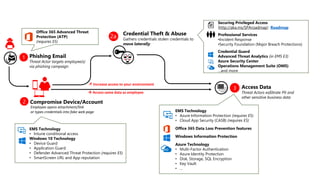
    3 Access Data ThreatActors exfiltrate PII and other sensitive business data Phishing Email Threat Actor targets employee(s) via phishing campaign 1 Credential Theft & Abuse Gathers credentials stolen credentials to move laterally 2a Compromise Device/Account Employee opens attachment/link or types credentials into fake web page Office 365 Advanced Threat Protection (ATP) (requires E5) EMS Technology • Azure Information Protection (requires E5) • Cloud App Security (CASB) (requires E5) Office 365 Data Loss Prevention features Windows Information Protection Azure Technology • Multi-Factor Authentication • Azure Identity Protection • Disk, Storage, SQL Encryption • Key Vault • … 2 EMS Technology • Intune conditional access Windows 10 Technology • Device Guard • Application Guard • Defender Advanced Threat Protection (requires E5) • SmartScreen URL and App reputation Securing Privileged Access (http://aka.ms/SPAroadmap) Roadmap Professional Services •Incident Response •Security Foundation (Major Breach Protections) Credential Guard Advanced Threat Analytics (in EMS E3) Azure Security Center Operations Management Suite (OMS) …and more  Access same data as employee Increase access to your environment