Being more secure using
Microsoft 365 Business
June 2019
@directorcia
http://about.me/ciaops
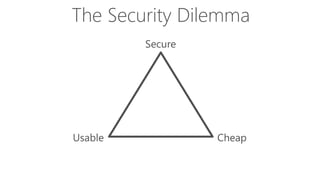
The Security Dilemma
Defence in Depth
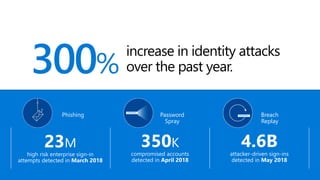
300%
increase in identity attacks
over the past year.
Phishing
23M
high risk enterprise sign-in
attempts detected in March 2018
Password
Spray
350K
compromised accounts
detected in April 2018
lllllllll
Breach
Replay
4.6Battacker-driven sign-ins
detected in May 2018
lllllllll
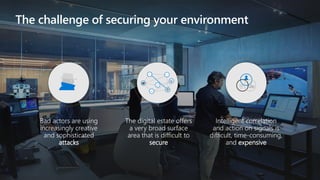
The challenge of securing your environment
The digital estate offers
a very broad surface
area that is difficult to
secure
Bad actors are using
increasingly creative
and sophisticated
attacks
Intelligent correlation
and action on signals is
difficult, time-consuming,
and expensive
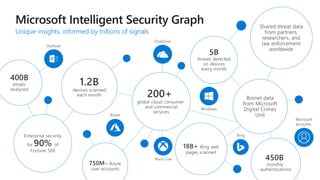
Unique insights, informed by trillions of signals
Where should you start?
Where will your adversary start?
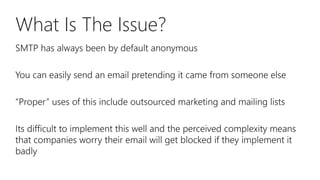
What Is The Issue?
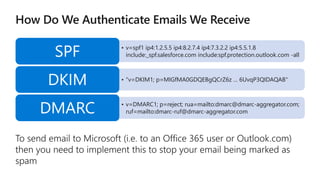
• v=spf1 ip4:1.2.5.5 ip4:8.2.7.4 ip4:7.3.2.2 ip4:5.5.1.8
include:_spf.salesforce.com include:spf.protection.outlook.com -allSPF
• "v=DKIM1; p=MIGfMA0GDQEBgQCrZ6z … 6UvqP3QIDAQAB"
DKIM
• v=DMARC1; p=reject; rua=mailto:dmarc@dmarc-aggregator.com;
ruf=mailto:dmarc-ruf@dmarc-aggregator.comDMARC
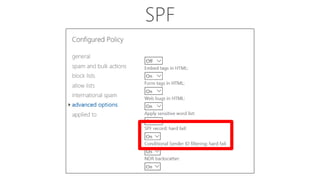
SPF
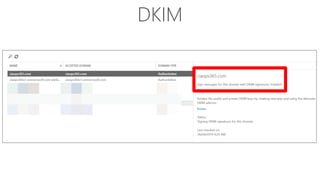
DKIM
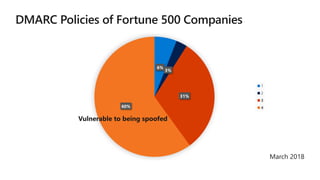
6%
3%
31%
60%
1
2
3
4
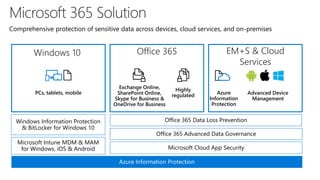
PCs, tablets, mobile
Office 365 Data Loss PreventionWindows Information Protection
& BitLocker for Windows 10
Azure Information Protection
Exchange Online,
SharePoint Online,
Skype for Business &
OneDrive for Business
Highly
regulated
Microsoft Intune MDM & MAM
for Windows, iOS & Android Microsoft Cloud App Security
Office 365 Advanced Data Governance
Azure
Information
Protection
Comprehensive protection of sensitive data across devices, cloud services, and on-premises
Windows 10 Office 365 EM+S & Cloud
Services
Advanced Device
Management
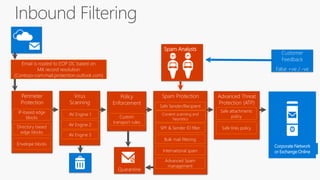
Perimeter
Protection
Email is routed to EOP DC based on
MX record resolution
(Contoso-com.mail.protection.outlook.com)
Virus
Scanning
AV Engine 1
AV Engine 2
AV Engine 3
Spam Protection
Safe Sender/Recipient
Policy
Enforcement
Custom
transport rules
Content scanning and
heuristics
Bulk mail filtering
SPF & Sender ID filter
Quarantine
International spam
Advanced Spam
management
Customer
Feedback
False +ve / -ve
Spam Analysts
Corporate Network
or Exchange Online
IP-based edge
blocks
Envelope blocks
Directory based
edge blocks
Advanced Threat
Protection (ATP)
Safe attachments
policy
Safe links policy
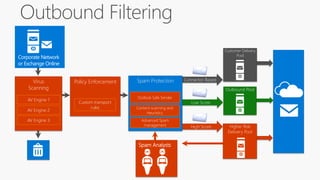
Connector-Based
Higher Risk
Delivery Pool
High Score
Outbound Pool
Low Score
Spam Protection
Content scanning and
Heuristics
Advanced Spam
management
Virus
Scanning
AV Engine 1
AV Engine 2
AV Engine 3
Policy Enforcement
Custom transport
rules
Spam Analysts
Corporate Network
or Exchange Online
Customer Delivery
Pool
Outlook Safe Sender
https://aka.ms/PasswordSprayBestPractices
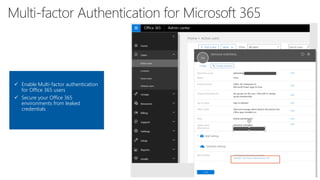
✓ Enable Multi-factor authentication
for Office 365 users
✓ Secure your Office 365
environments from leaked
credentials
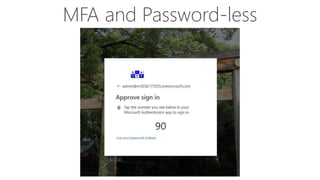
MFA and Password-less
User browses to a
website
Phishing
mail
Opens
attachment
Clicks on a URL
+
Exploitation
& Installation
Command
& Control
Brute force account or
use stolen account credentials
User account
is compromised
Attacker
attempts lateral
movement
Privileged
account
compromised
Domain
compromised
Attacker accesses
sensitive data
Exfiltrate data
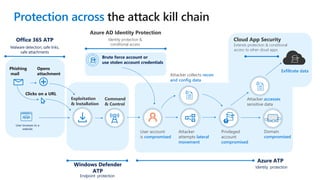
Protection across
Azure AD Identity Protection
Identity protection &
conditional access
Cloud App Security
Extends protection & conditional
access to other cloud apps
Azure ATP
Azure AD Identity Protection
Identity protection &
conditional access
Identity protection
Windows Defender
ATP
Endpoint protection
Office 365 ATP
Malware detection, safe links,
safe attachments
Attacker collects recon
and config data
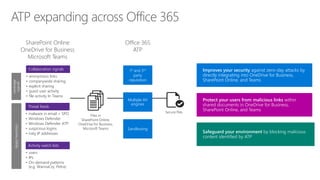
Sandboxing
Multiple AV
engines
1st and 3rd
party
reputation
• anonymous links
• companywide sharing
• explicit sharing
• guest user activity
• file activity In Teams
Collaboration signals
• malware in email + SPO
• Windows Defender
• Windows Defender ATP
• suspicious logins
• risky IP addresses
Threat feeds
• users
• IPs
• On-demand patterns
(e.g. WannaCry, Petra)
Activity watch lists
Leverage
signals
Files in
SharePoint Online,
OneDrive for Business,
Microsoft Teams
Applyheuristics
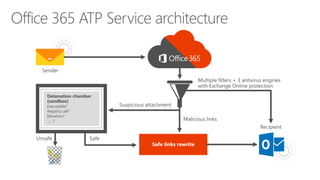
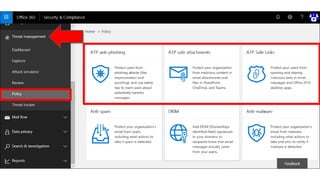
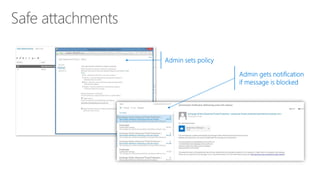
Improves your security against zero-day attacks by
directly integrating into OneDrive for Business,
SharePoint Online, and Teams
Safeguard your environment by blocking malicious
content identified by ATP
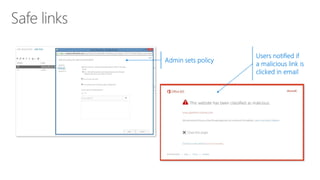
Protect your users from malicious links within
shared documents in OneDrive for Business,
SharePoint Online, and Teams
Office 365
ATP
SharePoint Online
OneDrive for Business
Microsoft Teams
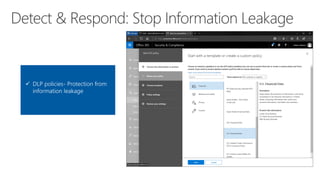
✓ DLP policies- Protection from
information leakage
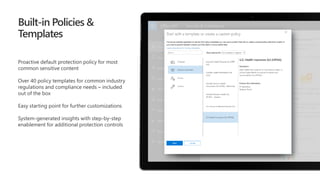
Built-in Policies &
Templates
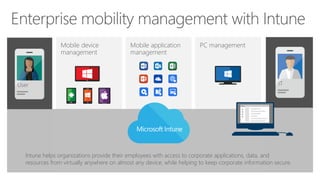
Mobile application
management
PC managementMobile device
management
Intune helps organizations provide their employees with access to corporate applications, data, and
resources from virtually anywhere on almost any device, while helping to keep corporate information secure.
User IT
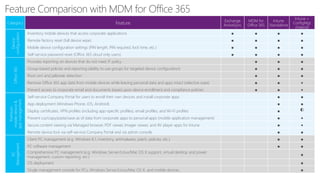
Category Feature
Exchange
ActiveSync
MDM for
Office 365
Intune
Standalone
Intune +
ConfigMgr
(Hybrid)
Device
configuration
Inventory mobile devices that access corporate applications ● ● ● ●
Remote factory reset (full device wipe) ● ● ● ●
Mobile device configuration settings (PIN length, PIN required, lock time, etc.) ● ● ● ●
Self-service password reset (Office 365 cloud only users) ● ● ● ●
Office365
Provides reporting on devices that do not meet IT policy ● ● ●
Group-based policies and reporting (ability to use groups for targeted device configuration) ● ● ●
Root cert and jailbreak detection ● ● ●
Remove Office 365 app data from mobile devices while leaving personal data and apps intact (selective wipe) ● ● ●
Prevent access to corporate email and documents based upon device enrollment and compliance policies ● ● ●
Premium
mobiledevice&
appmanagement
Self-service Company Portal for users to enroll their own devices and install corporate apps ● ●
App deployment (Windows Phone, iOS, Android) ● ●
Deploy certificates, VPN profiles (including app-specific profiles), email profiles, and Wi-Fi profiles ● ◐
Prevent cut/copy/paste/save as of data from corporate apps to personal apps (mobile application management) ● ●
Secure content viewing via Managed browser, PDF viewer, Imager viewer, and AV player apps for Intune ● ●
Remote device lock via self-service Company Portal and via admin console ● ●
PC
Management
Client PC management (e.g. Windows 8.1, inventory, antimalware, patch, policies, etc.) ● ●
PC software management ● ●
Comprehensive PC management (e.g. Windows Server/Linux/Mac OS X support, virtual desktop and power
management, custom reporting, etc.)
●
OS deployment ●
Single management console for PCs, Windows Server/Linux/Mac OS X, and mobile devices ●
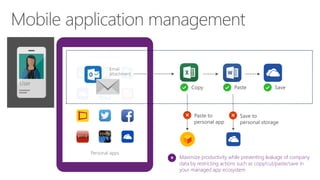
Personal apps
Managed apps
Maximize productivity while preventing leakage of company
data by restricting actions such as copy/cut/paste/save in
your managed app ecosystem
User
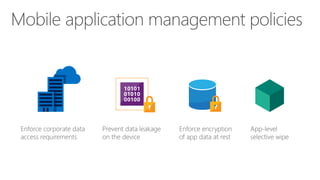
Enforce corporate data
access requirements
Prevent data leakage
on the device
Enforce encryption
of app data at rest
App-level
selective wipe
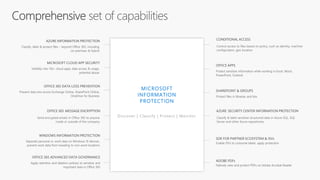
MICROSOFT CLOUD APP SECURITY
Visibility into 15k+ cloud apps, data access & usage,
potential abuse
AZURE SECURITY CENTER INFORMATION PROTECTION
Classify & label sensitive structured data in Azure SQL, SQL
Server and other Azure repositories
OFFICE APPS
Protect sensitive information while working in Excel, Word,
PowerPoint, Outlook
AZURE INFORMATION PROTECTION
Classify, label & protect files – beyond Office 365, including
on-premises & hybrid
OFFICE 365 DATA LOSS PREVENTION
Prevent data loss across Exchange Online, SharePoint Online,
OneDrive for Business
SHAREPOINT & GROUPS
Protect files in libraries and lists
OFFICE 365 ADVANCED DATA GOVERNANCE
Apply retention and deletion policies to sensitive and
important data in Office 365
ADOBE PDFs
Natively view and protect PDFs on Adobe Acrobat Reader
WINDOWS INFORMATION PROTECTION
Separate personal vs. work data on Windows 10 devices,
prevent work data from traveling to non-work locations
OFFICE 365 MESSAGE ENCRYPTION
Send encrypted emails in Office 365 to anyone
inside or outside of the company
CONDITIONAL ACCESS
Control access to files based on policy, such as identity, machine
configuration, geo location
Discover | Classify | Protect | Monitor
SDK FOR PARTNER ECOSYSTEM & ISVs
Enable ISVs to consume labels, apply protection
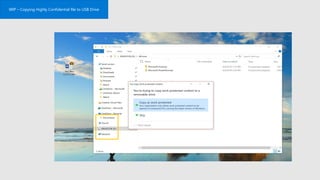
WIP – Copying Highly Confidential file to USB Drive
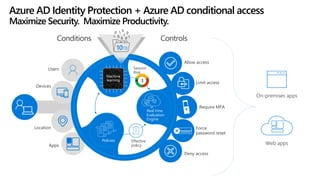
Require MFA
Allow access
Deny access
Force
password reset******
Limit access
Controls
On-premises apps
Web apps
Users
Devices
Location
Apps
Conditions
Policies
Real time
Evaluation
Engine
Session
Risk
3
10TB
Effective
policy
Azure AD Identity Protection + Azure AD conditional access
Maximize Security. Maximize Productivity.
Machine
learning
Add ons
Windows Defender ATP
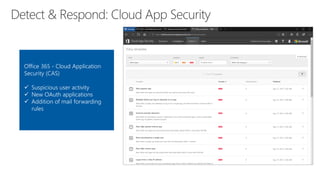
Office 365 - Cloud Application
Security (CAS)
✓ Suspicious user activity
✓ New OAuth applications
✓ Addition of mail forwarding
rules
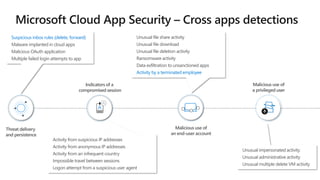
Unusual file share activity
Unusual file download
Unusual file deletion activity
Ransomware activity
Data exfiltration to unsanctioned apps
Activity by a terminated employee
Indicators of a
compromised session
Malicious use of
an end-user account
Suspicious inbox rules (delete, forward)
Malware implanted in cloud apps
Malicious OAuth application
Multiple failed login attempts to app
Threat delivery
and persistence
!
!
!
Unusual impersonated activity
Unusual administrative activity
Unusual multiple delete VM activity
Malicious use of
a privileged user
Activity from suspicious IP addresses
Activity from anonymous IP addresses
Activity from an infrequent country
Impossible travel between sessions
Logon attempt from a suspicious user agent
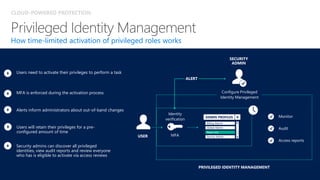
CLOUD-POWERED PROTECTION
How time-limited activation of privileged roles works
MFA is enforced during the activation process
Alerts inform administrators about out-of-band changes
Users need to activate their privileges to perform a task
Users will retain their privileges for a pre-
configured amount of time
Security admins can discover all privileged
identities, view audit reports and review everyone
who has is eligible to activate via access reviews
Audit
SECURITY
ADMIN
Configure Privileged
Identity Management
USER
PRIVILEGED IDENTITY MANAGEMENT
Identity
verification
Monitor
Access reports
MFA
ALERT
Read only
ADMIN PROFILES
Billing Admin
Global Admin
Service Admin
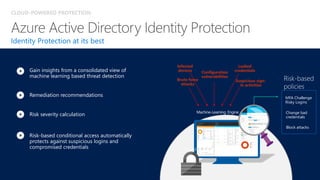
CLOUD-POWERED PROTECTION
Identity Protection at its best
Risk severity calculation
Remediation recommendations
Risk-based conditional access automatically
protects against suspicious logins and
compromised credentials
Gain insights from a consolidated view of
machine learning based threat detection
Leaked
credentials
Infected
devices Configuration
vulnerabilities
Risk-based
policies
MFA Challenge
Risky Logins
Block attacks
Change bad
credentials
Machine-Learning Engine
Brute force
attacks
Suspicious sign-
in activities
Resources
• Cyber Security: The Small Business Best Practice Guide -
https://www.asbfeo.gov.au/sites/default/files/documents/ASBFEO-cyber-security-research-report.pdf
• Australian Cyber Security Centre - https://www.cyber.gov.au/
• Office 365 Security and Compliance - https://docs.microsoft.com/en-
us/office365/securitycompliance/
• Microsoft Trust Center - https://www.microsoft.com/en-us/trustcenter/security/office365-security
• Microsoft Secure Score - https://docs.microsoft.com/en-us/office365/securitycompliance/microsoft-
secure-score
• Microsoft 365 for Partners Security - https://www.microsoft.com/microsoft-365/partners/security
• CIAOPS Github – https://github.com/directorcia

Being more secure using Microsoft 365 Business

  • 1.
    Being more secureusing Microsoft 365 Business June 2019 @directorcia http://about.me/ciaops
  • 2.
  • 3.
  • 4.
    300% increase in identityattacks over the past year. Phishing 23M high risk enterprise sign-in attempts detected in March 2018 Password Spray 350K compromised accounts detected in April 2018 lllllllll Breach Replay 4.6Battacker-driven sign-ins detected in May 2018 lllllllll
  • 5.
    The challenge ofsecuring your environment The digital estate offers a very broad surface area that is difficult to secure Bad actors are using increasingly creative and sophisticated attacks Intelligent correlation and action on signals is difficult, time-consuming, and expensive
  • 6.
    Unique insights, informedby trillions of signals
  • 7.
  • 11.
    Where will youradversary start?
  • 12.
  • 13.
    • v=spf1 ip4:1.2.5.5ip4:8.2.7.4 ip4:7.3.2.2 ip4:5.5.1.8 include:_spf.salesforce.com include:spf.protection.outlook.com -allSPF • "v=DKIM1; p=MIGfMA0GDQEBgQCrZ6z … 6UvqP3QIDAQAB" DKIM • v=DMARC1; p=reject; rua=mailto:dmarc@dmarc-aggregator.com; ruf=mailto:dmarc-ruf@dmarc-aggregator.comDMARC
  • 14.
  • 15.
  • 16.
  • 17.
    PCs, tablets, mobile Office365 Data Loss PreventionWindows Information Protection & BitLocker for Windows 10 Azure Information Protection Exchange Online, SharePoint Online, Skype for Business & OneDrive for Business Highly regulated Microsoft Intune MDM & MAM for Windows, iOS & Android Microsoft Cloud App Security Office 365 Advanced Data Governance Azure Information Protection Comprehensive protection of sensitive data across devices, cloud services, and on-premises Windows 10 Office 365 EM+S & Cloud Services Advanced Device Management
  • 18.
    Perimeter Protection Email is routedto EOP DC based on MX record resolution (Contoso-com.mail.protection.outlook.com) Virus Scanning AV Engine 1 AV Engine 2 AV Engine 3 Spam Protection Safe Sender/Recipient Policy Enforcement Custom transport rules Content scanning and heuristics Bulk mail filtering SPF & Sender ID filter Quarantine International spam Advanced Spam management Customer Feedback False +ve / -ve Spam Analysts Corporate Network or Exchange Online IP-based edge blocks Envelope blocks Directory based edge blocks Advanced Threat Protection (ATP) Safe attachments policy Safe links policy
  • 19.
    Connector-Based Higher Risk Delivery Pool HighScore Outbound Pool Low Score Spam Protection Content scanning and Heuristics Advanced Spam management Virus Scanning AV Engine 1 AV Engine 2 AV Engine 3 Policy Enforcement Custom transport rules Spam Analysts Corporate Network or Exchange Online Customer Delivery Pool Outlook Safe Sender
  • 23.
  • 24.
    ✓ Enable Multi-factorauthentication for Office 365 users ✓ Secure your Office 365 environments from leaked credentials
  • 25.
  • 26.
    User browses toa website Phishing mail Opens attachment Clicks on a URL + Exploitation & Installation Command & Control Brute force account or use stolen account credentials User account is compromised Attacker attempts lateral movement Privileged account compromised Domain compromised Attacker accesses sensitive data Exfiltrate data Protection across Azure AD Identity Protection Identity protection & conditional access Cloud App Security Extends protection & conditional access to other cloud apps Azure ATP Azure AD Identity Protection Identity protection & conditional access Identity protection Windows Defender ATP Endpoint protection Office 365 ATP Malware detection, safe links, safe attachments Attacker collects recon and config data
  • 32.
    Sandboxing Multiple AV engines 1st and3rd party reputation • anonymous links • companywide sharing • explicit sharing • guest user activity • file activity In Teams Collaboration signals • malware in email + SPO • Windows Defender • Windows Defender ATP • suspicious logins • risky IP addresses Threat feeds • users • IPs • On-demand patterns (e.g. WannaCry, Petra) Activity watch lists Leverage signals Files in SharePoint Online, OneDrive for Business, Microsoft Teams Applyheuristics Improves your security against zero-day attacks by directly integrating into OneDrive for Business, SharePoint Online, and Teams Safeguard your environment by blocking malicious content identified by ATP Protect your users from malicious links within shared documents in OneDrive for Business, SharePoint Online, and Teams Office 365 ATP SharePoint Online OneDrive for Business Microsoft Teams
  • 33.
    ✓ DLP policies-Protection from information leakage
  • 34.
  • 35.
    Mobile application management PC managementMobiledevice management Intune helps organizations provide their employees with access to corporate applications, data, and resources from virtually anywhere on almost any device, while helping to keep corporate information secure. User IT
  • 36.
    Category Feature Exchange ActiveSync MDM for Office365 Intune Standalone Intune + ConfigMgr (Hybrid) Device configuration Inventory mobile devices that access corporate applications ● ● ● ● Remote factory reset (full device wipe) ● ● ● ● Mobile device configuration settings (PIN length, PIN required, lock time, etc.) ● ● ● ● Self-service password reset (Office 365 cloud only users) ● ● ● ● Office365 Provides reporting on devices that do not meet IT policy ● ● ● Group-based policies and reporting (ability to use groups for targeted device configuration) ● ● ● Root cert and jailbreak detection ● ● ● Remove Office 365 app data from mobile devices while leaving personal data and apps intact (selective wipe) ● ● ● Prevent access to corporate email and documents based upon device enrollment and compliance policies ● ● ● Premium mobiledevice& appmanagement Self-service Company Portal for users to enroll their own devices and install corporate apps ● ● App deployment (Windows Phone, iOS, Android) ● ● Deploy certificates, VPN profiles (including app-specific profiles), email profiles, and Wi-Fi profiles ● ◐ Prevent cut/copy/paste/save as of data from corporate apps to personal apps (mobile application management) ● ● Secure content viewing via Managed browser, PDF viewer, Imager viewer, and AV player apps for Intune ● ● Remote device lock via self-service Company Portal and via admin console ● ● PC Management Client PC management (e.g. Windows 8.1, inventory, antimalware, patch, policies, etc.) ● ● PC software management ● ● Comprehensive PC management (e.g. Windows Server/Linux/Mac OS X support, virtual desktop and power management, custom reporting, etc.) ● OS deployment ● Single management console for PCs, Windows Server/Linux/Mac OS X, and mobile devices ●
  • 37.
    Personal apps Managed apps Maximizeproductivity while preventing leakage of company data by restricting actions such as copy/cut/paste/save in your managed app ecosystem User
  • 38.
    Enforce corporate data accessrequirements Prevent data leakage on the device Enforce encryption of app data at rest App-level selective wipe
  • 39.
    MICROSOFT CLOUD APPSECURITY Visibility into 15k+ cloud apps, data access & usage, potential abuse AZURE SECURITY CENTER INFORMATION PROTECTION Classify & label sensitive structured data in Azure SQL, SQL Server and other Azure repositories OFFICE APPS Protect sensitive information while working in Excel, Word, PowerPoint, Outlook AZURE INFORMATION PROTECTION Classify, label & protect files – beyond Office 365, including on-premises & hybrid OFFICE 365 DATA LOSS PREVENTION Prevent data loss across Exchange Online, SharePoint Online, OneDrive for Business SHAREPOINT & GROUPS Protect files in libraries and lists OFFICE 365 ADVANCED DATA GOVERNANCE Apply retention and deletion policies to sensitive and important data in Office 365 ADOBE PDFs Natively view and protect PDFs on Adobe Acrobat Reader WINDOWS INFORMATION PROTECTION Separate personal vs. work data on Windows 10 devices, prevent work data from traveling to non-work locations OFFICE 365 MESSAGE ENCRYPTION Send encrypted emails in Office 365 to anyone inside or outside of the company CONDITIONAL ACCESS Control access to files based on policy, such as identity, machine configuration, geo location Discover | Classify | Protect | Monitor SDK FOR PARTNER ECOSYSTEM & ISVs Enable ISVs to consume labels, apply protection
  • 40.
    WIP – CopyingHighly Confidential file to USB Drive
  • 42.
    Require MFA Allow access Denyaccess Force password reset****** Limit access Controls On-premises apps Web apps Users Devices Location Apps Conditions Policies Real time Evaluation Engine Session Risk 3 10TB Effective policy Azure AD Identity Protection + Azure AD conditional access Maximize Security. Maximize Productivity. Machine learning
  • 43.
  • 44.
  • 45.
    Office 365 -Cloud Application Security (CAS) ✓ Suspicious user activity ✓ New OAuth applications ✓ Addition of mail forwarding rules
  • 46.
    Unusual file shareactivity Unusual file download Unusual file deletion activity Ransomware activity Data exfiltration to unsanctioned apps Activity by a terminated employee Indicators of a compromised session Malicious use of an end-user account Suspicious inbox rules (delete, forward) Malware implanted in cloud apps Malicious OAuth application Multiple failed login attempts to app Threat delivery and persistence ! ! ! Unusual impersonated activity Unusual administrative activity Unusual multiple delete VM activity Malicious use of a privileged user Activity from suspicious IP addresses Activity from anonymous IP addresses Activity from an infrequent country Impossible travel between sessions Logon attempt from a suspicious user agent
  • 47.
    CLOUD-POWERED PROTECTION How time-limitedactivation of privileged roles works MFA is enforced during the activation process Alerts inform administrators about out-of-band changes Users need to activate their privileges to perform a task Users will retain their privileges for a pre- configured amount of time Security admins can discover all privileged identities, view audit reports and review everyone who has is eligible to activate via access reviews Audit SECURITY ADMIN Configure Privileged Identity Management USER PRIVILEGED IDENTITY MANAGEMENT Identity verification Monitor Access reports MFA ALERT Read only ADMIN PROFILES Billing Admin Global Admin Service Admin
  • 48.
    CLOUD-POWERED PROTECTION Identity Protectionat its best Risk severity calculation Remediation recommendations Risk-based conditional access automatically protects against suspicious logins and compromised credentials Gain insights from a consolidated view of machine learning based threat detection Leaked credentials Infected devices Configuration vulnerabilities Risk-based policies MFA Challenge Risky Logins Block attacks Change bad credentials Machine-Learning Engine Brute force attacks Suspicious sign- in activities
  • 49.
    Resources • Cyber Security:The Small Business Best Practice Guide - https://www.asbfeo.gov.au/sites/default/files/documents/ASBFEO-cyber-security-research-report.pdf • Australian Cyber Security Centre - https://www.cyber.gov.au/ • Office 365 Security and Compliance - https://docs.microsoft.com/en- us/office365/securitycompliance/ • Microsoft Trust Center - https://www.microsoft.com/en-us/trustcenter/security/office365-security • Microsoft Secure Score - https://docs.microsoft.com/en-us/office365/securitycompliance/microsoft- secure-score • Microsoft 365 for Partners Security - https://www.microsoft.com/microsoft-365/partners/security • CIAOPS Github – https://github.com/directorcia